JVC CU-VD3EX - DVD player

CU-VD3EX - DVD player JVC - Free user manual and instructions

Find the device manual for free CU-VD3EX JVC in PDF.

📄 64 pages English EN Download 💬 AI Question 10 questions ⚙️ Specs
Notice JVC CU-VD3EX - page 62
View the manual : Français FR Deutsch DE English EN Nederlands NL
Pick your language and provide your email: we'll send you a specifically translated version.
Brand JVC
Model CU-VD3EX
Category DVD burner/player for Everio camcorders
Dimensions (W x H x D) 141 x 23 x 166 mm
Weight Approx. 380 g (excluding adapter and cables)
Power supply Power adapter AP-V3U: input 110-240 V AC, 50/60 Hz; output 5.2 V DC, 2 A
Power consumption 0.9 A nominal
Compatible disc types (writing) DVD-R, DVD-RW, DVD-R DL (12 cm)
Compatible disc types (reading) DVD-R, DVD-RW, DVD-R DL, DVD-ROM, DVD-Video, CD-ROM, CD-DA, CD-R, CD-RW
Interface USB 2.0 (Everio or PC cable)
Recording formats (with Everio) DVD video (SD), DVD data (HD)
Writing speed (DVD-R) Up to 8x
Reading speed (DVD-R) Up to 8x
Included software CyberLink Power2Go 5.5 Lite
Supported operating systems Windows XP (Home/Pro), Windows Vista (Basic/Premium) 32-bit
Region code Changeable up to 5 times
Operating temperature 5°C to 35°C
Storage temperature -20°C to 60°C
Maintenance and cleaning Exterior: dry cloth; lens: special vacuum cleaner (no cleaning disc)
Safety Class 1 laser product; do not open or repair yourself
Included accessories Power cord, Everio USB cable, PC USB cable, manual, blank DVD-R, software CD-ROM

Frequently Asked Questions - CU-VD3EX JVC

What types of discs can I use with the CU-VD3EX?
For writing: DVD-R, DVD-RW and DVD-R DL (12 cm) from recommended brands (JVC, TDK, Verbatim, Sony). For reading, it also accepts DVD-ROM, DVD-Video, CD-ROM, CD-DA, CD-R and CD-RW.
How do I open the disc tray if the eject button does not work?
Unplug then plug back the power adapter. If the tray remains stuck, use a straightened paper clip about 5 cm into the forced ejection hole located to the right of the eject button. Gently pull the tray.
Why is my disc not read?
Check that the disc is inserted with the label facing up. Make sure the surface is not scratched or dirty. Use a compatible disc (DVD-R, etc.). If the problem persists, clean the disc with a soft cloth from the center outward.
How do I copy videos from my Everio camcorder to a DVD?
Connect the burner to the Everio camcorder using the provided USB cable. Turn on the camcorder, select 'CREATE DVD' on the screen, then choose a copy option: all folders, by date or by event. The copy starts automatically.
Can I use the CU-VD3EX with a Mac computer?
No, this burner does not support Macintosh. It only works with Windows XP or Vista (32-bit).
How do I change the region code of the burner?
Insert a DVD video from another region. A warning screen appears on the computer. Follow the instructions to change the code. Caution: you can only change it 5 times; the 5th change is permanent.
What should I do if the burner becomes very hot?
Moderate heating is normal. If the device is abnormally hot, unplug the power adapter and contact an authorized JVC dealer.
How do I clean the lens of the burner?
Use a commercially available special lens vacuum cleaner. Never use a cleaning disc, as it could damage the lens.
Can I burn CD-R or CD-RW with this burner?
No, this burner does not allow burning CD-R or CD-RW. It only writes to DVD-R, DVD-RW and DVD-R DL.
What should I do if the copy fails or takes too long?
Make sure you are using a compatible disc in good condition. Recording time may vary depending on conditions. If the failure persists, try restarting the burner and the camcorder, or check the USB connections.

User questions about CU-VD3EX JVC

0 question about this device. Answer the ones you know or ask your own.

Ask a new question about this device

The email remains private: it is only used to notify you if someone responds to your question.

No questions yet. Be the first to ask one.

Download the instructions for your DVD player in PDF format for free! Find your manual CU-VD3EX - JVC and take your electronic device back in hand. On this page are published all the documents necessary for the use of your device. CU-VD3EX by JVC.

USER MANUAL CU-VD3EX JVC

VARING KLASS 38 SYNLIG OCH OSYNLIG LASERSTRALNING NAR DENNA DEL AR OPPNAD. STRALEN AR FARLIG.

VARCI AVATTAESSA OLET ALTTINA LUOKAN 3B NAKYVALLE JA NAKYMATTOMALLE LASERSATEILYLE.

ALAKATSO SATEESEEN
JVC CU-VD3EX - 1
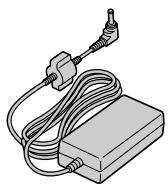
Adaptateur c.a. (AP-V3U)

CAUTION CLASS 38 VISIBLE AND INVISIBLE LASER RADIATION WHEN OPEN. AVOID EXPOSURE TO THE BEAM.
ATTENTION: CLASS 38 RADIENMENT LASER VISIBLE ET INVISIBLE CAS D/OUTVENTURE.
PROOF OF PRODUCTION

Manual assistant
Powered by Anthropic
Waiting for your message
Product information

Brand : JVC

Model : CU-VD3EX

Category : DVD player