
DR-M100 - DVD player JVC - Free user manual and instructions
Find the device manual for free DR-M100 JVC in PDF.
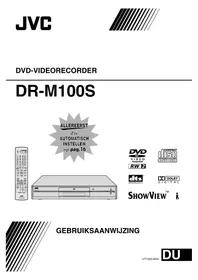


| Product Type | DVD Player |
| Brand | JVC |
| Model | DR-M100 |
| Video Outputs | Component Video (Y/Pb/Pr), L-1 IN/OUT, L-2 IN/DECODER |
| Audio Outputs | Analog Stereo (L/R), Digital Coaxial (DIGITAL OUT) |
| Antenna Connections | Antenna In, Antenna Out |
| Progressive Scan | Yes |
| Timer Recording | Instant Timer Recording (ITR) |
| Audio Recording Modes | NICAM 1/MAIN, NICAM 2/SUB, MONO, Linear PCM |
| Region Code | Specified on device (Region 2 typical for Europe) |
| Disc Types Supported | DVD-RAM (cartridge), likely DVD-R/RW, CD |
| Laser Class | Class 1 |
| Cooling Fan | Yes |
| Power Supply | AC 220-240 V, 50/60 Hz (typical) |
| Safety Features | Do not expose to rain/moisture, no user-serviceable parts |
| User Manual | 80 pages, available in PDF |
Frequently Asked Questions - DR-M100 JVC
User questions about DR-M100 JVC
0 question about this device. Answer the ones you know or ask your own.
Ask a new question about this device
Download the instructions for your DVD player in PDF format for free! Find your manual DR-M100 - JVC and take your electronic device back in hand. On this page are published all the documents necessary for the use of your device. DR-M100 by JVC.
USER MANUAL DR-M100 JVC


VIDEO RAM/RW




SHOWVIEW TM i
USER MANUAL
WARNING: DANGEROUS VOLTAGE INSIDE THIS DEVICE. WARNING: DO NOT EXPOSE THIS DEVICE TO RAIN OR MOISTURE. TO PREVENT THE RISK OF FIRE OR SHOCK.
NOTE:
THIS DEVICE IS A CLASS 1 LASER PRODUCT. HOWEVER, THIS DEVICE USES A VISIBLE LASER BEAM THAT CAN CAUSE HARMFUL RADIATION EXPOSURE IF THE BEAM IS DIRECTED. ALWAYS USE THE DEVICE ACCORDING TO THE INSTRUCTIONS. DO NOT LOOK CLOSELY INTO THE DISC TRAY OR OTHER OPENINGS WHEN THIS DEVICE IS CONNECTED TO THE POWER OUTLET. THE USE OF CONTROLS OR PERFORMING ACTIONS OTHER THAN THOSE SPECIFIED IN THIS MANUAL MAY RESULT IN HAZARDOUS RADIATION EXPOSURE. DO NOT OPEN COVERS AND DO NOT PERFORM REPAIRS YOURSELF. LEAVE REPAIRS TO QUALIFIED SERVICE TECHNICIANS.
CLASS 1 LASER PRODUCT
LABEL ILLUSTRATIONS
WARNING LABEL INSIDE THE DEVICE
CAUTION
VISIBLE AND INVISIBLE LASER RADIATION WHEN OPEN. AVOID EXPOSURE TO BEAM. DO NOT STARE INTO BEAM OR VIEW DIRECTLY WITH OPTICAL INSTRUMENTS.
WARNING
VISIBLE AND INVISIBLE LASER RADIATION WHEN OPEN. AVOID EXPOSURE TO RADIATION. DO NOT LOOK INTO THE BEAM - NOT EVEN WITH OPTICAL INSTRUMENTS.
WARNING
VISIBLE AND INVISIBLE LASER RADIATION WHEN OPEN. AVOID EXPOSURE TO THE BEAM. DO NOT STARE INTO THE BEAM OR VIEW DIRECTLY WITH OPTICAL INSTRUMENTS.
WARNING!
When opening, you are exposed to visible and invisible laser radiation. Do not stare into the beam or view it through optical instruments.
WARNING
Visible and invisible laser radiation when this part is open. The beam is dangerous. Do not stare into the beam or view it with optical instruments.
OF
| CAUTION:Visible and invisible laser radiation when open and interlock failed or deleted.AVOID DIRECT EXPOSURE TO BEAM. (e) | ADVARSEL:Syrlig og usynlig laserstråling når maskinen er åben eller interlocken fejler.Undgå direkte eksponering til stråling. (d) | VARNING: Symlig och osynlig laserstrålnning når den öppnas och spårren år urkopplad. Betrakta ej strålen. (s) | VARO: Avattaessa ja suojakulitus ohlettuna tai vallisena oleit altiina näkyvälle ja näkymättömälle lasersäteilylle. Vältä säaten kohdistumista suoraan tseesi. (f) |

DOLBY
DIGITAL

DIGITAL OUT
SHOWVIEW™
DVD-RAM discs in cartridge
Rear view
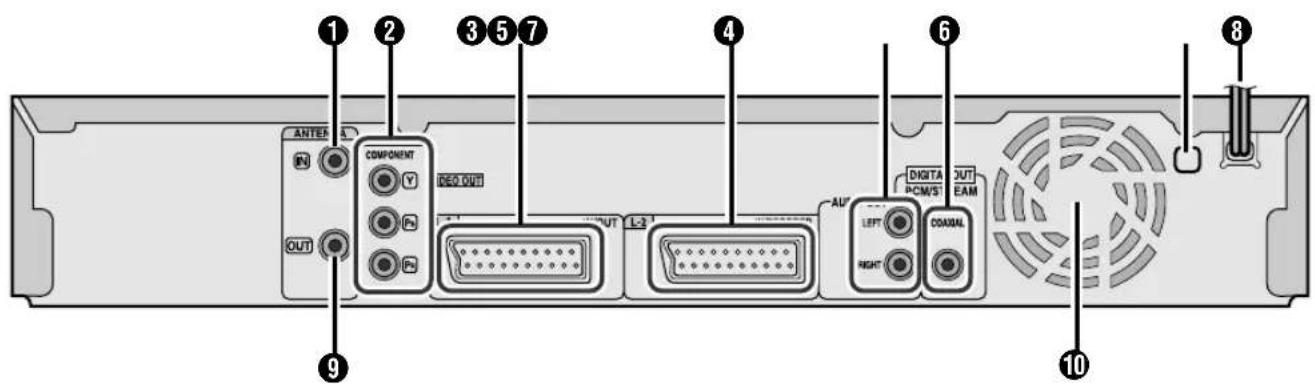
①Antenna input [ANTENNA IN] ②Component video outputs [COMPONENT VIDEO OUT (Y/PB/PR)] ③L-1 input/output [L-1 IN/OUT] ④L-2 input/decoder connection [L-2 IN/DECODER] ⑤Audio output [AUDIO OUT LEFT/RIGHT] ⑥Digital audio output [DIGITAL OUT (COAXIAL)] ⑦Region number ⑧Power cord ⑨Antenna output [ANTENNA OUT]
10 Cooling fan

NOTE:

Direct timer recording (ITR)
1 Confirm the overlapping programs.
NOTES:
Change category
■ SAVE AS LIBRARY — OFF / ON
Record in linear PCM format.
■ AUDIO REC — NICAM 1/MAIN / NICAM 2/SUB / MONO
1 Set "L-1 OUTPUT" to "COMPONENT". (p. 56) 2 Hold PROGRESSIVE SCAN for three seconds or longer.
- The disc tray was locked. → Unlock the tray. (p. 63)
Playback
Programs overlap 40
Progressive scan 63
R
Region number 6


Brand : JVC
Model : DR-M100
Category : DVD player