Mirror - Mp3 player Zipy - Free user manual and instructions
Find the device manual for free Mirror Zipy in PDF.


| Product Type | MP3 Player |
| Brand | Zipy |
| Model | Mirror |
| Dimensions (approx.) | 100 x 50 x 10 mm |
| Weight (approx.) | 50 g |
| Power Supply | Rechargeable lithium-ion battery (USB) |
| Internal storage capacity | 8 GB |
| Supported audio formats | MP3, WMA, WAV |
| Main functions | Music playback, FM radio, voice recording, screen display |
| Connectivity | USB 2.0, 3.5mm headphone jack |
| Screen | 1.8-inch LCD |
| Battery life (approx.) | 15 hours |
| Care and cleaning | Clean with a soft dry cloth. Do not use abrasive products. |
| Safety | Do not expose to humidity or extreme temperatures. Do not disassemble. |
| Spare parts and repairability | Battery and screen replaceable by a professional. Contact customer service. |
| General information | User manual available for free download in PDF format. |
Frequently Asked Questions - Mirror Zipy
User questions about Mirror Zipy
0 question about this device. Answer the ones you know or ask your own.
Ask a new question about this device
Download the instructions for your Mp3 player in PDF format for free! Find your manual Mirror - Zipy and take your electronic device back in hand. On this page are published all the documents necessary for the use of your device. Mirror by Zipy.
USER MANUAL Mirror Zipy
natural_image
3D rendered model of a metallic circular object with labeled points A and B, placed on a pink base (no text or symbols beyond labels)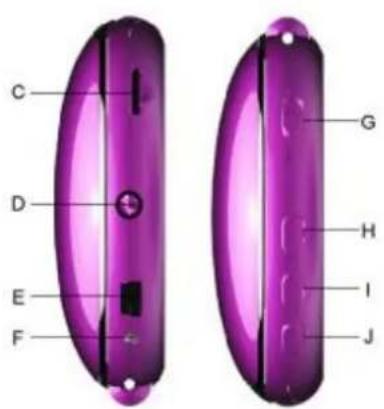
natural_image
3D rendered image of a pink cushioned object with a metallic circular top, no visible text or symbolsnatural_image
3D rendered model of a pink and silver device with labeled components A and D (no text or symbols on the device itself)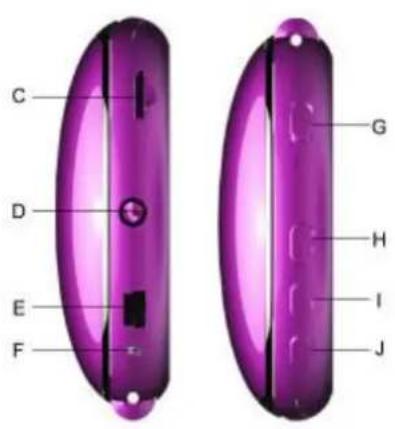
natural_image
3D rendered image of a pink circular object with a metallic lid, placed on a base (no text or symbols visible)7, Sobre a bateria
I Execute o software: Start--program---MP3 Player Utilities ---MP3 Player Upgrade Tool, e carregue no
botao [Choose new version firmware].
natural_image
3D rendered model of a pink cushioned object with a metallic sphere above it, labeled A and B (no text or symbols on the object itself)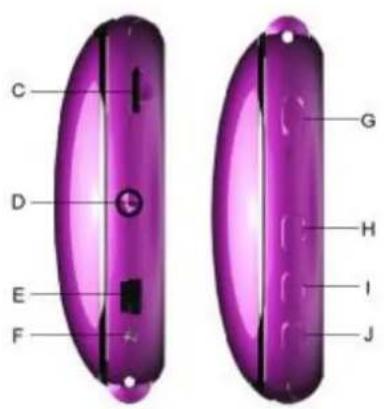
natural_image
3D rendered image of a pink circular object with a metallic ring above it, showing a small inset image (no text or symbols)7.A propos de la batterie:
1, Important Safety Instructions
The manual contains important safety instructions and information of the device's proper usage. Make sure to read carefully and understand all the instructions to avoid accidents.
Please do not expose the device in the extreme temperature (above 40^ C), especially in cars with window closed during summer.
I Please do not store it in the humid or dirty area.
I Please avoid the device falling and bumping strongly.
Please do not turn up the volume of the earphones too high while using it. If you feel ringing in your ears, stop using the device or turn the volume down.
Please do not disassemble the device by yourself and do not wipe the surface of device with alcohol or benzene or thinners.
I Please do not use the device in areas where electronic devices are prohibited.
It is not suggested to use the device when you are driving or walking on the street.
2, Product Feature
I Compact cosmetic mirror style
I Elegant & fashionable design
I Versatile fashion accessories for ladies
I Built-in Micro-SD card slot, supports up to 8GB
I Plays MP3, WMA, WMV audio format files
I Built-in 300mAh Li-poly battery
I Built-in 1W loudspeaker
I Available in wide range of attractive colors
3, Product Specification
| Item | Specifications |
| Data transfer rate | Mini USB2.0 |
| Audio formats supported | MP3, WMA, WMV |
| D/A+PA SNR | >91 dB |
| Max power output | (L) 20mW + (R) 20mW (160hm) |
| Micro-SD card | 1GB -8GB |
| Power | 300mAh Li-poly battery |
| Loudspeaker | 1W |
| Audio playback time | Speaker: up to 18 hoursEarphone: upto 20 hours |
| Operating temperature | -5°C ~40°C |
| Operating System | WIN SE/ME/2K/XP/WIN7, MacOS10.Linux2.4.2(Only Windows 98 needs the CD driver) |
| Accessories | User Manual, Earphone, Blister pack |
| Dimension | 70 x 70 x 20.5 mm |
4. Button Instruction:
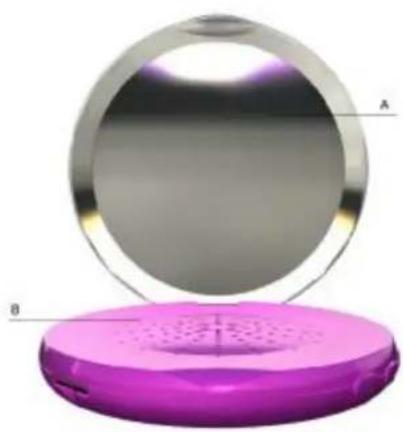
A: Mirror plate
B: Loudspeaker
C: Micro-SD card slot
D: Earphone jacket
E: USB Port
F: LED Indicator
G: Power ON/OFF
H: Next/+
I: Play / Pause
J: Prev/-
natural_image
3D rendered image of a pink circular object with a perforated base and labeled points A and B (no text or symbols on the object itself)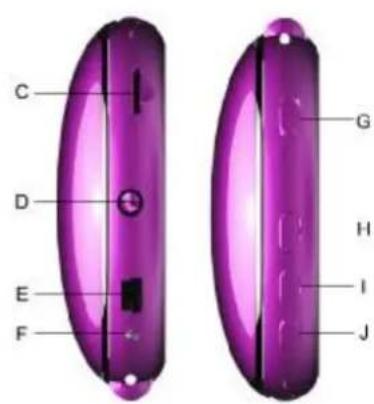
5, Operation Instruction
I Turn On/Turn Off
Push the Power ON/OFF button to turn on or turn off the player
I Play/Stop
Press "Play" button to play or stop
I Volume increase/decrease
To increase volume, press and hold the "Next/+" button
To decrease volume, press and hold the "Prev/-" button
I Previous/Next
To choose the previous music, press the "Prev/-" key once
To choose the next music, press the "Next/+" key once
6, Support Micro-SD card function
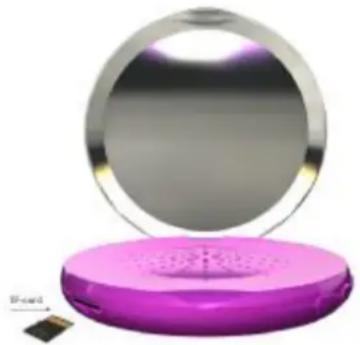
I Plug and pull Micro-SD:
Plug: Connect Micro-SD card to the device by inserting the card as its observe side to the socket of device.
Then the MP3 player can play the files in the Micro-SD Card
Pull: Push Micro-SD card, thus Micro-SD card will rebound a little, and then it's OK to take it out.
natural_image
3D rendered image of a pink circular device with a metallic top, showing a small inset image of a small object (no text or symbols visible)7, About battery
The player adopts a built-in Li-polymer with large capacity. If battery power is low, please recharge your battery by connecting the device to PC via USB.
It will take you at least 2 hours to fully recharge the battery. The running time of battery depends on high or low of volume, playing files format, button operation..etc
Please pay attention to the following important notice about the Rechargeable Battery of this device.
I Recharge the battery in an ambient temperature between 5°C and 35°C.
I Don't recharge more than the suitable period to prevent the risk of overheating and burst.
I Don't recharge the battery for more than 6 hours.
I Recharging the battery over the suitable period or an extended period of inactivity may reduce battery duration.
I Rechargeable battery is liable to wear and tear and its performance will reduce gradually.
To extend the duration of the battery use it when is completely charged up to the complete discharging, then recharge it fully before use it again. Recharge a battery not completely consumed, will result in a reduced duration. In this case, repeat the full charging/discharging cycle many times.
I Avoid recharge the battery for the whole night.
8, About LED indicator
a. Normal operation (with TF card inserted and normal battery level):
When the device is turned ON, the LED indicator turns on and stays on RED
While the device is playing music, the LED indicator flashes in RED slowly
While the device is stopped/paused, the LED indicator stays on RED
If the device is stopped/paused for 5 minutes, the LED indicator will flash in RED quickly for 5 seconds and then the device will turn off automatically.
b. Without TF card:
When the device is turned ON, the LED indicator turns on and stays on RED for 30 seconds. After that, the LED indicator will flash in RED quickly for 5 seconds and then the device will turn off automatically.
c. Low battery level
The LED indicator will flash in RED quickly for 5 seconds until the battery is empty and the device will turn off automatically.
d. Connected to PC via USB (battery is being recharged):
While the device is playing music, the LED indicator flashes in RED slowly
While the device is stopped/paused, the LED indicator stays on RED. When the battery is fully recharged, the LED indicator will turn off.
While the device is transferring data to/from the PC, the LED indicator flashes in RED quickly.
9., Upgrading
Use update tool installed in your computer to update and repair the damaged driver.
I Connect player to the computer
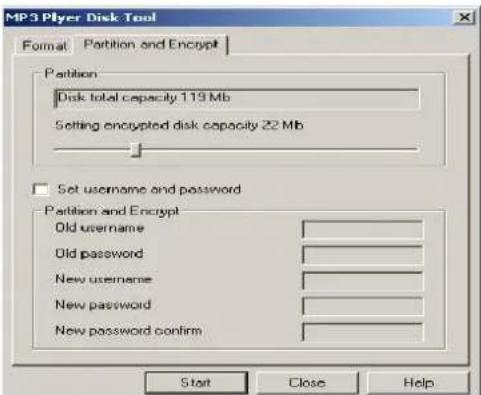
I Run the software: Start--program---MP3 Player Utilities ---MP3 Player Upgrade Tool, click [Choose new version firmware] button.
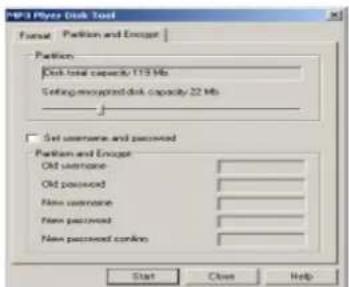
When upgrading is successful, the display will indicate successfully upgraded.
I Find the icon of removable disk in [my computer]. Click the right button of mouse to select [format]. In formatting interface, select FAT system in [file system], then click [start] button to format disk.
Notice: formatting disk would erase all the data and please backup data before formatting.
10. Troubleshooting
If the player couldn't play properly, please use trouble-shooting guide to help you.
| Symptom | Solution |
| The player cannot work | Please check the voltage of batteryMake sure the power button is onPlease check if volume is set to “0” or not and make sure that earphones are connected properly.Damaged music data will make noise in some extent;make sure there are files in the player.Choose right FAT file system in dialogue when formatting disk. |
| The player cannot upload /download files; no disk icon in computer | Please check USB cable is correctly connected.Please properly re-install CD driver if under Win 98 |
AID WARRANTY CONDITIONS
AID, in compliance with the Customer Protection Law (Ley 23/2003, July 10th, of Warranty in the Sale of Consumer Goods, BOE no. 165, 11/07/2003), offers Direct Warranty to Spain and Portugal customers for all our brands' products: ZIPY, MUSE, NEW ONE, AC-RAYAN, TNB, BARKAN, BRASFORMA, THE COMPLEMENTS, and GO BY ZIPY, under the following conditions:
A – Our products have a two year warranty. During the first year original defects that may be detected are repaired. In those cases stipulated by law, the buyer will be entitled to the replacement of the device by a new one, provided that the defects are not due to the negligence or exclusive fault of the buyer in handling the device. During the second year the buyer will need to prove that the malfunctioning of the device is due to a manufacturing defect. In both cases the warranty will apply provided that:
- The product has been used for its destined purpose alone.
- It was not opened, manipulated or altered in any way by someone other than the Official Technical Service.
- It has not undergone shock, flood, overheating, electric overcharge or any other external circumstance that may constitute a possible reason of INVALIDATING the warranty.
- The product will be returned to AID in proper packaging together with the receipt where the brand and type of product, the date of the purchase, the name and address of the shop that sold it and the reason for the malfunctioning should be clearly stated.
Any of the following circumstances invalidates the present warranty:
- Breaking the ports, the screen or the glass.
- Loss of liquid from the screen.
- Wearing out, obvious marks of incorrect manipulation, inappropriate use, ill-treatment, shock, falls, dirt, and so on.
- The data contained in the products are under no circumstances covered by any warranty whatsoever, nor are they to be considered during the physical repairing process of the products. AID guarantees absolute confidentiality of the data.
- AID does not cover the incorrect configuration or installation of the software / hardware on the part of the client, neither as a component nor as a peripheral, included prives / controllers included.
- The legislation on guarantees sets certain limits. “the guarantee does not cover additional components such as batteries, nor any elements that are subject to maintenance due to its use such as earphones”. These accessories have a 6 months guarantee.
- Waterproof bags have a 48-hour trial period, such as indicated on the product itself, therefore once this time period is elapsed they will no longer be covered by any guarantee.
- Final users do not need to send us the device accessories, especially if they are not the original ones, since we will not be held responsible for them.
CASES:
- If the product is out our guarantee, the AID technical department will facilitate a budget for the repair by fax or e-mail. Said budget will need to be authorized in writing, sealed and signed, and the user will have to satisfy the repair fee as well as the freight.
- If the budget is not accepted a diagnosis fee will be charged. (6€)
- Repairs have a 90 days guarantee, provided that the breakdown is under the same concept and in the case of budgeted breakdowns alone.
B – All the freight costs for the product will be covered by AID using only the transportation company designed by AID following the authorization procedure.
The expenses derived from incorrect or unjustified returns on the part of the client will be covered by the client alone.
C – Any incidence detected at the moment of the reception of the merchandise must be immediately notified at the AID Post-Sales Department: maria@accesoriosdigital.com in compliance with Article 366 from the Code of Commerce, AID will not consider complaints about breakages, shocks or absence of boxes or pieces 24 hours after the delivery of the merchandise.
In the case of shipments originated in Canarias, Ceuta and Melilla, AID will not pay the customs tax nor any kind of reimbursable expenses.
DECLARATION OF CONFORMITY
ACCESORIOS INTELIGENTES DIGITAL S.A.
We declare under our sole responsibility that the product:
MP 3 with speaker and mirror: MIRROR, which belongs to the brand Zipy, made in China
Conforms with the requirements of the Directives below by compliance with the following standards listed:
EN55022:2006+A12007
EN55024:1998+A1:2001+A2:2003
In accordance with the provisions of the Directive 99/05/EC, European Parliament and Council on March 9, 1999, transposed into Spanish legislation by Royal Decree 1890/2000, of November 20, 2000.
Place and date of issue:
Madrid, January 14th 2011
Signed by: Miguel Fauro


Waste management for all of your containers and domestic packagings that you deposit in the recycling bin

The packaging contains removable materials in order to treat them later in waste management

Do not deposit the device or the battery in the bin. Please, put it in a recycling in or carry it to your local nearby store

Deposit the packaging materials in the yellow bin

This device conforms to the EU directives

This unit conforms to the ROHS regulations

Symbol of frequency restriction in some countries of European Union
ZiPY