
MB-D10 - Camera Grip NIKON - Free user manual and instructions
Find the device manual for free MB-D10 NIKON in PDF.

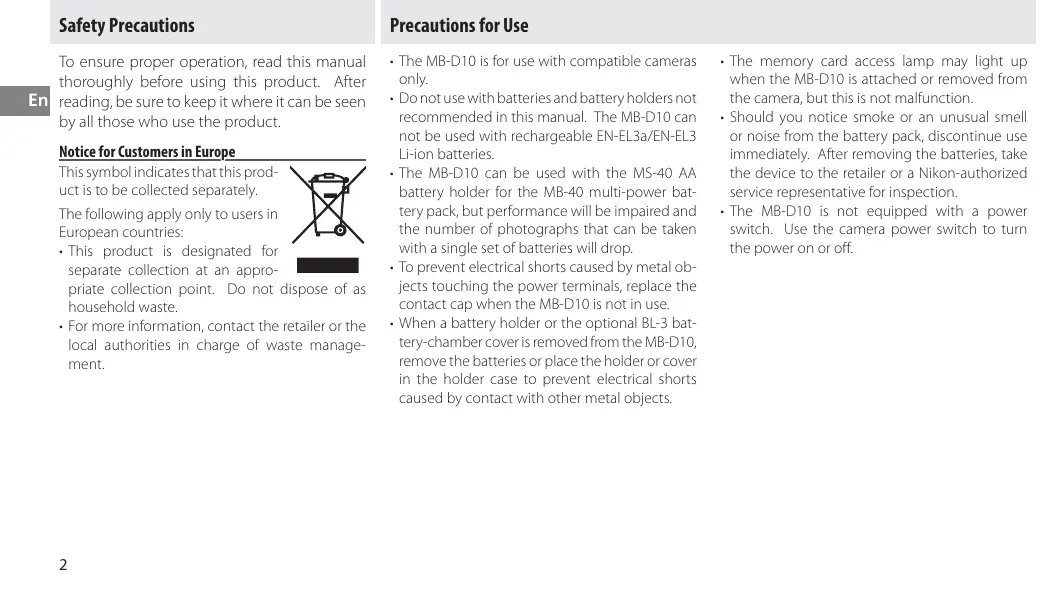


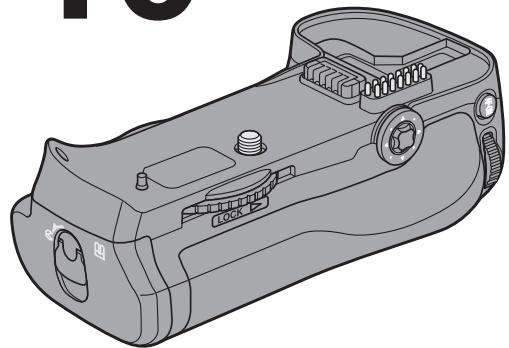
| Product Type | Camera Grip |
| Brand | Nikon |
| Model | MB-D10 |
| Compatibility | Compatible Nikon digital SLR cameras (e.g., D300, D700) |
| Dimensions (W × H × D) | 150.5 × 52 × 75.5 mm |
| Weight | Approx. 290 g (with MS-D10EN holder, without batteries) |
| Power Source | EN-EL3e, EN-EL4a, or EN-EL4 Li-ion battery, or 8 AA batteries (alkaline, Ni-MH, lithium, or nickel-manganese) |
| Operating Temperature | 0 – 40 °C |
| Built-in Controls | Shutter button, AF-ON button, multi selector, main and sub-command dials |
| Control Lock | Lock switch (L/●) to prevent accidental operation |
| Supplied Accessories | MS-D10EN holder (for EN-EL3e), MS-D10 holder (for AA batteries), holder case, contact cover, user's manual, warranty |
| Optional Parts | BL-3 battery chamber (for EN-EL4a/EL4), BL-3 chamber main cover |
| Mounting | Attached using mounting screw and tightening wheel; replace the camera's contact cover |
| Power Order | Configurable in camera menu (grip batteries first or camera batteries first) |
| Maintenance | Remove batteries when not in use; replace contact cover to prevent short circuits |
| Safety | Do not use non-recommended batteries; stop immediately if smoke, odor, or abnormal noise occurs |
| General Information | Designed for vertical (portrait) shooting; use with bellows requires extension rings |
Frequently Asked Questions - MB-D10 NIKON
User questions about MB-D10 NIKON
0 question about this device. Answer the ones you know or ask your own.
Ask a new question about this device
Download the instructions for your Camera Grip in PDF format for free! Find your manual MB-D10 - NIKON and take your electronic device back in hand. On this page are published all the documents necessary for the use of your device. MB-D10 by NIKON.
USER MANUAL MB-D10 NIKON
Multi-Power Battery Pack
MB-D10
User's Manual
User's Manual
User's Manual
User's Manual
User's Manual
User's Manual
User's Manual
User's Manual
User's Manual
User's Manual
De
Fr
Es
Se
Fi
Ru
NI
Pt
It
PI
CK
Ch
Kr
A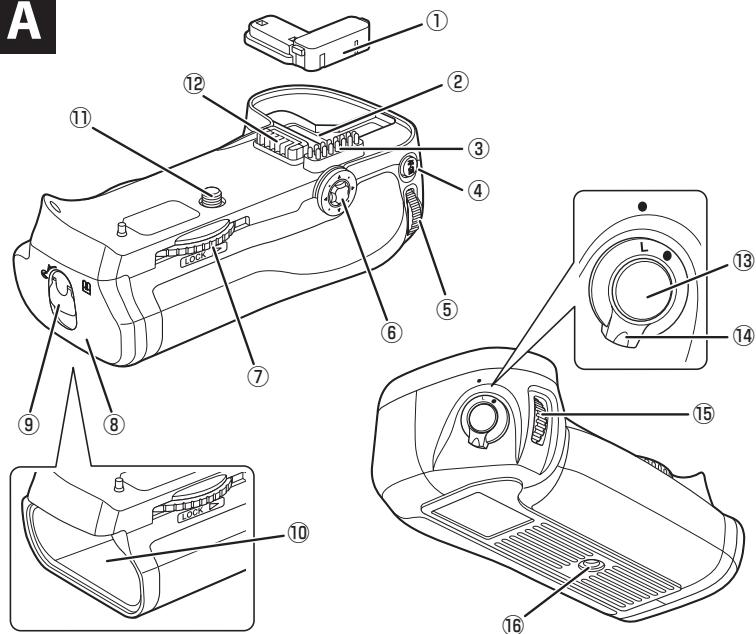
B
C
E
D
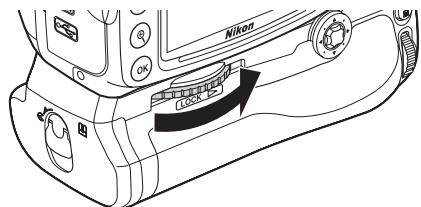
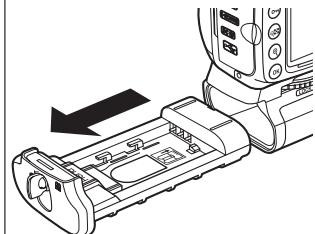
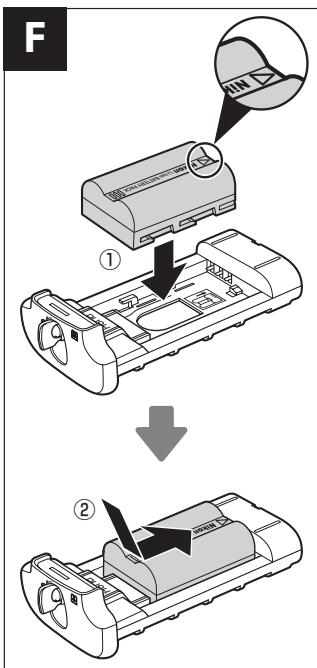
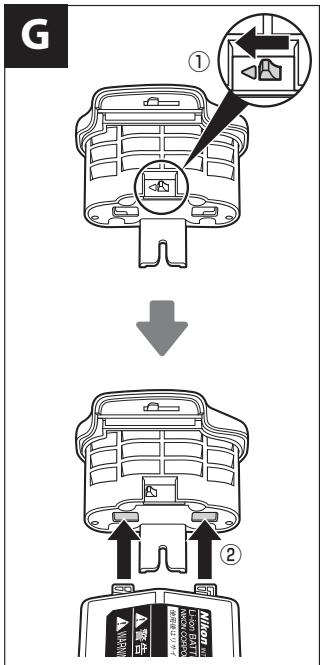
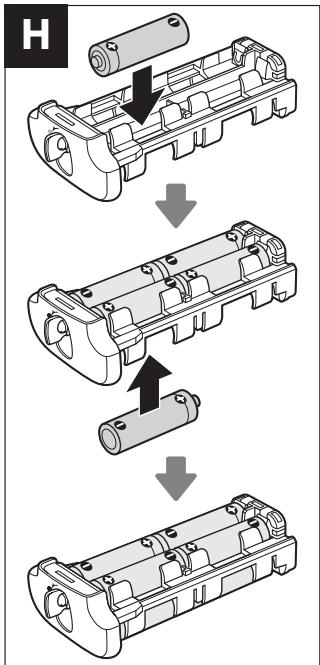
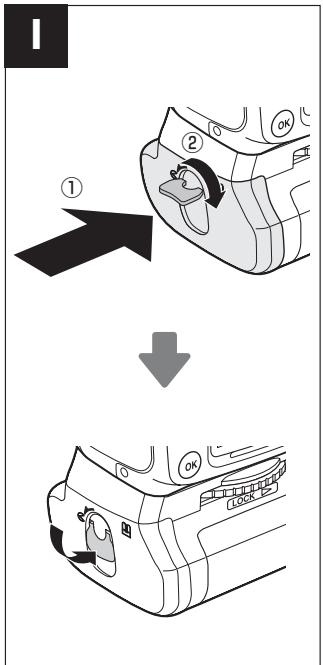
Table of Contents
Multi-Battery Pack
MB-D10
User's Manual
Safety Precautions 2
Precautions for Use 5
Introduction 6
Main Body and Accessories 6
MB-D10 6
Using the BL-3 Battery (sold separately)
Parts Names 7
Positioning the Battery
MB-D10 Multi-Power Battery Pack
User's Manual
Safety Precautions 2
Notice for Customers in Europe 2
Precautions for Use 2
Introduction 4
The MB-D10 and Accessories 4
The MB-D10 and Supplied Accessories 4
The BL-3 Battery-Chamber Cover (Available Separately) 4
Parts of the MB-D10 5
The MB-D10 Shutter-Release Button, Multi Selector, Command Dials, and AF-ON Button 5
The MB-D10 Shutter-Release Button, Multi Selector,
Command Dials, and AF-ON Button 5
The MB-D10 Control Lock 5
Using the Battery Pack 6
Attaching the Battery Pack 6
Removing the Battery Pack. 6
Inserting Batteries 7
Removing Batteries 9
Specifications. 10
Safety Precautions
En
To ensure proper operation, read this manual thoroughly before using this product. After reading, be sure to keep it where it can be seen by all those who use the product.
Notice for Customers in Europe
This symbol indicates that this product is to be collected separately.
The following apply only to users in European countries:
- This product is designated for separate collection at an appropriate collection point. Do not dispose of as household waste.
- For more information, contact the retailer or the local authorities in charge of waste management.

Precautions for Use
- The MB-D10 is for use with compatible cameras only.
- Do not use with batteries and battery holders not recommended in this manual. The MB-D10 cannot be used with rechargeable EN-EL3a/EN-EL3 Li-ion batteries.
- The MB-D10 can be used with the MS-40 AA battery holder for the MB-40 multi-power battery pack, but performance will be impaired and the number of photographs that can be taken with a single set of batteries will drop.
- To prevent electrical shorts caused by metal objects touching the power terminals, replace the contact cap when the MB-D10 is not in use.
- When a battery holder or the optional BL-3 battery-chamber cover is removed from the MB-D10, remove the batteries or place the holder or cover in the holder case to prevent electrical shorts caused by contact with other metal objects.
- The memory card access lamp may light up when the MB-D10 is attached or removed from the camera, but this is not a malfunction.
- Should you notice smoke or an unusual smell or noise from the battery pack, discontinue use immediately. After removing the batteries, take the device to the retailer or a Nikon-authorized service representative for inspection.
- The MB-D10 is not equipped with a power switch. Use the camera power switch to turn the power on or off.
Notice for Customers in the U.S.A.
Federal Communications Commission (FCC) Radio Frequency Interference Statement
This equipment has been tested and found to comply with the limits for a Class B digital device, pursuant to Part 15 of the FCC rules. These limits are designed to provide reasonable protection against harmful interference in a residential installation. This equipment generates, uses, and can radiate radio frequency energy and, if not installed and used in accordance with the instructions, may cause harmful interference to radio communications. However, there is no guarantee that interference will not occur in a particular installation. If this equipment does cause harmful interference to radio or television reception, which can be determined by turning the equipment off and on, the user is encouraged to try to correct the interference by one or more of the following measures:
- Reorient or relocate the receiving antenna.
- Increase the separation between the equipment and receiver.
- Connect the equipment to an outlet on a circuit different from that to which the receiver is connected.
- Consult the dealer or an experienced radio/TV technician for help.
Nikon
MB-D10

Tested To Comply With FCC Standards
FOR HOME OR OFFICE USE
CAUTION
Modifications: The FCC requires the user to be notified that any changes or modifications made to this device that are not expressly approved by Nikon Corporation may void the user's authority to operate the equipment.
Nikon Inc.,
1300 Walt Whitman Road, Melville, New York
11747-3064, U.S.A.
Tel.: 631-547-4200
Notice for Customers in Canada
CAUTION
This Class B digital apparatus complies with Canadian ICES-003.
WARNING
Thank you for purchasing the MB-D10 multi-power battery pack for use with all Nikon digital single-lens reflex cameras that list the MB-D10 as a compatible accessory in the camera manual. The MB-D10 accepts one EN-EL3e, EN-EL4a, or EN-EL4 rechargeable battery, or eight AA batteries (alkaline, Ni-MH, lithium, or nickel-manganese). It includes an alternate shutter-release button, AF-ON button, multi selector, and main and sub-command dials for taking pictures in "tall" (portrait) orientation. Camera menu options allow the user to choose whether the camera battery or the batteries in the MB-D10 are used first; see the camera manual for details.
The MB-D10 and Accessories
The MB-D10 and Supplied Accessories
Confirm that the following items are supplied with the MB-D10 (batteries are sold separately).
MB-D10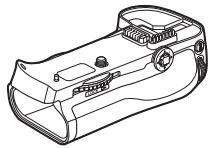
MS-D10EN holder for EN-EL3e batteries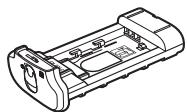
MS-D10 holder for AA batteries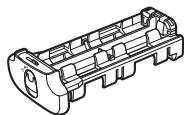
Holder case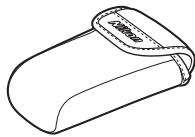
The MS-D10EN is inserted in the MB-D10 at shipment. See "Inserting Batteries" for information on removing the battery holder.
Contact cap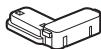
- User's manual (this manual) Warranty
The BL-3 Battery-Chamber Cover (Available Separately)
A BL-3 battery-chamber cover (available separately) is required when using EN-EL4a or EN-EL4 batteries.
BL-3 battery-chamber cover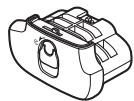
Parts of the MB-D10 (Figure A)
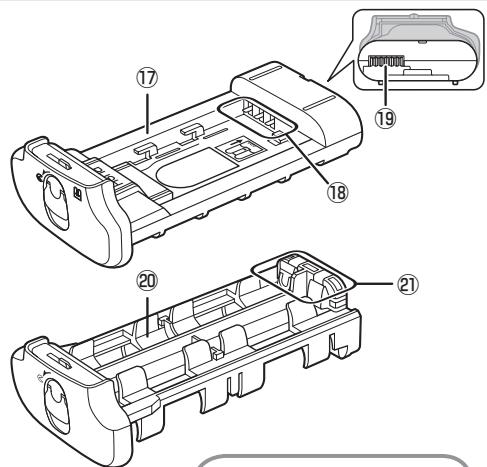
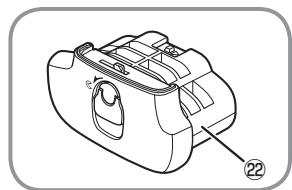
① Contact cap ② Holder for camera contact cover ③ Signal contacts ④ AF-ON button ⑤ Main command dial ⑥ Multi selector ⑦ Attachment wheel ⑧ Battery-chamber cover ⑨ Battery-chamber latch ⑩ Battery chamber ⑪ Mounting screw ⑫ Power terminals ⑬ Shutter-release button ⑭ Control lock ⑮ Sub-command dial ⑯ Tripod socket ⑰ MS-D10EN holder for EN-EL3e batteries ⑱ Power terminals ⑲ Power terminals (EN-EL3e battery holder) ⑳ MS-D10 holder for AA batteries ㉑ Power terminals (AA battery holder) ㉒ BL-3 battery-chamber cover (available separately)
The MB-D10 Shutter Release Button, Multi Selector, Command Dials, and AF-ON Button
The MB-D10 is equipped with a shutter-release button (Figure A-13), multi selector (Figure A-6), main command dial (Figure A-5), sub-command dial (Figure A-15), and AF-ON button (Figure A-4) for use when taking photographs in vertical ("tall," or portrait) orientation. These controls perform the same functions as the corresponding controls on the camera and are affected by changes to options in the Custom Settings menu (Group a for the AF-ON button, Group f for other controls) that affect these camera controls. See the camera manual for more information.
The MB-D10 Control Lock
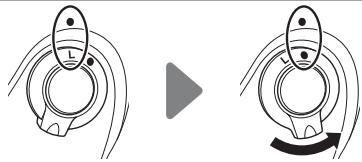
The control lock (Figure A-14) locks the controls on the MB-D10 to prevent unintended use. Before using these controls to take photographs in vertical (portrait) orientation, select to release the lock as shown at right.
The control lock is not a power switch. Use the camera power switch to turn the camera on and off.
Using the Battery Pack
Attaching the Battery Pack
En
Before attaching the battery pack, be sure that the camera is off and that the MB-D10 control lock (Figure A-14) is in the L position (the illustrations show the D300).
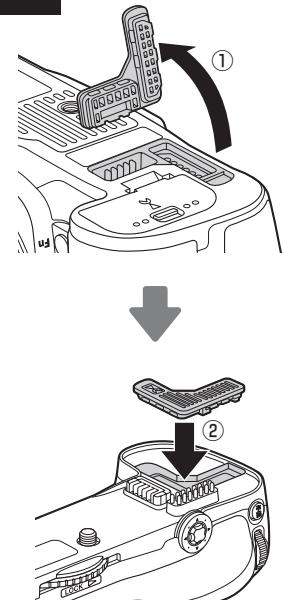
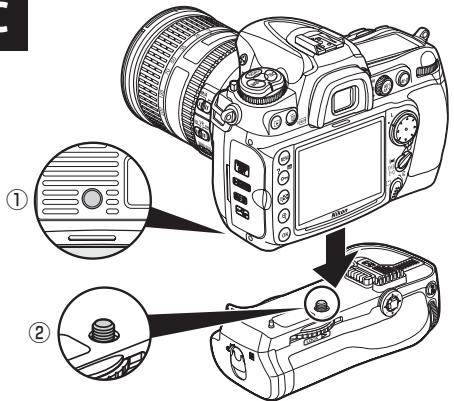
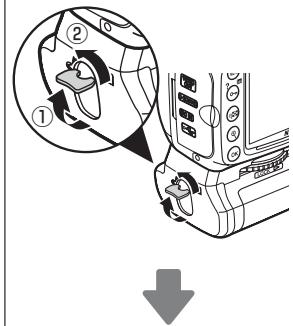
1 Remove the contact cap (Figure A-①) from the battery pack. 2 The contacts for the MB-D10 are in the base of the camera, where they are protected by a contact cover. Remove the contact cover as shown in Figure B-① and place it in the contact cover holder on the MB-D10 (Figure B-②). 3 Insert the MB-D10 (Figure C), keeping the MB-D10 mounting screw (C-②) aligned with the camera tripod socket (C-①). There is no need to remove the battery from the camera before connecting the MB-D10. At default settings, the battery inserted in the camera will be used only after the battery in the MB-D10 is exhausted. The [Battery order] option in the camera Custom Settings menu (Group d) can be used to change the order in which the batteries are used. See the camera manual for details. 4 Tighten the attachment wheel by rotating it in the direction shown by the LOCK arrow (Figure D).
Be sure to place the camera contact cover in the contact cover holder to prevent loss.
A PB-6D and PK-13 auto-extension ring are required when using PB-6 bellows with the MB-D10.
Removing the Battery Pack
To remove the MB-D10, turn the camera off and set the control lock on the MB-D10 to L, then loosen the attachment wheel and remove the MB-D10. Be sure to replace the contact cover on the camera and the contact cap on the MB-D10 when the battery pack is not in use.
Inserting Batteries
The MB-D10 can be used with one EN-EL3e, EN-EL4a, or EN-EL4 rechargeable Li-ion battery, or with eight AA batteries. A BL-3 battery-chamber cover (available separately) is required when using an EN-EL4a or EN-EL4 battery.
Before inserting batteries, be sure that the camera is off and that the MB-D10 control lock is in the L position.
1 Turn the MB-D10 battery-chamber latch to E and remove the battery holder (Figure E). 2 Ready the batteries as described below.
EN-EL3e: Matching the indentations on the battery to the projections on the MS-D10EN holder, insert the battery with the arrow (▲) on the battery toward the battery holder power terminals (Figure F-①). Press the battery lightly downward and slide it in the direction of the arrow until the power terminals click into place (Figure F-②).
EN-EL4a/EN-EL4: If the battery release on the optional BL-3 battery-chamber cover is positioned so that the arrow (◀) is visible, slide the battery release to cover the arrow (Figure G-1). Insert the two projections on the battery into the matching slots on the BL-3 (Figure G-2) and slide the BL-3 battery lock release to reveal the arrow.
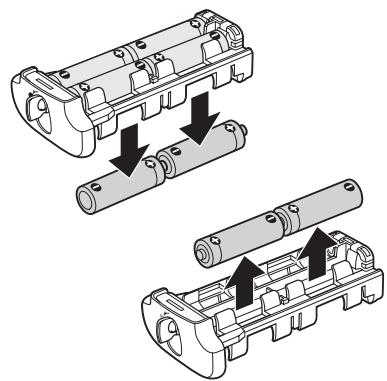
AA: Place eight AA batteries in the MS-D10 battery holder as shown in Figure H, making sure that the batteries are in the correct orientation.
3 Insert the battery or battery holder in the MB-D10 and latch the battery-chamber cover (Figure I). Make sure the battery or holder is fully inserted before turning the latch. 4 Turn the camera on and check the battery level in the control panel or viewfinder. If the camera does not turn on, check that the battery is correctly inserted.
Battery Level
The camera displays battery level as follows:
EN-EL3e, EN-EL4a, and EN-EL4 Batteries
| Control panel | Viewfinder | Description |
| — | Battery fully charged. | |
| — | Battery partially discharged. | |
| Low battery. Ready spare batteries. | ||
| (blinks) | (blinks) | Battery exhausted. Shutter release disabled. |
AA Batteries
| Control panel | Viewfinder | Description |
| √XXXX | — | Charge remaining. |
| √M | — | Low batteries. Ready spare batteries. |
| √A (blinks) | √B (blinks) | Batteries exhausted. Shutter release disabled. |
An option in Group d of the camera Custom Settings menu can be used to change the order in
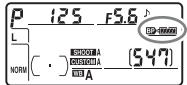
which the batteries are used. When the camera is drawing power from the MB-D10, a BP icon is displayed in the control panel.
To ensure that the camera shows the correct battery level when AA batteries are used, choose the appropriate option for [MB-D10 battery type]
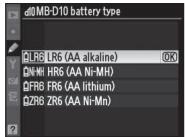
in the camera Custom Settings menu (Group d). If the correct option is not selected, the camera may fail to function as expected.
| Option | Battery type |
| ΩLR6 LR6 (AA alkaline) | AA alkaline (LR6) |
| ΩN+MH HR6 (AA Ni-MH) | AA Ni-MH (HR6) |
| ΩFR6 FR6 (AA lithium) | AA Lithium (FR6) |
| ΩZR6 ZR6 (AA Ni-Mn) | AA nickel-manganese (ZR6) |
Remove the batteries when the MB-D10 is not in use.
Battery Info
Battery information (including calibration information for EN-EL4a and EN-EL4 batteries) can be viewed from the camera setup menu
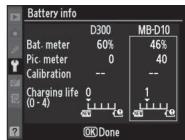
(the camera battery is listed on the left, the MB-D10 on the right). Only the battery level is listed when AA batteries are used. See the camera manual for details.
Note: The illustrations on this page are from the D300.
Removing Batteries
Be careful not to drop batteries, the holder, or the optional battery-chamber cover.
1 Turn the MB-D10 battery-chamber latch to \(\mathcal{G}\) and remove the battery holder (Figure E). 2 Remove the battery or batteries from the holder or optional battery-chamber cover.
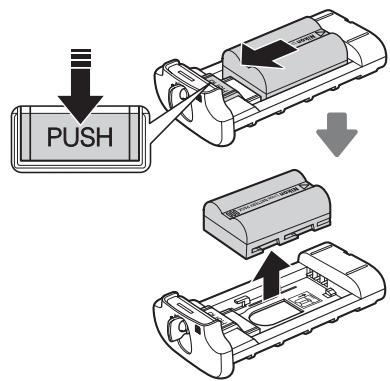
EN-EL3e
While pressing the holder PUSH button, slide the battery toward the button. The battery can then be removed as shown.
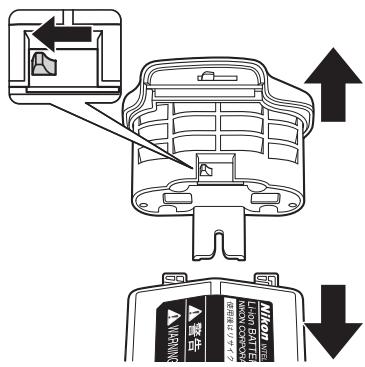
EN-EL4a/EN-EL4
Slide the battery release in the direction indicated by the arrow \((\triangleleft)\) and remove the battery-chamber cover.
AA Batteries
Remove the batteries as shown. Be careful not to drop the batteries when removing them from the holder.
Specifications
| Power source | One EN-EL3e, EN-EL4a, or EN-EL4 rechargeable Li-ion battery or eight LR6 alkaline, HR6 Ni-MH, FR6 lithium, or ZR6 nickel-manganese AA batteries |
| Operating temperature | 0 – 40°C (32 – 104°F) |
| Dimensions (W × H × D) | Approx. 150.5 × 52 × 75.5 mm/5.9 × 2.0 × 3.0 in. |
| Weight | Approx. 290 g (10.2 oz), with MS-D10EN but excluding batteries |
Specifications and design are subject to change without notice.
EN-EL3e, EN-EL4a, and EN-EL4 Batteries
The performance of EN-EL3e, EN-EL4a, and EN-EL4 batteries drops at temperatures below about 10°C (50°F). Be sure the battery is fully charged and keep a warm spare battery on hand ready to exchange as necessary. Cold batteries will recover some of their charge when warmed.
AA Batteries
Due to their limited capacity, AA LR6 alkaline and ZR6 nickel-manganese batteries should be used only when no other alternative is available. Use is not recommended at low temperatures. In general, AA batteries have less capacity than other power sources when used in the MB-D10; EN-EL3e, EN-EL4a, and EN-EL4 batteries are recommended for best performance.
The capacity of AA batteries varies with make and storage conditions and may in some instances be extremely low; in some cases, AA batteries may cease to function before their expiry date. Note that the capacity of AA batteries may drop at temperatures below 20°C (68°F).
V Frame Advance Rate
EN-EL4a/EN-EL4 and AA batteries support higher frame advance rates than the EN-EL3e. For more information on frame advance rates, see the camera manual.
Federal Communications Commission (FCC) Radio Frequency Interference Statement
Tested To Comply With FCC Standards
FOR HOME OR OFFICE USE
1300 Walt Whitman Road, Melville, New York
11747-3064, U.S.A.
Tel.: 631-547-4200

This Class B digital apparatus complies with Canadian ICES-003.
Introduction
Tested To Comply With FCC Standards
FOR HOME OR OFFICE USE
PRECAUTIONS
1300 Walt Whitman Road, Melville, New York
11747-3064, U.S.A.
Tel.: 631-547-4200
User's Manual
Table of Contents
For Your Safety. 2 Introduction to the User in Europe 2 Precautions for Use 2 Introduction 3 Handling the MB-D10 and Accessories. 3 The MB-D10 and Supplied Accessories...3 The BL-3 Battery Chamber Cover (available separately) 3 Components of the MB-D10. 4 Shutter-Release Button, Multi-Selector, Command Dial, and AF-ON Button of the MB-D10. 4 The MB-D10 Focus/Exposure Lock Switch 4 Using the Multi-Power Battery Pack...5 Attaching the Multi-Power Battery Pack...5 Removing the Battery Pack 5 Inserting Batteries. 6 Removing Batteries. 8 Specifications 9
For Your Safety
Remove the batteries when the MB-D10 is not in use.
MB-D10 Multi-Power Battery Pack
User Manual
Table of Contents
MB-D10 Operation Lock. 4
Removing the batteries 8
Specifications 9
Multi power battery pack MB-D10
User Manual
Multi power battery pack MB-D10 and accessories
Multi power battery pack MB-D10 and included accessories
Parts of the multi power battery pack MB-D10 (Figure A)
Use before "".
- MULTI-POWER BATTERY PACK
- MB-D
- TABLE OF CONTENTS
- MULTI-BATTERY PACK
- USER'S MANUAL
- MB-D10 MULTI-POWER BATTERY PACK
- SAFETY PRECAUTIONS
- EN
- NOTICE FOR CUSTOMERS IN EUROPE
- PRECAUTIONS FOR USE
- NOTICE FOR CUSTOMERS IN THE U.S.A
- FEDERAL COMMUNICATIONS COMMISSION (FCC) RADIO FREQUENCY INTERFERENCE STATEMENT
- NIKON
- CAUTION
- NOTICE FOR CUSTOMERS IN CANADA
- WARNING
- THE MB-D10 AND ACCESSORIES
- THE MB-D10 AND SUPPLIED ACCESSORIES
- THE BL-3 BATTERY-CHAMBER COVER (AVAILABLE SEPARATELY)
- PARTS OF THE MB-D10 (FIGURE A)
- THE MB-D10 SHUTTER RELEASE BUTTON, MULTI SELECTOR, COMMAND DIALS, AND AF-ON BUTTON
- THE MB-D10 CONTROL LOCK
- USING THE BATTERY PACK
- ATTACHING THE BATTERY PACK
- REMOVING THE BATTERY PACK
- INSERTING BATTERIES
- BATTERY LEVEL
- BATTERY INFO
- REMOVING BATTERIES
- EN-EL3E
- EN-EL4A/EN-EL
- AA BATTERIES
- SPECIFICATIONS
- EN-EL3E, EN-EL4A, AND EN-EL4 BATTERIES
- V FRAME ADVANCE RATE
- INTRODUCTION
- PRECAUTIONS
- FOR YOUR SAFETY
- USER MANUAL
- MULTI POWER BATTERY PACK MB-D
- MULTI POWER BATTERY PACK MB-D10 AND ACCESSORIES
- MULTI POWER BATTERY PACK MB-D10 AND INCLUDED ACCESSORIES
- PARTS OF THE MULTI POWER BATTERY PACK MB-D10 (FIGURE A)
Brand : NIKON
Model : MB-D10
Category : Camera Grip