Signature 6040R - Monitor GENELEC - Free user manual and instructions
Find the device manual for free Signature 6040R GENELEC in PDF.


| Product Type | Active Studio Monitor |
| Brand | Genelec |
| Model | Signature 6040R |
| Driver Configuration | 6.5" woofer + 1" tweeter |
| Amplifier Power | 90W (woofer) + 30W (tweeter) |
| Frequency Response | 35 Hz - 25 kHz (-6 dB) |
| Crossover Frequency | 2.4 kHz |
| Input Connectors | XLR balanced, RCA unbalanced |
| Dimensions (H x W x D) | 350 x 220 x 250 mm |
| Weight | 8.5 kg |
| Power Consumption | 120 W typical |
| Protection Features | Overload protection, thermal protection |
| Room Compensation Controls | Bass roll-off, treble adjustment, room response controls |
| Cabinet Material | MDF with curved design |
| Color | Black painted |
| Included Accessories | Power cord, user manual |
| Certifications | CE, EMC compliant |
| Maintenance | Wipe with dry cloth, avoid solvents |
| Repairability | Contact authorized Genelec service center |
Frequently Asked Questions - Signature 6040R GENELEC
User questions about Signature 6040R GENELEC
0 question about this device. Answer the ones you know or ask your own.
Ask a new question about this device
Download the instructions for your Monitor in PDF format for free! Find your manual Signature 6040R - GENELEC and take your electronic device back in hand. On this page are published all the documents necessary for the use of your device. Signature 6040R by GENELEC.
USER MANUAL Signature 6040R GENELEC
natural_image
Black-and-white photo of a modern white speaker with a wooden chair, no visible text or symbols.6040R
Smart Active Loudspeaker
Operating Manual 2–11
Käyttöohje 12–21
操作手册 22-31
GENELEC® Signature Series
text_image
A: K Designed by Harri KoskinenGENELEC® Signature Series
6040R Smart Active Loudspeaker
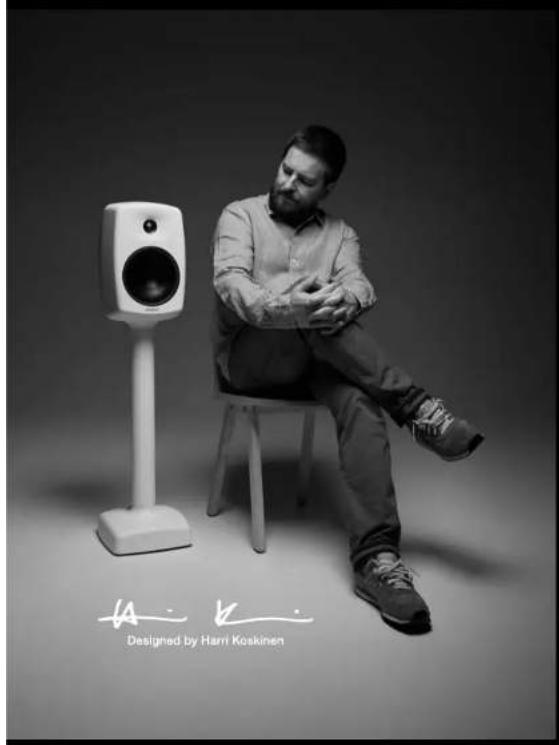
Back in 1999 Genelec founder, Ipo Martikainen, had a vision. He wanted to create a loudspeaker with curves reminiscent of a ball. And it wasn't merely for looks. It was so that sound waves could flow more freely. Ipo knew that curves were the optimal shape for the acoustical use of space. That same year Ipo met Harri Koskinen, the internationally renowned Finnish designer. And you might say the rest is history. Only this piece of history isn't relegated to the pest. Not anymore.
Harri recalls, "Even though Genelec's quality was the best in the world, back then their loudspeakers looked similar to others on the market. So we concluded that it was worthwhile considering an alternative. Iipo also explained to me the principles of the acoustic world, and he did it very well." Harri remembered that Genelec had already used aluminium in its 1029A model and he grasped its potential because "It's a very sympathetic material for a loudspeaker enclosure. It's easy to shape and it's also very stiff which means it doesn't resonate much." Harri was realising that he could bring Iipo's vision to life.
Launched in 2001 and constructed out of die-cast aluminium to enhance volume efficiency, EMC shielding and thermal conductivity, the 6040A sought to overcome the typical challenges that hindered a loudspeaker's acoustic performance. Then came its soft, fluid curves that brilliantly deliver pure, uncoloured sound in virtually any acoustic space. As a result, the 6040A was hailed a success in many international design publications, and in 2003 it was awarded an Honorary Mention in the esteemed Fennia Prize design competition.
In the subsequent years, we've worked tirelessly to refine the design of our electronics and drivers, and we've also embraced Digital Signal Processing to enable our loudspeakers to intelligently adapt to any room environment.
Now, the re-imagined 6040R features professional grade LF drivers, proprietary Class D power amplifier technology, and light integration with our GLM room calibration software. This results in a loudspeaker with increased power output, higher SPL, wide phase linearity, lower power consumption and performance completely optimised for your room – no matter how challenging the acoustics might be.
Table of Contents
- General Description 4
- Integrated Construction 4
- Loudspeaker Placement....4
- Unpacking.... 4
- Connecting audio signals .... 5
- ISS Automatic Power Management....6
- Loudspeaker Setup Using GLM....6
- Loudspeaker Setup Without GLM....6
- Using the Tone Controls....7
- Using the 6040R with Subwoofers....8
- Maintenance 8
- Safety Considerations....9
- Guarantee....9
- Specifications.... 10
natural_image
White speaker on a stand, no visible text or symbols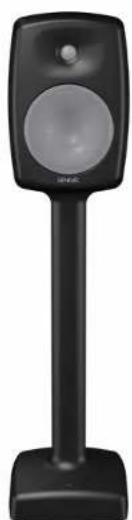
natural_image
Black handheld electronic device with a circular speaker and base (no visible text or symbols)1. General Description
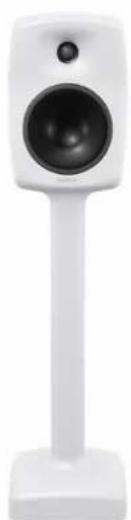
The bi-amplified GENELEC 6040R is a two-way floor-standing active loudspeaker with a high-resolution wide-bandwidth acoustic design, delivering an accurate and neutral sound character with a high output.
This operating manual addresses the basic setup procedures using either the Genelec Loudspeaker Manager™ (GLM™) room calibration software, via the proprietary Genelec loudspeaker control network, or the stand-alone setup without the software control. GLM offers versatile acoustic settings and features, and is described in full detail in the GLM System Operating Manual. GLM operation requires the additional hardware kit (8300-601) including a calibrated measuring microphone, GLM Adapter device and the necessary cables, but please note that this is not included with the 6040R and needs to be purchased separately. Alternatively, some Genelec dealers offer a one-off set-up and calibration service, removing the need to purchase the GLM kit. Please contact your dealer for more information.
2. Integrated Construction
As the amplifiers and signal processing circuitry are built into the loudspeaker base, the 6040R is very easy to set up and use. The integrated design allows the amplifiers and the drivers to be calibrated as a single unit at the factory. This eliminates the effects of component tolerances and ensures consistent quality. Being an active loudspeaker, the 6040R contains drivers, power amplifiers, active crossover filters and complete protection circuitry. The Directivity Control Waveguide™ (DCW™) technology used provides excellent frequency balance in all acoustic environments, and Genelec's proprietary GLM software allows automatic and precise acoustic calibration in all rooms.
3. Loudspeaker Placement
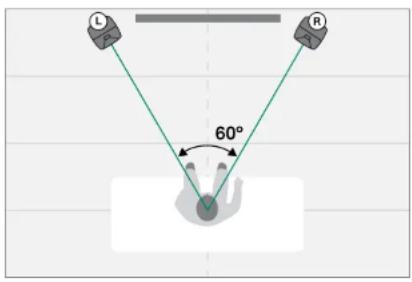
Genelec recommends loudspeakers to be placed symmetrically, at the same distance from the front and side walls. The loudspeakers should be aimed towards the listening position. To produce true and accurate stereo imaging the loudspeakers must have the same frequency responses, and this is affected by reflections in the room from the walls, ceiling, floor, furniture and other objects.
The recommended distance from the front wall is either less than 1 metre or more than 3 metres, to avoid uneven bass response due to reflections from the wall. When loudspeakers are placed close to the wall (<1 m) this boosts low frequencies and the 6040R's tone controls (or GLM) should then be adjusted appropriately. Distances between 1 and 3 metres can work perfectly but are more likely to present loss of certain bass frequencies, depending on wall reflections. See section 9 for advice on using the 6040R's tone controls, and for more detailed information on general loudspeaker placement, please consult our useful Monitor Setup Guide at www.genelec.com.
text_image
L R 60°Figure 1. Symmetrical placement of the loudspeakers in a listening room.
4. Unpacking
A 6040R loudspeaker is supplied with a mains power cable, a 5 m GLM network cable and this operating manual. To unpack, follow the instructions on the 6040R box.
5. Connecting audio signals
Please keep loudspeakers switched off while connecting cables.
text_image
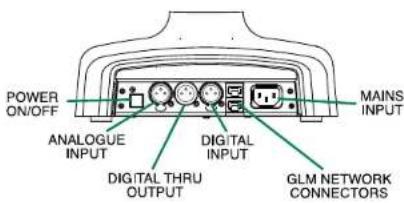
POWER ON/OFF ANALOGUE INPUT DIGITAL THRU OUTPUT DIGITAL INPUT GLM NETWORK CONNECTORS MAINS INPUTFigure 2. Connector panel of the 6040R.
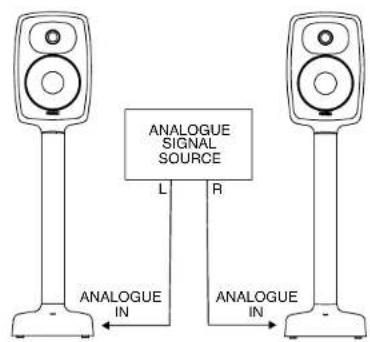
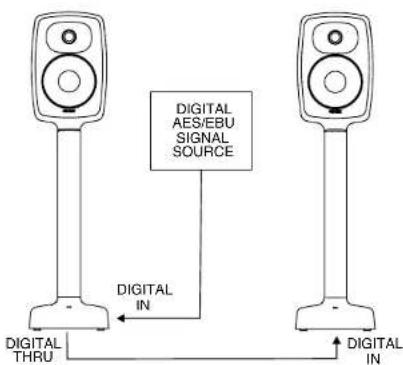
The 6040R accepts both analogue line level audio and digital audio (see figure 2). Figures 3 and 4 illustrate the audio cable routing. We recommend that you use an AES/EBU digital audio signal, but you can also use SPDIF digital audio when the signal cable is less than 3 metres, providing you use a digital audio impedance converter between the SPDIF output and the AES/EBU input.
Digital audio signals typically carry two audio channels. The digital audio 'Thru' output may be used to connect to the next 6040R loudspeaker. Each loudspeaker is designated to a specific channel when digital audio is used. This can be done via the GLM software during the system setup phase or with the "DIGITAL A" and "DIGITAL B" switches on the base panel of the 6040R. In larger systems, pairs of channels
flowchart
graph TD
    A["Speaker 1"] -->|L| B["ANALOGUE SIGNAL SOURCE"]
    C["Speaker 2"] -->|R| B
    B -->|L| D["Analogue IN"]
    B -->|R| E["Analogue IN"]
Figure 3. Audio cabling for analogue audio.
text_image
DIGITAL AES/EBU SIGNAL SOURCE DIGITAL IN DIGITAL THRU DIGITAL INFigure 4. Audio cabling for digital AES/EBU showing incoming cable and outgoing cable to the next loudspeaker.
flowchart
graph TD
    A["COMPUTER RUNNING GLM SOFTWARE"] -->|USB CABLE| B["GLM ADAPTER"]
    B -->|USB CABLE| C["GLM NETWORK CABLE"]
    D["SUGWOOFER"] --> E["AC/DC"]
    F["MICROPHONE PLACEDIN THC LISTENING POSITION"] --> B
    G["LED Speaker"] --> A
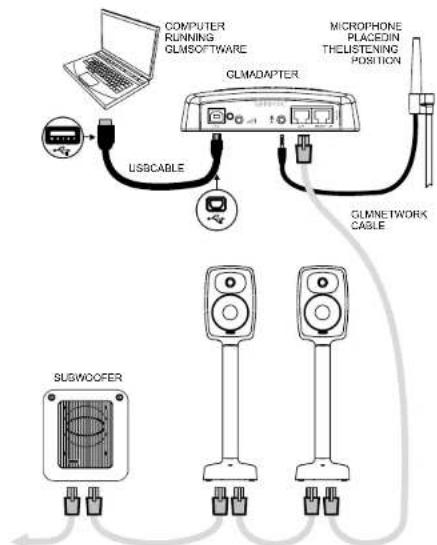
Figure 5. GLM network cabling.
are carried in each cable and sent to two loudspeakers, for example in a 5.1 multichannel system where cable 1 could carry Front L + R, cable 2 Front C + LFE and cable 3 Rear L + R. If your system also uses a subwoofer, the digital audio signal can also be run to it.
Figure 5 shows the GLM control network cabling and components. For this you'll need both the GLM Kit and GLM software. The GLM Kit contains an interface for computer USB
connection and a measurement microphone, and is available separately. The GLM software is downloaded free of charge at www.genelec.com/glm. As mentioned, some Genelec dealers offer system installation, setup and calibration as a service. Please consult your local dealer.
The "MAINS INPUT" on the 6040R supports all mains voltages globally (100–240 VAC, 50–60 Hz).
6. ISS Automatic Power Management
In its automatic energy saving mode, known as Intelligent Signal Sensing (ISS ^TM ), your 6040R consumes less than one Watt of power and you never have to turn off your loudspeakers. Sensing either an analogue input signal or a valid digital audio transmission (even when silent), the loudspeaker automatically wakes up to full operation. The waiting time before the loudspeaker enters the ISS power saving mode can be set using GLM software or with the "ISS TIME" switch on the base panel of the 6040R. ISS can be deactivated completely using the "ISS" switch on the same base panel.
7. Loudspeaker Setup Using GLM
While the 6040R can be set up using the controls on the loudspeaker, we recommend using GLM software via the control network to enable the 6040R to reach its full potential. Here we'll describe this process, and you can also find a more detailed description in the GLM System Operating Manual.
- Download and install GLM software at www.genelec.com/glm.
- Connect a CAT5 (RJ45) cable between each loudspeaker (and subwoofer) and finally to the control network input of the GLM Adapter (see Figure 5). Then connect the GLM Adapter device to your computer via the USB connector.
- Connect the Genelec measurement microphone to the microphone input of the GLM Adapter.
- Using a microphone stand, place the measurement microphone at your listening location with the microphone pointing upwards and the top of the microphone positioned at the listener's ear height.
- Follow the simple on-screen instructions within GLM software to measure and set up your loudspeakers.
- If you don't plan to use your computer for controlling the loudspeakers after calibration, you can store the calibration settings into the loudspeakers themselves (menu item "Store | Store the Current Group Settings...").
After the GLM network is disconnected, select these stored settings by switching the "STORED" switch on the base plate of the loudspeaker to "ON".
8. Loudspeaker Setup Without GLM
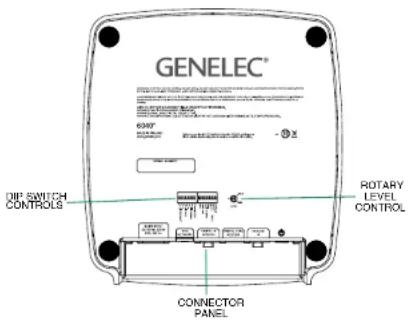
Use the settings on the base plate of the loudspeaker for system setup. These settings provide the basic acoustical calibrations and input selection. Set the "STORED" switch to the "OFF" position.
text_image
GENELEC® OIP SWITCH CONTROLS CONNECTOR PANEL ROTARY LEVEL CONTROLFigure 6. Controls on the base of the loudspeaker.
The following controls are available:
LOW BASS
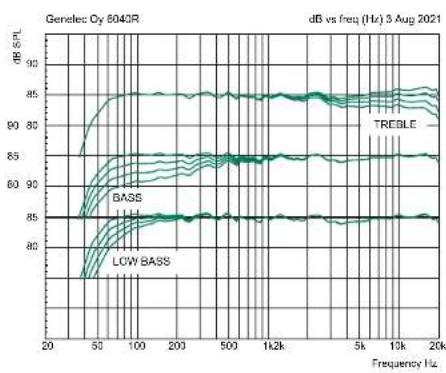
The Low Bass control reduces the output of very low bass frequencies, near the cut-off frequency (see Figure 8). The attenuation levels can be set to -2 dB, -4 dB or -6 dB (both switches ON). This is useful in rooms with significant low bass resonances.
BASS
The Bass control offers wider reduction of the bass output below 800 Hz (see Figure 8). The attenuation levels are -2 dB, -4 dB and -6 dB (both switches ON). This control is useful in balancing out the bass level relative to the mid and high frequencies.
TREBLE
The Treble control allows adjustment of the high frequency output above 5 kHz by +2 dB, -2 dB (both switches ON) or -4 dB (see Figure 8). This control is useful for correcting excessively bright or dull sounding systems or to compensate for any high frequency loss when the monitor is placed behind a projector screen.
LED DISABLE
This switch shuts off the LED light on the loudspeaker's base.
ISS
This switch activates or deactivates the ISS automatic power saving function.
ISS TIME
This switch selects the time of inactivity after which the loudspeaker goes into power saving mode. The time is approximately 60 minutes (the switch set to "ON") or 20 minutes (the switch set to "OFF".)
DIGITAL A and DIGITAL B
The Digital A and Digital B switches select which digital audio channels are reproduced by the loudspeaker. Turning both "DIGITAL A" and
“DIGITAL B” switches “ON” reproduces the sum of the A and B channels. A 6 dB attenuation is applied to avoid overloading the loudspeaker.
LEVEL
The two Level switches work in conjunction with the rotary Level control to reduce the maximum overall output to a more comfortable level where required. The switches individually provide 10 or 20 dB of attenuation, while setting both to the "ON" position gives 30 dB of attenuation. The rotary Level control can then apply up to an additional 12 dB of attenuation when set fully counterclockwise, see below.
STORED
The "STORED" switch selects either the physical controls on the loudspeaker base panel or the settings stored inside the loudspeaker using GLM calibration software. The "OFF" position selects the loudspeaker's local controls. The "ON" position selects the stored GLM settings. Selecting the stored settings disables the loudspeaker controls on the base panel.
LEVEL rotary control
The rotary “LEVEL” control adjusts the loudspeaker's output level. First set the correct level using the LEVEL DIP switches, as it is easier to repeat the same setting on all loudspeakers. When using the rotary LEVEL control, we recommend checking with a test signal and SPL metre to ensure that the playback level at your listening position is the same from all loudspeakers.
9. Using the Tone Controls
As mentioned, the response of the 6040R can be adjusted to overcome acoustical problems in the listening room. Excessive bass level often results if the loudspeakers are placed near a wall or in a corner. Treble can sound too dull or too bright depending on the acoustical damping of the room. The "TREBLE" switch "+2 dB" makes the sound brighter. If the treble feels too high, use "-2 dB" (both switches "ON") or "-4 dB" to reduce brightness. See Table 1 for suggested tone control settings depending on your speaker location in the room.
| Loudspeaker location Low Bass Bass Treble | |||
| Factory calibration, flat anechoic response OFF OFF OFF | |||
| Away from walls in a damped room OFF -2 dB OFF | |||
| Away from walls in a reverberant room OFF -4 dB OFF | |||
| Near a wall | -2 dB | -4 dB | OFF |
| In a corner | -4 dB | -4 dB | OFF |
Table 1. Recommended tone control settings.
10. Using the 6040R with Subwoofers
The 6040R can be combined with Genelec subwoofers to increase the sound pressure level (SPL) and extend the low frequency response of the system. Subwoofer models 7350, 7360 and 7370 all support GLM calibration, which is a great advantage for achieving a neutral and accurate bass output to match the main loudspeakers. The 7050 or F Two subwoofer models can also be used, but as these don't support GLM calibration they should be set using their own DIP switch controls once the 6040R loudspeakers have been calibrated. Recommended subwoofer solutions are shown in Table 2, but please consult your authorised Genelec dealer to determine the best system for your needs.
A basic method for setting up with F Two subwoofers and GLM calibration for the 6040Rs is as follows:
- Calibrate the 6040R using GLM.
- Store the calibration settings to the 6040R.
- Remove the GLM adapter and GLM network connections.
- Connect the F Two(s) to the system so that the cabling goes through the F Two.
- Calibrate the subwoofer phase manually (see the F Two user manual).
- Control the volume using the remote controller that is supplied with the F Two Subwoofer.
| Subwoofer model Number of GLM control Control with DIP Notes for a pair of 6040Rs subwoofers for subwoofer Switches | ||||
| F Two 1 No Yes | Using a single subwoofer may limit | maximum sound pressure level | ||
| F Two 2 No Yes | ||||
| 7050 | 1 No Yes | Using a single subwoofer may limit maximum sound pressure level | ||
| 7050 | 2 | No | Yes | |
| 7350 | 1 | Yes | Yes | Using a single subwoofer may limit maximum sound pressure level |
| 7350 | 2 | Yes | Yes | |
| 7360 | 1 | Yes | Yes | |
Table 2. Recommended subwoofers for a pair of 6040Rs.
text_image
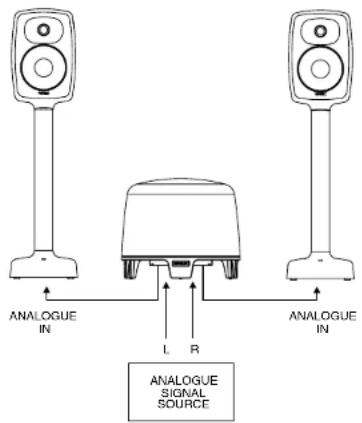
ANALOGUE IN L R ANALOGUE IN ANALOGUE SIGNAL SOURCEFigure 7. Analogue audio cabling with F Two subwoofer.
If GLM is not used for calibrating the 6040R, use the DIP switch controls on the subwoofer and 6040R to adjust the phase and frequency balance of the system.
11. Maintenance
No user serviceable parts are inside the loudspeaker. All servicing of the 6040R should only be done by qualified service personnel.
12. Safety Considerations
The 6040R has been designed in accordance with international safety standards. To ensure safe operation and to maintain the loudspeaker under safe operating conditions, the following warnings and cautions should be observed:
- Do not use this product with a mains cable having no protective earth conductor or a mains power connection with no protective earth terminal as this may compromise electrical safety.
- Do not expose the loudspeaker to water or moisture. Do not place any objects filled with liquid, such as vases on the loudspeaker or near it.
- All servicing of the 6040R should only be done by qualified service personnel.
- Do not open the loudspeaker enclose or remove any parts of the loudspeaker.
- Note that the power button on the loudspeaker's base does not completely disconnect mains power. To do this, you need to disconnect the mains power cable.
- The 6040R is capable of producing sound pressure level (SPL) in excess of 85 dB, which may cause hearing damage. Sound exposure is a measure of energy, i.e. SPL with time. Over an 8 hour period, sound exposure from your listening system should not exceed 80 dB(A) in adults or 75 dB(A) in children. The 3 dB equal energy principle applies, so 80 dB for 8 hours equals 83 dB for 4 hours, 86 dB for 2 hours etc.
- This equipment is only intended for indoor use and for use in normal room temperatures.
13. Guarantee
This product is guaranteed for a period of two years against faults in materials or workmanship.
Register your product at www.genelec.com/register-products to receive a three-year extension to the guarantee.
Please note that this extension of the guarantee period covers spare parts, but not labour charges. Refer to your supplier for full sales and guarantee terms.
natural_image
Black studio microphone on a stand, no visible text or symbols14. Specifications
| Acoustic Performance And Dimensions | 6040R |
| Lower cut-off frequency, -6 dB 43 Hz | |
| Upper cut-off frequency, -6 dB 20 kHz | |
| Accuracy of frequency response, ±1.5 dB | 50 Hz-20 kHz |
| Maximum short term sine wave acoustic output on axis in half space, averaged from 100 Hz to 3 kHz at 1 m | ≥109 dB SPL |
| Maximum long term RMS acoustic output in the same conditions with IEC weighted noise (limited by driver protection circuit) at 1 m | 98 dB SPL |
| Maximum peak acoustic output per pair in a listening room with music material at 1 m | ≥118 dB |
| Self generated noise level in free space at 1 m on axis (A-weighted) | ≤5 dB |
| Harmonic distortion at 90 dB SPL at 1 m on axisFreq: 50 to 100 Hz>100 Hz | <2%<0.5% |
| DriversBassTrebleAll drivers are magnetically shielded | 165 mm ( 6^12 , in)cone19 mm ( 8^14 , in)metal dome |
| Weight 14.9 kg (32.8 lb) | |
| DimensionsHeight without base pads or spikesSpeaker widthBase widthSpeaker depthBase depth | 999 mm ( 39^515 , in)237 mm ( 9^515 , in)250 mm (10 in)220 mm ( 8^54 , in)266 mm ( 10^12 , in) |
| Amplifier 6040R | |
| Bass amplifier short term output powerTreble amplifier short term output power(Long term output power is limited by driver protection circuitry) | 150 W150 W |
| Amplifier system THD at nominal output < 0.01% | |
| System Signal to Noise ratio, A-weightedBassTreble | >109 dB>110 dB |
| Mains voltage 100–240 VAC 50/60 Hz | |
| Power consumptionISS activeIdleFull output (short term) | < 1 W12 W180 W |
| Signal Processing 6040R | |
| Analogue signal input connector XLR female, balanced 10 kOhm | pin 1 gndpin 2 non-invertingpin 3 inverting |
| Maximum analogue input signalAnalogue input sensitivity (100 dB SPL at 1 m)Analogue input gain selection, rotary control | +25.0 dBu-6 dBuAdjustable from +6 to -6 dBu |
| Digital signal input connector XLR female 110 OhmDigital signal output / Thru connector XLR male 110 Ohm | AES/EBU Single WireAES/EBU Single Wire |
| Digital audio inputWord lengthSample rateDigital input sensitivity (100 dB SPL at 1 m) | 16-24 bits32-192 kHz-30 dBFS |
| Digital input gain sensitivity adjustmentRotary controlDip switches | +6 to -6 dBu-10, -20 and -30 dBu |
| Control networkTypeConnection | Proprietary GLMTMnetwork2 RJ45, CAT5 cables |
| Crossover frequency 2.6 kHz | |
| GLMTMsoftware frequency response adjustmentParametric notch filtersShelving filters | 162 LF and 2 HF |
| System room response calibration Genelec GLM AutoCalTM, GLM | ^12 manual, Stand-alone |
line
| Frequency (Hz) | TREBLE | BASS | LOW BASS | | -------------- | ------ | ---- | -------- | | 20 | 85 | 85 | 82 | | 50 | 90 | 85 | 83 | | 100 | 95 | 85 | 84 | | 200 | 95 | 85 | 84 | | 500 | 95 | 85 | 84 | | 1k | 95 | 85 | 84 | | 5k | 95 | 85 | 84 | | 10k | 95 | 85 | 84 | | 20k | 95 | 85 | 84 |Figure 8. The graphs above show the effect of the Low Bass, Bass and Treble controls on the frequency response of the 6040R.
heatmap
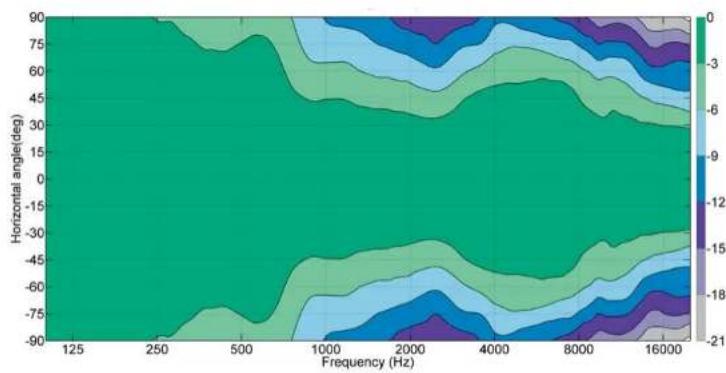
| Frequency (Hz) | Horizontal angle(deg) | Value | | -------------- | --------------------- | ----- | | 125 | 90 | 0 | | 250 | 75 | -3 | | 500 | 60 | -6 | | 1000 | 45 | -9 | | 2000 | 30 | -12 | | 4000 | 15 | -15 | | 8000 | 0 | -18 | | 16000 | -3 | -21 |Figure 10. The horizontal directivity characteristics of the 6040R.
line
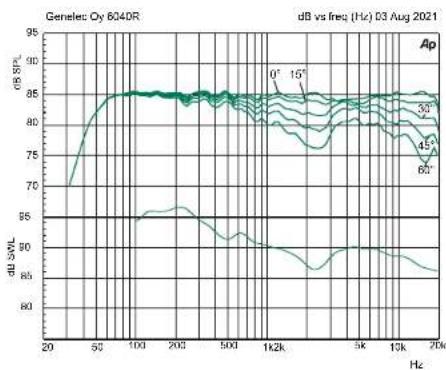
| Hz | dB vs. freq (Hz) | |------|------------------| | 20 | 70 | | 50 | 85 | | 100 | 85 | | 200 | 85 | | 500 | 85 | | 1k2k | 85 | | 5k | 85 | | 10k | 85 | | 20k | 85 |Figure 9. The graphs above show the horizontal directivity characteristics of the 6040R at 0, 15, 30, 45 and 60 degree angles.
heatmap
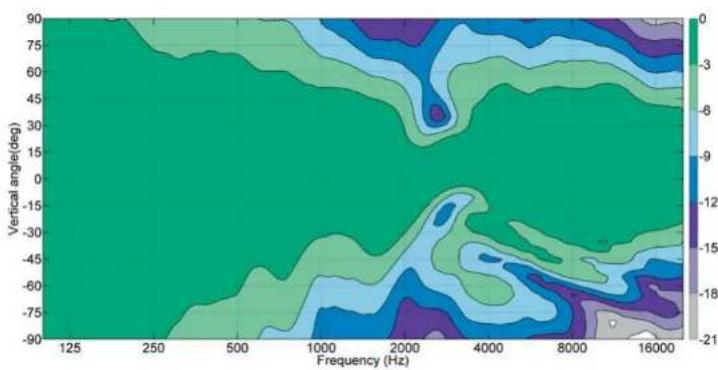
| Frequency (Hz) | Vertical angle(deg) | Value | | -------------- | ------------------- | ----- | | 125 | -90 | -21 | | 250 | -75 | -18 | | 500 | -60 | -15 | | 1000 | -45 | -12 | | 2000 | -30 | -9 | | 4000 | -15 | -6 | | 8000 | 0 | -3 | | 16000 | 15 | 0 |Figure 11. The vertical directivity characteristics of the 6040R.
text_image
A: K Designed by Harri KoskinenGENELEC® Signature Series
natural_image
White speaker with black sound block and stand (no text or symbols visible)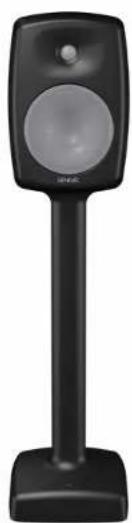
natural_image
Black handheld device with a circular speaker and rectangular body (no visible text or symbols)1. Yleistä
text_image
DIGITAALINEN AES/EBU- SIGNAALILÄHDE DIGITAL IN DIGITAL THRU DIGITAL IN DIGITAL INnatural_image
Black studio microphone on a stand, no visible text or symbols14. Tekniset tiedot
text_image
A - K Designed by Harri KoskinenGENELEC® Signature Series
6040R 智能有源音箱
natural_image
White speaker on a stand, no visible text or symbols
natural_image
Black handheld device with a speaker grille and circular head (no visible text or symbols)1. 概述
natural_image
Black studio microphone on a stand, no visible text or symbols- 参数
Factory & Headquarters
Genelec Oy
Olivie 5
FI-74100 lisalmi
Finland
T +358 17 83 881
genelec@genelec.com
Sweden
Genelec Sweden
Tureholmsvägen 12
125 35 Ålvsjö
Sweden
T +46 8 449 5220
sweden@genelec.com
China
Beijing Genelec Audio
Room 101, Building B33
Universal Business Park
No.10 Jiuxianqiao Road
Chaoyang District
Beijing 100015
China
T +86 10 5823 2014
T +86 400 700 1978
genelec.china@genelec.com
USA
Genelec Inc.
7 Tech Circle
Natick MA 01760
USA
T +1 508 652 0900
genelec.usa@genelec.com
Japan
Genelec Japan Inc
2-22-21 Akasaka
Minato ku
JP-107-0052 Tokyo
Japan
T +81 3 6441 0591
genelec.japan@genelec.com
GENELEC®