
CINE5 - Audio System ASUS - Free user manual and instructions
Find the device manual for free CINE5 ASUS in PDF.


| Product Type | 5.1 PC Audio System |
| Brand | ASUS |
| Model | CINE5 |
| Dimensions (with metal feet) | 373 x 100 x 100 mm |
| Dimensions (with rubber feet) | 373 x 100 x 80 mm |
| Power Supply | 12V / 3A AC adapter |
| Output Power | 15 W RMS |
| Frequency Response | 80 Hz - 20 kHz |
| Audio Inputs | 3 x 3.5mm jacks (Front, Side, Center/Subwoofer) |
| Headphone Jack | 1 x 3.5mm jack |
| Volume Control | Knob with mute function (press to mute) |
| Power On/Off Switch | Yes |
| LED Indicator | Blue (on when speaker is active and sound is not muted) |
| Input Level | 1.5 Vrms |
| Connectivity | Compatible with computer, MP3 player, game console, DVD player |
| Box Contents | Speaker, power adapter, power cord, set of rubber and metal feet, quick start guide, optional 5.1 audio cable |
| Operating Temperature | 0°C to 35°C |
| Compliance | FCC Class B, ICES-003, REACH |
| Safety | Do not open, do not expose to moisture, use on a flat and stable surface, unplug before cleaning |
| Maintenance | Unplug power before cleaning; use a dry cloth |
Frequently Asked Questions - CINE5 ASUS
User questions about CINE5 ASUS
0 question about this device. Answer the ones you know or ask your own.
Ask a new question about this device
Download the instructions for your Audio System in PDF format for free! Find your manual CINE5 - ASUS and take your electronic device back in hand. On this page are published all the documents necessary for the use of your device. CINE5 by ASUS.
USER MANUAL CINE5 ASUS
Q5221 / December 2009
Notices
Federal Communications Commission Statement
This device complies with Part 15 of the FCC Rules. Operation is subject to the following two conditions:
This device may not cause harmful interference. This device must accept any interference received including interference that may cause undesired operation.
This equipment has been tested and found to comply with the limits for a Class B digital device, pursuant to Part 15 of the FCC Rules. These limits are designed to provide reasonable protection against harmful interference in a residential installation. This equipment generates, uses and can radiate radio frequency energy and, if not installed and used in accordance with manufacturer's instructions, may cause harmful interference to radio communications. However, there is no guarantee that interference will not occur in a particular installation. If this equipment does cause harmful interference to radio or television reception, which can be determined by turning the equipment off and on, the user is encouraged to try to correct the interference by one or more of the following measures:
Reorient or relocate the receiving antenna. - Increase the separation between the equipment and receiver. - Connect the equipment to an outlet on a circuit different from that to which the receiver is connected. - Consult the dealer or an experienced radio/TV technician for help.
Canadian Department of Communications Statement
This digital apparatus does not exceed the Class B limits for radio noise emissions from digital apparatus set out in the Radio Interference Regulations of the Canadian Department of Communications.
This class B digital apparatus complies with Canadian ICES-003.
REACH
Complying with the REACH (Registration, Evaluation, Authorisation, and Restriction of Chemicals) regulatory framework, we published the chemical substances in our products at ASUS REACH website at http://green.asus.com/english/REACH.htm.

This symbol of the crossed out wheeled bin indicates that the product (electrical and electronic equipment) should not be placed in municipal waste. Check local regulations for disposal of electronic products.
Safety information
DO NOT service this product yourself. Contact a qualified service technician or your retailer. DO NOT place this product in a location where it may get wet. - Place this product on a flat and stable surface. Unplug this product from the power source before cleaning. - Ensure that you plug the AC adapter to the correct power input rating. Check the label on the AC adapter for the AC power rating. We recommend that you use this product in environments with an ambient temperature between 0°C and 35°C.
Knowing your PC Speaker
Package contents
- ASUS Cine5 PC Speaker x1 AC power cord x1 AC adapter x1 Rubber foot x4 Metal foot x4 Quick Start Guide x1 3.5mm jack 5.1-channel audio cable x1 (optional)

NOTE: If any of the above items is damaged or missing, contact your retailer.
Cine5 specifications summary
| Hardware | 3 x 3.5mm audio jacks (Front, Side, Center/Subwoofer) support 5.1-channel surround sound |
| 1 x Headphone port | |
| 1 x Power switch | |
| 1 x DC IN port | |
| 1 x Volume knob/Mute button | |
| Input level | 1.5 Vrms for all analog inputs |
| Speaker output | 15 W RMS |
| DC IN | 12V/3A |
| Frequency response | 80 ~ 20KHz |
| Dimensions (W x D x H) | 373 x 100 x 100 mm (with metal feet) |
| 373 x 100 x 80 mm (with rubber feet) |

NOTE: Specifications are subject to change without prior notice.
Hardware features
Top view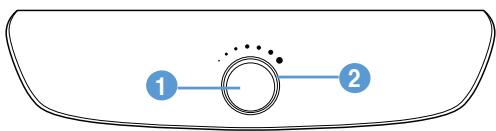
Back view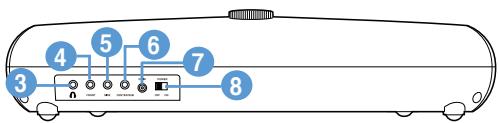
1
Mute button / Volume knob
Press to mute your speaker. - Turn clockwise to increase the volume of your speaker. - Turn counterclockwise to decrease the volume of your speaker.
2
LED
- When your speaker is turned ON and not muted, this circular blue LED is ON.
- When your speaker is turned OFF or muted, this circular blue LED is OFF.
3
Headphone port
Connects to a pair of headphones.
4
Front Speakers in jack
- Connects to the Front Speakers Out jack of an audio source.
- Connects to an audio source with stereo output only such as a laptop and portable MP3 player.
5
Side Speakers In jack
Connects to the Side or Rear Speakers Out jack of an audio source.
6
Center/Subwoofer Speaker In jack
Connects to the Center/Subwoofer jack of an audio source.
7
DC IN port
Insert the AC adapter into this port to supply power to your speaker.
8
Power switch
Switch to turn ON/OFF your speaker.
Turning on your PC Speaker
To turn ON your PC Speaker:
- Connect the AC power cord to the AC adapter.
- Connect the AC adapter to the DC IN port at the back of your speaker.
- Plug the AC power cord into a power outlet. The power LED on the AC adapter lights blue.
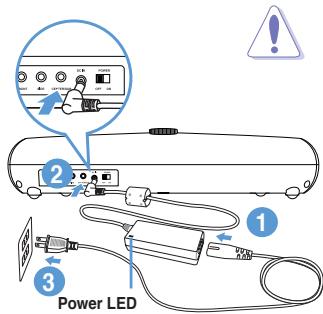
CAUTION:
- Use only the bundled AC adapter. Using other AC adapters may damage your device.
- Ensure that you plug the AC adapter to the correct power input rating. Check the label on the AC adapter for the AC power rating.
4. Switch ON your speaker.
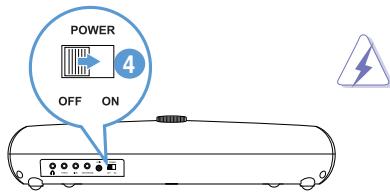
WARNING: Turn OFF your speaker before connecting / disconnecting it to / from audio sources.
Connecting your PC Speaker to audio sources

WARNING: Turn OFF your speaker before connecting / disconnecting it to / from audio sources.
Connecting to a desktop computer
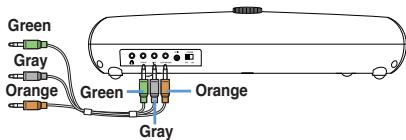
Connect your PC Speaker to a desktop computer with 5.1-channel audio output for a surround sound experience.
To connect your speaker to a desktop computer:
- Locate the audio jacks at the back panel of your desktop computer.
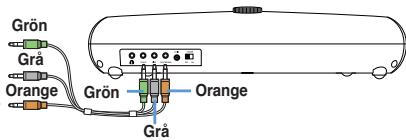
- Using a 5.1-channel audio cable, connect your speaker to the audio jacks at the back panel of your desktop computer.
Front Speakers Out jack, Side or Rear Speakers Out jack, Center/Subwoofer jack

IMPORTANT:
- The Side and Rear Speakers Out jacks (black or gray) vary with motherboard/soundcard design.
- To ensure that the speaker is connected properly, run a speaker test in 5.1-channel setup in your audio configuration utility.

NOTE: The 5.1-channel audio cable is an optional item.
- Turn ON your speaker.
- Play a media file from your desktop computer.

NOTE: We recommend that you adjust the volume of your audio source to 90%.
- Adjust the volume of your speaker to the desired level.
Connecting to a laptop or portable MP3 player
Connect your PC Speaker to a laptop or portable MP3 player with stereo audio output only.
To connect your speaker to a laptop or portable MP3 player:
- Locate the Headphone port on your laptop or portable MP3 player.
- Using a 5.1-channel audio cable, connect your speaker to the Headphone port on your laptop or portable MP3 player.
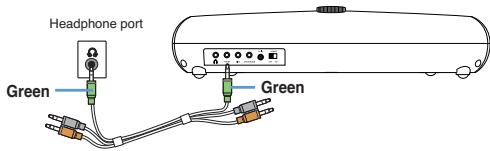

NOTE: The 5.1-channel audio cable is an optional item.
- Turn ON your speaker.
- Play a media file from your laptop or portable MP3 player.

NOTE: We recommend that you adjust the volume of your audio source to 90%.
- Adjust the volume of your speaker to the desired level.

NOTE: To get the best listening experience when playing a 5.1-channel movie on a laptop with stereo output only:
- Downmix the 5.1-channel audio output to stereo output in the playback software.
- If the playback software does not support downmix, select 2-channel PCM or Dolby/DTS 2.0 in the DVD settings.
Connecting to a DVD player or game console
Connect your PC Speaker to a DVD player or game console.
To connect your speaker to a DVD player or game console:
- Locate the RCA audio jacks on your DVD player or game console.
- Using an RCA audio cable, connect your speaker to the RCA audio jacks on your DVD player or game console.
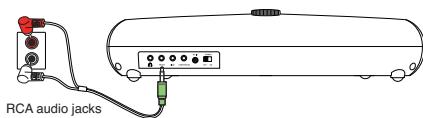

NOTE: The RCA audio cable is purchased separately.
- Turn ON your speaker.
- Play a media file from your DVD player or game console.

NOTE: We recommend that you adjust the volume of your audio source to 70%.
- Adjust the volume of your speaker to the desired level.
Achieving the best listening experience
Room & speaker placement considerations
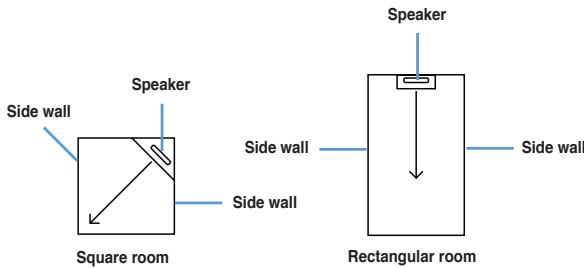
- The room shape and wall coverings affect the acoustics of your room. A symmetrical room shape such as a square or rectangular contributes to the room acoustics.
- Place your speaker in a symmetrical position in your room.
- Side walls covered with the same materials improve the sound clarity.
Listening position
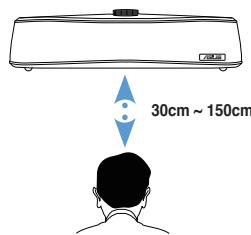
A proper listening position also enhances your listening experience.
- Keep your listening position towards the center of your speaker.
- Keep a distance of 30 cm to 150 cm from your listening position to your speaker.
Canadian Department of Communications Statement
This digital apparatus does not exceed the Class B limits for radio noise emissions from digital apparatus set out in the Radio Interference Regulations of the Canadian Department of Communications.
This class B digital apparatus complies with Canadian ICES-003.
REACH
FCC (Federal Communications Commission) Declaration
Federal Communications Commission Statement (original)
This device complies with Part 15 of the FCC Rules. Operation is subject to the following two conditions:
This device may not cause harmful interference. This device must accept any interference received including interference that may cause undesired operation.
This equipment has been tested and found to comply with the limits for a Class B digital device, pursuant to Part 15 of the FCC Rules. These limits are designed to provide reasonable protection against harmful interference in a residential installation. This equipment generates, uses and can radiate radio frequency energy and, if not installed and used in accordance with manufacturer's instructions, may cause harmful interference to radio communications. However, there is no guarantee that interference will not occur in a particular installation. If this equipment does cause harmful interference to radio or television reception, which can be determined by turning the equipment off and on, the user is encouraged to try to correct the interference by one or more of the following measures:
Reorient or relocate the receiving antenna. - Increase the separation between the equipment and receiver. - Connect the equipment to an outlet on a circuit different from that to which the receiver is connected. - Consult the dealer or an experienced radio/TV technician for help.
Canadian Department of Communications Statement
This digital apparatus does not exceed the Class B limits for radio noise emissions from digital apparatus set out in the Radio Interference Regulations of the Canadian Department of Communications.
This class B digital apparatus complies with Canadian ICES-003.
REACH
Complying with the REACH (Registration, Evaluation, Authorisation, and Restriction of Chemicals) regulatory framework, we published the chemical substances in our products at ASUS REACH website at http://green.asus.com/english/REACH.htm.

Input for 6-channel audio
Connection to the 6-channel audio output of the device.

Input for center channel/subwoofer
Connection to the center channel/subwoofer output of the audio device.

Power connector
Power supply unit.

Power supply unit
On/Off dynamics.
Enable dynamics
Enable dynamics LED indicator:
Federal Communications Commission Statement
Canadian Department of Communications Statement
This Class B digital equipment complies with all requirements of the Canadian Interference-Causing Equipment Regulations.
This Class B digital apparatus complies with Canadian ICES-003.
REACH
Federal Communications Commission Statement
This device complies with Part 15 of the FCC Rules. Operation is subject to the following two conditions:
This device may not cause harmful interference. This device must accept any interference received, including interference that may cause undesired operation.
This equipment has been tested and found to comply with the limits for a Class B digital device, pursuant to Part 15 of the FCC Rules. These limits are designed to provide reasonable protection against harmful interference in a residential installation. This equipment generates, uses and can radiate radio frequency energy and, if not installed and used in accordance with the manufacturer's instructions, may cause harmful interference to radio communications. However, there is no guarantee that interference will not occur in a particular installation. If this equipment does cause harmful interference to radio or television reception, which can be determined by turning the equipment off and on, the user is encouraged to try to correct the interference by one or more of the following measures:
Reorient or relocate the receiving antenna. - Increase the separation between the equipment and receiver. - Connect the equipment to an outlet on a circuit different from that to which the receiver is connected. - Consult the dealer or an experienced radio/TV technician for help.
Canadian Department of Communications Statement
This digital apparatus does not exceed the Class B limits for radio noise emissions from digital apparatus set out in the Radio Interference Regulations of the Canadian Department of Communications.
This class B digital apparatus complies with Canadian ICES-003.
REACH
In compliance with the REACH regulatory framework (Registration, Evaluation, Authorization and restriction of Chemicals), we have disclosed the chemical substances in our products on the ASUS REACH website at http://green.asus.com/english/REACH.htm

Power off
Use to enable/disable (ON/OFF) the device.
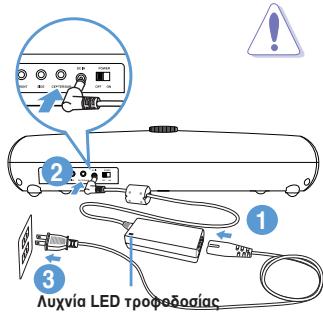
Enabling the PC
To enable the PC:
- Connect the AC power cord to the AC power connector.
- Connect the power connector to the DC input on the rear panel of the device.
- Connect the power cord to the AC power outlet. The LED indicator on the AC connector will light up.
CAUTION:
The AC power adapter may become hot during use. The AC power adapter may cause burns if touched. Ensure that the AC power adapter is connected to a properly grounded outlet. Check the label on the AC power adapter for the correct voltage.
4. TURN ON THE DEVICE
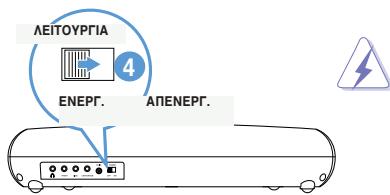
WARNING: TURN OFF THE DEVICE before connecting/disconnecting or handling the device.
This symbol of the crossed out wheeled bin indicates that the product (electrical and electronic equipment) should not be placed in municipal waste. Check local regulations for disposal of electronic products.
Indonesia
Federal Communications Commission Statement
This device complies with part 15 of the FCC Rules. Operation is subject to the following two conditions:
Canadian Department of Communications Statement
Federal Communications Commission Statement
Canadian Department of Communications Statement
Jack for center speaker/subwoofer

IMPORTANT:
Federal Communications Commission Statement
This device complies with Part 15 of the FCC Rules. Operation is subject to the following two conditions:
This device may not cause harmful interference. - This device must accept any interference received, including interference that may cause undesired operation.
This equipment has been tested and found to comply with the limits for a Class B digital device, pursuant to Part 15 of the FCC Rules. These limits are designed to provide reasonable protection against harmful interference in a residential installation. This equipment generates, uses, and can radiate radio frequency energy and, if not installed and used in accordance with the manufacturer's instructions, may cause harmful interference to radio communications. However, there is no guarantee that interference will not occur in a particular installation. If this equipment does cause harmful interference to radio or television reception, which can be determined by turning the equipment off and on, the user is encouraged to try to correct the interference by one or more of the following measures:
Reorient or relocate the receiving antenna. - Increase the separation between the equipment and receiver. - Connect the equipment to an outlet on a circuit different from that to which the receiver is connected. - Consult the dealer or an experienced radio/TV technician for help.
Canadian Department of Communications Statement
This digital apparatus does not exceed the Class B limits for radio noise emissions from digital apparatus set out in the Radio Interference Regulations of the Canadian Department of Communications.
This class B digital apparatus complies with Canadian ICES-003.
ASUS REACH
Federal Communications Commission Statement
This device complies with Part 15 of the FCC Rules. Operation is subject to the following two conditions:
This device may not cause harmful interference. - This device must accept any interference received, including interference that may cause undesired operation.
This equipment has been tested and found to comply with the limits for a Class B digital device, pursuant to Part 15 of the FCC Rules. These limits are designed to provide reasonable protection against harmful interference in a residential installation. This equipment generates, uses, and can radiate radio frequency energy and, if not installed and used in accordance with the manufacturer's instructions, may cause harmful interference to radio communications. However, there is no guarantee that interference will not occur in a particular installation. If this equipment does cause harmful interference to radio or television reception, which can be determined by turning the equipment off and on, the user is encouraged to try to correct the interference by one or more of the following measures:
Reorient or relocate the receiving antenna. - Increase the separation between the equipment and receiver. - Connect the equipment to an outlet on a circuit different from that to which the receiver is connected. - Consult the dealer or an experienced radio/TV technician for help.
Canadian Department of Communications Statement
This digital apparatus does not exceed the Class B limits for radio noise emissions from digital apparatus set out in the Radio Interference Regulations of the Canadian Department of Communications.
This class B digital apparatus complies with Canadian ICES-003.
ASUS REACH
Federal Communications Commission Statement
This device complies with Part 15 of the FCC Rules. Operation is subject to the following two conditions:
This device may not cause harmful interference.
This device must accept any interference received, including
interference that may cause undesired operation.
This equipment has been tested and found to comply with the limits for a Class B digital device, pursuant to Part 15 of the FCC Rules. These limits are designed to provide reasonable protection against harmful interference in a residential installation. This equipment generates, uses and can radiate radio frequency energy and, if not installed and used in accordance with manufacturer's instructions, may cause harmful interference to radio communications. However, there is no guarantee that interference will not occur in a particular installation. If this equipment does cause harmful interference to radio or television reception, which can be determined by turning the equipment off and on, the user is encouraged to try to correct the interference by one or more of the following measures:
Reorient or relocate the receiving antenna.
Increase the separation between the equipment and receiver.
Connect the equipment to an outlet on a circuit different from
that to which the receiver is connected.
Canadian Department of Communications Statement
This digital apparatus does not exceed the Class B limits for radio noise emissions from digital apparatus set out in the Radio Interference
Regulations of the Canadian Department of Communications
This class B digital apparatus complies with Canadian ICES-003

REACH


- NOTICES
- FEDERAL COMMUNICATIONS COMMISSION STATEMENT
- CANADIAN DEPARTMENT OF COMMUNICATIONS STATEMENT
- REACH
- SAFETY INFORMATION
- KNOWING YOUR PC SPEAKER
- PACKAGE CONTENTS
- CINE5 SPECIFICATIONS SUMMARY
- HARDWARE FEATURES
- MUTE BUTTON / VOLUME KNOB
- LED
- HEADPHONE PORT
- FRONT SPEAKERS IN JACK
- SIDE SPEAKERS IN JACK
- CENTER/SUBWOOFER SPEAKER IN JACK
- DC IN PORT
- POWER SWITCH
- TURNING ON YOUR PC SPEAKER
- TO TURN ON YOUR PC SPEAKER
- CAUTION
- SWITCH ON YOUR SPEAKER
- CONNECTING YOUR PC SPEAKER TO AUDIO SOURCES
- CONNECTING TO A DESKTOP COMPUTER
- TO CONNECT YOUR SPEAKER TO A DESKTOP COMPUTER
- IMPORTANT
- CONNECTING TO A LAPTOP OR PORTABLE MP3 PLAYER
- TO CONNECT YOUR SPEAKER TO A LAPTOP OR PORTABLE MP3 PLAYER
- NOTE: TO GET THE BEST LISTENING EXPERIENCE WHEN PLAYING A 5.1-CHANNEL MOVIE ON A LAPTOP WITH STEREO OUTPUT ONLY
- CONNECTING TO A DVD PLAYER OR GAME CONSOLE
- TO CONNECT YOUR SPEAKER TO A DVD PLAYER OR GAME CONSOLE
- ACHIEVING THE BEST LISTENING EXPERIENCE
- ROOM & SPEAKER PLACEMENT CONSIDERATIONS
- LISTENING POSITION
- FCC (FEDERAL COMMUNICATIONS COMMISSION) DECLARATION
- FEDERAL COMMUNICATIONS COMMISSION STATEMENT (ORIGINAL)
- ENABLE DYNAMICS
- ENABLE DYNAMICS LED INDICATOR
- ENABLING THE PC
- TO ENABLE THE PC
- TURN ON THE DEVICE
- ASUS REACH
Brand : ASUS
Model : CINE5
Category : Audio System