
TRAVELMATE 4750 - Laptop ACER - Free user manual and instructions
Find the device manual for free TRAVELMATE 4750 ACER in PDF.


| Product Type | Laptop |
| Brand | Acer |
| Model | TravelMate 4750 |
| Category | Professional laptop |
| Screen | 15.6 inches, HD resolution (1366 x 768) |
| Processor | Intel Core i5 second generation (estimated) |
| RAM | 4 GB DDR3 (estimated) |
| Hard drive | 320 GB or 500 GB SATA (estimated) |
| Optical drive | DVD±RW burner |
| Webcam | Integrated, 1.3 megapixel (estimated) |
| Network connectivity | Ethernet 10/100/1000, Wi-Fi 802.11 b/g/n, Bluetooth (estimated) |
| Ports | 2 x USB 2.0, 1 x USB 2.0, VGA, HDMI, headphone/microphone jack, RJ-45 |
| Card reader | SD, MMC, Memory Stick Pro, xD-Picture |
| Battery | 6-cell lithium-ion (estimated 48 Wh) |
| Power supply | 65 W AC adapter |
| Weight | Approximately 2.4 kg |
| Dimensions (L x W x H) | Approximately 382 x 253 x 33 mm |
| Operating system | Windows 7 Professional (pre-installed) |
| Operating temperature | 5°C to 35°C |
| Operating humidity | 20% to 80% (non-condensing) |
| Maintenance | Clean with a soft, dry cloth; avoid liquids |
| Security | Kensington lock slot, battery lock |
| Repairability | Access to battery, hard drive and memory via compartments |
Frequently Asked Questions - TRAVELMATE 4750 ACER
User questions about TRAVELMATE 4750 ACER
0 question about this device. Answer the ones you know or ask your own.
Ask a new question about this device
Download the instructions for your Laptop in PDF format for free! Find your manual TRAVELMATE 4750 - ACER and take your electronic device back in hand. On this page are published all the documents necessary for the use of your device. TRAVELMATE 4750 by ACER.
USER MANUAL TRAVELMATE 4750 ACER
TravelMate Notebook Series
Quick Guide
Acer recommends...
Productivity Software
Work Great with Microsoft Office 2010 - Express your ideas, solve problems and simplify everyday projects with Office 2010.
Photo editing - Easily edit and print your photos with Windows Live Photo Gallery. Then share them on Facebook, YouTube or Windows Live.
Search & Decide with Bing -- Find and organize the answers you need using Bing TM , so you can make faster, more informed decisions.
Model number:
Serial number:
Date of purchase:
Place of purchase:
First things first
We would like to thank you for making an Acer notebook your choice for meeting your mobile computing needs.
Your guides
To help you use your Acer notebook, we have designed a set of guides:
First off, the setup poster helps you get started with setting up your computer.
The TravelMate Generic User Guide contains useful information applying to all models in the TravelMate product series. It covers basic topics such as using the keyboard and audio, etc. Please understand that due to its nature, the Generic User Guide will occasionally refer to functions or features which are only contained in certain models of the series, but not necessarily in the model you purchased. Such instances are marked in the text with language such as "only for certain models".
The Quick Guide introduces you to the basic features and functions of your new computer. For more on how your computer can help you to be more productive, please refer to the TravelMate Generic User Guide. This guide contains detailed information on such subjects as system utilities, data recovery, expansion options and troubleshooting. In addition it contains warranty information and the general regulations and safety notices for your notebook. It is available in Portable Document Format (PDF) and comes preloaded on your notebook. Follow these steps to access it:
1. Click on Start > All Programs > Documentation. 2. Click on TravelMate Generic User Guide.

Note: Viewing the file requires Adobe Reader. If Adobe Reader is not installed on your computer, clicking on TravelMate Generic User Guide will run the Adobe Reader setup program first. Follow the instructions on the screen to complete the installation. For instructions on how to use Adobe Reader, access the Help and Support menu.
Your Acer notebook tour
After setting up your computer as illustrated in the setup poster, let us show you around your new Acer notebook.
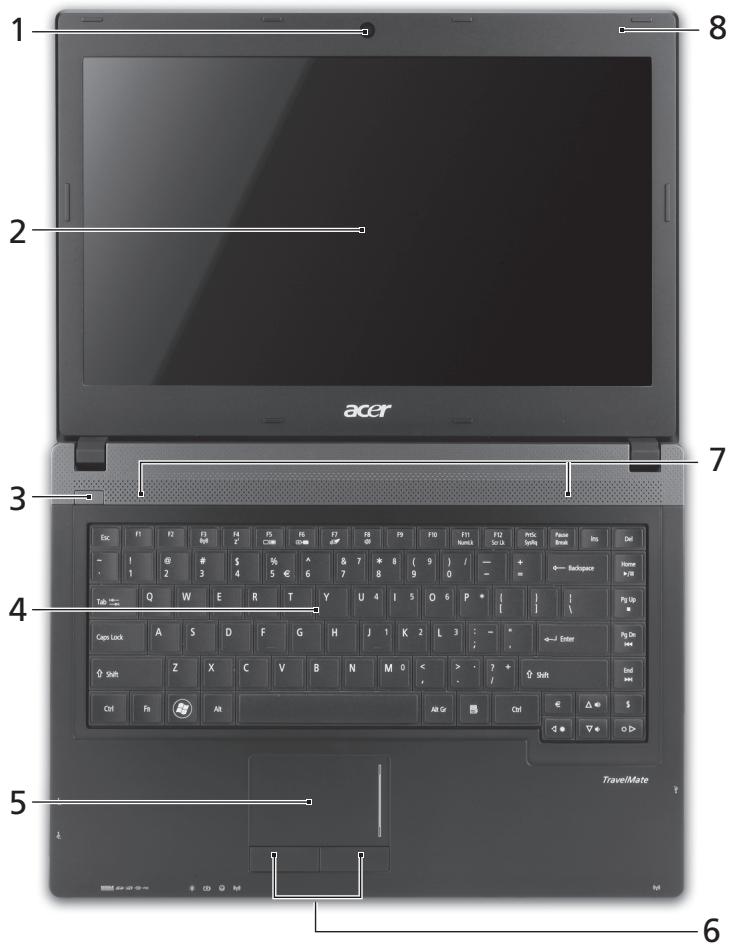
Top view
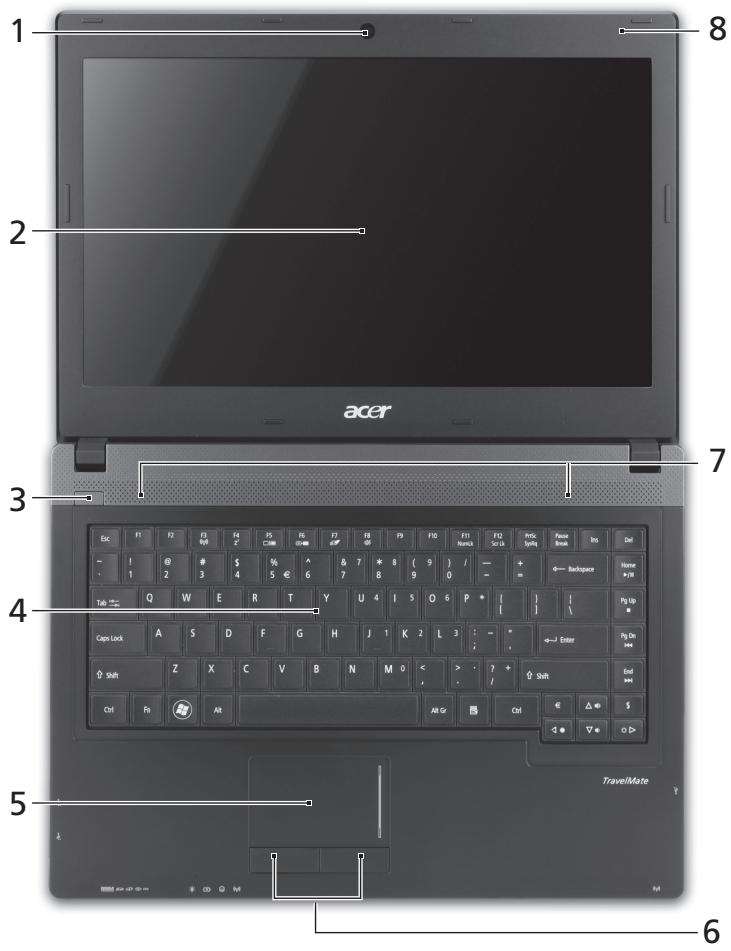
| # | Icon | Item | Description |
| 1 | Integrated webcam | Web camera for video communication. | |
| 2 | Display screen | Also called Liquid-Crystal Display (LCD), displays computer output (configuration may vary by model). | |
| 3 | ○ | Power button / indicator | Turns the computer on and off. Indicates the computer's power status. |
| 4 | Keyboard | For entering data into your computer. | |
| 5 | Touchpad | Touch-sensitive pointing device which functions like a computer mouse. | |
| 6 | Click buttons (left and right) | The left and right buttons function like the left and right mouse buttons. | |
| 7 | Speakers | Deliver stereo audio output. | |
| 8 | Microphone | Internal microphone for sound recording. |
Hotkeys
The computer employs hotkeys or key combinations to access most of the computer's controls like screen brightness and volume output.
To activate hotkeys, press and hold the key before pressing the other key in the hotkey combination.
| Hotkey | Icon | Function | Description |
| +Fn> + <F3> | (###) | Communication | Enables/disables the computer's communication devices. |
| <Fn> + <F4> | Z² | Sleep | Puts the computer in Sleep mode. |
| <Fn> + <F5> | □□ | Display toggle | Switches display output between the display screen, external monitor (if connected) and both. |
| <Fn> + <F6> | □□□ | Screen blank | Turns the display screen backlight off to save power. Press any key to return. |
| <Fn> + <F7> | ∅ | Touchpad toggle | Turns the internal touchpad on and off. |
| <Fn> + <F8> | 呦 | Speaker toggle | Turns the speakers on and off. |
| <Fn> + <F9> | Brightness up | Increases the screen brightness. | |
| +Fn> + <▲> | Brightness down | Decreases the screen brightness. | |
| +Fn> + <△> | Volume up | Increases the sound volume. | |
| +Fn> + <▼> | Volume down | Decreases the sound volume. | |
| +Fn> + <Home> | /II | Play/Pause | Play or pause a selected media file. |
| +Fn> + <Pg Up> | Stop | Stop playing the selected media file. | |
| +Fn> + <Pg Dn> | Previous | Return to the previous media file. | |
| +Fn> + <End> | Next | Jump to the next media file. |
Closed front view
| # | Icon | Item | Description |
| 1 | MULTI-MEDICARDPRO | Multi-in-1 card reader | Accepts Secure Digital (SD), MultiMediaCard (MMC), Memory Stick PRO (MS PRO), xD-Picture Card (xD). Note: Push to remove/install the card. Only one card can operate at any time. |
| 2 | Power indicator | Indicates the computer's power status. | |
| Battery indicator | Indicates the computer's battery status. 1. Charging: The light shows amber when the battery is charging. 2. Fully charged: The light shows blue when in AC mode. | ||
| HDD indicator | Indicates when the hard disk drive is active. | ||
| Communication indicator | Indicates the computer's wireless connectivity device status. | ||
| 3 | Communication switch | Enables/disables the computer's communication devices. |
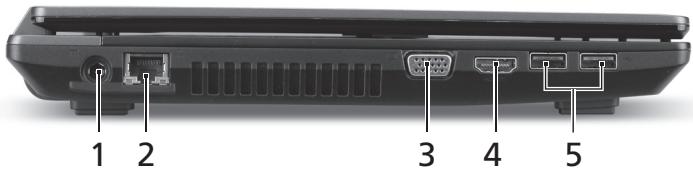
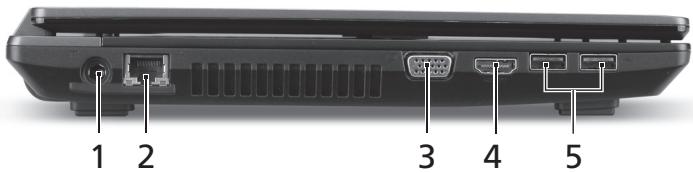
Left view
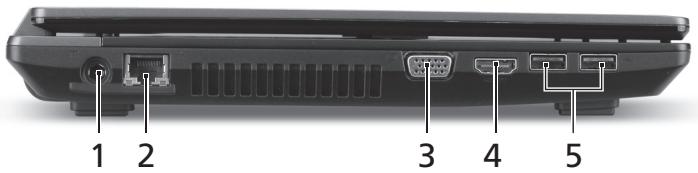
| # | Icon | Item | Description |
| 1 | DC-in jack | Connects to an AC adapter. | |
| 2 | Ethernet (RJ-45) port | Connects to an Ethernet 10/100/1000-based network. | |
| 3 | External display(VGA) port | Connects to a display device (e.g.,external monitor, LCD projector). | |
| 4 | HDMI | HDMI port | Supports high-definition digital video connections. |
| 5 | USB 2.0 ports | Connect to USB 2.0 devices (e.g., USB mouse, USB camera). |
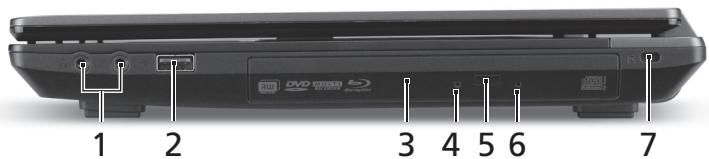
Right view
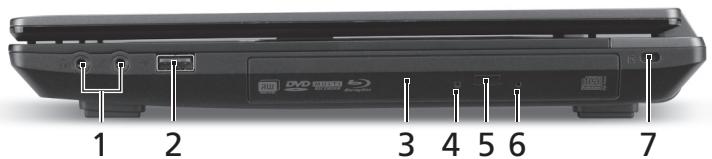
| # | Icon | Item | Description |
| 1 | Microphone jack | Accepts inputs from external microphones. | |
| Headphones/speaker jack | Connects to audio devices (e.g., speakers, headphones). | ||
| 2 | USB 2.0 port | Connects to USB 2.0 devices (e.g., USB mouse, USB camera). | |
| 3 | Optical drive | Internal optical drive; accepts CDs or DVDs. | |
| 4 | Optical disk access indicator | Lights up when the optical drive is active. | |
| 5 | Optical drive eject button | Ejects the optical disk from the drive. | |
| 6 | Emergency eject hole | Ejects the optical drive tray when the computer is turned off. Note: Insert a paper clip to the emergency eject hole to eject the optical drive tray when the computer is off. | |
| 7 | Kensington lock slot | Connects to a Kensington-compatible computer security lock. Note: Wrap the computer security lock cable around an immovable object such as a table or handle of a locked drawer. Insert the lock into the notch and turn the key to secure the lock. Some keyless models are also available. |
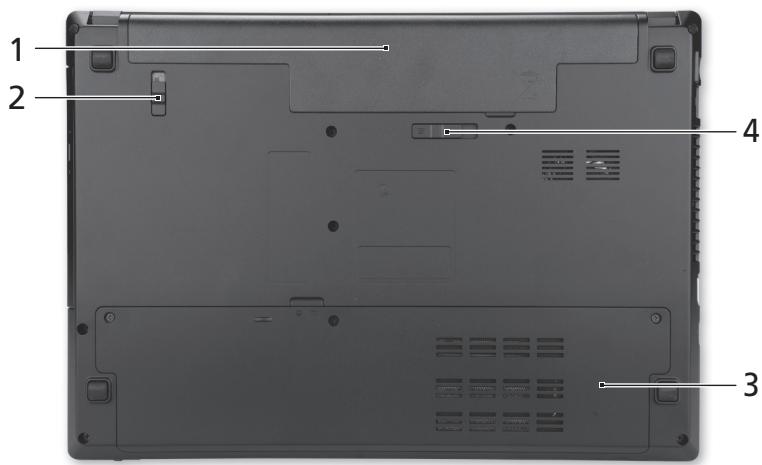
Base view
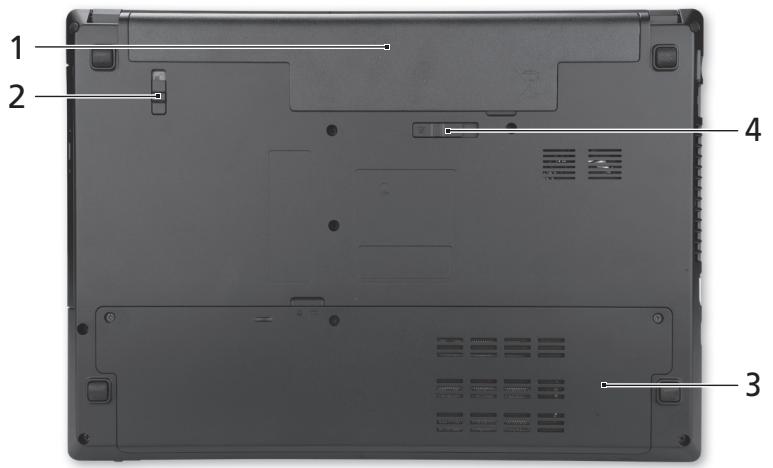
| # | Icon | Item | Description |
| 1 | Battery bay | Houses the computer's battery pack. | |
| 2 | Battery lock | Locks the battery in position. | |
| 3 | Hard disk bay | Houses the computer's hard disk (secured with screws). | |
| Memory compartment | Houses the computer's main memory. | ||
| 4 | Battery release latch | Releases the battery for removal. |
Environment
Temperature:
- Operating: 5°C to 35°C Non-operating: -20°C to 65°C
- Humidity (non-condensing):
- Operating: 20% to 80%. Non-operating: 20% to 80%
Gammede notebook TravelMate
Quick Guide
Getting Started
Acer notebook is bundled with the approved telecom modules for your networking. Those modules' model number and specific homologation number refers to below:
[Modem]
| Modelo: RD02-D330 | CNC 54-4512 |
| Modelo: Delphi D40 (AM5) | CNC 54-5681 |
[Bluetooth]
| Modelo: BCM92046 | CNC 16-6735 |
| Modelo: BCM92070MD_REF | CNC 16-7165 |
| Modelo: T77H056 | CNC 16-7788 |
| Modelo: AR5BBU12 | CNC 16-7946 |
[Bluetooth+802.11bgn]
| Modelo: BCM943225HMB | CNC C-7497 |
[802.11AGN]
| Modelo: 512AN_MMW | CNC C-6399 |
| Modelo: 533AN_MMW | CNC C-6385 |
| Modelo: 512AN_HMW | CNC C-7612 |
| Modelo: 533AN_HMW | CNC C-7618 |
| Modelo: 622ANHMW | CNC C-7682 |
| Modelo: 633ANHMW | CNC C-7681 |
[802.11BGN]
| Modelo: AR5B95 | CNC C-7152 |
| Modelo: AR5B93 | CNC C-7151 |
| Modelo: 112BNHMW | CNC C-7470 |
| Modelo: 112BNMMW | CNC C-7471 |
| Modelo: RTL8192SE | CNC C-7495 |
| Modelo: BCM943225HM | CNC C-7395 |
| Modelo: AR5B97 | CNC C-7781 |
| Modelo: BCM94313HMG2L | CNC C-7881 |
[802.11BG]
| Modelo: BCM94312HMG | CNC 16-6180 |
[3G]
| Modelo: UNDP-1 | CNC 17-6334 |
| Modelo: Gobi2000 | CNC 17-7291 |
[Brazil] Additional Anatel regulation notice
Acer notebook is bundled with the approved telecom modules for your networking. Those modules' model number and specific homologation number refers to below:
[Modem]
| Modelo: RD02-D330 | COFETEL: TTDCORD06-536 |
| Modelo: Delphi_D40 (AM5) | COFETEL: TTDAGDE07-056 |
[Bluetooth]
| Modelo: BCM92046 | COFETEL: RCPFOBC08-0472 |
| Modelo: BCM92070MD_REF | COFETEL: RCPBRBC09-0213 |
| Modelo: T77H056 | COFETEL: RCPATT709-1049 |
| Modelo: AR5BBU12 | COFETEL: RCPATAR10-0064 |
[Bluetooth+802.11BGN]
| Modelo: BCM943225HMB | COFETEL: RCPBRBC09-0574 |
[802.11AGN]
| Modelo: 512AN_HMW | COFETEL:RCPIN5108-0260 |
| Modelo: 512AN_MMW | COFETEL:RCPIN5108-0260-A3 |
| Modelo: 533AN_HMW | COFETEL:RCPIN5108-0260-A2 |
| Modelo: 533AN_MMW | COFETEL:RCPIN5108-0260-A1 |
| Modelo: 622ANHMW | COFETEL:RCPIN6209-1009 |
| Modelo: 633ANHMW | COFETEL:RCPIN6309-1010 |
[802.11BGN]
| Modelo: AR5B95 | COFETEL:RCPATAR09-0168 |
| Modelo: AR5B93 | COFETEL: RCPATAR09-0167 |
| Modelo: 112BNHMW | COFETEL: RCPIN1109-0613-A1 |
| Modelo: 112BNMMW | COFETEL: RCPIN1109-0613 |
| Modelo: RTL8192SE | COFETEL: RCPRERT09-0751 |
| Modelo: BCM943225HM | COFETEL: RCPBRBC09-0464 |
| Modelo: AR5B97 | COFETEL: RCPATAR09-1103 |
| Modelo: BCM94313HMG2L | COFETEL: RCPBRBC09-1196 |
[802.11BG]
| Modelo: BCM94312HMG | COFETEL: RCPBRBC08-0015 |
[3G]
| Modelo: UNDP-1 | COFETEL:RTIQUUN08-0253 |
| Modelo: Gobi2000 | COFETEL:RTIQUGO09-0555 |
| Modelo: EM770W | COFETEL:RTIHUEM10-0096 |
[WiMax]
| Modelo: 622ANXHMW | COFETEL: RCPIN6210-0219 |
TravelMate Series Portal
Quick guide
TravelMate Notebook Series
Quick guide
TravelMate Notebook series
Quick guide
The manuals that will help you use your Acer notebook have been developed:
This poster can perform the initial setup of the computer.
The generic user guide for the TravelMate series computers contains useful information applicable to all models in the TravelMate series. It describes the main topics, such as working with the keyboard, sound, etc. Note that the generic user guide is general, so it may describe functions or features that are not available in your specific model, but only in certain models of this series. In such cases, the text will include a note "Only for certain models".
The quick guide introduces you to the basic features and functions of your new computer. To learn more about how to increase your productivity with the computer, see the generic user guide for the TravelMate series computers. This guide contains detailed information on system functions, data recovery, expansion possibilities, and troubleshooting. It also includes information on warranty service, as well as general safety instructions and rules for working with the notebook. This guide is initially loaded onto the computer in PDF format. To open it, perform the following:
While the lid is closed

Humidity (without condensation):
- Operating: 20% to 80%
- Non-operating: 20% to 80%
TravelMate Notebook series
Quick guide
TravelMate notebook computers
Quick Guide
Quick Guide
Do not expose the computer to rain or moisture.

| # | Икona | Еlement | Опсанne |
| 1 | IIIIMM MUTUMMEDRGMD SVD PRO | Четец на карtni Multi-in-1 (Mного-B-1) | Чете Secure Digital (SD), MultiMediaCard (MMC), Memory Stick Pro (MS PRO), xD Picture Card (xD). 3абелека: Натишист, за ду Изваши: Инстамерате карта. He e Вьз金融机构 ИзюлбаHETO на поеве OT enda karpa. |
| # | Икona | ЕLEMENT | Описиме |
| 2 | Индikatop на Зхранвашио | Показастуca на зхранвашие на Компютьра. | |
| Индikatop за Новото на батерияа | Покочастуca на захетая на Компютьра. 1. Зaporжданe: Индikatopът CBETиЖылTO, Докато захетая се зaporжда. 2. Нарълно зараз dedа: Индikatopът CBETиВ синьо, Когато ст e В реким AC. | ||
| Индikatop на Тврдия дисk | Показа дади Тьрдиядиск e akтувен. | ||
| Индikatop за КOMунikaши | Покочастуca на устroduството за бezжчна врьзka на komпютьра. | ||
| 3 | Клич за КOMунikaши | Влухва/Излухва устroduства та за КOMунikaши на komпютьра. |
Do not expose the computer to direct sunlight.
2 Keep the TravelMate Generic User Guide.

© 2011 All Rights Reserved.
Important product information for TravelMate
First Edition: 02/2011
Model Number:
Serial Number:
Purchase Date:
Place of Purchase:
All rights reserved.
We would like to thank you for choosing this Acer notebook computer to meet your needs.
This guide will help you set up and use your new computer. Please read it carefully before using the computer.
First, the power adapter must be connected to the computer before turning it on.
The TravelMate Series User's Guide contains useful information that applies to all models in the TravelMate product line. It covers basic topics such as using the keyboard and the ACPI. Please note that the User's Guide may refer to features or capabilities that are only available on certain models in the series, but not necessarily on the model you purchased. These instances are indicated in the text with the phrase "on certain models only".
The Quick Guide presents the basic features and functions of your computer. For more information on how your computer can help you increase your productivity, refer to the TravelMate Series User's Guide. This guide includes detailed information on system utilities, data recovery, expansion options, and troubleshooting. Additionally, it contains information on warranty and general regulations, as well as safety precautions for your computer. It is available in Portable Document Format (PDF) and is pre-installed on your computer. Follow the steps below to access it.
1 Click Start, then point to Programs. 2 Click on TravelMate Series User's Guide.

Note: To view the file, you must have Adobe Reader installed. If Adobe Reader is not installed on your computer, when you click on TravelMate Series User's Guide, the Adobe Reader installation program will run first. Follow the on-screen instructions to complete the installation. For instructions on how to use the Adobe Reader program, refer to the Help and Support menu.
TravelMate Notebook Series
Quick Guide
Model number:
Serial number:
Purchase date:
Purchase address:
Important information
1 Start > All Programs > Documentation 2 TravelMate Generic User Guide

Acer yavn
| # | baham | baham | baham |
| 1 | baham | baham | baham |
| # | laohu | laohu | laohu |
| 2 | |||
| 3 | |||
| 4 | |||
| 5 | |||
| 6 | |||
| 7 | |||
| 8 |
| ### | ### | ### | ### |
| <Fn> + <F3> | (###) | ### | ### |
| <Fn> + <F4> | Z² | Sleep | ### Sleep |
| <Fn> + <F5> | □□ | ### | ### |
| <Fn> + <F6> | + | ### | ### |
| <Fn> + <F7> | # | ### | ### |
| <Fn> + <F8> | 呦 | ### | ### |

| ### | ### | ### |
| +Fn> + <|> | ### | ### |
| +Fn> + <|> | ### | ### |
| +Fn> + <△> | ### | ### |
| +Fn> + <V> | ### | ### |
| +Fn> + <Home> | ### | ### |
| +Fn> + <Pg Up> | ### | ### |
| +Fn> + <Pg Dn> | ### | ### |
| +Fn> + <End> | ### | ### |

| # | ### | ### | ### |
| 1 | MULIMENU MULTIMEDICRG SD PRO | ### | Secure Digital (SD), MultiMediaCard (MMC), Memory Stick PRO (MS PRO), xD-Picture Card (xD) ###: ### |
| 2 | ### | ### | |
| ### | ### | ||
| ### | ### | ||
| ### | |||
| ### | |||
| ### | |||
| ### | |||
| ### | |||
| ### | |||
| ### | |||
| ### | |||
| ### | |||
| ### | |||
| ### | |||
| ### | |||
| ### | |||
| ### | |||
| ### | |||
| ### | |||
| ### | |||
| ### | |||
| ### | |||
| ### | |||
| ### | |||
| ### | |||
| ### | |||
| ### | |||
| ### | |||
| ### | |||
| ### | |||
| ### |
2
| # | ### | ### | ### |
| 1 | ### | DC-in | ### AC |
| 2 | ### | Ethernet (RJ-45) | Ethernet 10/100/1000 |
| 3 | ### | VGA) | ### LCD) |
| 4 | HOMI | HDMI | ### USB 2.0 |
| 5 | ### | USB 2.0 | ### USB 2.0 (### USB) |
| # | ### | ### | ### |
| 1 | ### | ### | ### |
| ### | ### | ### | |
| 2 | ### USB 2.0 | ### USB 2.0 (### USB) | |
| 3 | ### | ### CD DVD | |
| 4 | ### | ### | |
| 5 | ### | ### | |
| 6 | ### | ### | |
| 7 | K | Kingsington | Kingsington |
| Kingsington | |||
| Kingsington | |||
| Kingsington | |||
| Kingsington | |||
| Kingsington | |||
| Kingsington | |||
| Kingsington | |||
| Kingsington | |||
| Kingsington | |||
| Kingsington | |||
| Kingsington | |||
2
| # | ### | ### | ### |
| 1 | ### | ### | ### |
| 2 | ### | ### | ### |
| 3 | ### | ### | ### |
| 4 | ### | ### | ### |
2
- Operating: 5°C to 35°C; Storage: -20°C to 65°C
- (1000000000): 20% to 80% 20% to 80%
- TRAVELMATE NOTEBOOK SERIES
- FIRST THINGS FIRST
- YOUR GUIDES
- YOUR ACER NOTEBOOK TOUR
- TOP VIEW
- HOTKEYS
- LEFT VIEW
- RIGHT VIEW
- BASE VIEW
- ENVIRONMENT
- GAMMEDE NOTEBOOK TRAVELMATE
- GETTING STARTED
- [BRAZIL] ADDITIONAL ANATEL REGULATION NOTICE
- TRAVELMATE SERIES PORTAL
- WHILE THE LID IS CLOSED
- TRAVELMATE NOTEBOOK COMPUTERS
- QUICK GUIDE
- DO NOT EXPOSE THE COMPUTER TO RAIN OR MOISTURE
- DO NOT EXPOSE THE COMPUTER TO DIRECT SUNLIGHT
- ALL RIGHTS RESERVED
- IMPORTANT INFORMATION
Brand : ACER
Model : TRAVELMATE 4750
Category : Laptop