
TDS 222510 H - Iron BOSCH - Free user manual and instructions
Find the device manual for free TDS 222510 H BOSCH in PDF.
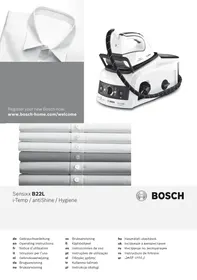


| Product type | Steam station (steam generator with iron) |
| Brand | BOSCH |
| Model | TDS 222510 H |
| Ironing functions | i-Temp, antiShine, Hygiene, PulseSteam, IntelligentSteam, Energy saving, Auto shut-off |
| Water tank | Removable, easy filling |
| Anti-calc filter | Calc'n'Clean Advanced, removable and washable |
| Fixation system | SecureLock for storage and transport |
| Iron rest | Removable, allows placing the iron horizontally |
| Soleplate | Textile protection soleplate available as an option (model TDZ2045) |
| Power | Not specified |
| Tank capacity | Not specified |
| Weight | Not specified |
| Dimensions | Not specified |
| Power supply | Mains electricity with grounding, voltage according to rating plate |
| Cleaning and maintenance | Rinsing the filter and boiler via Calc'n'Clean procedure; cleaning the soleplate with a damp cloth; descaling with recommended product |
| Safety | Auto shut-off after 8 minutes of inactivity; hot surface; do not open boiler under pressure; do not direct steam at people or animals |
| Recommended use | Tap water, possibly mixed with distilled water according to hardness; do not add chemicals |
| Accessories | Textile protection soleplate (optional); descaling liquid TDZ1101 |
| Indicators | Steam ready, water tank empty, auto shut-off, cleaning required |
Frequently Asked Questions - TDS 222510 H BOSCH
User questions about TDS 222510 H BOSCH
0 question about this device. Answer the ones you know or ask your own.
Ask a new question about this device
Download the instructions for your Iron in PDF format for free! Find your manual TDS 222510 H - BOSCH and take your electronic device back in hand. On this page are published all the documents necessary for the use of your device. TDS 222510 H by BOSCH.
USER MANUAL TDS 222510 H BOSCH
Register your new Bosch now: www.bosch-home.com/welcome

Sensixx B22L
i-Temp / antiShine / Hygiene

BOSCH
de Gebrauchsanleitung en Operating instructions fr Notice d'utilisation it Istruzioni per l'uso nl Gebruiksaanwijzing da Brugsanvisning no Bruksanvisning
sv Bruksanvisning fi Käytöhjeet es Instrucciones de uso pt Instruções de utilização el Odyieic xpon tr Kullanma talimati pl Instrukcja obslugi
hu Hasznalatiutasitask uk Inctpykui 3 BnKOpncTaHHa ru Hnctpykun IIO 3KcIaTaun ro Instruetiuni de folosire ar
A
B
C
E Calc'n'Clean Advanced


F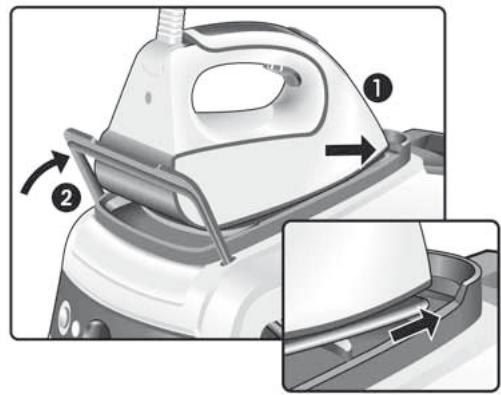


Index
| DEUTSCH | 6 |
| ENGLISH | 14 |
| FRANÇAISE | 21 |
| ITALIANO | 29 |
| NEDERLANDS | 37 |
| DANSK | 45 |
| NORSK | 52 |
| SVENSKA | 59 |
| SUOMI | 66 |
| ESPÁÑOL | 73 |
| PORTUGUES | 81 |
| ЕLVHNIKA | 89 |
| TURKQE | 97 |
| POLSKI | 104 |
| MAGYAR | 112 |
| УКРÂйСьКА | 119 |
| ЧУСКИ | 127 |
| ROMÁN | 135 |
| العربية | 149 |
DEUTSCH
ESPANOL
ENGLISH
PORTUGUES
FRANÇAISE
EMLHNIKA
ITALIANO
TURKÇE
NEDERLANDS
POLSKI
DANSK
MAGYAR
NORSK
yKPAIHcBKA
SVENSKA
PYCCKHE
SUOMI
ROMÁN
Thank you for buying the Sensixx B22L steam station, the new steam-ironing system from Bosch.
Carefully read through the operating instructions for the appliance and safeguard them for future reference.
You can download this manual from the local homepages of Bosch.
Open the leaflet sides
General safety instructions
During use, the decalcifying or rinsing aperture of the boiler is under pressure and must not be opened.
The iron must not be left unattended while it is connected to the supply mains.
- Remove the plug from the socket before filling the appliance with water or before pouring out the remaining water after use.
The appliance must be used and placed on a stable surface.
- When placed on its stand, make sure that the surface on which the stand is placed is stable.
The iron should not be used if it has been dropped, if there are visible signs of damage or if it is leaking water. It must be checked by an authorized Technical Service Centre before it can be used again.
With the aim of avoiding dangerous situations, any work or repair that the appliance may need, e.g. replacing a faulty mains cable, must only be carried out by qualified personnel from an Authorised Technical Service Centre.
This appliance can be used by children aged from 8 years and above and persons with reduced physical, sensory or mental capabilities or lack of experience and knowledge if they have been given supervision or instruction concerning use of the appliance in a safe way and understand the hazards involved. Children shall not play with the appliance. Cleaning and user maintenance shall not be made by children without supervision.
- Keep the iron and its cord out of reach of children less than 8 years of age when it is energized or cooling down.
This appliance is designed only for household use up to 2000m above sea level.

CAUTION. Hot surface.
Surface is liable to get hot during use.
- This appliance has been designed exclusively for domestic use and must not be used for industrial purposes.
- This appliance must be used only for the purposes for which it was designed, i.e. as an iron. Any other use will be considered improper and consequently dangerous. The manufacturer will not be held responsible for any damage arising from misuse or improper use.
- This appliance is to be connected and used in accordance with the information stated on its characteristics plate.
- This appliance must be connected to an earthed socket. If it is absolutely necessary to use an extension cable, make sure that it is suitable for 16A and has a socket with an earth connection.
- If the safety fuse fitted in the appliance blows, the appliance will be rendered inoperative. To restore normal operation the appliance will have to be taken to an authorised Technical Service Centre.
- In order to avoid that, under unfavourable mains conditions, phenomena like transient voltage drops or lighting fluctuations can happen, it is recommended that the iron is connected to a power supply system with a maximum impedance of 0.35Ω . If necessary, the user can ask the public power supply company for the system impedance at the interface point.
- The appliance must never be placed directly under the tap to fill the water tank.
- Unplug the appliance from the mains supply after each use, or if a fault is suspected.
- The electrical plug must not be removed from the socket by pulling the cable.
- Never immerse the iron in water or any other fluid.
- Do not leave the appliance exposed to weather conditions (rain, sun, frost, etc.)
Important:
- This appliance reaches high temperatures and produces steam during use, this could cause scalds or burns if not used properly.
- The steam hose, base station, metal plate at the bottom of the removable iron pad (2) and in particular the iron can get hot when used. This is normal.
- Never aim the steam at people or animals.
- Do not allow the power cable to come into contact with the soleplate when it is hot.
- Be aware that the system can keep on steaming for a short additional time after releasing the steam trigger. This is a normal function.
Advice on disposal
Our goods come in optimised packaging. This basically consists in using non-contaminating materials which should be handed over to the local waste disposal service as secondary raw materials. Your local town council can give you information about how to dispose of obsolete appliances.

This appliance is labelled in accordance with European Directive 2012/19/EU concerning used electrical and electronic appliances (waste electrical and electronic equipment - WEEE).
The guideline determines the framework for the return and recycling of used appliances as applicable throughout the EU.
Description
- Removable iron pad
- Water tank
- Steam hose storage fixing
- Steam hose
- "Calc'n'Clean Advanced" scale collector *
- Mains cable
- Mains cable storage compartment
- "Energy Saving" button *
- "Steam ready" / "Auto shut-off" indicator light
- Setting selector
- "Refill water tank" / "Clean warning" indicator light
- Illuminated main power button (0/I)
- Housing with internal steam generator
- Iron fixation system "SecureLock"
- Steam release button
- Steam shot button "PulseSteam" *
- Iron lamp
- Soleplate
- Fabric-protection soleplate cover*
- Model dependent
See the leaflet sides
- Release the iron from its lock system (14) by pulling the lever located at the heel of the iron backwards. 2. Remove any label or protective covering from the soleplate.
- Place the appliance horizontally on a solid, stable surface. You may remove the iron pad from the appliance and place the iron on it on another solid, stable, horizontal surface.
- Fill the water tank (2), making sure not to pass the level mark.
- Unwind the mains cable (6) fully and plug it into an earthed socket.
- Set the main power button (12) to the on position (illuminated in red).
- The "Steam ready" indicator lamp (9) will light up after several minutes, indicating that the appliance is ready to use.
The steam generator will take more time to reach "Steam ready" state only upon the initial heating up, or after performing the de-scaling operation (Calc'n'Dec).
When water is already present in the steam generator during regular use, heat up time to reach the operating temperature will be faster.
- This appliance has a built-in water level sensor. The "refill water tank" indicator (11) will light when the water tank is empty.
Important:
- Normal tap water can be used.
To prolong the optimum steam function, mix tap water with distilled water 1:1. If the tap water in your district is very hard, mix tap water with distilled water 1:2.
You can inquire about the water hardness with your local water supplier.
- The water tank can be filled at any time while using the appliance.
- To avoid damage and/or contamination of the water tank and the boiler, do not put perfume, vinegar, starch, descaling agents, additives or any other type of chemical product into the water tank.
Any damage caused by the use of the aforementioned products, will make the guarantee void.
- The iron is not designed to rest on its heal. Please always position it horizontally on the iron pad (1).
- The iron pad can be placed into the specially designed recess on the appliance or somewhere suitable alongside the ironing area.
Never rest the iron on the appliance without the iron pad!.
- During it first use the iron may produce certain vapours and odours, along with white particles on the soleplate, this is normal and it will stop after a few minutes
- While the steam release button is pressed, the water tank may produce a pumping sound, this is normal, indicating that water is being pumped to the steam tank.
i-Temp
"I-Temp" function
(Model dependent)
This steam station has a unique "i-Temp" function. If this function is selected, an appropriate combination of temperature and steam is set, which is suitable for all fabrics that can be ironed. The "i-Temp" function prevents clothes from being damaged due to an unsuitable temperature being selected.
The "i-Temp" function does not apply to fabrics that cannot be ironed. Please check the garment care label for details or try ironing on a part of the cloth not visible normally.
antiShine
"antiShine" function
(Model dependent)
This steam station has a unique "antiShine" function. If this function is selected and the steam release button (15) is regularly pressed, the risk of shiny marks on the garment due to the ironing is reduced.
Hygiene
"Hygiene" function
(Model dependent)
This steam station is equipped with a unique "Hygiene" function.
The innovative hygienic steam technology removes 99.9% of microbes. Suitable for all kinds of fabrics and extremely efficient in both thick and delicate garments. The unique combination of temperature and interval steam provides a sanitizing effect requiring no chemical additives.
Please proceed as follows:
- Choose the "Hygiene" function by turning the selector (10).
- Place the iron on the garment or fabric you want to disinfect.
- Press continuously the steam release button (15) on the bottom of the handle to release
powerful shots of hygienic steam. Slowly iron the whole garment to enhance the final result.
Notes:
- To ensure the high efficiency of the "Hygiene" function, the system has to be reset after 20 minutes. Indicator light (9) blinks five times and the steam generator switches automatically to the "i-Temp" function. If desired to continue in the "Hygiene" function, please turn the selector (10) to any other setting. After that, you can choose again the "Hygiene" function by turning the selector.
- Energy saving setting cannot be activated while the "Hygiene" function is selected.

B. Setting the temperature and steam amount
See the leaflet sides
- Check the ironing instruction label on the garment to determine the correct ironing temperature.
- Choose one of the following settings :
| Temperature | Steam setting | Suitable for |
| ● | ○ | Synthetics |
| ●● | ○○ | Silk – Wool |
| ●●● | ○○○ | Cotton – Linen |
- The indicator lamp (17) will remain lit while the iron is heating and go out as soon as the iron has reached the selected temperature.
- The "steam ready" indicator lamp (9) will light up after several minutes, indicating that steam is ready to be released.
- Press the steam release button (15-16*) to release steam.
Tips:
- Sort your garments out based on their cleaning symbol labels, always starting with clothes that have to be ironed at the lowest temperatures.
- If you are not sure what the garment is made of then begin ironing at a low temperature and decide on the correct temperature by ironing a small section not usually seen when worn
- At the beginning of each use, it is possible that drops of water will be dispensed alongside steam.
Therefore, it is advisable to try the iron on the ironing board or a piece of cloth to start with.
"PulseSteam" function

This appliance has a special function for tackling difficult creases.
The "PulseSteam" function helps soften stubborn garments like jeans or linen faster.
When the steam release button is activated, the steam generator will release three powerful shots of steam so that the steam reaches even deeper into the fabrics.
1. Set the setting selector (10) on 2. Briefly press the steam shot button (16*) on the top of the handle.
or (model dependent)
Press the steam release button (15) on the bottom of the handle two times in quick succession (double-click).
Remarks:
- It is possible to stop the shots of steam by quickly pressing the steam button again.
- Some water drops may appear when you use the "PulseSteam" function for the first time. The water drops will disappear after you have used the function for some time.
"IntelligentSteam" function
(Model dependent)
This system has intelligent steam control, which, after releasing the steam release button (15), provides a small amount of additional steam.
The additional steam can always be stopped by briefly pressing the steam release button once again.

Ironing without steam
Begin ironing but without pressing the steam release button.

C. Vertical steam
See the leaflet sides
This can be used to remove creases from hanging clothes, curtains etc.
Warning!
Never direct the steam jet at garments that are being worn. Never aim the steam at people or animals.
- Set the temperature to the "..." setting. 2. Hold the iron in an upright position 15 cm away from the garment being steamed.
- You can steam iron curtains and hanging garments (jackets, suits, coats...) by placing the iron in a vertical position and pressing the steam release button (15 or 16* ).
(model dependent)
If the "Energy saving" button (8) is switched on, you can save up to 25% of the energy and 40% of the water consumption (*) , and still achieve good results when ironing most of your garments. It is advisable to use the normal energy setting only for thick and very wrinkled fabrics.
(*) In comparison to the maximum setting.
Note: If you work with the "Energy saving" function, the variable steam regulation and temperature regulation can still be used as recommended.

Auto shut-off
(Model dependent)
If during ironing, the steam release button (15 - 16*) on the iron handle is not pressed for a certain length of time (8 minutes), the steam station will automatically switch off.
The "auto shut-off" indicator lamp (9) will flash when auto shut-off has been activated.
To switch the steam station back on, press the steam release button again.

D. Fabric protection soleplate cover
See the leaflet sides
(Model dependent)
The fabric-protection soleplate cover (19*) is used for steam-ironing delicate garments at maximum temperature without damaging them. Use of the soleplate cover also does away with the need for a cloth to prevent shine on dark materials.
It is advisable to first iron a small section on the inside of the garment to see if it is suitable.
To attach the soleplate cover to the iron, place the tip of the iron into the end of the soleplate cover and pull the elastic strap over the lower rear of the iron until it fits tightly. To release the soleplate cover, pull the elastic strap and remove the iron.
The fabric-protection soleplate cover may be purchased from our customer service or from our website
Accessory code (After-sales)
00571510
Name of accessory (online shop)
TDZ2045
See the leaflet sides
Cleaning the Boiler
To extend the life of your steam generator and to prevent any build up of scale, it is essential that you rinse out the filter (5*) and the boiler after several hours of use. If the water is hard, increase the frequency.
Do not use descending agents for rinsing out the boiler, as they could damage it.
Automatic clean warning
Indicator lamp (11) will flash indicating that boiler must be rinsed.
- Check carefully that the appliance is cold and unplugged for more than 2 hours, and that the water tank (2) is empty.
- Fix the iron to the stand by inserting the tip of the iron into the front slot and moving the fixation lever (14) against the heel of the iron.
- Place your appliance over a sink or bucket.
- Lean the appliance on the opposite side of the filter opening.
5. Unscrew the filter (5*) and take it out.
6. (model dependent)
To wash the filter, you may:
To wash the scale collector, place it under the water tap and wash it until calc residues are removed. Squeeze it as indicated in picture a).
To obtain the best result, you may immerse the scale collector for approximately 30 minutes in tap water (250 ml) mixed with a measure (25 ml) of descaling fluid, as indicated in picture b).
Then, rinse it again with water (very important!).
The descaling fluid can be obtained from our After-sales service or from our website.
Accessory code (After-sales)
00311715
Name of accessory (Online shop)
TDZ1101
7. Holding your steam generator in the lateral position and using a jug, fill the boiler with 1/4 litre of water and replace the filter. 8. Shake the base unit for a few moments, unscrew the filter again and empty the boiler completely over a sink or bucket. For best results, we recommend that this operation is performed twice. Important: before re-closing, make sure no water remains in the boiler. 9. Replace and tighten up the filter.
To reset the "Calc'nClean" counter, switch the steam station off twice, keeping it off for at least 30 seconds each time.
(on → 30s off → on → 30s off → on)

Attention! Risk of burns!
Always unplug the appliance from the mains supply before carrying out any cleaning or maintenance operation on it.
- After ironing, pull out the plug and allow the appliance to cool down before cleaning.
- Wipe the housing, handle and iron body with a damp cotton cloth. 3. If the soleplate is soiled with dirt or scale, clean it with a damp cotton cloth.
- If the cloth is synthetic, it may melt due to the high temperature on the soleplate (18). Switch off the steam and rub off any residue immediately with a thickly folded, dry cotton cloth.
- Never use abrasive products or solvents. To keep the soleplate smooth, you should avoid hard contact with metal objects. Never use a scouring pad, or chemicals to clean the soleplate.

F. Storing the appliance

See the leaflet sides
- Always allow the appliance to cool down before storing it.
- Set the main power button to the "0" position (the red light will go off) and disconnect the mains cable.
- Empty the water tank.
- Place the iron on the iron pad (1), standing on the soleplate, and fix it by inserting the tip of the iron into the front slot and moving the lock lever (14) against the heel of the iron.
- Store the mains cable in the storage compartment (7) and the steam hose in the storage fixing (3). Do not wrap the cords too tight.
- Use the iron's handle when moving the appliance, as shown in figure F.

Tips to help you save energy
Steam production consumes the most energy. To help minimise the energy used, follow the advice below:
- Start by ironing the fabrics that require the lowest ironing temperature.
Check the recommended ironing temperature in the label on the garment.
- Regulate the steam according to the selected ironing temperature, following the instructions in this manual.
- Try to iron the fabrics while they are still damp and reduce the steam setting. Steam will be generated from the fabrics rather than the iron. If you tumble dry your fabrics before ironing them, set the tumble drier on the 'iron dry' programme.
- If the fabrics are damp enough, turn off the steam regulator completely.

Troubleshooting
| Problem | Possible causes | Solution |
| Indicator light (11) flashes | ·Boiler and filter must be rinsed. | ·Rinse the filter and the boiler according to the cleaning instructions in this manual (see section E). |
| The steam generator does not come on. | ·There is a connection problem. ·The main power button is not switched on. | ·Check the mains cable (6), the plug and the socket. ·Set the main power button (12) to the "I" position (illuminated in red). |
| The iron does not heat up. | ·The main power button is not switched on. ·The temperature is set to a low position. | ·Set the main power button (12) to the "I" position (illuminated in red). ·Set the temperature to the desired position. |
| The iron begins to smoke when switched on. | ·During first use: certain components on the appliance have been lightly greased at the factory and may produce a little smoke when initially heated. ·During subsequent use: the soleplate may be soiled. | ·This is completely normal and will stop after a short while. ·Clean the soleplate according to the cleaning instructions in this manual. |
| Water flows through the holes on the soleplate. | ·The steam function is being used before it has reached the correct temperature. ·The water is condensing inside the pipes because steam is being used for the first time or has not been used for a long time. | ·Reduce the steam flow when ironing at low temperatures. ·Point the iron away from the ironing area and press the steam release button until steam is produced. |
| Dirt comes out through the soleplate. | ·There is a build up of scale or minerals in the steam tank. ·Chemical products or additives have been used. | ·Use tap water mixed 50% with distilled or demineralised water. To prolong the optimum steam function, mix tap water with distilled water 1:1. If the tap water in your district is very hard, mix tap water with distilled water 1:2. ·Clean the soleplate with a damp cloth. ·Never add products to the water. |
| The iron does not produce any steam. | ·The boiler is not switched on or the water tank is empty. ·The steam regulation is set to the minimum position. | ·Set the main power button (12) to the "I" position (illuminated in red), and/or fill the water tank. ·Increase the steam flow (see section B). |
| The ironed garment turns dark and/or sticks to the soleplate. | ·The selected temperature is too high and has damaged the garment. | ·Select a suitable temperature for the material being ironed and clean the soleplate with a damp cloth. |
| The soleplate turns brown. | ·This is a regular consequence of continued use over a long period of time. | ·Clean the soleplate with a damp cloth. |
| The appliance makes a pumping sound. | ·Water is being pumped into the steam tank. ·The sound will not stop. | ·This is normal. ·If the sound will not stop, do not use the steam generator and contact an authorised technical service centre. |
| Loss of pressure during ironing. | ·Steam release button has been activated for too long a period of time, that is, it has been pressed too frequently. | ·Use the steam release button at intervals. This improves the ironing result as the textiles will be steamed, dried and ironed properly. |
| Water spots appear on the garment during ironing. | ·May be caused by steam condensed on the ironing board. | ·Wipe the textile cover of the ironing board, and iron any water drops to dry them. |
| Water spots appear on the garment during use of the "PulseSteam" function. | ·Water spots are caused by steam condensation in the hose when cooling down after use. | ·Water drops stop coming out of the soleplate after using the "PulseSteam" function for some time. |
| The hose gets hot during use. | ·This is normal. It is caused by the steam passing through the hose during steam ironing. | ·Place the hose on the opposite side so that you cannot touch the hose during ironing. |
| Water leakage from the boiler. | ·Filter (5*) located at the side of the appliance is loose. | Tighten up the filter. |
| The iron does not stop steaming after placing it on the pad (1). | ·"PulseSteam" function has been activated by double click. | ·Just press the trigger once again and the iron will stop steaming at once. |
If the above does not solve the problem, get in touch with an authorised technical service.
The control light (11) will flash to indicate that the boiler needs to be rinsed.
C. Vertical steam ironing
T Ironing board sides
These data were created including the test and can be used only for its intended purpose. These data can be used only for its intended purpose, i.e., for ironing. Using it for any other purpose is considered improper and therefore unsafe. The manufacturer is not responsible for any damage caused by improper use. - Before connecting the device to the electrical network, check that the mains voltage corresponds to the voltage specified in the table with characteristics. - These data should be connected only to a grounded socket. If using an extension cord, make sure it has a grounded socket and is 16A grounded. If the device is damaged, further use is impossible. For the device to work normally, it must be taken to an authorized service center. - To avoid temporary voltage drops or flickering of other devices in case of unfavorable conditions in the electrical network, connect the iron to the electrical network with a maximum resistance of 0.35 Ω. If necessary, the user can contact the energy supply company for information on the network resistance at the connection point. Never hold the device by the cord to pull it out of the water. If you think the device is damaged, immediately disconnect it from the electrical network. Also disconnect it from the network immediately after use. Do not pull the plug out of the socket by the cord. Never immerse the iron in water or other liquids.
Do not leave the device under the influence of adverse weather conditions (e.g., in the sun, in frost, etc.).
Important!
During use, this device heats up to high temperatures, steam is generated, which can cause burns upon contact with hot surfaces if used improperly. - During use, the iron, the soleplate, the metal base of the winter stand (2) and often the iron itself can heat up. This is normal. Never direct steam at people or animals. Be careful not to touch the hot surfaces of the iron. Keep in mind that after releasing the steam button, the system may continue to emit steam for a few more seconds. This is normal.
Disposal recommendations
Our products are supplied in the best packaging. This means that the materials used do not cause environmental pollution and can be handed over to the municipal waste disposal service as secondary raw materials. At the local waste disposal site, you can get information on how to dispose of old electrical appliances.
This device is marked in accordance with the European Directive 2012/19/EC on waste electrical and electronic equipment (WEEE).
This Directive establishes the norms for the return and recycling of used electrical appliances and their application throughout the EU.
Device description
- Winter soleplate for the iron
- Water reservoir
- Water filling opening
- Power cord
- Filter for removing scale "Calc'n'Clean Advanced" *
- Plug
- BiDJIeHnHaIa 36epirAnHa KaebJa KxIBHeHHa
- "Ehepro36epiraohya" Khonka *
- Izhikatop "TOTOBHICTb napi" / "ABTomatnue H BIMKHeHHa 10.Ручka Вобору ржиму
- IIndnkaTop "HeCTaay BOni"/"ABTomuHnIcNHaJI pno nTopebOuy OunueHnra
- Khonka roJIOBHO BIMNKaHa 3 NiDCBVEHHM
- Kopnyc 3 naporehepatopom
- CnCTema pfikcaui npackn "SecureLock"
- Khonka Bùnúcy napi
- Khoinka Bvnucky napu "PulseSteam" * 17.Индикатор праски 18.Підошва
- TkaHH* * y DeaKnx MoedJx

ДиВ.складeniсториКн
1.BiD'edHaIte npacky BiD ciCTemn fikcaii (14), NOTaRhyBm IOH3y BaxiJIb, IIO yTpIMye HxKHHO qactInHy npackn. 2.3HIMITb Bci etnkeTkn Ta 3axncHy ynaKOBky 3 niooBn npackn. 3.YctaHObit npncTpi ropn3OHTanbHo Ha MiCuHy Ta CTiKy NOBepxHNo. MoXHa 3nTn iNkIaNky dny npackn 3 npncTpoTo Ta noknaTn H a HnSy MiHy, CTiKy, ropn3OHTanbHy NOBepxHNo. 4. HanobHITb pe3epByap IЯ BODn (2)Тak,ИбОВOA He npeBnIyBaIa BiIMtKy MaKcImaJIbHorO pIBHЯ. 5.Повсichtо розергить кабелхивення та πдклчіть по до замениою розетки. 6.YctahOBitb roOBHn BmIKauch (12)Ha no3HaChy YbIMKHeHOYbIMKHeTbc npCbiyBaHHa. 7. Yepe3 kijbka XBUNIH 3acBITNbC iHnKaTOp roTOBHOCTI napi (9), CnHani3yOu n npo MOXJIINBICtS BVKOPNCaTHn PnCtPOH.
Парoreнераторnotpe6yeбльшучасдяdoCSrHENnCTAHyrotOBHocTi dopoBToNiudacnoaTkoBOrOHarpiBaHNHaTicnI npoBeDEHHnpoceDpyuOnuSeHnBbIhakiny(Calc'nClean).KoINBpOeci peryIyrphoro BkOpuCtAnHnBpaporeHepatoPiPncTyBaoDa,uaHarpBaHNdIdoCSrHENnpo6Ooi TemnepaTypnCKoPoCyETcCra.
Never place the iron directly on the device body!
When using the steam function, some noise may be heard, which is normal. When you press the steam button, you may hear a pumping sound inside the device. This is normal and indicates that water is being transferred to the steam generator tank.

The "i-Temp" function
(on some models)
This steam station has a unique i-Temp function. When this function is selected, the optimal temperature and amount of steam for any fabric that can be ironed are set automatically.
The i-Temp function allows you to avoid damage caused by an incorrectly selected temperature. The i-Temp function cannot be used with fabrics that cannot be ironed. Please check the recommendations on the garment labels, or first try ironing an inconspicuous area of the garment.

The "antiShine" function
(on some models)
Removing shine on dark fabrics, etc. Caution!

Never direct a steam jet at clothes while they are being worn. Never direct steam at people or animals.
1. Set the temperature mode "...". 2. Hold the iron in a vertical position at a distance of 15 cm from the fabric, which is exposed to steam. 3. Depending on the type of fabric (jacket, suit, coat, etc.), you can iron with steam, keeping the iron in a vertical position and pressing the steam release button (15 or 16*).

The "Energy saving" button (eco)
(on some models)
Pressing the "Energy saving" button allows you to reduce energy consumption by about 25% and water consumption by about 40%, (*) while maintaining the same ironing results at reduced steam output.
It is recommended to use the ironing mode with energy saving when ironing thick and very wrinkled fabrics.
(*) With a steaming mode.
Note: The iron uses an energy-saving function, regulates the temperature and steam, all of which can be used according to the instructions.

AUTOMATIC SHUT-OFF
(on some models)
If during operation the iron is left unattended for a certain time (8 minutes) without pressing the steam button (15 or 16*), the iron will automatically shut off.
TROUBLESHOOTING
- It is possible to use distilled water.
(depending on the model)
This steam station is equipped with a unique function: i-Temp. When this function is selected, the optimal steam temperature for ironing is automatically chosen, which can be adjusted.
The i-Temp function allows you to avoid damaging fabrics due to incorrectly selected temperature. The i-Temp function must be used with fabrics that cannot be ironed. Follow the instructions on the garment label or try ironing an inconspicuous area first.

The "antiShine" function
(depending on the model)
This steam station is equipped with a unique function: antiShine. If this function is selected and the steam button is pressed repeatedly during ironing (15), the likelihood of shiny marks from the iron on the fabric is reduced.

The "Hygiene" function
(depending on the model)
(Depending on the model)
This system has a “smart” steam control mechanism, which, when the soleplate (15) is lifted, releases a small additional amount of steam.
(Depending on the model)
Pressing the “Eco” button (8) allows you to save up to 25% energy and up to 40% water (*), while achieving excellent ironing results on cotton fabrics.
It is recommended to use the low energy consumption mode only for ironing thick or heavily wrinkled fabrics.
(*) Compared to the set maximum value.
(Depending on the model)
If during the ironing process the steam release button (15 or 16*) is not pressed for a certain period of time (8 minutes), the steam station will turn off automatically.
After automatic shutdown, the “Auto Off” indicator light (9) will flash.
To turn the steam station back on, press the steam release button again.

D. Protective soleplate
See fold-out pages
(Depending on the model)
The protective soleplate is used for ironing delicate fabrics at maximum temperature without damaging them. Using the protective soleplate also eliminates the need to use a cloth for ironing dark fabrics. We recommend that you test the iron on a small area on the inside of the garment before ironing, and check the results.
To attach the protective soleplate, place the pointed tip of the iron into the slot of the protective soleplate and slide the elastic strap along the back of the iron until it fits. To remove the protective soleplate, pull the elastic strap to detach the soleplate from the iron.
A replacement soleplate can be purchased at the NIN service center or in specialized stores.
Accessory
00571510
Accessory name
TDZ2045

E. «Calc'n'Clean Advanced»
Descaling
Cleaning the steam generator tank
To extend the service life of the steam generator and avoid the accumulation of scale, the filter (5*) and the steam generator must be rinsed with water periodically, depending on the usage time. If the water in your region is hard, the steam generator should be rinsed more often.
Do not use descaling agents to rinse the steam generator, because they may damage it.
Cleaning
If the indicator light (11) flashes, the steam generator should be rinsed.
Warning! There is a risk of burns!
Before performing any actions related to maintenance and care of the electrical appliance, you must disconnect it from the electrical supply.
1. After unplugging the appliance, wait for the soleplate of the iron to cool down before cleaning the appliance. 2. Wipe the steam tank body, handle, and iron body with a damp cloth. 3. If dirt or scale remains on the soleplate of the iron, clean it with a damp, lint-free cloth. 4. If synthetic fabric has melted onto the soleplate of the iron (18) due to exposure to very high temperature, unplug the iron and immediately remove the melted material with a dry, lint-free cloth folded in several layers. 5. Never use abrasive agents or solvents. After cleaning the soleplate of the iron, avoid sharp contact with metal objects. Under no circumstances use hard sponges or abrasive chemicals to clean the soleplate of the iron.

F. Device layout
See the combined pages
1. Before cleaning the device, make sure it has cooled down. 2. Set the power switch to the "0" position (the red indicator will go out) and unplug the power cord from the electrical outlet.
- Pour out the water from the water reservoir. 4. Install the supply (1) of the new filter, placing the container in the front part of the water tank system (14) of the lower part. 5. Fold the power cord into the compartment (7) for storage and secure the cord in the provided clip (3). Do not bend the cords too much.
Function "IntelligentSteam"
Press the button (4) to select the steam function.
A. Press the button (4) to select the steam function.
The indicator light (5) will turn on.
Press the button (4) again to select the steam function. The indicator light (5) will turn off.
Therefore, the steam function is activated.
i 1
A and B intersect {aa}
Sg 1

(jdgall
*16-17) 8 8 8 8 8 8 8 8 8 8 8 8 8 8 8 8 8 8
.(15)
s²-8c
Therefore, lg(x - 1) ≤ x
a
(*17 16)
"Hygiene" a 150
Therefore, S(ΔACD) = S(ΔCOD) + S(ΔBDO) - S(ΔCDO)
"Hygiene"

a a
J
| j i yu liua | jià lì lǐ bù wǎ jiāng | jī lì lǚ lǐ à jú |
C
L
e o 1000
.
aiiia iie gianai ie eai "PulseSteam" a
jll jie jiuall jilai jijil
Caaa dai jilj lal al jla jlll j 1
"..." 10 (10) 1
(*17) jllj 2j jgaleaalbina.2
. 1222222222
19 (Jg)
jjgl (a jj a j) j j a a a a
jiaai jaiy 2y gao (15) jiai y
(1)
"Hygiene" aai jia jia jia jia jia jia jia jia jia jia
99.9% 90
Ailus
ailll lglll
Aaai 10
(15) jzll 1j r j gle sioa baii .3
ailll aill llll 1
"Hygiene" aaii gai aiil al lal 100000000000000000000000000000000000000000000000000000000000000000000000000000000
Hygiene" 10 (10)
.
1
14 14 14 14 14 14 14 14 14
.015015 215151515151515151515151515151515151515151515151515151515151515
0jS 1J jSau.0jla aL aLg 3
a13 g0g jS Jgol Sall g 1jglal oIgol Sall
Ssinae 1000 jglj tpc gl oal 0000
5
《jii(12)j.6
"jala jalld" (9) jlll al aol o gai gai jildd 27 .7
Juaauiu jia jia jia jia jia
aIgJgJgbljoljglJg jyJg JgJgJgJgJgJgJgJgJgJgJgJgJgJgJgJgJgJgJgJgJgJgJgJgJgJgJgJgJgJgJgJgJgJgJgJgJgJgJgJgJgJgJgJgJgJgJgJgJgJgJgJg
.(Calc'nClean)
Juauiy jiu Jia jia jia jia liu jia jia
1.5
Therefore, P_ΔA = 90% = 90%
a. 2j, 03. j = 1,2,3,4,10, ..., 19.
Therefore P is AQ
13/14
"SecureLock" 152
1.15
* "PulseSteam" j.16
aaii 17
ol all 1.18
jgal
1
all jj .2
jzll jbs jc 3
jdzjz.4
**Calc'nClean Advanced" 5.5
y
*Jzaii Jia jia li bua 80
"gaiy jaiy jaiy jaiy / "gaiy jaiy jaiy jaiy jaiy .9
Jauill Goo Juaic cio.10

Sensixx B22L
Bosch 2
Bosch
Therefore, in right triangle ABD:
2000 1
Therefore, the area of triangle APQ equals the area of triangle AQP plus the area of triangle PQQ.
. 1
.1


- SENSIXX B22L
- INDEX
- GENERAL SAFETY INSTRUCTIONS
- IMPORTANT
- ADVICE ON DISPOSAL
- DESCRIPTION
- SEE THE LEAFLET SIDES
- ANY DAMAGE CAUSED BY THE USE OF THE AFOREMENTIONED PRODUCTS, WILL MAKE THE GUARANTEE VOID
- I-TEMP" FUNCTION
- (MODEL DEPENDENT)
- ANTISHINE" FUNCTION
- HYGIENE" FUNCTION
- NOTES
- SETTING THE TEMPERATURE AND STEAM AMOUNT
- TIPS
- PULSESTEAM" FUNCTION
- OR (MODEL DEPENDENT)
- REMARKS
- INTELLIGENTSTEAM" FUNCTION
- IRONING WITHOUT STEAM
- VERTICAL STEAM
- WARNING
- AUTO SHUT-OFF
- FABRIC PROTECTION SOLEPLATE COVER
- CLEANING THE BOILER
- AUTOMATIC CLEAN WARNING
- ATTENTION! RISK OF BURNS
- STORING THE APPLIANCE
- TIPS TO HELP YOU SAVE ENERGY
- TROUBLESHOOTING
- VERTICAL STEAM IRONING
- T IRONING BOARD SIDES
- DISPOSAL RECOMMENDATIONS
- DEVICE DESCRIPTION
- THE "I-TEMP" FUNCTION
- (ON SOME MODELS)
- THE "ANTISHINE" FUNCTION
- THE "ENERGY SAVING" BUTTON (ECO)
- AUTOMATIC SHUT-OFF
- (DEPENDING ON THE MODEL)
- THE "HYGIENE" FUNCTION
- PROTECTIVE SOLEPLATE
- CALC'N'CLEAN ADVANCED
- CLEANING THE STEAM GENERATOR TANK
- CLEANING
- WARNING! THERE IS A RISK OF BURNS
- DEVICE LAYOUT
- FUNCTION "INTELLIGENTSTEAM
- SG
- S²-8C
- A A
- J
- (1)
- THEREFORE P IS AQ
Brand : BOSCH
Model : TDS 222510 H
Category : Iron