
TK52001 - Coffee maker SIEMENS - Free user manual and instructions
Find the device manual for free TK52001 SIEMENS in PDF.



| Product Type | Automatic Espresso Machine |
| Brand | Siemens |
| Model | TK52001 |
| Category | Coffee Machine |
| Usage | Household |
| Main Functions | Mild coffee, strong coffee, hot water, steam, milk froth |
| Built-in Grinder | Yes, with adjustable grind fineness slider |
| Grind Fineness Adjustment | Slider 15, only adjust while grinder is running |
| Adjustable Coffee Quantity | From 30 to 220 ml per cup, factory setting 125 ml |
| Adjustable Water Hardness | 4 levels (1-4), accessible in standby mode |
| Maintenance Program | Descaling and cleaning combined, duration approx. 40 min, triggered by LED S |
| Automatic Rinse | Yes, on cold start and when going to standby |
| Automatic Shut-off | After 3 hours in standby mode |
| Hot Water/Steam Nozzle | Nozzle 8 with removable sleeve, grip by plastic part |
| Coffee Spout | Height adjustable |
| Cup Warmer | Yes (14) |
| Water Tank | Removable (11), capacity not specified |
| Bean Container | With airtight lid (12) |
| Water Collection Tray | With level indicator float (18,19) |
| Puck Drawer | Yes (17) |
| Safety | Emergency stop, frost protection, burn instructions |
| Cleaning | Removable parts, removable brewing unit (22), removable nozzle |
| Optional Accessories | Water filter ref. 461732, descaling agent ref. 310451, cleaning tablets ref. 310575 |
| Warranty | As per distributor conditions in the country of purchase |
| After-Sales Service | BSH Hausgeräte AG, contact details according to country |
Frequently Asked Questions - TK52001 SIEMENS
User questions about TK52001 SIEMENS
0 question about this device. Answer the ones you know or ask your own.
Ask a new question about this device
Download the instructions for your Coffee maker in PDF format for free! Find your manual TK52001 - SIEMENS and take your electronic device back in hand. On this page are published all the documents necessary for the use of your device. TK52001 by SIEMENS.
USER MANUAL TK52001 SIEMENS
Operating instructions
IHCtpyKzno 3Kcnpyaataa
TK 52…
de 2
en 10
fr 18
nI 27
es 36
pt 46
ru 55
A
B
C
D
E
Sicherheitshinweise
2 Taste ,stand by
Please read these instructions carefully and keep for future reference.
This appliance is designed for domestic and not commercial use.
Risk of electric shock
Connect and operate the appliance only in accordance with the specifications on the rating label.
Do not use if either the power cord or the appliance is damaged.
Use indoors at room temperature only. This appliance is not intended for use by persons (including children) with reduced physical, sensory or mental capabilities, or lack of experience and knowledge, unless they have been given supervision or instruction concerning use of the appliance by a person responsible for their safety. Children should be supervised to ensure that they do not play with the appliance. In the event of malfunction, unplug the appliance immediately.
To avoid potential hazards, repairs such as replacing a damaged cord should only be performed by our service personnel. Never immerse the appliance or power cord in water.
Do not reach into the grinding unit.
Risk of scalding
The nozzle for hot water and steam 8 gets very hot. Hold the nozzle 8 by the plastic part only, not by the metal parts. When steam or hot water is released, the nozzle 8 may initially sputter.
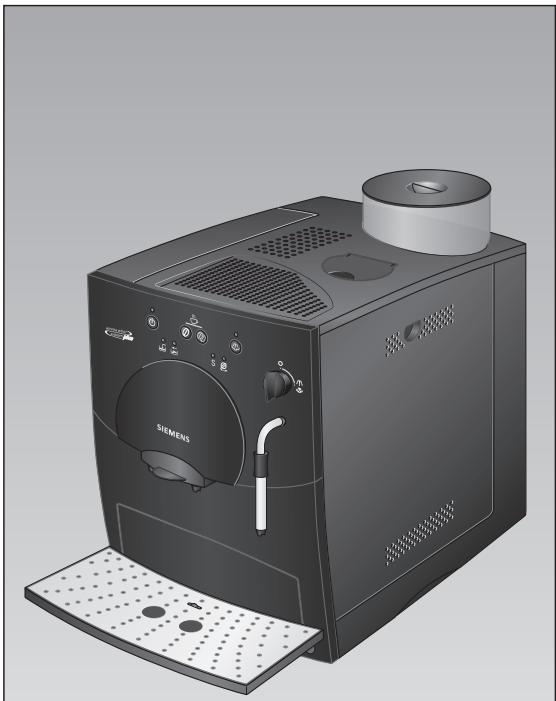
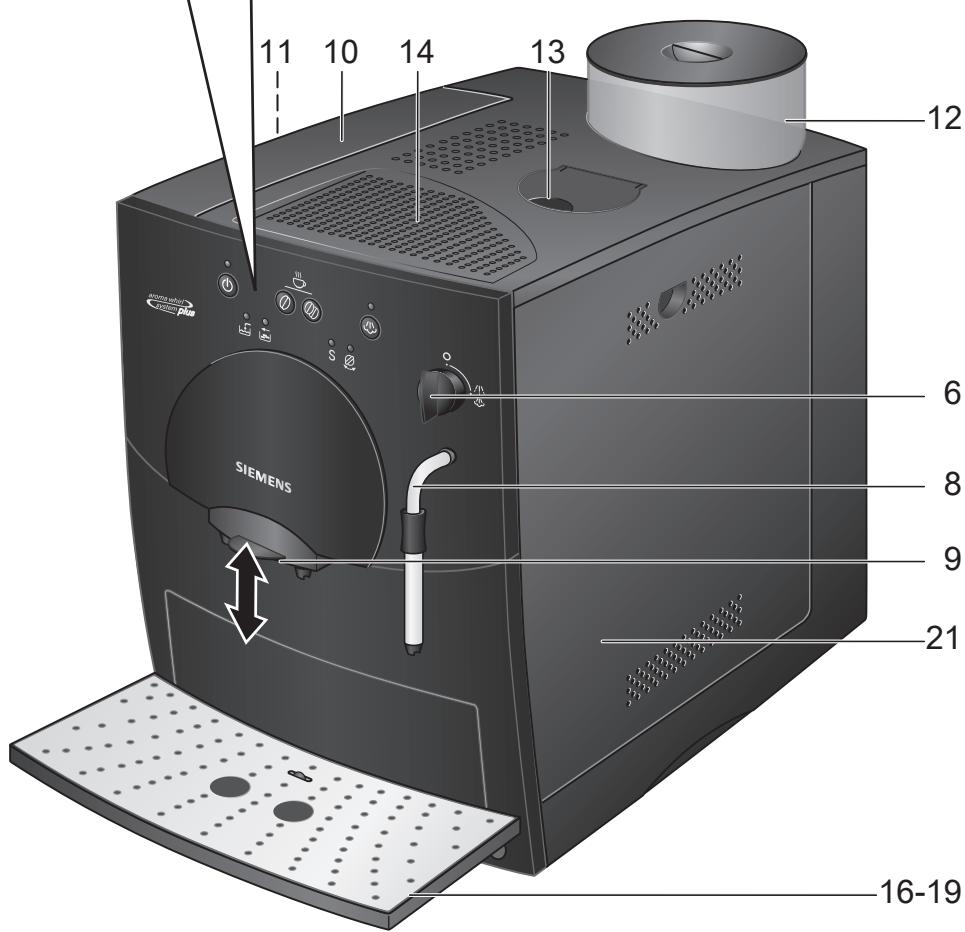
Overview
Figures A-E
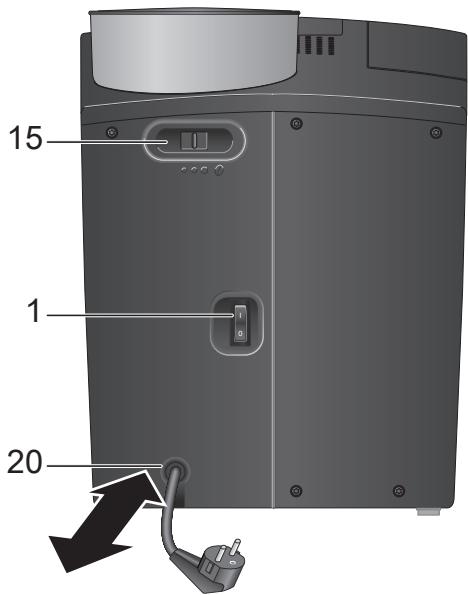
1 Power switch I/0
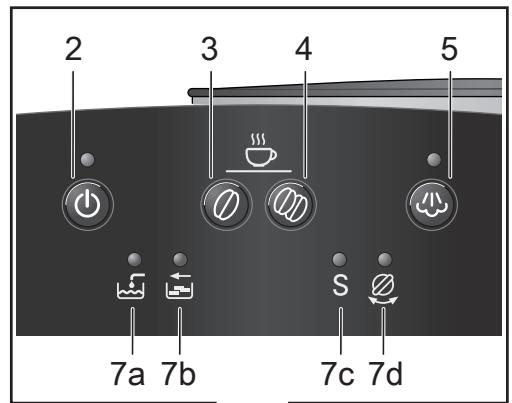
2 Stand-by / on button
3 Coffee dispensing button (mild coffee)
4 Coffee dispensing button (strong coffee)
5 Steam generation button 心
6 Hot water / steam dial /
7 LED display
a Add water
b Empty tray
c Run service programme S
d Turn dial
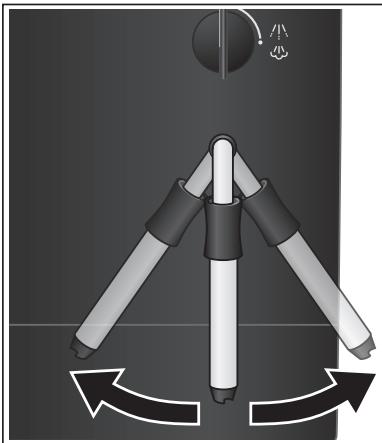
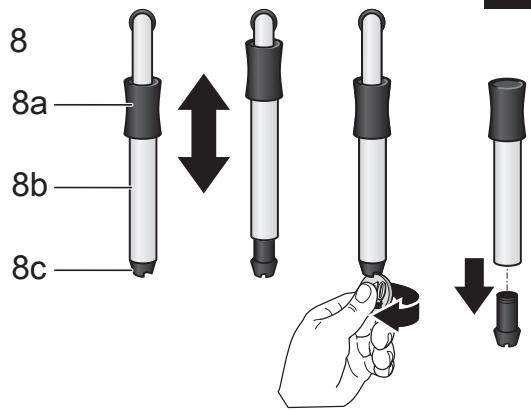
8 Nozzle (for hot water / steam)
a Plastic mounting
b Sleeve
c Nozzle tip
9 Height-adjustable coffee outlet
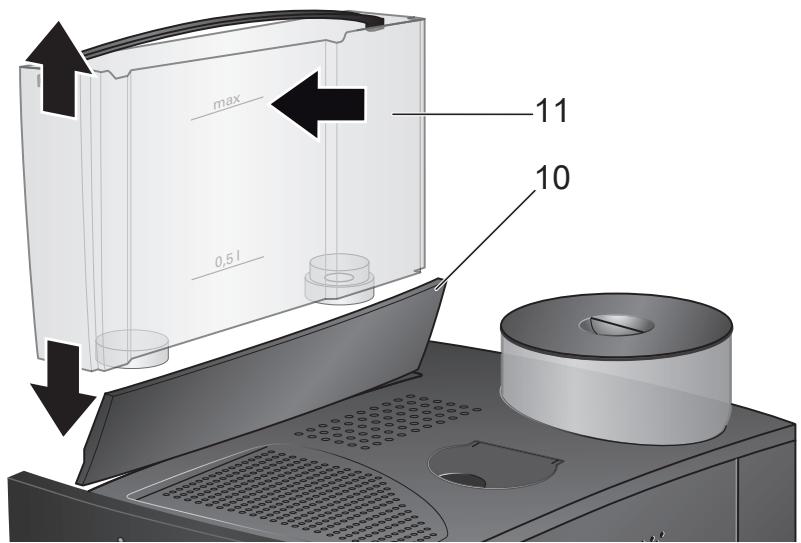
10 Lid for water tank
11 Removable water tank
12 Bean container with aroma cover
13 Cleaning tablet duct
14 Cup shelf (warming function)
15 Sliding switch for adjusting grind
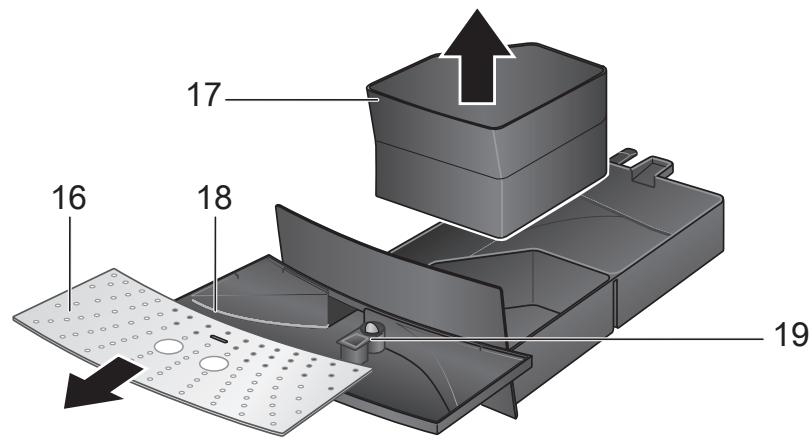
16 Grade
17 Coffee grounds tray
18 Residual water tray
19 Float
20 Cord storage compartment
21 Doors to brewing unit
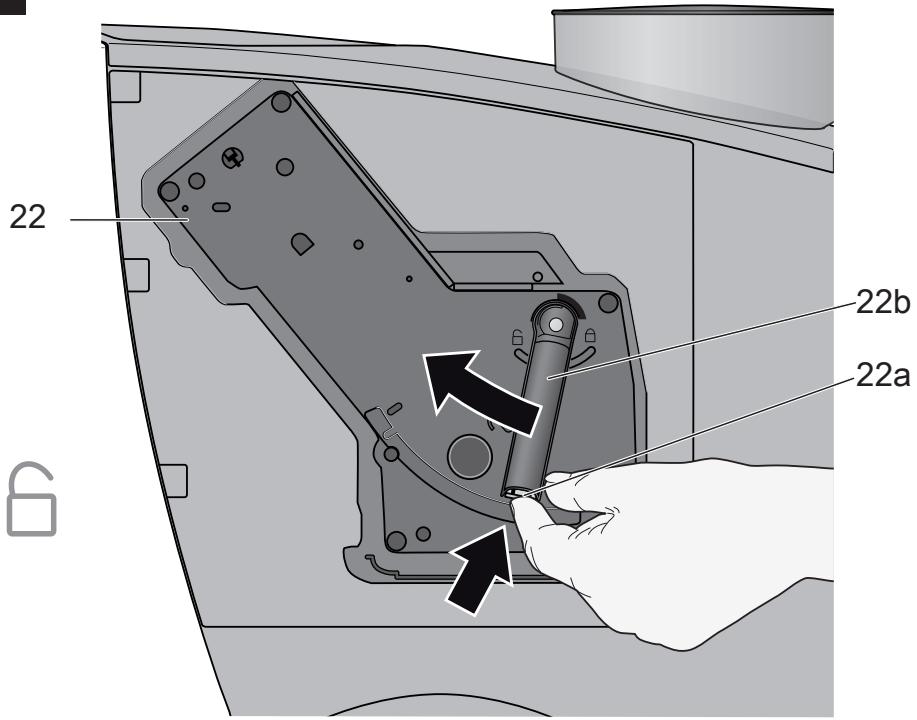
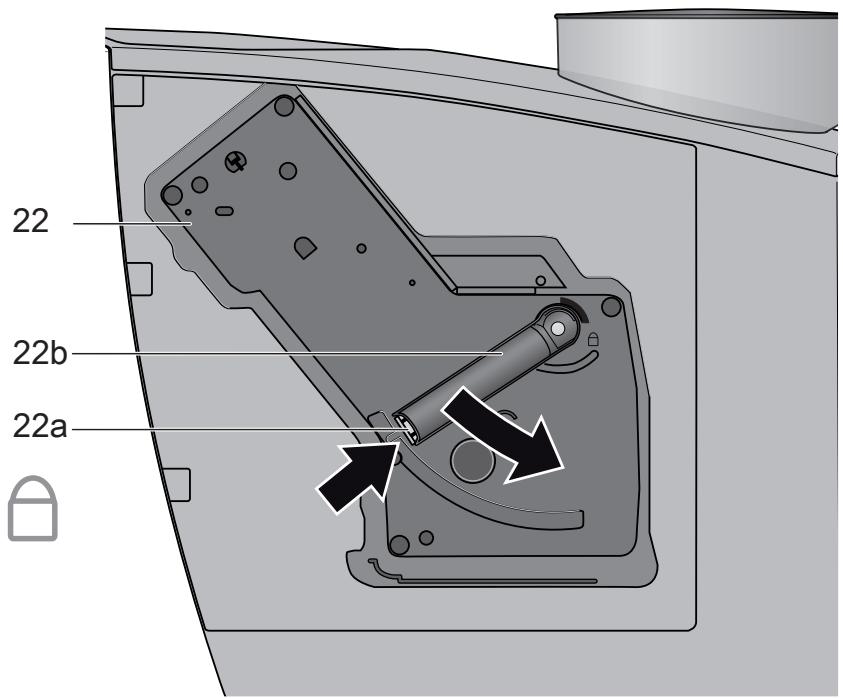
22 Brewing unit
a Button (red)
b Handle
Before using for the first time
General
Fill the water tank with fresh, uncarbonated water only, and if possible, use only beans for fully automatic coffee and espresso machines. Do not use coffee beans that have been glazed, caramelized or treated with other additives containing sugar, since they will block the grinding unit.
This appliance can be adjusted for use with different water hardness values (see "Setting the water hardness").
Switching on the appliance
- Pull enough of the power cord out of the storage compartment and plug it into the electrical socket.
- Remove and rinse the water tank 11 and fill it with fresh cold water. Do not fill above the "max" mark.
- Replace the water tank 11 and push it firmly down into place.
- Fill the bean container with coffee beans.
- Set the power switch 1 to I. The stand-by LED Ⓞ lights red.
- Make sure that the hot water/steam dial 6 is at O.
- Press the stand-by button. The LED flashes.
Filling the system
When switched on for the first time, the water pipes in the appliance must be filled.
- Place a cup under the nozzle 8.
- Turn the dial 6 to /ɪv/ 心. Water runs into the cup. As soon as ights up, turn the dial 6 back to 0.
- The stand-by button will now flash. The appliance rinses and heats up.
The appliance is ready for use when the stand-by LED lights green.
The appliance's factory settings are programmed for optimal performance.
Controls
1 Power switch
The power switch 1 on the rear of the appliance switches the power supply on and off.
When the power is switched on, the standby LED lights red.
The appliance is now in stand-by mode.
Warning
Do not press the power switch while the appliance is operating. The appliance should only be switched off when it is in stand-by mode.
2 Stand-by button
The stand-by button switches the
appliance from stand-by mode to on.
When the stand-by button is pressed, the
apppliance heats up. The stand-by button flashes while the appliance heats up and is
rinsed. When the stand-by button lights green, the appliance is ready for operation.
The appliance will not be rinsed if:
- it is still warm when switched on, or
- coffee was not dispensed before it was
switched to stand-by mode.
Note: After 3 hours, the appliance automatically switches to stand-by mode.
3 Coffee dispensing button (mild coffee)
This button is used to dispense mild coffee. When the button is pressed, the coffee is ground, brewed and dispensed into the cup.
4 Coffee dispensing button (strong coffee)
This button is used to dispense strong coffee.
When the button is pressed, the coffee is ground, brewed and dispensed into the cup.
5 Steam generation button
The steam button 心 generates steam for foaming or warming.
6 Steam dispensing dial
Hot water or steam can be dispensed by turning the dial to 山 or 心. To dispense steam, the steam generation button 心 must be pressed first (see "Steam for frothing milk").
7 LED display
The various LEDs indicate the following:
on The water tank is empty and needs to be filled.
on Trays full:
Trays full:
Empty and replace them.
flashing Trays missing:
Trays missing:
Reinsert them.
S on Run the service programme
(see "Service programme")
S flashing Service programme in
operation
flashing Turn dial to
on Turn dial to O.
Settings and displays
Setting the water hardness
It is important that the water hardness be set correctly, so that the appliance indicates accurately when the descending programme should be run. The factory setting is a water hardness of 4.
You can check the water hardness by asking your local water supplier.
| Degree | Water hardness | |
| German (°dH) | French (°fH) | |
| 1 | 1-7 | 1-13 |
| 2 | 8-15 | 14-27 |
| 3 | 16-23 | 28-42 |
| 4 | 24-30 | 43-54 |
- Switch the appliance to stand-by.
- Hold down the steam button for at least 5 seconds. The number of LEDs 7a, b, c, S, d that light up indicates the selected water hardness.
- Press the steam button repeatedly until the correct number of LEDs is lit; e.g. for a hardness of 3, the LEDs 7a, b and c (S, S) light up.
- Press the stand-by button once. The selected number of LEDs should light up briefly; this indicates that the desired setting has been saved successfully.
If a water filter (optional extra Order No. 461732) is used, the water hardness should be set to 1.
Note: If no button is pressed within 90 seconds, the appliance switches to standby without saving the new settings. In this case, the previous water hardness setting is retained.
The appliance must be rinsed when a filter is first used and after changing the filter.
- Fill the tank with water up to the 0.5 l mark.
- Place a suitable container (approx. 0.5 l) under the nozzle 8.
- Set the dial 6 to 小心
- When water stops coming out of the nozzle 8, set the dial back to 0.
- Fill the water tank and the water pipes (see "Switching on the appliance / Filling the system").
Adjusting the grinding unit
Sliding switch 15 adjusts the degree of grinding, from coarse to fine.
Warning
Adjust the grinding unit only while it is running! Otherwise the appliance may be damaged.
- Press the strong coffee button.
- While the grinding unit is running, move the sliding switch 15 to the desired position: the smaller the dots, the finer the grind.
The new setting will not become apparent until the second or third cup is brewed.
Tip: For dark roast coffee beans, choose a coarser grind; for light roast beans, select a finer grind.
Float
The float 19 in the water tray 18 shows when the tray needs emptying.
- If the float 19 is clearly visible, empty the water tray 18.
Using coffee beans
This fully automatic espresso/coffee machine grinds beans freshly for each brew. If possible, use only beans for fully automatic coffee and espresso machines. Deep-freeze or store in a cool place in sealed, airtight containers. Coffee beans can be ground while frozen.
Important: Fill the water tank with fresh water every day. The tank must always contain sufficient water for operating the appliance. Do not allow it to become empty.
Tip: Pre-warm cups, especially small, thick espresso cups, by placing on the cup shelf 14 or rinsing with hot water.
The appliance must be ready for use.
- Place the prewarmed cup(s) under the coffee outlet 9.
- Press or to select the desired coffee strength. The coffee is brewed and dispensed into the cup(s).
- Coffee delivery stops automatically when the selected quantity has been dispensed (factory setting approx. 125ml ).
1 The brewing process can be terminated at any time by pressing the coffee dispensing button or 空
Extra coffee
It is possible to dispense the same amount of coffee a second time.
- Just press the coffee dispensing button 0 or 0 within 3 seconds after brewing is complete.
Note: The second cup is brewed using the previously ground coffee.
Changing volume dispensed
It is possible to change the factory setting (approx. 125ml ) for the volume of mild or strong coffee to be dispensed.
- Press and hold the coffee dispensing button or until the desired volume of coffee has been delivered (range approx. 30 - 220ml ).
The volume can be changed again at any time. To restore the factory setting of approximately 125ml , simply reset the appliance.
Reset: Switch the appliance to stand-by and remove the trays 17 and 18. Press and hold the dispensing buttons and simultaneously for at least 5 seconds. The LEDs 7a, b, c and d ( ,, ) light up briefly. Replace the trays 17 and 18 and press the stand-by button to switch the appliance on again.
Preparing hot water
The appliance must be ready for use. This function allows water to be heated for a cup of tea, for example.
Risk of burns
The nozzle gets very hot. Do not touch the metal parts!.
- Place an appropriate cup under the nozzle 8.
- Push the sleeve on the nozzle 8 all the way down.
- Turn the dial 6 to '小心'
Risk of scalding
When the dial is set to 11, the nozzle may sputter a little. Do not touch the nozzle 8 or point it at anyone.
- End the process by turning the dial 6 back to O.
Steam for foaming milk
The appliance must be ready for use. You can foam the milk first and add the coffee on top, or foam the milk separately and pour it into the coffee.
Risk of burns
The nozzle gets very hot. Do not touch the metal parts!
- Push the sleeve on the nozzle 8 all the way down.
- Fill the cup approximately 1/3 full of milk.
- Press the steam button. The LED will start to flash.
1 The appliance will heat up for approx. 20 seconds.
- Immerse the nozzle 8 deep into the milk, but do not let it touch the bottom of the cup.
- As soon as the LED flashes, turn the dial 6 to
Risk of scalding
When the dial 6 is set to 心 ,the nozzle 8 may sputter. Escaping steam is very hot and may cause liquids to sputter.Do not touch the nozzle 8 or point it at anyone.
- Rotate the cup slowly until the milk is fully foamed.
- End the process by turning the dial 6 back to O.
To foam more milk, press the steam button again and repeat the whole process.
Note: When the nozzle 8 has cooled down, clean it immediately. Dried residue is difficult to remove.
Tip: If possible, use cold low-fat (1.5% fat) milk.
Steam for heating drinks
Risk of burns
The nozzle gets very hot. Do not touch the metal parts!
The appliance must be ready for use.
- Push the sleeve on the nozzle 8 all the way up.
- Press the steam button. The LED will start to flash.
1 The appliance will now heat up for approx. 20 seconds.
- Immerse the nozzle 8 deep into the liquid you want to heat.
- As soon as the LED flashes, turn the dial 6 to
Risk of scalding
When the dial 6 is set to 山 ,the nozzle 8 may sputter a little. Escaping steam is very hot and may cause liquid to sputter. Do not touch the nozzle 8 or point it at anyone.
- End the process by turning the dial 6 back to O.
To generate more steam, press the steam button 必 again and repeat the whole process.
Note: When the nozzle 8 has cooled down, clean immediately. Dried residue is difficult to remove.
Maintenance and daily cleaning
Risk of electric shock
Unplug the appliance before cleaning it. Never immerse the appliance in water. Do not use a steam cleaner.
- Wipe the outside of the appliance with a damp cloth. Do not use scouring agents.
- Wash all removable parts by hand only.
- Rinse out the water tank 11 with water only.
-
Remove, empty and clean the trays for coffee grounds 17 and residual water 18.
-
Wipe out or vacuum the inside of the appliance (tray holders).
- Open the doors to the brewing unit 21 and remove any coffee residues. Close the doors.
Note: If the appliance is cold when switched on with the stand-by button , or if it is set to stand-by after brewing coffee, it is automatically rinsed, i.e. the system cleans itself.
Nozzle 8 for hot water/steam
- Unscrew the nozzle 8 from the steam pipe.
- Dismantle all parts (Fig. D).
- Clean with a caustic cleaning solution and a soft brush. Clean the tip of the nozzle 8/c with a blunt needle.
- Thoroughly rinse and dry all parts.
Brewing unit
The brewing unit can be removed for cleaning (Fig. E).
- Turn off the appliance with button
- Turn the power on/off switch 1 to 0.
- Open the door 21 to the brewing unit 22.
- Hold the red button 22a down and push the handle 22b up until you hear it engage.
- Grasp the brewing unit 22 by the handle, remove carefully, and rinse under running water. Do not use cleaning agents. Do not place in the dishwasher.
Vacuum the inside of the appliance, or clean it with a damp cloth. - Reinsert the brewing unit 22 all the way into the appliance.
- Hold the red button 22a down and push the handle 22b down as far as it goes, until you hear it engage. The brewing unit is now secure.
- Close the doors of the brewing unit.
Service programme: Combined cleaning and descaling process
If the "S" LED lights up while the appliance is on, the service programme must be run immediately to clean and descale the appliance. If the service programme is not run as instructed, the appliance may be damaged. Specially developed descending (Order No. 310451) and cleaning agents (Order No. 310575) can be obtained from our customer service department.
Warning
Each time you run the service programme, follow the instructions for using the cleaning and descending agents.
Never interrupt the service programme.
Do not drink the liquids.
Never use vinegar or vinegar-based products.
Never put descending tablets or other descending materials into the duct for cleaning tablets.
The "S" LED flashes while the service programme is running (approx. 40 minutes).
Important: If there is a filter in the water tank, it must be removed before the service programme is run.
Starting the service programme
- Switch the appliance to stand-by mode using the stand-by button
- Empty and replace the trays 17 and 18.
- Hold down the mild coffee button for at least 5 seconds.
The S LED starts to flash and the appliance rinses the coffee dispenser through twice.
- Empty and reinsert the grounds tray 17.
The steam button LED flashes and the LED lights up.
- Place one cleaning tablet in the duct 13.
en
- Fill the water tank with lukewarm water, add descaling agent and dissolve completely (total liquid: 0.5 litres).
or pour prepared descaling mixture into the water tank (total liquid: 0.5 litres). - Press the steam button. The descending process begins. Duration approx. 10 minutes. The descending solution flows into the water tray 18.
The LED flashes.
- Place a suitable container (approx. 0.5 litres) under the nozzle 8.
- Set the dial 6 to /! 心. The descending process begins. Duration approx. 5 minutes. The descending solution flows into the container.
The LED lights up.
- Empty and reinsert the grounds tray 17.
The steam LED 心 flashes.
- Empty and clean the water tank 11, fill with fresh water up to the "max" mark and reinsert.
- Place a suitable container (approx. 0.5 litres) under the nozzle 8.
- Press the steam button 心. The cleaning process begins. Water flows into the container.
The LED lights up.
- Turn the dial 6 to O. The cleaning process begins. Duration approx. 10 minutes. Liquid flows into the coffee grounds tray 17 inside the appliance, then out through the coffee outlet.
The LED lights up.
- Empty, clean and reinsert the trays 17 and 18.
The appliance heats up and is ready for use again when the stand-by LED lights green.
Important: If the service programme is interrupted, e.g. due to a power cut, it is vital that the appliance be rinsed before it is used again.
- Press the stand-by button 山
The stand-by and steam LEDs flash. - Rinse the water tank 11 thoroughly and fill with fresh water.
- Press the steam button 心. The appliance is rinsed and liquid flows into the tray.
The LED flashes.
- Hold a cup under the nozzle 8 and turn the dial 6 to [4]10 . Water runs into the cup.The LED lights up.
- Turn the dial 6 back to O.
The appliance rinses and is ready for use again.
Anti-freeze
In order to avoid damage through cold during transportation and storage, the appliance must be emptied completely first.
The appliance must be ready for use.
- Remove, empty, and replace water tank.
- Place a large, narrow container under nozzle 8.
- Press button.
- As soon as , lights up on display, turn dial 6 to 1 1 . The appliance will release steam for a while.
- When nozzle 8 stops releasing steam, turn dial back to 'O'.
- Turn off the appliance.
Disposal

This appliance is labelled in accordance with the European Directive 2002/96/EG relating to waste electrical and electronic equipment - WEEE. The directive provides the framework for the EU-wide take-back and disposal of end-of-life appliances. Please ask your specialist retailer about current disposal facilities.
Troubleshooting
| Problem | Possible cause | Solution |
| No hot water or steam discharge. | Nozzle 8 is blocked. | Clean nozzle 8. |
| Foam insufficient or too runny. | Sleeve b on nozzle 8 not in correct position. | Push down sleeve b on nozzle 8. |
| Milk not suitable for foaming. | Use cold low-fat (1.5% fat) milk. | |
| Coffee dispensing slows to a trickle. | Coffee is ground too fine. | Adjust the grinding unit to a coarser setting. |
| Coffee not dispensed. | Water tank not filled or not correctly positioned. | Fill water tank and make sure it is in the right position. If necessary, fill water pipes (see “Switching on the appliance”). |
| Coffee has no “crema” (creamy foam). | Unsuitable type of coffee. Beans no longer fresh. | Change type of coffee used. Use fresh beans. |
| Degree of grinding inappropriate for beans. | Optimize degree of grinding. | |
| Grinding unit does not grind the beans. | Beans are not falling into the grinding unit (beans too oily). | Gently tap the bean container. |
| Grinding unit makes a loud noise. | Foreign objects in the grinding unit (e.g. grit, which can be found even in superior types of coffee). | Call the hotline. |
| Button ♂ and button S flash alternately. | The brewing unit 22 is missing, or is not properly inserted or secured. | Insert and secure the brewing unit 22. |
If problems cannot be eliminated, always call the hotline.
Guarantee
The guarantee conditions for this appliance are as defined by our representative in the country in which it is sold. Details regarding these conditions can be obtained from the dealer from whom the appliance was pur
chased. The bill of sale or receipt must be produced when making any claim under the terms of this guarantee.
Right of modification reserved.
1 CTeB0B BbIKJIIOHaTeIb
HaxoJusnca Ha 3aHei cToPoHe np6bopa CeTeBOB BvIKNoUcATEnb 1 CnyKNT dJa BKJIIOUeHnI NII OTKJIIOUeHnI PoJaN IJIeKTPo3Heprnn.
Iocne BkHoueHn CeTeBOro BbIKHouaTeTn CBToOnIDhN INHdNkAToP KJIaBUnu 3aRopaeTcKpaChbIM CBeTOM.
7 CBeToDnOuHbIe INdNkaTopbI
CbeueHne mMraHne COOTBeTCTBYIOUx CBETOINOHNbIX INDNkATOPOB COO6uaet O cJeDyUoIeM:
CBETTCa EMKOCb IJIa BOIbI NyCTa, ee CJeJyET CHOba HAnONHHTb.
CBETITcI POnIOHbI 3aONJIHeNbI: ONOPOKHNTE POnIOHbI IN CHOBAyCTAHOBITE IN HA MECTO.
Mnraet IOnIOHObl OTCyTCTBYOT:CHOBA yCTaHOBNTe IOdoHObl Ha MECTO.
S CBeTITcA CJIeJyET BbIOnHHTb cepBnCHyIO nporpamMy, CM. pa3dEn „CepBnCHa nporpamMa".
S Muraet BbIOnHЯETc cepBucHaj npoRpaMma.
Mnraet CneJyET yCTaHOBNTb NOBOPHTbI peryTApOB B NIOJOKeHHe
CBeNTcCnEnyeYucTahOBuNbIIOBOpOT HbI peyJrTop B noJoxHeH e O.
HactpoIKN Bn3yaJIbHaN HdNkaZna
Hactpoika XeCTKoCTN BOdBi
Правиьная Habstpoяka JecTeKoCTn BOdbl BaxKaДЯ ObeCneYeHЯ CBoeBpeMeHHoI CNrHaJIu3aUInO HeObXoDmOCTn YdaJeHЯ HakIN. ПрEdВapnteJbHo yctaHOBNeHa CTeNeHb JecTeKoCTn BOdbl 4.
O cTepeHn JecKtOcTn BObI Bbl MoKeTe y3HaTb B MeCTHom IpeDpNpTn BOoCHa6- XeHn.
| Стениь | Граздусы жecточы Вобь Нем. (°dH) | Фразни. (°fH) |
| 1 | 1-7 | 1-13 |
| 2 | 8-15 | 14-27 |
| 3 | 16-23 | 28-42 |
| 4 | 24-30 | 43-54 |
Pn6bOp DoJIkeH 6bITb rOToB K pa6oTe.
DaanHaayHKcIa N03BOJIAET PnroTOBtB
rOpyuO BDOy, HAnpIMep, DnAaIKN qAra.
Onachoctb ownpBaHn
Hacadka cullho Haapeeaemc, no3momy npukacambc moKHO molko Ke ennnacmmaccobou pyuke.
- IocTaBbTe COOTBETCTByUOuYU OaUKy nOHaCaIky 8.
Cdbnhte BtyIky Ha hacaKe 8 NIOHOCTbIO BH3. - YctaHOBnTe NOBOPoTHbI peRyJIaTOp 6 B nOJoxKeHne /V/
Onachoctb ownpBaHn
Iocne ycmaHOKpupeaymopoe noJooKeHue 1 心603MoxHo 6pa3o8aHue 6pb3a. He npukacauMeCb K HacaKe 8 u He HanpaEJaMe ee Ha JIOdeu.
3aBepuTe IpoceC B03BpaTOM peryIaTopa 6 B IIOJoxHe nE O.
Bo n36eXaHHe BbI3BaHHbIX 3aMep3aHnEm NOBpeXdEHN npi6oPa npi erO
TpaHcnpTnpoBke XpaHeHHN Heo6xOdIMo
IpeDbapnteJIbHO NOnHocTbIO ONOpOxHNtB
Ipn6op.
PpibopdoJnxken6bItbrotOBkpafoTe.
- CHrTb eMKoCTb IaIy BoDbl, OOnopoXKnHtB ee N yCTaHOBnTb Ha npexKHee MeCTO.
- Побставиь пон насану 8 бolyшую y3kyo EMKOCTb.
- HαkaTb KlaBnUy 心.
KordaHaDnCnneeHaunetMeNbKaTb CmBOnI ,yCTaHOBVt NOBOPOTbI pyrJyTOp6BnONOKeHne/小心.
B TeueHne He npoOJnxIeJIbHOrO BpeMeHn pnp6Op npOn3BoiNT o6pa3OBAHne npa.
- Посл.TOROΚakИЗнасадк8песаHT NOBЛТСAP,уCTaHOBTbNOBOPTHbIperyJIaTOpOBpaTHOBnIOLOXKeHneO.
BbIKnIOuHTb npIbOp.
YTNJIH3aCnA

Данньий пибор Имeel Маркировky corlacho ebponeeCKOДиpeKTHBE 2002/96/EC no yTuIN3aCn nCTapbIX 3NeKTPnuYeCKnx I 3NeKTPoHbIx npi6opOB (waste electrical and electronic equipment- WEEE). 3ToI DipeKTHBOI ONpeJeHbI DeiCTBvUOuIne Ha BceI TeppitOpN EC npaBnla pInema n yTuIN3aCn nCTapbIX npi6opOB. INHΦOpMaIIO o6 aKtYaNbHbIX BO3MOxHocTEx yTuIN3aCn Bbl MoKeTe npolyntB M mara3InHe, B KOTOpOM Bbl npino6peI INp6op.
YcNoBna rapaHTnHoro 06cnyxNbHa
IOnyUHTb NcYeepbIBaHOuYIO INHOpMaUNo 06 yCNoBnJx rapaHTnHOrO oBCJyKuBaHnB Bbl MoKeTe B BaWem 6nKaJWe mABTopn3OBaHHOM cepBnCHOM ueHTpe nNt BcePbNCHOM ueHTpe OT npON3BOIDnteJr OOO «5CX BbITOBaTexnka», a TaKKe HaHTN BΦnpMeHHOM rapaHTnHOM taLoHe, BblDaBAeMOM pRn pnoJaXe.
Mbl octablaem 3a coboi npabo HbHeceHne N3MeHEni.
CamocToTeIbHoe yCTpaHeHne MeJKNx HenCnpaBHOCTeI
AE United Arab Emirates,
BSH Home Appliances FZE
Round About 13,
Plot Nr MO-0532A
Jebel Ali Free Zone - Dubai
Tel.:048814401
Fax:048814805
www.siemens-home.ae
CLAYTON, Victoria 3168
Tel.: 1300 368 339
Fax: 1300 306 818
valid only in AUS
BA Bosnia-Herzegovina, Bosna i Hercegovina
"HIGH" d.o.o.
Odobasina 57
71000 Sarajewo
Info-Line: 061 10 09 05
Fax: 033 21 35 13
mailto:delicnanda@hotmail.com
BE Belgique, Belgie, Belgium
BSH Home Appliances S.A.
www.bshappliancecare.co.uk/
Siemens
Service Requests (nationwide)
Tel.:08702413382
mailto: mks-servicerequest@
bshg.com
Spares, Accessories and Central
Warehouse
Tel.:08705 543210
mailto: mks-spares@bshg.com
Customer Liaison
Fax:01908328660
mailto:mks-customerliaison@
bshg.com
Head office
Tel.:08705222777
Fax:01908328670
GR Greece, Eλλας
BSH Ikiakes Siskeves A. B. E.
Kentriko Ipokastima Service
17 km E.O. Athinon-Lamias &
Potamou 20
145 64 Kifisia
Unit 1&2B, 7th Floor
North Block, Skyway House
3 Sham Mong Road
Tai Kok Tsui, Kowloon
Hongkong
Tel.:25656151
Fax: 2565 6252
HR Hrvatska, Croatia
Gemma B&D d.o.o.
Prisavlje 2
10000 Zagreb
Tel.: 01 6195 582
Fax: 01 6195 582
mailto:servis@gemma.hr
IE Republic of Ireland
BSH Home Appliances Ltd.
BSH Appliance Care,
Service Division
Unit F4, Ballymount Drive
Ballymount Industrial Estate
Walkinstown
Dublin 12
www.bshappliancecare.ie/
siemens
Service Requests
Tel.:014502655
Fax: 01450 2520
Spares and Accessories
Tel.:014502655
Fax: 01450 2520
IL Israel,
C/S/B Home Appliance Ltd.
Uiel Building
2, Hamelacha St.
Industrial Park North
71293 Lod
Tel.:089777222
Fax:089777245
mailto:csb-serv@zahav.net.il
IS Iceland
Smith & Norland hf.
Noatuni 4
105 Reykjavik
Tel.: 0520 3000
Fax:05203011
www.sminor.is
IT Italia, Italy
LT Lietuva, Lithuania
Ogmios pulsas, Ltd
P. Luksio Str. 23
2600 Vilnius
Tel.: 05 274 1750
Fax:052741760
www.ogmios.lt/pulsas
LU Luxembourg
72 Buluju street, house 2
1067 Riga
Tel.:07 74 42 274
Fax:077473300
mailto:latinter@latinter.lv
ME Crna Gora, Montenegro
Elektronika komerc
Ulica Slobode 17
84000 Bijelo polje
Tel.: 084 432 575
Fax: 084 432 575
mailto:elektronikabsh@cg.yu
MK Macedonia, Makeonna
RIMEKO
Partizanski odredi 62 / 13
1000 Skopje
Tel./Fax: 02 3077 744
Tel./Fax: 02 3069 314
Tel./Fax: 02 2549 890
Tel./Fax: 02 2549 775
mailto:rimeko@mt.net.mk
MT Malta
Aplan Limited
Aplan Centre
B - Kara By Pass
B - Kara BKR
Tel.:021480590
Fax:021480598
mailto:lapap@aplan.com.mt
NL Nederlande, Netherlands
Building C, 39-43 Apollo Drive
Mairangi Bay, Auckland 1310
Tel.:094786158
Fax:094782914
PL Polska, Poland
OOO"ECX BbITOBaTexHnka"
CepBnc O T npOn3BOJnteJIa
Majayckay 19
119071 MockBa
Ten.: 4957372962
daKc:4957372982
www.bsh-service.ru
SE Sverige, Sweden
BSH Hushàllsapparater AB
Rontgenvagen 1
Solna
Tel.:087341310
Fax:087341321
41104 Goteborg
Tel.: 031 636 990
Fax: 031 154 820
21376 Malmö
Tel.: 040 227 880
Fax:040224353
www.siemens-hushall.com
SG Singapore, 星加坡
BSH Home Appliances (SEA)
Pte. Ltd
15 th Rd., Randjespark
Private Bag X36, Randjespark
1685 Midrand-Johannesburg
Tel.:0112657800
Fax:0112657867
mailto:service@bsh.co.za
www.siemensappliances.co.za
Garantiebedingungen
- Sicherheitshinweise
- Taste ,stand by
- Risk of electric shock
- Risk of scalding
- Overview
- Figures A-E
- Before using for the first time
- General
- Switching on the appliance
- Filling the system
- Controls
- Power switch
- Warning
- Stand-by button
- Coffee dispensing button (mild coffee)
- Coffee dispensing button (strong coffee)
- Steam generation button
- Steam dispensing dial
- LED display
- Settings and displays
- Setting the water hardness
- Adjusting the grinding unit
- Float
- Using coffee beans
- Extra coffee
- Changing volume dispensed
- Preparing hot water
- Risk of burns
- Steam for foaming milk
- Steam for heating drinks
- Risk of burns
- Maintenance and daily cleaning
- Nozzle 8 for hot water/steam
- Brewing unit
- Service programme: Combined cleaning and descaling process
- Starting the service programme
- en
- Anti-freeze
- Disposal
- Guarantee
- CTeB0B BbIKJIIOHaTeIb
- HactpoIKN Bn3yaJIbHaN HdNkaZna
- Onachoctb ownpBaHn
- YTNJIH3aCnA
- YcNoBna rapaHTnHoro 06cnyxNbHa
- GR Greece, Eλλας
- HR Hrvatska, Croatia
- IE Republic of Ireland
- IL Israel,
- IS Iceland
- IT Italia, Italy
- LT Lietuva, Lithuania
- LU Luxembourg
- ME Crna Gora, Montenegro
- MK Macedonia, Makeonna
- RIMEKO
- MT Malta
- NL Nederlande, Netherlands
- PL Polska, Poland
- SE Sverige, Sweden
- SG Singapore, 星加坡
- Garantiebedingungen
Brand : SIEMENS
Model : TK52001
Category : Coffee maker