
RPWFG20E - Headphones PANASONIC - Free user manual and instructions
Find the device manual for free RPWFG20E PANASONIC in PDF.



| Product type | RF wireless stereo headset, available in bone conduction and in-ear versions |
| Brand | Panasonic |
| Model | RPWFG20E |
| Transmitter dimensions (W×H×D) | 96 × 104 × 91 mm |
| In-ear headset dimensions (W×H×D) | 146 × 270 × 26 mm |
| Bone conduction headset dimensions (W×H×D) | 146 × 270 × 36 mm |
| Transmitter weight | 155 g |
| In-ear headset weight | 67 g |
| Bone conduction headset weight | 80 g |
| Transmitter power supply | 12 V DC, 300 mA via included AC adapter |
| Headset power supply | Built-in rechargeable lithium-ion battery in receiver |
| Battery life (in-ear) | Approximately 20 hours |
| Battery life (bone conduction) | Approximately 10 hours |
| Charging time | Approximately 2.5 hours |
| Transmission range | Up to 100 meters (depending on conditions) |
| Carrier frequency | 863 MHz to 865 MHz |
| Frequency response (in-ear) | 20 Hz to 16,000 Hz |
| Main functions | Automatic on/off, Enhancing Speech, volume adjustment, L/R balance, channel change |
| Included accessories | AC adapter, adapter cord (3.5 mm mini-jack to 2 plugs), 3 pairs of earpieces, headset stand |
| Maintenance and cleaning | Wipe with a soft, dry cloth. Do not use solvents (benzine, alcohol, etc.) |
| Safety | Do not expose to moisture, do not modify, keep earphones away from children, do not listen at excessive volume |
| Spare parts and repairability | Earpieces available as consumables. The battery is built-in and must be removed by a professional for recycling. |
| Operating temperature | 0 °C to 40 °C |
Frequently Asked Questions - RPWFG20E PANASONIC
User questions about RPWFG20E PANASONIC
0 question about this device. Answer the ones you know or ask your own.
Ask a new question about this device
Download the instructions for your Headphones in PDF format for free! Find your manual RPWFG20E - PANASONIC and take your electronic device back in hand. On this page are published all the documents necessary for the use of your device. RPWFG20E by PANASONIC.
USER MANUAL RPWFG20E PANASONIC
natural_image
3D renderings of a car seat, two neck-mounted sensors, and a bucket (no text or symbols)Panasonic®
Bedienungsanleitung
Mode d'emploi
Operating Instructions
Thank you for purchasing this product. Please read these instructions carefully before using this product, and save this manual for future use.
Bone conduction headphones
In-Ear type headphones
Cuffie intrauricolari
Auriculares internos


Empfänger
Récepteur
Receiver
Ricevitore
Receptor
Ontvanger
Modtager
Mottagare


Geber
Émetteur
Transmitter
Trasmettitore
Transmisor
Zender
Sender
Sändare


Anschlüsse Raccordements Connections Connessioni


F


Betrieb
Utilisation
Operation
Funzionamento
Funcionamiento
Bediening
Betjening
Drift

natural_image
Simple line drawing of a bucket with two handles and an upward arrow indicating direction (no text or symbols)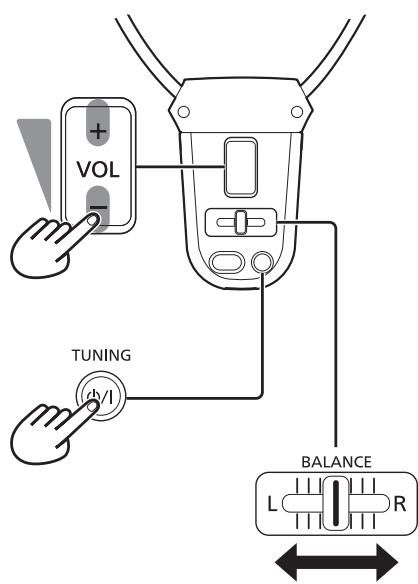

A
B

C

So setzen Sie die Kopfhörer-Einheit auf Comment mettre le casque How to put the headphone unit Come indossare l'unità cuffie Cómo colocar la unidad de auriculares De hoofdtelefooneenheid plaatsen Sådan tages høretelefonenheden på Hur hörlursenheten placeras
So tauschen Sie Kopfhörer aus Comment remettre le casque en place How to replace the headphones Come sostituire le cuffie Cómo sustituir los auriculares De hoofdtelefoon vervangen Sådan skiftes høretelefonerne Så här byter du ut hörlurarna
J

B

natural_image
Line drawing showing hands holding a cable and a container with a switch, no text or symbols presentnatural_image
Simple line drawing of a mobile phone with a cable and power cord (no text or symbols)- Adapterkabel (3,5 mm Stereo Mini-Klinkenstecker - Bananenstecker × 2)

natural_image
Mechanical assembly diagram showing a clamp or bracket with a handle and spring (no text or symbols)Teilenamen
natural_image
Simple line drawing of a two-pin electric plug connected to a cable (no text or symbols)natural_image
Technical line drawing of a mechanical clamp or bracket assembly (no text or symbols)Noms des pièces
- This system is equipped with the bone conduction headphones. These headphones let you hear sounds from both bone conductors and the surrounding environment. The In-Ear headphones are also supplied. You can select and use one of the headphones according to your application.
- The headphones can be used up to 100 meters from the transmitter.
The actual distance depends on the transmitter position and the battery condition. - The transmitter is powered by the AC adaptor and the headphone unit (headphones connected to the receiver) is powered by economical rechargeable battery. Just by placing the headphone unit on the transmitter, the headphone unit battery can be charged.
- AUTO ON/OFF function is equipped with the transmitter.
- AUTO OFF function is equipped with the headphone unit.
- ENHANCING SPEECH is a function to enhance human voice for speech intelligibility.
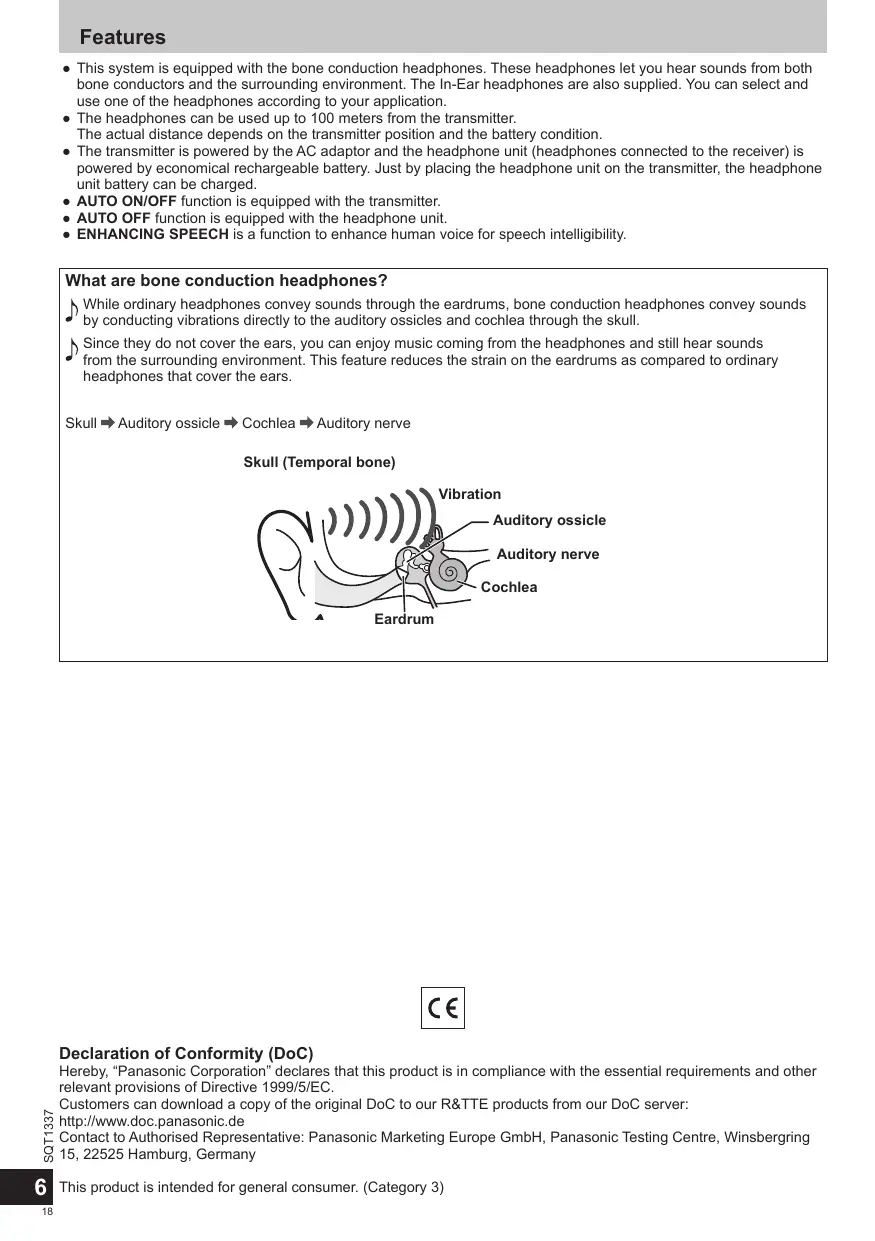
What are bone conduction headphones?
While ordinary headphones convey sounds through the eardrums, bone conduction headphones convey sounds by conducting vibrations directly to the auditory ossicles and cochlea through the skull.
Since they do not cover the ears, you can enjoy music coming from the headphones and still hear sounds from the surrounding environment. This feature reduces the strain on the eardrums as compared to ordinary headphones that cover the ears.
Skull → Auditory ossicle → Cochlea → Auditory nerve
Skull (Temporal bone)

C€
Declaration of Conformity (DoC)
Hereby, “Panasonic Corporation” declares that this product is in compliance with the essential requirements and other relevant provisions of Directive 1999/5/EC.
Customers can download a copy of the original DoC to our R&TTE products from our DoC server:
http://www.doc.panasonic.de
Contact to Authorised Representative: Panasonic Marketing Europe GmbH, Panasonic Testing Centre, Winsbergring
15, 22525 Hamburg, Germany
AC adaptor
Handle the AC adaptor carefully. Improper handling is dangerous.
- Do not touch it with wet hands.
- Do not place heavy objects on top of it.
- Do not forcibly bend it.
Be sure to use the supplied AC adaptor.
The unit
No altering or remodeling
This may cause malfunctioning.
No dropping or strong impacts
This may damage the unit.
Avoid using the unit in the following locations since they may cause malfunctioning.
- Bathrooms and other moisture-prone places
- Warehouses and other dusty places
- Very hot places near heating appliances, etc.
Do not leave the unit exposed to direct sunlight for long periods of time.
This may deform or discolor the cabinet and may also cause malfunctioning.
Earpieces
- Keep the earpieces out of reach of children to prevent swallowing.

This mark shows that the construction of the product is double-insulated.
CAUTION!
To reduce the risk of fire, electric shock or product damage,
- Do not install or place this unit in a bookcase, built-in cabinet or in another confined space. Ensure this unit is well ventilated.
- Do not obstruct this unit's ventilation openings with newspapers, tablecloths, curtains, and similar items.
- Do not place sources of naked flames, such as lighted candles, on this unit.
The mains plug is the disconnecting device. Install this unit so that the mains plug can be unplugged from the socket outlet immediately.
This unit may receive radio interference caused by mobile telephones during use. If such interference occurs, please increase separation between this unit and the mobile telephone.
This unit is intended for use in moderate and tropical climates.
Excessive sound pressure from earphones and headphones can cause hearing loss.
Product Identification Marking is located on the bottom of unit.
For indoor use only.
Note
The illustrations in this manual may differ from the actual product.
Table of contents
Precautions....7
Accessories 7
Part names 8
Connections......8
Installation 8
Power sources....9
Operation....9
How to put the headphone unit....10
How to replace the headphones....10
Maintenance....10
Troubleshooting guide....11
Specifications 11
To remove the battery when disposing of this unit...54-55
Accessories
Please check and identify the supplied accessories.
• AC adaptor (DC12 V, 300 mA)

natural_image
Simple line drawing of a mobile phone with a cable and power plug (no text or symbols)- Adaptor cord (3.5 mm stereo mini jack - pin plug × 2)

- Earpieces set (available in 3 different versions)

- The one pair of earpieces is attached to the headphones at the time of purchase. You can choose the suitable version for your ears, and replace it.
- Earpieces are consumables.
- Headphones holder

How to use the headphones holder
- Attach the holder to the rear panel of the transmitter.
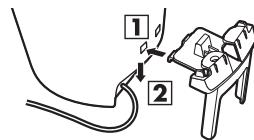
- Place the unused headphones on the holder.

natural_image
Mechanical assembly diagram showing a bracket with a downward arrow indicating force or movement (no text or symbols present)Part names
See illustrations on page 2.
A Bone conduction headphones
B In-Ear type headphones
① Left speaker
② Right speaker
③ Earpieces
(Only for In-Ear type headphones)
④ Arm
⑤ Connection plug
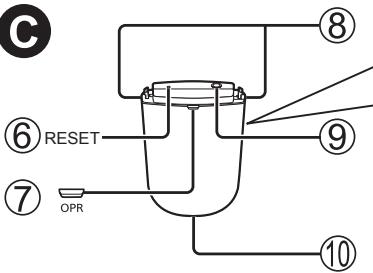
© Receiver
Receives signals from the transmitter. Connected to headphones.
Front panel
⑥ Reset switch
⑦ OPR (operation) indicator ( → page 9, 10, 11)
- Lights up in red when the receiver is turned on.
- Lights up in green when enhancing speech is on.
- Goes out when the receiver is turned off, and when the receiver has not received audio input for approximately 1 minute (AUTO OFF).
⑧ Headphones release buttons
⑨ Headphones connection jack
- Do not connect any other headphones except the supplied ones.
⑩ Charging terminal
Rear panel
⑪ ENHANCING SPEECH button ( → page 10)
⑫ VOL (volume) button +/- Use this to adjust the volume level. (→ page 9)
⑬ BALANCE control L/R ( → page 9)
⑭ POWER ⏻/I/TUNING button (→ page 9, 10, 11)
D Transmitter
Transmits signals to the receiver.
Front panel
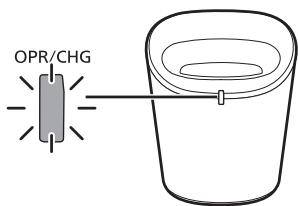
⑮ OPR/CHG (operation/charging) indicator
(→ page 8, 9, 10)
- Lights up in red when charging the receiver.
- Lights up in green when the transmitter is operating.
- Goes out when charging is completed, and when the transmitter has not received audio input for approximately 3 minutes (AUTO OFF).
⑯ Charging terminal
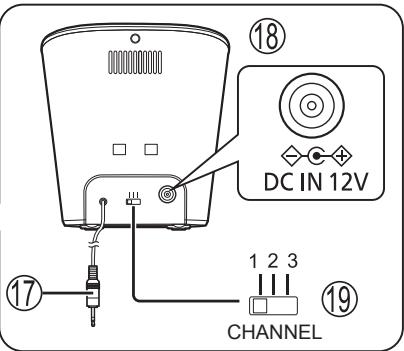
Rear panel
⑰ AUDIO input plug
Used to connect to the audio terminal on the audio-visual equipment.
⑱ DC IN 12 V terminal
Used to connect to the supplied AC adaptor.
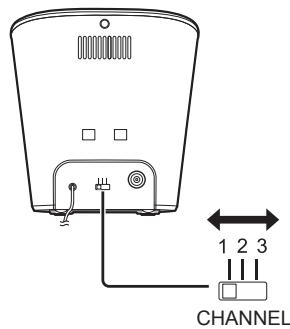
⑲ CHANNEL switch ( → page 10, 11)
Connections
See illustrations E on page 3.
- Connect the transmitter to the audio-visual equipment.
The audio input plug ① of the transmitter can be connected directly to the 3.5 mm stereo mini headphones jack on your equipment ②.
② Portable CD player, headphones stereo, radio/tape players, personal computer, etc.
OR
Use the supplied adaptor cord ③ to connect the transmitter to the audio output stereo pin terminals on your equipment ④.
④ Amplifier, TV set, video deck, cassette deck, DVD player, etc.
- Do not use any other adaptor cord except the supplied one.
- Connect the supplied AC adaptor to the transmitter, and then to a household mains socket.
(AC 230 V - 240 V, 50 Hz)
Disconnect the AC adaptor from the household mains socket if the unit is not going to be used for a long time.
The unit is in the standby condition when the AC adaptor is connected. The primary circuit is always “live” as long as the AC adaptor is connected to an electrical outlet.
- Do not use any other AC adaptors except the supplied one.
Note
- [OPR/CHG] indicator lights in green when the transmitter receives audio signals. It does not light just by connecting the transmitter to an AC power source.
- Use the 6.3 mm stereo standard plug adaptor (not supplied) if the headphones jack is large (6.3 mm stereo).
Installation
This unit uses radio waves.
The waves can be transmitted to a range of up to 100 meters.
Note
Under optimum conditions, the headphone unit can pick up clean signals from the transmitter to a maximum of 100 meters. Metal between the two units and the presence of other radio waves may cause interference to occur at a shorter distance. This interference can be cleared by moving closer to the transmitter, removing the obstructions, or changing the transmitter channel. You may occasionally experience interference due to dead spots in the area covered by the transmitter. This phenomenon occurs with any kind of radio signal and is not a malfunction. Dead spots can be moved by moving the transmitter and the headphone unit.
See illustrations F on page 3.
Recharge the battery before using the unit.
- Connect the supplied AC adaptor to the transmitter, and then to a household mains socket.
(AC 230 V - 240 V, 50 Hz)
- Mount the headphones on the receiver.
Insert the plug on the headphones to the jack on the receiver, and connect them.
(The headphones connected to the receiver are hereinafter referred to as "the headphone unit".)
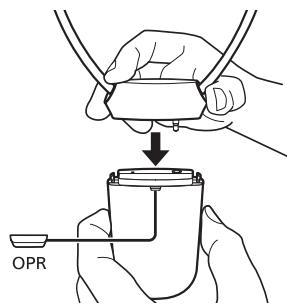
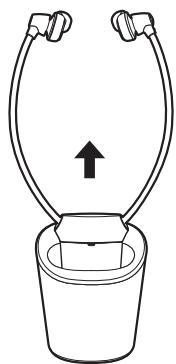
- Place the headphone unit in the transmitter.
Put the headphone unit correctly, with [OPR] indicator toward you, and place it in the transmitter. Press the headphone unit down gently, and make sure [OPR/CHG] indicator will light up in red. Charging starts.
- If the indicator does not light up in red, lift up the headphone unit, and place it in the transmitter again.
- If you have placed the headphone unit oppositely, the indicator does not light up in red.
- When charging finishes, the red light will go out.
Approximate recharging and operating time
Recharging: 2.5 hours
Operating: 20 hours (In-Ear type headphones) /
10 hours (Bone conduction headphones)
To check the remaining battery level:
When the battery level is getting low, [OPR] indicator on the headphone unit will blink in red or green, and the beep will sound every one minute. Charge the battery.
Recharge the battery in the environment of ambient temperature between 5 °C and 35 °C. In other environments, charging time may become longer, or charging may be impossible.
Disposal of Old Equipment and Batteries Only for European Union and countries with recycling systems

These symbols on the products, packaging, and/or accompanying documents mean that used electrical and electronic products and batteries must not be mixed with general household waste.
For proper treatment, recovery and recycling of old products and used batteries, please take them to applicable collection points in accordance with your national legislation.
By disposing of them correctly, you will help to save valuable resources and prevent any potential negative effects on human health and the environment.
For more information about collection and recycling, please contact your local municipality.
Penalties may be applicable for incorrect disposal of this waste, in accordance with national legislation.

Note for the battery symbol (bottom symbol):
This symbol might be used in combination with a chemical symbol. In this case it complies with the requirement set by the Directive for the chemical involved.
Operation
Preparation
- Turn on the audio-visual equipment the transmitter is connected to.
- Adjust the volume on the sound source up as much as possible without causing distortion. Sound is more susceptible to noise interference when the source volume is set to low.
See illustrations © on page 4.
- Remove the headphone unit from the transmitter.
- Press and hold [POWER ⏻/I/TUNING] button for approximately 3 seconds.
The power is turned on. [OPR] indicator lights up in red.
- Reduce the volume of the headphone unit with [VOL] button.
- Put the headphone unit on.
Put the headphone unit correctly, with [OPR] indicator outward.
- Adjust the volume on the headphone unit with [VOL] button.
- Slide [BALANCE] lever to adjust the sound volume balance.
After listening
- Take the headphone unit off.
- Press and hold [POWER ⏻/I/TUNING] button for approximately 3 seconds.
The power is turned off. [OPR] indicator goes out.
- Place the headphone unit in the transmitter, and recharge them.
- Turn off the audio-visual equipment the transmitter is connected to.
Note
- Avoid listening for prolonged periods of time to prevent hearing damage.
- Discontinue use if you experience discomfort with the headphones that directly contact your skin. Continued use may cause rashes or other allergic reactions.
- Small abnormal sound may be heard from the AC adaptor. This is not a malfunction.
- If noise occurs in a radio, etc., keep the AC adaptor away from the radio.
Operation
AUTO ON/OFF function
See illustrations H A on page 4.
When the transmitter receives audio input, the power is turned on ([OPR/CHG] indicator lights up in green). When the transmitter has not received audio input for approximately 3 minutes, the power is automatically turned off ([OPR/CHG] indicator goes out). When the volume of the connected unit is too low, this function doesn't work. Turn up the volume as much as possible without causing distortion.
Note
Even if the transmitter's power is automatically turned off, some noise may be generated when the headphone unit is still on. This is not a malfunction.
If reception is still poor
See illustrations H B on page 4.
Interference may occur between the radio waves from the transmitter and other radio waves. You can change the transmitter channel to improve reception. If you use the unit near a cordless telephone, it may cause radio interference.
Before changing the transmitter channel:
Make sure that the headphone unit is turned off.
- Select another channel with [CHANNEL] switch.
- Press [POWER ⏻/I/TUNING] button to adjust the frequency automatically.
Note
Some sound or noise may still be heard even if no sound signals are passing through the transmitter.
ENHANCING SPEECH
See illustrations H C on page 4.
ENHANCING SPEECH can be used to make human voice easier to hear.
- Make sure that the headphone unit is turned on ([OPR] indicator is red).
The function only works when the headphone unit is turned on. - Press [ENHANCING SPEECH] button.
[OPR] indicator turns to green. The enhancing speech function is enabled.
- To disable the function, press [ENHANCING SPEECH] button again. [OPR] indicator turns to red.
- When the headphone unit is turned off and turned on, the unit starts up with the last enabled/disabled status of the function.
Note
When using bone conduction headphones, this function may not be effective.
Resetting the unit
This unit can be reset if all operations are rejected. To reset the unit, press the end of a thin object, such as a paper clip, into the [RESET] switch on the upper part of the receiver.
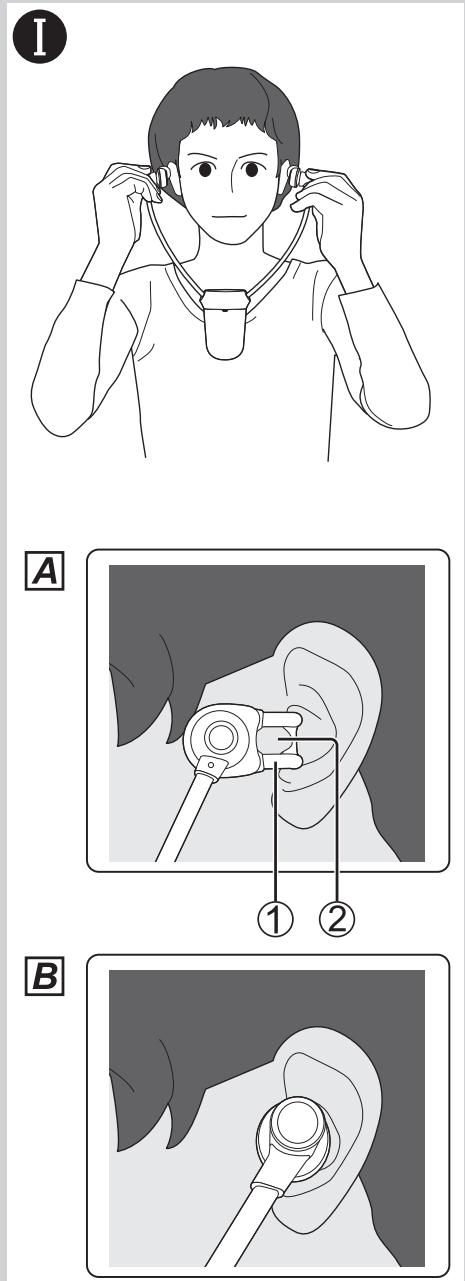
How to put the headphone unit
See illustrations I on page 5.
- Hold the headphone unit correctly, with [OPR] indicator outward.
- Slowly expand the arms, and put the right and left speakers.
- Do not excessively pull the arms apart.
A Put the bone conduction headphones
- Hang the hook ① on the tragus (triangle part) ②.
This will give you the most appropriate position.
- If you put the headphones in the incorrect position, you may not hear sounds well from the speakers and the surrounding environment.
B Put the In-Ear headphones
-
Insert the earpieces into ears.
-
If earpieces do not fit your earholes properly, a low pitch could not be heard due to the decreased sealing property. In order to enjoy higher quality sound, insert earpieces farther into the ears by turning them slightly.
- If earpieces do not fit to your earholes, replace them with other earpieces sets supplied.
How to replace the headphones
See illustrations Ⓙ on page 5.
A Remove the headphones
While pressing and holding the release buttons on the both sides of the receiver, pull out the current headphones from the receiver.
B Mount the headphones
Mount the other headphones on the receiver.
- Insert the plug on the headphones to the jack on the receiver, and connect them.
Maintenance
Wipe with a soft, dry cloth.
- When extremely dirty, wipe away the dirt using a cloth dampened with water and firmly wrung out, and then wipe away any remaining moisture with a dry cloth.
- Do not use solvents such as benzine, thinner, alcohol and kitchen detergent, or chemically treated cloth. Doing so may degrade the exterior case or cause the paint to peel.
Before requesting service, make the following checks. If you are in doubt about any of the check points, or if the remedies indicated in the chart do not solve the problem, consult your dealer for instructions.
| Problem | Probable cause(s) | Suggested remedy |
| No sound. | Is the audio-visual equipment that the transmitter is connected to on? | Turn the audio-visual equipment on. |
| Are the audio-visual equipment and the transmitter connected? | Connect the audio-visual equipment correctly and ensure the plug is properly inserted. | |
| Isn't the volume too low? | Turn up the volume of the connected audio-visual equipment. | |
| Turn up the volume on the headphone unit. | ||
| Sound is distorted. | Isn't the input level of the audio signal too high? | Turn down the volume of the connected audio-visual equipment. |
| Excessive noise. | Isn't there an obstruction between the transmitter and the headphone unit? | Remove the obstruction, move the transmitter, or change your listening location. |
| Aren't other radio waves obstructing the transmitter's waves?Are the transmission frequency and the receiver's frequency tuned correctly? | Change the transmitter channel with [CHANNEL] switch and then press [POWER ♂/I/TUNING] button on the headphone unit to the position of least interference. | |
| Isn't the input level of the audio signal too low? | Turn up the volume of the connected audio-visual equipment. | |
| No sound, sound is distorted, or there is excessive noise. | Is [OPR] indicator dim or does it fail to light at all? | The battery has run down. Recharge the battery. If the charge time and operating time become shortened, the battery may have run down. (Number of charging times of the installed battery: Approximately 500.) |
Specifications
General
Modulation system
Stereo Frequency modulation system
Carrier frequency range 863 MHz to 865 MHz
Transmitting distance up to 100 m
Operating temperature range 0 °C to 40 °C
Operating humidity range
35% to 80% RH (no condensation)
Charging temperature range 10 °C to 35 °C
Operating time
IN-EAR type Approx. 20 hours
Bone Conduction type Approx. 10 hours
Charging time Approx. 2.5 hours
■ RF Stereo Transmitter
Power supply DC 12 V, 300 mA
(Using AC Adaptor, supplied)
Dimensions (W×H×D)
Approx. 96 mm x 104 mm x 91 mm
Mass Approx. 155 g
■ RF Stereo Headphones
Frequency response
IN-EAR type 20 Hz to 16,000 Hz
Dimensions (W×H×D)
IN-EAR type Approx. 146 mm x 270 mm x 26 mm Bone Conduction type
Approx. 146 mm x 270 mm x 36 mm
Mass IN-EAR type Approx. 67 g
Bone Conduction type Approx. 80 g
Note
Actual life of the battery will depend on operating conditions.
Specifications are subject to change without notice.
natural_image
Simple line drawing of a connected charger with cable (no text or symbols)natural_image
Mechanical assembly diagram showing a clamp or bracket with a handle and spring (no text or symbols)Nomi delle parti
natural_image
Simple line drawing of a two-pin electric plug connected to a cable (no text or symbols)- Cable adaptador (mini clavija estéreo de 3,5 mm - conector de pines × 2)

natural_image
Technical line drawing of a mechanical clamp or bracket assembly (no text or symbols)natural_image
Simple line drawing of a connected power plug and cable (no text or symbols)- Adaptersnoer (3,5 mm stereo ministekker - poolstekker × 2)

natural_image
Mechanical assembly diagram showing a bracket with a downward arrow indicating force or movement (no text or symbols present)natural_image
Simple line drawing of a connected power plug and cable (no text or symbols)- Adapterledning (3,5 mm stereo-minijackstik - stikben × 2)

natural_image
Mechanical assembly diagram showing a clamp or bracket with a downward arrow indicating force or movement (no text or symbols present)Se illustrationer på side 2.
A Benledende høretelefoner
natural_image
Simple line drawing of a mobile phone with a cable and power plug (no text or symbols)- Adaptersladd (3,5 mm stereominiuttag - stiftkontakt × 2)

natural_image
Technical line drawing of a mechanical clamp or connector assembly (no text or symbols)

To remove the battery when disposing of this unit
The following instructions are not intended for repairing purposes but for the disposal of this unit. This unit is not restorable once disassembled. When disposing of this unit, take out the battery installed in this unit and recycle it.
Danger
As the rechargeable battery is specifically for this product, do not use it for any other device.
Do not charge the removed battery.
- Do not heat or expose to flame.
- Do not leave the battery(ies) in a car exposed to direct sunlight for a long period of time with doors and windows closed.
- Do not pierce the battery with a nail, subject it to an impact, or dismantle or modify it.
- Do not let the wires touch any other metal or each other.
- Do not carry or store the battery with a necklace, hair pin, or the like.
Doing so may cause the battery to generate heat, ignite, or rupture.
Warning
Do not place the removed battery, and other items within reach of infants.
Accidental swallowing of such an item may have an adverse effect on the body.
- In the event that you think such an item has been swallowed, consult a doctor immediately.
In the event of fluid leaking from the battery, take the following measure, and do not touch the fluid with bare hands.
Fluid entering into an eye may cause loss of eyesight.
- Wash the eye with water immediately without rubbing it, and then consult a doctor.
Fluid getting on your body or clothes may cause inflammation of the skin or injury.
- Sufficiently rinse with clean water, and then consult a doctor.
A lithium-ion rechargeable battery is built in to the receiver. Please discard according to local regulations. When disposing this product, disassemble properly by following the procedure, and remove the internal rechargeable battery.
- Disassemble after the battery runs out.
- When disposing of the battery, please contact your local authorities or dealer and ask for the correct method of disposal.
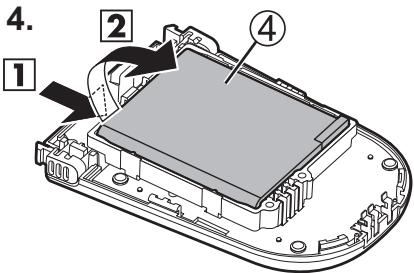
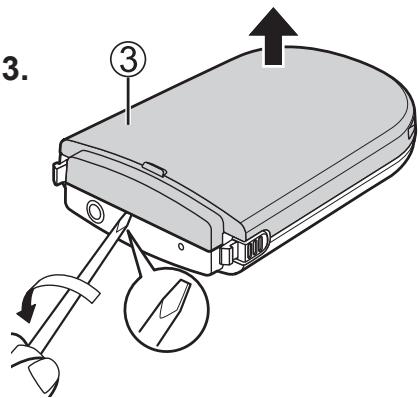
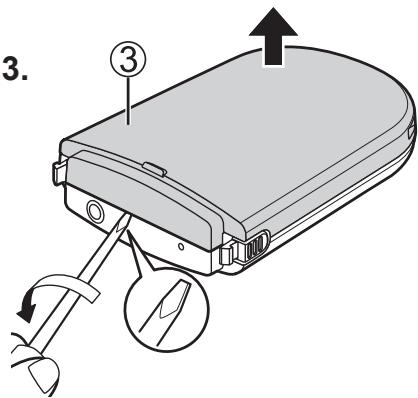
See illustrations K on page 54.
- Remove the internal screws ① with a Phillips head screwdriver.
- Press the release buttons from the both sides, and make a clearance ② between the upper and lower parts.
- Put a straight-slot screwdriver into the clearance, and remove the upper part ③ using the screwdriver for leverage.
- Lift the battery ④, and remove it.
- Do not damage or dismantle the battery.
- Use commercially available screwdrivers.
- Make sure to keep fingers away from the tip of screwdrivers.
K





Kadoma, Osaka, Japan
Importer for Europe:
Panasonic Marketing Europe GmbH
Panasonic Testing Centre
Winsbergring 15, 22525 Hamburg, Germany
EU

- Panasonic®
- F
- Teilenamen
- Noms des pièces
- What are bone conduction headphones?
- Declaration of Conformity (DoC)
- AC adaptor
- The unit
- No altering or remodeling
- No dropping or strong impacts
- Do not leave the unit exposed to direct sunlight for long periods of time.
- Earpieces
- CAUTION!
- Note
- Table of contents
- Accessories
- How to use the headphones holder
- Part names
- A Bone conduction headphones
- B In-Ear type headphones
- © Receiver
- Front panel
- Rear panel
- D Transmitter
- Connections
- OR
- Installation
- Approximate recharging and operating time
- To check the remaining battery level:
- Disposal of Old Equipment and Batteries Only for European Union and countries with recycling systems
- Note for the battery symbol (bottom symbol):
- Operation
- Preparation
- See illustrations © on page 4.
- After listening
- AUTO ON/OFF function
- If reception is still poor
- ENHANCING SPEECH
- Resetting the unit
- How to put the headphone unit
- How to replace the headphones
- Maintenance
- Specifications
- General
- ■ RF Stereo Transmitter
- ■ RF Stereo Headphones
- Nomi delle parti
- To remove the battery when disposing of this unit
- Danger
- Warning
- See illustrations K on page 54.
- K
Brand : PANASONIC
Model : RPWFG20E
Category : Headphones