
RF-U300 - Radio PANASONIC - Free user manual and instructions
Find the device manual for free RF-U300 PANASONIC in PDF.



| Product type | FM Radio |
| Brand | Panasonic |
| Model | RF-U300 |
| Power supply | AC 230 V, 50 Hz or batteries (6 R14/LR14 batteries, not included) |
| Power consumption | 5.0 W (operating); 0.9 W standby |
| Weight | Approx. 1.24 kg (without batteries); approx. 1.65 kg (with batteries) |
| FM frequency range | 87.50 – 108.00 MHz (50 kHz step) |
| Speaker | 10 cm, 8 Ω, 1 way |
| Output power | 1 W (RMS) |
| Headphone output | Mono jack ∅ 3.5 mm (8 – 16 Ω) |
| Main functions | RDS, sleep timer (30/60/90/120 min), 10 FM presets, equalizer (Normal/Music/News/High) |
| Care and cleaning | Wipe with a soft, dry cloth. Do not use alcohol, thinner, or benzene. |
| Safety | Do not expose to rain, moisture, flame sources; do not block ventilation slots; use only recommended accessories. |
| Spare parts and repairability | No user-serviceable parts inside. Contact a qualified service center for any repairs. |
| General information | 80-page user manual available online. Included accessory: power cord. |
Frequently Asked Questions - RF-U300 PANASONIC
User questions about RF-U300 PANASONIC
0 question about this device. Answer the ones you know or ask your own.
Ask a new question about this device
Download the instructions for your Radio in PDF format for free! Find your manual RF-U300 - PANASONIC and take your electronic device back in hand. On this page are published all the documents necessary for the use of your device. RF-U300 by PANASONIC.
USER MANUAL RF-U300 PANASONIC
The illustrations show RF-U350.
Before connecting, operating or adjusting this product, please read the instructions completely.
Please keep this manual for future reference.
Operating Instructions
Bedienungsanleitung
Thank you for purchasing this product.
For optimum performance and safety, please read the instructions carefully.
Supplied accessories

Please check and identify the supplied accessories.
☐ 1 AC power supply code
Table of contents
Power sources....3
Listening to the radio....4
Different ways to use the unit ....5
Using the timer 6
Maintenance....6
Troubleshooting guide....7
Specifications 7
CAUTION!
- DO NOT INSTALL OR PLACE THIS UNIT IN A BOOKCASE, BUILT-IN CABINET OR IN ANOTHER CONFINED SPACE. ENSURE THE UNIT IS WELL VENTILATED. TO PREVENT RISK OF ELECTRIC SHOCK OR FIRE HAZARD DUE TO OVERHEATING, ENSURE THAT CURTAINS AND ANY OTHER MATERIALS DO NOT OBSTRUCT THE VENTILATION VENTS.
- DO NOT OBSTRUCT THE UNIT'S VENTILATION OPENINGS WITH NEWSPAPERS, TABLECLOTHS, CURTAINS, AND SIMILAR ITEMS.
- DO NOT PLACE SOURCES OF NAKED FLAMES, SUCH AS LIGHTED CANDLES, ON THE UNIT.
• DISPOSE OF BATTERIES IN AN ENVIRONMENTALLY FRIENDLY MANNER.
The socket outlet shall be installed near the equipment and easily accessible.
The mains plug of the power supply cord shall remain readily operable.
To completely disconnect this apparatus from the AC Mains, disconnect the power supply cord plug from AC receptacle.
WARNING:
TO REDUCE THE RISK OF FIRE, ELECTRIC SHOCK OR PRODUCT DAMAGE,
- DO NOT EXPOSE THIS APPARATUS TO RAIN, MOISTURE, DRIPPING OR SPLASHING AND THAT NO OBJECTS FILLED WITH LIQUIDS, SUCH AS VASES, SHALL BE PLACED ON THE APPARATUS.
- USE ONLY THE RECOMMENDED ACCESSORIES.
- DO NOT REMOVE THE COVER (OR BACK); THERE ARE NO USER SERVICEABLE PARTS INSIDE. REFER SERVICING TO QUALIFIED SERVICE PERSONNEL.
This product may receive radio interference caused by mobile telephones during use. If such interference is apparent, please increase separation between the product and the mobile telephone.
THIS UNIT IS INTENDED FOR USE IN MODERATE CLIMATES.
These speakers do not have magnetic shielding. Do not place them near televisions, personal computers or other devices easily influenced by magnetism.
CAUTION
Danger of explosion if battery is incorrectly replaced.
Replace only with the same or equivalent type recommended by the manufacturer.
Dispose of used batteries according to the manufacturer's instructions.
Safety precautions
Placement
Set the unit up on an even surface away from direct sunlight, high temperatures, high humidity, and excessive vibration. These conditions can damage the cabinet and other components, thereby shortening the unit's service life.
Do not place heavy items on the unit.
Voltage
Do not use high voltage power sources. This can overload the unit and cause a fire.
AC power supply code protection
Ensure the AC power supply code is connected correctly and not damaged. Poor connection and code damage can cause fire or electric shock. Do not pull, bend, or place heavy items on the code.
Grasp the plug firmly when unplugging the code. Pulling the AC power supply code can cause electric shock.
Do not handle the plug with wet hands. This can cause electric shock.
Foreign matter
Do not let metal objects fall inside the unit. This can cause electric shock or malfunction.
Do not let liquids get into the unit. This can cause electric shock or malfunction. If this occurs, immediately disconnect the unit from the power supply and contact your dealer.
Do not spray insecticides onto or into the unit. They contain flammable gases which can ignite if sprayed into the unit.
Service
Do not attempt to repair this unit by yourself. If sound is interrupted, indicators fail to light, smoke appears, or any other problem that is not covered in these instructions occurs, disconnect the AC power supply code and contact your dealer or an authorized service center. Electric shock or damage to the unit can occur if the unit is repaired, disassembled or reconstructed by unqualified persons.
Extend operating life by disconnecting the unit from the power source if it is not to be used for a long time.
The unit can be powered with household AC power or dry cell batteries (not included).
Using a household AC outlet
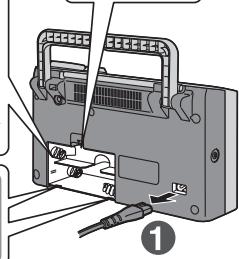
Connect the AC power supply code firmly to the unit and the outlet.
1 Plug one end of the AC power supply code (included) into the unit's AC IN socket.
2 Plug the other end into the household AC outlet.
Note
- The included AC power supply code is for use with this unit only. Do not use it with other equipment.
Do not use an AC power supply code from any other type of equipment with this unit. - If you are not going to use the unit for a prolonged time, it is recommended that you unplug the AC power supply code from the household AC outlet. Power will still be consumed even when the unit's power is not turned on. (Approx. 0.9 W)
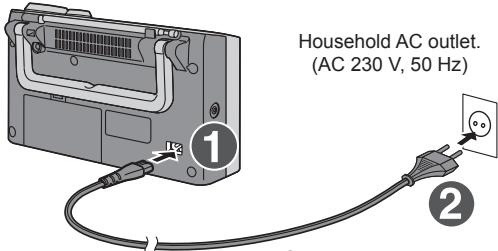
AC power supply code (included)
Using dry cell batteries (not included)
1 Unplug the AC power supply code from the unit's AC IN socket.
- When the AC power supply code is connected to the unit, the unit cannot be powered by the dry cell batteries.
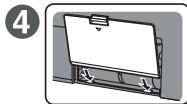
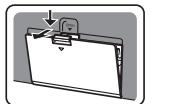
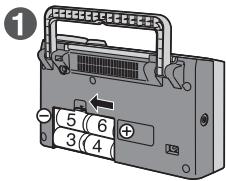
2 Remove the battery cover.
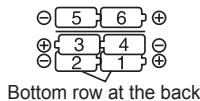
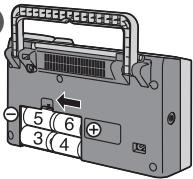
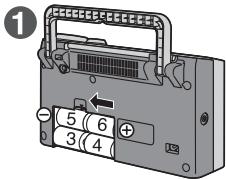
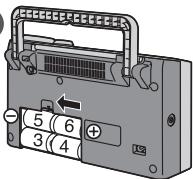
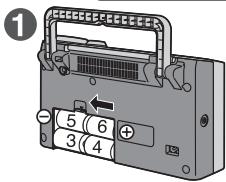
3 Insert six R14/LR14 batteries (not included) in the numerical sequence.
- Insert the batteries correctly with their “⊕” and “⊖” poles aligned as displayed.
4 Put the battery cover back in its original position.
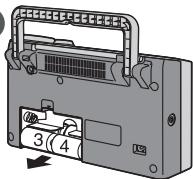
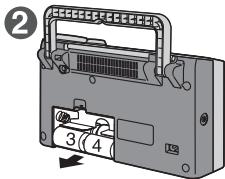
■ Removing the batteries
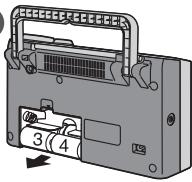
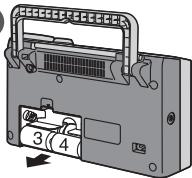
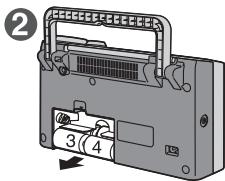
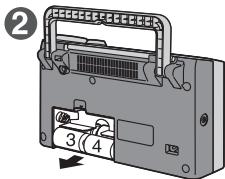
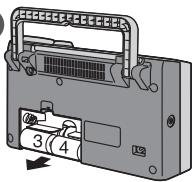
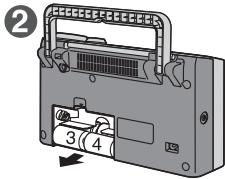
1 Push the “⊕” side of battery 6 toward its “⊖” side, and remove batteries 5 and 6.
2 Put your finger into the cutout inside the compartment, and remove batteries 3, 4, 1 and 2.
Note
- When the charge of the dry cell batteries is depleted, "LOW BATTERY" appears and "☐" flashes on the display panel.
- After replacing the batteries, set the clock again (page 5).
- The registered preset stations (☐ page 5) will be lost if the batteries have been removed for more than 3 minutes. Register the stations again when using the radio next.
Dry cell battery
- Align the poles (+ and -) properly when inserting the batteries.
- Do not mix old and new batteries or different types of batteries.
- Do not recharge ordinary dry cell batteries.
- Do not heat or disassemble the batteries. Do not allow them to contact flame or water.
- If the unit is not going to be used for a long time or if the unit is to be powered exclusively by AC power, remove the batteries and store them in a cool dark place.
- Do not keep together with metallic objects such as necklaces.
- Do not use rechargeable type batteries.
- Do not use batteries if the covering has been peeled off.
Mishandling of batteries can damage other items, cause damage to the unit, and may cause a fire through short-circuiting or electrolyte leakage.
If electrolyte leaks from the batteries, consult your dealer.
Wash thoroughly with water if electrolyte comes in contact with any part of your body.
3
Insert the batteries in numerical sequence while pushing down on their “⊖” sides.
2
natural_image
Diagram of a device with cable connectors and a switch, no visible text or symbols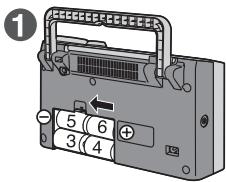
2
natural_image
Diagram of a device rear panel with labeled ports and internal components (no text or symbols)1 Turn on the unit's power.

To turn the power off, press the button again.
Note
When the power is turned on again, the broadcast station that was last tuned in when the power was turned off, will be tuned in.
2 Select the broadcast station.
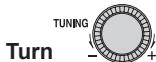
to select the desired station.
■ Automatic tuning

When -TIMER CHECK is pressed, automatic tuning starts, and it stops at the station which is tuned in first. Repeat this until the station you want to listen to is tuned in.
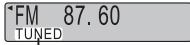
"TUNED" appears for about 1 second when a station is tuned in.
Note
Depending on the quality of the reception, automatic tuning may not be possible.
- During tuning press -TIMER CHECK to stop.
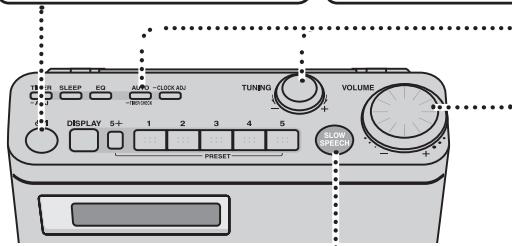
Standby/on switch (↓/I)
Press to switch the unit from on to standby mode or vice versa. In standby mode, the unit is still consuming a small amount of power.
The illustrations show RF-U350.
Making it easier to understand what's being said (RF-U350 only)
You can adjust the speed of what's being said to understand newscasts, the dialogue of characters in dramas, etc. better.
Press

• The indicator around 📍 now lights.
- To close the slow speech function, press the button again. (The indicator around SLOW SPEECH now goes off.)
Note
- When the slow speech function is activated, the sound quality will automatically be switched to NORMAL and cannot be changed.
- The slow speech function effects may not be obtained with some music programs and other broadcast content.
- The slow speech function is released in the following cases:
(1) When the power is turned off
(2) When you have changed the station you are now listening to
- When the slow speech function is set to ON, the tone quality will change, and there will be a delay in the sound heard.
- The speed of the slow speech function cannot be changed.
- When the slow speech function is set to ON while the reception is poor and accompanied by a lot of noise, the noise will be amplified, making the sound hard to listen to. At a time like this, set the function to OFF.
3 Adjust the volume.
Turn
to adjust the
volume. (0 to 50)
VOLUME 28
To improve reception
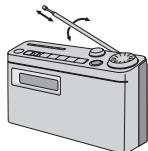
Adjust the length and angle of the rod antenna to obtain the best reception.
natural_image
Illustration of a radio device with a pointer and scroll, no text or symbols presentHandle
Note
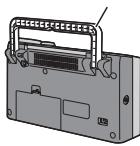
If you take hold of the unit's rod antenna and move it from one place to another, you may damage the unit.
To move the unit, make sure you pick it up by the handle on the rear panel, and then move it.
natural_image
Illustration of a portable electronic device with a rack and ventilation slots (no text or symbols)RDS broadcasting
This unit can display the text data transmitted by the radio data system (RDS) available in some areas.
The panel display is automatically switched when a Program Service name (PS) or Radio Text message (RT) is received.
When a Program Service name
(PS) is received
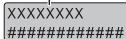
When a Radio Text message (RT) is received
Note
- RDS displays may not be available if reception is poor.
- During timer operations the unit will not automatically switch over to the RDS displays. To indicate the RDS displays, press DISPLAY.
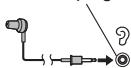
Listening to sound via earphone (not included)
Plug type:
- Turn the volume down before connecting the earphone.
Note
Avoid listening for prolonged periods of time to prevent hearing damage.
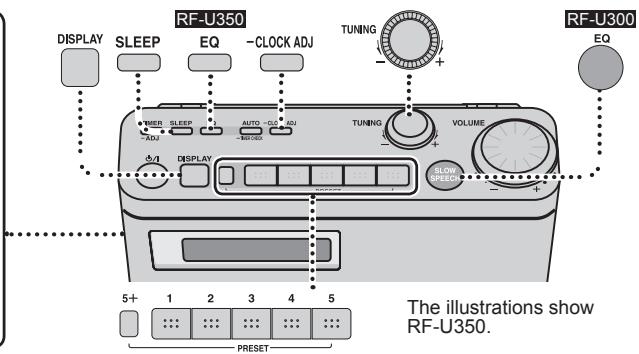
Selecting the sound quality that suits the broadcast
RF-U350
RF-U300
Press
EQ
[Non-Text]

Each time this button is pressed, the position of “◀” changes.

This position is recommended for programs.
Set to this position to enjoy music.
NEWS
Set to this position to listen to news programs.
HIGH
Set to this position when high-pitched sound is hard to hear.
Using the sleep timer
The unit's power is automatically turned off when the set time is reached.
Press
SLEEP
•
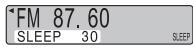
Each time the button is pressed, the setting changes in the following sequence: 30 (minutes)→60→90→120


To display how much time remains until the set time
Press
SLEEP
•
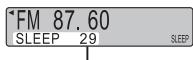
Remaining time
Note
When the power is turned on again, the broadcast station that was last tuned in when the power was turned off, will be tuned in.
Preset tuning
A total of 10 FM stations can be preset.
■ Preset stations
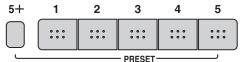
While listening to the station you want to register, hold down one of the number buttons [1] to [5] for at least 1 second. The number of the button you pressed and "PROGRAM" now appear on the display panel, and the station is registered in the button concerned.
Example: When you registered a station in button [1]
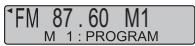
- To register a station greater than 5, first press [5+], then, e.g. to register 7 (within 10 seconds) press and hold [2].
■ Listening to a station which you have registered
After the power has been turned on, press the number button in which the desired station has been registered. (To listen to, e.g., station 7, press [5+], then press [2].) The station will then be tuned in.
■ Changing a station which you have registered
With the new station you want to register already tuned in, press and hold the button with the number whose registered station is to be changed so that you will overwrite the existing station with the new one.
Setting the clock
The 24-hour system is used to display the time on the clock.
1. Press and hold.

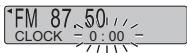
2. Select the time.
。

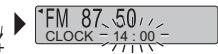
3. Press
-CLOCK ADJ

• To display the clock when the unit is on
DISPLAY
Press

The time is always displayed while the power is off.
Note
The clock is accurate to within ± 60 seconds a month. Readjust if necessary.
You can set the times at which to turn the power on and off and set the station and volume level while the power is on.
Preparation: Setting the clock. ( page 5)
Select the broadcast station. ( page 4)
Adjust the volume. ( page 4)
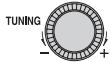
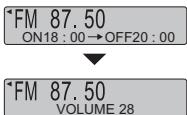
1. Setting the timer times
① Press and hold.


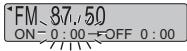
If this display appears ...
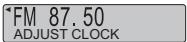
Set the clock.
② Select the ON time.
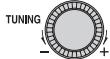

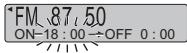
③ Press.


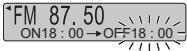
④ Select the OFF time.

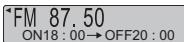
If this display appears ...
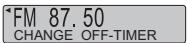
The same time has been set for both the ON time and OFF time. Set the timer times again.
⑤ Press.


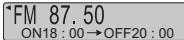
2. Setting the timer settings to ON
Press.


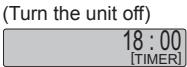
The unit must be off for the timer to operate.
Note
- Once the timer times are set, they need not be set the next time.
- To change the times, perform time setting procedure again.
- The “[TIMER]” display flashes during a timer operation.
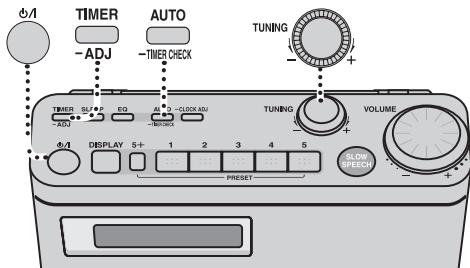
The illustrations show RF-U350.
Setting the timer settings to OFF
These steps can be taken while the power is on.

Setting the timer settings to ON

The unit must be off for the timer to operate.
If this display appears ...
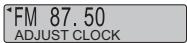
Set the clock.
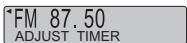
Set the timer times.
Note
Even when the timer settings are set to OFF, the timer time settings remain in the memory so that when the timer settings are next set to ON, the timer function will be activated at the set times.
Checking the timer settings when the power is off

What has been set is now displayed.
Maintenance
If the surfaces are dirty
To clean this unit, wipe with a soft, dry cloth.
- Never use alcohol, paint thinner or benzine to clean this unit.
- Before using a chemically treated cloth, read the instructions that came with the cloth carefully.
Troubleshooting guide
Before requesting service, make the following checks. If you are in doubt about any of the check points, or if the solutions indicated in the chart do not solve the problem, consult your dealer for instructions.
The reception is poor. There is too much noise and distortion.
- Try changing the length and angle of the rod antenna.
- Inside some buildings and on some means of transport, the signals may be weak, making it hard to hear the stations. In such cases, use the unit as close to the windows as possible.
- If this unit is used close to another radio, TV, VCR or other electrical appliance, noise may be heard from the resulting mutual interference. Try turning off the power of the radio, TV or VCR, etc. in the vicinity.
- This unit may not operate properly after it has been moved from a cold location to a warm place. This happens because condensation has formed on the unit's operating parts: The unit will return to normal in about 60 minutes.
- Noise may be caused if a mobile telephone is brought close to the unit. Use the unit at a distance from mobile telephones.
No sound is heard.
Is the volume control at the lowest position? Adjust the volume level using

Dry cell batteries were installed in the unit, but the unit won't work.
Is the AC power supply code connected to the unit? To power the unit using the batteries, unplug the AC power supply code from the unit.
When the unit's power is turned on, the "CHANGE BATTERY" message is displayed.
Replace the existing batteries with new ones or use a household AC outlet.
The unit's power is not turned off even when the set time is reached.
Is "SLEEP" displayed on the display panel? (page 5)
If it is, press SLEEP, and check the remaining time.
The timer does not work.
Is the timer setting OFF? First turn on the power, and then press ☐ to set the timer to ON.
■ F □ □ (□ □ indicates a number.)
Connect the AC power supply code firmly to the unit and the outlet. If the unit still cannot be turned on, disconnect the AC power supply code, remove the batteries, and consult your dealer.
Specifications
Frequency range
| FM | 87.50-108.00 MHz (50 kHz steps) |
Speakers
| Full range | 10 cm, 8 Ω x 1 |
Terminals
| Output | PHONES: Φ3.5 mm monaural (8-16 Ω) |
Output power
Power supply
| 1 W (RMS) | |
| y | |
| AC | 230 V, 50 Hz |
Power consumption:
6.0 W (RF-U350)
5.0 W (RF-U300)
Battery 9 V (Six R14/LR14 batteries)
Dimensions (W x H x D)
Mass
| 270 mm × 152 mm × 92.5 mm |
with batteries Approx. 1700 g (RF-U350)
Approx. 1650 g (RF-U300)
without batteries Approx. 1290 g (RF-U350)
Approx. 1240 g (RF-U300)
Power consumption if power off: 0.9 W
Note
Specifications are subject to change without notice.
-If you see this symbol-
Information on Disposal for Users of Waste Electrical & Electronic Equipment (private households)

This symbol on the products and/or accompanying documents means that used electrical and electronic products should not be mixed with general household waste.
For proper treatment, recovery and recycling, please take these products to designated collection points, where they will be accepted on a free of charge basis. Alternatively, in some countries you may be able to return your products to your local retailer upon the purchase of an equivalent new product.
Disposing of this product correctly will help to save valuable resources and prevent any potential negative effects on human health and the environment which could otherwise arise from inappropriate waste handling.
Please contact your local authority for further details of your nearest designated collection point.
Penalties may be applicable for incorrect disposal of this waste, in accordance with national legislation.
For business users in the European Union
If you wish to discard electrical and electronic equipment, please contact your dealer or supplier for further information.
Information on Disposal in other Countries outside the European Union
This symbol is only valid in the European Union.
If you wish to discard this product, please contact your local authorities or dealer and ask for the correct method of disposal.
Sehr geehrter Kunde
natural_image
Illustration of a portable radio with a pointer and scroll, showing no text or symbolsTragegriff
natural_image
Illustration of a portable radio with a pointer and scroll, no text or symbols presentManico
Nota
natural_image
Illustration of a portable electronic device with a rack and control panel (no text or symbols visible)Nota
Dimensioni (L x A x P)
| 270 mm x 152 mm x 92,5 mm | ||
| Peso | con batterie | 1700 g circa (RF-U350) |
| 1650 g circa (RF-U300) | ||
| senza batterie | 1290 g circa (RF-U350) | |
| 1240 g circa (RF-U300) | ||
natural_image
Diagram of a device with wires and connectors, no visible text or symbols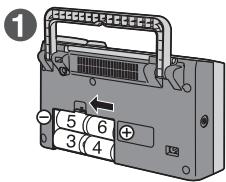
Remarque
natural_image
Illustration of a radio device with a pointer and scroll, no text or symbols presentPoignée
Remarque
Dimensions (L x H x P)
| 270 mm × 152 mm × 92,5 mm |
Poids
natural_image
Diagram of a device with wires and connectors, no visible text or symbols1
2
natural_image
Illustration of a portable radio with a pointer and scroll, no text or symbols presentAsa
Nota
natural_image
Illustration of a portable electronic device with a handle and internal components (no text or symbols visible)natural_image
Diagram of a device with cable connectors and a switch, no visible text or symbols2
natural_image
Diagram of a device rear panel with labeled ports and internal components (no text or symbols)natural_image
Illustration of a portable radio with a pointer and control panel (no text or symbols)Handvat
natural_image
Diagram of a device with ports and connectors, showing internal components without any text or symbols1
natural_image
Illustration of a handbag device with a scroll wheel and control panel (no text or symbols on the device itself)natural_image
Illustration of a portable electronic device with a handle and internal components (no text or symbols visible)RDS-udsendelser
TENTO PŘÍSTROJ JE KONSTRUOVÁN PRO POUŽITÍ V MÍRNÉM KLIMATU.
natural_image
Illustration of a portable radio with a pointer and scroll, no text or symbols presentDržadlo
Poznámka
natural_image
Illustration of a portable electronic device with a front panel and internal components (no text or symbols visible)Vysílání RDS
natural_image
Illustration of a portable radio with a pointer and scroll, no text or symbols presentUchwyt
Uwaga
natural_image
Illustration of a portable electronic device with a handle and internal components (no text or symbols visible)natural_image
Illustration of a portable radio with a pointer and scroll, no text or symbols present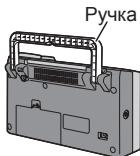
natural_image
Diagram of a device with attached cable and connector, showing internal components without any text or symbols1
2
1 Ligue o aparelho.
natural_image
Illustration of a portable radio with a pointer and scroll, no text or symbols presentPega
Nota
Se as superfícies estiverem sujas
natural_image
Illustration of a portable radio with a pointer and scroll, no text or symbols presentРучка
natural_image
Illustration of a portable radio with a pointer and control panel (no text or symbols)Handtag
Observera
natural_image
Illustration of a portable electronic device with a handle and internal components (no text or symbols visible)RDS-sändningar

- Supplied accessories
- Table of contents
- CAUTION!
- WARNING:
- THIS UNIT IS INTENDED FOR USE IN MODERATE CLIMATES.
- CAUTION
- Safety precautions
- Placement
- Voltage
- AC power supply code protection
- Foreign matter
- Service
- Using a household AC outlet
- Note
- Using dry cell batteries (not included)
- Turn on the unit's power.
- Select the broadcast station.
- ■ Automatic tuning
- Making it easier to understand what's being said (RF-U350 only)
- Adjust the volume.
- To improve reception
- RDS broadcasting
- Listening to sound via earphone (not included)
- Selecting the sound quality that suits the broadcast
- Using the sleep timer
- To display how much time remains until the set time
- Preset tuning
- ■ Preset stations
- ■ Listening to a station which you have registered
- ■ Changing a station which you have registered
- Setting the clock
- Press and hold.
- Select the time.
- Press
- • To display the clock when the unit is on
- Setting the timer times
- Setting the timer settings to ON
- Setting the timer settings to OFF
- Setting the timer settings to ON
- Checking the timer settings when the power is off
- Maintenance
- Troubleshooting guide
- The reception is poor. There is too much noise and distortion.
- No sound is heard.
- Dry cell batteries were installed in the unit, but the unit won't work.
- When the unit's power is turned on, the "CHANGE BATTERY" message is displayed.
- The unit's power is not turned off even when the set time is reached.
- The timer does not work.
- ■ F □ □ (□ □ indicates a number.)
- Specifications
- Information on Disposal for Users of Waste Electrical & Electronic Equipment (private households)
- For business users in the European Union
- Information on Disposal in other Countries outside the European Union
- Sehr geehrter Kunde
- Nota
- Remarque
- RDS-udsendelser
- Poznámka
- Vysílání RDS
- Uwaga
- Ligue o aparelho.
- Observera
- RDS-sändningar
Brand : PANASONIC
Model : RF-U300
Category : Radio