EasyManual
SWF-BR100 - Pregnant SONY - Free user manual and instructions
Find the device manual for free SWF-BR100 SONY in PDF.



User questions about SWF-BR100 SONY
0 question about this device. Answer the ones you know or ask your own.
Ask a new question about this device
Download the instructions for your Pregnant in PDF format for free! Find your manual SWF-BR100 - SONY and take your electronic device back in hand. On this page are published all the documents necessary for the use of your device. SWF-BR100 by SONY.
USER MANUAL SWF-BR100 SONY
Operating Instructions
US
Mode d'emploi
FR
Wireless Sound Specification
version 3.0
周波数带域
5 GHz带(5.180/5.200/
5.240 GHz
变調方式
DSSS
電源
DC 5V
消費電力
500 mA
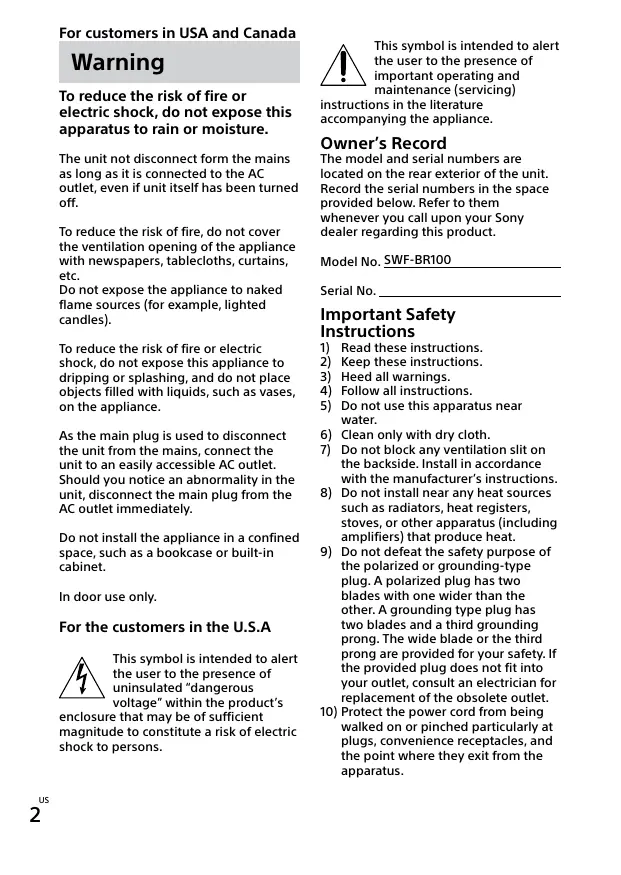
For customers in USA and Canada
Warning
To reduce the risk of fire or electric shock, do not expose this apparatus to rain or moisture.
The unit not disconnect form the mains as long as it is connected to the AC outlet, even if unit itself has been turned off.
To reduce the risk of fire, do not cover the ventilation opening of the appliance with newspapers, tablecloths, curtains, etc.
Do not expose the appliance to naked flame sources (for example, lighted candles).
To reduce the risk of fire or electric shock, do not expose this appliance to dripping or splashing, and do not place objects filled with liquids, such as vases, on the appliance.
As the main plug is used to disconnect the unit from the mains, connect the unit to an easily accessible AC outlet. Should you notice an abnormality in the unit, disconnect the main plug from the AC outlet immediately.
Do not install the appliance in a confined space, such as a bookcase or built-in cabinet.
In door use only.
For the customers in the U.S.A

This symbol is intended to alert the user to the presence of uninsulated "dangerous voltage" within the product's
enclosure that may be of sufficient magnitude to constitute a risk of electric shock to persons.

This symbol is intended to alert the user to the presence of important operating and maintenance (servicing)
instructions in the literature accompanying the appliance.
Owner's Record
The model and serial numbers are located on the rear exterior of the unit. Record the serial numbers in the space provided below. Refer to them whenever you call upon your Sony dealer regarding this product.
Model No. SWF-BR100
Serial No.
Important Safety Instructions
1) Read these instructions.
2) Keep these instructions.
3) Heed all warnings.
4) Follow all instructions.
5) Do not use this apparatus near water.
6) Clean only with dry cloth.
7) Do not block any ventilation slit on the backside. Install in accordance with the manufacturer's instructions.
8) Do not install near any heat sources such as radiators, heat registers, stoves, or other apparatus (including amplifiers) that produce heat.
9) Do not defeat the safety purpose of the polarized or grounding-type plug. A polarized plug has two blades with one wider than the other. A grounding type plug has two blades and a third grounding prong. The wide blade or the third prong are provided for your safety. If the provided plug does not fit into your outlet, consult an electrician for replacement of the obsolete outlet.
10) Protect the power cord from being walked on or pinched particularly at plugs, convenience receptacles, and the point where they exit from the apparatus.
11) Only use attachments/accessories specified by the manufacturer.
12) Use only with the cart, stand, tripod, bracket, or table specified by the manufacturer, or sold with the apparatus. When a cart is used, use caution when moving the cart/ apparatus combination to avoid injury from tip-over.

13) Unplug this apparatus during lightning storms or when unused for long periods of time.
14) Refer all servicing to qualified service personnel. Servicing is required when the apparatus has been damaged in any way, such as power-supply cord or plug is damaged, liquid has been spilled or objects have fallen into the apparatus, the apparatus has been exposed to rain or moisture, does not operate normally, or has been dropped.
The following FCC statement applies only to the version of this model manufactured for sale in the U.S.A. Other versions may not comply with FCC technical regulations.
NOTE:
This equipment has been tested and found to comply with the limits for a Class B digital device, pursuant to Part 15 of the FCC Rules. These limits are designed to provide reasonable protection against harmful interference in a residential installation. This equipment generates, uses and can radiate radio frequency energy and, if not installed and used in accordance with the instructions, may cause harmful interference to radio communications. However, there is no guarantee that interference will not occur in a particular
installation. If this equipment does cause harmful interference to radio or television reception, which can be determined by turning the equipment off and on, the user is encouraged to try to correct the interference by one or more of the following measures:
- Reorient or relocate the receiving antenna.
- Increase the separation between the equipment and receiver.
- Connect the equipment into an outlet on a circuit different from that to which the receiver is connected.
- Consult the dealer or an experienced radio/TV technician for help.
Properly shielded and grounded cables and connectors must be used for connection to host computers and/or peripherals in order to meet FCC emission limits.
CAUTION
You are cautioned that any changes or modifications not expressly approved in this manual could void your authority to operate this equipment.
This equipment must not be co-located or operated in conjunction with any other antenna or transmitter.
Compliance with FCC requirement 15.407(c)
Data transmission is always initiated by software, which is the passed down through the MAC, through the digital and analog baseband, and finally to the RF chip. Several special packets are initiated by the MAC. These are the only ways the digital baseband portion will turn on the RF transmitter, which it then turns off at the end of the packet. Therefore, the transmitter will be on only while one of the aforementioned packets is being transmitted. In other words, this device automatically discontinues transmission in case of either absence of information to transmit or operational failure.
Frequency Tolerance: ± 20ppm or less
5.15-5.25GHz band is restricted to indoor operations only.
This equipment complies with FCC radiation exposure limits set forth for an uncontrolled environment and meets the FCC radio frequency (RF) Exposure Guidelines. This equipment should be installed and operated keeping the radiator at least 20cm or more away from person's body (excluding extremities: hands, wrists, feet and ankles).
For UWT-BR100
This device complies with part 15 of the FCC Rules. Operation is subject to the following two conditions:(1) this device may not cause harmful interference, and (2) this device must accept any interference received, including interference that may cause undesired operation.
For the customer in Canada
This device complies with Industry Canada license-exempt RSS standard(s). Operation is subject to the following two condition: (1) this device may not cause interference, and (2) this device must accept any interference, including interference that may cause undesired operation of the device.
5.15-5.25GHz band is restricted to indoor operations only.
This equipment complies with IC radiation exposure limits set forth for an uncontrolled environment and meets RSS-102 of the IC radio frequency (RF) Exposure rules. This equipment should be installed and operated keeping the radiator at least 20cm or more away from person's body (excluding extremities: hands, wrists, feet and ankles).
Properly shielded and grounded cables and connectors must be used for connection to host computers and/or peripherals.
Caution
This product is designed for use with Sony TV. You should only use this product on a compatible Sony TV. Please read these safety instructions to ensure your personal safety and prevent property damage.
On safety
- Should any solid object or liquid fall into the subwoofer, unplug the subwoofer and have it checked by qualified personnel before operating it any further.
- Do not climb on the subwoofer, as you may fall down and injure yourself, or subwoofer damage may result.
- Before operating the subwoofer, check that the operating voltage is identical to your local power supply.
- If you are not going to use the subwoofer for a long time, be sure to disconnect the subwoofer from the wall outlet (mains). To disconnect the AC power cord (mains lead), grasp the plug itself; never pull the cord.
- AC power cord (mains lead) must be changed only at the qualified service shop.
On placement
- Place the subwoofer in a location with adequate ventilation to prevent heat buildup and prolong the life of the subwoofer.
- Do not place the subwoofer near heat sources, or in a place subject to direct sunlight, excessive dust, or mechanical shock.
-
Use caution when placing the subwoofer on surfaces that have been specially treated (with wax, oil, polish, etc.) as staining or discoloration of the surface may result.
Take care to avoid any possible injury on the corners of the subwoofer. -
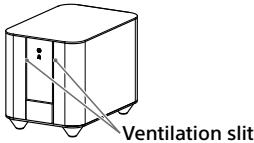
Please keep the back panel (a side with the switch) away from the wall more than 5cm. Prevent something like cloth from blocking up the ventilation slit.
On operation
Before connecting other equipment, be sure to turn off and unplug the subwoofer.
On cleaning
Clean the subwoofer with a soft dry cloth. Do not use any type of abrasive pad, scouring powder or solvent such as alcohol or benzine.
If you have any question or problem concerning your subwoofer, please consult your nearest Sony dealer.
Setting up the Wireless System
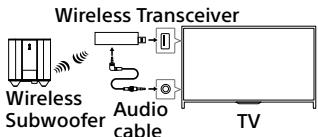
1 Connect the audio cable (supplied) to the Wireless Transceiver.
2 Connect the other end of the audio cable to the AUDIO OUT / jack of the TV.
3 Connect the Wireless Transceiver to a USB port of the TV.

The wireless transceiver may interfere with other terminals on TV physically, depending on the position of USB terminal you connected.
4 Connect the AC power cord (mains lead) from the subwoofer to the AC power outlet.

It is recommended that the Subwoofer is placed as close as possible to the TV.
5 The subwoofer will automatically turns on and the I/ indicator lights in green when the TV is turned on.
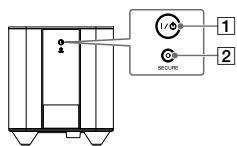
I/O (on/standby) button, indicator
2 SECURE button
Using the subwoofer
About the power state
The subwoofer would be turned on automatically when you turn on the TV.
Then it would enter standby mode and the I/ indicator lights in red, when the TV is in standby mode.
You can also turn the subwoofer to standby mode by TV's menu, during TV is turned on.
If you want to turn off the subwoofer, you can operate by I/ button on the subwoofer. I/ indicator would not light up during the subwoofer is turned off.
About the sound adjustment
You can adjust subwoofer level, cut-off frequency and phase by TV's menu.
Refer to the TV's instruction manual.
Activating wireless transmission between specific units
You can specify the wireless connection to be used to link the Wireless Transceiver to the subwoofer using the Secure Link function.
This function is useful when you use multiple wireless products.
1 Press SECURE button on the Wireless Transceiver (the LED indicator lights and flashes in amber).
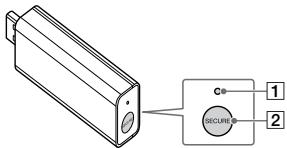
1 LED
2 SECURE button
2 Press SECURE button on the rear of the subwoofer (the LED indicator lights and flashes in amber).
3 Both LEDs light in solid turns into amber, and the subwoofer makes bass sound.
To cancel this operation, press the button again.
Proceed the step 2 within 2 minutes.
Cancelling the Secure Link function
Press and hold SECURE button on the Wireless Transceiver for several seconds until the LED indicator turns off.

If the LED indicator on the Subwoofer is still blinking amber, press and hold SECURE button on the rear of the subwoofer for several seconds until the I/ indicator turns green or flashes in green.
Additional Information
Troubleshooting
If you experience any of the following difficulties while using the system, use this troubleshooting guide to help remedy the problem before requesting support. Should any problem persist, consult your nearest Sony dealer. When bringing the system in for repairs, be sure to bring in the entire system. This product is a system product, and the entire system is needed to determine the part requiring repair.
No TV sound is output from the subwoofer.
- Check the connection of the audio cable that is connected to the wireless transceiver and the TV.
- Check the sound output of the TV. When sound does not come out, confirm the sound output settings of the TV and the volume of the TV speaker.
-
Check the status of I / indicator on the subwoofer:
Turns off. -
Check that the AC power cord (mains lead) of the subwoofer is securely connected.
-
Turn the subwoofer on by pressing I/按钮 on the subwoofer.
Stays lit in red:
-
Check the location of the subwoofer.
-
Do not place the TV and subwoofer in a metal cabinet.
-
Place the subwoofer close to the TV in a room.
-
Make sure that the wireless transceiver is inserted correctly into the TV.
-
Please confirm that power setting of Wireless Subwoofer of TV is Auto.
-
Flashes in green or amber slowly or turns red:
-
Make the Secure Link setting again.
Sound transmission is poor. Move the subwoofer so that the power indicator turns green or amber.
-
Flashes in red:
-
Press power to turn off the subwoofer, and check that nothing is blocking the ventilation slit of the subwoofer. A protection function may act by excessive input. Please lower TV volume or the SW level.
Noise is heard from the subwoofer or sound from the subwoofer is intermittent.
-
Move the subwoofer closer to the TV.
-
Do not install the TV and subwoofer in a closed rack, on a metal rack, or under a table.
-
Move the subwoofer away from other wireless devices.
-
Avoid using any other wireless devices.
The sound output from the subwoofer is very low.
-
Check the subwoofer level in the sound setting of the TV.
-
With some types of content such as news there will not be a lot of bass sound, this is normal.
Specifications
Wireless Subwoofer (SWF-BR100)
Amplifier section
For U.S.A model: (FTC)
With 4 ohms load, subwoofer channel driven, from 30 - 150 Hz; rated 45 W per channel minimum RMS power, with no more than 1% total harmonic distortion from 250 milliwatts to rated output.
POWER OUTPUT (reference)
100 W (per channel at 4 ohms, 100 Hz)
For Canadian and Mexican model:
POWER OUTPUT (rated) 70 W (4 ohms, 100 Hz, 1% THD)
POWER OUTPUT (reference) 100 W (4 ohms, 100 Hz)
Speaker System Subwoofer, sealed enclosure
Speaker Unit 200 mm cone type
Rated impedance 4 ohms
Power requirements 120 V AC, 60 Hz
Power consumption On:30W Standby mode: 0.5W or less
Dimensions (approx.) (W / h / d) 272 mm x 305 mm x 395 mm 10 3/4 in x 12 1/8 in x 15 5/8 in
Mass (approx.) 12.2kg 26 lb 14 3/10 o
Wireless Transceiver (UWT-BR100)
Communication system Wireless Sound Specification version 3.0
Frequency band 5GHz band (5.180/5.200/5.210/5.240GHz, 5.736/5.762/5.814GHz) The frequency bands used depend on the country.
Modulation method DSSS
Power requirement 5V DC
Power consumption 500 mA
Dimensions (approx.) 19 mm x 27 mm x 91 mm 3/4 in x 11/8 in x 3 5/8 in (w/h/d)
Mass (approx.) 25g 7/8oz
Supplied accessories Audio cable (1)
Design and specifications are subject to change without notice.
Avertissement
(5,180/5,200/5,210/5,240 GHz,
5,736/5,762/5,814 GHz)
Dimensions (approx.)
19 mm x 27 mm x 91 mm
3/4 po x 11/8 po x 3 5/8 po
(I/h/p)
Poids (approx.)
25g
7/8 oz
Accessoires fournis
Cable audio (1)
70 W (4 ohms, 100 Hz, 1% THD)
100 W (4 ohms, 100 Hz)
© 2014 Sony Corporation