
SCD480 - Baby monitor PHILIPS - Free user manual and instructions
Find the device manual for free SCD480 PHILIPS in PDF.
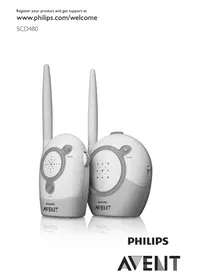


| Product type | Baby monitor |
| Brand | PHILIPS |
| Model | SCD480 |
| Outdoor range | 200 meters |
| Number of channels | 16 channels |
| Baby unit power supply | Mains (6V DC adapter) or 4 AA LR6 1.5V non-rechargeable batteries |
| Parent unit power supply | Mains (6V DC adapter) or 4 AA LR6 1.5V non-rechargeable batteries |
| Recommended battery type | Philips LR6 PowerLife |
| Microphone sensitivity | Adjustable (low, mid, high) |
| Connection alarm | Yes, adjustable (on/off) |
| Connection indicator | Green (connection established), red flashing (connection lost) |
| Power indicator | Green (on), red flashing (low battery) |
| Minimum distance baby-baby unit | 1 meter |
| Operating temperature | 10°C to 40°C |
| Cleaning | Damp cloth, do not immerse |
| Replacement adapters (EU/SGP) | SBC CS0920/00W |
| Replacement adapters (UK) | SBC CS0920/05W |
| Replacement adapters (AU/NZ) | 9VD200 |
| Warranty | International (see leaflet) |
| Customer service | www.philips.com/AVENT |
Frequently Asked Questions - SCD480 PHILIPS
User questions about SCD480 PHILIPS
0 question about this device. Answer the ones you know or ask your own.
Ask a new question about this device
Download the instructions for your Baby monitor in PDF format for free! Find your manual SCD480 - PHILIPS and take your electronic device back in hand. On this page are published all the documents necessary for the use of your device. SCD480 by PHILIPS.
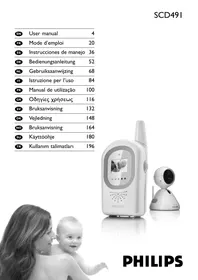
USER MANUAL SCD480 PHILIPS
PHILIPS
ENGLISH 6
DANSK 13
DEUTSCH 21
GREEK 29
FINNISH 38
FRENCH 45
DUTCH 53
SPANISH 62
ITALIAN 70
NORWEGIAN 78
PORTUGUESE 85
SWEDISH 92
TURKISH 100
Introduction
Congratulations on your purchase and welcome to Philips AVENT! To fully benefit from the support that Philips AVENT offers, register your product at www.philips.com/welcome.
Philips AVENT is dedicated to producing caring, reliable products that give parents the reassurance they need. This Philips AVENT baby monitor allows you to hear your baby from wherever you are in and around your home. The sixteen different channel options guarantee minimal interference and a secure reception, enabling you to be in constant contact with your baby.
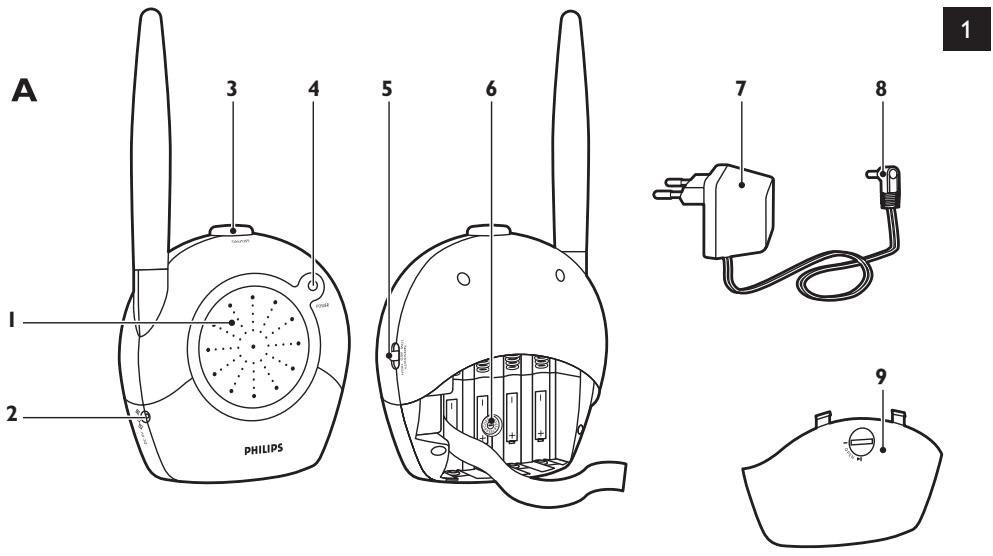
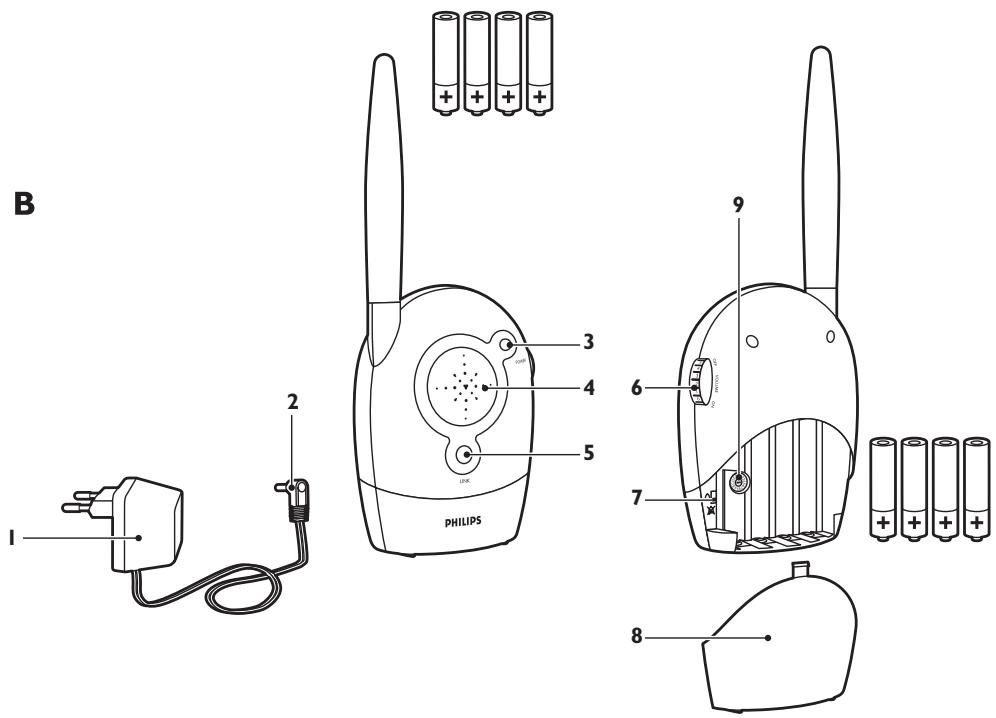
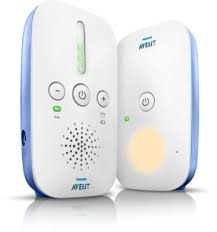
General description (Fig. 1)
A Baby unit
1 Microphone 2 Socket for small plug 3 On/off button 4 Power-on light 5 Microphone sensitivity control 6 Channel selector 7 Adapter 8 Small plug 9 Battery compartment lid
B Parent unit
1 Adapter 2 Small plug 3 Power-on light 4 Loudspeaker 5 Connection light 6 Volume control with on/off function 7 Connection alarm switch 8 Battery compartment lid 9 Channel selector
Important
Read these instructions for use carefully before you use the appliance and save them for future reference.
Danger
- Never immerse any part of the baby monitor in water or any other liquid.
Warning
- Check if the voltage indicated on the adapters of the baby unit and the parent unit correspond to the local mains voltage before you connect the appliance.
- Only use the adapters supplied to connect the baby unit and the parent unit to the mains.
- The adapters contain a transformer. Do not cut off the adapters to replace them with other plugs, as this causes a hazardous situation.
- If the adapters are damaged, always have them replaced with one of the original type in order to avoid a hazard. For the correct type, see chapter 'Replacement'.
- Never use the baby monitor in moist places or close to water.
- Except for the battery compartments, do not open the housing of the baby unit or the parent unit in order to prevent electric shock.
- This appliance is not intended for use by persons (including children) with reduced physical, sensory or mental capabilities, or lack of experience and knowledge, unless they have been given supervision or instruction concerning use of the appliance by a person responsible for their safety.
- Children should be supervised to ensure that they do not play with the appliance.
- The baby monitor has an operating range of 200 meters/600 feet in open air. Depending on the surroundings and other disturbing factors, the operating range may be smaller (see section 'Operating range', in chapter 'Using the appliance'.
Caution
- Use and store the appliance at a temperature between 10°C and 40°C.
- Do not expose the baby unit and parent unit to extreme cold, heat or direct sunlight.
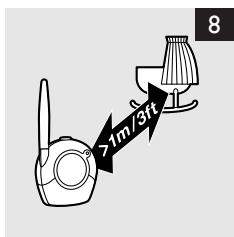
- Make sure the baby unit and its cord are always out of reach of the baby (at least 1 metre/3 feet away).
- Never place the baby unit inside the baby's bed or playpen.
- Never cover the parent unit and the baby unit with anything (e.g. a towel or blanket).
- Always place non-rechargeable batteries of the correct type in the baby unit and the parent unit.
General
- This baby monitor is intended as an aid. It is not a substitute for responsible and proper adult supervision and should not be used as such.
Electromagnetic fields (EMF)
This Philips AVENT appliance complies with all standards regarding electromagnetic fields (EMF). If handled properly and according to the instructions in this user manual, the appliance is safe to use based on scientific evidence available today.
Preparing for use
Baby unit
You can use the baby unit from the mains or on non-rechargeable batteries. Even if you are going to use the unit from the mains, we advise you to insert the non-rechargeable batteries. This guarantees automatic back-up in case of mains failure.
Mains operation
1 Put the appliance plug in the baby unit and put the adapter into a wall socket (Fig. 2). The power-on light goes on.
Operation on non-rechargeable batteries
The baby unit runs on four 1.5V R6 AA batteries (not included). We strongly advise you to use Philips LR6 PowerLife batteries. Do not use rechargeable batteries, as the baby unit does not have a charging function.
Unplug the baby unit and make sure your hands and the unit are dry when you insert the non-rechargeable batteries.
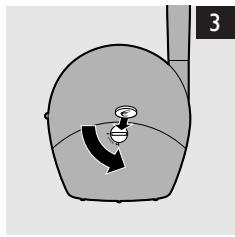
1 Unlock the battery compartment lid by turning the locking knob with a coin. Then remove the lid (Fig. 3). 2 Insert four non-rechargeable batteries. Make sure the + and - poles of the batteries point in the right direction. 3 Reattach the battery compartment lid and close it by turning the locking knob with a coin. When the batteries are low, the power light on the baby unit flashes red.
Parent unit
You can use the parent unit from the mains or on non-rechargeable batteries. Even if you are going to use the unit from the mains, we advise you to insert the non-rechargeable batteries. This guarantees automatic back-up in case of mains failure.
Mains operation
1 Put the appliance plug in the parent unit and put the adapter into a wall socket.
The power-on light goes on.
Operation on non-rechargeable batteries
The parent unit runs on four 1.5V R6 AA batteries (not included). We strongly advise you to use Philips LR6 PowerLife batteries.
Do not use rechargeable batteries, as the parent unit does not have a charging function.
Unplug the parent unit and make sure your hands and the unit are dry when you insert the non-rechargeable batteries.
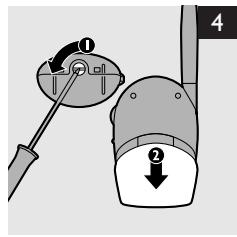
1 Turn the locking knob a quarter turn (1) and slide the battery cover downwards to remove it (2) (Fig. 4).
2 Insert four non-rechargeable batteries.
Make sure the + and - poles of the batteries point in the right direction.
3 Replace the battery compartment lid.
Note: When the batteries are low, the power light on the parent unit flashes red.
Note: When the batteries are completely empty, the parent unit automatically switches off and loses contact with the baby unit.
Using the appliance
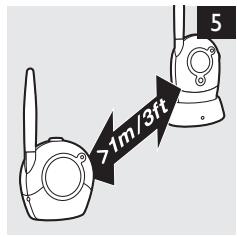
1 Place the two units in the same room to test the connection (Fig. 5).
Make sure the baby unit is at least 1 metre/3 feet away from the parent unit.
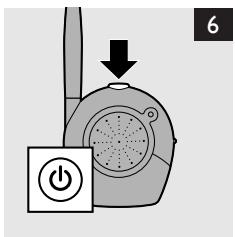
2 Press the on/off button to switch on the baby unit (Fig. 6).
The power-on light lights up green continuously.
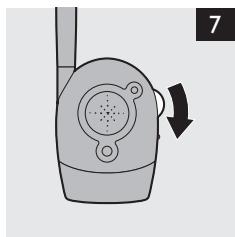
3 Turn the volume control to switch on the parent unit and to set the volume to the level you prefer. (Fig. 7)
The power-on light lights up green continuously.
When a connection has been established between the units, the connection light on the parent unit lights up green constantly.
Note: It takes about 30 seconds before a connection is established.
Note: If a connection cannot be established, the connection light on the parent unit flashes red.
4 Place the baby unit at least 1 metre/3 feet away from your baby (Fig. 8).
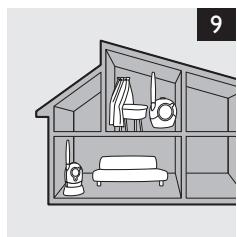
5 Place the parent unit within the operating range of the baby unit. Make sure it is at least 1 metre/3 feet away from the baby unit. For more information on the operating range, see section ‘Operating range’ below (Fig. 9).
Operating range
The operating range of the baby monitor is 200 metres/600 feet in open air. Depending on the surroundings and other disturbing factors, this range may be smaller.
| Dry materials | Material thickness | Loss of range |
| Wood, plaster, plaster cardboard, glass (without metal, wires or lead) | <30cm/12in | 0-10% |
| Brick, plywood | <30cm/12in | 5-35% |
| Reinforced concrete | <30cm/12in | 30-100% |
| Metal grilles or bars | <1cm/0.4in | 90-100% |
| Metal or aluminium sheets | <1cm/0.4in | 100% |
For wet and moist materials, the range loss may be up to 100%.
Features
Digital signal confirmation
The parent unit has a link light that continuously advises you of the status of the connection between the baby and the parent units. You can set an alert on the parent unit to notify you if the link is lost. The alert will sound an audible beep and the link light will flash red when a connection is lost.
To activate the alert on the parent unit:
1 Turn the locking knob a quarter turn (1) and slide the battery cover downwards to remove it (2) (Fig. 4). 2 Set the link alarm switch in the battery compartment to the 'on' position. 3 Replace the battery compartment lid. To switch off the alert, set the link alert switch to the 'off' position.
Adjustable sound sensitivity
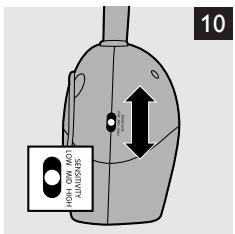
With the microphone sensitivity control on the baby unit, you can set the sound that is picked up by the baby unit to the desired level: low, mid or high. When the microphone sensitivity is set to 'high', the baby unit picks up all sounds.
Note: The sensitivity of the baby unit can only be changed when there is a connection between the baby unit and the parent unit.
1 Use the microphone sensitivity control to set the microphone sensitivity of the baby unit to the desired level. You can use your own voice as a sound reference (Fig. 10).
The power-on light on the baby unit turns yellow when a sound is transmitted.
Note: Whilst operating on batteries, if the sensitivity is set to a high level, the parent unit will consume more power.
Adjustable loudspeaker volume
You can change the volume on the parent unit, so you can adjust to suit your surroundings.
1 Turn the volume dial on the right side of the parent unit until the desired loudspeaker volume for the parent unit has been reached.
Note: Whilst operating on batteries, if the volume is set to a high level, the parent unit will consume more power.
Channel selector
Always make sure that the channel selectors inside the battery compartments of both units are set to the same channel. With these channel selectors, you can select sixteen different channel positions. If you experience interference from other baby monitors, radio devices etc., select a different channel.
1 Open the battery compartment lids of both units.
Baby unit: (Fig. 3)
- Turn the locking knob with a coin and remove the lid.
- Remove the batteries from the battery compartment, if present.
- Use a small, flat screwdriver to turn the channel selector to the desired position.
▶ Parent unit: (Fig. 4)
- Turn the locking knob a quarter turn (1) and slide the battery cover downwards to remove it (2).
- Remove the batteries from the battery compartment, if present.
- Use a small, flat screwdriver to turn the channel selector to the desired position.
Note: Make sure both units are set to the same channel.
If you do not experience any interference when you test the connection, close the battery compartments of the baby and the parent units.
If you experience interference, set the selector to another channel and test the connection again. If the units are operating on non-rechargeable batteries, replace the batteries and close the battery compartments.
Cleaning and Maintenance
Do not immerse the parent unit or the baby unit in water and do not clean them under the tap.
Do not use cleaning spray or liquid cleaners.
- Unplug the baby unit or the parent unit if they are connected to the mains.
- Clean the parent unit and the baby unit with a damp cloth.
Make sure the units are dry before you connect them to the mains.
- Clean the adapters with a dry cloth.
Storage
When you are not going to use the baby monitor for some time, remove the non-rechargeable batteries from the baby unit and parent unit. Store the baby unit, the parent unit and the adapters in a cool and dry place.
Replacement
Baby unit
Batteries
Only replace the non-rechargeable batteries of the baby unit with four 1.5V R6 AA batteries.
Note: We strongly advise you to use Philips non-rechargeable batteries.
Adapter
Only replace the adapter of the baby unit with an adapter of the original type. You can order a new adapter from your dealer or a Philips service centre:
- SBC CS0920/00W (EU/SGP only)
- SBC CS0920/05W (UK only)
- 9VD200 (AU/NZ only)
Parent unit
Batteries
Only replace the non-rechargeable batteries of the parent unit with four 1.5V R6 AA batteries.
Note: We strongly advise you to use Philips non-rechargeable batteries.
Adapter
Only replace the adapter of the parent unit with an adapter of the original type. You can order a new adapter from your dealer or a Philips service centre:
- SBC CS0920/00W (EU/SGP only)
- SBC CS0920/05W (UK only)
- 9VD200 (AU/NZ only)
Environment
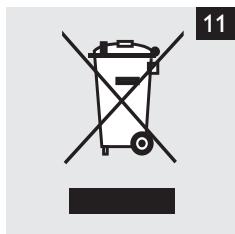
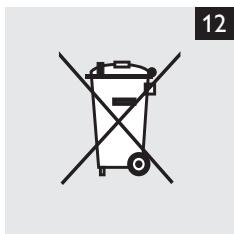
Do not throw away the appliance with the normal household waste at the end of its life, but hand it in at an official collection point for recycling. By doing this, you help to preserve the environment (Fig. 11). Batteries contain substances that may pollute the environment. Do not throw empty batteries away with the normal household waste, but hand them in at an official collection point. Always remove the batteries before discarding the appliance or handing it in at an official collection point. (Fig. 12)
Guarantee and service
If you need service or information or if you have a problem, please visit the Philips AVENT website at www.philips.com/AVENT or contact the Philips Consumer Care Centre in your country (you can find the phone number in the worldwide guarantee leaflet). If there is no Consumer Care Centre in your country, go to your local Philips dealer.
Frequently asked questions
This chapter lists the questions most frequently asked about the appliance. If you cannot find the answer to your question, contact the Customer Care Centre in your country.
| Question | Answer |
| Why is the power-on light not on? | Perhaps the appliance plug has not been inserted properly into the socket on the unit, or perhaps the adapter has not or not properly been inserted into the wall socket. |
| You may also have forgotten to switch on the units. Press the on/off button on the baby unit and turn the volume control on the parent unit downwards to switch on the units. | |
| If you operate the units on batteries, the batteries may be low. In that case, replace the batteries. | |
| Why does the power on light flash red? | You are operating the unit on batteries and the batteries are low. Replace the batteries. |
| Why does the parent unit produce a high pitched noise? | The units are too close together. Move the parent unit at least 1 metre/3 feet away from the baby unit. If this does not help, the volume is too high. Turn the volume control to a lower volume. |
| Why is there no sound coming from the parent unit? | Check if the volume is set high enough. If the volume is too low, turn the volume control to a higher volume. Also check the microphone sensitivity of the baby unit. |
| Why does the link light flash red? | It flashes red because there is no connection. The parent unit may be out of range of the baby unit or may be set to a different channel than the baby unit. Check if the parent unit and the baby unit are both set to the same channel. If they are, put the parent unit in a different place, closer to the baby unit. |
| Why does the parent unit beep? | What you hear is the link alarm. It indicates that there is no link between the baby and the parent units. The parent unit may be out of range of the baby unit or may be set to a different channel than the baby unit. Check if the parent unit and the baby unit are both set to the same channel. If they are, put the parent unit in a different place, closer to the baby unit. |
| Why does the parent unit react too slowly to the baby's sounds? | Set the microphone sensitivity on the baby unit to a higher level and/or move the baby unit closer to the baby. Make sure the baby unit is at least 1 metre/3 feet away from the baby. |
| Why does the parent unit react too quickly to other sounds? | Set the microphone sensitivity on the baby unit to a lower level and/or move the baby unit closer to the baby. |
| Why is the connection lost every now and then? | The parent unit is probably close to the boundaries of the operating range. Put the parent unit closer to the baby unit in a place where it has better reception. Please note that it takes about 30 seconds before the connection is re-established when you move one or both of the units. |
| Why do I get interference on the parent unit? | You may get interference when the parent unit is out of range of the baby unit. The parent unit may also be too close to a window and pick up interfering signals through this window. Move the parent unit away from the window. |
| Interference also occurs if there are too many walls or ceilings between the parent unit and the baby unit. Put the parent unit in a different place, closer to the baby unit. Also make sure the units are well away from mobile or cordless phones, radios or TVs. | |
| Why does the parent unit pick up signals from another baby monitor? | The baby monitor operates on the same channel as another baby monitor in the neighbourhood. Set both units to a different channel with the channel selector. |
| Why doesn't the baby monitor manage the specified range of 200m? | The specified range of 200 metres is only valid in open air. Inside the house the range is limited by the number and type of walls and/or ceilings between the two units. Change the position of one or both units to optimise the range. |
| What happens when there is a mains failure? | If you are using the units from the mains without having put batteries in them, the connection will be lost when there is a mains failure. If there are batteries in both units, they will automatically switch to battery power in case of a mains failure and the connection will not be lost. |
Introduction
EC DECLARATION OF CONFORMITY
| Philips Domestic Appliances and Personal Care | Ref: DOC-SCD481 |
| Date: 28 Oct, 2008 | |
| By: Phoebe Cheng |
We, PHILIPS DOMESTIC APPLIANCES AND PERSONAL CARE BV
(Manufacturer's name)
Tussendiepen 4, 9206 AD DRACHTEN, The Netherlands
(Manufacturer's address)
declare under our responsibility that the electrical products:
Philips SCD470, SCD480, SCD481
(Name) (Type or model)
Baby Monitor
(Product description)
To which this declaration relates is in conformity with the following harmonized standards:
| EN60950-1:2004 | EN 62311:2008 | ETSI EN 301 489-1 V1.8.1 |
| ETSI EN 301 489-3 V1.4.1 | ||
| ETSI EN 300 220-1 V2.1.1 | ||
| ETSI EN 300 220-2 V2.1.2 |
Year in which the CE-mark was affixed: (2008)
Following the provisions of 1999/5/EC (R&TTE Directive)
and are produced under a quality scheme at least in conformity with ISO 9001 or CENELEC Permanent Documents
For the CoC
Signature:

Name Quality Manager: Agamen Pun Date: 28 Oct, 2008
For DAP
Signature:
Name Quality Manager DAP:
Date: 20-0012000P
R&TTE Directive 1999/5 EC
| AT √ | DK √ | DE √ | IT √ | MT √ | SK √ | GB √ | CH √ |
| BE √ | EE √ | GR √ | LV √ | NL √ | SI √ | IS √ | BG √ |
| CY √ | FI √ | HU √ | LT √ | PL √ | ES √ | LI √ | RO √ |
| CZ √ | FR √ | IE √ | LU √ | PT √ | SE √ | NO √ | TR √ |
- INTRODUCTION
- GENERAL DESCRIPTION (FIG. 1)
- A BABY UNIT
- B PARENT UNIT
- IMPORTANT
- DANGER
- WARNING
- CAUTION
- GENERAL
- ELECTROMAGNETIC FIELDS (EMF)
- PREPARING FOR USE
- BABY UNIT
- MAINS OPERATION
- OPERATION ON NON-RECHARGEABLE BATTERIES
- PARENT UNIT
- USING THE APPLIANCE
- OPERATING RANGE
- FEATURES
- DIGITAL SIGNAL CONFIRMATION
- TO ACTIVATE THE ALERT ON THE PARENT UNIT
- ADJUSTABLE SOUND SENSITIVITY
- ADJUSTABLE LOUDSPEAKER VOLUME
- CHANNEL SELECTOR
- BABY UNIT: (FIG. 3)
- PARENT UNIT: (FIG. 4)
- NOTE: MAKE SURE BOTH UNITS ARE SET TO THE SAME CHANNEL
- CLEANING AND MAINTENANCE
- DO NOT USE CLEANING SPRAY OR LIQUID CLEANERS
- STORAGE
- REPLACEMENT
- BATTERIES
- ADAPTER
- ENVIRONMENT
- GUARANTEE AND SERVICE
- FREQUENTLY ASKED QUESTIONS
- EC DECLARATION OF CONFORMITY
Brand : PHILIPS
Model : SCD480
Category : Baby monitor