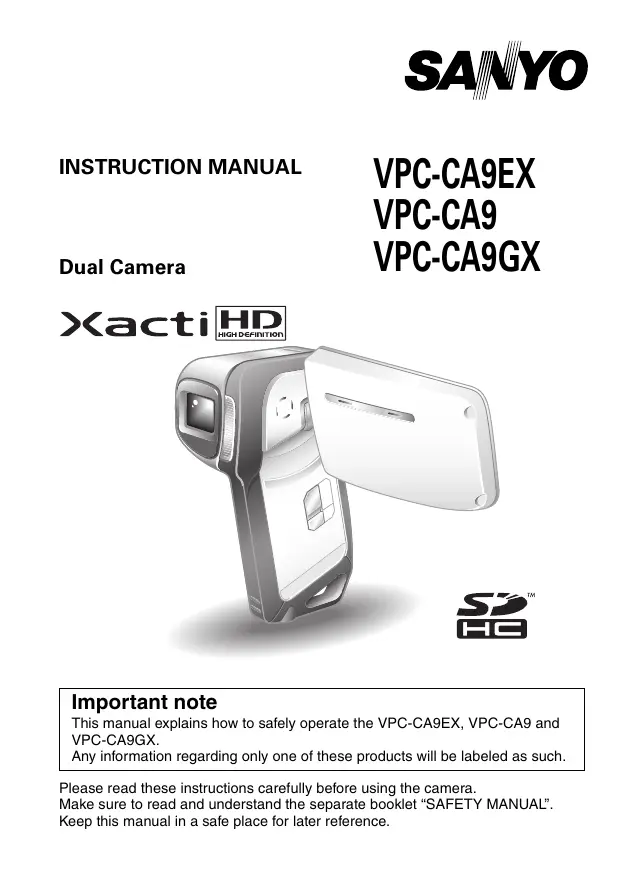
MODE D'EMPLOI VPC-CA9 SANYO
INSTRUCTION MANUAL
VPC-CA9EX
VPC-CA9
Dual Camera
VPC-CA9GX
Xacti HD

Important note
This manual explains how to safely operate the VPC-CA9EX, VPC-CA9 and VPC-CA9GX.
Any information regarding only one of these products will be labeled as such.
Please read these instructions carefully before using the camera.
Make sure to read and understand the separate booklet "SAFETY MANUAL".
Keep this manual in a safe place for later reference.
Warning
TO PREVENT THE RISK OF FIRE OR ELECTRIC SHOCK, DO NOT EXPOSE THIS APPLIANCE TO RAIN OR MOISTURE.
FOR AMERICAN USERS
The following advisory is included in accordance with the laws of the State of California (USA):
WARNING:
This product contains chemicals, including lead, known to the State of California to cause cancer, birth defects or other reproductive harm. Wash hands after handling.
-
This equipment has been tested and found to comply with the limits for a Class B digital device, pursuant to Part 15 of the FCC Rules. These limits are designed to provide reasonable protection against harmful interference in a residential installation. This equipment generates, uses and can radiate radio frequency energy and, if not installed and used in accordance with the instructions, may cause harmful interference to radio communications. However, there is no guarantee that interference will not occur in a particular installation. If this equipment does cause harmful interference to radio or television reception, which can be determined by turning the equipment off and on, the user is encouraged to try to correct the interference by one or more of the following measures:
-
Reorient or relocate the receiving antenna.
- Increase the separation between the equipment and receiver.
- Connect the equipment into an outlet on a circuit different from that to which the receiver is connected.
-
Consult the dealer or an experienced radio/TV technician for help.
-
Changes or modifications not expressly approved by the party responsible for compliance could void the user's authority to operate the equipment.
Model number: VPC-CA9
Trade Name: SANYO
Responsible party: SANYO FISHER COMPANY
Address: 21605 Plummer Street, Chatsworth, California 91311
Telephone No.: (818) 998-7322
This device complies with Part 15 of the FCC Rules. Operation is subject to the following two conditions:
(1) this device may not cause harmful interference, and
(2) this device must accept any interference received, including interference that may cause undesired operation.
FOR CANADIAN USERS
- This Class B digital apparatus complies with Canadian ICES-003.
FOR EU USERS
The symbol mark and recycling systems described below apply to EU countries and do not apply to countries in other areas of the world.
Your SANYO product is designed and manufactured with high quality materials and components which can be recycled and/or reused.
The symbol mark means that electrical and electronic equipment, batteries and accumulators, at their end-of-life, should be disposed of separately from your household waste.
Note:
If a chemical symbol is printed beneath the symbol mark, this chemical symbol means that the battery or accumulator contains a heavy metal at a certain concentration. This will be indicated as follows: Hg: mercury, Cd: cadmium, Pb: lead
In the European Union there are separate collection systems for used electrical and electronic equipment, batteries and accumulators.
Please, dispose of them correctly at your local community waste collection/ recycling centre.
Please, help us to conserve the environment we live in!

SANYO FISHER Sales (Europe) GmbH
Stahlgruberring 4, D-81829 München, Germany
SANYO Electric Co., Ltd.
1-1, Sanyo-cho, Daito City, Osaka 574-8534, Japan
FOR RUSSIAN USERS

AR46
This product is certified by an official certification company which is authorized by the Russian Federation.
HOW TO READ THIS MANUAL
For first-time users
Please read the sections on "SETUP" and "SIMPLE" in this manual, as well as the included "QUICK GUIDE" to familiarize yourself with your camera's operation.
To use the various camera features
Please read the sections on "NORMAL" and "OPTION SETTINGS" in this manual. To view on a TV, please read the section on "OTHER DEVICES AND CONNECTIONS" in this manual. To connect to a computer, please see the "Xacti Software CD INSTRUCTION MANUAL".
To use additional features
To use a computer to edit the recorded data or to save data to a DVD, please read the "Xacti Software CD INSTRUCTION MANUAL".
You may find the answers to questions or problems concerning camera operation in the sections "COMMONLY ASKED QUESTIONS" (page 143) and "TROUBLESHOOTING" (page 150).
Symbols used in this manual
HINT Points giving some extended instructions or special points to pay attention to.
CAUTION Points that require special attention.
(page xx) Refer to the page indicated for detailed information.
SHOOT, PLAY BACK AND SAVE
Install the battery pack and card
1 Insert the battery pack.
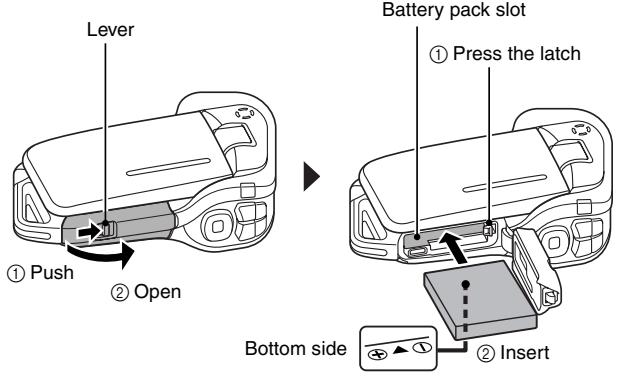
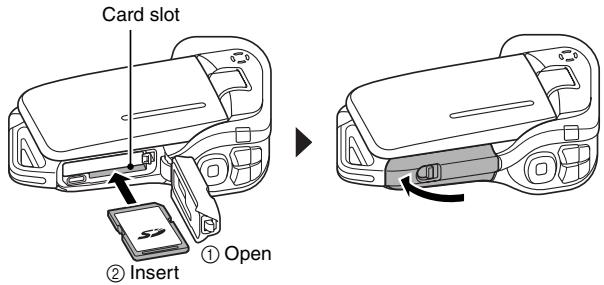
2 Insert the SD Memory Card.
- An SD Memory Card is not included with your camera. Please purchase a commercially sold card.
- In this manual, the SD Memory Card is referred to as the "card".
Shooting
Video clip recording
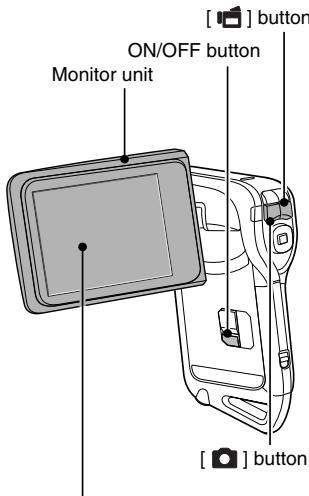
- The camera turns on.
- If the screen to set the date and time appears, press the MENU button 2 times to cancel it.
For how to set the date and time, see page 32.
2 Record.
To record a video clip:
- Press the [ ] button to begin recording a video clip.
Press the [ ] button again to end the recording.
To take a photo:
- Press the [ ] button.
- A still image is captured.

1031

00:55:58
Before capturing those important shots, be sure to first take a test shot to confirm that your camera is set up and ready to go
- Sanyo declines any claim for compensation for recorded contents etc. in case of photographing or recording failure due to a chance camera or card flaw.
Playback
The display changes to the Playback Screen.
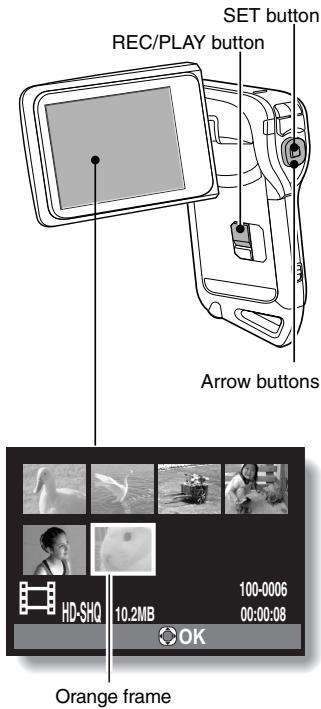
2 Select the image to play back.
- Press the [▶] or [▶] button to move the orange frame to the image you wish to pl back.
- The image information for the framed image is shown at the bottom of the screen.