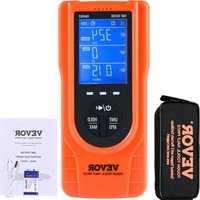
EM4552 - équipements de mesure Vevor - Notice d'utilisation et mode d'emploi gratuit
Retrouvez gratuitement la notice de l'appareil EM4552 Vevor au format PDF.


| Caractéristiques techniques | Modèle : Vevor EM4552, Type : Équipement de mesure, Précision : ±0.1% |
|---|---|
| Utilisation | Conçu pour des mesures précises dans divers environnements industriels et de laboratoire. |
| Maintenance et réparation | Vérifier régulièrement l'étalonnage, nettoyer les capteurs, consulter le manuel pour les procédures de dépannage. |
| Sécurité | Utiliser des équipements de protection individuelle (EPI) lors de la manipulation, respecter les consignes de sécurité du fabricant. |
| Informations générales | Garantie : 1 an, Support technique disponible, Accessoires inclus : câbles de connexion, manuel d'utilisation. |
FOIRE AUX QUESTIONS - EM4552 Vevor
Questions des utilisateurs sur EM4552 Vevor
0 question sur cet appareil. Repondez a celles que vous connaissez ou posez la votre.
Poser une nouvelle question sur cet appareil
Téléchargez la notice de votre équipements de mesure au format PDF gratuitement ! Retrouvez votre notice EM4552 - Vevor et reprennez votre appareil électronique en main. Sur cette page sont publiés tous les documents nécessaires à l'utilisation de votre appareil EM4552 de la marque Vevor.
MODE D'EMPLOI EM4552 Vevor
VEVOR
TOUGH TOOLS, HALF PRICE
Technical Support and E-Warranty Certificate www.vevor.com/support
EMF TESTER
INSTRUCTION SHEET
MODEL:EM4552
We continue to be committed to provide you tools with competitive price. "Save Half", "Half Price" or any other similar expressions used by us only represents an estimate of savings you might benefit from buying certain tools with us compared to the major top brands and does not necessarily mean to cover all categories of tools offered by us. You are kindly reminded to verify carefully when you are placing an order with us if you are actually saving half in comparison with the top major brands.
MODEL:EM4552
NEED HELP? CONTACT US!
Have product questions? Need technical support? Please feel free to contact us:
Technical Support and E-Warranty Certificate www.vevor.com/support
This is the original instruction, please read all manual instructions carefully before operating. VEVOR reserves a clear interpretation of our user manual. The appearance of the product shall be subject to the product you received. Please forgive us that we won't inform you again if there are any technology or software updates on our product.
| Warning-To reduce the risk of injury, user must read instructions manual carefully. | |
| This device complies with Part 15 of the FCC Rules. Operation is subject to the following two conditions:(1)This device may not cause harmful interference, and (2)this device must accept any interference received, including interference that may cause undesired operation. | |
| This product is subject to the provision of European Directive 2012/19/EC. The symbol showing a wheelie bin crossed through indicates that the product requires separate refuse collection in the European Union. This applies to the product and all accessories marked with this symbol. Products marked as such may not be discarded with normal domestic waste, but must be taken to a collection point for recycling electrical and electronic devices |
INTRODUCTION
This meter is a hand-held EMF tester designed to measure electromagnetic field radiation levels around power lines, home appliances and industrial devices. Users can make reasonable processing or take effective prevention measures toward the electromagnetic radiation according to the test result.
FEATURES
- Simultaneously measure and display electric field, magnetic field and radio frequency field
- Two magnetic field units to select from
MAX recording mode - Low battery indication
Data hold - Auto power off
APPLICATIONS
- Detect electromagnetic field radiation in living environments such as residence, office, computer room, distribution room and transmission tower.
- Test functions of electromagnetic field radiation protection products, including assessing the effectiveness of electromagnetic shielding in radiation protective clothing.
- Detcet various RF radiation sources, including testing wireless communication devices such as mobile phone, router and microwave oven.
WARNING
- Do not tamper with the internal circuits of the instrument.
Do not bump or drop the instrument. Keep the instrument clean and dry. - Replace the battery as soon as the low battery indicator (
appears on the display. - If you do not use the instrument for a long period of time, remove
the battery from the battery compartment to avoid damage. - Do not expose the instrument to direct sunlight or to extreme
temperatures and humidity. - Before use, verify the instrument's operation by testing a device
- which is producing electromagnetic field. Do not use the instrument if it operates abnormally or it is damaged.
-
Adhere to local and national safety codes.
-
Use caution when working in the vicinity of powerful radiation sources. Long term exposure to electromagnetic field may be the cause of childhood leukemia and other forms of cancer. Persons with electronic implants (e.g. cardiac pacemakers) should avoid powerful radiation sources.
- Carefully read the operating instructions for equipment generating electromagnetic field that will be measured.
- Do not operate the instrument where explosive gas, vapor or dust is present.
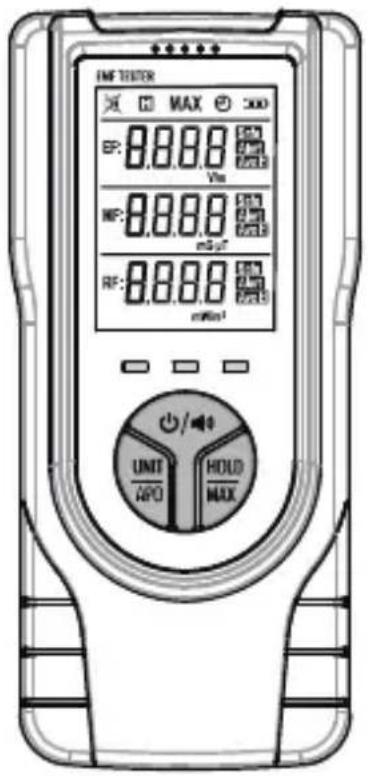
FRONT PANEL
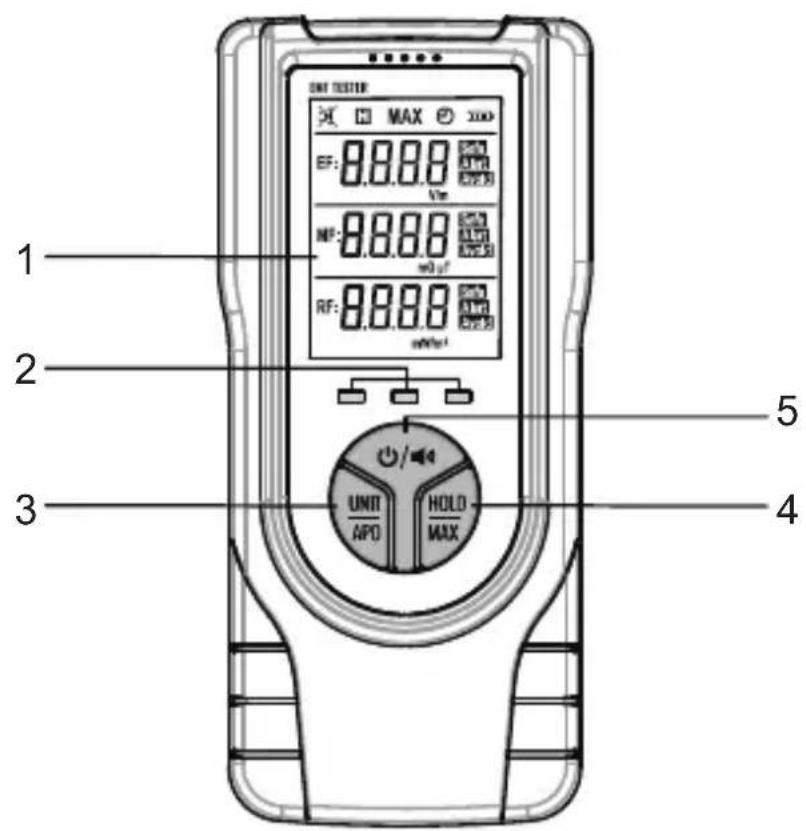
- Display
- Radiation Strength Indicator LED
Green indicates a low level; Yellow indicates a medium level; Red indicates a high level.
- " UNIT APO " Button
Short press to change the magnetic field unit.
Long press to enable or disable the automatic power-off feature.
- " HOLD MAX" Button
Short press to lock or unlock the current readings.
Long press to enter or exit the MAX recording mode.
- "按钮
Short press to enable or disable the audible alarm function. Long press to turn on or off the tester.
DISPLAY DESCRIPTION
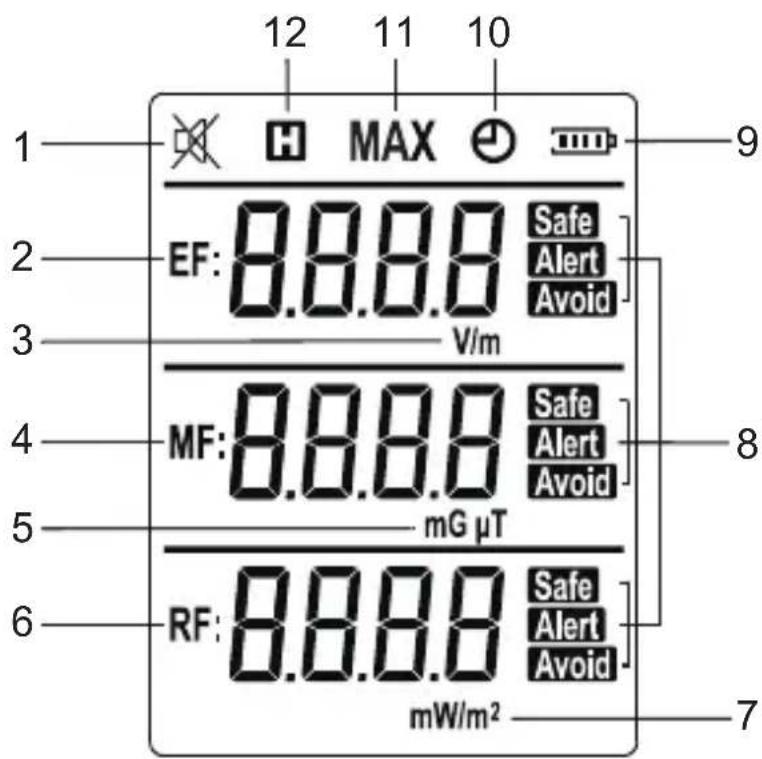
| No. | Symbol | Description |
| 1 | × | The buzzer sound is disabled. |
| [ ] | The buzzer sound is enabled. | |
| 2 | EF | Electric field indication area |
| 3 | V/m | Electric field unit: volts per meter |
| 4 | MF | Magnetic field indication area |
| 5 | mG μT | Magnetic field units:mG: milli Gauss; μT: micro Tesla |
| 6 | RF | RF field indication area |
| 7 | mW/m2 | RF field unit:milliwatts per square meter |
| 8 | SafeAlertAvoid | Radiation intensity indicator:" Safe " indicates a low level;" Alert " indicates a medium level;" Avoid " indicates a high level. |
| 9 | [ ] | Battery level indicator |
| 10 | ⊕ | Auto power-off feature is enabled. |
| 11 | MAX | Maximum reading is displayed. |
| 12 | [ ] | The detector is in Data Hold mode. |
OPERATION INSTRUCTION
1. Making measurements
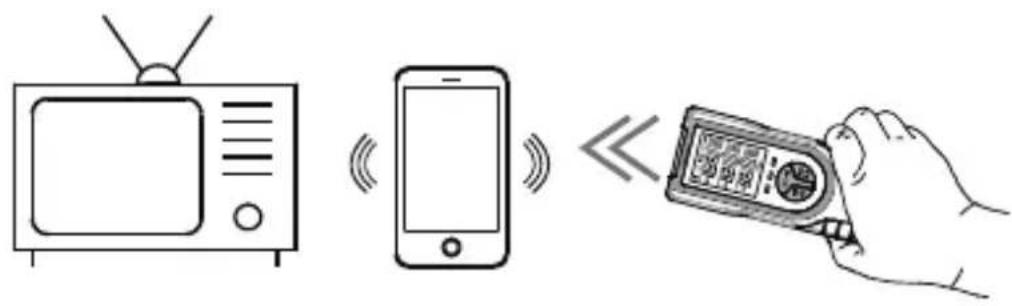
-
Press and hold the " / 一 " button for about 2 seconds to turn on the tester. It defaults to enter the real-time measurement mode.
-
With the tester in hand, move the head of the tester slowly towards the object under test (as show in the above Figure). The display simultaneously shows the measurement results of electric field, magnetic field and radio frequency field. The tester also gives indications to indicate the intensity of measured radiation, as shown in the following table.
Note: The radiation intensity increases as the tester gets closer to a radiation source.
| Range | Indicator LED | Symbol | Buzzer Sound |
| EF:< 40V/m | Green | Safe | No |
| MF:< 0.4μT | |||
| RF:< 5mW/m2 | |||
| EF:40 ~ 80V/m | Yellow | Alert | Yes |
| MF:0.4 ~ 0.8μT | |||
| RF:5 ~ 10mW/m2 | No | ||
| EF:> 80V/m | Red | Avoid | Yes |
| MF:> 0.8μT | |||
| RF:> 10mW/m2 |
Note:
-
Whenever any of the EF, MF or RF radiation intensities reaches the medium level (" Alert " appears), the yellow indicator LED will light up. If either EF or MF reaches the medium level, the buzzer will sound. Similarly, whenever any of the three radiation intensities reaches the high level (" Avoid " appears), the red indicator LED will light up and the buzzer will sound.
-
Move the tester a little left and right and change the tester's direction, the tester may change its radiation intensity indication. The highest reading displayed during the detection is the most accurate measurement result.
-
The detection sensor is positioned at the head of the tester. When making a measurement, you should hold the tester at the rear section (below the display and the buttons) to avoid hand obstruction which may affect the measurement results.
-
Hold the tester steadily in close proximity to the object being measured. Avoid rapid movements, as the tester requires reaction time.
- During detection, ensure that there are no metals or other conductive materials in the vicinity of the measured object.
2. Data Hold
Briefly press the "HOLD MAX" button, the readings are held on the display.
The symbol "H" will appear as an indicator.
To exit the data hold mode, press this button again.
The symbol " 串 " disappears.
3. Audible Alarm Function
When the tester is turned on, the audible alarm function is on. The display shows the symbol " 品 " as an indicator.
To disable the audible alarm function, briefly press the "O/0" button.
The symbol " 品 " appears on the display.
4. MAX Recording Mode
When the tester is turned on, it defaults to enter the real-time measurement mode.
To switch to MAX recording mode, press and hold the "HOLD" button for about 2 seconds. The display will show the symbol "MAX".
In MAX recording mode, the display always shows the maximum readings of all readings taken since entering this mode. Whenever the tester detects a new value which is higher than the presently displayed reading, it replaces the presently displayed reading with this new value.
If you need to return to real-time measurement mode, long press the "HOLD" button until the symbol "MAX" disappears from the display.
5. Switching Units
The tester has two magnetic field units. You can briefly press the "UNIT" button to switch the MF unit between mG and T .
6. Automatic Power-off
Press and hold the " UNIT APO" button to enable or disable the automatic power-off feature. When the automatic power-off feature is enabled, the symbol " " will appear on the display.
If there is no button press for about 10 minutes, the tester will turn off automatically.
7. Turning off the tester
To turn off the tester, press and hold the " button for about 2 seconds.
BATTERY CHARGING/REPLACEMENT
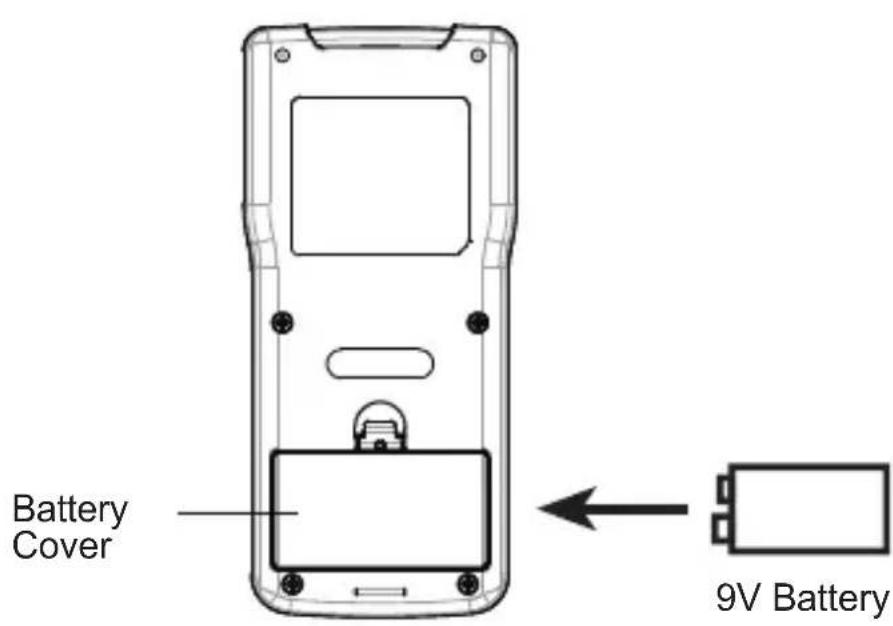
When the symbol " " appears on the display, replacement of the battery is needed. To replace the battery, open the battery cover on the back of the tester. Replace the old battery with a new one of the same type, make sure that the polarity connections are correct. Close the battery cover until it is secured in place.