
WM-GX688 - Lecteur de cassette portable SONY - Notice d'utilisation et mode d'emploi gratuit
Retrouvez gratuitement la notice de l'appareil WM-GX688 SONY au format PDF.


| Type de produit | Lecteur de cassette portable avec radio AM/FM |
| Marque | Sony |
| Modèle | WM-GX688 |
| Dimensions (sans pile) | 108,4 × 77,7 × 23,0 mm |
| Dimensions (avec pile rechargeable NC-6WM) | 108,4 × 77,7 × 23,4 mm |
| Poids (sans pile) | 148 g |
| Poids (avec pile rechargeable NC-6WM) | 172 g |
| Alimentation | 1 pile R6 (AA) 1,5 V DC ou pile rechargeable NC-6WM 1,2 V 600 mAh Ni-Cd ; adaptateur secteur AC-E15L / AC-E15HG (en option) |
| Autonomie des piles (alcaline LR6) | Lecture cassette : 31,5 h ; Radio : 32 h ; Enregistrement micro : 10 h ; Enregistrement radio : 6,5 h |
| Autonomie de la pile rechargeable NC-6WM | Lecture cassette : 8,5 h ; Radio : 10 h ; Enregistrement micro : 4 h ; Enregistrement radio : 3 h |
| Gammes de fréquences radio | FM : 76 – 90 MHz (Japon) / 87,5 – 108 MHz (USA/Eur) ; AM : 531 – 1710 kHz |
| Fonctions de lecture | Lecture automatique, avance rapide, rembobinage, AMS (recherche de plage), lecture A-B répétée, inversion de sens, Skip Reverse, Rewind Auto Play |
| Réduction de bruit | Dolby B NR activable en lecture |
| Enregistrement | Par micro intégré (fourni) ou depuis la radio ; niveau d'enregistrement fixe ; enregistrement automatique sur les deux faces |
| Amplification sonore | RV (aigus), MB (basses modérées), GRV (basses puissantes) |
| Protection auditive | AVLS (limiteur de volume automatique) |
| Verrouillage des touches | Fonction HOLD sur l'appareil et la télécommande |
| Compteur de bande | Affichage numérique avec remise à zéro |
| Préréglages radio | Jusqu'à 16 stations (8 FM + 8 AM) ; mémorisation automatique ou manuelle |
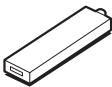
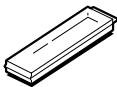
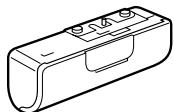
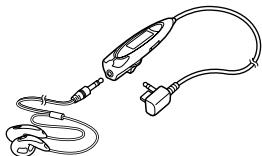
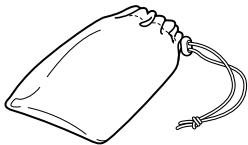
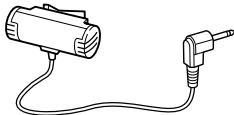
| Accessoires fournis | Télécommande, micro, écouteurs, pile rechargeable NC-6WM, chargeur, boîtier à piles |
| Entretien et nettoyage | Nettoyer avec un chiffon doux et sec ; ne pas utiliser de solvants ; nettoyer les têtes de lecture avec un coton-tige imbibé d'alcool |
| Réparabilité | Les piles rechargeables sont remplaçables ; les pièces détachées sont disponibles auprès du service après-vente Sony |
FOIRE AUX QUESTIONS - WM-GX688 SONY
Questions des utilisateurs sur WM-GX688 SONY
0 question sur cet appareil. Repondez a celles que vous connaissez ou posez la votre.
Poser une nouvelle question sur cet appareil
Téléchargez la notice de votre Lecteur de cassette portable au format PDF gratuitement ! Retrouvez votre notice WM-GX688 - SONY et reprennez votre appareil électronique en main. Sur cette page sont publiés tous les documents nécessaires à l'utilisation de votre appareil WM-GX688 de la marque SONY.
MODE D'EMPLOI WM-GX688 SONY


WALKMAN
WALKMAN est une marque déposée de Sony Corporation.
WALKMAN est une marque déposée de Sony Corporation, filiale à 100 % de notre société.
WALKMAN est une marque déposée de Sony Corporation.
WM-GX688
Danger
4 6 8 10 14
18
AMS 19
PB MODE 20
BNR 21
A-B 22
24
25
26
29
30
32
SON 34
AVLS 35
36
37
39
40 41 43 45 46 48
14
3 REVIVE MEGA BASS GROOVE 34 A-B 22 ·16 9 AMS 19 8 JR 10 40 38 . 24
NC-6WM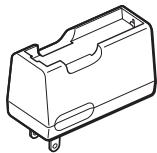
AC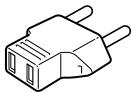
39
1
3
AC
1
2


3
TÉLÉCOMMANDE
MAINTIEN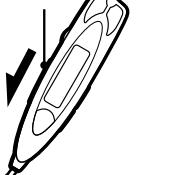
TYPE I
TYPE II
TYPE IV
1
① OUVERT (2)
FWD
REV
2
L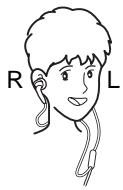

FWD
REV

/ FF* 1
REW
FF
REW
FF REW
FF
REW
FF 2
FF
REW 2
REW

18

8
ZONE 4
1
2
① ENTRER
② ZONE 1 RADIO MARCHE/BANDE
(3)
SYNCHRO/PRÉRÉGLAGE
18 JR
SYNCHRO/PRÉRÉGLAGE
1 2
3 4 5 6 7 8 JR USA* Eur* 1 2 3...
USA Eur
32
*
2-①
.
.
30
31
④ENTER
3 AM FM
4
5
RADIO OFF
RADIO ON/BAND·OFF
2
15
AM
FM
25
26
TYPE I
17
1
① OPEN
(2)
FWD
REV
FWD
REV
FWD
FWD REV
2 (1) FM ② 10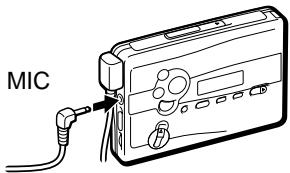
TUNE/PRESET RADIO ON/BAND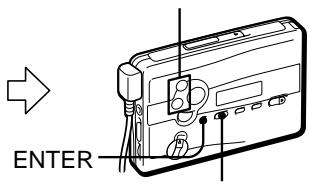
3 REC REC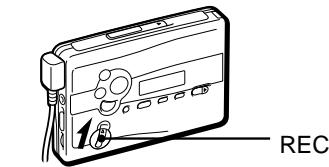
| AM | ||
| ISS | 1 2 3 | |
| FWD | REV | |
| REV | ||
| REV | ||
| VOL | RV/MB/GRV | |
| AVLS ONR | ||
| VOL | ||
| NORM | RV | |
| MB GRV | ||
| REC | 2 | |
| TYPE I | ||
FWD
REV
10
24
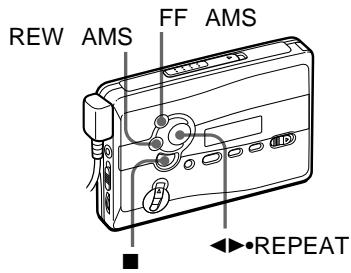
| ←●REPEAT | FWDREV | ||||
| ←●REPEAT | FWDREV | ||||
| ■ | |||||
| / | FF | REW | |||
| * | 1 | ||||
| / | FF | REW | : | ... | |
| : | |||||
| ... | |||||
| FF | AMS | ... | |||
| 2 | |||||
| REW | AMS | ... | |||
| 2 | |||||
AMS
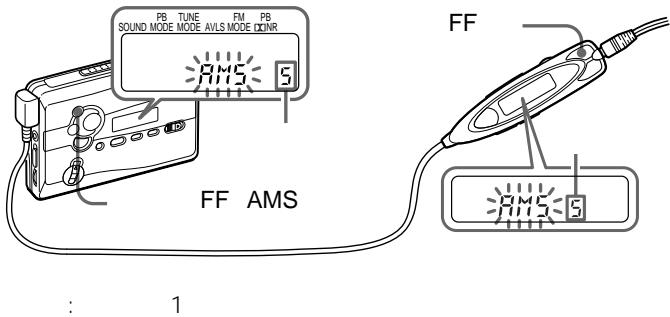
9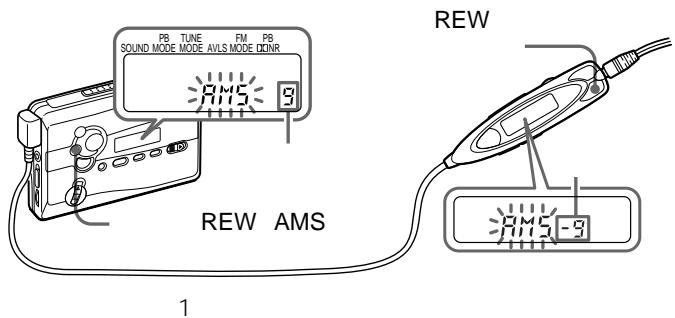
AMS
AMS
4
4
AMS
PB MODE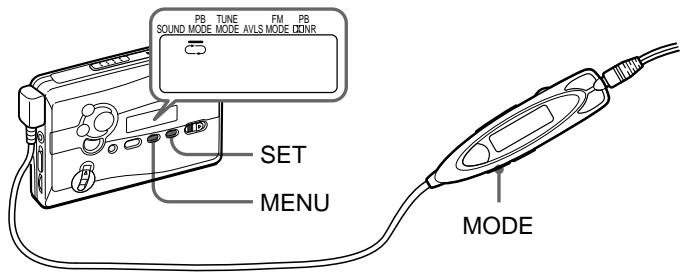
| PB MODE | ||
| ← | ← | |
| → | → | 1 * |
| * REV | REV | |
MODE
MENU
SET
PB MODE
*B NR BNR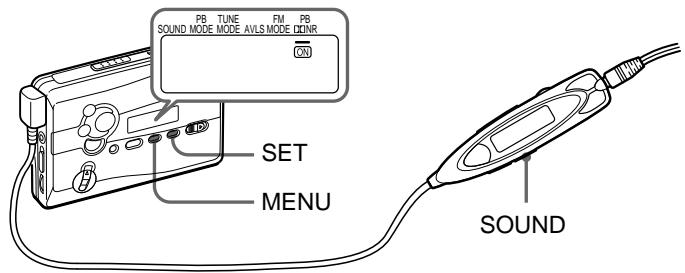
Dolby
ON
D
| PB DQNIR | |
| ON | BNR |
| BNR | |
SOUND
BNR
SOUND
MENU
SET
ON
PB DNNR
•
.
BNR
BNR
B NR
ON
A-B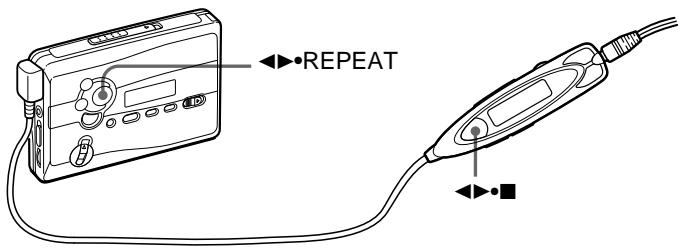
A
B
1

2
A
2

B
1

REPEAT
A
2

REPEAT
B
A-B
REP
A-B


FWD REV REV FWD A-B ·2 A-B A-B
? 43
·90
A-B
FWD /
REV
ENTRÉE/REMISE À ZÉRO DU COMPTEUR
ENTRÉE/REMISE À ZÉRO DU COMPTEUR
:
1 RADIO MARCHE/BANDE
RADIO MARCHE/
BANDE·ARRÊT 1
2 RADIO MARCHE/BANDE
AM FM
RADIO MARCHE/BANDE·ARRÊT 1
3 MENU MODE D'ACCORD 4 RÉGLAGE MANUEL 5 ACCORD/PRÉRÉGLAGE
- ACCORD/PRÉRÉGLAGE
ACCORD/PRÉRÉGLAGE

AM FM 8
1 RADIO ON/BAND
RADIO ON/
BAND·OFF 1
2 RADIO ON/BAND FM
AM
RADIO ON/BAND·OFF 1
3 A
ENTER
28
8 30 31

AM FM 8
1 RADIO ON/BAND
RADIO ON/
BAND·OFF 1
2 RADIO ON/BAND
AM FM
RADIO ON/BAND·OFF 1
3 ENTER
4 TUNE/PRESET
ENTER
5 TUNE/PRESET
6 ENTER
* 3
28
.
30 31
1 27
1 3
2
TUNE/PRESET
3 ENTER
4
TUNE/PRESET
5 ENTER

1 RADIO ON/BAND
RADIO ON/
BAND·OFF 1
2 RADIO ON/BAND FM
RADIO ON/BAND·OFF 1
3 MENU TUNE MODE 4 SET PRESET 5 TUNE/PRESET
- -
FM MENU
FM MODE SET
LOCAL MONO
AM
| AREA 1 | Sapporo | |
| AM 1 | 567kHz | NHK 1 |
| 2 | 747kHz | NHK 2 |
| 3 | 1287kHz | |
| 4 | 1440kHz | |
| FM 1 | 80.4MHz | FM |
| 2 | 82.5MHz | FM |
| 3 | 85.2MHz | NHK FM |
| 4 | 88.2MHz | NHK FM |
| AREA 2 | Sendai | ||
| AM | 1 | 891kHz | NHK 1 |
| 2 | 1089kHz | NHK 2 | |
| 3 | 1260kHz | ||
| FM | 1 | 77.1MHz | FM |
| 2 | 82.5MHz | NHK FM | |
| AREA 3 | Northern Kanto | ||
| AM | 1 | 594kHz | NHK 1 |
| 2 | 693kHz | NHK 2 | |
| 3 | 810kHz | AFN FEN | |
| 4 | 954kHz | TBS | |
| 5 | 1134kHz | ||
| 6 | 1197kHz | ||
| 7 | 1242kHz | ||
| 8 | 1530kHz | ||
| FM | 1 | 76.4MHz | FM |
| 2 | 78.8MHz | ||
| 3 | 80.0MHz | TOKYO FM | |
| 4 | 80.3MHz | NHK FM | |
| 5 | 81.6MHz | NHK FM | |
| 6 | 83.2MHz | NHK FM | |
| 7 | 86.3MHz | FM | |
| AREA 4 | Southern Kanto | ||
| AM | 1 | 594kHz | NHK 1 |
| 2 | 693kHz | NHK 2 | |
| 3 | 810kHz | AFN FEN | |
| 4 | 954kHz | TBS | |
| 5 | 1134kHz | ||
| 6 | 1242kHz | ||
| 7 | 1422kHz | ||
| FM | 1 | 76.1MHz | FM |
| 2 | 78.0MHz | FM | |
| 3 | 78.6MHz | FM | |
| 4 | 79.5MHz | FM | |
| 5 | 80.0MHz | TOKYO FM | |
| 6 | 81.3MHz | FM | |
| 7 | 82.5MHz | NHK FM | |
| 8 | 84.7MHz | FM | |
| AREA 5 | Nagoya | ||
| AM | 1 | 729kHz | NHK 1 |
| 2 | 909kHz | NHK 2 | |
| 3 | 1053kHz | CBC | |
| 4 | 1332kHz | ||
| 5 | 1431kHz | ||
| FM | 1 | 77.8MHz | FM |
| 2 | 78.9MHz | FM | |
| 3 | 80.7MHz | FM | |
| 4 | 81.8MHz | NHK FM | |
| 5 | 82.5MHz | NHK FM | |
| 6 | 83.6MHz | NHK FM | |
| AREA 6 | Osaka |
| AM 1 | 558kHz | |
| 2 | 666kHz | NHK 1 |
| 3 | 828kHz | NHK 2 |
| 4 | 1008kHz | ABC |
| 5 | 1143kHz | KBS |
| 6 | 1179kHz | |
| 7 | 1314kHz | |
| 8 | 1431kHz | |
| FM 1 | 76.5MHz | |
| 2 | 80.2MHz | FM802 |
| 3 | 82.8MHz | NHK FM |
| 4 | 85.1MHz | FM |
| 5 | 86.5MHz | NHK FM |
| 6 | 88.1MHz | NHK FM |
| 7 | 89.4MHz | FM |
| 8 | 89.9MHz | FM |
| AREA 7 | Hiroshima | ||
| AM | 1 | 702kHz | NHK 2 |
| 2 | 918kHz | ||
| 3 | 1071kHz | NHK 1 | |
| 4 | 1116kHz | ||
| 5 | 1350kHz | ||
| 6 | 1575kHz | AFN FEN | |
| FM | 1 | 78.2MHz | FM |
| 2 | 88.3MHz | NHK FM | |
| AREA 8 | Fukuoka | ||
| AM | 1 | 612kHz | NHK 1 |
| 2 | 1017kHz | NHK 2 | |
| 3 | 1278kHz | RKB | |
| 4 | 1413kHz | ||
| FM | 1 | 77.9MHz | FM |
| 2 | 78.7MHz | FM | |
| 3 | 80.7MHz | FM | |
| 4 | 81.6MHz | NHK FM | |
| 5 | 84.8MHz | NHK FM | |
| JR | JR | * | Shinkansen |
| FM 1 | 76.0MHz |
| 2 | 76.6MHz |
| 3 | 77.5MHz |
| 4 | 78.8MHz |
| 5 | 79.6MHz |
| * | 2 |
1 RADIO ON/BAND 2 ENTER 3 AREA 1 RADIO ON/BAND 4 TUNE/PRESET
USA Eur
2
| USA | FM: 87.5 - 108MHz AM: 530 - 1 710kHz |
| Eur | FM: 87.5 - 108MHz AM: 531 - 1 602kHz |
5 ENTER 6 25
26
USA Eur AREA1 8 JR
26 27
1 3 ENTER
4 AREA1 8 JR
26 27
AREA1 8 JR 30 31
SOUND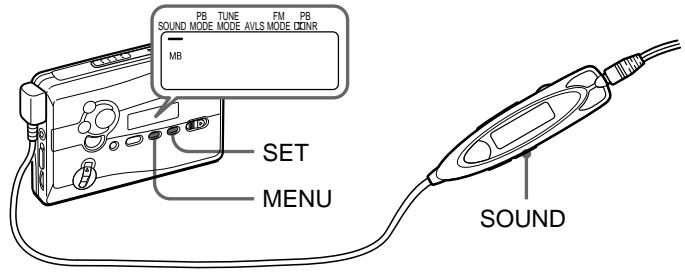
RV
MB
GRV
SON
MENU
RÉGLAGE
SON
GRV
AVLS—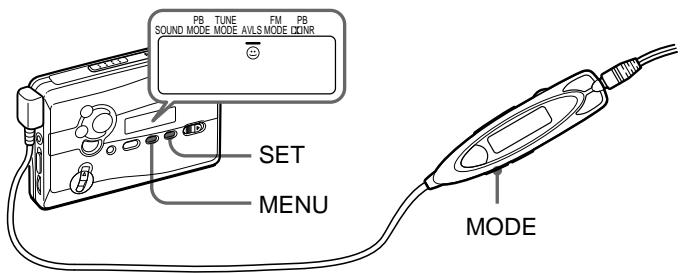
| AVLS | |
| AVLS | ◎ AVLS |
| AVLS | |
AVLS
MODE
AVLS
AVLS
MODE
MENU
RÉGLAGE

AVLS
AVLS
SET

AVLS
AVLS
HOLD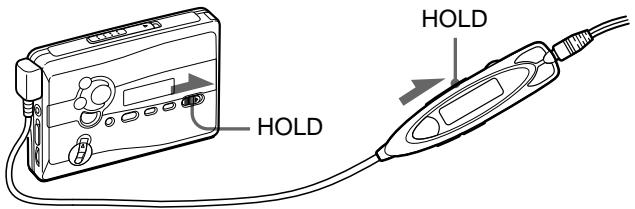


100
| LR6 SG ** | 31.5 | 32 | 10 | 6.5 |
| NC-6WM 100% | 8.5 | 10 | 4 | 3 |
| 40 | 42 | 13 | 9 | |
| * EIAJ | HF | |||
| ** | LR6 SG | |||
| · | ||||
| · | A-B | AMS |
1
2 AC
AC-E15L
AC-E15HG
DC IN 1.5V
3 AC
.
AC AC-E15L AC-E15H
EIAJ
AC
- AC-E15HG
10
CHK-1W
C-1KW/
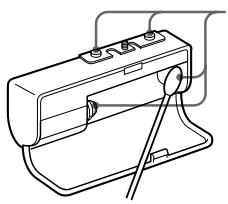
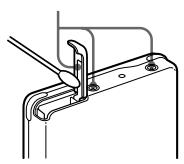
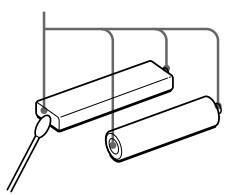
300

Ni-Cd
TEL 03-3434-0261
http://www.baj.or.jp
60
40 0 1 . . 90 .
A-B AMS
A-B AMS
36
| A-B | A-B 2 | A-B 2 |
| REC | 17 | |
| AVLS | AVLS | |
| 35 | ||
| RV MB | ||
| GRV | 34 | |
| ---- | 15 | |
1
6
1
90
DOLBY NR OFF 40 15 000 Hz EIA
100 8,000 Hz
1
0.4 mV
1
8 300
DC 3 mW + 3 mW EIAJ' 16
DC 1.5 V
NC-6WM 1.2 V 600 mAh
Ni-Cd 3 1
EIAJ
38
108.4 × 77.7 × 23.0 mm / /
108.4 × 77.7 × 23.4 mm / /
EIAJ*
148 g
172 g + NC-6WM EIAJ*
FM 76.0 90.0MHz
AM 531 1 710kHz
AC AC-E15L
AC AC-E15HG
NC-6WM
C-1KW CHK-1W
** MDR-ED238SP GROOVE
MDR-Q33SL MDR-E888SP MDR-848SP MDR-EX70SL
- EIAJ
**
TÉLÉCOMMANDE
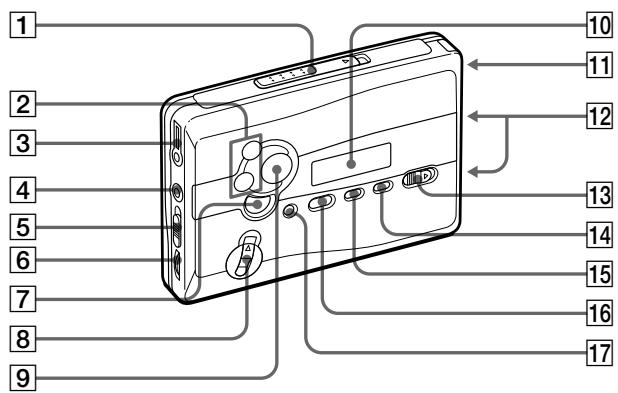
1 OUVRIR 2 :FF •AMS /REW •AMS: TUNE /PRESET 3 TÉLÉCOMMANDE 4 MIC ISS AM 6 VOL 7 :■:RADIO OFF
REC 9 RÉPÉTER 10 11 12 13 HOLD 14 RÉGLER 15 MENU 16 RADIO ON /BANDE FM AM 17 COMPTEUR REMISE À ZÉRO
ENTRER
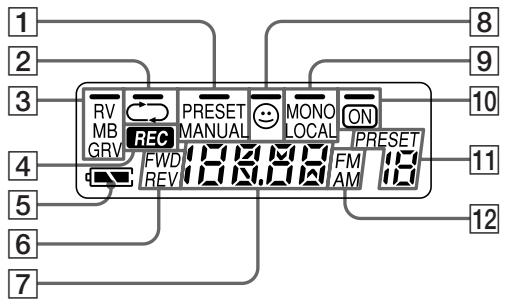
1 PRESET/MANUAL 2 / 3 RV/MB/GRV 4 REC 5 10 BN R ON 6 PRESET FWD/REV 7 8 AVLS FM MONO/LOCAL 10 BN R ON 11 PRESET
12 FM/AM
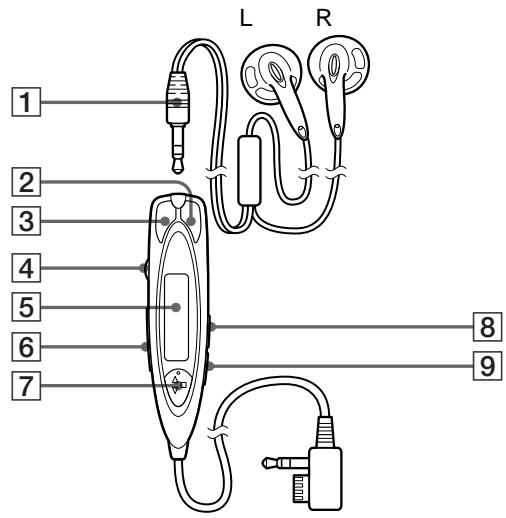
1 2 REW 3 FF 4 VOL 5 6 HOLD 7

: RADIO N/
BAND·OFF
SOUND 9 MODE
5
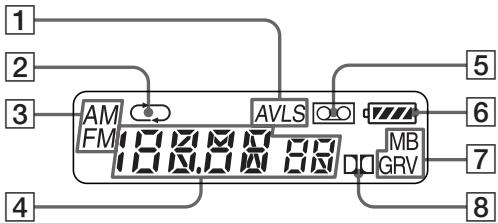
1 AVLS
5
2
6
3
7
4
8
Choix de la source d'alimentation
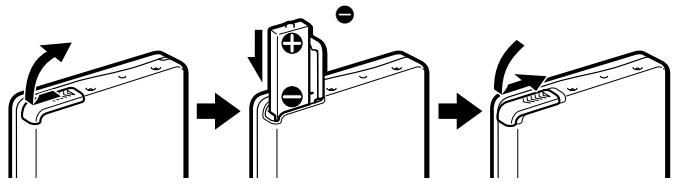
Pile sèche
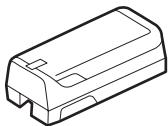
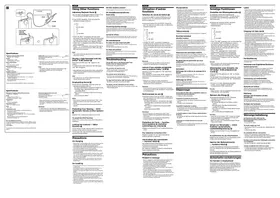
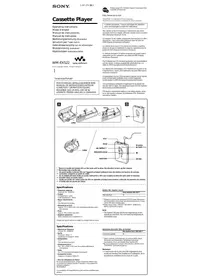
Fixez le boîtier de piles fourni, puis insérez une pile R6 (format AA) en respectant la polarité.
Remarque
- Pour des performances optimales, nous vous recommandons d'utiliser une pile alcaline Sony.
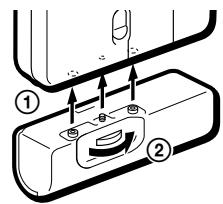
Batterie rechargeable
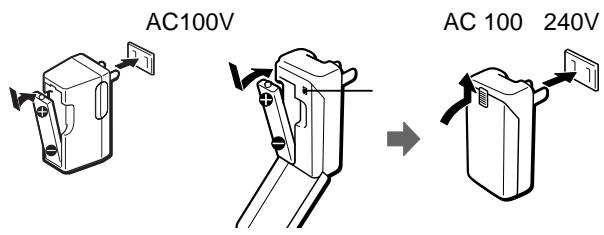
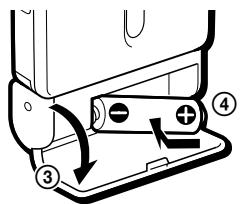
1 Insérez la batterie rechargeable fournie (NC-6WM) dans le chargeur en respectant la polarité. Reportez-vous aux indications et sur votre chargeur. 2 Branchez le chargeur sur le secteur. Modèle japonais : la charge complète prend environ 3 heures. « Modèle mondial Sony » : la charge complète prend environ 1 heure. Si la fiche ne correspond pas à votre prise secteur, fixez l'adaptateur de fiche secteur fourni. 3 Insérez la batterie complètement chargée dans le compartiment à batterie rechargeable.
Vous pouvez recharger la batterie environ 300 fois.
Quand remplacer ou recharger la batterie
Remplacez ou rechargez la batterie lorsque « □ » clignote à l'écran.
Durée de vie de la batterie
| (Approx. hours) | (EIAJ*) |
| Sony alkaline LR6 (SG)** | |
| Tape playback | 31.5 |
| Radio reception | 32 |
| MIC recording | 10 |
| Radio recording | 6.5 |
| Rechargeable battery (NC-6WM) | |
| Tape playback | 8.5 |
| Radio reception | 10 |
| MIC recording | 4 |
| Radio recording | 3 |
| Sony alkaline LR6 (SG)** and Rechargeable NC-6WM | |
| Tape playback | 40 |
| Radio reception | 42 |
| MIC recording | 13 |
| Radio recording | 9 |
- Valeur mesurée selon la norme EIAJ (Electronic Industries Association of Japan). (Avec une cassette Sony de la série HF.) **Lors de l'utilisation d'une pile alcaline sèche Sony LR6 (SG) « STAMINA » (fabriquée au Japon).
Remarque
- La durée de vie de la batterie peut être plus courte selon les conditions d'utilisation, la température ambiante et le type de batterie.
Courant domestique
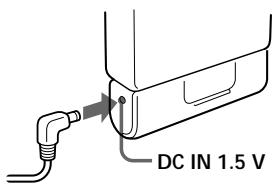
Retirez la batterie rechargeable si elle est insérée. Fixez le boîtier de batterie et connectez l'adaptateur secteur AC-E15L pour le Japon (non fourni) ou AC-E15HG (non fourni) à la prise DC IN 1,5 V du boîtier de batterie et à la prise murale.
N'utilisez aucun autre adaptateur secteur.
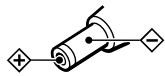
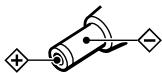
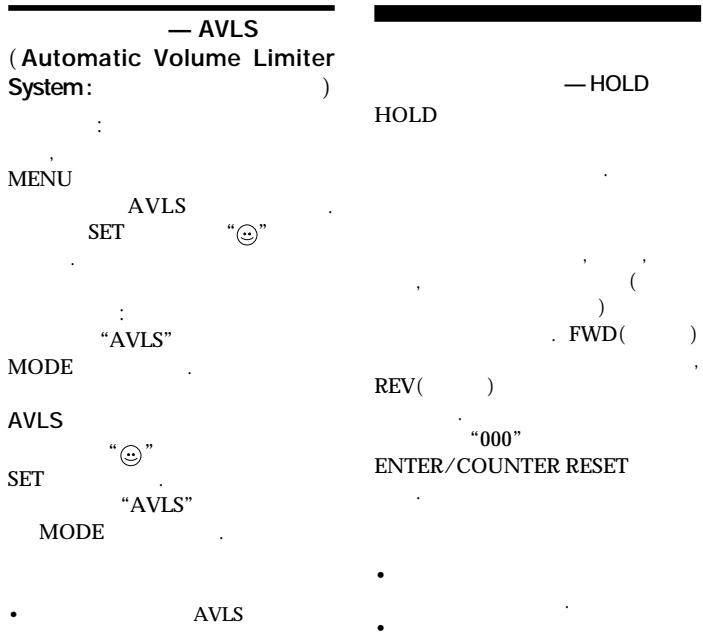
Les spécifications de l'AC-E15HG varient selon les régions. Vérifiez la tension locale et la polarité de la fiche avant l'achat.
Polarité de la fiche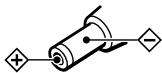
Lecture d'une cassette
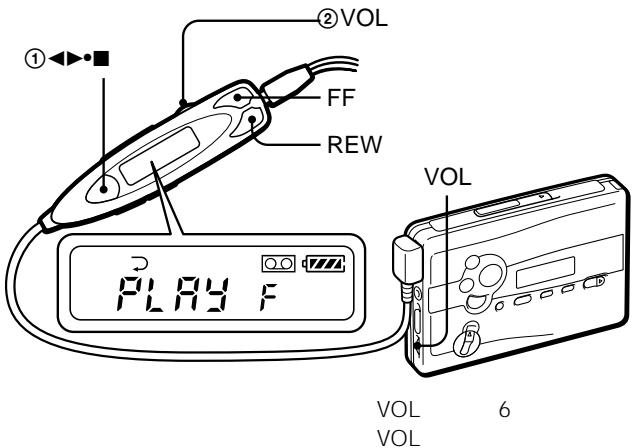
1 Insérez une cassette et si la fonction HOLD est activée, faites glisser l'interrupteur HOLD dans le sens opposé à la flèche pour déverrouiller les commandes. 2 Appuyez sur (lecture) (arrêt) sur la télécommande et réglez le volume avec VOL. (Sur l'unité principale, appuyez sur REPEAT.)
Lors du réglage du volume sur l'unité principale
Réglez la commande VOL de la télécommande au maximum.
Lors du réglage du volume sur la télécommande
Réglez la commande VOL de l'unité principale sur environ 6.
Fonctionnement sur la télécommande
| To | Press |
| Switch playback to the other side | ▲▶■ for 2 seconds or more during playback |
| Stop playback | ▲▶■ once during playback |
Fonctionnement sur l'unité principale
| To | Press |
| Switch playback to the other side | ▲●REPEAT during playback |
| Stop playback | ■ (stop) |
Autres opérations sur la cassette
| To | Press |
| Fast forward | FF during stop* or during playback During playback, the tape is fast-forwardsed as long as FF is pressed. |
| Rewind | REW during stop* or during playback During playback, the tape is rewound as long as REW is pressed. |
| To | Press |
| Play the next track/succeeding 9 tracks from the beginning (AMS**) | FF once/repeatedly during playback |
| Play the current track/previous 8 tracks from the beginning (AMS**) | REW once/repeatedly during playback |
| Play the other side from the beginning (Skip Reverse function) | FF for 2 seconds or more during stop |
| Play the same side from the beginning (Rewind Auto Play function) | REW for 2 seconds or more during stop |
- Si vous appuyez sur sur la télécommande pendant l'avance rapide ou le retour rapide, le Walkman passe en lecture. **Capteur de musique automatique
Répétition A-B
La répétition A-B permet de lire de manière répétée toute portion de la bande que vous avez spécifiée. Spécifiez-la en marquant le début (point A) et la fin (point B) de la portion pendant la lecture.
Sur la télécommande
1 Appuyez sur pendant 2 secondes ou plus pendant la lecture pour marquer le point A.
"A-" clignotera sur l'afficheur de l'unité principale.
2 Appuyez à nouveau sur pour marquer le point B.
"A-B" clignotera et la bande sera rembobinée jusqu'au point A. Ensuite, "REP" apparaît sur l'afficheur et la portion spécifiée est lue de manière répétée.
Sur l'unité principale
1 Appuyez sur REPEAT pendant 2 secondes ou plus pendant la lecture pour marquer le point A. "A-" clignotera sur l'afficheur de l'unité principale.
2 Appuyez à nouveau sur REPEAT pour marquer le point B.
"A-B" clignotera et la bande sera rembobinée jusqu'au point A. Ensuite, "REP" s'affiche et la portion spécifiée est lue de manière répétée.
Pour annuler la lecture en répétition A-B
Appuyez sur REPEAT sur l'unité principale.
Sur la télécommande, appuyez sur

Notes
- Vous ne pouvez pas spécifier une portion de répétition qui inclut les deux côtés de la bande.
- Vous ne pouvez pas spécifier une portion de répétition de moins de 2 secondes. Après une opération répétée, la portion réellement lue peut légèrement dévier de la portion exacte spécifiée avec les marqueurs en raison du mou de la bande.
- La répétition A-B se répétera 50 fois avant de revenir à la lecture normale si elle n'est pas annulée manuellement.
- N'utilisez pas la fonction de répétition A-B avec des cassettes de plus de 90 minutes. Si vous le faites, la cassette peut être endommagée.
Enregistrement
Vous pouvez enregistrer des programmes radio depuis la radio intégrée, ou enregistrer avec le microphone fourni. Dans les deux cas, utilisez une pile neuve ou complètement chargée.
Remarque
- Si la languette de protection contre l'enregistrement est cassée, vous ne pouvez pas enregistrer sur ce côté.
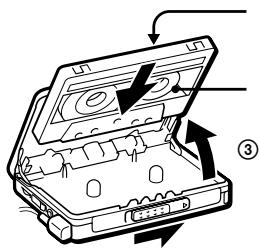
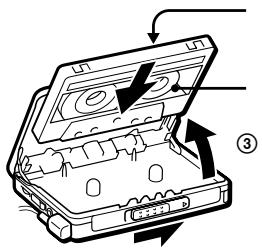
1 Insérez une cassette normale (TYPE I).
Pour enregistrer sur les deux côtés, insérez la cassette avec le côté à enregistrer en premier comme côté FWD (avant)*.
- Assurez-vous que "FWD" est affiché. Sinon, maintenez enfoncé jusqu'à ce que "REV" change en "FWD".
Pour enregistrer sur un seul côté
Insérez la cassette avec le côté à enregistrer comme côté REV (arrière)**.
**Assurez-vous que "REV" est affiché. Sinon, maintenez enfoncé jusqu'à ce que "FWD" change en "REV".
Note
- Lorsque le logement de la cassette est ouvert, le sens de la bande est automatiquement réglé sur « FWD ».
2 Sélectionnez une source d'enregistrement :
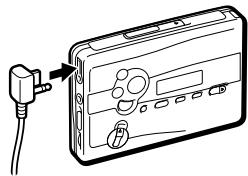
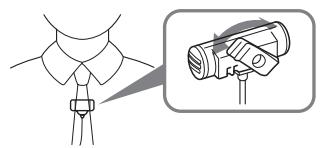
Pour enregistrer avec le microphone : branchez le microphone fourni sur la prise MIC (PLUG IN POWER).
Pour enregistrer à partir de la radio : syntonisez la station que vous souhaitez enregistrer (voir « Écoute de la radio »).
3 Faites glisser REC.
« REC » apparaît à l'écran et l'enregistrement démarre après environ 2 secondes.
Si vous avez commencé l'enregistrement sur le côté FWD, l'enregistrement basculera automatiquement sur le côté inverse à la fin du côté FWD.
Pour arrêter l'enregistrement
Appuyez sur (sur la télécommande, appuyez sur pour arrêter l'enregistrement).
Pour réduire le bruit lors de l'enregistrement de programmes AM
Réglez l'ISS (Interference Suppress Switch) sur la position qui réduit le plus le bruit.
Pour surveiller le son enregistré
Vous pouvez surveiller le son enregistré via un casque/écouteurs. Ajustez le niveau de surveillance avec VOL.
Note
- Vous pouvez entendre un certain bruit dans le son du moniteur en mode RV, MB ou GRV, mais cela n'affecte pas l'enregistrement.
Remarques sur l'enregistrement
Le niveau d'enregistrement est fixe. Les réglages d'accentuation sonore (RV, MB ou GRV), AVLS et Dolby B NR n'affectent pas l'enregistrement. - L'enregistrement réel commence environ 2 secondes après avoir fait glisser REC. Faites glisser REC environ 2 secondes avant le moment où vous voulez commencer l'enregistrement, sinon vous manquerez le début de votre enregistrement. - Lors de l'enregistrement sur les deux faces, l'enregistrement ne se fera pas pendant environ 10 secondes pendant que la cassette change de face.
- N'utilisez pas de cassette à haute position (TYPE II) ou métal (TYPE IV). Si vous le faites, le son peut être déformé lors de la lecture de la cassette, ou l'enregistrement précédent peut ne pas être effacé complètement.
- Ne connectez pas ou ne déconnectez pas les écouteurs de la prise ☑REMOTE pendant l'enregistrement depuis la radio. La condition d'enregistrement peut changer brusquement, ou du bruit peut être enregistré.
- Pour éviter les interférences de bruit, ne placez pas l'appareil près d'un cordon de lampe ou d'une lampe fluorescente lors de l'enregistrement avec le microphone.
- Si un effet de larsen se produit, baissez le volume.
- Aucune autre opération ne peut être effectuée pendant l'enregistrement. Pour toute autre opération, arrêtez d'abord l'enregistrement.
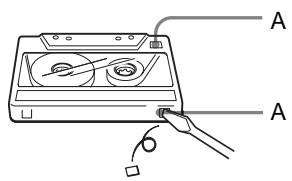
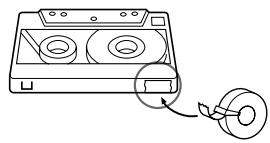
Pour empêcher qu'une cassette soit accidentellement enregistrée par-dessus
Cassez les languettes de la face A et/ou B. Pour réutiliser la cassette pour l'enregistrement, couvrez le trou de la languette avec du ruban adhésif.
Écoute de la radio
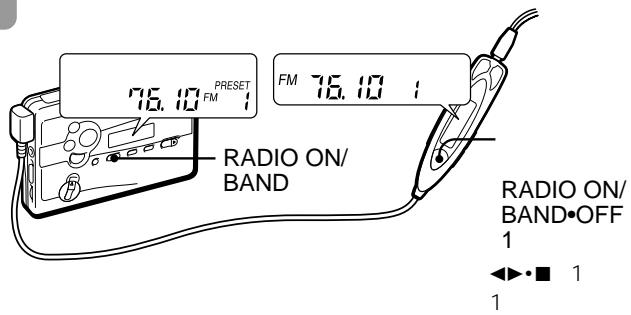
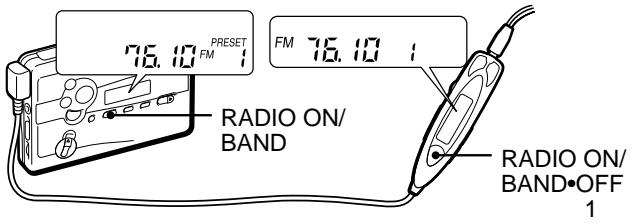
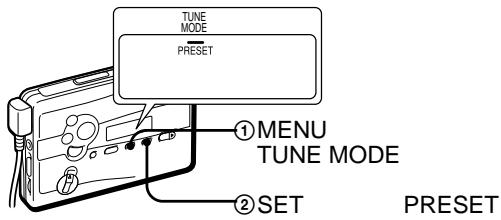
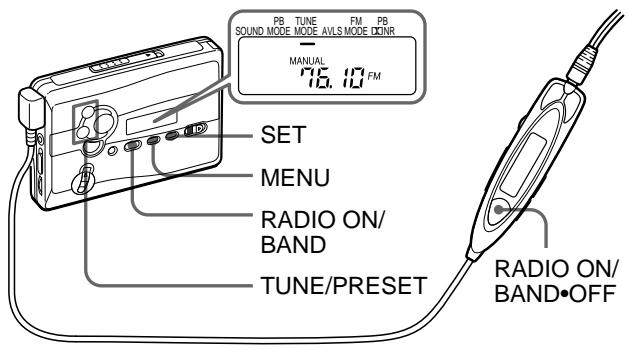
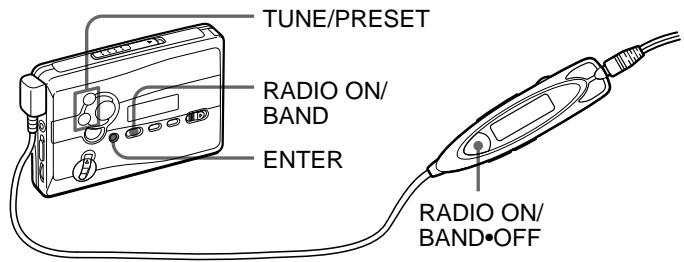
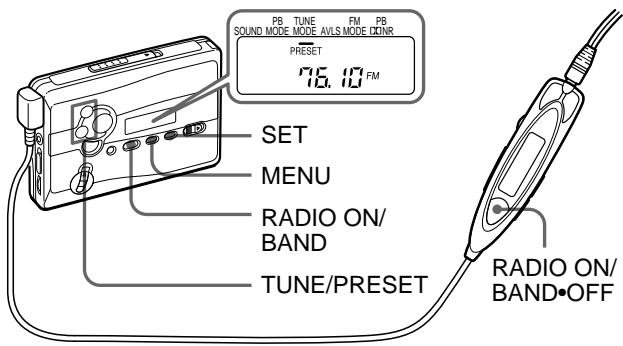
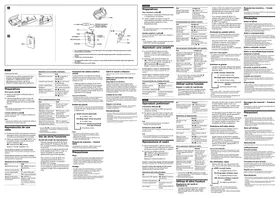
1 Appuyez sur RADIO ON/BAND pour allumer la radio. 2 Appuyez plusieurs fois sur RADIO ON/BAND pour sélectionner AM ou FM. 3 Appuyez plusieurs fois sur MENU sur l'unité principale et réglez " _ " (le curseur) dans l'affichage de l'unité principale sur TUNE MODE.
4 Pour l'accord manuel
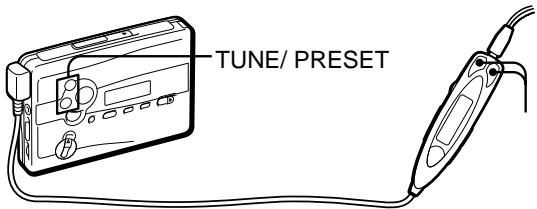
① Appuyez sur SET pour choisir MANUAL. ② Appuyez plusieurs fois sur TUNE/PRESET ^+ ou - pour vous accorder sur la station souhaitée.
Maintenez enfoncé TUNE/PRESET + ou - pendant quelques secondes pour rechercher des stations.
Pour la syntonisation des stations préréglées
① Appuyez sur SET pour choisir PRESET. ② Appuyez plusieurs fois sur TUNE/PRESET + ou - pour rappeler la station préréglée souhaitée.
Pour utiliser la syntonisation des stations préréglées, préréglez d'abord les stations (voir « Syntonisation des stations préréglées pour chaque région » ou « Préréglage des stations de radio »).
Pour éteindre la radio
Appuyez sur RADIO OFF.
Pour améliorer la réception
- Pour AM : réorientez l'appareil lui-même.
- Pour FM : déployez le cordon de la télécommande (antenne). Si la réception n'est toujours pas bonne, appuyez plusieurs fois sur MENU pour placer le curseur de l'affichage sur FM MODE. Ensuite, appuyez sur SET pour choisir « MONO » (mono), « LOCAL » ou rien (stéréo) pour une meilleure réception.
Pour utiliser la télécommande
Pour allumer la radio, appuyez sur RADIO ON/BAND·OFF pendant plus d'une seconde (uniquement lorsque la cassette est en mode arrêt). Pour sélectionner la bande, appuyez sur RADIO ON/BAND·OFF pendant plus d'une seconde lorsque la radio est allumée. Pour syntoniser ou rappeler une station préréglée, appuyez sur PRESET+ ou -. Pour éteindre la radio, appuyez sur RADIO ON/BAND·OFF.
Syntonisation des stations préréglées pour chaque région (appel manuel de région)
Pour chacune des neuf régions du Japon (Sapporo, Sendai, Kanto Nord, Kanto Sud, Nagoya, Osaka, Hiroshima, Fukuoka et le Shinkansen), ce Walkman est préréglé en usine avec les fréquences des principales stations recevables dans la région. Une fois votre région actuelle sélectionnée, vous pouvez syntoniser les stations de la région par la syntonisation des stations préréglées. Pour les stations préréglées en usine de chaque région, voir les pages 30 à 31 du texte japonais.
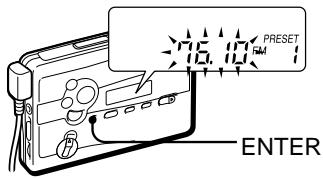
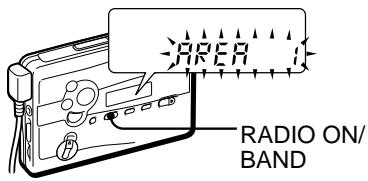
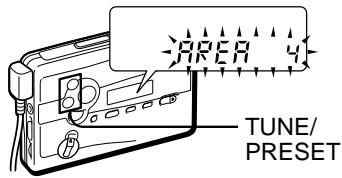
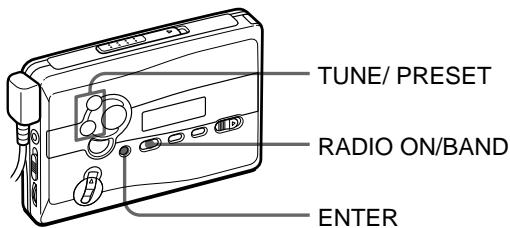
1 Appuyez sur RADIO ON/BAND pour allumer la radio. 2 Appuyez sur ENTER. Les chiffres de fréquence clignotent à l'affichage. 3 Maintenez enfoncé RADIO ON/BAND jusqu'à ce que « AREA 1 » clignote. 4 Pendant que « AREA 1 » clignote, appuyez plusieurs fois sur TUNE/PRESET + ou - pour sélectionner un numéro de région de 1 à 8 ou « JR », puis appuyez sur ENTER. 5 Syntonisez la station préréglée souhaitée par la « syntonisation des stations préréglées » (voir « Écoute de la radio »).
Préréglage des stations de radio
Une fois que vous avez mémorisé vos stations préférées, vous pouvez les écouter facilement. Vous pouvez prérégler jusqu'à 16 stations - 8 pour FM et 8 pour AM.
Réglage et mémorisation automatiques des stations de radio (fonction de balayage avec mémorisation automatique)
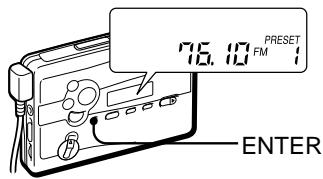
1 Appuyez sur RADIO ON/BAND pour allumer la radio. 2 Appuyez plusieurs fois sur RADIO ON/BAND pour sélectionner AM ou FM. 3 Appuyez sur ENTER jusqu'à ce que "A" apparaisse à l'écran. Le Walkman commence à rechercher et à mémoriser les stations. Le numéro de préréglage apparaît alors.
Remarque
- Ne retirez pas les sources d'alimentation avant que toutes les stations soient mémorisées.
Mémorisation manuelle des stations de radio (fonction de mémorisation manuelle)
Vous pouvez prérégler les stations dans n'importe quel ordre.
1 Appuyez sur RADIO ON/BAND pour allumer la radio. 2 Appuyez plusieurs fois sur RADIO ON/BAND pour sélectionner AM ou FM. 3 Appuyez sur ENTER. Les chiffres de la fréquence clignotent à l'écran. 4 Appuyez plusieurs fois sur TUNE/PRESET + ou - pour syntoniser la station souhaitée, puis appuyez sur ENTER. Le numéro de préréglage clignote à l'écran. 5 Appuyez plusieurs fois sur TUNE/PRESET + ou - pour sélectionner le numéro de préréglage souhaité, puis appuyez sur ENTER. La station est préréglée sur le numéro de votre choix.
Remarques
- Si vous ne pouvez pas terminer l'étape 4 ou 5 pendant que les indications clignotent, répétez à partir de l'étape 3.
- Si vous préréglez une nouvelle station sur le même numéro de préréglage, la station précédemment mémorisée sera effacée.
Pour annuler la station mémorisée
Suivez la procédure ci-dessus et, à l'étape 4, au lieu de syntoniser une station, maintenez enfoncé TUNE/PRESET + ou - jusqu'à ce que "---" s'affiche. Appuyez sur ENTER pendant que "---" clignote. Le numéro de préréglage clignote à l'écran. Appuyez plusieurs fois sur TUNE/PRESET + ou - pour sélectionner le numéro de préréglage que vous souhaitez annuler, puis appuyez sur ENTER.
Réception de stations en dehors du Japon
1 Appuyez sur RADIO ON/BAND pour allumer la radio. 2 Appuyez sur ENTER.
Les chiffres de la fréquence clignotent à l'écran.
3 Appuyez sur RADIO ON/BAND et maintenez enfoncé jusqu'à ce que "AREA 1" clignote. 4 Pendant que "AREA 1" clignote, appuyez sur TUNE/PRESET + ou - pour sélectionner "USA" ou "Eur". 5 Appuyez sur ENTER.
6 Réglez et mémorisez les stations selon la procédure décrite dans "Écoute de la radio" et "Préréglage des stations de radio".
Indication de zone et plage de fréquences
| Area* | Frequency range | |
| FM (MHz) | AM (kHz) | |
| USA | 87.5 - 108 | 530 - 1 710 |
| Eur | 87.5 - 108 | 531 - 1 602 |
| Japan (AREA 1-8, JR) | 76 - 90 | 531 - 1 710 |
- USA : États-Unis, Canada, Amérique centrale et du Sud. Eur : Europe et autres pays.
Pour recevoir des stations au Japon
Sélectionnez "AREA 1 à 8" ou "JR" à l'étape 4 ci-dessus.
Utilisation du menu
Réglage des modes de lecture
Pour sélectionner le mode de direction de lecture
Appuyez plusieurs fois sur MENU pour placer le curseur à l'écran sur PB MODE. Puis appuyez sur SET pour sélectionner le mode souhaité.
| To play | Select |
| both sides repeatedly | ←→ |
| both sides once from the FWD side | → |
Pour lire une cassette enregistrée avec le système de réduction de bruit Dolby* B
Appuyez plusieurs fois sur MENU pour placer le curseur à l'écran sur PB NR (réduction de bruit Dolby). Puis appuyez sur SET pour afficher "ON".
- Fabriqué sous licence de Dolby Laboratories. "Dolby" et le symbole double-D sont des marques de commerce de Dolby Laboratories.
Mise en valeur du son
Sur l'appareil principal :
1 Appuyez plusieurs fois sur MENU pour placer le curseur sur SOUND dans l'afficheur. 2 Appuyez plusieurs fois sur SET pour sélectionner l'accentuation sonore de votre choix.
Sur la télécommande :
1 Appuyez plusieurs fois sur SOUND. À chaque pression, les indications changent.
Les indications changent comme suit :
RV : Sound Revitalizer. Accentue les aigus.
MB : Mega Bass. Accentue les graves (effet modéré).
GRV : Groove. Accentue les graves (effet fort). Aucun message : normal (aucun effet).
Remarques
- Si le son est déformé avec le mode « GRV », baissez le volume de l'appareil principal ou sélectionnez d'autres modes.
- Vous ne pouvez pas changer de mode pendant l'avance rapide ou le retour rapide.
Protection de votre ouïe — AVLS (système de limitation automatique du volume)
Sur l'appareil principal :
Appuyez plusieurs fois sur MENU en mode lecture, arrêt ou radio pour placer le curseur sur AVLS dans l'afficheur. Puis appuyez sur SET pour afficher
Sur la télécommande : maintenez MODE enfoncé jusqu'à ce que « AVLS » apparaisse dans l'afficheur.
Pour annuler la fonction AVLS
Appuyez sur SET pour que " ⑦ " disparaisse de l'affichage de l'unité principale. Sur la télécommande, maintenez à nouveau MODE enfoncé jusqu'à ce que "AVLS" disparaisse.
Remarque
- Le réglage AVLS sera annulé lorsque vous remplacerez la pile.
Utilisation d'autres fonctions
Verrouillage des commandes - Fonction HOLD
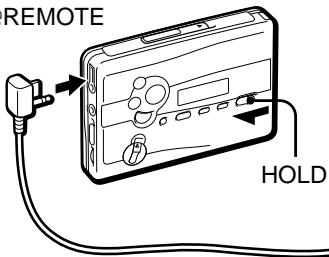
Faites glisser l'interrupteur HOLD dans le sens de la flèche pour verrouiller les commandes du Walkman ou de la télécommande.
Pour utiliser le compteur de bande
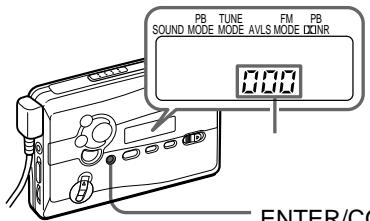
Le compteur de bande est affiché sur l'unité principale pendant la lecture, l'enregistrement, l'avance rapide, le rembobinage et l'arrêt (sauf lorsque la radio est allumée). Le nombre augmentera lors de la lecture du côté FWD et diminuera lors de la lecture du côté REV. Pour remettre le compteur à "000", appuyez sur ENTER/COUNTER RESET.
Remarques
- Le compteur de bande peut présenter un léger écart.
- Le compteur de bande ne sera pas affiché lorsque le compartiment à cassette est vide.
R6(AA
Sony
1 (NC-6WM)
- -
2 ( )
3
"Sony 1
AC
3
300
(EIAJ*)
| Sony | LR6(SG)** |
| 31.5 | |
| 32 | |
| MIC( ) | 10 |
| 6.5 |
| (NC-6WM) | |
| 8.5 | |
| 10 | |
| MIC( ) | 4 |
| 3 | |
| Sony | LR6(SG)**NC-6WM |
| 40 | |
| 42 | |
| MIC( ) | 13 |
| 9 |
*EIAJ(Electronic Industries Association of Japan : (Sony HF) **LR6(SG) Sony STAMINA
1
HOLD HOLD
2
( )

VOL
.(
REPEAT
VOL
VOL 6
A-B
A-B
(A
(B
A-B
REPEAT

1 2
A
"A - "
2 B
"A-B"
A
"REP"
A-B
50
·90
A-B
1 REPEAT 2
A
"A - "
2 REPEAT
B
"A-B"
A
"REP"
"FWD"
2
MIC(PLUG IN POWER)
1 (TYPEI)
FWD( )*
- “FWD”
"FWD"
, “REV”

3REC
"REC"
2
FWD(
FWD
REV(
)**
**“REV”
"REV"
,“FWD”


).
AM (TYPE II) (TYPE IV)
ISS (Interference Suppress Switch) : REMOTE
VOL
• RV, MB, GRV, AVLS, Dolby, BNR, REC 2
2 REC
10
① SET PRESET
1 RADIO ON/BAND
② TUNE/PRESET +
2 RADIO ON/BAND
AM FM
3 MENU
« _ » (TUNE MODE)
4
① SET MANUAL
RADIO OFF
② TUNE/PRESET +
AM :
TUNE/PRESET + -
FM : ( )
MENU
FM MODE . SET “MONO” ( ) , “LOCAL” , ( )
RADIO ON/BAND OFF 1 ( ) .
RADIO ON/BAND OFF 1
, PRESET + -
OFF
RADIO ON/BAND
Manual Area Call
9 ( , 1 , , , , , , , ,
1 RADIO ON/BAND 2 ENTER 3 RADIO ON/BAND "AREA 1" 4 "AREA 1" TUNE/PRESET + - 1 8 "JR" ENTER 5 " " (
FM AM 8 16
( )
1 RADIO ON/BAND 2 RADIO ON/BAND AM FM 3 "A" ENTER Walkman
(
1 RADIO ON/BAND 2 RADIO ON/BAND AM FM 3 ENTER 4 TUNE/PRESET + ENTER 5 TUNE/PRESET + ENTER
5 3
6
4 TUNE/PRESET ^+ ENTER
TUNE/PRESET +
ENTER
| * | FM(MHz) | AM(kHz) |
| USA | 87.5 - 108 | 530 - 1 710 |
| Eur | 87.5 - 108 | 531 - 1 602 |
| 76 - 90 | 531 - 1 710 | |
| (AREA 1-8, JR) |
- USA :
Eur:
4 "AREA1 8 J" JR
1 RADIO ON/BAND 2 ENTER 3 "AREA 1"
RADIO ON/BAND
4 "AREA 1" TUNE/PRESET + “USA” “Eur” 5 ENTER
| MENU PB MODE SET . |
| FWD |
| Dolby( )* B NR |
| MENU PB DQN(R) ) . SET “ON” |
| *Dolby Laboratories “Dolby” -D Dolby Laboratories |
1 MENU
SOUND
2 SET
1 SOUND
RV:Sound Revitalizer( ).
MB:Mega Bass.
GRV:Groove.
- "GRV"

选择电源
干电池
安装附带的电池盒,然后对正确极性装入一节R6(AA,3号)电池。
注
- 为获得最佳效果,建议您使用Sony牌碱性电池。
充电电池
1 以正确极性将附带的充电电池(NC-6WM)装入充电器。
请注意充电器上的 ⊕、⊖ 指示。
2 把充电器接插到家庭用电源插座。
日本机型:完全充电约需3小时。
“Sony世界机型”:完全充电约需1小时。
如果插头与所用主电源插座不匹配,请装上附带的AC电源插头转接器。
3 将完全充电后的电池装入充电电池室。
充电电池大约可充电使用300次。
何时更换电池/给电池充电
“□”在显示窗中闪烁时,即请更换电池或给电池充电。
电池寿命
(大约时数) (EIAJ*)
| Sony 碱电池 LR6(SG)** | |
| 录音带放音 | 31.5 |
| 听收音机 | 32 |
| MIC 录音 | 10 |
| 收音机录音 | 6.5 |
| 充电池(NC-6WM) | |
| 录音带放音 | 8.5 |
| 听收音机 | 10 |
| MIC录音 | 4 |
| 收音机录音 | 3 |
| 同时使用Sony碱电池LR6(SG)**和充电池NC-6WM | |
| 录音带放音 | 40 |
| 听收音机 | 42 |
| MIC录音 | 13 |
| 收音机录音 | 9 |
- 按 EIAJ(Electronic Industries Association of Japan) 标准测定的值。(使用 Sony HF 系列磁带) **使用LR6(SG)型Sony“STAMINA”碱性电池(日本制)时。
注
- 电池寿命可能因操作条件、环境温度和电池类型而缩短。
家用电源
如果装有充电电池,请将其取出。装上电池盒,将用于日本的AC-E15L AC电源适配器(未附带)或AC-E15HG(未附带)连接到电池盒的DC IN 1.5V插孔和墙上插座。
请勿使用任何其他的AC电源适配器。
AC-E15HG的规格因地区而异,购买前请核查您所在地区的电压和插头极性。
插头极性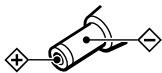
播放录音带
1 装入盒带,如果遥控器的HOLD功能仍处于开启状态,请沿与箭头相反的方向滑动HOLD开关以解除锁定。2 按遥控器上的◀(放音)(停止)并用VOL旋钮调节音量。(在主机上,则按REPEAT。)
在主机上调节音量时
请将遥控器上的VOL控制设定为最大。
在遥控器上调节音量时
请将主机上的VOL控制设定为6左右。
在遥控器上的操作
| 要 | 请按 |
| 换播放另一面 | 播放中按▲▶■2秒以上 |
| 停止播放 | 播放中按一次 |
在主机上的操作
| 要 | 请按 |
| 换播放另一面 | 播放中按 ←▶·REPEAT |
| 停止播放 | 按■(停止) |
Autres opérations sur la cassette
| 要 | 请按 |
| 快进绕 | 停止中*或播放中,请按FF播放中,只要按着FF,磁带便将继续快进绕。 |
| 重绕 | 停止中*或播放中,请按REW播放中,只要按着REW,磁带便将继续进行重绕。 |
| 要 | 请按 |
| 从头播放下一曲/接下9首曲子(AMS**) | 播放中按一次/反复按FF |
| 从头播放现在放音中曲子/前面8首曲子(AMS**) | 播放中按一次/反复按REW |
| 从头播放另外一面(跳越倒绕功能) | 停止中按FF 2秒以上 |
| 从头播放同一面(重绕自动播放功能) | 停止中按REW 2秒以上 |
- Si vous appuyez sur ▲▶●■ de la télécommande pendant l'avance rapide ou le rembobinage, le Walkman passe en mode lecture. **Détection automatique de plage
Répétition A-B
La fonction de répétition A-B répète la lecture de n'importe quelle partie de la cassette que vous spécifiez. Pendant la lecture, marquez le début (point A) et la fin (point B) de cette partie.
Sur la télécommande
1 Pendant la lecture, appuyez sur la touche pendant plus de 2 secondes pour marquer le point A.
« A- » clignote dans la fenêtre d'affichage de l'appareil principal.
2 Appuyez à nouveau sur la touche pour marquer le point B.
« A-B » clignote, la cassette est rembobinée jusqu'au point A. Ensuite, « REP » apparaît dans la fenêtre d'affichage et la partie spécifiée est lue en boucle.
Sur l'appareil principal
1 Pendant la lecture, appuyez sur la touche ▶REPEAT pendant 2 secondes pour marquer le point A.
« A- » clignote dans la fenêtre d'affichage de l'appareil principal.
2 Appuyez à nouveau sur la touche REPEAT pour marquer le point B.
« A-B » clignote et la cassette est rembobinée jusqu'au point A. Ensuite, « REP » apparaît dans la fenêtre d'affichage et la partie spécifiée est lue en boucle.
Pour annuler la répétition A-B
请按主机上的 ◁ REPEAT,或按遥控器上的 ◁。
注
- 您不能指定跨越录音带两面的重复部分。
- 您不能指定短于2秒钟的重复部分。
- 在反复操作之后,由于录音带的松弛,实际播放的部分可能和所标记指定的部分稍有不同。
- 在恢复普通放音之前,如果不手动取消,A-B反复将重复50次。
- 请勿用长度90分钟以上的磁带去使用A-B反复功能。否则,该磁带可能会损坏。
录音
您可以从内装的收音机录制广播节目,也可以用附带的麦克风进行录音。无论如何,都请使用新的或充足了电的电池。
注
- 如果防误抹小翼已被折断,则无法在该面录音。
1 插入标准型(TYPE I)录音带。
要在两面录音时
将要先录音的面作为FWD(正)面*插入录音带。
- 确认是否显示“FWD”。如果没有,请按住■直到“REV”变为“FWD”。
只需录制一面时
将要录音的面作为REV(反)面插入录音带。
确认是否显示“REV”。如果没有,请按住■直到“FWD”变为“REV”。
注
- 录音带座打开着时,走带方向将被自动地设定为“FWD”。
2 选择录音源:
要用麦克风录音时
将附带的麦克风连接到MIC(PLUG IN POWER)插孔。
要从收音机录音时
请调入您想录音的电台(参见“听收音机”)。
3 滑动REC。
“REC”即出现于显示窗中,约2秒钟之后,开始录音。
如果您是从FWD面开始录音的,在录完FWD面时,录音将自动转换到反面。
要停止录音时
请按(或按遥控器上的 )以停止录音。
要在录制AM节目时减小噪声
请将ISS(干扰抑制开关)设定于能将噪声减至最小的位置。
要监听录音中的声音
您可以用头戴式耳机/耳塞式耳机来监听正在录制的声音。可用VOL控制旋钮调节监听的音量。
注
- 在RV、MB或GRV方式下,您可能会在监听的声音中听到一些噪音,但这并不影响录音。
录音须知
- 录音电平被固定。
- 声音增强功能(RV、MB或GRV)、AVLS和Dolby B NR设定不影响录音。
- 实际录音将在您滑动REC约2秒钟之后开始。请在您要开始录音时刻的约2秒钟之前滑动REC,否则您将错过录音的开始部分。
- 在两面录音时,在录音带换面过程中,录音将有约10秒钟不进行。
- 请勿用高位(TYPE II)或金属(TYPE IV)型的录音带录音。否则播放录音带时声音可能会失真,以前的录音内容也可能不会被完全抹消。
- 从收音机录音时,请勿将耳机接到/拔出;REMOTE插孔。否则录音条件可能会突然改变,也可能录下噪音。
- 用麦克风录音时,请勿将麦克风靠近电灯线或日光灯,以避免噪音干扰。
- 如果发生啸叫,请调低音量。
- 在录音时所有其他操作都无法进行。要进行其他操作,请先停止录音。
要防止录音带被误录时
请折断A面和/或B面的防误抹小翼。要重新用该录音带录音,用胶带盖住折断防误抹小翼后的缺口。
听收音机
1 按RADIO ON/BAND打开收音机。 2 反复按RADIO ON/BAND选择AM或FM。 3 反复按主机上的MENU,将主机显示窗中的“____”(光标)设为TUNE MODE。
4 要手动调台时
① 按SET选择MANUAL。 ② 反复按TUNE/PRESET+或-调入所要的电台。按住TUNE/PRESET+或-数秒以扫描电台。
要预约调谐时
① 按 SET 选择 PRESET。 ② 反复按TUNE/PRESET+或-选出所要的预约电台。要使用预约调谐时,请先预约电台(参见“调入各地区已预约电台”或“预约电台”)。
要关掉收音机时
按 RADIO OFF 键。
要改善广播接收效果时
- 收听AM节目时:调转机器方位。
- 收听FM节目时:请拉长遥控器导线(天线)。如果接收效果仍不好,请反复按MENU将主机显示窗中的游标设为FM MODE。然后按SET以便从“MONO”(单耳声)、“LOCAL”或无显示(立体声)模式中选择最佳接收效果。
要从遥控器进行操作时
要打开收音机时,请按RADIO ON/BAND·OFF 1秒以上(限当录音带处于停止状态时)。
要选择波段时,请在打开着收音机时,按下RADIO ON/BAND·OFF 1秒以上。
要调入或选出预调电台时,请向上/向下逐渐调整PRESET+或-。
要关掉收音机时,请按RADIO ON/BAND·OFF。
调入各地区已预约电台(手动地区呼叫)
对日本9个地区(札幌、仙台、北关东、南关东、名古屋、大阪、广岛、福冈和新干线)的各地区,Walkman已在工厂预调能接收该地区的主要电台的频率数据。一旦您选择了现在的地区,您就可用预约调谐调入所在地区的电台。有关各地区的工厂预调电台,请参见日语版的第30至31页。
1 按 RADIO ON/BAND 键打开收音机。 2 按ENTER键。频率数字即将在显示窗中闪烁。 3 按住RADIO ON/BAND键,直至“AREA1”起闪烁。 4 在“AREA1”闪烁中,反复按TUNE/PRESET+或-键,以便在1至8或“JR”中选一个地区号,然后按ENTER键。 5 利用“预约调谐”调入所要的预约电台。(参见“听收音机”)
预约电台
一旦在本机的存储器中储存了喜欢的电台,便可简单地操作收听。您最多可以预调16个电台——FM和AM各8个。
自动调入和储存广播电台(自动储存扫描功能)
1 按RADIO ON/BAND打开收音机。 2 反复按 RADIO ON/BAND 选择 AM 或 FM。 3 按ENTER直到“A”出现于显示窗中。
Walkman即开始搜索并储存电台。
随即出现预约号。
注
- 在所有电台储存完毕之前请勿拔掉电源或关闭电源。
手动储存广播电台(手动储存功能)
您可以按任意顺序预约电台。
1 按 RADIO ON/BAND 打开收音机。 2 反复按 RADIO ON/BAND 选择 AM 或 FM。 3 按 ENTER 键。频率数字将闪烁于显示窗中。 4 反复按 TUNE/PRESET+ 或 - 调入所要的电台并按 ENTER 键。
预约号将闪烁于显示窗中。
5 反复按 TUNE/PRESET+ 或 - 选择所要的预约号并按 ENTER 键。
电台即被预约为您所选择的号码。
注
- 如果您不能在指示闪烁时完成步骤 4 或 5,请从步骤 3 开始重复。
- 如果您给一个新电台预设了相同的预约号,则以前所储存的电台将被抹消。
要取消已储存的电台时
请按照上述步骤操作,在步骤 4,不调入电台而按住 TUNE/PRESET+ 或 - 直到“----”显示出来。在“----”闪烁时按 ENTER 键。预约号将闪烁于显示窗中。反复按 TUNE/PRESET+ 或 - 选择您要取消的预约号并按 ENTER 键。
在日本国外接收电台
1 按 RADIO ON/BAND 打开收音机。 2 按 ENTER 键。频率数字将闪烁于显示窗中。 3 按住 RADIO ON/BAND 键直到“AREA 1”开始闪烁。 4 在“AREA 1”闪烁中,按 TUNE/PRESET+ 或 - 键以选择“USA”或“Eur”。 5 按 ENTER 键。
6 按照“听收音机”和“预约电台”的操作步骤,调入并储存所要的电台。
地区指示和频率范围
| 地区* | 频率范围 FM(MHz) | AM(kHz) |
| USA | 87.5-108 | 530-1710 |
| Eur | 87.5-108 | 531-1602 |
| Japan (AREA 1-8, JR) | 76-90 | 531-1710 |
- USA:美国、加拿大和中南美 Eur:欧洲和其他国家
在日本国内接收电台
在上面步骤4中选择“AREA1到8”或“JR”。
使用项目单
调整播放模式
要选择播放方向模式时
请反复按MENU把显示器中的游标设定于PB MODE,然后按SET以选择所要模式。
| 要 | 请选择 |
| 反复放双面 | ←→ |
| 从FWD面放一次双面 | → |
要播放用杜比 *B减噪系统录的录音带时
反复按MENU把显示器中的游标设定于PB NR(标比减噪),然后按SET以显示“ON”。
- 经杜比实验室授权生产。 “杜比”,“Dolby”和双D标志是杜比实验室的商标。
增强声音
在主机上:
1 反复按MENU把显示器中的游标设定于SOUND。 2 反复按 SET 以选择所喜欢的声加强模式。
Sur la télécommande :
1 Appuyez plusieurs fois sur SOUND ; à chaque pression, l'indicateur change d'affichage.
L'indicateur affiche ce qui suit :
RV : Sound Revitalizer (régénérateur de son). Renforce les aigus.
MB : Mega Bass (grave puissant). Renforce les graves (effet moyen).
GRV : Groove (état optimal). Renforce les graves (effet fort).
Aucune indication : normal (aucun effet).
Remarque
- En mode « GRV », si le son est déformé, réduisez le volume de l'appareil principal ou choisissez un autre mode.
- Ce mode ne peut pas être modifié pendant l'avance rapide ou le rembobinage.
Protégez votre ouïe - AVLS (système de limitation automatique du volume)
Sur l'appareil principal :
En mode lecture, arrêt ou radio, appuyez plusieurs fois sur MENU pour placer le curseur de l'afficheur sur AVLS, puis appuyez sur SET pour afficher « ».
Sur la télécommande :
Appuyez sur MODE jusqu'à ce que « AVLS » apparaisse dans l'afficheur.
要解除AVLS功能时
按SET使主机上的显示器中的“@”消失显示。
遥控器上则再按住MODE至“AVLS”消失显示。
注
- 当更换电池时,AVLS设定将被抹去。
利用其他功能
锁定控制器-HOLD功能
沿箭头所指方向滑动HOLD开关以锁定Walkman或遥控器上的控制器。
要利用磁带计数器时
在放音、录音、快进,倒带和停止(收音机打开时除外)时磁带计数器显示在主机上。播放FWD面时数字增加,播放REV面时数字减少。要将计数器重调为“000”时,请按ENTER/COUNTERRESET键。
注
- 磁带计数器显示可能稍有误差。
- 盒带室空着时,将不显示磁带计数器。

株式会社 141-0001 東京都品川区北品川6-7-35
お問い合わせはお客様ご相談センターへ
- ナビダイヤル

0570-00-3311
受付時間:
(全国からでも市内通話料金でご利用いただけます)
月~金
● 携帯電話・PHSでのご利用は…03-5448-3311
9:00~20:00
Fax 0466-31-2595
土・日・祝日
9:00~17:00
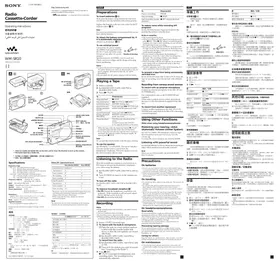
- DANGER
- TÉLÉCOMMANDE
- SYNCHRO/PRÉRÉGLAGE
- AM FM
- AMS
- RADIO ON/BAND
- ENTER
- TUNE/PRESET
- CHOIX DE LA SOURCE D'ALIMENTATION
- PILE SÈCHE
- REMARQUE
- BATTERIE RECHARGEABLE
- QUAND REMPLACER OU RECHARGER LA BATTERIE
- DURÉE DE VIE DE LA BATTERIE
- COURANT DOMESTIQUE
- LECTURE D'UNE CASSETTE
- LORS DU RÉGLAGE DU VOLUME SUR L'UNITÉ PRINCIPALE
- LORS DU RÉGLAGE DU VOLUME SUR LA TÉLÉCOMMANDE
- FONCTIONNEMENT SUR LA TÉLÉCOMMANDE
- FONCTIONNEMENT SUR L'UNITÉ PRINCIPALE
- AUTRES OPÉRATIONS SUR LA CASSETTE
- RÉPÉTITION A-B
- SUR LA TÉLÉCOMMANDE
- SUR L'UNITÉ PRINCIPALE
- POUR ANNULER LA LECTURE EN RÉPÉTITION A-B
- NOTES
- ENREGISTREMENT
- NOTE
- POUR ARRÊTER L'ENREGISTREMENT
- POUR RÉDUIRE LE BRUIT LORS DE L'ENREGISTREMENT DE PROGRAMMES AM
- POUR SURVEILLER LE SON ENREGISTRÉ
- REMARQUES SUR L'ENREGISTREMENT
- POUR EMPÊCHER QU'UNE CASSETTE SOIT ACCIDENTELLEMENT ENREGISTRÉE PAR-DESSUS
- ÉCOUTE DE LA RADIO
- POUR ÉTEINDRE LA RADIO
- POUR AMÉLIORER LA RÉCEPTION
- POUR UTILISER LA TÉLÉCOMMANDE
- SYNTONISATION DES STATIONS PRÉRÉGLÉES POUR CHAQUE RÉGION (APPEL MANUEL DE RÉGION)
- PRÉRÉGLAGE DES STATIONS DE RADIO
- RÉGLAGE ET MÉMORISATION AUTOMATIQUES DES STATIONS DE RADIO (FONCTION DE BALAYAGE AVEC MÉMORISATION AUTOMATIQUE)
- MÉMORISATION MANUELLE DES STATIONS DE RADIO (FONCTION DE MÉMORISATION MANUELLE)
- REMARQUES
- POUR ANNULER LA STATION MÉMORISÉE
- RÉCEPTION DE STATIONS EN DEHORS DU JAPON
- INDICATION DE ZONE ET PLAGE DE FRÉQUENCES
- POUR RECEVOIR DES STATIONS AU JAPON
- UTILISATION DU MENU
- RÉGLAGE DES MODES DE LECTURE
- POUR SÉLECTIONNER LE MODE DE DIRECTION DE LECTURE
- POUR LIRE UNE CASSETTE ENREGISTRÉE AVEC LE SYSTÈME DE RÉDUCTION DE BRUIT DOLBY* B
- MISE EN VALEUR DU SON
- SUR L'APPAREIL PRINCIPAL
- PROTECTION DE VOTRE OUÏE — AVLS (SYSTÈME DE LIMITATION AUTOMATIQUE DU VOLUME)
- POUR ANNULER LA FONCTION AVLS
- UTILISATION D'AUTRES FONCTIONS
- VERROUILLAGE DES COMMANDES - FONCTION HOLD
- POUR UTILISER LE COMPTEUR DE BANDE
- (TYPEI)
- MANUAL AREA CALL
- 选择电源
- 干电池
- 注
- 充电电池
- 何时更换电池/给电池充电
- 电池寿命
- 家用电源
- 播放录音带
- 在主机上调节音量时
- 在遥控器上调节音量时
- POUR ANNULER LA RÉPÉTITION A-B
- 录音
- 要在两面录音时
- 只需录制一面时
- 要用麦克风录音时
- 要从收音机录音时
- 要停止录音时
- 要在录制AM节目时减小噪声
- 要监听录音中的声音
- 录音须知
- 要防止录音带被误录时
- 听收音机
- 要预约调谐时
- 要关掉收音机时
- 要从遥控器进行操作时
- 调入各地区已预约电台(手动地区呼叫)
- 预约电台
- 自动调入和储存广播电台(自动储存扫描功能)
- 手动储存广播电台(手动储存功能)
- 要取消已储存的电台时
- 在日本国外接收电台
- 在日本国内接收电台
- 使用项目单
- 调整播放模式
- 要选择播放方向模式时
- 要播放用杜比 *B减噪系统录的录音带时
- 增强声音
- 在主机上:
- PROTÉGEZ VOTRE OUÏE - AVLS (SYSTÈME DE LIMITATION AUTOMATIQUE DU VOLUME)
- 要解除AVLS功能时
- 利用其他功能
- 锁定控制器-HOLD功能
- 要利用磁带计数器时
Marque : SONY
Modèle : WM-GX688
Catégorie : Lecteur de cassette portable