
WM-GX688 - Portable cassette player SONY - Free user manual and instructions
Find the device manual for free WM-GX688 SONY in PDF.


| Product Type | Portable cassette player with AM/FM radio |
| Brand | Sony |
| Model | WM-GX688 |
| Dimensions (without battery) | 108.4 × 77.7 × 23.0 mm |
| Dimensions (with rechargeable battery NC-6WM) | 108.4 × 77.7 × 23.4 mm |
| Weight (without battery) | 148 g |
| Weight (with rechargeable battery NC-6WM) | 172 g |
| Power supply | 1 R6 (AA) battery 1.5 V DC or rechargeable battery NC-6WM 1.2 V 600 mAh Ni-Cd; AC adapter AC-E15L / AC-E15HG (optional) |
| Battery life (alkaline LR6) | Tape playback: 31.5 h; Radio: 32 h; Microphone recording: 10 h; Radio recording: 6.5 h |
| Battery life of rechargeable battery NC-6WM | Tape playback: 8.5 h; Radio: 10 h; Microphone recording: 4 h; Radio recording: 3 h |
| Radio frequency ranges | FM: 76 – 90 MHz (Japan) / 87.5 – 108 MHz (USA/Eur); AM: 531 – 1710 kHz |
| Playback functions | Auto play, fast forward, rewind, AMS (track search), A-B repeat playback, direction reverse, Skip Reverse, Rewind Auto Play |
| Noise reduction | Dolby B NR selectable during playback |
| Recording | Via built-in microphone (supplied) or from radio; fixed recording level; automatic recording on both sides |
| Sound enhancement | RV (treble), MB (moderate bass), GRV (heavy bass) |
| Hearing protection | AVLS (automatic volume limiter) |
| Key lock | HOLD function on the unit and remote control |
| Tape counter | Digital display with reset |
| Radio presets | Up to 16 stations (8 FM + 8 AM); automatic or manual presetting |
| Supplied accessories | Remote control, microphone, headphones, rechargeable battery NC-6WM, charger, battery case |
| Maintenance and cleaning | Clean with a soft dry cloth; do not use solvents; clean the playback heads with a cotton swab moistened with alcohol |
| Repairability | Rechargeable batteries are replaceable; spare parts are available from Sony after-sales service |
Frequently Asked Questions - WM-GX688 SONY
User questions about WM-GX688 SONY
0 question about this device. Answer the ones you know or ask your own.
Ask a new question about this device
Download the instructions for your Portable cassette player in PDF format for free! Find your manual WM-GX688 - SONY and take your electronic device back in hand. On this page are published all the documents necessary for the use of your device. WM-GX688 by SONY.
USER MANUAL WM-GX688 SONY
Operating Instructions (page 52)
User Manual (page 76)


WALKMAN
WALKMAN is a registered trademark of Sony Corporation
1: 2: 3: 4: 5: 6: 7: 8: JR:
USA Eur
32
*
2-①
.
.
30
31
④ENTER
3 AM FM
4
5
RADIO OFF
RADIO ON/BAND·OFF
2
15
AM
FM
25
26
TYPE I
17
1
① OPEN
(2)
FWD
REV
FWD
REV
FWD
FWD REV
2 (1) FM ② 10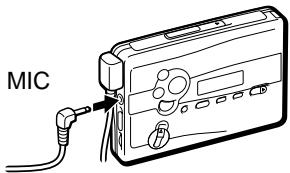
| AM | ||
| ISS | 1 2 3 | |
| FWD | REV | |
| REV | ||
| REV | ||
| VOL | RV/MB/GRV | |
| AVLS ONR | ||
| VOL | ||
| NORM | RV | |
| MB GRV | ||
| REC | 2 | |
| TYPE I | ||
FWD
REV
10
24
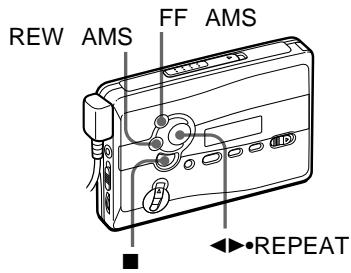
| ←●REPEAT | FWDREV | ||||
| ←●REPEAT | FWDREV | ||||
| ■ | |||||
| / | FF | REW | |||
| * | 1 | ||||
| / | FF | REW | : | ... | |
| : | |||||
| ... | |||||
| FF | AMS | ... | |||
| 2 | |||||
| REW | AMS | ... | |||
| 2 | |||||
AMS
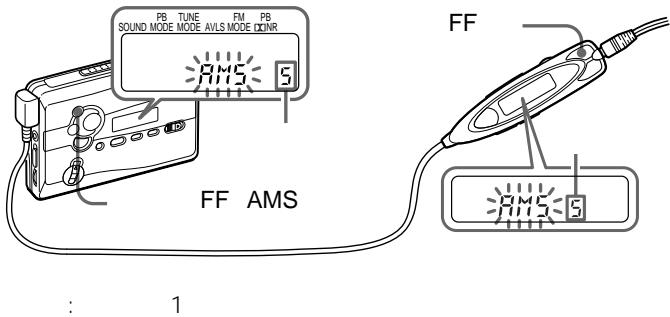
9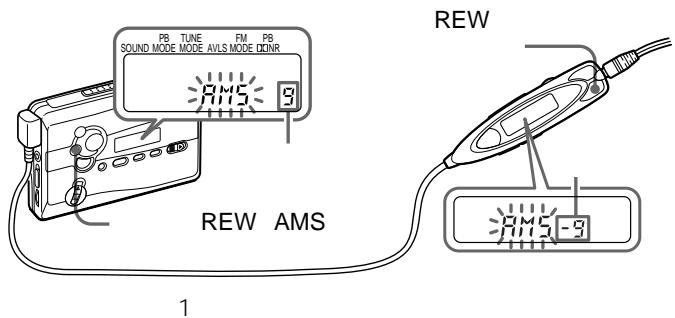
AMS
AMS
4
4
AMS
PB MODE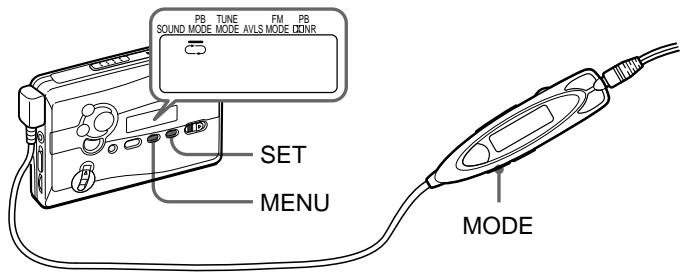
| PB MODE | ||
| ← | ← | |
| → | → | 1 * |
| * REV | REV | |
MODE
MENU
SET
PB MODE
*B NR BNR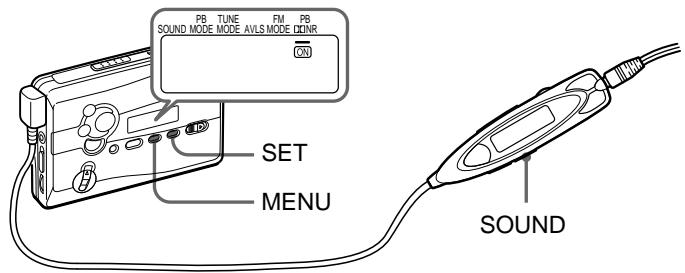
Dolby
ON
D
| PB DQNIR | |
| ON | BNR |
| BNR | |
SOUND
BNR
SOUND
MENU
SET
ON
PB DNNR
•
.
BNR
BNR
B NR
ON
A-B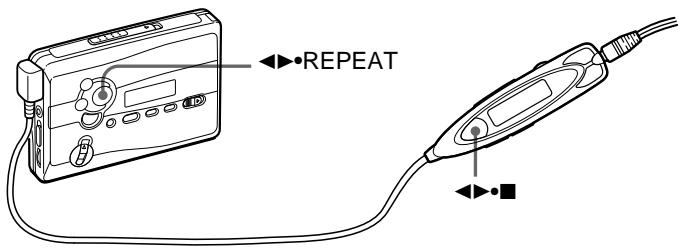
A
B
1

2
A
2

B
1

REPEAT
A
2

REPEAT
B
A-B
REP
A-B


FWD REV REV FWD A-B ·2 A-B A-B
? 43
90
A-B
FWD /
000
REV
ENTER/COUNTER RESET
ENTER/COUNTER RESET
:
1 RADIO ON/BAND
RADIO ON/
BAND·OFF 1
2 RADIO ON/BAND
AM FM
RADIO ON/BAND·OFF 1
3 MENU TUNE MODE 4 SET MANUAL 5 TUNE/PRESET
- TUNE/PRESET
TUNE/PRESET

AM FM 8
1 RADIO ON/BAND
RADIO ON/
BAND·OFF 1
2 RADIO ON/BAND FM
AM
RADIO ON/BAND·OFF 1
3 A
ENTER
28
8 30 31

AM FM 8
1 RADIO ON/BAND
RADIO ON/
BAND·OFF 1
2 RADIO ON/BAND
AM FM
RADIO ON/BAND·OFF 1
3 ENTER
4 TUNE/PRESET
ENTER
5 TUNE/PRESET
6 ENTER
* 3
28
.
30 31
1 27
1 3
2
TUNE/PRESET
3 ENTER
4
TUNE/PRESET
5 ENTER

1 RADIO ON/BAND
RADIO ON/
BAND·OFF 1
2 RADIO ON/BAND FM
RADIO ON/BAND·OFF 1
3 MENU TUNE MODE 4 SET PRESET 5 TUNE/PRESET
- -
FM MENU
FM MODE SET
LOCAL MONO
AM
| AREA 1 | Sapporo | |
| AM 1 | 567kHz | NHK 1 |
| 2 | 747kHz | NHK 2 |
| 3 | 1287kHz | |
| 4 | 1440kHz | |
| FM 1 | 80.4MHz | FM |
| 2 | 82.5MHz | FM |
| 3 | 85.2MHz | NHK FM |
| 4 | 88.2MHz | NHK FM |
| AREA 2 | Sendai | ||
| AM | 1 | 891kHz | NHK 1 |
| 2 | 1089kHz | NHK 2 | |
| 3 | 1260kHz | ||
| FM | 1 | 77.1MHz | FM |
| 2 | 82.5MHz | NHK FM | |
| AREA 3 | Northern Kanto | ||
| AM | 1 | 594kHz | NHK 1 |
| 2 | 693kHz | NHK 2 | |
| 3 | 810kHz | AFN FEN | |
| 4 | 954kHz | TBS | |
| 5 | 1134kHz | ||
| 6 | 1197kHz | ||
| 7 | 1242kHz | ||
| 8 | 1530kHz | ||
| FM | 1 | 76.4MHz | FM |
| 2 | 78.8MHz | ||
| 3 | 80.0MHz | TOKYO FM | |
| 4 | 80.3MHz | NHK FM | |
| 5 | 81.6MHz | NHK FM | |
| 6 | 83.2MHz | NHK FM | |
| 7 | 86.3MHz | FM | |
| AREA 4 | Southern Kanto | ||
| AM | 1 | 594kHz | NHK 1 |
| 2 | 693kHz | NHK 2 | |
| 3 | 810kHz | AFN FEN | |
| 4 | 954kHz | TBS | |
| 5 | 1134kHz | ||
| 6 | 1242kHz | ||
| 7 | 1422kHz | ||
| FM | 1 | 76.1MHz | FM |
| 2 | 78.0MHz | FM | |
| 3 | 78.6MHz | FM | |
| 4 | 79.5MHz | FM | |
| 5 | 80.0MHz | TOKYO FM | |
| 6 | 81.3MHz | FM | |
| 7 | 82.5MHz | NHK FM | |
| 8 | 84.7MHz | FM | |
| AREA 5 | Nagoya | ||
| AM | 1 | 729kHz | NHK 1 |
| 2 | 909kHz | NHK 2 | |
| 3 | 1053kHz | CBC | |
| 4 | 1332kHz | ||
| 5 | 1431kHz | ||
| FM | 1 | 77.8MHz | FM |
| 2 | 78.9MHz | FM | |
| 3 | 80.7MHz | FM | |
| 4 | 81.8MHz | NHK FM | |
| 5 | 82.5MHz | NHK FM | |
| 6 | 83.6MHz | NHK FM | |
| AREA 6 | Osaka |
| AM 1 | 558kHz | |
| 2 | 666kHz | NHK 1 |
| 3 | 828kHz | NHK 2 |
| 4 | 1008kHz | ABC |
| 5 | 1143kHz | KBS |
| 6 | 1179kHz | |
| 7 | 1314kHz | |
| 8 | 1431kHz | |
| FM 1 | 76.5MHz | |
| 2 | 80.2MHz | FM802 |
| 3 | 82.8MHz | NHK FM |
| 4 | 85.1MHz | FM |
| 5 | 86.5MHz | NHK FM |
| 6 | 88.1MHz | NHK FM |
| 7 | 89.4MHz | FM |
| 8 | 89.9MHz | FM |
| AREA 7 | Hiroshima | ||
| AM | 1 | 702kHz | NHK 2 |
| 2 | 918kHz | ||
| 3 | 1071kHz | NHK 1 | |
| 4 | 1116kHz | ||
| 5 | 1350kHz | ||
| 6 | 1575kHz | AFN FEN | |
| FM | 1 | 78.2MHz | FM |
| 2 | 88.3MHz | NHK FM | |
| AREA 8 | Fukuoka | ||
| AM | 1 | 612kHz | NHK 1 |
| 2 | 1017kHz | NHK 2 | |
| 3 | 1278kHz | RKB | |
| 4 | 1413kHz | ||
| FM | 1 | 77.9MHz | FM |
| 2 | 78.7MHz | FM | |
| 3 | 80.7MHz | FM | |
| 4 | 81.6MHz | NHK FM | |
| 5 | 84.8MHz | NHK FM | |
| JR | JR | * | Shinkansen |
| FM 1 | 76.0MHz |
| 2 | 76.6MHz |
| 3 | 77.5MHz |
| 4 | 78.8MHz |
| 5 | 79.6MHz |
| * | 2 |
1 RADIO ON/BAND 2 ENTER 3 AREA 1 RADIO ON/BAND 4 TUNE/PRESET
USA Eur
2
| USA | FM: 87.5 - 108MHz AM: 530 - 1 710kHz |
| Eur | FM: 87.5 - 108MHz AM: 531 - 1 602kHz |
5 ENTER 6 25
26
USA Eur AREA1 8 JR
26 27
1 3 ENTER
4 AREA1 8 JR
26 27
AREA1 8 JR 30 31
SOUND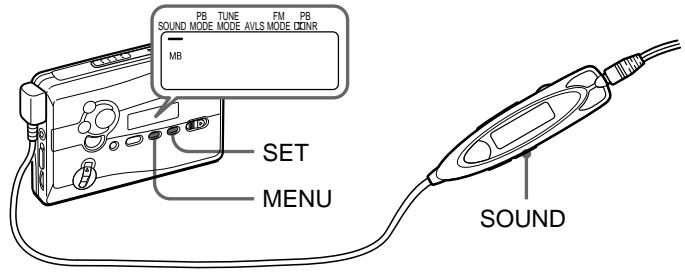
RV
MB
GRV
SOUND
MENU
SET
SOUND
GRV
AVLS—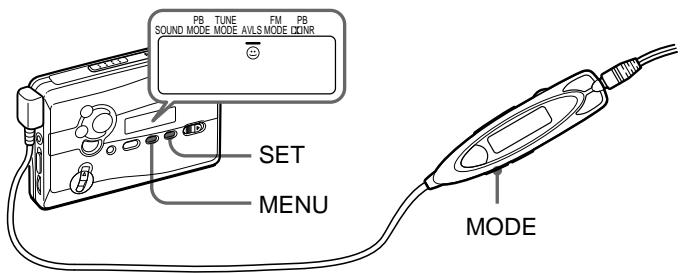
| AVLS | |
| AVLS | ◎ AVLS |
| AVLS | |
AVLS
MODE
AVLS
AVLS
MODE
MENU
SET

AVLS
AVLS
SET

AVLS
AVLS
HOLD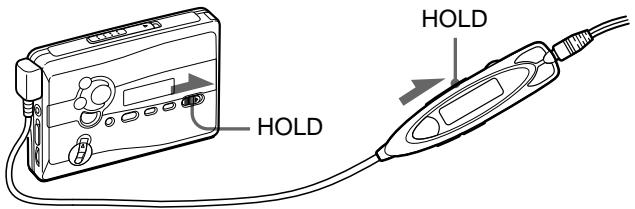


100
| LR6 SG ** | 31.5 | 32 | 10 | 6.5 |
| NC-6WM 100% | 8.5 | 10 | 4 | 3 |
| 40 | 42 | 13 | 9 | |
| * EIAJ | HF | |||
| ** | LR6 SG | |||
| · | ||||
| · | A-B | AMS |
1
2 AC
AC-E15L
AC-E15HG
DC IN 1.5V
3 AC
AC AC-E15L AC-E15H
EIAJ
AC
- AC-E15HG
10
CHK-1W
C-1KW/
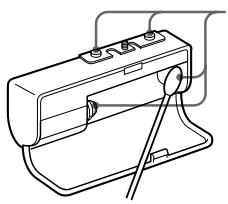
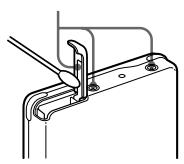
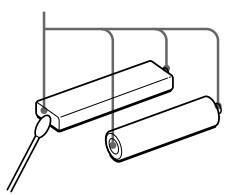
300

Ni-Cd
TEL 03-3434-0261
http://www.baj.or.jp
60
40 0 1 . . 90 .
A-B AMS
A-B AMS
36
| A-B | A-B 2 | A-B 2 |
| REC | 17 | |
| AVLS | AVLS | |
| 35 | ||
| RV MB | ||
| GRV | 34 | |
| ---- | 15 | |
1
6
1
90
DOLBY NR OFF 40 15 000 Hz EIA
100 8,000 Hz
1
0.4 mV
1
8 300
DC 3 mW + 3 mW EIAJ' 16
DC 1.5 V
NC-6WM 1.2 V 600 mAh
Ni-Cd 3 1
EIAJ
38
108.4 × 77.7 × 23.0 mm / /
108.4 × 77.7 × 23.4 mm / /
EIAJ*
148 g
172 g + NC-6WM EIAJ*
FM 76.0 90.0MHz
AM 531 1 710kHz
AC AC-E15L
AC AC-E15HG
NC-6WM
C-1KW CHK-1W
** MDR-ED238SP GROOVE
MDR-Q33SL MDR-E888SP MDR-848SP MDR-EX70SL
- EIAJ
**
REMOTE
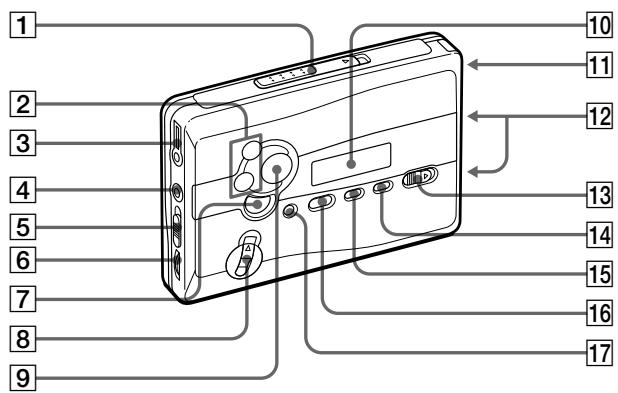
1 OPEN 2 FF / REW • AMS: TUNE / PRESET 3 REMOTE 4 MIC ISS AM 6 VOL 7 :■:RADIO OFF
REC 9 REPEAT 10 11 12 13 HOLD 14 SET 15 MENU 16 RADIO ON / BAND FM AM 17 COUNTER RESET
ENTER
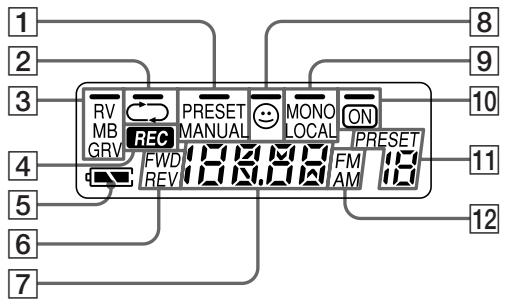
1 PRESET/MANUAL 2 / 3 RV/MB/GRV 4 REC 5 10 BN R ON 6 PRESET FWD/REV 7 8 AVLS FM MONO/LOCAL 10 BN RON 11 PRESET
12 FM/AM
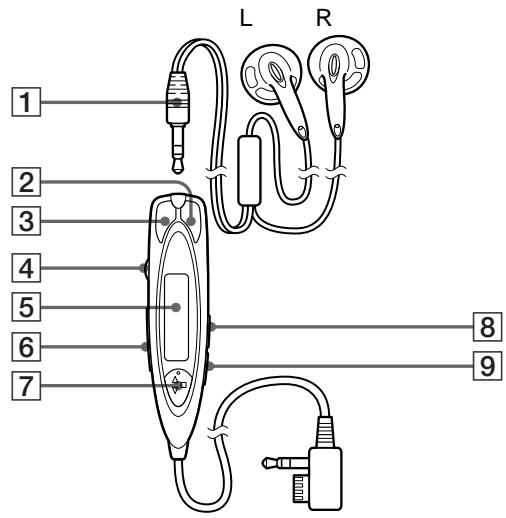
1 2 REW 3 FF 4 VOL 5 6 HOLD 7

: RADIO ON/
BAND·OFF
SOUND 9 MODE
5
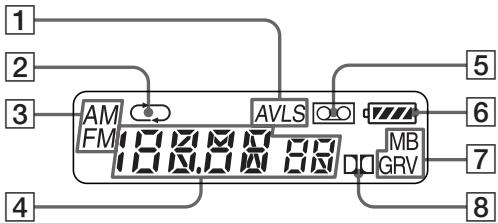
1 AVLS
5
2
6
3
7
4
8
RV/MB/GRV
B NR ON
Choosing a Power Source
Dry Battery
Attach the supplied battery case, and then insert one R6 (size AA) battery with correct polarity.
Note
- For maximum performance we recommend that you use a Sony alkaline battery.
Rechargeable Battery
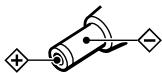
1 Insert the supplied rechargeable battery (NC-6WM) into the charger with correct polarity. See the ⊕ and ⊖ indications on your charger. 2 Plug in the charger to the house current (mains). Japanese model: Full charging takes about 3 hours. "Sony World Model": Full charging takes about 1 hour. If the plug does not fit to your mains, attach the supplied AC plug adaptor. 3 Insert the fully charged battery into the rechargeable battery compartment.
You can charge the battery about 300 times.
When to replace/charge the battery
Replace or charge the battery when "□" flashes in the display.
Battery life
| (Approx. hours) | (EIAJ*) |
| Sony alkaline LR6 (SG)** | |
| Tape playback | 31.5 |
| Radio reception | 32 |
| MIC recording | 10 |
| Radio recording | 6.5 |
| Rechargeable battery (NC-6WM) | |
| Tape playback | 8.5 |
| Radio reception | 10 |
| MIC recording | 4 |
| Radio recording | 3 |
| Sony alkaline LR6 (SG)** and Rechargeable NC-6WM | |
| Tape playback | 40 |
| Radio reception | 42 |
| MIC recording | 13 |
| Radio recording | 9 |
- Measured value by the standard of EIAJ (Electronic Industries Association of Japan). (Using a Sony HF series cassette tape) **When using a Sony LR6 (SG) "STAMINA" alkaline dry battery (produced in Japan).
Note
- The battery life may be shorter depending on the operating condition, the surrounding temperature and battery type.
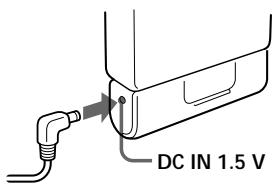
House Current
Remove the rechargeable battery if inserted. Attach the battery case and connect the AC power adaptor AC-E15L for Japan (not supplied) or AC-E15HG (not supplied) to the DC IN 1.5 V jack of the battery case and to the wall outlet.
Do not use any other AC power adaptor.
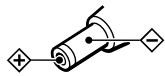
Specifications for AC-E15HG vary for each area. Check your local voltage and the polarity of the plug before purchasing.
Polarity of the plug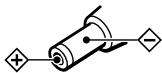
Playing a Tape
1 Insert a cassette and if the HOLD function is on, slide the HOLD switch in the opposite direction of the arrow to unlock the controls. 2 Press ◀ (play) ● (stop) on the remote control and adjust the volume with VOL. (On the main unit, press ◀ REPEAT.)
When adjusting the volume on the main unit
Set the VOL control on the remote control at maximum.
When adjusting the volume on the remote control
Set the VOL control on the main unit to around 6.
Operation on the remote control
| To | Press |
| Switch playback to the other side | ▲▶■ for 2 seconds or more during playback |
| Stop playback | ▲▶■ once during playback |
Operation on the main unit
| To | Press |
| Switch playback to the other side | ▲●REPEAT during playback |
| Stop playback | ■ (stop) |
Other tape operations
| To | Press |
| Fast forward | FF during stop* or during playback During playback, the tape is fast-forwardsed as long as FF is pressed. |
| Rewind | REW during stop* or during playback During playback, the tape is rewound as long as REW is pressed. |
| To | Press |
| Play the next track/succeeding 9 tracks from the beginning (AMS**) | FF once/repeatedly during playback |
| Play the current track/previous 8 tracks from the beginning (AMS**) | REW once/repeatedly during playback |
| Play the other side from the beginning (Skip Reverse function) | FF for 2 seconds or more during stop |
| Play the same side from the beginning (Rewind Auto Play function) | REW for 2 seconds or more during stop |
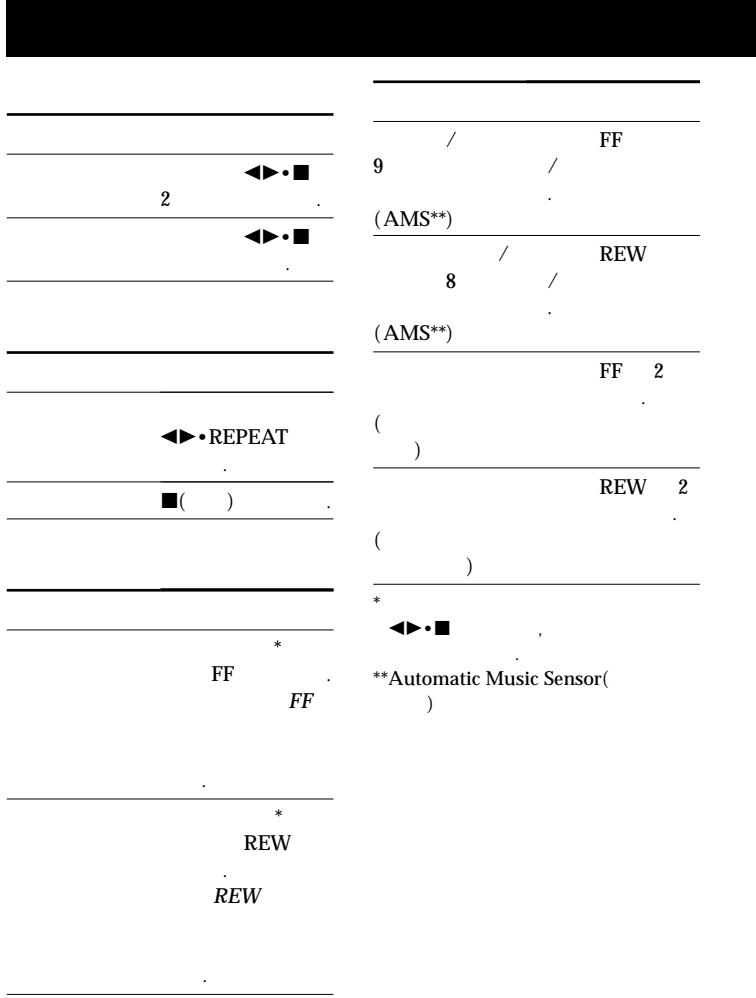
- If on the remote control is pressed during fast forward or rewind, the Walkman switches to playback. **Automatic Music Sensor
A-B Repeat
A-B Repeat plays back repeatedly any portion of the tape you specify. Specify by tagging the beginning (point A) and the end (point B) of the portion during playback.
On the remote control
1 Press for 2 seconds or more during playback to tag point A.
"A-" will flash in the display of the main unit.
2 Press again to tag point B.
"A-B" will flash and the tape will be rewound to point A. Then "REP" appears in the display and the specified portion is played repeatedly.
On the main unit
1 Press REPEAT for 2 seconds or more during playback to tag point A. "A-" will flash in the display of the main unit.
2 Press REPEAT again to tag point B.
"A-B" will flash and the tape will be rewound to point A. Then "REP" display and the specified portion is played repeatedly.
To cancel the A-B Repeat playback
Press ◀ REPEAT on the main unit.
On the remote control, press

Notes
- You cannot specify a repeat portion to include both sides of the tape.
- You cannot specify a repeat portion of shorter than 2 seconds. After repeated operation, the actual portion that is played back may shift off somewhat from the exact portion specified with the tags due to tape slack.
- A-B Repeat will repeat 50 times before returning to normal playback if not canceled manually.
- Do not use the A-B Repeat function with tapes longer than 90 minutes. If you do, the tape may be damaged.
Recording
You can record radio programs from the built-in radio, or record with the supplied microphone. In either case, use a new or fully charged battery.
Note
- If the record-protect tab is broken, you cannot record on that side.
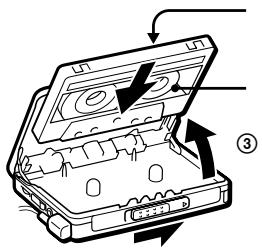
1 Insert a normal (TYPE I) tape.
To record on both sides Insert the cassette with the side to be first recorded on as the FWD (forward) side*.
- Make sure that "FWD" is displayed. If not, press and hold until "REV" changes to "FWD".
To record on one side only
Insert the cassette with the side to be recorded on as the REV (reverse) side.
Make sure that "REV" is displayed. If not, press and hold until "FWD" changes to "REV".
Note
- When the cassette holder is opened, the direction of the tape will be automatically set to "FWD".
2 Select a recording source:
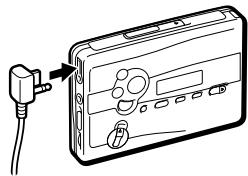
To record with the microphone, connect the supplied microphone to the MIC (PLUG IN POWER) jack.
To record from the radio, tune in to the station you want to record (see "Listening to the Radio").
3 Slide REC.
"REC" appears in the display and recording starts after about 2 seconds.
If you have started recording from the FWD side, recording will switch to reverse side automatically at the end of the FWD side.
To stop recording
Press (on the remote control, press ◀ to stop recording).
To reduce noise while recording AM programs
Set the ISS (Interference Suppress Switch) to the position that reduces noise the most.
To monitor the recording sound
You can monitor the recording sound through headphones/earphones. Adjust monitoring level using VOL.
Note
- You may hear some noise in the monitor sound in the RV, MB, or GRV mode, but this does not affect recording.
Notes on recording
The recording level is fixed. Sound emphasis (RV, MB, or GRV), AVLS and Dolby B NR settings do not affect recording. - Actual recording will start about 2 seconds after you slide REC. Slide REC about 2 seconds before the moment you want to start recording, or you will miss the beginning of your recording. - When recording on both sides, recording will not be made for about 10 seconds while the tape is switching sides.
- Do not use a high-position (TYPE II) or metal (TYPE IV) tape. If you do, the sound may be distorted when you play back the tape, or the previous recording may not be erased completely.
- Do not connect or disconnect the earphones to/from ☑REMOTE while recording from the radio. The recording condition may change abruptly, or noise may be recorded.
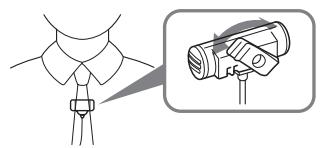
- To avoid noise interference, do not place it near a lamp cord or a fluorescent lamp when recording with the microphone.
- If a howling effect occurs, turn down the volume.
- All other operation cannot be made while recording. For other operation, stop recording first.
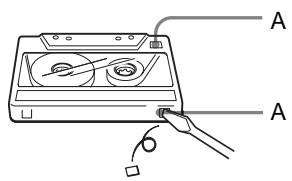
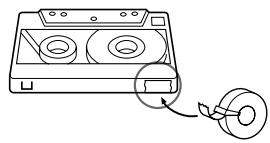
To prevent a tape from being accidentally recorded over
Break off the tabs from side A and/or B. To reuse the tape for recording, cover the tab hole with adhesive tape.
Listening to the Radio
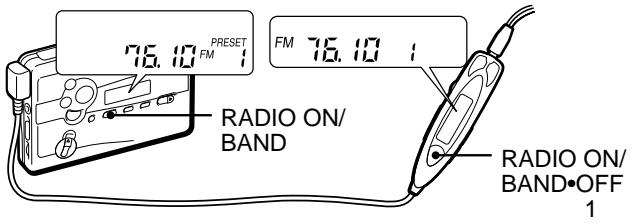
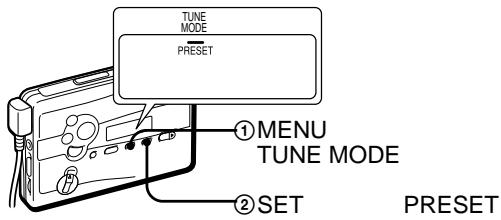
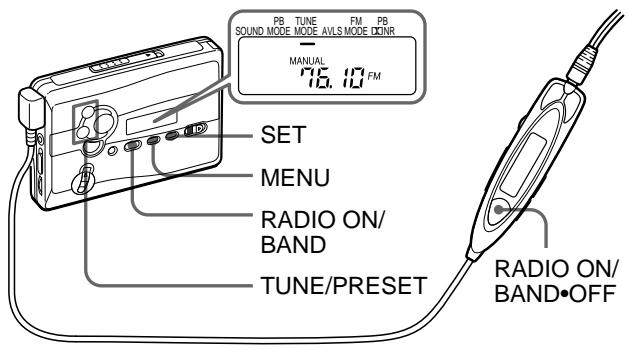
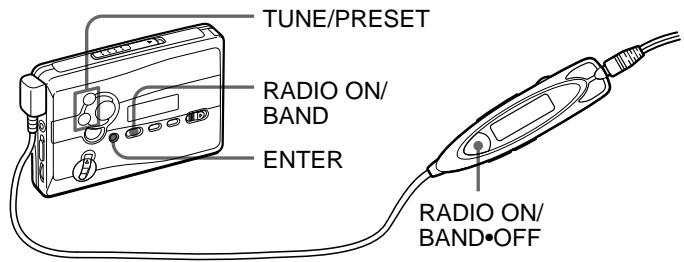
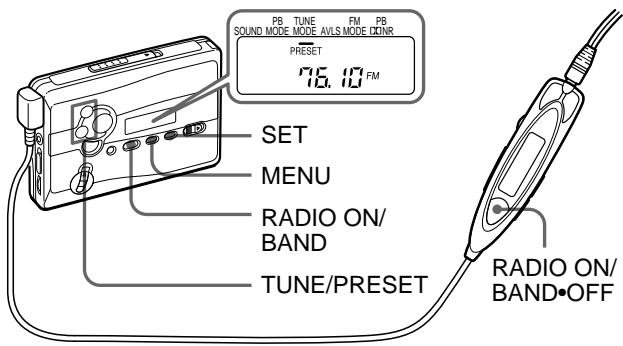
1 Press RADIO ON/BAND to turn on the radio. 2 Press RADIO ON/BAND repeatedly to select AM or FM. 3 Press MENU on the main unit repeatedly and set " _ " (the cursor) in the display of the main unit to TUNE MODE.
For manual tuning
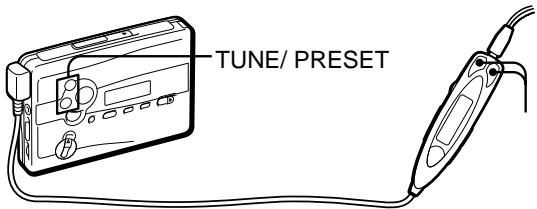
① Press SET to choose MANUAL. ② Press TUNE/PRESET + or - repeatedly to tune in to the desired station.
Hold down TUNE/PRESET + or - for a few seconds to scan for stations.
For preset tuning
① Press SET to choose PRESET. ② Press TUNE/PRESET + or - repeatedly to recall the desired preset station.
To use preset tuning, preset stations first (see "Tuning in to the Ready-preset Stations for Each Area" or "Presetting Radio Stations").
To turn off the radio
Press RADIO OFF.
To improve the broadcast reception
- For AM: Reorient the unit itself.
- For FM: Extend the remote control cord (antenna). If the reception is still not good, press MENU repeatedly to set the cursor in the display to FM MODE. Then press SET to choose from "MONO" (monaural), "LOCAL" or none (stereo) for best reception.
To operate from the remote control
To turn on the radio, press RADIO ON/BAND·OFF for more than one second (while the tape is in stop mode only). To select the band, press RADIO ON/BAND·OFF for more than one second while the radio is on. To tune in or recall a preset station, press PRESET+ or -. To turn off the radio, press RADIO ON/BAND·OFF.
Tuning in to the Ready-preset Stations for Each Area (Manual Area Call)
For each of the nine areas in Japan (Sapporo, Sendai, Northern Kanto, Southern Kanto, Nagoya, Osaka, Hiroshima, Fukuoka and the Shinkansen), this Walkman is factory preset with frequency data for major stations receivable in the area. Once your present area is selected, you can tune in to the stations on the area by preset tuning. For the factory preset stations for each area, see pages 30 to 31 of the Japanese text.
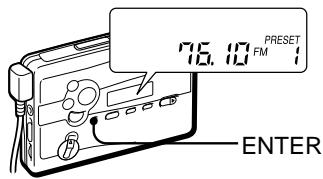
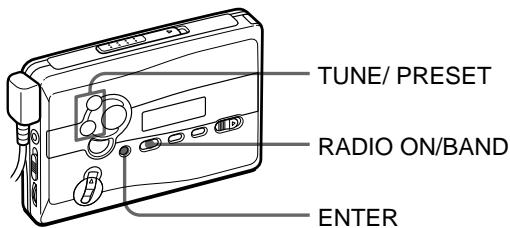
1 Press RADIO ON/BAND to turn on the radio. 2 Press ENTER. The frequency digits will flash in the display. 3 Hold down RADIO ON/BAND until "AREA 1" flashes. 4 While "AREA 1" is flashing, press TUNE/PRESET + or - repeatedly to select an area number from 1 to 8 or "JR" and then press ENTER. 5 Tune in to the desired preset station by "preset tuning" (see "Listening to the Radio").
Presetting Radio Stations
Once you store your favorite stations in memory, you can play them easily. You can preset up to 16 stations - 8 each for FM and AM.
Tuning in to and Storing Radio Stations Automatically (Auto-Memory Scanning function)
1 Press RADIO ON/BAND to turn on the radio. 2 Press RADIO ON/BAND repeatedly to select AM or FM. 3 Press ENTER until "A" appears in the display. The Walkman starts searching and storing stations. Then the preset number appears.
Note
- Do not remove the power sources until all the stations are stored.
Storing Radio Stations Manually (Manual-Memory function)
You can preset the stations in any order.
1 Press RADIO ON/BAND to turn on the radio. 2 Press RADIO ON/BAND repeatedly to select AM or FM. 3 Press ENTER. The frequency digits will flash in the display. 4 Press TUNE/PRESET + or - repeatedly to tune in to the desired station and press ENTER. The preset number will flash in the display. 5 Press TUNE/PRESET + or - repeatedly to select the desired preset number and press ENTER. The station is preset to the number of your choice.
Notes
- If you cannot complete step 4 or 5 while the indications are flashing, repeat from step 3.
- If you preset a new station to the same preset number, the previously stored station will be erased.
To cancel the stored station
Follow the procedure above and in step 4, instead of tuning in to a station, press and hold TUNE/PRESET + or - until "---" is displayed. Press ENTER while "---" is flashing. The preset number will flash in the display. Press TUNE/PRESET + or - repeatedly to select the preset number you want to cancel and press ENTER.
Receiving Stations Outside Japan
1 Press RADIO ON/BAND to turn on the radio. 2 Press ENTER.
The frequency digits will flash in the display.
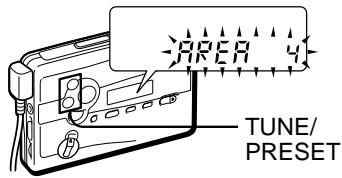
3 Press and hold RADIO ON/BAND until "AREA 1" flashes. 4 While "AREA 1" is flashing, press TUNE/PRESET + or - to select "USA" or "Eur". 5 Press ENTER.
6 Tune in to and store stations as necessary following the procedure of "Listening to the Radio" and "Presetting Radio Stations".
Area indication and frequency range
| Area* | Frequency range | |
| FM (MHz) | AM (kHz) | |
| USA | 87.5 - 108 | 530 - 1 710 |
| Eur | 87.5 - 108 | 531 - 1 602 |
| Japan (AREA 1-8, JR) | 76 - 90 | 531 - 1 710 |
- USA: USA, Canada, and Central and South America. Eur: European and other countries.
To receive stations in Japan
Select "AREA 1 to 8" or "JR" in step 4 above.
Using the Menu
Adjusting playback modes
To select playback direction mode
Press MENU repeatedly to set the cursor in the display to PB MODE. Then press SET to select the desired mode.
| To play | Select |
| both sides repeatedly | ←→ |
| both sides once from the FWD side | → |
To play a tape recorded with Dolby* B NR system
Press MENU repeatedly to set the cursor in the display to PB NR (Dolby noise reduction). Then press SET to show "ON".
- Manufactured under license from Dolby Laboratories. "Dolby" and the double-D symbol are trademarks of Dolby Laboratories.
Emphasizing Sound
On the main unit:
1 Press MENU repeatedly to set the cursor in the display to SOUND. 2 Press SET repeatedly to select the sound emphasis of your choice.
On the remote control:
1 Press SOUND repeatedly. With each press, the indications change.
The indications change as follows:
RV: Sound Revitalizer. Emphasizes treble sound.
MB: Mega Bass. Emphasizes bass sound (moderate effect).
GRV: Groove. Emphasizes bass sound (strong effect). No message: normal (no effect).
Notes
- If the sound is distorted with the mode "GRV", turn down the volume of the main unit or select other modes.
- You cannot change the mode during fast-forward or rewind.
Protecting Your Hearing — AVLS (Automatic Volume Limiter System)
On the main unit:
Press MENU repeatedly in the playback, stop, or radio mode to set the cursor to AVLS in the display. Then press SET to show ⊙.
On the remote control: Hold down MODE until "AVLS" appears in the display.
To cancel the AVLS function
Press SET so that "⊙" disappears from the display on the main unit. On the remote control, hold down MODE again until "AVLS" disappears.
Note
- The AVLS setting will be canceled when you replace the battery.
Using Other Functions
Locking the Controls - HOLD Function
Slide the HOLD switch in the direction of the arrow to lock the controls of the Walkman or the remote control.
To use the tape counter
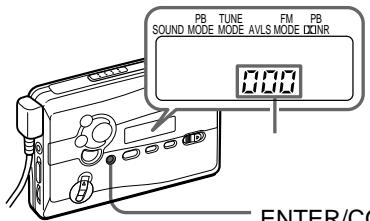
The tape counter is displayed on the main unit during playback, recording, fast forward, rewind, and stop (except when the radio is turned on). The number will increase when playing back the FWD side, and decrease when playing back the REV side. To reset the counter to "000", press ENTER/COUNTER RESET.
Notes
- The tape counter may show some deviation.
- The tape counter will not be displayed when the cassette compartment is empty.
R6(AA)
Sony
1 (NC-6WM)
- -
2 ( )
3
"Sony 1
AC
3
300
(EIAJ*)
| Sony | LR6(SG)** |
| 31.5 | |
| 32 | |
| MIC( ) | 10 |
| 6.5 |
| (NC-6WM) | |
| 8.5 | |
| 10 | |
| MIC( ) | 4 |
| 3 | |
| Sony | LR6(SG)**NC-6WM |
| 40 | |
| 42 | |
| MIC( ) | 13 |
| 9 |
*EIAJ (Electronic Industries Association of Japan) : (Sony HF) **LR6(SG) Sony STAMINA
1
HOLD HOLD
2
( )

VOL
.(
REPEAT
VOL
VOL 6
A-B
A-B
(A
(B
A-B
REPEAT

1 2
A
"A - "
2 B
"A-B"
A
"REP"
A-B
50
·90
A-B
1 REPEAT 2
A
"A - "
2 REPEAT
B
"A-B"
A
"REP"
"FWD"
2
MIC (PLUG IN POWER)
1 (TYPE I)
FWD ( )*
- "FWD"
"FWD"
, "REV"

3 REC
"REC"
2
FWD (
FWD
REV (
)**
**“REV”
"REV"
,“FWD”


).
- OPERATING INSTRUCTIONS (PAGE 52)
- USER MANUAL (PAGE 76)
- AM FM
- AMS
- RADIO ON/BAND
- ENTER
- TUNE/PRESET
- CHOOSING A POWER SOURCE
- DRY BATTERY
- NOTE
- RECHARGEABLE BATTERY
- WHEN TO REPLACE/CHARGE THE BATTERY
- BATTERY LIFE
- HOUSE CURRENT
- PLAYING A TAPE
- WHEN ADJUSTING THE VOLUME ON THE MAIN UNIT
- WHEN ADJUSTING THE VOLUME ON THE REMOTE CONTROL
- OPERATION ON THE REMOTE CONTROL
- OPERATION ON THE MAIN UNIT
- OTHER TAPE OPERATIONS
- A-B REPEAT
- ON THE REMOTE CONTROL
- ON THE MAIN UNIT
- TO CANCEL THE A-B REPEAT PLAYBACK
- NOTES
- RECORDING
- TO STOP RECORDING
- TO REDUCE NOISE WHILE RECORDING AM PROGRAMS
- TO MONITOR THE RECORDING SOUND
- NOTES ON RECORDING
- TO PREVENT A TAPE FROM BEING ACCIDENTALLY RECORDED OVER
- LISTENING TO THE RADIO
- TO TURN OFF THE RADIO
- TO IMPROVE THE BROADCAST RECEPTION
- TO OPERATE FROM THE REMOTE CONTROL
- TUNING IN TO THE READY-PRESET STATIONS FOR EACH AREA (MANUAL AREA CALL)
- PRESETTING RADIO STATIONS
- TUNING IN TO AND STORING RADIO STATIONS AUTOMATICALLY (AUTO-MEMORY SCANNING FUNCTION)
- STORING RADIO STATIONS MANUALLY (MANUAL-MEMORY FUNCTION)
- TO CANCEL THE STORED STATION
- RECEIVING STATIONS OUTSIDE JAPAN
- AREA INDICATION AND FREQUENCY RANGE
- TO RECEIVE STATIONS IN JAPAN
- USING THE MENU
- ADJUSTING PLAYBACK MODES
- TO SELECT PLAYBACK DIRECTION MODE
- TO PLAY A TAPE RECORDED WITH DOLBY* B NR SYSTEM
- EMPHASIZING SOUND
- PROTECTING YOUR HEARING — AVLS (AUTOMATIC VOLUME LIMITER SYSTEM)
- TO CANCEL THE AVLS FUNCTION
- USING OTHER FUNCTIONS
- LOCKING THE CONTROLS - HOLD FUNCTION
- TO USE THE TAPE COUNTER
- (TYPE I)
Brand : SONY
Model : WM-GX688
Category : Portable cassette player