
WM-GX822 - Lecteur de cassette portable SONY - Notice d'utilisation et mode d'emploi gratuit
Retrouvez gratuitement la notice de l'appareil WM-GX822 SONY au format PDF.
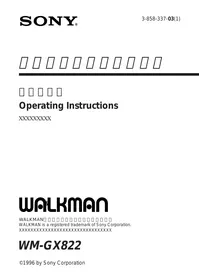


| Type de produit | Lecteur de cassette portable avec radio AM/FM/TV |
| Marque | Sony |
| Modèle | WM-GX822 |
| Dimensions | 108,9 × 78,6 × 26,5 mm |
| Poids | 170 g (sans piles), 265 g (avec pile rechargeable et cassette) |
| Alimentation | Pile rechargeable Ni-Cd NC-6WM (1,2 V, 600 mAh) ou pile alcaline LR6(WM) ou pile R6P(SR) ou adaptateur secteur AC-E15L (Japon) / AC-E15HG (international) |
| Autonomie (lecture cassette) | Environ 16 h avec pile alcaline LR6(WM), 6 h avec pile rechargeable NC-6WM |
| Autonomie (radio/TV) | Environ 25 h avec pile alcaline LR6(WM), 8 h avec pile rechargeable NC-6WM |
| Bandes radio | FM 76 – 90 MHz, AM 531 – 1710 kHz, TV 1 – 12 canaux |
| Fonctions de lecture | Lecture normale, répétition (piste unique, IC 4 s, A-B), avance/retour rapide, AMS (saut de piste), Skip Reverse, Auto Rewind Play, BL SKIP, contrôle de vitesse (3 vitesses rapides, 2 lentes, normale) |
| Enregistrement | Microphone intégré (prise MIC), enregistrement radio, enregistrement programmé (minuterie), réduction de bruit ISS pour AM |
| Réduction de bruit | Dolby B NR (activable/désactivable) |
| Amplification des basses | MEGA BASS (deux niveaux) |
| Limiteur de volume | AVLS (Automatic Volume Limiter System) |
| Types de cassettes compatibles | Type I (normale) – ne pas utiliser CrO2 (Type II) ni métal (Type IV) |
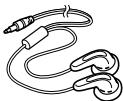
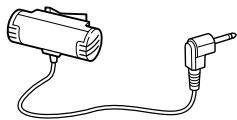
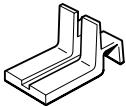
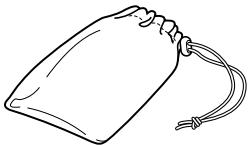
| Accessoires fournis | Chargeur de batterie, pile rechargeable NC-6WM, boîtier de piles, pile R6P(SR), pile lithium CR2016, écouteurs stéréo avec télécommande, pochette de transport, étui pour pile rechargeable, adaptateur secteur (selon modèle), microphone stéréo, support de micro, adaptateurs d'oreille |
| Consommation | 4 mW + 4 mW (DC, selon norme EIAJ) |
FOIRE AUX QUESTIONS - WM-GX822 SONY
Questions des utilisateurs sur WM-GX822 SONY
0 question sur cet appareil. Repondez a celles que vous connaissez ou posez la votre.
Poser une nouvelle question sur cet appareil
Téléchargez la notice de votre Lecteur de cassette portable au format PDF gratuitement ! Retrouvez votre notice WM-GX822 - SONY et reprennez votre appareil électronique en main. Sur cette page sont publiés tous les documents nécessaires à l'utilisation de votre appareil WM-GX822 de la marque SONY.
MODE D'EMPLOI WM-GX822 SONY
Instructions d'utilisation
WALKMAN
WALKMAN
WALKMAN est une marque déposée de Sony Corporation.
WM-GX822


4 5 6 8 10 12 14
29
16 31
19
32
22 33
23 34
36 37
36
38 39
40 44
41 45
43 46
Anglais 48
XXXX 58
IC A-B 30 20 6
14 3 AMS FM/AM TV
ASP)
LCD
21
MEGA BASS
EL
LIVE
REC/PAUSE
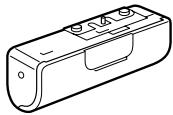
R6P (SR)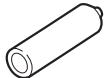
NC-6WM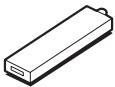
CR2016
2
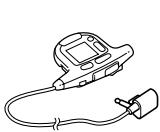
(
AC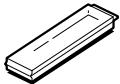
39
1 CR2016
2
300
50 (30)
3
4
QREMOTE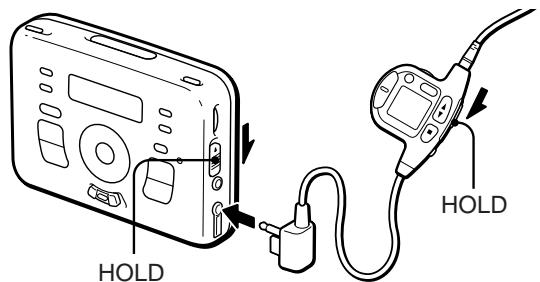
HORLOGE
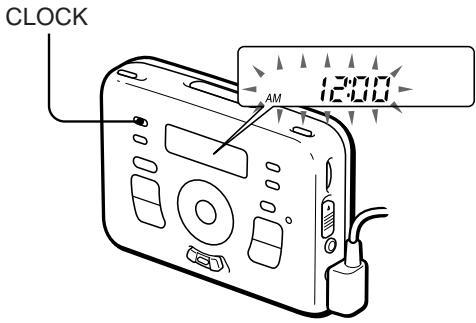
2 CONTRÔLE DE VITESSE·TEMPS/RÉGLAGE
3 HORLOGE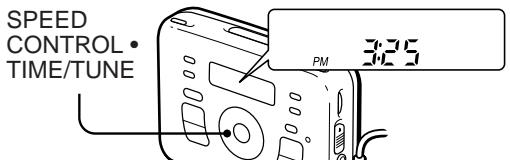
12 AM12 00 PM12 00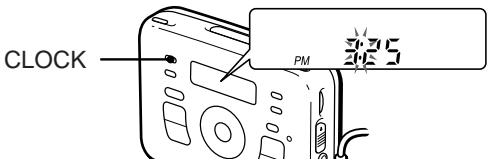
1 ① OUVERT 43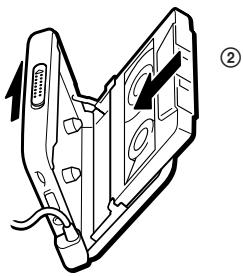
2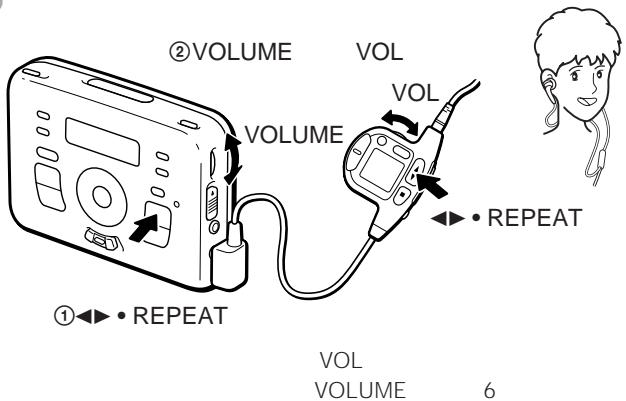
| ←● REPEAT FWD | ||
| REV | ||
| ■ | ||
| FF • AMS | ||
| REW • AMS | ||
| 1 | 2 | ←● REPEAT |
| REP | ||
| FF • AMS | …… | |
| 2 | ||
| REW • AMS | …… | |
| 2 | ||
1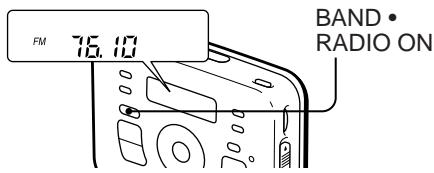
2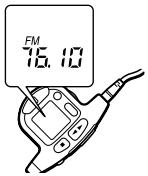
"ZONE"
ASP
PRÉRÉGLAGE 1
FM
FM
1
3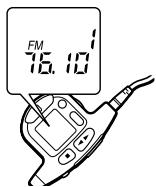
AM FM TV
4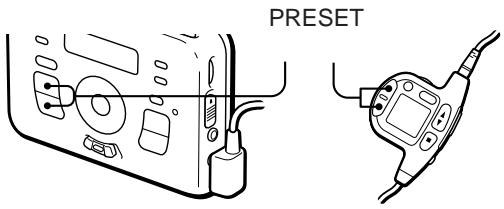
RADIO OFF
2 14
AM
FM TV
23
22
TYPE I
1
FWD
REV
FWD
AVANCE RAPIDE
2
① FM TV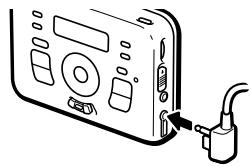
② 12 BAND·RADIO ON ASP
3 ENREG/PAUSE ENREG ENREG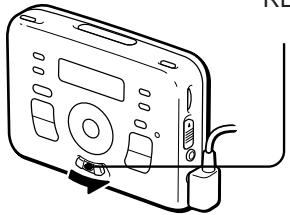
ENREG/PAUSE ENREG ENREG/PAUSE 5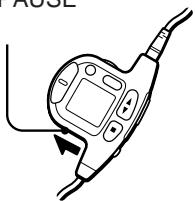
AM
ISS
12
3
AVANCE RAPIDE • AMS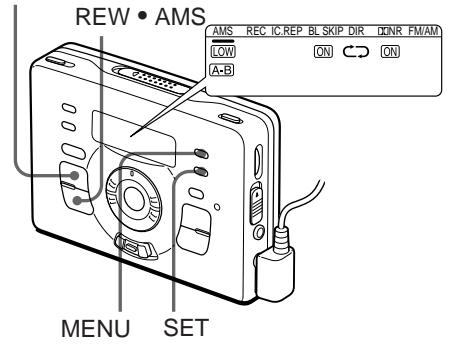
AVANCE RAPIDE·AMS
RETOUR RAPIDE·AMS
3
| FF AMS | 3 | |
| 2 | ||
| 1 | ... | |
| REW AMS | 2 | |
| 1 | ||
| ... |
AMS
AMS
4
4

MENU
BLSKIP
SET
BLSKIP
ON
SKIP
12

AMS
AMS
MENU
SET
LOW
AMS
SET
LOW

MENU
DIR
SET
| DIR | |
| 1 | * |
*

* B NR
ONR
MENU
SET
ON
B NR
ON
DOLBY
D

30
20
6
CONTRÔLE DE VITESSE TEMPS/RÉGLAGE
CONTRÔLE DE VITESSE • TEMPS/RÉGLAGE
| 10 | FAST/+ | FAST 1 | |
| 20 | FAST 2 | ||
| 30 | FAST 3 | ||
| 10 | SLOW/ | SLOW 1 | |
| 20 | SLOW 2 | ||
| FAST/+ | SLOW/ | PLAY |
4
IC
A-B
1
3
1
11
4 IC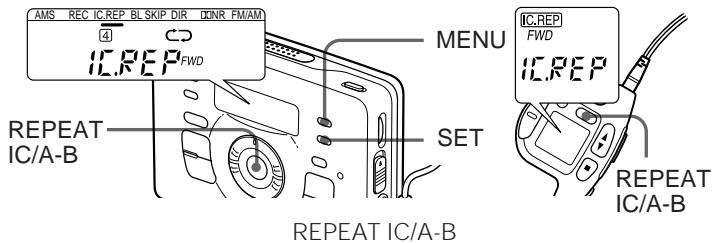
4
IC. REP
MENU
A-B
IC
MENU
MENU
IC. REP
SET
IC
REPEAT IC/A-B
4
IC
REPEAT IC/A-B

- REPEAT
IC
IC
REW·AMS
SLOW
10
FF·AMS
A-B MENU MENU SET IC. REP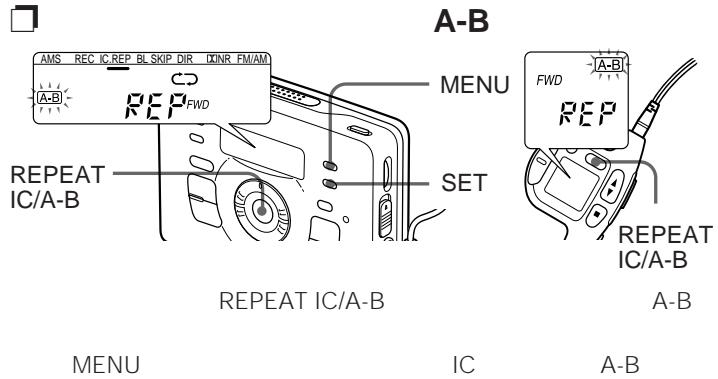
REPEAT IC/A-B
B A-B
A-B
REPEAT IC/A-B
REPEAT
FWD REV REV FWD A-B
1 A-B
A-B
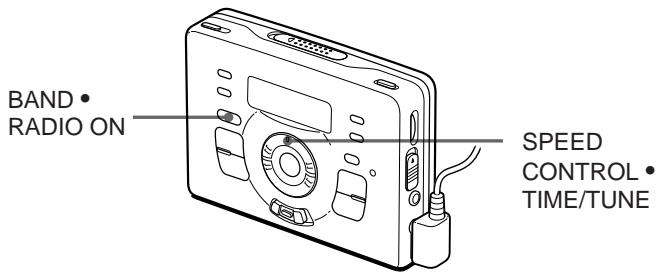
1 BAND·RADIO ON 2 BAND·RADIO ON
TV
3 CONTRÔLE DE VITESSE · TEMPS/SYNCHRONISATION
RAPIDE/
AM FM
/LENT
CONTRÔLE DE VITESSE · TEMPS/SYNCHRONISATION

8
ASP
12
AM FM TV
ASP
ASP
ASP
ASP


23


24
1 1


27


M 28

18
JR
25 26
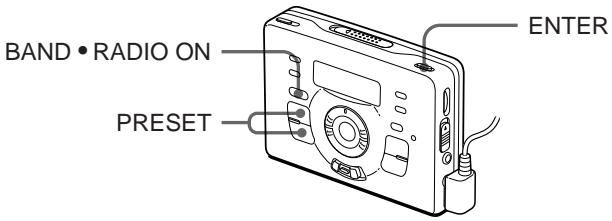
1 BAND·RADIO ON 2 ENTER
PRESET
3 AREA 1 BAND·RADIO ON 4 PRESET 18 JR 5 BAND·RADIO ON TV PRESET ENTER
AM FM

AM FM TV 8
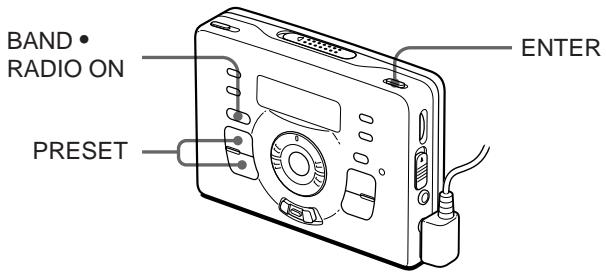
1 BAND·RADIO ON 2 BAND·RADIO ON TV 3 SCAN ENTER 4 PRESET
AM FM
8
25 26
1
| AM 1 | 567kHz | NHK 1 |
| 2 | 747kHz | NHK 2 |
| 3 | 1287kHz | |
| 4 | 1440kHz | |
| FM 1 | 80.4MHz | FM |
| 2 | 82.5MHz | FM |
| 3 | 85.2MHz | NHK FM |
| 4 | 88.2MHz | NHK FM |
| TV 1 | 1 ch | HBC |
| 2 | 3 ch | NHK |
| 3 | 5 ch | STV |
| 4 | 12 ch | NHK |
2
| AM 1 | 891kHz | NHK 1 |
| 2 | 1089kHz | NHK 2 |
| 3 | 1260kHz | |
| FM 1 | 77.1MHz | FM |
| 2 | 82.5MHz | NHK FM |
| TV 1 | 1 ch | |
| 2 | 3 ch | NHK |
| 3 | 5 ch | NHK |
| 4 | 12 ch |
3
| AM 1 | 594kHz | NHK 1 |
| 2 | 693kHz | NHK 2 |
| 3 | 810kHz | FEN |
| 4 | 954kHz | TBS |
| 5 | 1134kHz | |
| 6 | 1197kHz | |
| 7 | 1242kHz | |
| 8 | 1530kHz |
3
| FM 1 | 76.4MHz | FM |
| 2 | 78.8MHz | |
| 3 | 80.0MHz | TOKYO FM |
| 4 | 80.3MHz | NHK FM |
| 5 | 81.6MHz | NHK FM |
| 6 | 83.2MHz | NHK FM |
| 7 | 86.3MHz | FM |
| TV 1 | 1 ch | NHK |
| 2 | 3 ch | NHK |
| 3 | 4 ch | |
| 4 | 6 ch | TBS |
| 5 | 8 ch | |
| 6 | 10 ch | |
| 7 | 12 ch |
4
| AM 1 | 594kHz | NHK 1 |
| 2 | 693kHz | NHK 2 |
| 3 | 810kHz | FEN |
| 4 | 954kHz | TBS |
| 5 | 1134kHz | |
| 6 | 1242kHz | |
| 7 | 1422kHz | |
| FM 1 | 76.1MHz | FM |
| 2 | 78.0MHz | FM |
| 3 | 78.6MHz | FM |
| 4 | 79.5MHz | FM |
| 5 | 80.0MHz | TOKYO FM |
| 6 | 81.3MHz | FM |
| 7 | 82.5MHz | NHK FM |
| 8 | 84.7MHz | FM |
| TV 1 | 1 ch | NHK |
| 2 | 3 ch | NHK |
| 3 | 4 ch | |
| 4 | 6 ch | TBS |
| 5 | 8 ch | |
| 6 | 10 ch | |
| 7 | 12 ch |
5
| AM 1 | 729kHz | NHK 1 |
| 2 | 909kHz | NHK 2 |
| 3 | 1053kHz | CBC |
| 4 | 1332kHz | |
| 5 | 1431kHz | |
| FM 1 | 77.8MHz | FM |
| 2 | 78.9MHz | FM |
| 3 | 80.7MHz | FM |
| 4 | 81.8MHz | NHK FM |
| 5 | 82.5MHz | NHK FM |
| 6 | 83.6MHz | NHK FM |
| TV 1 | 1 ch | |
| 2 | 3 ch | NHK |
| 3 | 5 ch | CBC |
| 4 | 9 ch | NHK |
| 5 | 11 ch |
6
| AM 1 | 558kHz | |
| 2 | 666kHz | NHK 1 |
| 3 | 828kHz | NHK 2 |
| 4 | 1008kHz | ABC |
| 5 | 1143kHz | KBS |
| 6 | 1179kHz | |
| 7 | 1314kHz | |
| 8 | 1431kHz | |
| FM 1 | 76.5MHz | |
| 2 | 80.2MHz | FM802 |
| 3 | 82.8MHz | NHK FM |
| 4 | 85.1MHz | FM |
| 5 | 86.5MHz | NHK FM |
| 6 | 88.1MHz | NHK FM |
| 7 | 89.4MHz | FM |
| 8 | 89.9MHz | FM |
| TV 1 | 2 ch | NHK |
| 2 | 4 ch | |
| 3 | 6 ch | ABC |
| 4 | 8 ch | |
| 5 | 10 ch | |
| 6 | 12 ch | NHK |
7
| AM 1 | 702kHz | NHK 2 |
| 2 | 918kHz | |
| 3 | 1071kHz | NHK 1 |
| 4 | 1116kHz | |
| 5 | 1350kHz | |
| 6 | 1575kHz | FEN |
| FM 1 | 78.2MHz | FM |
| 2 | 88.3MHz | NHK FM |
| TV 1 | 3 ch | NHK |
| 2 | 4 ch | |
| 3 | 7 ch | NHK |
| 4 | 12 ch |
8
| AM 1 | 612kHz | NHK 1 |
| 2 | 1017kHz | NHK 2 |
| 3 | 1278kHz | RKB |
| 4 | 1413kHz | |
| FM 1 | 77.9MHz | FM |
| 2 | 78.7MHz | FM |
| 3 | 80.7MHz | FM |
| 4 | 81.6MHz | NHK FM |
| 5 | 84.8MHz | NHK FM |
| TV 1 | 1 ch | |
| 2 | 3 ch | NHK |
| 3 | 4 ch | RKB |
| 4 | 6 ch | NHK |
| 5 | 9 ch |
JR JR
| FM 1 | 76.0MHz |
| 2 | 76.6MHz |
| 3 | 77.5MHz |
| 4 | 78.8MHz |
| 5 | 79.6MHz |
2

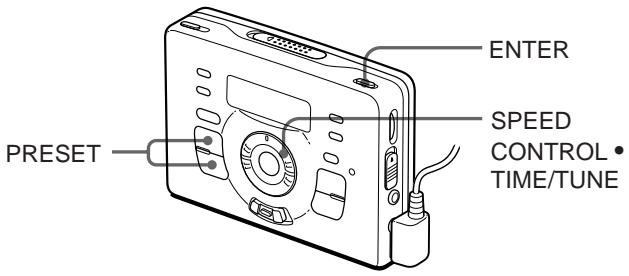
1
22
2 ENTER
PRESET
3
PRESET
SPEED CONTROL·TIME/TUNE
/SLOW
FAST/
4
ENTER
5
PRESET
ENTER
SPEED CONTROL · TIME/TUNE
/SLOW
FAST/
ENTER


ASP
1 BAND·RADIO ON 2 COPY M BAND·RADIO ON
AM FM TV
M
M
ENTER
PRESET
BAND
RADIO ON 2
PRESET
ENTER
AREA 1
AREA M
1 BAND·RADIO ON 2 ENTER PRESET 3 AREA 1 BAND·RADIO ON 4 PRESET
USA Eur ENTER
87.50 MHz PRÉRÉGLAGE 1
| USA | FM: 87.5 | 108MHz |
| AM: 530 | 1,710kHz | |
| Eur | FM: 87.5 | 108MHz |
| AM: 531 | 1,602kHz |
5 1 A ASP
AM FM
6 BANDE·RADIO ON AM FM
PRÉRÉGLAGE
(22
(27)
ASP
3 ENTRÉE
FM
2 3
FM
FM AM
FM/AM
RÉGLAGE
MENU
MONO
MONO
TV
8
1 2 3
START
TIMER
4 CONTRÔLE DE VITESSE · TEMPS/SYNCHRONISATION
5 MINUTEUR
STOP
6 CONTRÔLE DE VITESSE · TEMPS/SYNCHRONISATION 7 MINUTEUR
MINUTEUR
1
DIRECT
LIVE
MENU
SET
LIVE
REC
LIVE
SET 1
MEGA BASS AVLS
VOLUME NR
REPEAT REC/PAUSE 2
BATT
TYPE I (CrO2)
MEGA BASS

LIGHT 5
LIGHT
MEGA BASS
MEGA BASS/AVLS


AVLS

MEGA BASS/AVLS 2
AVLS
AVLS

MEGA BASS AVLS
BATT
| LR6 (WM) | 16.0 | 25.0 | 8.5 | 7.0 |
| NC-6WM (100%) | 6.0 | 8.0 | 3.5 | 3.0 |
| 21.0 | 32.0 | 12.0 | 9.5 | |
| R6P (SR) | 4.5 | 8.0 | 2.0 | 1.5 |
1 2 3
AM 12:00
8
1 2 ACAC-E15HG( ) 3 AC
AC-E15L ( ) DC IN 1.5V
AC E15L AC-E15HG( )
AC
AC-EIAJ
10
CHK-1

Ni-Cd
(60
( )
(40 ) (0
90
| OPEN | OPEN | ||
| IC | 1 | ||
| A-B | 11 | ||
| REC/PAUSE | 35 | ||
| AVLS | AVLS | ||
| (37) | |||
| MEGA BASS | MEGA BASS | ||
| (37) | |||
| CHK-1 | 40 | ||
| HOLD | HOLD | ||
| 6 | |||
| BL SKIP | |||
| ON | 17 | ||
| ASP | (22) | ||
| (23) | |||
| ---- | 15 | ||
| 38 | |||
1
)
6
1
90
DOLBY NR OFF
(EIAJ) 30 18,000 Hz
100 8,000 Hz
1
0.4 mV
( ) 1
8 300
(DC) 4 mW + 4 mW (EIAJ 16)
DC 1.5 V
NC-6WM 1.2 V 600 mA
Ni-Cd 3 1
(EIAJ) 38
108.9×78.6×26.5mm(/ )170g265g(NC-6WM C-60HF
FM 76.0 90.0MHz
AM 531 1,710kHz
TV 1 12ch
AC AC-E15L( ) AC AC-E15HG NC-6WM CHK-1 ( ) MDR-E747V MDR-E868MP DCC-E215
*EIAJ(
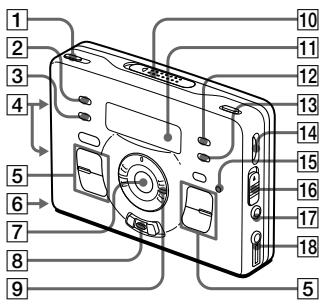
ISS AM CLOCK 3 TIMER
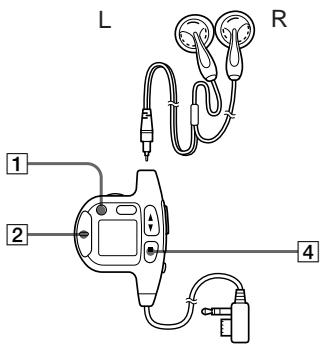
4 5 6 7 REPEAT IC/A-B REC/PAUSE 9 SPEED CONTROL TIME SLOW,FAST/ 10 OPEN(
11 12 MENU 13 SET 14 : VOLUME
: VOL
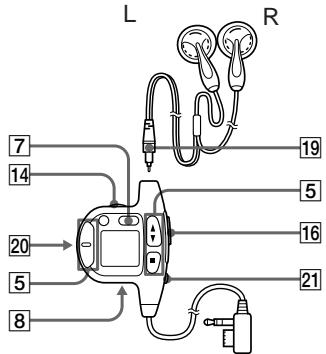
15 BATT 16 HOLD MIC 18 REMOTE
19 20 LIGHT 21 MEGA BASS /AVLS
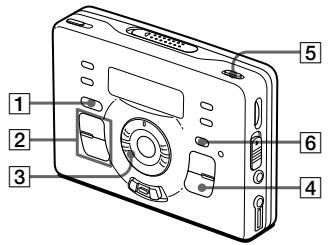
1 : BAND FM AM TV RADIO ON
:BAND FM AM TV
2 PRESET 3 TIME/TUNE / 4 : ■ RADIO OFF
5 ENTER 6 ASP

Avant d'utiliser l'appareil, veuillez lire attentivement ce manuel et conservez-le pour référence future.
Pour commencer
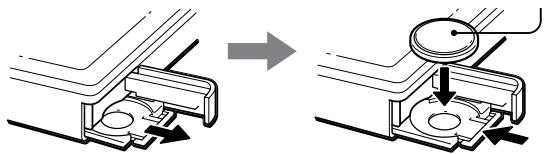
Installation de la pile au lithium
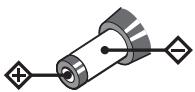
Avant la première utilisation de l'appareil, ouvrez le couvercle du compartiment à piles sur le côté gauche du Walkman et insérez une pile au lithium CR2016 (fournie) en respectant la polarité. La pile conserve la mémoire de l'horloge.
Quand remplacer la pile au lithium
La pile au lithium dure environ un an. Pour la remplacer, retirez toutes les piles de l'appareil et attendez 15 secondes avant d'en insérer une nouvelle. L'affichage de l'horloge reviendra à "AM 12:00", réglez à nouveau l'horloge.
Préparation des sources d'alimentation
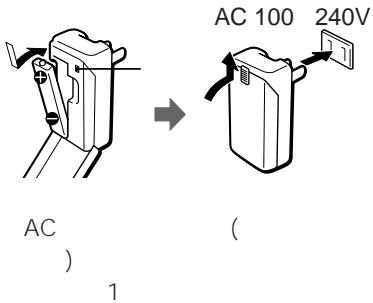
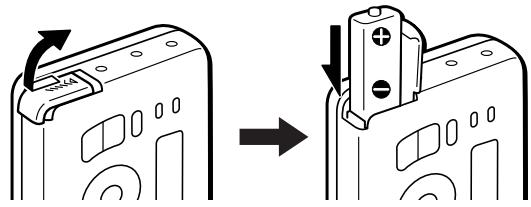
Batterie rechargeable
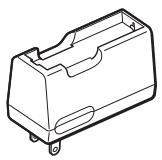
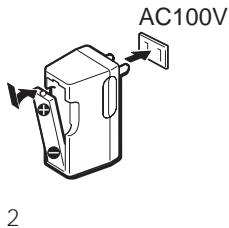
1 Avant d'utiliser la batterie rechargeable, vous devez la charger avec le chargeur de batterie fourni.
Modèle japonais : la charge complète prend environ 2 heures. Modèle mondial : la charge à 50 % prend environ 30 minutes. La charge complète prend environ 60 minutes (le témoin de charge s'éteint alors).
2 Ouvrez le couvercle du compartiment de la batterie rechargeable sur le côté gauche du Walkman et insérez la batterie chargée.
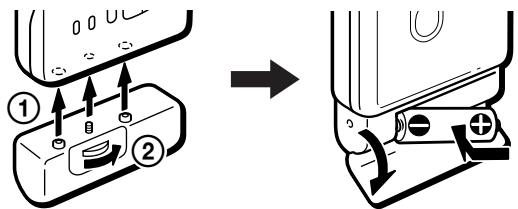
Pile sèche
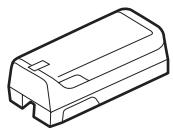
Fixez le boîtier de pile à l'appareil, puis insérez une pile R6P(SR) (fournie) en respectant la polarité.
Autonomie de la batterie (environ, en heures)
| Sony alkaline LR6(WM) | |
| Playback | 16.0 |
| Radio/TV reception | 25.0 |
| MIC recording | 8.5 |
| Radio recording | 7.0 |
| Rechargeable NC-6WM | |
| Playback | 6.0 |
| Radio/TV reception | 8.0 |
| MIC recording | 3.5 |
| Radio recording | 3.0 |
| Sony alkaline LR6(WM) and Rechargeable NC-6WM | |
| Playback | 21.0 |
| Radio/TV reception | 32.0 |
| MIC recording | 12.0 |
| Radio recording | 9.5 |
(suite)
| Sony R6P(SR) | |
| Playback | 4.5 |
| Radio/TV reception | 8.0 |
| MIC recording | 2.0 |
| Radio recording | 1.5 |
Remarques
- Retirez le chargeur de la prise murale dès que possible après avoir chargé la batterie rechargeable. Une surcharge peut endommager la batterie rechargeable.
- Utilisez la batterie rechargeable Sony NC-6WM uniquement avec le chargeur fourni ou avec le chargeur vendu séparément pour la Sony NC-6WM.
- Veillez à ne pas court-circuiter la batterie. Lorsque vous la transportez, utilisez l'étui de transport fourni. Si vous n'utilisez pas l'étui, ne la transportez pas avec des objets métalliques tels que des clés dans votre poche.
- Le chargeur et la batterie rechargeable peuvent chauffer pendant la charge, mais ce n'est pas un problème.
Courant secteur
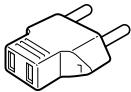
Avant d'utiliser le Walkman, retirez la batterie rechargeable si elle est installée. Fixez le boîtier de pile fourni et connectez l'adaptateur secteur AC-E15L pour le Japon (non fourni) ou AC-E15HG pour l'étranger (non fourni) à la prise DC IN 1,5 V du boîtier de pile. N'utilisez aucun autre adaptateur secteur.
Réglage de l'horloge
1 Appuyez sur CLOCK jusqu'à ce que l'affichage clignote "AM 12:00". 2 Tournez SPEED CONTROL·TIME/TUNE pour régler l'horloge. 3 Relâchez CLOCK au signal horaire.
"..." commence à clignoter et l'horloge se met en marche.
Système de 12 heures :
"AM 12:00" = minuit
"PM 12:00" = midi
▷ Utilisation du Walkman
Lecture d'une cassette
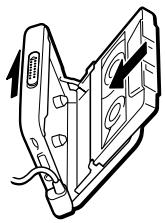
1 Connectez fermement les écouteurs fournis avec la télécommande à la prise REMOTE et désactivez la fonction Hold. 2 Ouvrez le logement de cassette et insérez une cassette. 3 Appuyez sur ◁ REPEAT (lecture) et réglez le volume avec la molette de volume.
| To | Press |
| Play the other side | (REPEAT (during playback) |
| Stop playback | ■ (stop) |
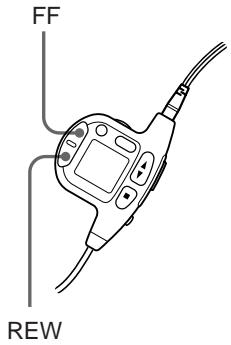
| Fast forward | FF·AMS (in the stop mode) |
| Rewind | REW·AMS (in the stop mode) |
| Repeat the current track (Repeat Single Track function) | (REPEAT (2 seconds or more during playback) to stop a single repeat, press it again. |
| Find the beginning of the next track/succeeding 3 tracks (AMS*function) | FF·AMS (shortly/repeatedly during playback) |
| Find the beginning or the current track/previous 2 tracks (AMS function) | REW·AMS (shortly/repeatedly during playback) |
| Play the other side from the beginning (Skip Reverse function) | FF·AMS (2 seconds or more during stop) |
| Play the same side from the beginning (Auto Rewind Play function) | REW·AMS (2 seconds or more during stop) |
*Capteur de musique automatique
Pour sauter un long espace vide entre les pistes (fonction BL SKIP*)
Appuyez plusieurs fois sur MENU pour placer le curseur sur BL SKIP dans l'affichage. Appuyez sur SET pour afficher "ON".
- Le Walkman avance rapidement la bande jusqu'à la piste suivante s'il y a un espace vide de plus de 12 secondes.
Remarque
Pour détecter plus facilement un espace vide lorsque AMS ou BL SKIP ne fonctionne pas, appuyez plusieurs fois sur MENU pour placer le curseur sur AMS dans l'affichage, puis appuyez sur SET pour afficher "LOW". AMS et BL SKIP changeront de sensibilité pour détecter plus facilement l'espace vide. Pour revenir aux réglages normaux, appuyez sur SET pour effacer "LOW".
Pour sélectionner le mode de lecture
Appuyez plusieurs fois sur MENU pour placer le curseur sur DIR dans l'affichage. Appuyez sur SET pour sélectionner la fonction souhaitée.
| To play | Set the selector to |
| Both sides repeatedly | ←→ |
| Both sides once from the side facing the tape holder | → |
Pour lire une cassette enregistrée avec le système Dolby* B NR
Appuyez plusieurs fois sur MENU pour placer le curseur sur NR (réduction de bruit Dolby) dans l'affichage. Appuyez sur SET pour afficher "ON".
- Réduction de bruit Dolby fabriquée sous licence de Dolby Laboratories Licensing Corporation. "DOLBY" et le symbole double-D sont des marques de commerce de Dolby Laboratories Licensing Corporation.
Réglage de la vitesse de lecture
Vous pouvez choisir parmi 6 niveaux de vitesse de lecture : trois en vitesse rapide, deux en vitesse lente et un en vitesse normale. Environ de +30 % à -20 %.
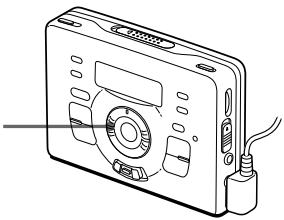
Tournez SPEED CONTROL·TIME/TUNE vers FAST/+.
(En tournant la commande à fond, les niveaux changent rapidement.) (Vitesse approximative)
| Playback Speed | Display |
| +10% | FAST 1 |
| +20% | FAST 2 |
| +30% | FAST 3 |
Tournez SPEED CONTROL·TIME/TUNE vers SLOW/-.
(En tournant la commande à fond, les niveaux changent rapidement.) (Vitesse approximative)
| Playback Speed | Display |
| -10% | SLOW 1 |
| -20% | SLOW 2 |
Pour revenir à la vitesse normale
Tournez SPEED CONTROL·TIME/TUNE plusieurs fois jusqu'à ce que "PLAY" apparaisse dans l'affichage.
Remarques
- Si vous ouvrez le logement de la cassette ou démarrez l'enregistrement, la vitesse de lecture revient automatiquement à la vitesse normale.
- La vitesse de lecture réglée sera mémorisée jusqu'à ce qu'elle soit modifiée pour revenir à la vitesse normale.
- Vous ne pouvez pas modifier la vitesse d'enregistrement par la vitesse de lecture.
Lecture répétée IC
La lecture répète 4 secondes à partir du point où vous appuyez sur REPEAT IC/A-B.
Lorsque l'opération de la cassette est arrêtée, appuyez sur REPEAT IC/A-B, "4" apparaît à l'écran. Sur la télécommande, "IC. REP" apparaîtra.
Pendant la lecture, appuyez plusieurs fois sur MENU pour placer le curseur sur IC. REP à l'écran. Appuyez sur SET pour afficher "4".
Pour ralentir la lecture en mode IC Repeat
Lorsque vous appuyez sur REW·AMS pendant la lecture répétée IC, "SLOW" apparaîtra et la lecture ralentira à 10 %. Pour revenir à la vitesse normale, appuyez sur FF·AMS.
Pour annuler la lecture répétée IC
Appuyez sur REPEAT IC/A-B ou
REPEAT pendant la lecture.
Remarques
- Lorsque IC REPEAT est activé, la consommation de la batterie augmente. Si vous n'utilisez pas la lecture répétée IC, changez l'affichage sur "A-B".
- La lecture répétée IC s'annulera automatiquement et démarrera la lecture dans 5 minutes.
- Lorsque vous utilisez la fonction IC REPEAT, le son devient monaural.
- La répétition IC ne fonctionnera pas pendant la lecture répétée d'une seule piste.
- La répétition IC ne peut pas être utilisée à la radio.
Lecture répétée A-B
Choisissez une section à répéter en appuyant sur REPEAT IC/A-B.
Lorsque la lecture de la cassette est arrêtée, appuyez sur REPEAT IC/A-B, "A-B" s'affiche à l'écran. Pendant la lecture, appuyez plusieurs fois sur MENU pour placer le curseur sur "IC. REP" à l'écran. Appuyez sur SET pour afficher "A-B".
Répétez la lecture en appuyant sur REPEAT IC/A-B une fois au début (point A) et une fois à la fin de la section choisie (point B).
Pour annuler la lecture répétée A-B
Appuyez sur REPEAT IC/A-B ou
REPEAT pendant la lecture.
Remarques
- La fonction de répétition A-B ne fonctionnera pas à l'endroit où la cassette se retourne de l'autre côté.
- La répétition A-B ne fonctionnera pas pendant la lecture répétée d'une seule piste.
- La répétition A-B ne peut pas être utilisée à la radio.
Écoute de la radio
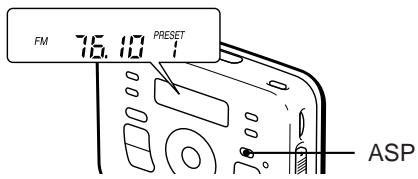
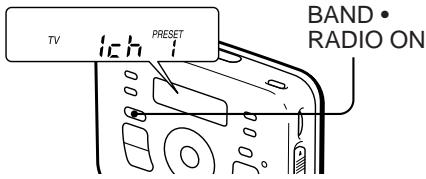
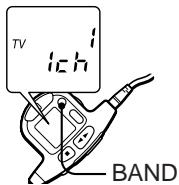
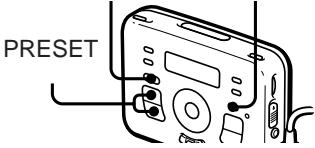
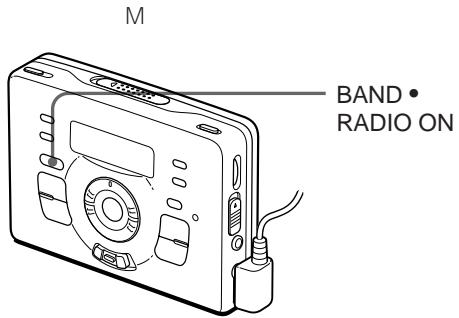
1 Connectez fermement la télécommande fournie à la prise REMOTE et désactivez la fonction Hold. 2 Appuyez sur BAND·RADIO ON pour allumer la radio. 3 Maintenez enfoncé ASP jusqu'à ce que "AREA" clignote à l'écran. Ensuite, la fréquence FM et "PRESET 1" s'allument sur l'écran de l'appareil et "1" s'allume sur l'écran de la télécommande. 4 Appuyez sur BAND·RADIO ON pour sélectionner AM, FM ou TV. 5 Appuyez sur PRESET+/- pour sélectionner le numéro de préréglage que vous souhaitez écouter et réglez le volume à l'aide du bouton de volume.
Pour éteindre la radio, appuyez sur
■RADIO OFF.
La prochaine fois que vous écoutez la radio dans la même zone de fréquence, vous pouvez sauter l'étape 3.
Pour améliorer la réception radio
Lorsque vous écoutez FM ou TV, dépliez le cordon de l'écouteur pour une meilleure réception. Lorsque vous écoutez AM, faites pivoter l'appareil horizontalement pour une réception optimale.
Lorsque vous écoutez une émission stéréo
Appuyez plusieurs fois sur MENU pour placer le curseur sur FM/AM. Appuyez sur SET pour que "MONO" disparaisse. Si la réception est mauvaise, affichez "MONO".
Ce que fait le bouton ASP (fonction de préréglage automatique des stations)
Ce Walkman stocke les principales stations de huit régions du Japon (Sapporo, Sendai, Kanto Nord, Kanto Sud, Nagoya, Osaka, Hiroshima et Fukuoka) et du Shinkansen. Vous pouvez syntoniser les stations d'origine en appuyant simplement sur ASP. Maintenez le bouton ASP enfoncé jusqu'à ce que le Walkman commence à rechercher.
Si la fonction ASP ne stocke pas la station souhaitée, ou si vous souhaitez personnaliser le numéro de préréglage des stations, consultez "Syntonisation manuelle de la radio" ou "Stockage manuel des stations de radio" ci-dessous.
Syntonisation manuelle de la radio (syntonisation manuelle)
Allumez la radio et sélectionnez la bande souhaitée. Ensuite, syntonisez avec SPEED CONTROL · TIME/TUNE-/SLOW ou + / FAST . Si vous maintenez SPEED CONTROL · TIME/TUNE-/SLOW ou + / FAST enfoncé pendant plus de quelques secondes, le Walkman commencera à syntoniser automatiquement les stations.
Stockage manuel des stations de radio (fonction de mémoire manuelle)
1 Allumez la radio et sélectionnez la bande souhaitée. 2 Appuyez sur ENTER. Les chiffres de fréquence, "PRESET" et un numéro de préréglage clignotent à l'écran. 3 Pendant que les chiffres de fréquence, "PRESET" et le numéro de préréglage clignotent, syntonisez une station que vous souhaitez mémoriser à l'aide de SPEED CONTROL. TIME/TUNE, et sélectionnez un numéro de préréglage sur lequel vous souhaitez mémoriser une station à l'aide de PRESET+/-. 4 Pendant que les chiffres de fréquence, "PRESET" et le numéro de préréglage clignotent, appuyez sur ENTER.
Remarques
- Si vous ne pouvez pas terminer les étapes 3 ou 4 pendant que les indications clignotent, répétez à partir de l'étape 2.
- Si vous préréglez automatiquement à l'aide de la fonction ASP, les stations mémorisées seront effacées.
Pour annuler la station mémorisée
Utilisez l'appareil en suivant les étapes de la section « Mémorisation manuelle des stations de radio » et « Réception des stations » de l'étape 1 à l'étape 3. Au lieu de syntoniser une station, tournez et maintenez SPEED CONTROL·TIME/TUNE-/SLOW ou + /FAST jusqu'à ce que « - - - » s'affiche. Puis appuyez sur ENTER pendant que « - - - » clignote. La fréquence maximale ou minimale s'affiche sous forme de « - - - ».
Réception de stations hors du Japon
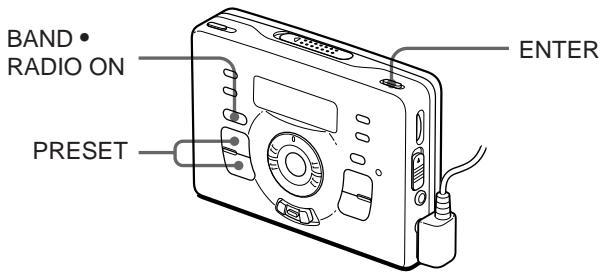
1 Appuyez sur BAND·RADIO ON pour allumer la radio. 2 Appuyez sur ENTER. Les chiffres de fréquence, « PRESET » et un numéro de préréglage clignotent à l'écran. 3 Maintenez enfoncé BAND·RADIO ON jusqu'à ce que « AREA 1 » clignote à l'écran. 4 Pendant que « AREA 1 » clignote, appuyez plusieurs fois sur PRESET + / - pour sélectionner la zone « USA » (États-Unis, Canada, Amérique centrale et du Sud) ou « Eur » (Europe et autres pays), puis appuyez sur ENTER.
5 Maintenez enfoncé ASP jusqu'à ce que « 1 » devienne « A » à l'écran.
Le Walkman commence à rechercher et à mémoriser les stations.
6 Appuyez sur BAND·RADIO ON pour sélectionner la bande souhaitée, puis appuyez sur PRESET+/- pour sélectionner une station.
Enregistrement
1 Insérez une cassette normale (TYPE I) avec le côté à enregistrer vers l'avant.
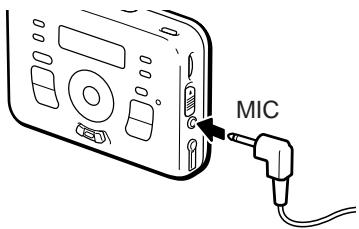
2 Sélectionnez une source d'enregistrement : Pour enregistrer avec le microphone
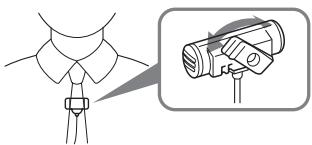
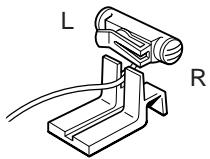
Branchez le microphone fourni sur la prise MIC.
Vous pouvez utiliser le pied de microphone fourni.
Pour enregistrer à partir de la radio
Réglez la station que vous souhaitez enregistrer (voir « Écoute de la radio » à la page 52). Lors de l'enregistrement de programmes FM ou TV, assurez-vous que le casque est branché car il sert d'antenne.
3 Faites glisser REC/PAUSE.
« REC » apparaît à l'écran et l'enregistrement commence après environ deux secondes.
Pour enregistrer sur les deux faces, insérez une cassette avec la face à enregistrer face au logement de cassette.
Pour enregistrer sur une seule face, insérez la cassette avec la face à enregistrer non face au logement de cassette.
Lorsque le logement de cassette est ouvert, le sens de la bande se règle automatiquement sur FWD. Pour enregistrer sur une seule face, maintenez enfoncé (stop) jusqu'à ce que FWD devienne REV à l'écran.
Remarque
Si la languette de protection contre l'enregistrement est cassée, vous ne pouvez pas enregistrer sur cette face.
Pour mettre en pause un enregistrement
Appuyez et faites glisser REC/PAUSE pendant l'enregistrement, l'enregistrement sera mis en pause.
Une pause pendant l'enregistrement : « REC » clignote à l'écran.
Pour enregistrer, appuyez et faites glisser REC/PAUSE à nouveau.
Pour arrêter l'enregistrement
Appuyez sur (stop).
Pour réduire le bruit lors de l'enregistrement de programmes AM
Réglez l'ISS (Interrupteur de suppression des interférences) sur la position qui réduit le plus le bruit.
Enregistrement programmé
Vous pouvez enregistrer la radio ou la télévision grâce à l'enregistrement programmé.
Assurez-vous que l'horloge est à l'heure correcte lors de l'utilisation de l'enregistrement programmé.
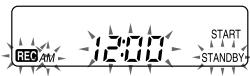
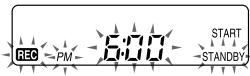
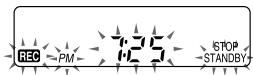
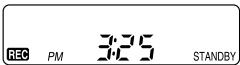
1. Syntonisez la station que vous souhaitez enregistrer. 2. Insérez une cassette vierge avec le côté à enregistrer. 3. Maintenez enfoncée la touche TIMER jusqu'à ce que "START" apparaisse. 4. Tournez SPEED CONTROL·TIME/TUNE pour régler l'heure de début d'enregistrement. 5. Appuyez sur TIMER, "STOP" apparaîtra. 6. Tournez SPEED CONTROL·TIME/TUNE pour régler l'heure de fin d'enregistrement. 7. Appuyez sur TIMER. Le réglage est terminé, la radio s'éteindra et l'enregistrement programmé passera en mode veille.
Le réglage de l'heure d'enregistrement programmé est effacé lorsque la source d'alimentation est retirée. Dans ce cas, réglez-le à nouveau.
Pour annuler le mode veille, appuyez sur.
Pour arrêter l'enregistrement
Appuyez sur ■.
Remarques
- Si la source d'alimentation est retirée pendant la veille de l'enregistrement programmé, le réglage est effacé et l'enregistrement programmé ne fonctionnera pas. Dans ce cas, réglez à nouveau les paramètres de l'enregistrement programmé.
- Vous ne pouvez pas écouter une cassette pendant le mode veille de l'enregistrement programmé.
- Réglez l'enregistrement programmé au moins une minute avant l'heure d'enregistrement. Si le réglage est terminé moins d'une minute avant l'heure d'enregistrement, la fonction d'enregistrement programmé ne fonctionnera pas.
Choix d'un mode d'enregistrement
Lors d'une scène privée ou de l'enregistrement de musique forte, appuyez plusieurs fois sur MENU pour placer le curseur sur REC, puis appuyez sur SET ; "LIVE" apparaîtra à l'écran. Lors de l'enregistrement d'une réunion d'affaires ou d'un son de faible niveau, appuyez sur SET et "LIVE" disparaîtra de l'écran.
Pour empêcher l'enregistrement accidentel sur une cassette
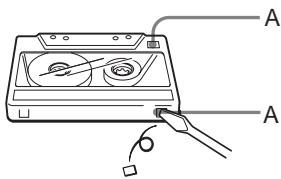
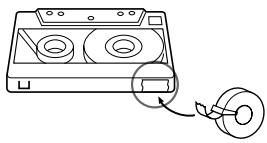
Cassez les languettes du côté A et/ou B. Pour réutiliser la cassette pour l'enregistrement, couvrez le trou de la languette avec du ruban adhésif.
Remarques
- N'utilisez pas de cassette CrO2 (TYPE II) ou métal (TYPE IV), sinon le son peut être déformé lors de la lecture, ou l'enregistrement précédent peut ne pas être effacé complètement.
- Ne connectez pas ou ne déconnectez pas le casque à la prise ☑REMOTE pendant l'enregistrement depuis la radio. La condition d'enregistrement peut changer brusquement, ou du bruit peut être enregistré.
- Lors de l'enregistrement avec le microphone, ne le placez pas près d'un cordon de lampe ou d'une lampe fluorescente pour éviter les interférences.
- Si un effet de larsen se produit, baissez le volume.
- Pendant l'enregistrement, seule la fonction de fonctionnement est active.
Utilisation d'autres fonctions
Pour verrouiller les commandes - Fonction HOLD
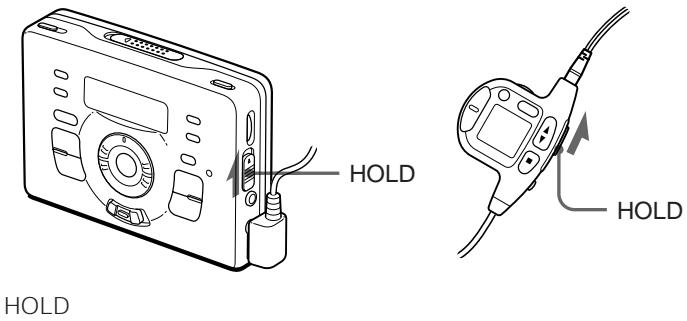
Faites glisser HOLD dans le sens de la flèche pour verrouiller les commandes du Walkman ou de la télécommande.
Pour voir l'affichage de la télécommande dans l'obscurité
Appuyez sur LIGHT sur la télécommande.
Vous pouvez voir l'affichage à distance dans l'obscurité, car il est éclairé par électroluminescence (EL). L'affichage EL s'allume pendant environ 5 secondes à chaque pression. Le bouton LIGHT de la télécommande fonctionne même si la fonction HOLD est activée.
Pour accentuer les basses - fonction MEGA BASS
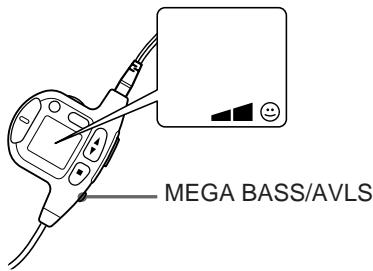
Pour écouter un son avec des basses profondes accentuées, appuyez plusieurs fois sur MEGA BASS / AVLS de la télécommande pour sélectionner le mode souhaité.
Chaque pression sur le bouton change le mode. Le mode sélectionné s'affiche dans la fenêtre de la télécommande.
: accentue les basses : accentue des basses plus profondes
Aucun message : désactivé (normal)
Pour régler le son à un niveau approprié — fonction AVLS (système limiteur de volume automatique)
Pour limiter le volume maximal, maintenez enfoncé MEGA BASS / AVLS sur la télécommande pendant plus de 2 secondes jusqu'à ce que apparaisse à l'affichage.
Pour annuler la fonction AVLS, maintenez enfoncé MEGA BASS / AVLS pendant plus de 2 secondes jusqu'à ce que disparaisse de l'affichage.
Accessoires fournis
- Chargeur de batterie (1)
- Batterie rechargeable (NC-6WM, 1,2 V, 600 mAh, Ni-Cd) (1) Boîtier de piles (1)
- Pile R6P (SR) (1) Pile au lithium CR2016 (1)
- Casque stéréo avec télécommande (1)
- Pochette de transport (1)
- Batterie, étui de transport (1)
- Adaptateur de prise secteur (1) (sauf modèle japonais)
- Microphone stéréo (1)
- Pied de microphone (1)
- Adaptateurs d'oreille (2)
- INSTRUCTIONS D'UTILISATION
- WALKMAN
- WM-GX
- CR
- CONTRÔLE DE VITESSE·TEMPS/RÉGLAGE
- AM FM TV
- AMS
- B NR
- A-B
- MEGA BASS
- AVLS
- BATT
- POUR COMMENCER
- INSTALLATION DE LA PILE AU LITHIUM
- QUAND REMPLACER LA PILE AU LITHIUM
- PRÉPARATION DES SOURCES D'ALIMENTATION
- BATTERIE RECHARGEABLE
- PILE SÈCHE
- REMARQUES
- COURANT SECTEUR
- RÉGLAGE DE L'HORLOGE
- ▷ UTILISATION DU WALKMAN
- LECTURE D'UNE CASSETTE
- POUR SAUTER UN LONG ESPACE VIDE ENTRE LES PISTES (FONCTION BL SKIP*)
- REMARQUE
- POUR SÉLECTIONNER LE MODE DE LECTURE
- POUR LIRE UNE CASSETTE ENREGISTRÉE AVEC LE SYSTÈME DOLBY* B NR
- RÉGLAGE DE LA VITESSE DE LECTURE
- POUR REVENIR À LA VITESSE NORMALE
- LECTURE RÉPÉTÉE IC
- POUR RALENTIR LA LECTURE EN MODE IC REPEAT
- POUR ANNULER LA LECTURE RÉPÉTÉE IC
- LECTURE RÉPÉTÉE A-B
- POUR ANNULER LA LECTURE RÉPÉTÉE A-B
- ÉCOUTE DE LA RADIO
- POUR AMÉLIORER LA RÉCEPTION RADIO
- LORSQUE VOUS ÉCOUTEZ UNE ÉMISSION STÉRÉO
- CE QUE FAIT LE BOUTON ASP (FONCTION DE PRÉRÉGLAGE AUTOMATIQUE DES STATIONS)
- SYNTONISATION MANUELLE DE LA RADIO (SYNTONISATION MANUELLE)
- STOCKAGE MANUEL DES STATIONS DE RADIO (FONCTION DE MÉMOIRE MANUELLE)
- POUR ANNULER LA STATION MÉMORISÉE
- RÉCEPTION DE STATIONS HORS DU JAPON
- ENREGISTREMENT
- POUR METTRE EN PAUSE UN ENREGISTREMENT
- POUR ARRÊTER L'ENREGISTREMENT
- POUR RÉDUIRE LE BRUIT LORS DE L'ENREGISTREMENT DE PROGRAMMES AM
- ENREGISTREMENT PROGRAMMÉ
- POUR ANNULER LE MODE VEILLE, APPUYEZ SUR
- CHOIX D'UN MODE D'ENREGISTREMENT
- POUR EMPÊCHER L'ENREGISTREMENT ACCIDENTEL SUR UNE CASSETTE
- UTILISATION D'AUTRES FONCTIONS
- POUR VERROUILLER LES COMMANDES - FONCTION HOLD
- POUR VOIR L'AFFICHAGE DE LA TÉLÉCOMMANDE DANS L'OBSCURITÉ
- POUR ACCENTUER LES BASSES - FONCTION MEGA BASS
- POUR RÉGLER LE SON À UN NIVEAU APPROPRIÉ — FONCTION AVLS (SYSTÈME LIMITEUR DE VOLUME AUTOMATIQUE)
- ACCESSOIRES FOURNIS
Marque : SONY
Modèle : WM-GX822
Catégorie : Lecteur de cassette portable