CARE - CURVE-RUNNER - Tapis de course CARE FITNESS - Notice d'utilisation et mode d'emploi gratuit
Retrouvez gratuitement la notice de l'appareil CARE - CURVE-RUNNER CARE FITNESS au format PDF.


| Caractéristiques | Détails |
|---|---|
| Type de produit | Tapis de course |
| Dimensions approximatives | Longueur : 160 cm, Largeur : 70 cm, Hauteur : 130 cm |
| Poids | 75 kg |
| Alimentation électrique | 220-240 V |
| Puissance | 2,5 CV (pic) |
| Vitesse maximale | 16 km/h |
| Inclinaison | Inclinaison manuelle jusqu'à 15% |
| Fonctions principales | Affichage de la vitesse, distance, temps, calories brûlées, fréquence cardiaque |
| Matériaux | Structure en acier, surface de course en PVC |
| Entretien et nettoyage | Nettoyer avec un chiffon humide, vérifier régulièrement la lubrification de la bande de course |
| Pièces détachées et réparabilité | Disponibilité de pièces de rechange sur demande |
| Sécurité | Système d'arrêt d'urgence, protection contre les surcharges |
| Compatibilités | Compatible avec des applications de fitness via Bluetooth |
| Garantie | 2 ans sur le cadre, 1 an sur les pièces électroniques |
FOIRE AUX QUESTIONS - CARE - CURVE-RUNNER CARE FITNESS
Questions des utilisateurs sur CARE - CURVE-RUNNER CARE FITNESS
0 question sur cet appareil. Repondez a celles que vous connaissez ou posez la votre.
Poser une nouvelle question sur cet appareil
Téléchargez la notice de votre Tapis de course au format PDF gratuitement ! Retrouvez votre notice CARE - CURVE-RUNNER - CARE FITNESS et reprennez votre appareil électronique en main. Sur cette page sont publiés tous les documents nécessaires à l'utilisation de votre appareil CARE - CURVE-RUNNER de la marque CARE FITNESS.
MODE D'EMPLOI CARE - CURVE-RUNNER CARE FITNESS
Computer instruction
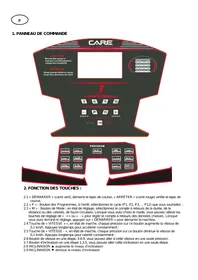
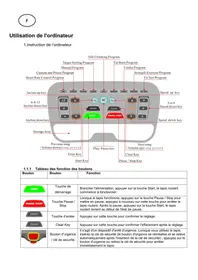
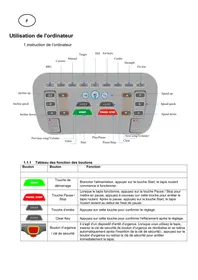
Display function:
| Item | Description |
| TIME | .Display user workout time. |
| .Display range 0:00~1:59:00 | |
| DISTANCE | .Display user workout distance. |
| Display range 0.5~100 | |
| CALORIES | .Display calories consumption during workout . |
| Display range 0 ~ 2000 | |
| PULSE | .Display userheart-rate during workout . |
| Display range 30~230 | |
| WATT | .Display the power consumption during training |
| SPEED | .Display current training speed |
| PACE | .Set the time to reach the target distance |
| Load | Display LOAD resistance value for each level in WATT window when adjust LOAD resistance |
| Display range L1~L4 |
Button function:
| Item | Description |
| Up▲ | Adjust function value up. |
| Down▼ | Adjust function value down. |
| Enter | Confirm setting or selection. |
| Start | Start workout quickly or resume workout in Stop mode. |
| Stop | To stop/pause workout.Hold on this key for 2 seconds to reboot the console. |
| Interval | here are 3 programs: INTERVAL 10/20,INTERVAL 20/10, Custom Interval . |
| Target Distance | Fast access to Target Distance training mode. |
| Target Calories | Fast access to Target Calories training mode. |
| Target Heart-rate | Fast access to Target Heart Rate training mode. |
| Target Time | Fast access to Target Time training mode. |
Operation procedure :
Power on--
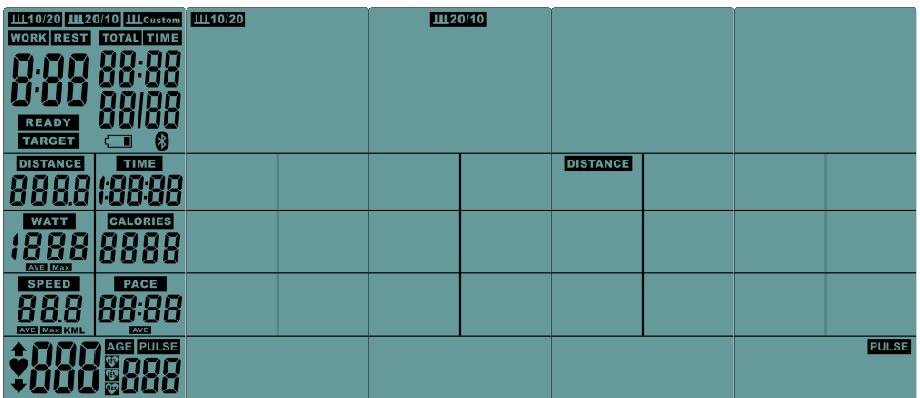
- When POWER ON, LCD will full display 1s (Figure 1) with long beep sound, then enter into display standby mode( FIG 2), the pictures will be displayed from top ICON to bottom in sequence. Press STOP button for 2s, then enter into standby mode.
(FIG 1) (FIG 2)
- If no input of key operation or RPM signal input in 4Min, LCD will go to Sleeping mode(FIG 3).
(FIG 3)
3. Break mode:
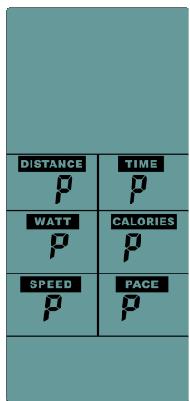
When START, press "START" button one time, enter into Break mode with buzzer sound 0.5s by every 30s. Computer still display all functions ,but LCD windows display"P"
.Buzzer will sound for 1s and enter into stand by mode after broke with 5 Min, then press " START "to continue. (FIG 4)
(FIG 4)
4. Stop mode:
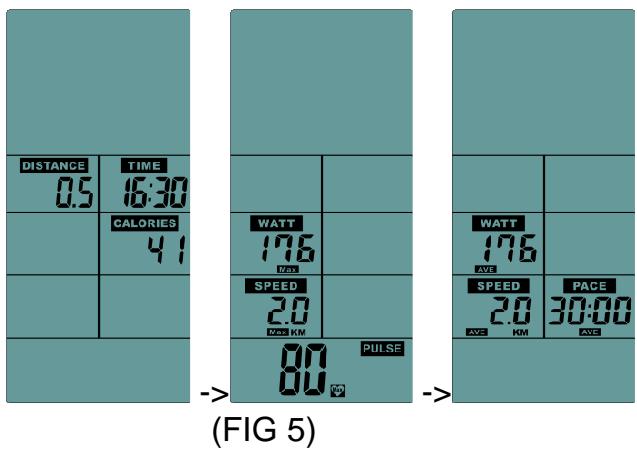
Press "STOP" button with buzzer sound 0.5s, enter into Stop mode. All the LCD windows no display, but after 0.5s LCD will display TIME, DIST, CAL (display KM or ML according to the setting). After 7s with buzzer sound 0.25s, LCD display MAX ICON, WATTS,SPEED ,PULSE,also after keep shows 7s with buzzer sound 0.25s, LCD display AVE ICON WATTS , SPEED ,PACE, after keep shows 7s without display any data at the moment, then re-show the data two times and enter into stand by mode.(FIG 5)
5. Quick start :
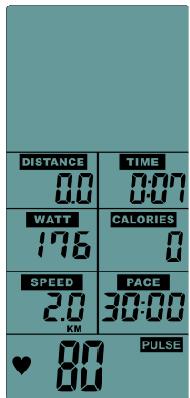
A. In stand by mode, with single RPM>20 input, quick press “START”, buzzer sound 0.5s, then TIME、CALORIES、DISTANCE、WATTS、SPEED、&PACE shining in in sequence, the value will count up according to the operation.
(FIG 6)
B. "PULSE" ICON is lighten, if any heart single input the "PULSE" ICON is flashing with current value, if no heart single input LCD display "P".
C. If without any single input in 5Min, the buzzer rings for 0.5s and computer will back to stand by mode .
D. If did not complete the setting in 30 seconds, the buzzer sounded for 0.5 seconds and back to standby mode.
E. Press the "START "button once, enter into the break mode, and press "START" to continue running.
F. Press the "STOP" button to sound the buzzer for 0.5 seconds and enter into the stop mode.
G. If the result of movement is displayed, press "STOP" button to leave and return to standby mode.
H. When adjust the adjustment button, it will display the LOAD resistance for each segment in WATT window.
6. INTERVAL10/20:
A. Press" INTERVAL10/20" button ,enter to this mode , LCD display ICON , with buzzer beeps 0.5s.
B. If did not input in 30s when setting, computer will back to standby mode.
C. The “READY” ICON counts down from 3s to 0s , meanwhile with a short buzzer beep
(FIG 7), LCD display "01/XX"(“01”is flashing). The “WORK” ICON is flashing one time every 1s with buzzer sounds (shining 0.75s/ put out 0.25s), “TIME” ICON counts down from 10s to 0s, DISTANCE、CALORIES、WATTS、SPEED、RPM count up according the operation.(FIG 8)
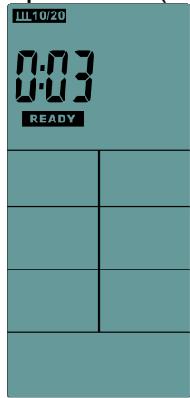
(FIG 7)
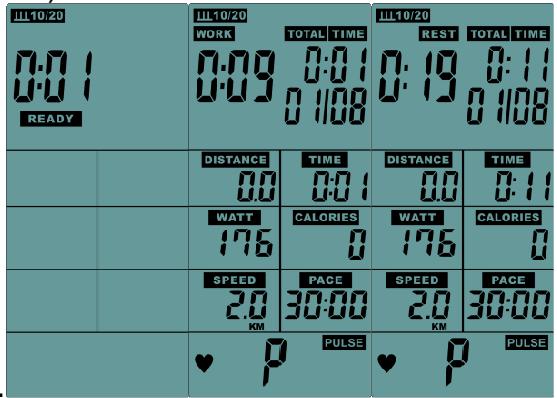
(FIG 8)
D. After Work 10s, LCD window display"01/08"(“01”is flashing), “REST” ICON is keep flashing , the buzzer rings for 0.25s per 1s, TIME start to count down from 20s to 0s.
E. Work & REST display in cycle, cycle count increase 1every time till reach to 08/08(total cycle counts 8 times). Buzzer rings 0.5s enter to stop mode.(The average value of the sports results is only calculated within the Work time)
F. when the last REST is reached, this mode is stop directly.
G. If no single input in 5Min, buzzer rings 0.5s enter into stand by mode.
H. Press the "START "button once, enter into the break mode, and press "START" to continue running.
I. Press the "STOP" button to sound the buzzer for 0.5s and enter into the stop mode.
J. If the result of movement is displayed, press "STOP" button to leave and return to standby mode.
7、INTERVAL 20/10:
A. Press" INTERVAL20/10" button ,enter to this mode , LCD display Ⅲ20/10 ICON(FIG 10), with buzzer beeps 0.5s.
B. If did not input in 30s when setting, computer will back to standby mode.
C. The “READY” ICON counts down from 3s to 0s, meanwhile with a short buzzer beep (FIG 7), LCD display "01/XX"(“01”is flashing). The “WORK” ICON is flashing one time every 1s with buzzer sounds ( shining 0.75s/ put out 0.25s), “TIME” ICON counts down from 10s to 0s, DISTANCE、CALORIES、WATTS、SPEED、RPM count up according the operation.(FIG 10).
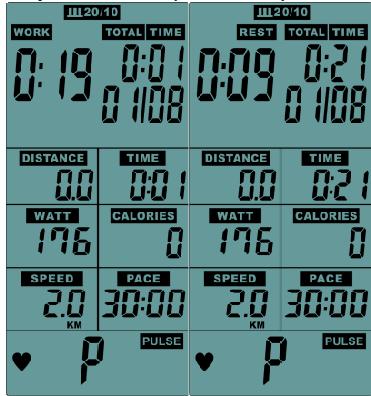
(FIG 10)
D. After Work 10s, LCD window display"01/08"(“01”is flashing), “REST” ICON is keep
flashing, the buzzer rings for 0.25 seconds per second, TIME start to count down from 20s to 0s.
E. Work & REST display in cycle, cycle count increase 1every time till reach to 08/08(total cycle counts 8 times). Buzzer rings 0.5s enter to stop mode.(The average value of the sports results is only calculated within the Work time)
F. when the last REST is reached, this mode is stop directly.
G. If no single input in 5Min, buzzer rings 0.5s enter into stand by mode.
H. Press the "START "button once, enter into the break mode, and press "START" to continue running.
I. Press the "STOP" button to sound the buzzer for 0.5s and enter into the stop mode.
J. If the result of movement is displayed, press "STOP" button to leave and return to standby mode.
8、INTERVAL CUSTOM:
A. Press"INTERVAL CUSTOM" button, enter to this mode, LCD display ICON(FIG 13), with buzzer beeps 0.5s.
B. LCD display the presetting value 01, press "UP、DOWN" button to setting (setting range 01~20), it is non-recyclable (FIG 14).
C. Press "ENTER" confirmed, "WORK" ICON is flashing, LCD window "TOTAL TIME " display the presetting value 0:30. Press"UP、DOWN" button to setting(setting range:0:05~30:00), it is non-recyclable ( FIG 15).
D. Press "ENTER" confirmed, "REST" ICON is flashing, LCD window "TOTAL TIME " display the presetting value 0:20. Press"UP、DOWN" button to setting(setting range:0:05~30:00), it is non-recyclable ( FIG 16).
E. Press “ENTER” confirmed, meanwhile with a short buzzer rings 0.5s , LCD display "01/XX"(“01”is flashing) . The “WORK” ICON is flashing one time every 1s with buzzer sounds( shining 0.75s/ put out 0.25s) ,“TIME”ICON counts down from the setting value, DISTANCE、CALORIES、WATTS、SPEED、PACE count up according the operation.
F. There is set RSET time, matrix displays 01/XX(part 01 is flashing), “REST” ICON keep flashing, The buzzer rings for 0.25s every second.
G. “Work” & “REST “display in cycle , cycle count increase 1every time till reach to 08/08(total cycle counts 8 times). Buzzer rings 0.5s enter to stop mode.(The average value of the sports results is only calculated within the Work time)
H. when the last REST is reached, this mode is stop directly.
- If no single input in 5Min, buzzer rings 0.5s enter into stand by mode.
J. Press the "START button once, enter into the break mode, and press "START" to continue running.
K. Press the "STOP" button to sound the buzzer for 0.5 seconds and enter into the stop mode.
L. If the result of movement is displayed, press “STOP” button to leave and return to standby mode.
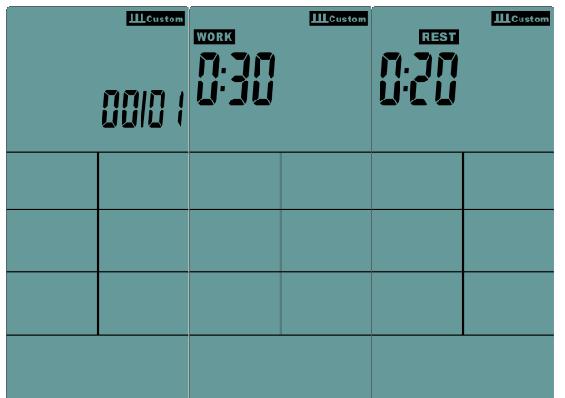
(FIG 14)
(FIG 15)
(FIG 16)
9、TARGET TIME:
A. Press" TARGET TIME" button ,enter to this mode , LCD flashing display TARGET&TIME .
B. LCD “TIME” window display the presetting value1:00 or the last setting value.press “UP、DOWN” button to setting (setting range 1:00~1:59:00), it is non-recyclable.
C. After setting, press "ENTER" confirmed, TARGET&TIME ICONcontinue to flashing, meanwhile start to count down form setting value.
D. Press the "START button once, enter into the break mode, and press "START" to continue running.
E. Press the "STOP" button to sound the buzzer for 0.5s and enter into the stop mode.
F. If no single input in 5Min, buzzer rings 0.5s enter into stand by mode.
G. If did not complete the setting in 30s, the buzzer rings for 0.5s and back to standby mode.
H. If the result of movement is displayed, press "STOP" button to leave and return to standby mode.
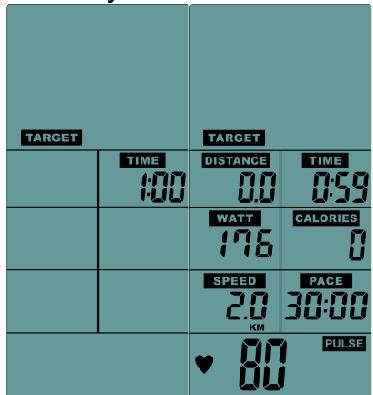
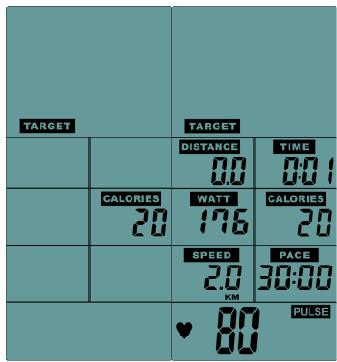
10、TARGET CALORIES:
A. Press "TARGETCALORIE" button, enter to this mode, LCD flashing display TARGET& CALORIE.
B. LCD "CALORIE" window display the presetting value 2:00 or the last setting value.press "UP、DOWN"button to setting (setting range1~2000), it is non-recyclable.
C. After setting, press" ENTER" confirmed, TARGET&CALORIE ICONcontinue to flashing, meanwhile start to count down form the setting value.
D. Press the "START button once, enter into the break mode, and press "START" to continue running.
E. Press the "STOP" button to sound the buzzer for 0.5s and enter into the stop mode.
F. If no single input in 5Min, buzzer rings 0.5s enter into stand by mode.
G. If did not complete the setting in 30s, the buzzer rings for 0.5s and back to standby mode.
H. If the result of movement is displayed, press "STOP" button to leave and return to standby mode.
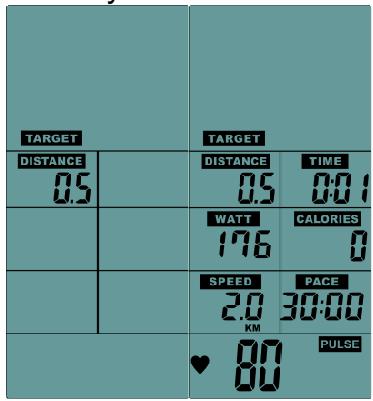
11、TARGET DISTANCE:
A. Press "TARGETDISTANCE" button, enter to this mode, LCD flashing display TARGET& DISTANCE.
B. LCD "DISTANCE" window display the presetting value 0.5KM/0.5Miles or the last setting value.press "UP、DOWN"button to setting (setting range0.5~100), it is nonrecyclable.
C. After setting, press "ENTER" confirmed, TARGET&DISTANNCEcontinue to flashing, meanwhile start to count down from the setting value.
D. Press the "START button once, enter into the break mode, and press "START" to continue running.
E. Press the "STOP" button to sound the buzzer for 0.5s and enter into the stop mode.
F. If no single input in 5Min, buzzer rings 0.5s enter into stand by mode.
G. If did not complete the setting in 30s, the buzzer rings for 0.5s and back to standby mode.
H. If the result of movement is displayed, press "STOP" button to leave and return to standby mode.
12、TARGET HEART RATE:
A. Press "TARGETHEART RATE" button, enter to this mode, LCD flashing display Age ICON with presetting value 30 or the last setting value. Press "UP、DOWN" button to setting (setting range11~99), it is non-recyclable.
B. After setting, press" ENTER" confirmed , LCD display the presetting value 65 % , press
"UP、DOWN"button to adjust to 65 % or 85 % & the value of Pulse,LCD will shows the corresponding value.
C. If selected PULSE, LCD display the presetting value"100", press"UP、DOWN"button to setting (setting range 30~230),it is non-recyclable.
D. Press"ENTER"button to start to count,TARGET & PULSE ICON is flashing.
E. When the heartbeat value is higher or lower than the setting value (+ / - 10%) , the PULSE value is displayed continuously.
F. The heartbeat value is lower than the setting value (<10%), and the PULSE window "UP IOCN" flashes to remind USER to accelerate.
G. The heartbeat value is higher than the setting value (>10%) , and the PULSE window "DOWN IOCN" flashes to remind USER to slow down
H. The heartbeat value is higher than or equal to the setting value of 100% . The buzzer rings 3 short sounds every 1s. After 10 times, the heartbeat value is still not lower than 100% , the buzzer rings 1s and enter into the stand by mode.
I. Without any heart single input in 30s, the “PULSE” LCD window display “P”, buzzer rings 1s and enter into the stand by mode.
J. Press the "START button once, enter into the break mode, and press "START" to continue running.
K. Press the "STOP" button to sound the buzzer for 0.5 seconds and enter into the stop mode.
L. If no single input in 5Min, buzzer rings 0.5s enter into stand by mode.
M. If did not complete the setting in 30s, the buzzer rings for 0.5s and back to standby mode.
N. If the result of movement is displayed, press “STOP” button to leave and return to standby mode.
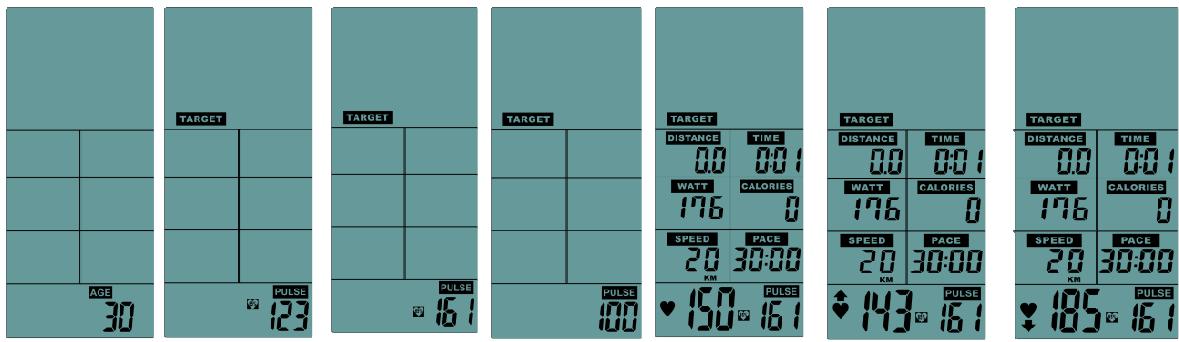
Set Age 65% 85% PULSE START < TARGET10%>TARGET10%
To order spare parts
To guarantee an efficient service, make sure you have the following items before you contact our After Sales Service:
The name or reference of the product.
The manufacturing number shown on the main chassis and on the packing box.
The number of the missing or faulty part shown on the exploded view of the product described in this manual.
After Sales Service
Email: service-uk@carefitness.com