
TL-SG6108 - Commutateur réseau TP-LINK - Notice d'utilisation et mode d'emploi gratuit
Retrouvez gratuitement la notice de l'appareil TL-SG6108 TP-LINK au format PDF.
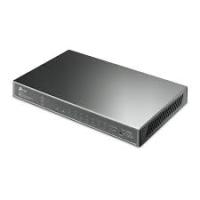


| Type de produit | Commutateur réseau Gigabit de bureau 8 ports |
| Marque | TP-LINK |
| Modèle | TL-SG6108 |
| Nombre de ports | 8 ports RJ45 10/100/1000 Mbps Auto-Negotiation |
| Normes réseau | IEEE 802.3, 802.3u, 802.3ab |
| Type de câble | UTP catégorie 3, 4, 5, 5e (100 m max) |
| Méthode de transfert | Store-and-Forward |
| Table d'adresses MAC | 4K entrées avec auto-apprentissage et vieillissement |
| Prise en charge Jumbo Frame | Jusqu'à 9 Ko |
| Fonctions avancées | IGMP Snooping, QoS (802.1p/Q), Contrôle de flux IEEE 802.3x |
| Économie d'énergie | Green Ethernet : mise en veille des ports inactifs, adaptation selon longueur de câble |
| Alimentation | Adaptateur secteur externe |
| Indicateurs LED | Alimentation (vert), port : vert (1000 Mbps) / jaune (10/100 Mbps), clignotement pour activité |
| Température de fonctionnement | 0 à 40 °C |
| Humidité de fonctionnement | 10% à 90% (sans condensation) |
| Montage | Sur bureau ou mural (vis non fournies) |
| Sécurité | Ne pas utiliser près de l'eau ; débrancher en cas d'orage |
| Entretien | Nettoyer avec un chiffon sec ; éviter les liquides |
| Réparabilité | Aucune pièce remplaçable par l'utilisateur ; contacter le SAV |
FOIRE AUX QUESTIONS - TL-SG6108 TP-LINK
Questions des utilisateurs sur TL-SG6108 TP-LINK
0 question sur cet appareil. Repondez a celles que vous connaissez ou posez la votre.
Poser une nouvelle question sur cet appareil
Téléchargez la notice de votre Commutateur réseau au format PDF gratuitement ! Retrouvez votre notice TL-SG6108 - TP-LINK et reprennez votre appareil électronique en main. Sur cette page sont publiés tous les documents nécessaires à l'utilisation de votre appareil TL-SG6108 de la marque TP-LINK.
MODE D'EMPLOI TL-SG6108 TP-LINK
TP-LINK
Guide de l'utilisateur
TL-SG105
TL-SG108
Commutateur de bureau Gigabit 5/8 ports
DROITS D'AUTEUR ET MARQUES
Les spécifications peuvent être modifiées sans préavis. TP-LINK est une marque déposée de TP-LINK TECHNOLOGIES CO., LTD. Les autres marques et noms de produits sont des marques ou des marques déposées de leurs détenteurs respectifs.
Aucune partie des spécifications ne peut être reproduite sous quelque forme ou par quelque moyen que ce soit, ni utilisée pour créer un dérivé tel qu'une traduction, une transformation ou une adaptation, sans l'autorisation de TP-LINK TECHNOLOGIES CO., LTD. Copyright © 2013 TP-LINK TECHNOLOGIES CO., LTD. Tous droits réservés.
http://www.tp-link.com
DÉCLARATION FCC

Cet équipement a été testé et déclaré conforme aux limites d'un appareil numérique de classe B, conformément à la partie 15 des règles de la FCC. Ces limites sont conçues pour fournir une protection raisonnable contre les interférences nuisibles dans une installation résidentielle. Cet équipement génère, utilise et peut émettre de l'énergie radiofréquence et, s'il n'est pas installé et utilisé conformément aux instructions, peut causer des interférences nuisibles aux communications radio. Cependant, il n'y a aucune garantie que des interférences ne se produiront pas dans une installation particulière. Si cet équipement cause des interférences nuisibles à la réception radio ou télévision, ce qui peut être déterminé en éteignant et en allumant l'équipement, l'utilisateur est encouragé à essayer de corriger les interférences par une ou plusieurs des mesures suivantes :
Réorienter ou déplacer l'antenne de réception. - Augmenter la distance entre l'équipement et le récepteur. - Connecter l'équipement à une prise sur un circuit différent de celui auquel le récepteur est connecté. - Consulter le revendeur ou un technicien radio/TV expérimenté pour obtenir de l'aide.
Cet appareil est conforme à la partie 15 des règles de la FCC. Son fonctionnement est soumis aux deux conditions suivantes :
1) Cet appareil ne doit pas causer d'interférences nuisibles. 2) Cet appareil doit accepter toute interférence reçue, y compris les interférences susceptibles de provoquer un fonctionnement indésirable.
Tout changement ou modification non expressément approuvé par la partie responsable de la conformité pourrait annuler le droit de l'utilisateur à utiliser l'équipement.
Avertissement de marquage CE
C
Ce produit est de classe B. Dans un environnement domestique, ce produit peut provoquer des interférences radio, auquel cas l'utilisateur peut être amené à prendre des mesures adéquates.
Consignes de sécurité

Précautions :
N'utilisez pas ce produit près de l'eau, par exemple dans un sous-sol humide ou près d'une piscine.
Évitez d'utiliser ce produit pendant un orage électrique. Il peut y avoir un risque résiduel de choc électrique dû à la foudre.
Contenu de l'emballage
Les articles suivants doivent se trouver dans votre emballage :
Un commutateur TL-SG105/TL-SG108, un adaptateur secteur, ce guide de l'utilisateur.
Remarque :
Les vis de montage mural ne sont pas fournies avec notre produit. Veuillez contacter votre distributeur si l'un des articles listés est endommagé ou manquant.
Convention
Le commutateur ou TL-SG105/TL-SG108 mentionné dans ce guide de l'utilisateur désigne le commutateur de bureau Gigabit 5/8 ports TL-SG105/TL-SG108 sans autre explication.
Remarque :
Les deux appareils TL-SG105 et TL-SG108 partagent ce guide d'utilisation. Pour simplifier, nous prendrons le TL-SG108 comme exemple tout au long de ce guide.
Les différences entre le TL-SG105 et le TL-SG108 sont présentées ci-dessous :
TL-SG105 : Il fournit 5 ports RJ45 10/100/1000Mbps à négociation automatique et prend en charge IGMP Snooping. TL-SG108 : Il fournit 8 ports RJ45 10/100/1000Mbps à négociation automatique et dispose d'un emplacement de sécurité Kensington.
Chapitre 1 Introduction du produit
Merci d'avoir choisi le commutateur de bureau Gigabit TL-SG105/TL-SG108 à 5/8 ports.
1.1 Présentation du produit
Alimenté par la technologie Ethernet Gigabit, le commutateur de bureau Gigabit TL-SG105/TL-SG108 fournit une connexion réseau transparente, qui peut accélérer votre ancien réseau à 1000Mbps, garantissant que les graphiques, CGI, CAO, fichiers multimédia et autres applications avec des fichiers gourmands en bande passante sont transférés sur le réseau presque instantanément.
L'architecture de commutation non bloquante adoptée dans le commutateur TL-SG105/TL-SG108 améliore considérablement les temps de réponse du réseau et accélère le trafic entre sous-réseaux en transférant et en filtrant les paquets à pleine vitesse filaire pour un débit maximal.
Le commutateur TL-SG105/TL-SG108 est plug-and-play. De plus, la détection de câble AutoMDI/MDIX sur tous les ports élimine le besoin de câble croisé ou de port Uplink. Chaque port peut être utilisé comme port général ou port Uplink, et n'importe quel port peut être simplement branché à un serveur, un hub, un routeur, un commutateur ou un PC, en utilisant un câble droit ou croisé. Les voyants de diagnostic affichent l'état de la liaison et l'activité, vous permettant de détecter et de corriger rapidement les problèmes sur le réseau.
Le commutateur TL-SG105/TL-SG108 adopte la technologie Green Ethernet, prend en charge les fonctions d'économie d'énergie. Le commutateur met automatiquement hors tension les ports qui n'ont pas de liaison ou qui sont connectés à des ordinateurs éteints, et ajuste la puissance de sortie en fonction de la longueur des câbles Ethernet.
1.2 Caractéristiques
Prend en charge la technologie Green Ethernet pour mettre en œuvre des fonctions d'économie d'énergie. Conforme aux normes IEEE802.3, IEEE802.3u, IEEE802.3ab.
5/8 ports RJ45 10/100/1000Mbps à détection automatique prenant en charge Auto-MDI/MDIX. Prend en charge le contrôle de flux IEEE802.3x pour le mode Full-duplex et la backpressure pour le mode Half-duplex. Architecture de commutation non bloquante qui transfère et filtre les paquets à pleine vitesse filaire pour un débit maximal. IGMP snooping permet le transfert de paquets multicast tels que le streaming audio et vidéo, sans augmenter la congestion de diffusion du réseau. Prend en charge la fonction QoS (basée sur 802.1p/Q). Table d'adresses MAC de 4K entrées pour TL-SG105/TL-SG108 avec auto-apprentissage et auto-vieillissement. Prend en charge les trames Jumbo jusqu'à 9 Ko. Voyants LED pour surveiller l'alimentation, la liaison, la vitesse et l'activité. Alimentation par adaptateur externe.
Chapitre 2 Identification des composants externes
Ce chapitre décrit le panneau avant et le panneau arrière du commutateur.
2.1 Panneau avant
Figure 2-1 Panneau avant du commutateur TL-SG108
Les éléments suivants se trouvent sur le panneau avant :
Ports (1-8) : Le commutateur TL-SG108 est équipé de 8 ports RJ45 à détection automatique 10/100/1000Mbps auxquels vous connecterez vos périphériques réseau. L'état de fonctionnement peut être indiqué par les LED correspondantes sur le panneau. LED d'alimentation : Ce voyant s'allume lorsque le commutateur est sous tension. LED : Chaque port RJ45 à détection automatique 10/100/1000Mbps possède deux LED correspondantes.
La LED située sur le côté gauche du port RJ45 s'allume en vert fixe lorsqu'un périphérique 1000Mbps est connecté au port. Elle clignote en vert lorsque des données sont transmises ou reçues sur la connexion active.
La LED située sur le côté droit s'allume en jaune fixe lorsqu'un périphérique 10/100Mbps est connecté au port. Elle clignote en jaune lorsque des données sont transmises ou reçues sur la connexion active.
Remarque :
La description des LED ci-dessus explique l'état de fonctionnement de l'appareil après l'initialisation.
2.2 Panneau arrière
Figure 2-2 Panneau arrière du commutateur TL-SG108
Les éléments suivants se trouvent sur le panneau arrière :
Emplacement de sécurité Kensington : Le commutateur est doté d'un emplacement de sécurité. Prise d'alimentation : La prise d'alimentation, située sur le côté droit du panneau arrière, est l'endroit où vous connecterez l'adaptateur secteur. Veuillez utiliser l'adaptateur secteur fourni avec le commutateur TL-SG108.
Chapitre 3 Installation
Le commutateur peut être posé sur un bureau ou monté sur un mur.
3.1 Montage du commutateur sur un bureau
Pour localiser le commutateur sur un bureau, veuillez suivre ces étapes :
1) Placez le commutateur sur un bureau plat. 2) Inspectez soigneusement l'adaptateur d'alimentation et assurez-vous qu'il est correctement connecté à une source d'alimentation. 3) Assurez un espace de ventilation adéquat autour du commutateur pour dissiper la chaleur et l'air.
Remarque :
Évitez de placer tout objet lourd sur le commutateur.
Pour garantir une connexion de câble stable, maintenez le commutateur horizontal sur le bureau, avec le capot blanc vers le haut.
3.2 Montage du commutateur sur un mur
Il y a deux fentes de montage mural sur le panneau inférieur du commutateur. Pour monter le commutateur sur un mur, suivez les étapes ci-dessous.
1) Percez deux trous dans le mur. Insérez une vis dans chaque trou et laissez une partie de sa tête exposée. 2) Placez les deux fentes de montage mural sur les vis et faites glisser le commutateur vers le bas pour le fixer.
Figure 3-1 Montage du commutateur sur un mur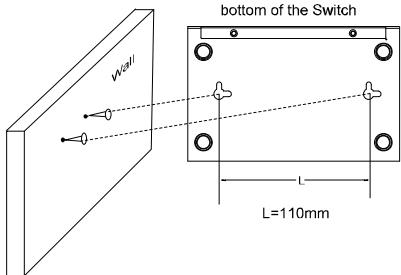
3.3 Mise sous tension
Mettez le commutateur sous tension et il s'initialisera automatiquement, et ses voyants LED réagiront comme suit :
| Name | Time | Status | Indication |
| Power | All the time | On | Power on |
| LEDs (port 1-8) | 1stsecond | On | N/A |
| 2ndsecond | Off | N/A | |
| 3rdsecond~ | Off | No device connected to the corresponding port. | |
| On | There is a 10/100/1000Mbps device connected to the corresponding port. |
Remarque :
Si les voyants LED ne réagissent pas comme décrit ci-dessus, vérifiez l'alimentation électrique et sa connexion.
Annexe A : Spécifications
| General | |
| Standards | IEEE802.3, IEEE802.3u, IEEE802.3ab |
| Topology | Star |
| Protocol | CSMA/CD |
| Data Transfer Rate | Ethernet: 10Mbps (Half Duplex)20Mbps (Full Duplex) |
| Fast Ethernet: 100Mbps (Half Duplex)200Mbps (Full Duplex) | |
| Gigabit Ethernet: 2000Mbps (Full Duplex) | |
| Network Media(Cable) | 10Base-T:UTP category 3, 4, 5 cable (maximum 100m)EIA/TIA-568 100Ω STP (maximum 100m) |
| 100Base-TX:UTP category 5, 5e cable (maximum 100m)EIA/TIA-568 100Ω STP (maximum 100m) | |
| 1000Base-T:UTP category 5 cable (maximum 100m)EIA/TIA-568 100Ω STP (maximum 100m) | |
| Number of Ports | 5 10/100/1000Mbps Auto-Negotiation RJ45 ports(TL-SG105)8 10/100/1000Mbps Auto-Negotiation RJ45 ports(TL-SG108) |
| LED indicators | Power, LEDs |
| Transfer Method | Store-and-Forward |
| MAC Address Learning | automatically learning, automatically aging |
| Frame Filter Rate | 10Base-T: 14880pps/Port |
| 100Base-Tx: 148800pps/Port | |
| 1000Base-T: 1488000pps/Port | |
| Frame Forward Rate | 10Base-T: 14880pps/Port |
| 100Base-Tx: 148800pps/Port | |
| 1000Base-T: 1488000pps/Port | |
| Environmental and Physical | |
| Operating Temperature | 0 ~40℃ (32 ~104℉) |
| Storage Temperature | -40 ~70℃ (-40 ~158℉) |
| Operating Humidity | 10%~90% non-condensing |
| Storage Humidity | 5%~90% non-condensing |
Annexe B : Dépannage
1. Le voyant d'alimentation ne s'allume pas
Vérifiez que le cordon d'alimentation secteur est correctement connecté au commutateur et assurez-vous que la source d'alimentation est activée.
2. Le voyant Link/Act ne s'allume pas lorsqu'un périphérique est connecté au port correspondant
Vérifiez que les connecteurs du câble sont fermement branchés sur le commutateur et le périphérique, et confirmez que le périphérique connecté est sous tension et fonctionne correctement. Assurez-vous que le câble ne dépasse pas 100 mètres (328 pieds).



- TP-LINK
- DROITS D'AUTEUR ET MARQUES
- DÉCLARATION FCC
- AVERTISSEMENT DE MARQUAGE CE
- C
- CONSIGNES DE SÉCURITÉ
- PRÉCAUTIONS
- CONTENU DE L'EMBALLAGE
- REMARQUE
- CONVENTION
- CHAPITRE 1 INTRODUCTION DU PRODUIT
- PRÉSENTATION DU PRODUIT
- CARACTÉRISTIQUES
- CHAPITRE 2 IDENTIFICATION DES COMPOSANTS EXTERNES
- PANNEAU AVANT
- PANNEAU ARRIÈRE
- CHAPITRE 3 INSTALLATION
- MONTAGE DU COMMUTATEUR SUR UN BUREAU
- MONTAGE DU COMMUTATEUR SUR UN MUR
- MISE SOUS TENSION
- ANNEXE A : SPÉCIFICATIONS
- ANNEXE B : DÉPANNAGE
- LE VOYANT D'ALIMENTATION NE S'ALLUME PAS
- LE VOYANT LINK/ACT NE S'ALLUME PAS LORSQU'UN PÉRIPHÉRIQUE EST CONNECTÉ AU PORT CORRESPONDANT
Marque : TP-LINK
Modèle : TL-SG6108
Catégorie : Commutateur réseau