IMPRESSA X7-S - Machine à café automatique JURA - Notice d'utilisation et mode d'emploi gratuit
Retrouvez gratuitement la notice de l'appareil IMPRESSA X7-S JURA au format PDF.

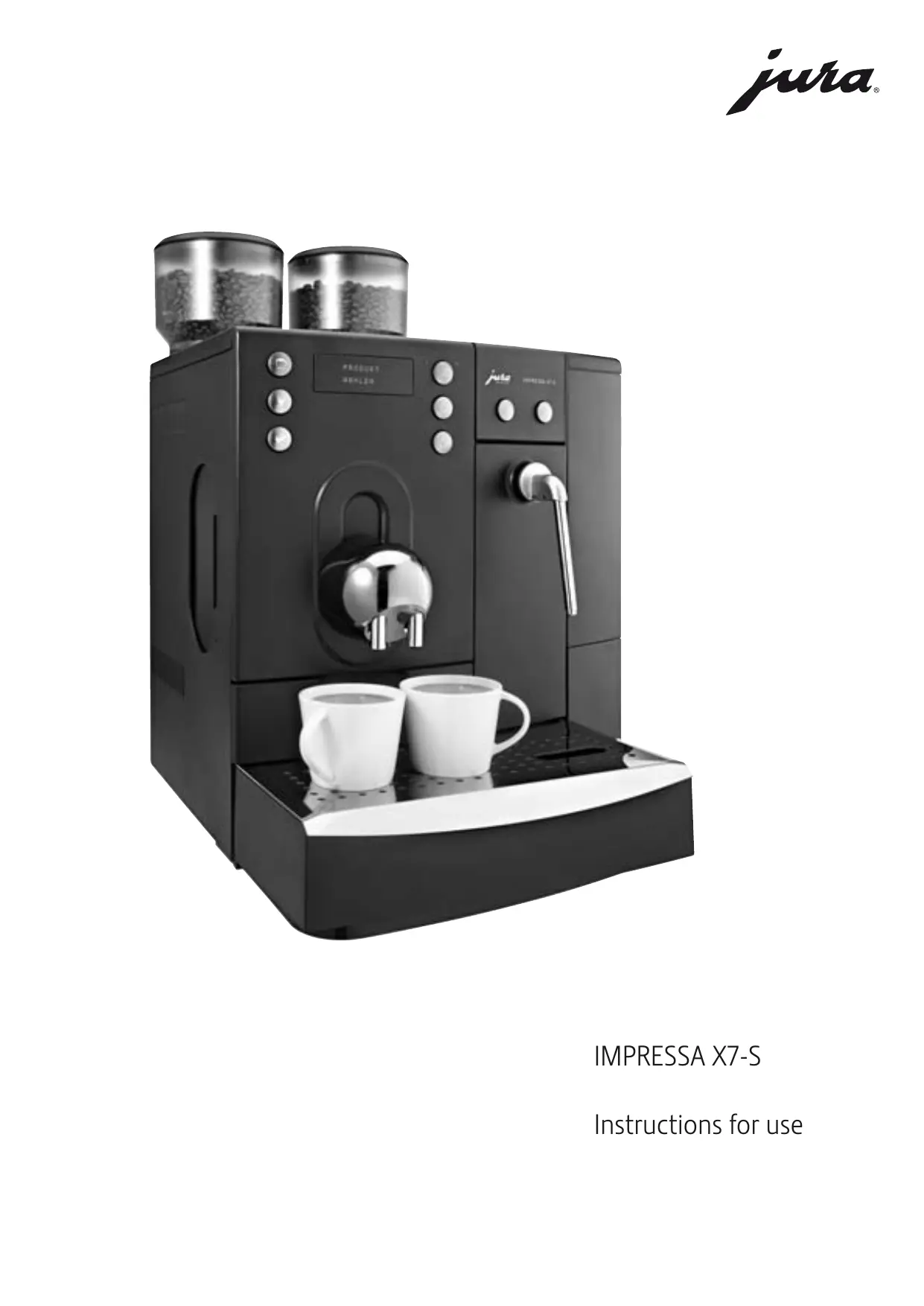

| Type de produit | Machine à café automatique |
| Marque | JURA |
| Modèle | IMPRESSA X7-S |
| Dimensions (L x H x P) | 43 x 58.5 x 51 cm |
| Poids | 18.5 kg |
| Alimentation | 230 V AC, 1500-2200 W |
| Pression de la pompe | 2 x 15 bar maximum |
| Capacité du réservoir d'eau | 5,0 litres |
| Capacité des réservoirs à grains | 2 x 650 g |
| Fonctions principales | Espresso, café, cappuccino, vapeur, eau chaude, deux moulins, système I.P.B.A.S., programmation individuelle |
| Programme de nettoyage | Intégré (nettoyage cappuccino, nettoyage combiné, nettoyage café) |
| Programme de détartrage | Intégré avec message d'alerte |
| Filtre à eau | CLARIS plus (optionnel, installation par technicien) |
| Rinçage automatique | À la mise en marche et à l'arrêt |
| Sécurité | Arrêt automatique, protection contre les surchauffes, contacts de sécurité |
| Pièces détachées | Filtre CLARIS plus, buses, joints, etc. Disponibles chez les revendeurs agréés |
| Réparabilité | Réparations exclusivement par les centres de service agréés JURA |
| Classe énergétique | Non spécifié (consommation veille 3 Wh, prêt env. 51 Wh) |
FOIRE AUX QUESTIONS - IMPRESSA X7-S JURA
Questions des utilisateurs sur IMPRESSA X7-S JURA
0 question sur cet appareil. Repondez a celles que vous connaissez ou posez la votre.
Poser une nouvelle question sur cet appareil
Téléchargez la notice de votre Machine à café automatique au format PDF gratuitement ! Retrouvez votre notice IMPRESSA X7-S - JURA et reprennez votre appareil électronique en main. Sur cette page sont publiés tous les documents nécessaires à l'utilisation de votre appareil IMPRESSA X7-S de la marque JURA.
MODE D'EMPLOI IMPRESSA X7-S JURA
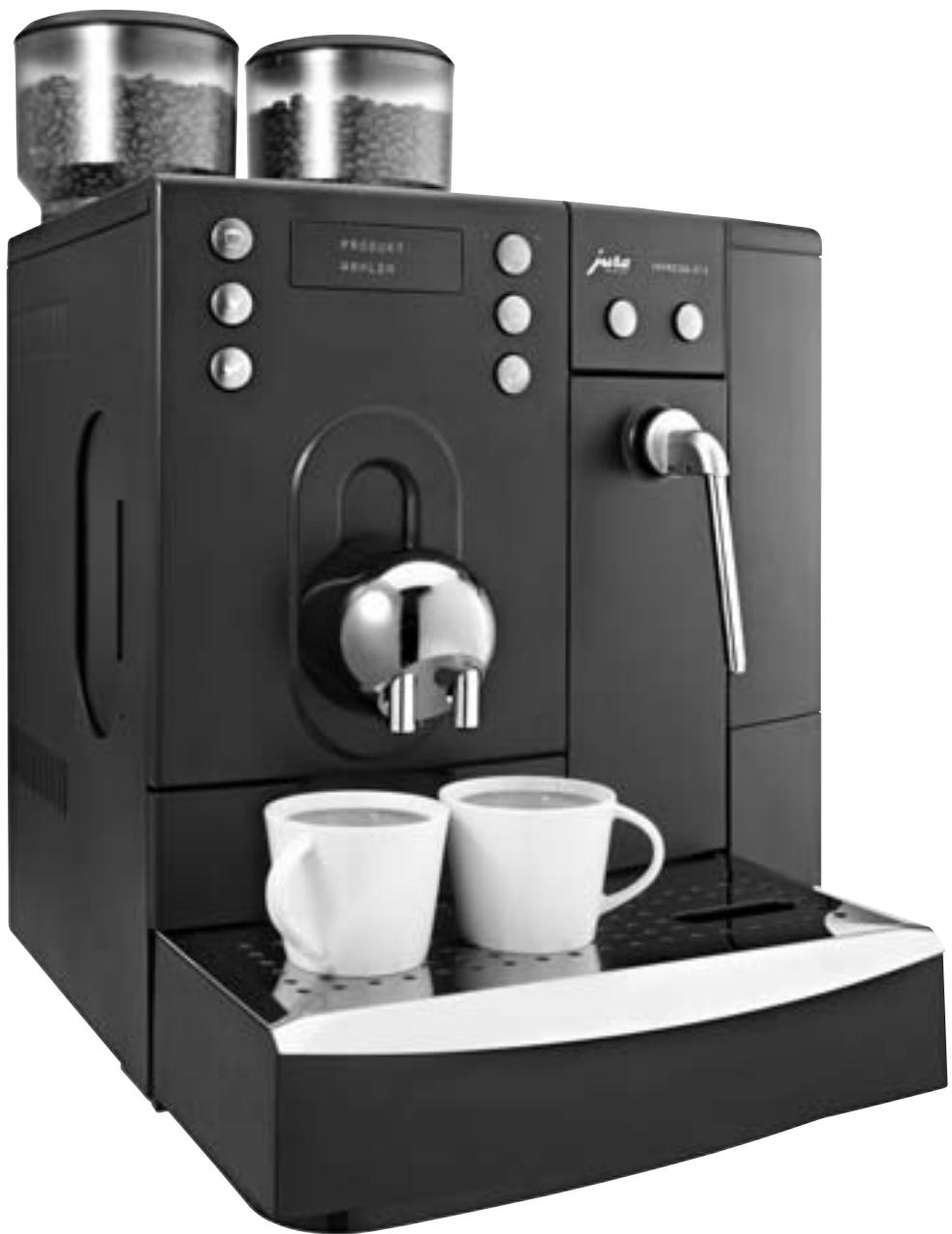
IMPRESSA X7-S
Instructions for use
Legend:
DISPLAY DISPLAY: serves as information.
■ DISPLAY DISPLAY: please follow the instructions shown.
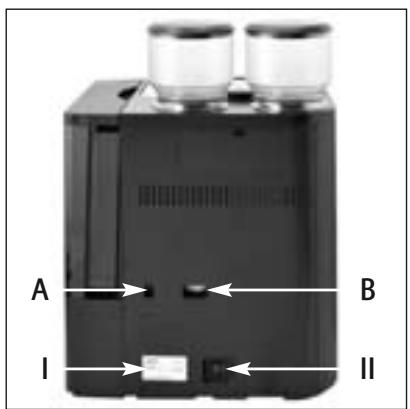
Fig. 1
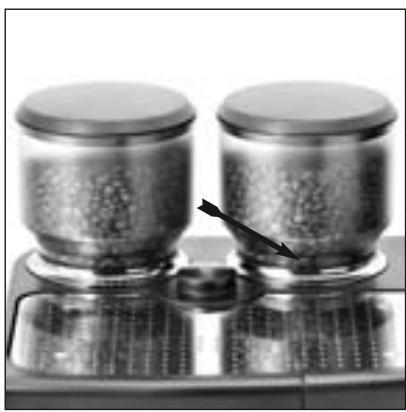
Fig. 2
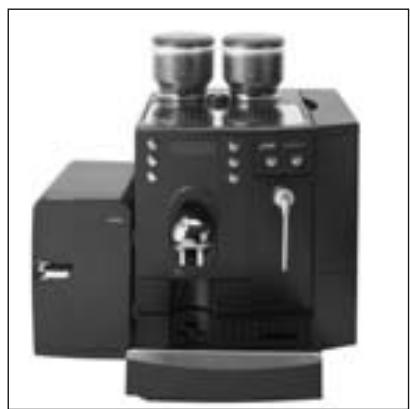
Fig. 3
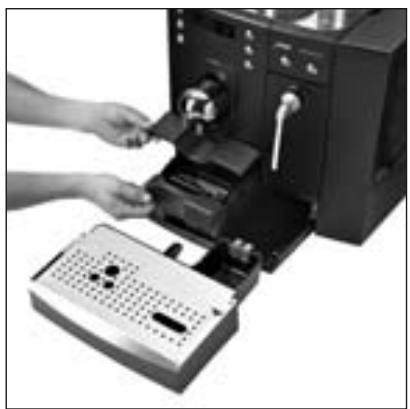
Fig. 4
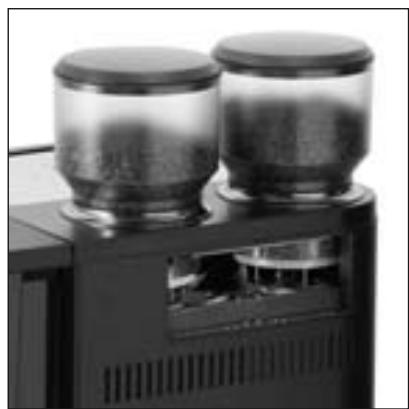
Fig. 5
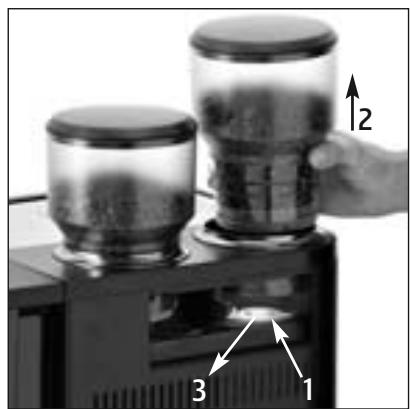
Fig. 6
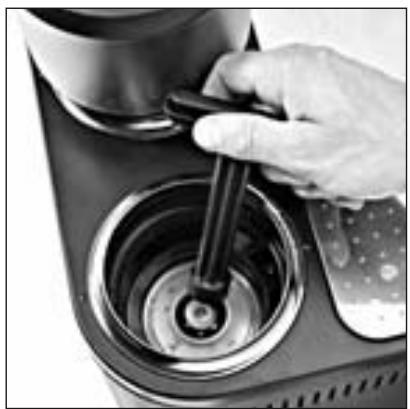
Fig. 7
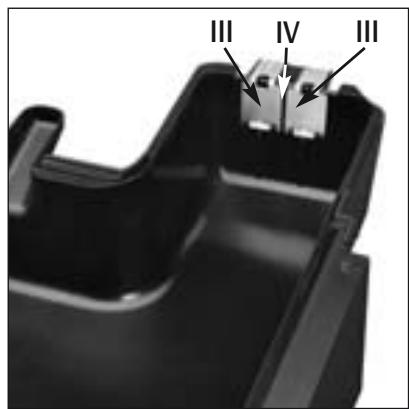
Fig. 8
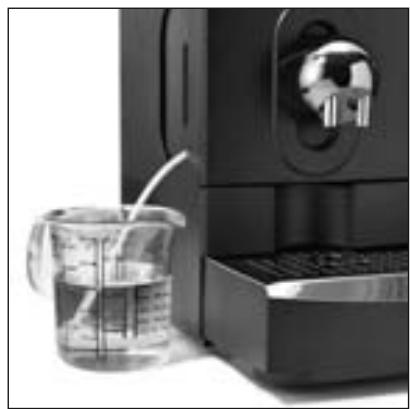
Fig. 9
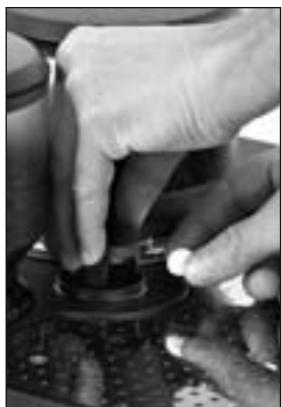
Fig. 10
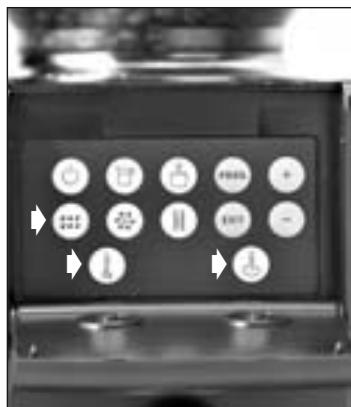
Fig. 11
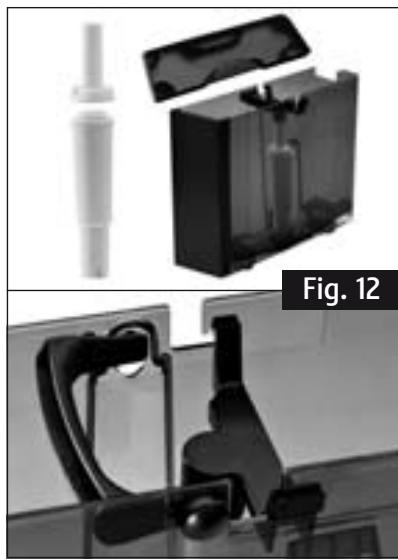
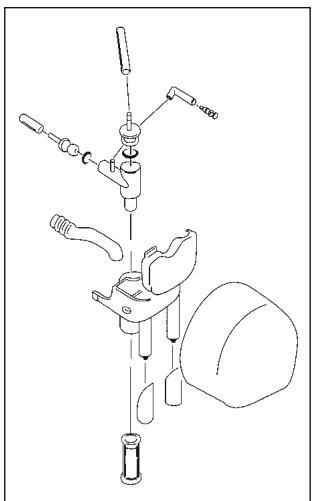
Fig. 13
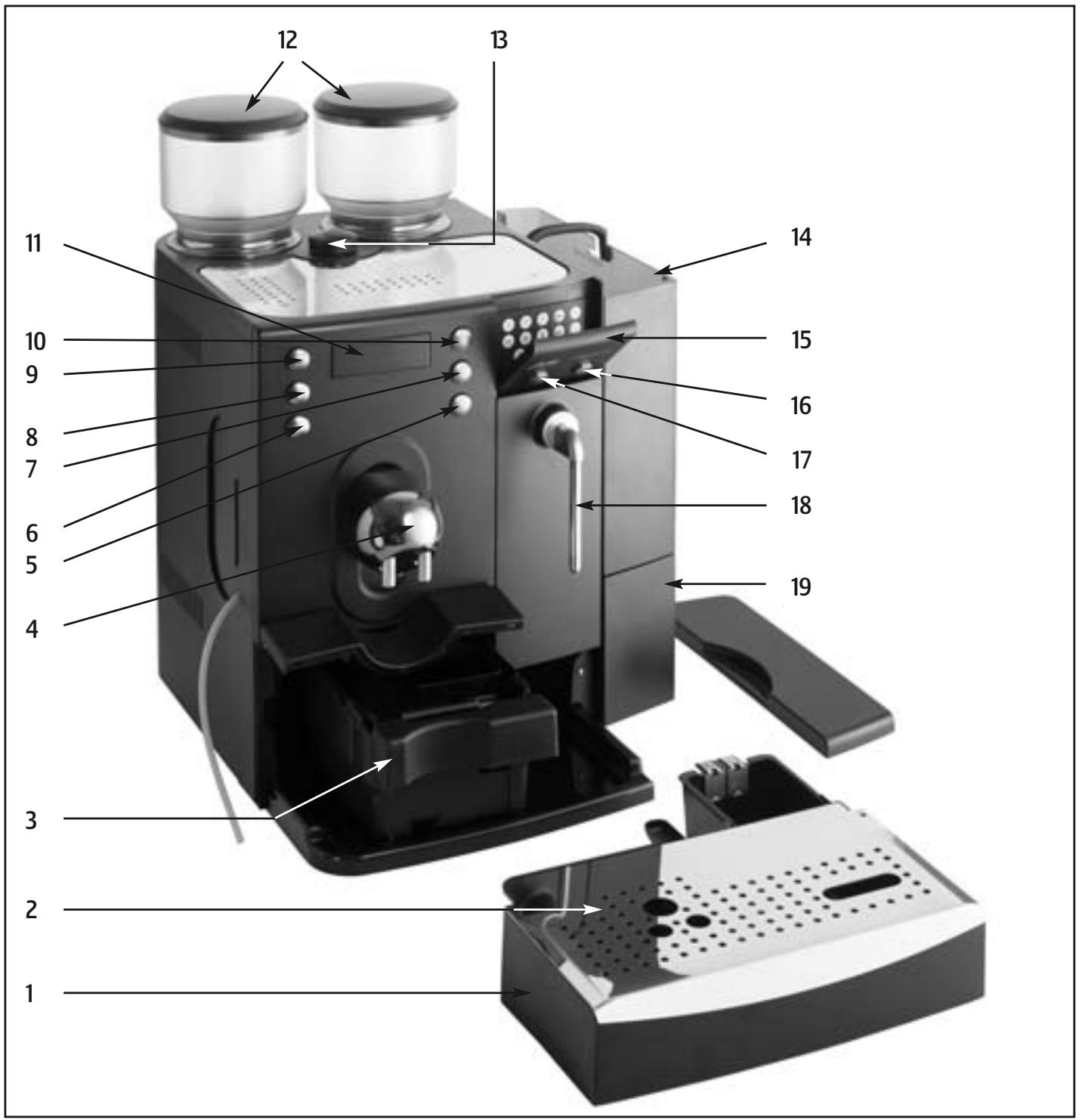
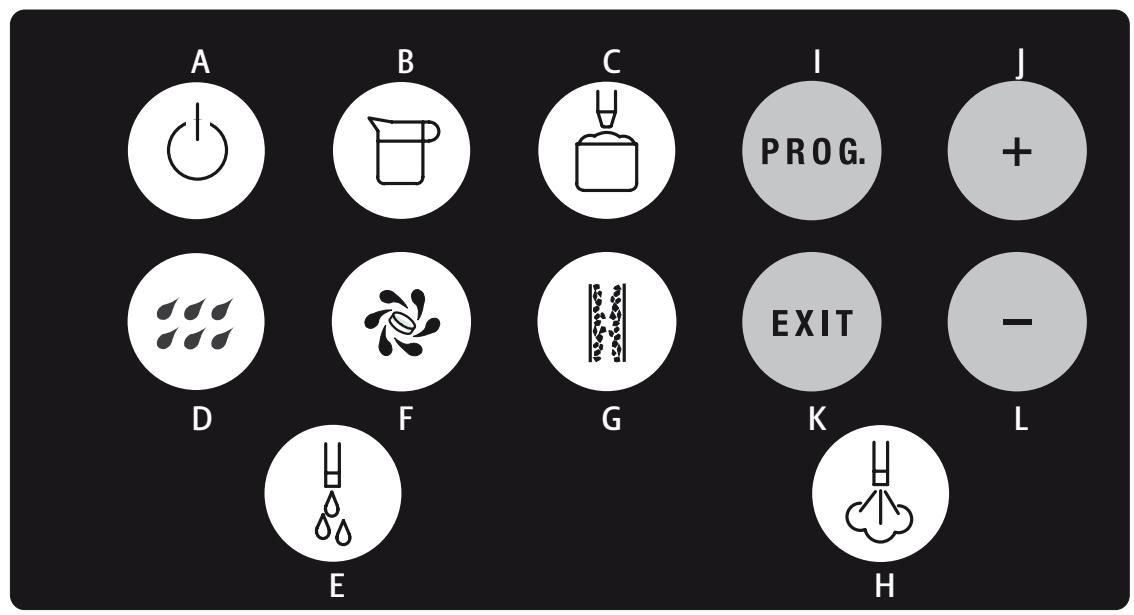
Operating elements JURA IMPRESSA X7-S
- Drip tray
- Drip tray cover
- Ground container
- Heigt-adjustable coffee and cappuccino spout
- Draw-off button 2 coffees
- Draw-off button 2 Espressos
- Draw-off button 1 coffee
- Draw-off button 1 Espresso
- Draw-off button Cappuccino
- Selector key for grinder
- Display dialogue system
- Grinders
- Funnel for cleaning tablets
- Water tank
- Cover for programming keys
- Draw-off button steam
- Draw-off button hot water
- Pivoting nozzle for hot water/steam
- Accessory drawer
Programming keys/Coffee key
A ON/OFF switch
B Draw-off button pot
C Draw-off button milk froth
D Rinsing key
E Draw-off button hot water
F Cleaning button
G Descaling button
H Draw-off buttom steam
Open program
J Forward-setting of criteria/changing of memory indications up-wards
K Close program
L Back-setting of criteria/changing of memory indications downwards
Table of contents
JURA IMPRESSA X7-S
1.Description. page 7
2. Safety instructions page 7
2.1Warnings page 7
2.2 Safety precautions page 7
3.Preparing the machine. page 7
3.1 Checking the mains voltage page 7
3.2 Checking the fuse.. 7
3.3 Filling the water tank. page 7
3.4 Adding coffee beans.. page 7
-
Switching the machine on.. page 7
-
Rinsing the machine.. page 8
- Selecting the grinder 8
6.1 Setting the grinder.. 8
- Adjusting the grinder.. 8
- Adjusting of water hardness
- Installing the CLARIS plus filter cartridge.. page 8
9.1 Installing the filter.. page 8
9.2 Replacing the filter.. page 8
- Coffee page 9
10.1 Drawing off coffee/espresso 9
10.2 Drawing off Cappuccino page 9
10.3 Drawing off pots of coffee.. 9
-
Drawing off hot water.. page 9
-
Drawing off steam.. page 9
-
Drawing-off milk froth . page 9
-
Switching the machine off 9
- Programming.. page 9
15.1 Programming grinding amount
15.2 Programming temperature.. page 10
15.3 Programming amount of water.. page 10
15.4 Programming amount of milk.. page 10
15.5 Programming portion of hot water.. page 10
15.6 Programming water hardness.. page 10
15.7 Programming clock.. page 10
15.8 Programming machine on.. page 10
15.9 Programming machine off.. page 10
15.10 Draw-offs page 10
15.11 Programming language page 11
- Care and maintenance.. page 11
16.1 Fill water.. page 11
16.2 Installation of an automatic filling device.. 11
16.3 Empty grounds container.. page 11
16.4 Empty drip tray.. page 11
16.5 Grounds container missing.. page 11
16.6 Drip tray missing.. page 11
16.7 Fill beans.. page 11
16.8 Removing foreign objects 11
16.9 Clean machine.. page 11
16.10 Machine scaled.. 11
16.11 Clean contacts.. page 11
16.12 General cleaning instructions.. page 11
16.13 Disassembling and cleaning the dual spout
- Cappuccino cleaning page 12
- Combined cleaning page 12
- Coffee cleaning.. page 12
- Descaling page 12
- Disposal page 13
- Adjustments by the JURA service technician page 13
- Tips for perfect coffee.. page 13
- Messages page 14
25.Problems page 14 - Legal information page 15
- Technical specifications page 15
Important information for the user
Thank you for choosing this JURA product.
Please study these instructions carefully before using your new machine and keep them in a safe place for easy reference in the future. Should you require further information or should particular problems occur that are not dealt with in sufficient detail for you in these operating instructions, then please ask your local dealer for the information you require or get in touch with us directly.

You will also find useful tips on operation and maintenance of your IMPRESSA X7-S on the website at www.jura.com.
Don't forget to check out the Knowledge Builder our animated operating instructions. LEO, our assistant, will take you through all the functions.
1.Description
The first IMPRESSA for the office and small gastronomy area is outstanding not only because of its modern technology, but also a number of features, and prepares 1 or 2 cups of espresso/coffee in only one brewing process. The Intelligent Pre Brew Aroma System (I.P.B.A.S.) ensures that the full coffee aroma is made use of and supplies the best espresso/coffee, guaranteed to be covered by a splendid froth. Optionally, coffee can be used from either of the grinders, and the mixture can be programmed individually. Drawing-off Cappuccino is possible at the push of a button and without moving the cups. Integrated rinsing, cleaning and de-scaling programmes ensure perfect cleanliness at the push of a button.
2. Safety instructions
2.1Warnings
Children are unaware of the dangers that can be caused by electrical machines; for this reason, children should never be left unsupervised with electrical machines.
The machine may only be used by people who have been instructed.
- Never use a faulty machine or one with a damaged power cable.
- Never repair or open the machine yourself. Repairs may only be done by authorised service centres using original spare parts and accessories.
- Never immerse the machine in water.
2.2 Safety precautions
- Never expose the machine to the effects of weather (rain, snow, frost) and never operate it with your hands wet.
- Place the IMPRESSA on a firm, level base that is resistant to any water that may leak. Never stand on hot or warm surfaces (oven hobs). Keep out of the reach of children.
- Remove the plug from the power socket if you are away for some time (holidays etc.).
Always remove the plug from the power socket before cleaning. -
When removing the plug from the power socket, never tug on the cord or the machine itself.
The machine is connected to the mains power socket via an electric cable. Please ensure that no-one trips over the cable and pulls the machine down. Keep children and pets at a distance. -
Never put the machine or parts of it into the dishwasher.
- To prevent overheating, please put the machine in a place with a good circulation of air.
If you use de-scaling agents containing acid, remove any splashes and drips on sensitive surfaces, in particular natural stone and wood surfaces, straight away or take corresponding safety precautions.
3. Preparing the machine
3.1 Checking the mains voltage
The machine has been set to the correct mains voltage in the factory. Ensure that your mains voltage corresponds to the details on the rating plate attached to the reverse of your machine (Fig. 1/A).
3.2 Checking the fuse
Check whether the fuse matches your machine.
3.3 Filling the water tank
Remove the water tank and rinse it out well with cold tap water.
- Then fill the water tank and put it back into the machine. Please ensure that the tank locks in properly.

Please only use fresh, cold water. Never fill up with milk, mineral water and other fluids. You can also top up water without removing the tank. Simply remove the cover and pour in the water from above with a vessel and replace the lid again.
3.4 Adding coffee beans

To ensure that your machine gives satisfaction for a long time and to avoid repairs, please note that the grinder on your JURA coffee machine is not suitable for coffee beans that have been treated with additives (e.g. sugar) during or after roasting. Use of such coffee blends can result in damage to the grinder. Any repair costs incurred as a result are not covered by the warranty provisions.
You have the possibility of adding two different sorts of coffee beans.
- Remove the cover from the bean container.
Clean out any dirt or foreign objects from the bean container. - Fill coffee beans into the bean container and replace the cover again.
4. Switching the machine on
Operate the switch on the reverse of the machine (Fig. 1/II).
- Switch the machine on with the ON/OFF operating switch.
DISPLAY:PLEASEWAIT
Place an empty cup under the coffee spout (4).
DISPLAY:RINSEUNIT

The rinsing is done first via the Cappuccino nozzle, after which the coffee spout is cleaned.
5. Rinsing the machine
A rinsing process is automatically started when the machine is switched off.
However, if no Cappuccino has been drawn off, the rinsing is only done via the coffee spout when switching off. When the machine has been switched off and has cooled down, the rinsing process is requested when it is switched on again.
6. Selecting the grinder
You can select the grinder manually
Press the key 1x or 2x. The light above the key tells you which grinder has been activated (grinder left or grinder right).
6.1 Setting the grinder
So that the coffee can be matched to the grinder as well as possible, carry out the following steps:
Press the key 10
- Draw off 6 coffee and 6 espresso by manually selecting the grinder "left" and then the grinder "right".

We recommend that you also readjust the grinder after:
- a change of sort of coffee beans
- extreme changes of the degree of grinding
- service
7. Adjusting the grinder
You have the opportunity of adapting the grinder to the roast of your coffee. We recommend the following:
for a light roast a finer adjustment
for a dark roast a coarser adjustment
To adjust the grinding, turn the setting rings into the required position (Fig. 2)
You have the following options:
the smaller the dots, the finer the grinding
the larger the dots, the coarser the grinding

The grinding may only be adjusted with the grinder in operation.
8. Adjustment of water hardness
Water is heated in the machine. This leads to scale as a result of use, which is automatically shown on the display. The machine must be adjusted to match the hardness of the water used. For this, please use the enclosed test stick.

1^ water hardness on the German scale corresponds to 1.79^ on the French scale.
The machine has 5 hardness settings to choose from. The indications on the display mean:
WATER HARDNESS
LEVEL — Water hardness function switched off
WATER HARDNESS German water hardness 1 - 7^
LEVEL 1 French water hardness 1.79 - 12.53^
WATER HARDNESS German water hardness 8 - 15^
LEVEL 2 French water hardness 14.32 - 26.85^
WATER HARDNESS German water hardness 16 - 23^
LEVEL 3 French water hardness 28.64 - 41.14°
WATER HARDNESS German water hardness 24 - 30^
LEVEL 4 French water hardness 42.96 - 53.7^
In the factory, the machine is set to hardness level 3. You can alter this setting. Proceed as follows:
- Switch the machine on with the ON/OFF operating switch.
DISPLAY:PLEASEWAIT
Press the key PROG. (I) until an acoustic signal is heard.
DISPLAY:AJUST COFFEE QUANTITY/SELECT PRODUCT
Press the key ④ until the following report appears:
DISPLAY: WATER HARDNESS LEVEL 3
Press the key PROG., an acoustic signal is heard and the level set flashes.
■ By pressing the key or you can set the required level. To store, press the key PROG. An acoustic signal is heard.
Press the key EXIT (K).
9. Installing the CLARIS plus filter cartridge

If the CLARIS plus filter cartridge is installed properly you don't have to de-scale your machine anymore. For more information on the CLARIS plus filter cartridge refer to the brochure "CLARIS plus. Hard on limescale. Gentle on your coffee machine."
9.1 Installing the filter

First installation of a CLARIS plus filter cartridge must be carried out by a service engineer. Contact your service partner.
9.2 Replacing the filter

After drawing off 50 liters the filter cartridge will be used up. Please monitor the period of use of the CLARIS plus filter cartridge (max. 2 months) using the scale on the cartridge holder by the water tank.
DISPLAY:Replace water filter
- Switch off your IMPRESSA X7-S.
- Press the following key combination (Fig. 11). NB: Press the keys at the same time.
DISPLAY:OK
- Empty the water tank and install the filter cartridge together with the cartridge holder in the water tank, applying a gentle pressure downward. Move back the cartridge holder until it engages audibly (Fig. 12).
- Fill the water tank with cold, fresh tap water and reinstall it.
- After replacing the filter draw off 0.5 liters of water.

The water may be slightly coloured (not harmful)
10. Coffee
10.1 Drawing off coffee / espresso
DISPLAY:SELECTPRODUCT
- Place 1 or 2 cups, as necessary, under the coffee spout (4) and press the required selection switch. The pre-brew system (I.P.B.A.S) moisturises the coffee powder, briefly interrupts the discharge and then starts the actual brewing procedure.

You can interrupt the draw-off prematurely by pressing any of the coffee draw-off buttons. In order to obtain outstanding froth, you can adapt the coffee spout (4) individually to match the size of your cups.
10.2 Drawing off cappuccino
DISPLAY:SELECTPRODUCT
Put milk/Tetra Pak into a jug and immerse the cappuccino tube into the milk.
- Place 1 cup under the coffee spout and press the draw-off key . The machine firstly prepares the milk froth, then the coffee (Fig. 3).

You can interrupt the milk froth and the coffee prematurely by pressing the draw-off key once more.
10 min. after the draw-off of Cappuccino, a rinsing is automatically started. The rinsing is announced in advance by an acoustic signal.
10.3 Drawing off pots of coffee
DISPLAY:SELECTPRODUCT
- Place 1 pot under the coffee spout (4) and press the draw-off key (pot of coffee). Your pot of coffee is brewed in a number of cycles. The number of cycles is shown in the display.

You can interrupt the draw-off prematurely at any time by pressing the draw-off key again.
11. Drawing off hot water
DISPLAY:SELECTPRODUCT
- Place a cup under the pivoting nozzle (18) and press the draw-off key.
DISPLAY:PORTION HOT WATER
The draw-off of the programme portion of hot water stops automatically.

You can interrupt the draw-off prematurely at any time by pressing the draw-off key again.

When water is drawn off, there can be splattering at the beginning. The pivoting nozzle becomes hot. Avoid direct contact with the skin.
12. Drawing off steam
DISPLAY:SELECTPRODUCT
Place a cup with the liquid to be heated under the pivoting nozzle (18) and press the draw-off key.
DISPLAY:STEAMACTIVE
To end the draw-off of steam, press the key 念

When steam is drawn off, there can be splattering at the beginning. The pivoting nozzle becomes hot. Avoid direct contact with the skin.
13. Drawing-off milk froth
DISPLAY:SELECTPRODUCT
Pour milk/Tetra Pak into a jug and immerse the Cappuccino tube into the milk.
- Place 1 cup under the coffee spout (4) and press the draw-off key.
The programme amount is prepared and stops automatically.

You can interrupt the draw-off prematurely at any time by pressing the draw-off key again.
10 min. after the draw-off of milk, a rinsing is automatically started. The rinsing is announced in advance by an acoustic signal.
14. Switching the machine off
- Switch the machine off with the ON/OFF operating switch. A rinsing is automatically started when the machine is switched off.
15. Programming
The following phases can be programmed:
Grinding amount
Temperature
Amount of water
Amount of milk
Portion of hot water
Water hardness
Clock
Machine on
Machine off
Draw-offs
Language
15.1 Programming grinding amount
- Switch your machine on the with ON/OFF operating switch.
Press the key PROG. until an acoustic signal is heard.
DISPLAY:ADJUST COFFEE QUANTITY/SELECT PRODUCT
Press the required draw-off key.
■ DISPLAY: (selected product)
■ By pressing the key or you can determine the amount to be ground.
To store, press the key PROG.
■ DISPLAY: (selected product)
<: 100% >: 0%
You can determine the allocation of the grinder "left" or "right".
By pressing the key or you can change the values.
To store, press the key PROG.
DISPLAY:ADJUST COFFEE QUANTITY/SELECT PRODUCT
Press the required draw-off key, the key in order to reach the next phase or the key EXIT to quit the programming.
15.2 Programming Temperature
DISPLAY:ADJUST TEMPERATURE/SELECTPRODUCT
Press the required draw-off key.
■ DISPLAY: (selected product)
STAND. TEMP.
- Select the required temperature with the keys or (high or standart)
To store, press the key PROG.
DISPLAY:ADJUSTTEMPERATURE/SELECTPRODUCT
Press the required draw-off key, the key in order to reach the next phase or the key EXIT to quit the programming.
15.3 Programming amount of water
DISPLAY:ADJUST WATER QUANTITY/SELECTPRODUCT
Press the required draw-off key.
■ DISPLAY: (selected product)
WATER 90 ML
- You can change the value by pressing the key or .
To store, press the key PROG.
DISPLAY:ADJUST WATER QUANTITY/SELECTPRODUCT
Press the required draw-off key, the key in order to reach the next phase or the key EXIT to quit the programming.
15.4 Programming amount of milk
DISPLAY:ADJUST MILK QUANTITY/SELECTPRODUCT
Press the key or
■ DISPLAY: (selected product) 10 SEC.
■ You can alter the time by pressing the keys or (draw-off time from 3 - 60 sec.)
To store, press the key PROG.
DISPLAY:ADJUST MILK QUANTITY/SELECTPRODUCT
Press the required draw-off key, the key in order to reach the next phase or the key EXIT to quit the programming.
15.5 Programming portion of hot water
Place a cup under the pivoting nozzle (18).
■ DISPLAY: HOT WATER PORTION / PRESS FOR HOT WATER
■ DISPLAY: ENOUGH HOT WATER? / PRESS FOR HOT WATER
DISPLAY: HOT WATER PORTION / PRESS FOR HOT WATER
Press the key ④ in order to reach the next phase or the key EXIT to quit the programming.
15.6 Programming water hardness
DISPLAY: WATER HARDNESS LEVEL 3
Press the key PROG.
- You can set the water hardness by pressing the keys or .
To store, press the key PROG.
Press the key ④ in order to reach the next phase or the key EXIT to quit the programming.
To determine the water hardness, please read Chapter 8 "Setting the water hardness"
15.7 Programming CLOCK
Programming the clock is necessary if the function "Machine on" is used.
DISPLAY:TIME.
Press the key PROG.
By pressing the keys or you can set the hours.
To store, press the key PROG.
By pressing the keys or you can set the minutes.
To store, press the key PROG.
Press the key ④ in order to reach the next phase or the key EXIT to quit the programming.
15.8 Programming machine on
Programming the clock is necessary if the function "Machine on" is used.
DISPLAY:UNIT ON-:-
Press the key PROG.
By pressing the keys or you can set the hours.
To store, press the key PROG.
By pressing the keys or you can set the minutes.
To store, press the key PROG.
Press the key ④ in order to reach the next phase or the key EXIT to quit the programming.

The display - - means that the function is switched off.
15.9 Programming machine off
■ DISPLAY: UNIT OFF 5.0 HRS.
Press the key PROG.
■ By pressing the keys or you can set the hours (switched off or 0.5 hrs. - 9 hrs.).
To store, press the key PROG.
Press the key ④ in order to reach the next phase or the key EXIT to quit the programming.
15.10 Draw-offs
DISPLAY: AUDIT TRAIL (total audit trail)
Press the required draw-off key to inquire the draw-offs.
Press the key ④ in order to reach the next phase or the key EXIT to quit the programming.
Draw-offs of steam cannot be inquired.
15.11 Programming language
Press the key PROG.
- By pressing the keys or you can select the required language.
To store, press the key PROG.
- Press the key ④ in order to reach the next phase or the key EXIT to quit the programming.
16. Care and maintenance
16.1 Fill water
DISPLAY:FILL WATER TANK
- When this display lights up, no more drawing-off is possible. Fill with water as described under Section 3.3.

The water tank should be rinsed out every day and filled with fresh water.
If you use an automatic filling device, we recommend that you rinse the water tank out regularly and fill it up with fresh water.
16.2 Installation of an automatic filling device
Please read the operating instructions of the automatic filling device.
16.3 Empty grounds container
The grounds container collects the coffee grounds.
DISPLAY: EMPTY DRAWER
- When this display lights up, no more draw-offs are possible and the grounds container must be emptied.
- Carefully remove the drip tray - there is water in it. Then remove the grounds container (Fig. 4).
16.4 Empty drip tray
DISPLAY: EMPTY DRIP TRAY
- When this display lights up, no more draw-offs are possible and the drip tray must be emptied.
Carefully remove the drip tray - there is water in it (Fig. 4).
16.5 Grounds container missing
DISPLAY: DRAWER MISSING
- When this display lights up, the grounds container has not been inserted properly or is missing.
16.6 Drip tray missing
DISPLAY: DRIP TRAY MISSING
- When this display lights up, the drip tray has not been inserted properly.
16.7 Fill beans
DISPLAY:FILL COFFEEBeans
■ Fill with beans as described in Chapter 3.4.

The display FILL COFFEE BEANS goes off after a draw-off of coffee.
We recommend that you clean the bean container out with a dry cloth from time to time before filling. For this, switch the machine off.
16.8 Removing foreign objects
- Switch your machine off with the ON/OFF operating switch.
Remove the plug from the power socket. - Open the hinged door on the reverse of the machine (Fig. 5).
Press the slides downwards (Fig. 6) and remove the bean container.
Remove any beans with a vacuum cleaner.
Position the spanner (Fig. 7). - Turn the spanner in an anti-clockwise direction until the foreign object becomes loose.
- Remove remaining powder with a vacuum cleaner.
Now replace the bean container and pull the slides to the front before closing the door (Fig. 6).
16.9 Clean machine
DISPLAY: CLEANING NECESSARY
After 220 draw-offs or 180 rinsings, the machine has to be cleaned. You can continue to draw off coffee and hot water/steam. We recommend that you clean the machine (Chapter 19) within the next few days.

Carry out a cleaning (Chapter 19).
16.10 Machine scaled
DISPLAY:DECALCIFYINGNECESSARY
The machine recognises the necessity of de-scaling. You can continue to draw off coffee or hot water/steam. We recommend that you carry out the de-scaling (Chapter 20) within the next few days.
16.11 Clean contacts
DISPLAY: EMPTY DRIP TRAY / CLEAN CONTACTS
The de-scaling residue in the area of the contacts must be removed. Please proceed as follows:
- Rinse the contact fasteners in trough (B) (Fig. 8) as well as the contacts (A) with hot water and washing-up liquid. Then additionally clean the contact fasteners in trough (B) with a brush.
16.12 General cleaning instructions
- Never use abrasive articles or corrosive chemicals to clean your machine.
■ Wipe off the inside and outside of the casing with a soft, damp cloth.
Clean the pivoting nozzle after every use.
After heating milk, draw off a little hot water, in order to clean the pivoting nozzle from the inside.
The water tank must be rinsed and filled with fresh water every day.

If you see any visible scaling in the water tank, you can remove it with a customary de-scaling agent.

Remove the water tank in order to clean it.
16.13 Disassembling and cleaning the dual spout

We recommend to disassemble and clean the dual spout if you make milk products regularly.
Remove the cover of the height-adjustable dual spout.
Take the spouts apart (Fig. 13).
Thoroughly rinse all the parts with warm water.
Reassemble the parts (Fig. 13).
- Attach the spouts to the IMPRESSA X7-S.
Put back the cover, making sure it locks into place.

Use corresponding brushes for carrying out the cleaning steps described in sections above.
17. Cappuccino cleaning

Carry out this cleaning every day.
Once the cleaning sequence has started, it must not be interrupted. It takes about 5 min.
Switch the machine on with the ON/OFF switch.
Press the key until an acoustic signal is heard.
DISPLAY:SELECT
CLEANING - +
Press the key
DISPLAY: CAPPUCCINO CLEANING
Press the key again.
DISPLAY: CLEANER FOR CAPPUCCINO / PRESS CLEANING

Place a vessel of at least 0.5 I under the coffee spout (4).
- Put about 25 cl of water into a vessel and add the cleaner. You can see the amount of cleaner on the label or the sheet accompanying the product in question. Immerse the Cappuccino tube into it.
Press the key
DISPLAY: CAPPUCCINO CLEANING / PLEASE WAIT
An acoustic signal is heard.
DISPLAY: WATER FOR CAPPUCCINO / PRESS CLEAN

Fill a vessel with fresh water and immerse the Cappuccino tube into it.
Press the key
DISPLAY: CAPPUCCINO CLEANING / PLEASE WAIT
18. Combined cleaning
Once the cleaning sequence has started, it must not be interrupted. It takes about 20 min.
- Switch the machine on with the ON/OFF switch.
Press the key until an acoustic signal is heard.
DISPLAY:SELECT
CLEANING-+
Press the key 2x
DISPLAY:ENTIRE CLEANING
Press the key
■ DISPLAY: EMPTY DRAWER / INSERT TABLET (Fig. 10) / CLEANER FOR CAPPUCCINO
Place a sufficiently large vessel under the coffee spout.
- Put about 25 cl of water into a vessel and add the cleaner. You can see the amount of cleaner on the label or the sheet accompanying the product in question. Immerse the cappuccino tube into it.
Press the key
■ DISPLAY: ENTIRE CLEANING / PLEASE WAIT
DISPLAY: WATER FOR CAPPUCCINO / PRESS CLEAN

Fill a vessel with fresh water and immerse the Cappuccino tube into it.
Press the key
DISPLAY: COMBI CLEANING / PLEASE WAIT
DISPLAY: EMPTY DRAWER
19. Coffee cleaning
Once the cleaning sequence has started, it must not be interrupted. It takes about 15 min.
- Switch the machine on with the ON/OFF switch.
Press the key until an acoustic signal is heard.
■ DISPLAY: SELECT CLEANING-+
Press the key 3x
DISPLAY:COFFEE CLEANING
Press the key
■ DISPLAY: EMPTY DRAWER / INSERT TABLET (Fig. 10) / PRESS CLEANING
Place a sufficiently large vessel under the coffee spout (4).
Press the key
DISPLAY: COFFEE CLEANING/ PLEASE WAIT
DISPLAY: EMPTY DRAWER
20. Dscaling
The machine has an integrated descaling programme. The process takes about 40min

Once the descending process has started, it must not be interrupted
If you use descending agents containing acid, remove any splashes and drips on sensitive surfaces, in particular natural stone and wood surfaces, straight away or take corresponding safety precautions.
Switch the machine off with the ON/OFF switch.
Press the key H until an acoustic signal is heard.
DISPLAY: EMPTY DRIP TRAY
■ DISPLAY: INSERT AGENT IN TANK / PRESS DECALCIFYING Dissolve 3 tablets completely in 0.7 litres of water in a vessel and pour the mixture into the empty water tank.
Place two sufficiently large vessels under the pivoting nozzle (18) and the coffee spout.
Press the key H.
DISPLAY:UNITDECALCIFYING/PLEASEWAIT
An acoustic signal is heard.
DISPLAY: EMPTY DRIP TRAY
DISPLAY:FILL WATER TANK
- Place a vessel under the pivoting nozzle (18) and the coffee spout (4).
DISPLAY:PRESSDESCALING
DISPLAY:UNITDECALCIFYING/PLEASEWAIT
An acoustic signal is heard
DISPLAY: EMPTY DRIP TRAY / CLEAN CONTACTS (Chapter 16.4).
21. Disposal
Please dispose of old machines in an environmentally compatible way
Old machines contain valuable materials capable of being recycled which should be salvaged for recycling. Please therefore dispose of old machines via suitable collection systems.
22. Adjustments by the JURA service technician

The following adjustments/alterations can only be done by a JURA service technician.
- Re-arrangement of the key occupancy of the coffee products
- Alteration of the cycles in "pot of coffee" draw-off
-Filter capacity
23. Tips for perfect coffee
Height-adjustable coffee spout
You can adjust the height of the coffee spout to the size of your cups.
Grinding
Please refer to Chapter 7 "Setting of grinder"
Pre-warm cups
You can warm the cups in advance with hot water or steam. The smaller the quantity of coffee, the more important the warming of the cups.
Sugar and cream
Heat is lost by stirring the contents of the cup. Adding milk or cream from the fridge considerably lowers the temperature of the coffee.
- Messages
| DISPLAY | Cause | Action |
| FILL WATER TANK | The tank is empty | Top up with water |
| The water level display in the tank has jammed | Empty tank, rinse out and replace when it has been filled | |
| The tank is scaled; the water level display is jammed | Remove the tank, de-scale it, rinse well, fill and put in again | |
| FILL COFFEE BEANS | The bean container is empty | Fill up with beans |
| Although beans have been filled, the display does not go off | Draw off a cup of coffee. “FILL BEANS” only goes off after a draw-off | |
| A foreign body has got jammed | Remove the foreign body as described in Section 16.8 “Removing foreign objects” | |
| EMPTY DRAWER | The grounds container is full | Remove the tray, empty the grounds container, replace the tray |
| The display appears after only a few cups | Leave the machine switched on while the grounds container is emptied. The counter is only reset if the machine is switched on. | |
| DRIP TRAY MISSING | The drip tray has not locked in properly | Position the tray correctly. |
| EMPTY DRIP TRAY | The drip tray is full | Carefully remove the tray, empty it, rinse it out and replace it |
| The display does not go off despite the tray being emptied | Remove the tray, clean the metal contacts, see Chapter 16.11 | |
| CLEANING NECESSARY | 220 draw-offs or 180 rinsings have been done | Carry out cleaning according to Chapter 19 |
| The display does not go off despite the cleaning | Do the cleaning once more; but do not add a cleaning tablet this time | |
| DECALCIFYING NECESSARY | The machine must be de-scaled | Carry out de-scaling as described in Chapter 20 |
| The display does not go off despite the de-scaling | De-scale the machine again; this time only with water, without de-scaling agent | |
| MALFUNCTION | Various causes | Call the office trader |
- Problems
| Problems | Cause | Action |
| Coffee only drips out when drawing off | – powder too fine | – adjust grinder to a coarser grinding |
| – run one or two rinse programmes. If the results are no better, clean the machine. | ||
| Coffee flow is stopped after the pre-brew | – not enough powder in the system | – draw off one cup of coffee |
| Grinder is very noisy | – foreign object in the grinder | – refer to Chapter 16.8 |
| Not enough froth when frothing milk | – Cappuccino blocked | – carry out a Cappuccino cleaning (refer to Chapter 17) |
| Device cannot be switched on with the ON/OFF switch | – Main switch (Fig. 1/II) not switched on | – switch on |
| – Flat not engaged properly | – close flap |
If the messages or problems nevertheless still persist, please get in touch with your dealer or directly with the firm of JURA Elektroapparate AG.
26. Legal information
These operating instructions contain all the information necessary for the correct use, operation and maintenance of your machine.
Understanding and complying with the directives contained in these operating instructions are essential for the use of the machine without risk and also for safety during operation and maintenance.
These operating instructions cannot cover all imaginable uses of the machine.
We would further point out that the contents of these operating instructions in no way constitute a part of or amend any previous or existing contract, agreement or legal relationship. All obligations on the part of JURA Elektroapparate AG result from the sales agreement in question, which also contains the complete details of the valid warranty terms. These contractual warranty terms are neither extended nor limited in any way by the information contained in these operating instructions.
These operating instructions contain information protected by copyright. Photocopying or translation into another language without the prior written approval of JURA Elektroapparate AG are not admissible.
27. Technical specifications
Version «CH»
Voltage: 230 V AC
Output: 1500 W
Intensity of current: 6.5 A
Safety check:

Energy consumption standby: 3 Wh
Energy consumption ready to make coffee: approx. 51 Wh
Pump pressure: 2 x max. 15 bar
Water tank: 5.0 litres
Capacity, bean container: 2 × 650 gr
Capacity, grounds container: max. 40 port.
Cable length: approx. 1.8m
Weight: 18.5 kg
Dimensions (BxHxD): 43 × 58.5 × 51 cm
Version «International»
Voltage: 230 V AC
Voltage: 2200 W
Intensity of current: 9.6 A*
Safety check:

Energy consumption standby: 3 Wh
Energy consumption ready to make coffee: approx. 52 Wh
Pump pressure: 2 x max. 15 bar
Water tank: 5.0 litres
Capacity, bean container: 2 × 650 gr
Capacity, grounds container: max. 40 port.
Cable length: approx. 1.8m
Weight: 18.5 kg
Dimensions (BxHxD): 43 × 58.5 × 51 cm
- Legend:
- Operating elements JURA IMPRESSA X7-S
- Programming keys/Coffee key
- Table of contents
- JURA IMPRESSA X7-S
- Important information for the user
- 1.Description
- Safety instructions
- 2.1Warnings
- Safety precautions
- Preparing the machine
- Checking the mains voltage
- Checking the fuse
- Filling the water tank
- Adding coffee beans
- Switching the machine on
- Rinsing the machine
- Selecting the grinder
- Setting the grinder
- Adjusting the grinder
- Adjustment of water hardness
- Installing the CLARIS plus filter cartridge
- Installing the filter
- Replacing the filter
- Coffee
- Drawing off coffee / espresso
- Drawing off cappuccino
- Drawing off pots of coffee
- Drawing off hot water
- Drawing off steam
- Drawing-off milk froth
- Switching the machine off
- Programming
- Programming grinding amount
- Programming Temperature
- Programming amount of water
- Programming amount of milk
- Programming portion of hot water
- Programming water hardness
- Programming CLOCK
- Programming machine on
- Programming machine off
- Draw-offs
- Programming language
- Care and maintenance
- Fill water
- Installation of an automatic filling device
- Empty grounds container
- Empty drip tray
- Grounds container missing
- Drip tray missing
- Fill beans
- Removing foreign objects
- Clean machine
- Machine scaled
- Clean contacts
- General cleaning instructions
- Disassembling and cleaning the dual spout
- Cappuccino cleaning
- Combined cleaning
- Coffee cleaning
- Dscaling
- Disposal
- Please dispose of old machines in an environmentally compatible way
- Adjustments by the JURA service technician
- Tips for perfect coffee
- Legal information
- Technical specifications
- Version «CH»
- Version «International»
Marque : JURA
Modèle : IMPRESSA X7-S
Catégorie : Machine à café automatique