BAR332ESA - Horloge météo solaire OREGON - Notice d'utilisation et mode d'emploi gratuit
Retrouvez gratuitement la notice de l'appareil BAR332ESA OREGON au format PDF.


| Type d'appareil | Horloge météo solaire |
| Alimentation | Solaire avec batterie de secours |
| Affichage | Horloge et prévisions météo |
| Capteur | Capteur à distance |
| Réception de l'heure | Automatique (radio-pilotée) |
| Réglage manuel | Oui |
| Fonction alarme | Oui |
| Mesure de la température | Oui |
| Prévisions météo | Oui |
| Rétroéclairage | Oui |
| Matériau | Non précisé |
| Dimensions | Non précisées |
| Poids | Non précisé |
| Précautions d'utilisation | Oui, incluses dans la notice |
| Normes et certifications | Conformité UE et FCC |
FOIRE AUX QUESTIONS - BAR332ESA OREGON
Questions des utilisateurs sur BAR332ESA OREGON
0 question sur cet appareil. Repondez a celles que vous connaissez ou posez la votre.
Poser une nouvelle question sur cet appareil
Téléchargez la notice de votre Horloge météo solaire au format PDF gratuitement ! Retrouvez votre notice BAR332ESA - OREGON et reprennez votre appareil électronique en main. Sur cette page sont publiés tous les documents nécessaires à l'utilisation de votre appareil BAR332ESA de la marque OREGON.
MODE D'EMPLOI BAR332ESA OREGON
+ECO Solar Weather Clock
Model: BAR332ES / BAR332ESA / BAR332ESU
USER MANUAL
CONTENTS
EarthFriendly. 2
Overview 2
Front View 2
Top View 3
Bottom View 3
Solar Panel 4
Remote Sensor 4
Getting Started 4
Solar Panel 4
Backup Power 6
Remote Sensor. 6
Clock and Calendar 7
Clock Reception 7
Manually Set Clock. 7
Alarm 8
Temperature 8
Weather forecast. 8
Backlight 9
Reset 9
Specifications 9
Precautions 9
About Oregon Scientific. 10
EU-Declaration of Conformity. 10
FCC Statement 10
EARTH FRIENDLY
The +ECO line embodies our commitment to environmental concerns. Aware of threats facing the world we live in, Oregon Scientific™ has combined technological know-how, practicality and style to create this line of environmentally friendly products. These products provide practical solutions while enabling you and us to fulfill our environmental responsibility.
Simply detach the solar panel and face it directly towards the sun for a few hours to receive the amount of energy necessary to power the device.
Together we can improve the world we live in.
OVERVIEW
FRONT VIEW
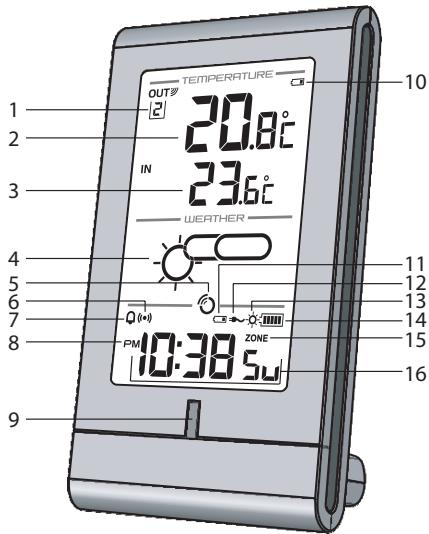
OUT罗
- Remote sensor reception indicator and outdoor channel selected
- Outdoor temperature
- Indoor temperature
-
Weather forecast
-
Clock signal reception indicator
- : Alarm time is displayed
- Q: Daily alarm is On
- AM / PM
- Rechargeable battery status LED indicator
- Outdoor remote sensor battery low
- Main unit back-up batteries low / no battery
- AC adaptor connected
- Rechargeable battery is low / solar panel detached
- Rechargeable battery level indicator
- ZONE: Time zone offset
- Calendar / Clock with weekday / seconds
TOP VIEW
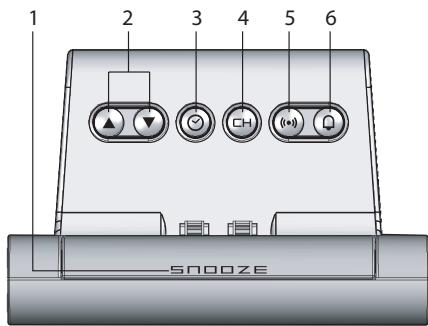
- SNOOZE: Activate snooze alarm / backlight
- / : Increase / decrease value of the setting; activate / deactivate clock reception signal
- : Change display; set clock
- CH: Toggle between outdoor temperature channels (1-3); initiate auto-toggle
- (10): View alarm status; set alarm
- Q: Activate / deactivate alarm function
BOTTOM VIEW
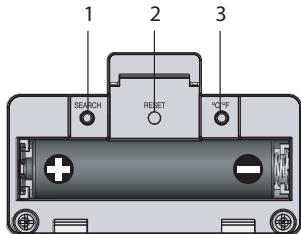
- SEARCH: Initiate sensor search
- RESET: Reset unit to default settings
- ^ C / ^ F : Select temperature unit
SOLAR PANEL
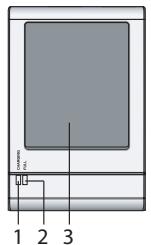
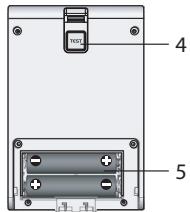
- CHARGING: charging in process
- FULL: batteries fully charged (when TEST is pressed)
- Solar panel
- TEST establish if battery is full
- Battery compartment
REMOTE SENSOR
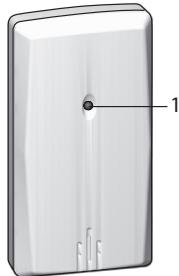
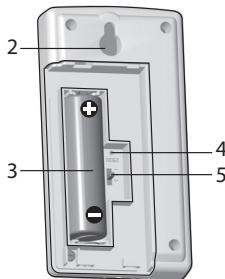
- LED status indicator
- Wall mount hole
- Battery compartment
- RESET: Reset unit to default settings
- CHANNEL switch
GETTING STARTED
SOLAR PANEL
This product uses two AAA rechargeable batteries which should be charged via the solar panel. For the batteries' first charge, it is strongly advised to charge it for at least 12 hours.
To charge the battery:
- Detach solar panel by exerting downward pressure and pulling at a 45^ angle (approx.) away from main unit.
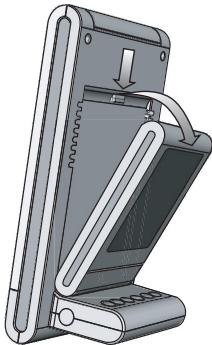
- Insert 2 AAA rechargeable batteries in battery compartment located at the back of the solar panel.
IMPORTANT Place ONLY NiMH type rechargeable batteries in the solar panel battery compartment. Do not charge non-rechargeable batteries.
- Expose the solar panel directly to sunlight for approximately 5-6 hours to charge the battery. The (red) CHARGING LED on solar panel will light up indicating there is sunlight and unit is charging.
TIP Press and hold TEST located at the back of the solar panel. (Green) FULL LED indicates batteries have been fully charged.
- Align holes with protruding plastic. Push solar panel towards main unit and snap into place.
5-6 hours of battery charging will normally provide power to operate unit for 2 months.
When the rechargeable battery is nearly flat or when solar panel has been detached, the (green) LED indicator on the main unit and will flash.
TIPS
- For best results when charging the battery, place the solar panel directly with view to sunlight.
- Direct solar panel as follows:
| Solar panel facing: | if you reside in the: |
| North | Southern Hemisphere |
| South | Northern Hemisphere |
- Do not scratch the solar panel's surface or wipe it with strong detergent.
- Do not expose the solar panel to rain, snow or moisture.
- The duration of the rechargeable battery's charging or operating time is determined by either the intensity of sunlight or the position of the solar panel towards the sun.
Do not overcharge the batteries.
BACKUP POWER
1 piece AAA battery
In the case when the rechargeable battery is flat or nearly flat or when the solar panel has been detached, the AAA battery can act as backup power supply for the main unit.
- Remove the battery compartment located at the base of the unit.
- Insert the battery, matching the polarity.
- Press RESET after each battery change.
Power adaptor (not included)
The adaptor powers the unit and can also be used for charging the rechargeable battery. When connected to the main unit, will be displayed.
NOTE The main unit and adaptor should not be exposed to wet conditions. No objects filled with liquid, such as vases, should be placed on the main unit and adaptor.
REMOTE SENSOR
This product can work with up to 3 sensors at any one time to capture temperature readings in various locations.
To set up the remote sensor:
-
Slide open the battery compartment.
-
Slide channel switch to select a channel (1, 2, 3).
Ensure you use a different channel for each sensor. - Insert the battery, matching the polarities.
- Press RESET after each battery change.
- Close the battery compartment.
- Press and hold SEARCH for 2 seconds to initiate a sensor search.
NOTE Use alkaline batteries for longer usage and consumer grade lithium batteries in temperatures below freezing.
The remote sensor reception icon will show the following status:
| ICONS | MEANING |
| OUT'→OUT' | Main unit is searching for sensor(s) |
| OUT'→OUT'→OUT'→OUT' | A sensor channel has been found |
| OUT' | No sensor found |
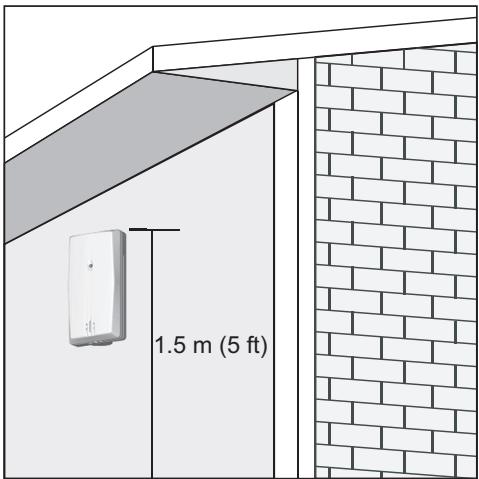
TIP Ideal placements for the sensor would be in any location on the exterior of the home at a height of not more than 1.5m (5 ft) and which can shield it from direct sunlight or wet conditions for an accurate reading.
CLOCK ANDCALENDAR
CLOCK RECEPTION
This product is designed to synchronize its clock automatically with a clock signal.
BAR332ES: EU: DCF-77 signal: within 1500km (932 miles) of Frankfurt, Germany.
BAR332ESU: UK: MSF-60 signal: within 1500 km (932 miles) of Anthorn, England.
BAR332ESA: WWVB-60 signal: within 3200km (2000 miles) of Fort Collins Colorado.
To enable / disable clock signal reception:
Press and hold to enable or to disable clock signal reception.
NOTE Reception takes 2-10 minutes. If the signal is weak, it can take up to 24 hours to get a valid signal. If signal reception is unsuccessful, place your unit next to a window, press and hold to force another signal search.
Clock signal reception indicator:
| STRONG SIGNAL | WEAK / NO SIGNAL |
MANUALLY SET CLOCK
To set the clock manually, disable the clock signal reception first.
- Press and hold .
- Press / to change the settings.
- Press to confirm.
The settings order is: time zone, 12/24 hr format, hour, minute, year, calendar mode (month - day / day - month), month, day and language.
BAR332ES / BAR332ESU: Time zone offset sets the clock +/- 23 hours from the received clock signal time. If you have deactivated the clock signal reception, do not set a value for time zone.
NOTE If you enter +1 in the time offset setting, this will give you your local time plus one hour. If you are in the US (BAR332ESA) set the clock to:
PA for Pacific time
MO for Mountain time
CE for Central time
EA for Eastern time
NOTE The language options are English (E), German (D), French (F), Italian (I), Spanish (S) and Russian (R).
To select clock display:
Press to toggle between clock with seconds, clock with weekday and calendar.
ALARM
To set the alarm:
- Press and hold to enter alarm setting.
- Press / to set hour / minute.
- Press () to confirm.

indicates alarm is ON.
To activate / deactivate alarm:
Press
To silence the alarm:
Press SNOOZE to silence it for 8 minutes
OR
- Press any key to turn the alarm off and activate it again after 24 hours.
To display alarm:
Press (10).
TEMPERATURE
To toggle temperature unit:
Press ^ C / ^ F
To toggle between each outdoor sensor's readings:
Press CH repeatedly
OR
- Press and hold CH for 2 seconds to initiate auto toggle of outdoor channels.
WEATHER FORECAST
This product forecasts the next 12 to 24 hours of weather forecast within a 30 - 50km (19-31 mile) radius.
| Sunny |
| Partially cloudy |
| Cloudy |
| Rainy |
| Snowy |
BACKLIGHT
Press SNOOZE to activate backlight for 3 seconds.
RESET
Press RESET to return to the default settings.
SPECIFICATIONS
MAIN UNIT
| TYPE | DESCRIPTION |
| L x W x H | 158 x 87 x 55mm (6.2 x 3.4 x 2.2 in) |
| Weight | 280 g (9.88 oz) without battery |
| Signal frequency | 433 MHz |
| Power | 2 x UM-4 (AAA) rechargeable batteries;6V AC adaptor (not included)1 x UM-4 (AAA) battery (for backup) |
REMOTE SENSOR (THN132N)
| L x W x H | 96 x 50 x 22mm (3.78 x 1.97 x 0.87 in) |
| Weight | 62 g (2.22 ounces) without battery |
| Transmission range | 30 m (98ft) unobstructed |
| Temperature range | -20°C to 60°C (-4°F to 140°F) |
| Power | 1 x UM-3 (AA) 1.5 V battery |
PRECAUTIONS
- Do not subject the unit to excessive force, shock, dust, temperature or humidity
- Do not cover the ventilation holes with any items such as newspapers, curtains etc.
- Do not immerse the unit in water. If you spill liquid over it, dry it immediately with a soft, lint-free cloth.
- Do not clean the unit with abrasive or corrosive materials.
- Do not tamper with the unit's internal components. This invalidates the warranty.
Only use fresh batteries. Do not mix new and old batteries.
Images shown in this manual may differ from the actual display.
- When disposing of this product, ensure it is collected separately for special treatment.
- Placement of this product on certain types of wood may result in damage to its finish for which Oregon Scientific will not be responsible. Consult the furniture manufacturer's care instructions for information.
- The contents of this manual may not be reproduced without the permission of the manufacturer.
- Do not dispose old batteries as unsorted municipal waste. Collection of such waste separately for special treatment is necessary.
- Please note that some units are equipped with a battery safety strip. Remove the strip from the battery compartment before first use.
NOTE The technical specifications for this product and the contents of the user manual are subject to change without notice.
NOTE Features and accessories will not be available in all countries. For more information, please contact your local retailer.
ABOUT OREGON SCIENTIFIC
Visit our website (www.oregonscientific.com) to learn more about Oregon Scientific products. If you're in the US and would like to contact our Customer Care department directly, please visit:
www2.oregonscientific.com/service/support.asp
For international inquiries, please visit: www2.oregonscientific.com/about/international.asp
EU-DECLARATION OF CONFORMITY
Hereby, Oregon Scientific, declares that this +ECO Solar Weather Clock (model: BAR332ES / BAR332ESU/ BAR332ESA) is in compliance with the essential requirements and other relevant provisions of Directive 1999/5/EC. A copy of the signed and dated Declaration of Conformity is available on request via our Oregon Scientific Customer Service.



COUNTRIES RTTE APPROVED COMPLIED
All EU countries, Switzerland

and Norway
FCC STATEMENT
This device complies with Part 15 of the FCC Rules. Operation is subject to the following two conditions: (1) This device may not cause harmful interference, and (2) This device must accept any interference received, including interference that may cause undesired operation.
WARNING
Changes or modifications not expressly
approved by the party responsible for compliance could void the user's authority to operate the equipment.
NOTE
This equipment has been tested and found to
comply with the limits for a Class B digital device, pursuant to Part 15 of the FCC Rules. These limits are designed to provide reasonable protection against harmful interference in a residential installation.
This equipment generates, uses and can radiate radio frequency energy and, if not installed and used in accordance with the instructions, may cause harmful interference to radio communications. However, there is no guarantee that interference will not occur in a particular installation. If this equipment does cause harmful interference to radio or television reception, which can be determined by turning the equipment off and on, the user is encouraged to try to correct the interference by one or more of the following measures:
Reorient or relocate the receiving antenna.
- Increase the separation between the equipment and receiver.
- Connect the equipment into an outlet on a circuit different from that to which the receiver is connected.
- Consult the dealer or an experienced radio / TV technician for help.
DECLARATION OF CONFORMITY
The following information is not to be used as contact for support or sales. Please visit our website at www2. oregonscientific.com/service for all enquiries.
We
Name: Oregon Scientific, Inc.
Address: 19861 SW 95th Ave., Tualatin, Oregon 97062 USA
Telephone No.: 1-800-853-8883
declare that the product
Product No.: BAR332ES / BAR332ESU / BAR332ESA
Product Name: +ECO Solar Weather Clock
Manufacturer: IDT Technology Limited
Address: Block C, 9/F, Kaiser Estate, Phase 1, 41 Man Yue St., Hung Hom, Kowloon, Hong Kong
is in conformity with Part 15 of the FCC Rules. Operation is subject to the following two conditions: 1) This device may not cause harmful interference. 2) This device must accept any interference received, including interference that may cause undesired operation.