
CM1584ME - Écran d'ordinateur HITACHI - Notice d'utilisation et mode d'emploi gratuit
Retrouvez gratuitement la notice de l'appareil CM1584ME HITACHI au format PDF.


| Type de produit | Écran d'ordinateur à tube cathodique (CRT) |
| Marque | HITACHI |
| Modèle | CM1584ME (15MVX) |
| Taille de l'écran | 15 pouces (14 pouces visibles) diagonale |
| Pas de masque | 0,28 mm |
| Résolution maximale | 1024 x 768 pixels |
| Fréquences de synchronisation | Horizontal : 30-58 kHz, Vertical : 50-100 Hz |
| Bande passante vidéo | 75 MHz |
| Zone d'affichage active | 260 x 195 mm |
| Alimentation | CA 200-240 V, 50 Hz, 100 W |
| Dimensions (avec socle inclinable) | 358 x 378 x 414 mm |
| Poids | 16,5 kg |
| Connectivité | Connecteur VGA 15 broches |
| Compatibilité | IBM PS/2, VGA, XGA, 8514/A, Super VGA, Macintosh II (avec adaptateur) |
| Réglages utilisateur | Contraste, luminosité, taille horizontale/verticale, position horizontale/verticale |
| Fonctions spéciales | Base inclinable et pivotante, dégaussing automatique |
| Entretien et nettoyage | Essuyer avec un chiffon doux et sec. Ne pas utiliser de produits abrasifs ou liquides. |
| Sécurité | Ne pas retirer le capot arrière (haute tension). Éviter l'humidité, la chaleur et les champs magnétiques. |
| Pièces détachées et réparabilité | Réparation uniquement par un technicien qualifié. Pièces disponibles auprès du SAV. |
| Conditions d'utilisation | Température : 5-35°C, Humidité : 30-80% |
FOIRE AUX QUESTIONS - CM1584ME HITACHI
Questions des utilisateurs sur CM1584ME HITACHI
0 question sur cet appareil. Repondez a celles que vous connaissez ou posez la votre.
Poser une nouvelle question sur cet appareil
Téléchargez la notice de votre Écran d'ordinateur au format PDF gratuitement ! Retrouvez votre notice CM1584ME - HITACHI et reprennez votre appareil électronique en main. Sur cette page sont publiés tous les documents nécessaires à l'utilisation de votre appareil CM1584ME de la marque HITACHI.
MODE D'EMPLOI CM1584ME HITACHI
COLOUR MONITOR FARBMONITOR MONITOR EN COLOR MONITOR A COLORI MONITEUR COULEUR
CM1584ME
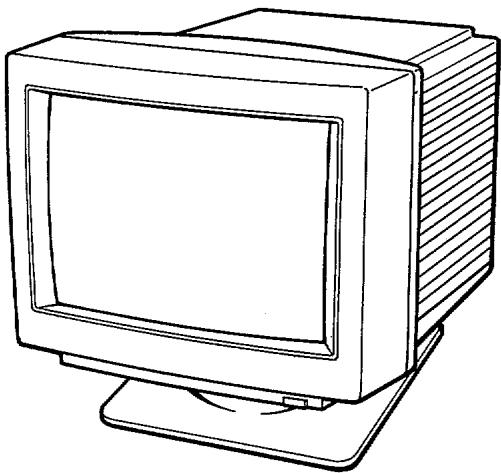
15MVX
USER MANUAL . page 2
BEDIENUNGSANLEITUNG . . . . . . . . . . . . . . . . . . . . . . . . . . . . . . . . . . . . . . . . . . . . . . . . . . . . . . . . . . . . . . .
MANUAL DEL USUARIO . . . . . . . . . . . . . . . . . . . . . . . . . . . . . . . . . . . . . . . . . . . . . . . . . . . . . .
ISTRUZIONI PER L'USO... .pag 22
MANUEL DE L'UTILISATEUR. . page 28
Colour Monitor 15MVX Operating Guide
Features
- The following features are provided with the HITACHI colour Monitor 15MVX.
- Wide compatibility range of graphics standard, VGA, XGA, 8514/A, Super VGA, and Macintoshi II Video Card.
- Sharp focus and remarkable display quality by new design CRT.
- Cubic and Simple design cabinet with Tilt and Swivel base.
- No ventilation holes on top of the cabinet for better safety.
TRADEMARK ACKNOWLEDGMENT
IBM PC, PC/XT, PC/AT. Personal Systems/2, VGA, and 8514/A are registered trademarks of International Business Machines Corporation.
Apple and Macintosh are registered trademarks of the Apple Computer, Inc.. Macintosh II Video Card is a trade mark of Apple Computer, Inc..
2 15MVX User Manual
CAUTION
NEVER REMOVE THE BACK COVER
Removal of the back cover MUST be carried out only by qualified personnel. This display monitor contains high voltage inside.
DO NOT USE IN HOSTILE ENVIRONMENTS
DO NOT expose this display monitor to rain or moisture to prevent electric shock or fire hazard. This unit is designed to be used in office or home.
DO NOT subject the unit to vibrations, dust, or corrosive gases.
KEEP IN A WELL VENTILATED PLACE
DO NOT cover this monitor or place anything against the sides of unit. Ventilation holes are provided on the cabinet to prevent the temperature from rising. Ventilation holes are also provided on the bottom of the cabinet.
AVOID HEAT
Avoid placing the unit in direct sunshine or near a heating appliance.
BE CAREFUL OF MAGNETIC FIELDS
DO NOT place a magnet, loud speaker system, floppy disk drive, or anything which will generate magnetism near the unit. A magnetic field may cause blurred colors or distortion of the displayed pattern.
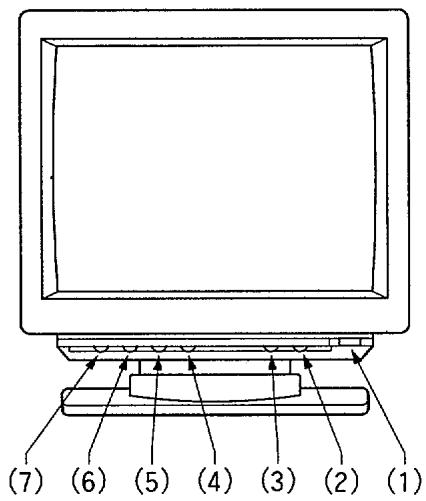
Front View
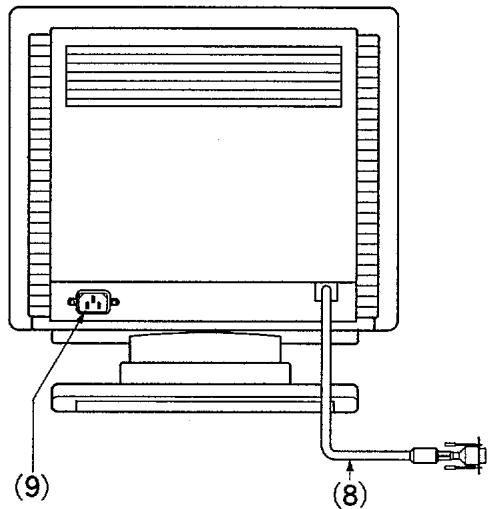
Rear View
(1) Power Switch
Use this switch to power ON or OFF by pressing it.
When the power is ON, green light on the knob turns on to indicate.
(2) Contrast Control [①]
Use this to set the foreground brightness of the screen.
(3) Brightness Control [O]
Use this to set the background to black.
Most of the latest application software utilizes coloured background and this control is usually set at its maximum.
(4) Horizontal Size [ ]
Adjust this control to the preferred horizontal width. If the width is too wide, part of information will be missed from the screen.
(5) Horizontal Position [□]
Adjust this to place the display at the centre of the screen.
(6) Vertical Size
Adjust this control to the preferred height.
(7) Vertical Position
Adjust this to place the display at the centre of the screen.
(8) Signal Cable
Connect the end of the cable to your computer.
(9) Power Cord In-let Connector
Insert proper power cord here.
BEFORE CONNECTING THE MONITOR TO YOUR COMPUTER, MAKE SURE THE POWER TO THE MONITOR AND COMPUTER ARE TURNED OFF.
- Connect the signal cable to your computer's video output connector. The connector is compatible with IBM P.S./2 series computers and VGA standard graphics cards for IBM PC, PC/XT, PC/AT, and compatibles. When you are using the monitor with Apple Macintosh II computer, please obtain an optional converter for connection from your dealer. Hitachi's part number for converter: SC-1
- Connect power cord to the monitor then to wall power outlet. USE PROPER UL/CSA APPROVED POWER CORD...H05VV
- Power on the monitor then power on your computer. When you switch OFF, do the reverse sequence.
- Adjust front located user controls to obtain right picture size, location, and brightness. Display location on the screen and the size may change when you switch one application software to another one.
- Adjust Tilt & Swivel to suit your eye level.
DO NOT use the monitor with a bright background light, direct sunshine, or bright light into the screen area. These may increase eye fatigue.
Earth magnetic field can affect the display screen, therefore, when the monitor is turned on the bases and shows impurity of color, power off the monitor then power on to activate automatic degauss circuit. Do not make this sequence too quick.
COMPATIBILITY
15MVX is compatible with
- IBM P S/2 series computers with MCGA, VGA, XGA and 8514/A graphics standards. Signal cable is configured as IBM 8514 monitor.
- Most of the VGA and Super VGA standard graphics boards available for the PC, PC/AT, PS/2 and EISA bus computers. Please ask your dealer for details.
- Apple Macintosh II computer with Macintosh Video Card. You haveto obtain a 15 pin to 15 pin converter (Hitachi parts: SC-1) from your dealer.
Connector Pin Assignment
Pin#
1 Red Video
2 Green Video
3 Blue Video
4 Ground
5 Ground
6 Red Ground
7 Green Ground
8 Blue Ground
Pin#
9 No Pin
10 Ground
11 Ground
12 No Pin
13 Horizontal Sync
14 Vertical Sync
15 No Connection
SPECIFICATIONS
CRT
15(14V) inches diagonal, 0.28 mm dot pitch, Black matrix, Silica coated, Short Persistence.
Input Signal
Video: 0.7 Vpp
Sync: Separate H,V or Composite H/V TTL level or Sync on Green at 0.3 Vpp.
Synchronization
Horizontal: 30 - 58 kHz
Vertical: 50 - 100Hz
Automatically synchronize.
Resolution
Horizontal: Up to 1024 dots
Vertical: Up to 768 lines
Video Band Width
75 MHz
Active Display Area
Horizontal: 260mm
Vertical: 195 mm
Active display area is changed by the graphics board standard.
Misconvergence
Less than 0.5 mm
Power Supply
AC 200--240V,50Hz
Power Consumption
100 W Approximately
Dimensions
358 (W) x 378 (H) x 414 (D) mm Including Tilt & Swivel base.
Weight
16.5 kg
Environmental
Operation
Storage
Conditions
Temperature: 5^ to 35^
-20°C to 60°C
Humidity: 30% to 80%
10% to 90%
- COLOUR MONITOR FARBMONITOR MONITOR EN COLOR MONITOR A COLORI MONITEUR COULEUR
- 15MVX
- Colour Monitor 15MVX Operating Guide
- Features
- TRADEMARK ACKNOWLEDGMENT
- 15MVX User Manual
- CAUTION
- NEVER REMOVE THE BACK COVER
- DO NOT USE IN HOSTILE ENVIRONMENTS
- KEEP IN A WELL VENTILATED PLACE
- AVOID HEAT
- BE CAREFUL OF MAGNETIC FIELDS
- BEFORE CONNECTING THE MONITOR TO YOUR COMPUTER, MAKE SURE THE POWER TO THE MONITOR AND COMPUTER ARE TURNED OFF.
- COMPATIBILITY
- Connector Pin Assignment
- Pin#
- SPECIFICATIONS
- CRT
- Input Signal
- Synchronization
- Resolution
- Video Band Width
- Active Display Area
- Misconvergence
- Power Supply
- Power Consumption
- Dimensions
- Weight
- Environmental
- Conditions
Marque : HITACHI
Modèle : CM1584ME
Catégorie : Écran d'ordinateur