
X381 - Projector OPTOMA - Free user manual and instructions
Find the device manual for free X381 OPTOMA in PDF.


| Product type | DLP projector |
| Native resolution | XGA (1024 x 768) |
| Brightness | 3800 ANSI lumens |
| Contrast | 20 000:1 |
| Lamp life | Up to 10,000 hours (Eco mode) |
| Display technology | 0.55" DLP |
| Lens | Manual focus, 1.1x zoom |
| Projected image size | 40" - 300" |
| Projection distance | 1.2 - 10 m |
| Connectivity | HDMI, VGA, USB, RS-232, audio 3.5 mm |
| Dimensions (W x D x H) | 316 x 244 x 108 mm |
| Weight | 2.9 kg |
| Power supply | 100-240 V, 50/60 Hz |
| Power consumption | 260 W (normal), < 0.5 W standby |
| Noise level | 29 dB (Eco mode) |
| Keystone correction | Vertical ±40° |
| Security | Kensington lock, password |
| Maintenance and cleaning | Washable air filter, lens cleaning with soft cloth |
| Spare parts and repairability | Replacement lamp (model BL-FU240A), filter |
| General information | User manual available online, 2-year warranty |
Frequently Asked Questions - X381 OPTOMA
User questions about X381 OPTOMA
0 question about this device. Answer the ones you know or ask your own.
Ask a new question about this device
Download the instructions for your Projector in PDF format for free! Find your manual X381 - OPTOMA and take your electronic device back in hand. On this page are published all the documents necessary for the use of your device. X381 by OPTOMA.
USER MANUAL X381 OPTOMA
natural_image
Line drawing of a projector with a circular aperture and control panel (no text or symbols)TABLE DES MATIÈRES
SÉCURITÉ 4
This Class B digital apparatus complies with Canadian ICES-003.
natural_image
Diagram of a cable VGA connector with no text or symbols on the diagram itself
SVGA_XGA_WXGA (Type 1 (3 ES))

SVGA_XGA_WXGA (Type 2 (6 ES))
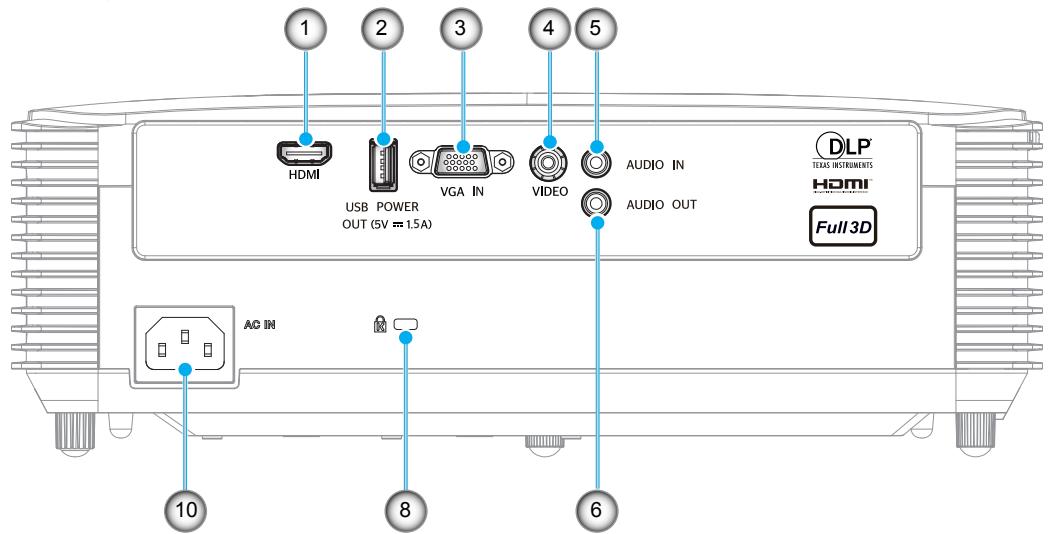
SVGA_XGA_WXGA (Type 3 (8 ES))

INTRODUCTION
natural_image
Line drawing of a person sitting in a chair watching a projector on a desk (no text or symbols)natural_image
Line drawing of a person sitting in a chair watching a projector mounted on a wall, with no text or symbols present.natural_image
Line drawing of a person sitting in a chair watching a projector on a screen (no text or symbols)natural_image
Illustration of a person sitting in a chair watching a projector screen, with no text or symbols present.natural_image
Exterior view of a modern office building (no signage)

SVGA_XGA_WXGA (Type 1 (3 ES))

flowchart
graph TD
    A["DRAM"] -->|4| B["USB POWER OUT (5V 1.5A)"]
    A -->|5| C["VGA IN"]
    A -->|6| D["VIDEO"]
    A -->|10| E["AC BI"]
    A -->|12| F["Laptop"]
    A -->|12| G["Laptop"]
CONFIGURATION ET INSTALLATION
SVGA_XGA_WXGA (Type 2 (6 ES))
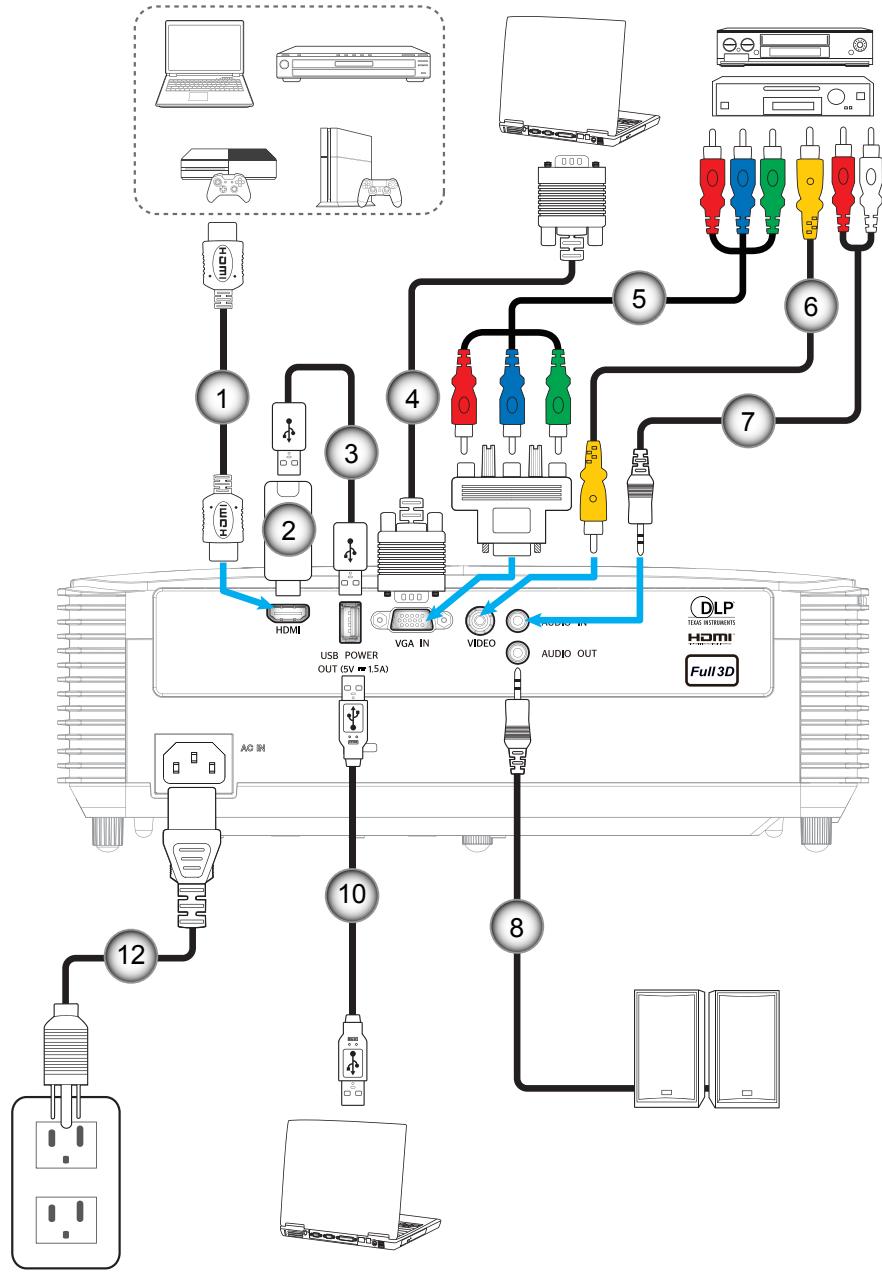
flowchart
graph TD
    A["Home Device"] -->|1| B["USB POWER OUT (5V 15A)"]
    A -->|2| C["HDMI"]
    A -->|3| D["VGA IN"]
    A -->|4| E["VIDEO"]
    A -->|5| F["Audio OUT"]
    A -->|6| G["Full 3D"]
    A -->|7| H["Laptop"]
    A -->|8| I["Laptop"]
    A -->|9| J["Laptop"]
    A -->|10| K["USB Power OUT"]
    A -->|11| L["Video In"]
    A -->|12| M["AC/DC"]
    style A fill:#f9f,stroke:#333
    style B fill:#ccf,stroke:#333
    style C fill:#cfc,stroke:#333
    style D fill:#fcc,stroke:#333
    style E fill:#cff,stroke:#333
    style F fill:#ffc,stroke:#333
    style G fill:#fcc,stroke:#333
    style H fill:#ffc,stroke:#333
    style I fill:#fcc,stroke:#333
    style J fill:#fcc,stroke:#333
    style K fill:#fcc,stroke:#333
    style L fill:#fcc,stroke:#333
    style M fill:#fcc,stroke:#333
    style N fill:#fcc,stroke:#333
CONFIGURATION ET INSTALLATION
SVGA_XGA_WXGA (Type 3 (8 ES))
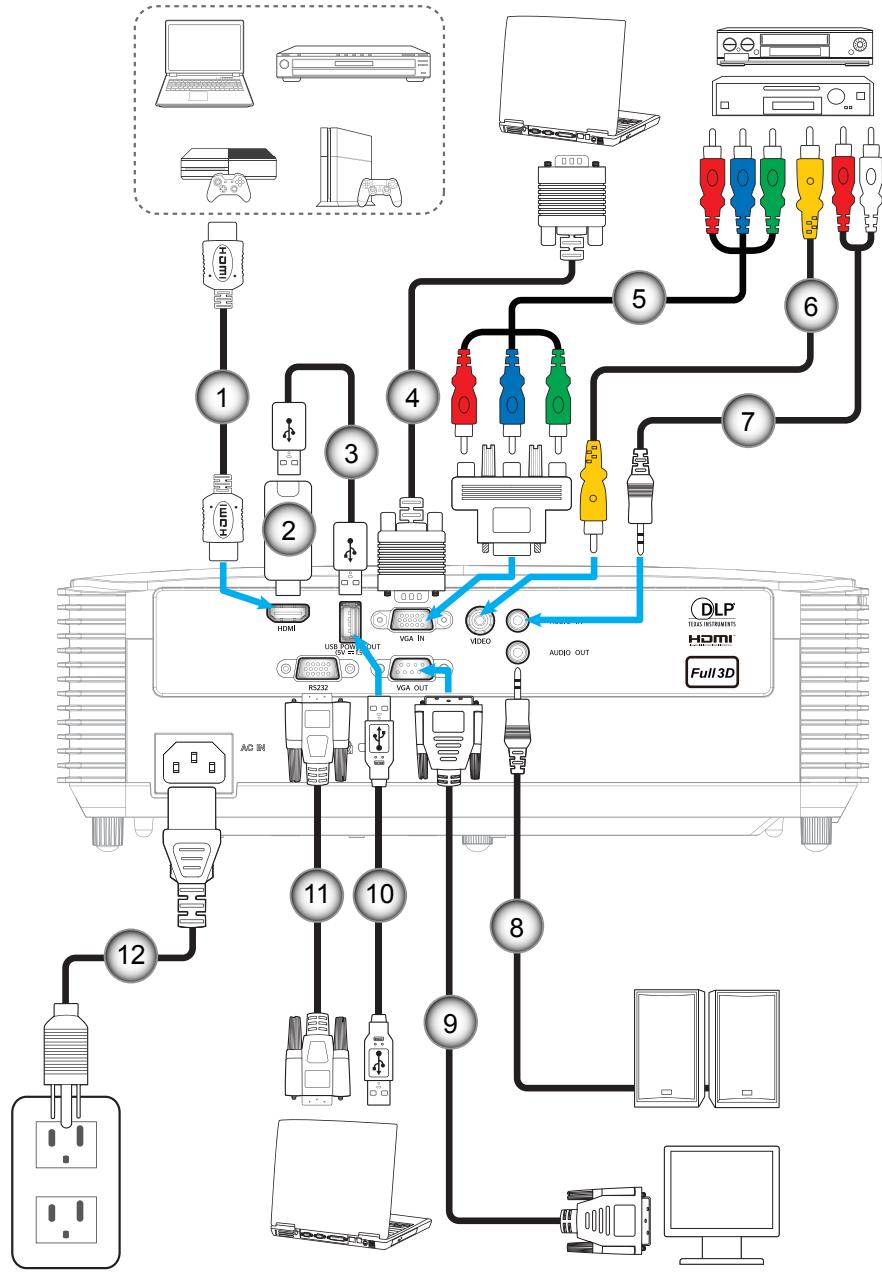
flowchart
graph TD
    A["1"] --> B["2"]
    B --> C["3"]
    C --> D["4"]
    D --> E["5"]
    E --> F["6"]
    F --> G["7"]
    G --> H["8"]
    H --> I["9"]
    I --> J["10"]
    J --> K["11"]
    K --> L["12"]
    L --> M["1"]
    M --> N["2"]
    N --> O["3"]
    O --> P["4"]
    P --> Q["5"]
    Q --> R["6"]
    R --> S["7"]
    S --> T["8"]
    T --> U["9"]
    U --> V["10"]
    V --> W["11"]
    W --> X["12"]
    X --> Y["1"]
CONFIGURATION ET INSTALLATION
natural_image
Illustration of hands using a tool to adjust or install a component, with red arrows indicating direction (no text or symbols present)

Marche
natural_image
Illustration of a projector with internal cooling fins and a blue arrow indicating the component (no text or symbols present)INFORMATIONS SUPPLÉMENTAIRES
info@os-worldwide.com
www.os-worldwide.com
Canada
3178 Laurelview Ct.
Fremont, CA 94538, USA
www.optomausa.com
888-289-6786
510-897-8601
services@optoma.com
Taiwan
12F., No.213, Sec. 3, Beixin Rd., Xindian Dist., New Taipei City 231, Taiwan, R.O.C.
www.optoma.com.tw
+886-2-8911-8600
+886-2-8911-6550
services@optoma.com.tw
asia.optoma.com
Amérique Latine
3178 Laurelview Ct.
Fremont, CA 94538, USA
www.optomausa.com
888-289-6786
510-897-8601
services@optoma.com
Hong Kong
Unit A, 27/F Dragon Centre, 79 Wing Hong Street,
Cheung Sha Wan,
Kowloon, Hong Kong
+852-2396-8968
+852-2370-1222
www.optoma.com.hk
Europe
Unit 1, Network 41, Bourne End Mills
Hemel Hempstead, Herts,
HP1 2UJ, United Kingdom
www.optoma.eu
service@tsc-europe.com
Chine
5F, No. 1205, Kaixuan Rd., Changning District
Shanghai, 200052, China
+86-21-62947376
+86-21-62947375
www.optoma.com.cn
Benelux BV
Randstad 22-123
1316 BW Almere
The Netherlands
www.optoma.nl
+31 (0) 36 820 0252
+31 (0) 36 548 9052
France
Bâtiment E
81-83 avenue Edouard Vaillant
92100 Boulogne Billancourt, France
+33 1 41 46 12 20
+33 1 41 46 94 35
savoptoma@optoma.fr
Espagne
C/ José Hierro,36 Of. 1C
28522 Rivas VaciaMadrid,
Spain
+34 91 499 06 06
+34 91 670 08 32
Allemagne
Wiesenstrasse 21 W
D40549 Düsseldorf,
Germany
+49 (0) 211 506 6670
+49 (0) 211 506 66799
info@optoma.de
Scandinavie
Lerpeveien 25
3040 Drammen
Norway
+47 32 98 89 90
+47 32 98 89 99
info@optoma.no
PO.BOX 9515
3038 Drammen
Norway
Corée
WOOMI TECH.CO.,LTD.
4F, Minu Bldg.33-14, Kangnam-Ku,
Seoul,135-815, KOREA
korea.optoma.com
+82+2+34430004
+82+2+34430005
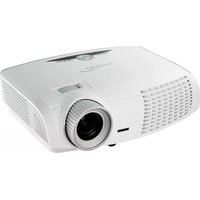


Brand : OPTOMA
Model : X381
Category : Projector