
OAC 701 - Air Conditioning OK - Free user manual and instructions
Find the device manual for free OAC 701 OK in PDF.


| Brand | OK |
| Model | OAC 701 |
| Product type | Monoblock mobile air conditioner |
| Dimensions (W x D x H) | 45 x 35 x 75 cm |
| Net weight | 25 kg |
| Power supply | 220-240 V ~ 50 Hz |
| Cooling power | 9000 BTU/h (2.6 kW) |
| Energy class | A |
| Main functions | Cooling, dehumidification, ventilation |
| Noise level | 65 dB(A) |
| Drain tank capacity | 1.5 L (continuous drainage possible) |
| Exhaust hose dimensions | 15 cm diameter, 1.5 m length |
| Filter type | Washable air filter |
| Maintenance and cleaning | Clean the air filter every 2 weeks and before each use season |
| Safety | Overheating protection, automatic shutdown in case of malfunction |
| Spare parts | Air filter, remote control, exhaust hose, window adapter |
| Repairability | Repairability score: 6.5/10 (parts available) |
| Included accessories | Remote control, window installation kit, exhaust hose |
| Warranty | 2 years |
Frequently Asked Questions - OAC 701 OK
User questions about OAC 701 OK
0 question about this device. Answer the ones you know or ask your own.
Ask a new question about this device
Download the instructions for your Air Conditioning in PDF format for free! Find your manual OAC 701 - OK and take your electronic device back in hand. On this page are published all the documents necessary for the use of your device. OAC 701 by OK.
USER MANUAL OAC 701 OK
natural_image
Exterior view of a modern electric air purifier with ventilation grilles and wheels (no visible text or symbols)
Deutsch 4 - 13
Ελληνικά 14 - 23
English 24 - 33
Español 34 - 43
Français 44 - 53
Magyar 54 - 63
Italiano 64 - 73
Nederlands 74 - 83
Polski 84 - 93
Português 94 - 103
Svenska 104 - 113
Türkçe 114 - 123


Fernbedienung
natural_image
3D rendering of a metallic cylindrical device with a dashed line indicating an upward trend, no visible text or symbols.123
natural_image
Close-up of a mechanical knob with an arrow and lock icon (no text or symbols)natural_image
Close-up of a hand pouring liquid into a container with an arrow indicating direction (no text or symbols)456
natural_image
Mechanical device with a downward arrow and a small circular component, no visible text or symbolsnatural_image
Close-up of a metallic object with a pointed tip and arrow indicator (no text or symbols)8
Batterien einlegen:
natural_image
Close-up of a mechanical component with a lock icon and curved arrow indicating rotation or cycle (no text or symbols)natural_image
Hand holding a fan blade with an upward arrow, no text or symbols visible12 13
natural_image
Close-up of a control panel with an arrow pointing to the left side (no text or symbols visible)natural_image
Close-up of a hand pressing down on a grid-patterned electronic device with a black arrow pointing to the button (no visible text or symbols)15 16 17
natural_image
Two meshed solar panels with grid patterns, no visible text or symbolsnatural_image
Close-up of a hand inserting a small black arrow into a grid-patterned air conditioner cover (no text or symbols visible)natural_image
Close-up of a metallic cable with a black cap and white tip, no visible text or symbols18 19 20
natural_image
Close-up of a metallic screw with a pointed tip and a circular hole, showing a directional arrow (no text or symbols)natural_image
Glass of water with a dark circular object submerged in it (no text or symbols visible)21 22
Schlauchfilter-Sieb:
natural_image
Close-up of a hand holding a small object inside a container (no visible text or symbols)
Τηλεχειριστήριο
natural_image
3D rendering of a metallic cylindrical device with a dashed line indicating a measurement or alignment, and an upward arrow symbolizing motion (no text or labels present)123
natural_image
Close-up of a mechanical knob with an arrow and lock icon, no text or symbols presentnatural_image
Close-up of a hand pouring liquid into a container with an arrow indicating direction (no text or symbols)456
natural_image
Mechanical device with a downward arrow and a small circular component, no visible text or symbolsΛειτουργία ψύξης:
natural_image
Close-up of a metallic object with a pointed tip and arrow indicator (no text or symbols)7
8
natural_image
Close-up of a mechanical knob with a lock icon and curved arrow indicating rotation (no text or symbols)natural_image
Hand holding a stack of papers with an upward arrow, symbolizing growth or progress (no text or symbols present)12 13
natural_image
Close-up of a control panel with an arrow pointing to the left side (no text or symbols visible)natural_image
Close-up of a hand pressing down on a grid-patterned device component with an arrow pointing to the top section (no visible text or symbols)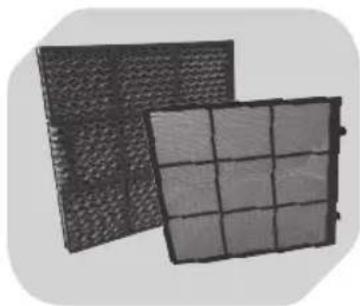
natural_image
Two meshed fabric panels with grid patterns, no visible text or symbols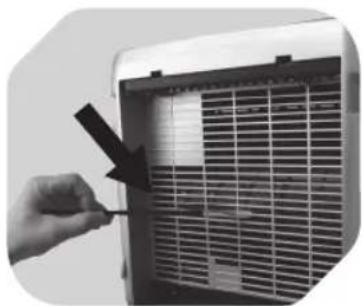
natural_image
Close-up of a hand holding a small black object next to a white air vent grille (no text or symbols visible)15 16 17
ΚΑΘΑΡΙΣΜΟΣ ΑΛΛώΝ ΜΕΡώΝ

natural_image
Close-up of a metallic cable with a black cap and white insulation (no text or symbols visible)18 19 20
natural_image
Close-up of a metallic screw with a threaded shaft and a circular hole, showing an arrow pointing to it (no text or symbols)natural_image
Glass of water with a dark circular object submerged in it, no visible text or symbols21 22
natural_image
Close-up of a hand holding a small object inside a container (no visible text or symbols)Δεξαμενή νερού:
IMPORTANT SAFETY INSTRUCTIONS. READ CAREFULLY AND KEEP FOR FUTURE REFERENCE.
- Danger of electric shock! Do not attempt to repair the appliance yourself. In case of malfunction, repairs are to be conducted by qualified personnel only.
- Warning! Risk of injury! During operation, keep hands, hair, clothing and utensils away from the air vents to avoid injuries and damage of the appliance.
- Before connecting the appliance to the power supply, check that the power supply voltage and current rating corresponds with the power supply details shown on the appliance rating label.
- Warning! During cleaning or operation do not immerse the electrical parts of the appliance in water or other liquids. Never hold the appliance under running water.
- This appliance can be used by children aged from 8 years and above and persons with reduced physical, sensory or mental capabilities or lack of experience and knowledge if they have been given supervision or instruction concerning use of the appliance in a safe way and understand the hazards involved.
- Children shall not play with the appliance. Cleaning and user maintenance shall not be made by children without supervision.
-
Never use a damaged appliance! Disconnect the appliance from the electrical outlet and contact your supplier if it is damaged.
-
Observe all safety instructions to avoid damage through improper use! Pay attention to all warning notices on the appliance.
- No liability will be accepted for damage resulting from improper use or non-compliance with these instructions.
- Only use this appliance for its intended use. The appliance is not suitable for commercial use. This appliance is only suitable for household use. Do not use the appliance outdoors or in the bathroom. For dry indoor use.
- To avoid damaging the cord, do not squeeze, bend or chafe it on sharp edges. Keep it away from hot surfaces and open flames as well. Lay out the cord in such a way that no unintentional pulling or tripping over it is possible.
- If an extension cord is used, its capacity needs to be suitable for the power consumed by the appliance.
- Do not open the appliance casing under any circumstances. Do not insert any foreign objects into the inside of the casing.
- Never cover the product.
- Never use accessories which are not recommended by the manufacturer. They could pose a safety risk to the user and might damage the appliance. Only use original parts and accessories.
- Do not operate the appliance with wet hands or while standing on a wet floor. Do not touch the power plug with wet hands.
- Keep the appliance away from any hot surfaces and open flames. Always operate the appliance on a level, stable, clean and dry surface. Protect the appliance against heat, dust, direct sunlight, moisture, dripping and splashing water.
- Do not place heavy objects on top of the appliance. Do not place objects with open flames, e.g. candles, on top of or beside the appliance. Do not place objects filled with water, e.g. vases, on or near the appliance.
- Do not use the appliance near explosive or flammable vapours.
- Children should be supervised to ensure that they do not play with the appliance.
- Never leave the appliance unattended during use.
- Regularly check the power plug and power cord for damage. If the supply cord is damaged, it must be replaced by the manufacturer, its service agent or similarly qualified persons in order to avoid a hazard.
- Do not pull the power plug out of the electrical outlet by the power cord, only by the power plug and do not wrap the power cord around the appliance.
- Connect the power plug to an easily reachable electrical outlet so that in case of an emergency the appliance can be unplugged immediately. Pull the power plug out of the electrical outlet to completely switch off the appliance. Use the power plug as the disconnection device.
- Disconnect the power plug from the electrical outlet when not in use and before cleaning.
- Always turn the appliance off before disconnecting the power plug.
- Switch the appliance off before moving.
CONgrAtuLAtiONs
Thanks for your purchase of this ok. product. Please read this manual carefully and keep it for future reference.
iNteNded use
This product is intended for air cooling in indoor spaces only. Do not use it for other purposes. Any other type of use can lead to personal injury or damage to the product.
COMPONeNts
The product may be available in different colours.

- User panel
- On/off switch
- Handle
- Power cord with plug
- Water level indicator
-
Castor wheels (x4)
-
Water tank
- Air vents
- Air inlet filter and filter cover
- Locking lever
- Water outlet
- Remote control
COMPONENTS


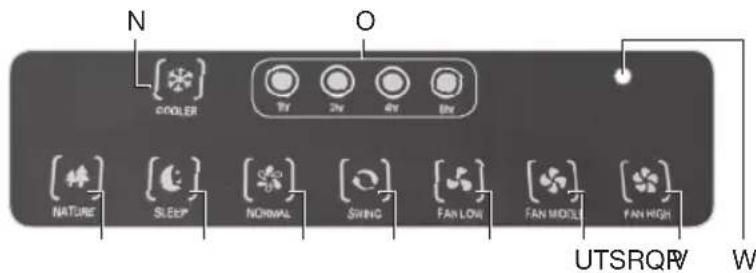
Remote control
| Key Function | |
| ON (A) | Turn on fan |
| OFF (B) | Standby mode |
| (C) | Turn on/off oscillation |
| (D) | Select fan mode NATURE, SLEEP, NORMAL |
| Key Function | |
| (E) | Select fan speed LOW, MIDDLE, HIGH |
| (F) | Turn on/off cooling function |
| (G) | Select duty cycle 1/2/4/8 hr |
Control keys
| Key Function | |
| ON/OFF (H) | Turn on fan/Standby mode |
| SPEED (I) | Select fan speed LOW, MIDDLE, HIGH |
| TIMER (J) | Select duty cycle 1/2/4/8 hr |
| Key Function | |
| COOLER (K) | Turn on/off cooling function |
| MODE (L) | Select fan mode NATURE, SLEEP, NORMAL |
| SWING (M) | Turn on/off oscillation |
Display elements
| Display | Function |
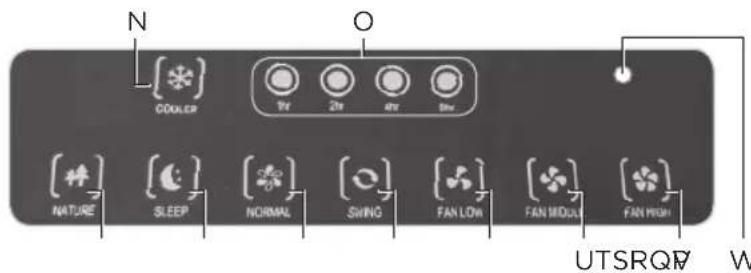
| COOLER (N) | Cooling function on |
| 1/2/4/8 hr (O) | Shows the duty cycle. If none of the 4 LEDs is lit, the product is in continuous operating mode |
| NATURE (P) | Fan modes (→ page 31) |
| SLEEP (Q) | |
| NORMAL (R) |
| Display | Function |
| SWING (S) | Oscillation function on |
| FAN LOW (T) | Fan speeds |
| FAN (U)MIDDLE | |
| FAN HIGH (V) | |
| Power indicator(W) | Lights up red during operation and standby mode |
BEFORE FIRST USE
Unpacking and assembling
- Remove all packaging materials.
- Check for completeness and transport damage. In case of damages or incomplete delivery please contact your dealer.

natural_image
3D rendering of a mechanical device with a dashed line indicating a dimension or alignment, and an upward arrow symbolizing motion (no text or labels present)123
Pull up the cooling unit from the water tank. Remove the remote control and the 4 wheels from the water tank.

natural_image
Close-up of a mechanical knob with an arrow and lock icon, no text or symbols presentTurn the water outlet cap all the way clockwise to close it.

Fasten all 4 wheels to the water tank. The wheels must click into place.

natural_image
Close-up of a hand pouring liquid into a container with an arrow indicating direction (no text or symbols)456
Fill the water tank with cold, clear water without any additives.

The water level must be above the MIN and below the MAX marking.

natural_image
Mechanical device with a downward arrow and a small circular component, no visible text or symbolsCooling function: Fit the cooling unit onto the water tank. The hose must hang into the water tank.
BEFORE FIRST USE

natural_image
Abstract grayscale image with a black arrow pointing to a sharp triangular shape, no text or symbols present.7
Make sure that the 2 locking levers on the back of the cooling unit are fit correctly to the edge of the water tank.

8
Inserting batteries:
Remove the battery compartment lid. Insert 2 AAA batteries (not included), heeding correct polarity (+/-). Close the battery compartment.
NOTE
Replace the batteries when the range decreases noticeably or when the product no longer responds to commands from the remote control.
9 10 11
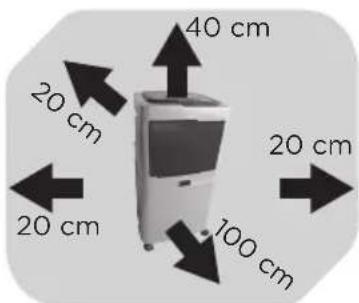
Make sure there is sufficient clearance around the product.
natural_image
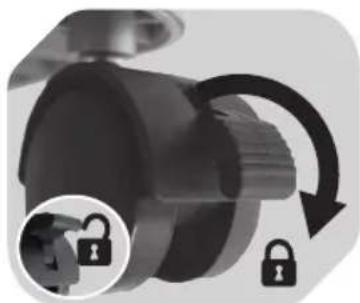
Close-up of a mechanical knob with a lock icon and curved arrow indicating rotation (no text or symbols)Secure the position by locking the wheels (push lever down).
Make sure the floor is level.
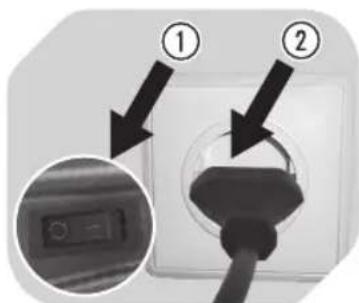
Set the power switch to position O (off). Connect the power plug to a suitable power outlet.
OPERATION

natural_image
Close-up of a hand holding a stack of folded paper sheets with an upward arrow (no text or symbols visible)12 13
Set the desired fan angle by carefully lifting one of the fins with your fingers.
Caution: The product can be only turned on after the air vents are opened.
natural_image
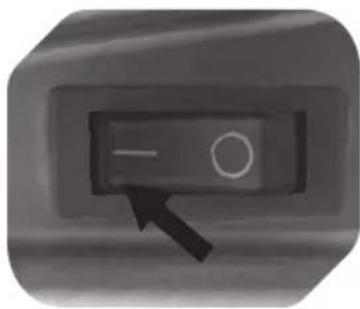
Close-up of a control panel with an arrow pointing to the left side (no text or symbols visible)Turning product on:
Flip the power switch to position I. The product is now in standby mode.
Please refer to the panel description page for operation (→page 27).
NOTE
Turn the product off completely if you will not use the product for an extended period of time:
- Flip the power switch to position 0.
- Close the air vents by folding them down.
- Disconnect the power plug from the power outlet.
COOLING FUNCTION

14
- When the cooling function is activated, the product sucks in air from the surroundings through the air vents on the back and mixes the air with water from the tank. A very fine vapour then issues from the front air vents. The vapour condenses immediately and cools down the air in the room.
- Fan function: You can use the product as a fan if the cooling function is deactivated. There is no need to fill the tank with water in this case.
Important notes on cooling function
- Caution! Never activate the cooling function if the water tank is empty or filled below the MIN marking.
- The water pump will become increasingly loud if the cooling function is activated with too little water in the water tank. Deactivate the cooling function if this happens.
- Before filling the water tank: Set the power switch to position O (off). Disconnect the power plug from the power outlet.
OPERATION
FAN MODES
- Toggle through 3 fan modes with the MODE or ≡ key (remote control):
| Mode Description |
| NORMAL Constant fan speed, as per SPEED setting. |
| NATURE Fan speed varies to simulate a natural breeze. The change of breeze depends on the SPEED setting. |
| SLEEP Light night-time breeze. Press this button again to switch back to NORMAL mode. |
CLEANING AND CARE
GENERAL
• Caution! Never operate the product if the filter is missing or clogged.
- Make sure that no water comes into contact with the operating controls or enters the cooling unit interior.
- Do not use any chemical, aggressive or abrasive cleaning agents.
- Before cleaning: Turn the product off, unplug it and remove the cooling unit from the water tank.
- Depending on the environment and on the frequency the product is used, we recommend to clean the product at least once a month. Should you activate the cooling function for an extended period a few times a week, it may be necessary to clean the product more often than once a month.
• Exercise caution to minimize health risks.
• Exercise caution to prevent damage to the filter.
• Empty the tank or replace the water every 2 days.
CLEANING THE AIR INLET FILTER

natural_image
Close-up of a hand holding a grid-mounted device with a black arrow pointing to its top panel (no visible text or symbols)15 16 17
Push both tabs on the filter cover down. Remove the filter cover and the filter (including its frame).

natural_image
Two mesh filter panels with grid patterns, one tilted and one tilted (no text or symbols visible)Submerge the filter and the cover in warm soapy water. Use a soft brush to remove any residue. Rinse the filter and cover thoroughly with clear water.

natural_image
Close-up of a hand inserting a small black arrow into a white air conditioner unit (no text or symbols visible)Use a soft brush to clean the entire air inlet and all openings on the back of the cooling unit. Allow all components to dry completely and then reassemble them in reverse order.
CLEANING AND CARE
CLEANING OTHER PARTS
natural_image
Close-up of a black cable with a white tip, showing internal structure (no text or symbols)18 19 20
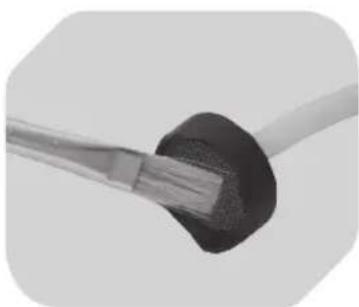
Hose filter: Wet a small soft brush in soapy water and use it to carefully clean the small filter at the end of the hose. Rinse the filter with clear water and allow it to dry completely.
natural_image
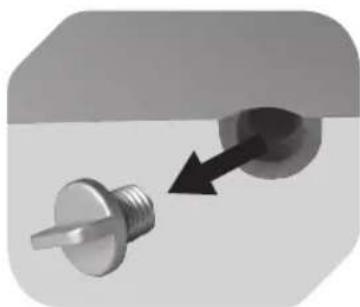
Close-up of a metallic screw with a pointed tip and arrow indicating direction (no text or symbols)Water tank: Hold the tank over a sink. Turn off the cap from the water outlet. Allow the water to drain completely. Wet a soft sponge in soapy water and clean the entire interior of the water tank. Rinse the water tank with clear water and allow it to dry completely. Close the water outlet using the cap.

Housing: Use a soft brush to remove dust from the air vent fins. Then clean all the fins with a damp cloth. Close the air vents by pushing the fins down.
Wipe down the housing exterior using a soft, slightly damp cloth and allow it to dry completely.
DECALCIFICATION
Limescale deposits are best removed with a commercially available decalcification agent.
Follow the manufacturers directions when decalcifying (use, duration, dilution).

natural_image
Glass of water with a dark circular object inside, no visible text or symbols21 22
Hose filter: Pull off the filter from the hose. Let soak. Afterwards rinse under running water and push back onto the hose.

natural_image
Close-up of a hand holding a small object inside a container (no visible text or symbols)Water tank: Fill mixture in the tank. Then, drain tank and wipe clean tank with a wet cloth.
TROUBLESHOOTING
| Problem Cause | Solution | |
| The product does not turn on. | Plug is not connected. Connect plug to | power outlet. |
| Power switch at position O. Power switch to position I (located on the side of the product). | ||
| Air vents are closed. Open air vents. | ||
| Unusual noises during operation. | Air inlet filter and/or hose filter are clogged. | Clean filter(s). |
| Cooling function is active and tank is empty. | Fill water tank. | |
TECHNICAL DATA
Operating voltage: 220 - 240 V\~, 50 Hz
Power input: 80 W
Protection class: II
Water tank capacity: 20 litres
Weight: 6.6 kg (without water)
| Description Symbol Value Unit | |||
| Maximum fan flow rate | F | 5.04 m | ^3/min |
| Fan power input | P | 61.97 W | |
| Service value | SV | 0.08 (m | ^3/min)/W |
| Standby power consumption | P_SB | 0.43 W | |
| Seasonal electricity consumption | Q | 20.31 kWh/a | |
| Fan sound power level | L_WA | 59.43 dB(A) | |
| Maximum air velocity | c | 1.40 metres/sec | |
| Measurement standard for service value | Commission regulation (EU) No 206/2012ISO 5801:2007EN 50564:2011EN 60704-2-7:1998EN 60704-1:2010 | ||


Control remoto
natural_image
3D rendering of a metallic cylindrical device with a dashed line indicating an upward trend, no visible text or symbols.123
natural_image
Close-up of a mechanical knob with an arrow and lock icon (no text or symbols)natural_image
Close-up of a hand pouring liquid into a container with an arrow indicating direction (no text or symbols)456
natural_image
Mechanical device with a downward arrow and a small circular component, no visible text or symbolsnatural_image
Close-up of a metallic object with a black arrow pointing to a small feature, no visible text or symbols.7
8
natural_image
Close-up of a mechanical knob with a lock icon and curved arrow indicating rotation (no text or symbols)natural_image
Close-up of a hand holding a fan blade with an upward arrow, no text or symbols visible12 13
natural_image
Close-up of a control panel with a black arrow pointing to the left side (no text or symbols visible)natural_image
Close-up of a hand pressing down on a grid device with a black arrow pointing to the top section (no visible text or symbols)15 16 17
natural_image
Two mesh filter panels with grid patterns, no text or symbols visiblenatural_image
Close-up of a hand inserting a black arrow into a white air conditioner cover (no text or symbols visible)natural_image
Close-up of a black cable with exposed wire, showing sheath and sheath tip (no text or symbols visible)18 19 20
natural_image
Close-up of a metallic screw with a pointed tip and arrow indicating direction (no text or symbols)natural_image
Hand cleaning a washing machine with a cloth (no visible text or symbols)natural_image
Glass of water with a dark circular object inside, no visible text or symbols21 22
Filtro de la manguera:
natural_image
Close-up of a hand holding a small circular object inside a container (no visible text or symbols)

Télécommande
natural_image
3D rendering of a metallic cylindrical device with a dashed line indicating an upward trend, no visible text or symbols.123
natural_image
Close-up of a mechanical knob with an arrow and lock icon, no text or symbols presentnatural_image
Close-up of a hand pouring liquid into a container with an arrow indicating direction (no text or symbols)456
natural_image
Mechanical device with a downward arrow and a small circular component, no visible text or symbolsnatural_image
Close-up of a metallic object with a pointed tip and arrow indicator (no text or symbols)7
8
natural_image
Close-up of a mechanical component with a lock icon and curved arrow indicating rotation or cycle (no text or symbols)natural_image
Hand holding a fan blade with an upward arrow, no text or symbols visible12 13
natural_image
Close-up of a control panel with an arrow pointing to the left side (no text or symbols visible)natural_image
Close-up of a hand pressing down on a battery cover with a black arrow pointing to the component (no visible text or symbols)15 16 17
natural_image
Two meshed solar panels with grid patterns, no visible text or symbolsnatural_image
Close-up of a hand using a tool to adjust or install a ventilation grille (no text or symbols visible)natural_image
Close-up of a metallic cable with a black cap and white tip, no visible text or symbols18 19 20
natural_image
Close-up of a metallic screw with a pointed tip, showing a directional arrow (no text or symbols)natural_image
Glass of water with a dark circular object submerged in it (no text or symbols visible)21 22
natural_image
Close-up of a hand holding a small object inside a container (no visible text or symbols)

Távirányító
natural_image
3D rendering of a metallic industrial container with an upward arrow indicating motion or force (no text or symbols)123
natural_image
Close-up of a mechanical knob with an arrow and lock icon, no text or symbols presentnatural_image
Close-up of a hand pouring liquid into a container with an arrow indicating direction (no text or symbols)456
natural_image
Mechanical device with a downward arrow and a small circular component, no visible text or symbolsnatural_image
Close-up of a metallic object with a pointed tip and arrow indicator (no text or symbols)7
8
natural_image
Close-up of a mechanical component with a curved arrow indicating rotation or cycle, and an inset showing a lock mechanism (no text or symbols)natural_image
Close-up of a hand holding a fan blade with an upward arrow, no text or symbols visible12 13
natural_image
Close-up of a control panel with a black arrow pointing to the left side (no text or symbols visible)natural_image
Close-up of a hand pressing down on a black plastic panel with a black arrow pointing to the component (no visible text or symbols)15 16 17
natural_image
Two meshed air filters with grid patterns, no text or symbols visiblenatural_image
Close-up of a hand inserting a small black arrow into a grid-like air vent (no text or symbols visible)natural_image
Close-up of a black cable with a white plastic tip, showing internal structure (no text or symbols)18 19 20
natural_image
Close-up of a metallic screw with a threaded shaft and a circular head, showing a black arrow pointing to its end (no text or symbols)natural_image
Hand cleaning a washing machine with a cloth (no visible text or symbols)natural_image
Glass of water with a dark circular object inside, no visible text or symbols21 22
natural_image
Close-up of a hand holding a small object inside a rectangular container (no visible text or symbols)
Telecomando
natural_image
3D rendering of a mechanical component with an upward arrow indicating motion or force (no text or symbols)123
natural_image
Close-up of a mechanical knob with an arrow and lock icon, no text or symbols presentnatural_image
Close-up of a hand pouring liquid into a container with an arrow indicating direction (no text or symbols)456
natural_image
Mechanical device with a downward arrow and a small circular component, no visible text or symbolsnatural_image
Close-up of a metallic object with a pointed tip and arrow indicator (no text or symbols)7
8
natural_image
Close-up of a mechanical component with a lock icon and curved arrow indicating rotation or motion (no text or symbols)natural_image
Close-up of a hand holding a fan blade with an upward arrow, no text or symbols visible12 13
natural_image
Close-up of a control panel with an arrow pointing to the left side (no text or symbols visible)natural_image
Close-up of a hand pressing down on a grid-patterned device component with an arrow pointing to it (no visible text or symbols)15 16 17
natural_image
Two mesh filter panels with grid patterns, one black and one gray, shown against a plain background (no text or symbols)natural_image
Close-up of a hand inserting a small black arrow into a white air conditioner cover (no text or symbols visible)natural_image
Close-up of a metallic cable with a black cap and white tip, no visible text or symbols18 19 20
natural_image
Close-up of a metallic screw with a pointed tip, showing a directional arrow (no text or symbols)natural_image
Glass of water with a dark circular object submerged in it (no text or symbols visible)21 22
natural_image
Close-up of a hand holding a small object inside a container (no visible text or symbols)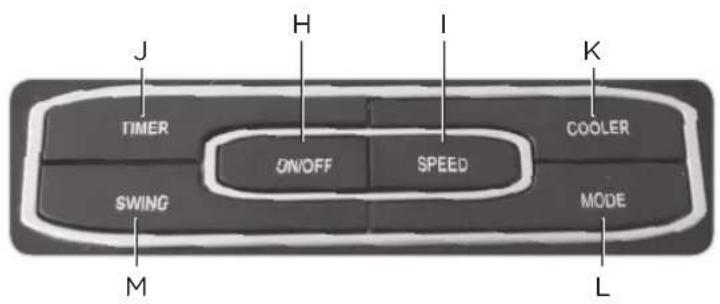

Afstandsbediening
natural_image
3D rendering of a mechanical component with an upward arrow indicating motion or force (no text or symbols)123
natural_image
Close-up of a mechanical knob with an arrow and lock icon, no text or symbols presentnatural_image
Close-up of a hand pouring liquid into a container with an arrow indicating direction (no text or symbols)456
natural_image
Mechanical device with a downward arrow and a small circular component, no visible text or symbolsnatural_image
Abstract grayscale image with a black arrow pointing to a sharp, irregular shape (no text or symbols)7
Zorg dat de
8
De batterijen
natural_image
Close-up of a mechanical knob with a lock icon and curved arrow indicating rotation (no text or symbols)natural_image
Close-up of a hand holding a fan blade with an upward arrow, no text or symbols visible12 13
natural_image
Close-up of a control panel with a black arrow pointing to the left side (no text or symbols visible)natural_image
Close-up of a hand pressing down on a black plastic panel with a black arrow pointing to the component (no visible text or symbols)15 16 17
natural_image
Two meshed solar panels with grid patterns, no visible text or symbolsnatural_image
Close-up of a hand inserting a small black arrow into a white air vent (no text or symbols visible)natural_image
Close-up of a black cable with a white connector, showing internal structure (no text or symbols)18 19 20
natural_image
Close-up of a metallic screw with a pointed tip, showing a directional arrow pointing to a circular component (no text or symbols)natural_image
Hand cleaning a device with a cloth (no visible text or symbols)natural_image
Glass of water with a circular object submerged in it, no visible text or symbols21 22
natural_image
Close-up of a hand cleaning a tiled surface with a circular object (no text or symbols visible)

natural_image
3D rendering of a metallic cylindrical device with a dashed line indicating an upward trend, no visible text or symbols.123
natural_image
Close-up of a mechanical knob with an arrow and lock icon, no text or symbols presentnatural_image
Close-up of a hand pouring liquid into a container with an arrow indicating direction (no text or symbols)456
natural_image
Mechanical device with a downward arrow and a small circular component, no visible text or symbolsFunkcja chłodzenia:
natural_image
Abstract grayscale image with a black arrow pointing to a sharp triangular shape, no text or symbols present.7
8
natural_image
Close-up of a mechanical knob with a lock icon and curved arrow indicating rotation (no text or symbols)natural_image
Close-up of a hand holding a stack of papers with an upward arrow, symbolizing growth or direction (no text or symbols present)12 13
natural_image
Close-up of a control panel with an arrow pointing to the left side (no text or symbols visible)Włączanie produktu:
natural_image
Close-up of a hand holding a battery cover with a black arrow pointing to its top panel (no visible text or symbols)15 16 17
natural_image
Two mesh filter panels with grid patterns, one black and one gray, shown against a plain background (no text or symbols)natural_image
Close-up of a hand holding a small black object next to a grid-patterned air conditioner unit (no visible text or symbols)natural_image
Close-up of a black cable with exposed wire, no text or symbols visible18 19 20
natural_image
Close-up of a metallic screw with a pointed tip and arrow indicating direction (no text or symbols)natural_image
Glass of water with a dark circular object inside, no visible text or symbols21 22
natural_image
Close-up of a hand holding a small object inside a container (no visible text or symbols)Zbiornik na wodę:

Controlo remoto
natural_image
3D rendering of a mechanical component with an upward arrow indicating motion or force (no text or symbols)123
natural_image
Close-up of a mechanical knob with an arrow and lock icon, no text or symbols presentnatural_image
Close-up of a hand pouring liquid into a container with an arrow indicating direction (no text or symbols)456
natural_image
Mechanical device with a downward arrow and a small circular component, no visible text or symbolsnatural_image
Abstract grayscale image with a black arrow pointing to a sharp triangular shape, no text or symbols present.7
8
natural_image
Close-up of a mechanical knob with a lock icon and curved arrow indicating rotation (no text or symbols)natural_image
Close-up of a hand holding a fan blade with an upward arrow, no text or symbols visible12 13
natural_image
Close-up of a control panel with an arrow pointing to the left side (no text or symbols visible)natural_image
Close-up of a hand pressing down on a black panel with a black arrow pointing to the top section (no visible text or symbols)15 16 17
natural_image
Two mesh filter panels with grid patterns, one black and one gray, shown against a plain background (no text or symbols)natural_image
Close-up of a hand holding a small black tool next to a white air vent (no text or symbols visible)natural_image
Close-up of a black cable with a white tip, showing internal structure (no text or symbols)18 19 20
Filtro da mangueira:
natural_image
Close-up of a metallic screw with a pointed tip and arrow indicating direction (no text or symbols)natural_image
Glass of water with a circular object submerged in it, no visible text or symbols21 22
natural_image
Close-up of a hand holding a small object inside a container (no visible text or symbols)Depósito de água:


Fjärrkontroll
natural_image
3D rendering of a cylindrical mechanical component with an upward arrow indicating motion or force (no text or symbols)123
natural_image
Close-up of a mechanical knob with an arrow and lock icon, no text or symbols presentnatural_image
Close-up of a hand pouring liquid into a container with an arrow indicating direction (no text or symbols)456
natural_image
Mechanical device with a downward arrow and a small circular component, no visible text or symbolsnatural_image
Close-up of a metallic object with a black arrow pointing to a small feature, no visible text or symbols.7
8
natural_image
Close-up of a mechanical component with a curved arrow indicating rotation or motion, and an inset showing a lock mechanism (no text or symbols)natural_image
Close-up of a hand holding a stack of papers with an upward arrow, symbolizing growth or progress (no text or symbols present)12 13
natural_image
Close-up of a control panel with a black arrow pointing to the left side (no text or symbols visible)natural_image
Hand placing a component into a grid-like device with an arrow pointing to it (no visible text or symbols)15 16 17
natural_image
Two mesh filter panels with grid patterns, one tilted and one tilted (no text or symbols visible)natural_image
Close-up of a hand inserting a small black arrow into a white air vent (no text or symbols visible)natural_image
Close-up of a black cable with a white tip, showing internal structure (no text or symbols)18 19 20
natural_image
Close-up of a metallic screw with a pin and arrow indicating direction (no text or symbols)natural_image
Glass of water with a circular object submerged in it, no visible text or symbols21 22
natural_image
Close-up of a hand holding a small object inside a container (no visible text or symbols)

Uzaktan kumanda
natural_image
3D rendering of a mechanical component with an upward arrow indicating motion or force (no text or symbols)123
natural_image
Close-up of a mechanical knob with an arrow and lock icon, no text or symbols presentnatural_image
Close-up of a hand pouring liquid into a container with an arrow indicating direction (no text or symbols)456
natural_image
Mechanical device with a downward arrow and a small circular component, no visible text or symbolsnatural_image
Abstract grayscale image with a black arrow pointing to a sharp, irregular shape (no text or symbols)7
8
natural_image
Close-up of a mechanical knob with a lock icon and curved arrow indicating rotation (no text or symbols)natural_image
Close-up of a hand holding a fan blade with an upward arrow, no text or symbols visible12 13
natural_image
Close-up of a control panel with an arrow pointing to the left side (no text or symbols visible)natural_image
Close-up of a hand holding a device with a black arrow pointing to a grid pattern (no visible text or symbols)15 16 17
natural_image
Two meshed fabric panels with grid patterns, no visible text or symbolsnatural_image
Close-up of a hand inserting a small black arrow into a white air vent (no text or symbols visible)natural_image
Close-up of a black cable with a white tip, showing internal structure (no text or symbols)18 19 20
natural_image
Close-up of a metallic screw with a pointed tip, showing a directional arrow pointing to a circular component (no text or symbols)natural_image
Glass of water with a dark circular object submerged in it, no visible text or symbols21 22
natural_image
Close-up of a hand holding a small object near a plastic container (no visible text or symbols)
- Batterien einlegen:
- 13
- 19 20
- 22
- Schlauchfilter-Sieb:
- Λειτουργία ψύξης:
- 16 17
- Δεξαμενή νερού:
- IMPORTANT SAFETY INSTRUCTIONS. READ CAREFULLY AND KEEP FOR FUTURE REFERENCE.
- CONgrAtuLAtiONs
- iNteNded use
- COMPONeNts
- BEFORE FIRST USE
- Unpacking and assembling
- Inserting batteries:
- NOTE
- OPERATION
- Turning product on:
- COOLING FUNCTION
- Important notes on cooling function
- FAN MODES
- CLEANING AND CARE
- GENERAL
- CLEANING THE AIR INLET FILTER
- DECALCIFICATION
- TECHNICAL DATA
- Filtro de la manguera:
- Funkcja chłodzenia:
- Włączanie produktu:
- Zbiornik na wodę:
- Filtro da mangueira:
- Depósito de água:
Brand : OK
Model : OAC 701
Category : Air Conditioning