
CJ18DL - Cordless drill HITACHI - Free user manual and instructions
Find the device manual for free CJ18DL HITACHI in PDF.



| Product Type | Cordless Jigsaw |
| Brand | Hitachi |
| Model | CJ18DL |
| Rated Voltage | 18 V |
| Battery Type | Lithium-ion or Ni-Cd |
| Standard Battery Capacity | 3.0 Ah (Li-ion EBM1830) or 2.0 Ah (Ni-Cd EB1820L) |
| No-load Speed | 0 – 2400 min⁻¹ |
| Stroke | 26 mm |
| Max. Cutting Depth (wood) | 135 mm |
| Max. Cutting Depth (mild steel) | 10 mm |
| Min. Cutting Radius | 25 mm |
| Weight (with battery) | 2.4 kg |
| Orbital Function | Yes, adjustable to 4 positions (0 to III) |
| LED Light | Yes, built-in |
| Vacuum Connection | Possible via adapter and dust collector |
| Angular Cutting | Yes, up to 45° from both sides |
| Anti-splinter | Yes, removable |
| Included Accessories | Blade (No. 41), hex key, anti-splinter, splinter cover, charger UC18YRL, battery EBM1830, plastic case |
| Warranty | According to national regulations |
| Sound Pressure Level | 84 dB(A) |
| Vibration (RMS value) | 3.5 m/s² |
Frequently Asked Questions - CJ18DL HITACHI
User questions about CJ18DL HITACHI
0 question about this device. Answer the ones you know or ask your own.
Ask a new question about this device
Download the instructions for your Cordless drill in PDF format for free! Find your manual CJ18DL - HITACHI and take your electronic device back in hand. On this page are published all the documents necessary for the use of your device. CJ18DL by HITACHI.
USER MANUAL CJ18DL HITACHI
natural_image
Line drawing of a manual saw cutting tool (no text or symbols)Read through carefully and understand these instructions before use.
text_image
Technical diagram of a mechanical device with numbered parts and directional arrows indicating motion or assembly.2

text_image
Technical diagram of a mechanical assembly with numbered parts and directional arrows indicating motion or force3
text_image
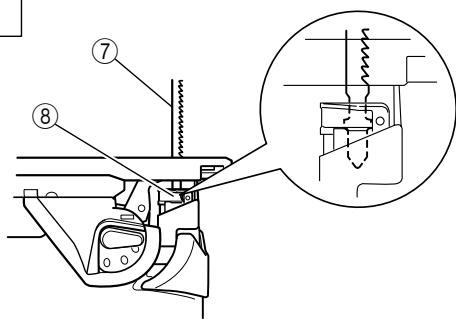
Technical diagram of a mechanical assembly with numbered components and an inset close-up view of a component detail.4
text_image
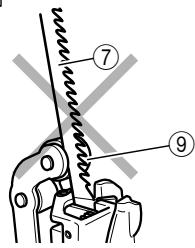
Technical diagram of a mechanical clamp or spring mechanism with numbered parts labeled ⑦ and ⑨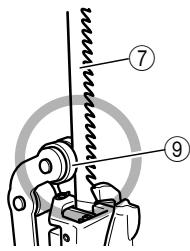
text_image
Technical diagram of a mechanical clamp or spring assembly with numbered parts labeled 7 and 95
text_image
⑩ ⑪ ⑫ ⑫6
text_image
137

text_image
Ⅲ Ⅱ Ⅰ ⑭8

text_image
Technical diagram showing a mechanical assembly with numbered components, likely illustrating a sewing or sewing process.9

text_image
Technical diagram showing mechanical assembly with numbered components and directional arrows indicating motion or movement.10

text_image
Diagram showing foot positioning with numbered arrows and numbered labels (18, 20)11

text_image
Technical diagram showing a hand operating a mechanical device with numbered parts labeled 16, 21, and 22.12

text_image
Technical diagram of a sewing machine with numbered parts and directional arrow indicating assembly or repair13

text_image
Technical diagram of a sewing machine with numbered parts labeled 24, 25, and 2614

text_image
Technical diagram of a sewing machine with numbered parts labeled 24, 27, and 2815

natural_image
Line drawing of a hand holding a camera on a flat surface (no text or symbols)16
natural_image
Technical line drawing of a sewing machine with no visible text or symbols17

text_image
Technical diagram of a mechanical assembly with numbered components labeled 29, 30, and 3118
text_image
Technical diagram of a mechanical device with numbered components for identification19

text_image
Technical diagram of a mechanical assembly with numbered components for identification20
text_image
Technical diagram of a mechanical assembly with numbered parts and directional arrows indicating motion or movement.| English | Deutsch | Français | Italiano | |
| 1 | Rechargeable battery | Akkumulator | Batterie rechargeable | Batteria ricaricabile |
| 2 | Latch | Schnapper | Loquet | Fermo |
| 3 | Handle | Handgriff | Poignée | Impugnatura |
| 4 | Pull out | Herausziehen | Tirer | Estrarre |
| 5 | Insert | Einsatz | Insérer | Inserire |
| 6 | Lever | Hebel | Levier | Leva |
| 7 | Blade | Blatt | Lame | Lama |
| 8 | Blade holder | Sägeblatthalter | Support de lame | Portalama |
| 9 | Roller | Führungsrolle | Rouleau | Rullo |
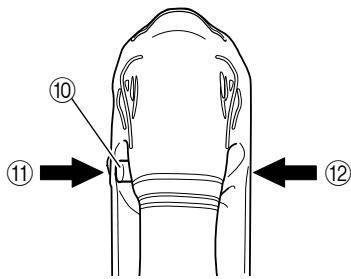
| 10 | Lock off button | Absperrtaste | Bouton de verrouillage | Tasto di blocco |
| 11 | Lock | Schließen | Blocage | Blocco |
| 12 | Free | Lösen | Libérer | Libero |
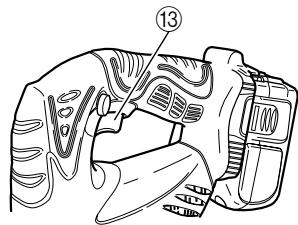
| 13 | Switch | Umschalten | Interrupteur | Interruttore |
| 14 | Change knob | Wechselring | Bouton de changement | Rotella di cambio |
| 15 | Splinter guard | Splitterschutz | Anti-éclats | Pará-schegge |
| 16 | Base | Grundplatte | Base | Base |
| 17 | Insert | Einsatz | Insérer | Inserire |
| 18 | Chip cover | Schnipseldeckel | Couvercle d’éclats | Raccoglitrucioli |
| 19 | Insert | Einsatz | Insérer | Inserire |
| 20 | Open | Öffnen | Ouvrir | Apri |
| 21 | Base bolt | Grundplattenschraube | Boulon de la base | Bullone base |
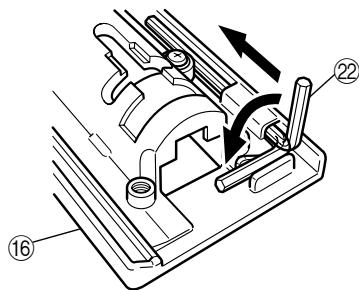
| 22 | Hexagonal bar wrench | Sechskantinnenschüssel | Clef à six pans | Chiave esagonale maschia |
| 23 | Forward | Vorwärts | Avant | Avanti |
| 24 | Guide | Führung | Guide | Guida |
| 25 | Attachment hole | Anbringungsloch | Orifice de fixation | Foro di attacco |
| 26 | M5 bolt | M5-Schraube | Boulon M5 | Bullone M5 |
| 27 | Nail or screw | Nagel oder Schraube | Clou ou vis | Chiodo o vite |
| 28 | Guide hole | Führungsloch | Orifice de guidage | Foro di guida |
| 29 | Scale | Skala | Echelle | Scala |
| 30 | Semi-circular part | Halbkreisförmiger Teil | Section semi-circulaire | Parte semicircolare |
| 31 | ▽-mark | ▽-Markierung | Repère ▽ | Segno a ▽ |
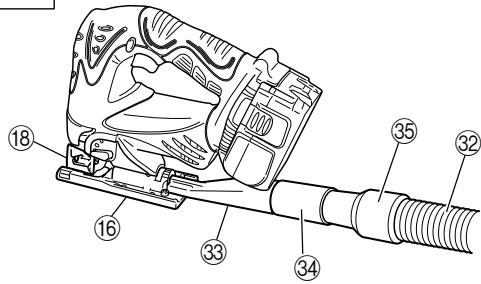
| 32 | Cleaner | Staubsauger | Nettoyeur | Dispositivo di pulizia |
| 33 | Dust collector | Staubsammler | Collecteur à poussière | Raccoglipolvere |
| 34 | Adapter | Adapter | Adaptateur | Adattatore |
| 35 | Nose | Nase | Bec | Estremità anteriore |
| 36 | Rear hole | Hinteres Loch | Orifice arrière | Foro posteriore |
| 37 | Hook | Haken | Crochet | Gancio |
| 38 | Notch | Kerbe | Rainure | Scanalatura |
| Nederlands | Español | Português | Ελληνικά | |
| 1 | Oplaadbare batterij | Batería recargable | Bateria recarregável | Επαναφορτιζόμενη μπαταρία |
| 2 | Vergrendeling | Enganche | Lingüeta | Μάνδαλο |
| 3 | Handgreep | Asidero | Cabo | Χερούλι |
| 4 | Uittrekken | Sacar | Retirar | Βραβήξτε έξω |
| 5 | Insteken | Insertar | Inserir | Εισχωρήστε |
| 6 | Hendel | Palanca | Alavanca | Μοχλός |
| 7 | Zaagblad | Cuchilla | Lâmina | Λεπίδα |
| 8 | Bladhouder | Portacuchilla | Suporte de lamina | Στήριγμα λεπίδας |
| 9 | Geleiderol | Rodillo | Cilindro | Κύλινδρος |
| 10 | Ontgrendelknop | Botón de desbloqueo | Botão de bloqueio | Κουμπί απασφάλισης |
| 11 | Vergrendelen | Bloquear | Bloquear | Κλείδωμα |
| 12 | Vrij | Liberar | Libertar | Ελεύθερο |
| 13 | Schakelaar | Interruptor | Interruptor | Διακόπτης |
| 14 | Omstelknop | Perilla de cambio | Botão de câmbio | Κουμπί αλλαγής |
| 15 | Anti-splinterstuk | Protector contra astillas | Proteção contra lascas | Προφυλακτήρας σχίζας |
| 16 | Zaagtafel | Base | Base | Βάση |
| 17 | Insteken | Insertar | Inserir | Εισχωρήστε |
| 18 | Spaankast | Cubierta de virutas | Capa contra fragmentos | Κάλυμμα ρινισμάτων |
| 19 | Insteken | Insertar | Inserir | Εισχωρήστε |
| 20 | Open | Abrir | Abrir | Ανοικτό |
| 21 | Bout voetplaat | Perno de base | Parafuso da base | Μπουλόνι βάσης |
| 22 | Inbussleutel | Ilave macho hexagonal | Chave de barra sextavada | Εξάγωνο κλειδί ́Αλεν |
| 23 | Voorwaarts | Avanzar | Para a frente | Προώθηση |
| 24 | Geleider | Guía | Guia | Οδηγός |
| 25 | Bevestigingsgat | Orificio de fijación | Furo de fixação | Τρύπα σύνδεσης |
| 26 | M5 bout | Perno M5 | Parafuso M5 | M5 Μπουλόνι |
| 27 | Spijker of schroef | Clavo o tornillo | Prego ou parafuso | Καρφί ή βίδα |
| 28 | Geleidegat | Orificio de guía | Furo-guia | Τρύπα οδηγός |
| 29 | Schaal | Escala | Escala | Κλίμακα |
| 30 | Halfcirkelvormig gedeelte | Parte semiciruclar | Parte semicircular | Ημικυκλικό τμήμα |
| 31 | ▽-markering | Marca ▽ | Marca ▽ | ▽-σημάδι |
| 32 | Reiniger | Limpiador | Limpador | Καθαριστής |
| 33 | Stofzak | Colector de polvo | Coletor de poeira | Συλλέκτης σκόνης |
| 34 | Adapter | Adaptador | Adaptador | Προσαρμογέας |
| 35 | Neus | Punta | Ponta | Άκρο |
| 36 | Achtergat | Orificio trasero | Furo traseiro | Πίσω τρύπα |
| 37 | Haak | Gancho | Gancho | Άγκιστρο |
| 38 | Inkeping | Muesca | Encaixe | Εγκοπή |
GENERAL SAFETY RULES
WARNING!
Read all instructions
Failure to follow all instructions listed below may result in electric shock, fire and/or serious injury.
The term “power tool” in all of the warnings listed below refers to your mains operated (corded) power tool or battery operated (cordless) power tool.
SAVE THESE INSTRUCTIONS
1) Work area
a) Keep work area clean and well lit.
Cluttered and dark areas invite accidents.
b) Do not operate power tools in explosive atmospheres, such as in the presence of flammable liquids, gases or dust.
Power tools create sparks which may ignite the dust of fumes.
c) Keep children and bystanders away while operating a power tool.
Distractions can cause you to lose control.
2) Electrical safety
a) Power tool plugs must match the outlet.
Never modify the plug in any way.
Do not use any adapter plugs with earthed (grounded) power tools.
Unmodified plugs and matching outlets will reduce risk of electric shock.
b) Avoid body contact with earthed or grounded surfaces such as pipes, radiators, ranges and refrigerators.
There is an increased risk of electric shock if your body is earthed or grounded.
c) Do not expose power tools to rain or wet conditions.
Water entering a power tool will increase the risk of electric shock.
d) Do not abuse the cord. Never use the cord for carrying, pulling or unplugging the power tool. Keep cord away from heat, oil, sharp edges or moving parts.
Damaged or entangled cords increase the risk of electric shock.
e) When operating a power tool outdoors, use an extension cord suitable for outdoor use.
Use of a cord suitable for outdoor use reduces the risk of electric shock.
3) Personal safety
a) Stay alert, watch what you are doing and use common sense when operating a power tool. Do not use a power tool while you are tired or under the influence of drugs, alcohol or medication.
A moment of inattention while operating power tools may result in serious personal injury.
b) Use safety equipment. Always wear eye protection.
Safety equipment such as dust mask, non-skid safety shoes, hard hat, or hearing protection used for appropriate conditions will reduce personal injuries.
c) Avoid accidental starting. Ensure the switch is in the off position before plugging in.
Carrying power tools with your finger on the switch or plugging in power tools that have the switch on invites accidents.
d) Remove any adjusting key or wrench before turning the power tool on. A wrench or a key left attached to a rotating part of the power tool may result in personal injury.
e) Do not overreach. Keep proper footing and balance at all times.
This enables better control of the power tool in unexpected situations.
f) Dress properly. Do not wear loose clothing or jewellery. Keep your hair, clothing and gloves away from moving parts.
Loose clothes, jewellery or long hair can be caught in moving parts.
g) If devices are provided for the connection of dust extraction and collection facilities, ensure these are connected and properly used.
Use of these devices can reduce dust related hazards.
4) Power tool use and care
a) Do not force the power tool. Use the correct power tool for your application.
The correct power tool will do the job better and safer at the rate for which it was designed.
b) Do not use the power tool if the switch does not turn it on and off.
Any power tool that cannot be controlled with the switch is dangerous and must be repaired.
c) Disconnect the plug from the power source before making any adjustments, changing accessories, or storing power tools.
Such preventive safety measures reduce the risk of starting the power tool accidentally.
d) Store idle power tools out of the reach of children and do not allow persons unfamiliar with the power tool or these instructions to operate the power tool.
Power tools are dangerous in the hands of untrained users.
e) Maintain power tools. Check for misalignment or binding of moving parts, breakage of parts and any other condition that may affect the power tools operation.
If damaged, have the power tool repaired before use.
Many accidents are caused by poorly maintained power tools.
f) Keep cutting tools sharp and clean.
Properly maintained cutting tools with sharp cutting edges are less likely to bind and are easier to control.
g) Use the power tool, accessories and tool bits etc., in accordance with these instructions and in the manner intended for the particular type of power tool, taking into account the working conditions and the work to be performed.
Use of the power tool for operations different from intended could result in a hazardous situation.
5) Battery tool use and care
a) Ensure the switch is in the off position before inserting battery pack.
Inserting the battery pack into power tools that have the switch on invites accidents.
b) Recharge only with the charger specified by the manufacturer.
A charger that is suitable for one type of battery pack may create a risk of fire when used with another battery pack.
c) Use power tools only with specifically designated battery packs.
Use of any other battery packs may create a risk of injury and fire.
d) When battery pack is not in use, keep it away from other metal objects like paper clips, coins, keys, nails, screws, or other small metal objects that can make a connection from one terminal to another.
Shorting the battery terminals together may cause burns or a fire.
e) Under abusive conditions, liquid may be ejected from the battery; avoid contact. If contact accidentally occurs, flush with water. If liquid contacts eyes, additionally seek medical help.
Liquid ejected from the battery may cause irritation or burns.
6) Service
a) Have your power tool serviced by a qualified repair person using only identical replacement parts.
This will ensure that the safety of the power tool is maintained.
PRECAUTION
Keep children and infirm persons away.
When not in use, tools should be stored out of reach of children and infirm persons.
PRECAUTIONS FOR CORDLESS JIG SAW
- Always charge the battery at a temperature of 0 – 40°C. A temperature of less than 0°C will result in overcharging which is dangerous. The battery cannot be charged at a temperature greater than 40°C. The most suitable temperature for charging is that of 20 – 25°C.
- Do not use the charger continuously. When one charging is completed, leave the charger for about 15 minutes before the next charging of battery.
- Do not allow foreign matter to enter the hole for connecting the rechargeable battery.
- Never disassemble the rechargeable battery and charger.
- Never short-circuit the rechargeable battery. Short-circuiting the battery will cause a great electric current and overheat. It results in burn or damage to the battery.
- Do not dispose of the battery in fire. If the battery burnt, it may explode.
- Do not insert object into the air ventilation slots of the charger. Inserting metal objects or inflammables into the charger air ventilation slots will result in electrical shock hazard or damaged charger.
- Bring the battery to the shop from which it was purchased as soon as the post-charging battery life becomes too short for practical use. Do not dispose of the exhausted battery.
- Using an exhausted battery will damage the charger.
- If the machine is used continuously at low speed, an extra load is applied to the motor which can result in motor seizure. Always operate the power tool so that the blade is not caught by the material during operation. Always adjust the blade speed to enable smooth cutting.
CAUTION ON LITHIUM-ION BATTERY
To extend the lifetime, the lithium-ion battery equips with the protection function to stop the output.
In the cases of 1 and 2 described below, when using this product, even if you are pulling the switch, the motor may stop. This is not the trouble but the result of protection function.
- When the battery power remaining runs out (The battery voltage drops to about 12V (CJ18DL) / about 8V (CJ14DL)), the motor stops. In such case, charge it up immediately.
- If the tool is overloaded, the motor may stop. In this case, release the switch of tool and eliminate causes of overloading. After that, you can use it again.
Furthermore, please heed the following warning and caution.
WARNING
In order to prevent any battery leakage, heat generation, smoke emission, explosion and ignition beforehand, please be sure to heed the following precautions.
- Make sure that swarf and dust do not collect on the battery.
During work make sure that swarf and dust do not fall on the battery.
○ Make sure that any swarf and dust falling on the power tool during work do not collect on the battery.
☐ Do not store an unused battery in a location exposed to swarf and dust.
Before storing a battery, remove any swarf and dust that may adhere to it and do not store it together with metal parts (screws, nails, etc.). - Do not pierce battery with a sharp object such as a nail, strike with a hammer, step on, throw or subject the battery to severe physical shock.
- Do not use an apparently damaged or deformed battery.
- Do not use the battery in reverse polarity.
- Do not connect directly to an electrical outlets or car cigarette lighter sockets.
- Do not use the battery for a purpose other than those specified.
- If the battery charging fails to complete even when a specified recharging time has elapsed, immediately stop further recharging.
- Do not put or subject the battery to high temperatures or high pressure such as into a microwave oven, dryer, or high pressure container.
- Keep away from fire immediately when leakage or foul odor are detected.
- Do not use in a location where strong static electricity generates.
- If there is battery leakage, foul odor, heat generated, discolored or deformed, or in any way appears abnormal during use, recharging or storage, immediately remove it from the equipment or battery charger, and stop use.
CAUTION
- If liquid leaking from the battery gets into your eyes, do not rub your eyes and wash them well with fresh clean water such as tap water and contact a doctor immediately.
If left untreated, the liquid may cause eye-problems.
-
If liquid leaks onto your skin or clothes, wash well with clean water such as tap water immediately. There is a possibility that this can cause skin irritation.
-
If you find rust, foul odor, overheating, discolor, deformation, and/or other irregularities when using the battery for the first time, do not use and return it to your supplier or vendor.
SPECIFICATIONS
Cordless Jig Saw
| Model | CJ14DMR | CJ14DL | CJ18DMR | CJ18DL | |
| Voltage | 14.4V | 18V | |||
| Max. Cutting Depth | Wood 135 mmMild Steel 10 mm | ||||
| No-Load Speed | 0 – 2400min ^-1 | ||||
| Stroke | 26 mm | ||||
| Min. Cutting Radius | 25 mm | ||||
| Rechargeable battery | 2.0 Ah | EB14B:Ni-Cd(12 cells) | x | EB1820L: Ni-Cd(15 cells) | x |
| 3.0 Ah | x | BCL1430: Li-ion(4 or 8 cells) | x | EBM1830: Li-ion(10 cells) | |
| Weight | 2.5 kg | 2.3 kg | 2.7 kg | 2.4 kg | |
Charger
| Model | UC18YG | UC18YRL | |
| Charging voltage | 7.2 – 18 V | 7.2 – 18 V | |
| Charging time | 2.0 Ah : Ni-Cd | 50 min. | 30 min. |
| 3.0 Ah : Li-ion | x | 45 min. | |
| Weight | 0.3 Kg | 0.6 Kg | |
Charge time is approximate. Actual charge time may vary.
"x" Indicates that the battery pack is not compatible with that specific charger.
STANDARD ACCESSORIES
| CJ14DMR (2BGK) CJ14DL (2LRK) CJ18DMR (2BGK) CJ18DL (2MRK) | 1 Blades (No. 41) ...... 1 Refer to Table 3 for use of the blades.2 Hexagon bar wrench ...... 13 Splinter guard ...... 14 Chip cover ...... 15 Charger ...... 16 Battery ...... 27 Plastic case ...... 1 |
| CJ14DMR (BGK) CJ14DL (LRK) CJ18DMR (BGK) CJ18DL (MRK) | 1 Blades (No. 41) ...... 1 Refer to Table 3 for use of the blades.2 Hexagon bar wrench ...... 13 Splinter guard ...... 14 Chip cover ...... 15 Charger ...... 16 Battery ...... 17 Plastic case ...... 1 |
| CJ14DMR (NN) CJ14DL (NN) CJ18DMR (NN) CJ18DL (NN) | Without charger, battery, plastic case |
Standard accessories are subject to change without notice.
OPTIONAL ACCESSORIES ... Sold separately
| (1) Various types of bladesRefer to Table 3 for use of the blades. |
| (2) Guide |
| (3) Sub base |
| (4) Dust collector |
| Optional accessories are subject to change without notice. |
APPLICATIONS
○ Cutting various lumber and pocket cutting
○ Cutting mild steel plate, aluminum plate, and copper plate
○ Cutting synthetic resins, such as phenol resin and vinyl chloride
○ Cutting thin and soft construction materials
○ Cutting stainless steel plate (with No. 97 blade)
BATTERY REMOVAL/INSTALLATION
1. Battery removal
Hold the handle tightly and push the battery latch to remove the battery (See Fig. 1).
CAUTION
Never short-circuit the battery.
2. Battery installation
Insert the battery while observing its polarities (See Fig. 1).
CHARGING
Before using the cordless jig saw, charge the battery as follows.
1. Connect the charger's power cord to a receptacle
When the power cord is connected, the charger's pilot lamp will blink in red (At 1-second intervals).
2. Insert the battery into the charger
Insert the battery firmly, until it contacts the bottom of the charger compartment.
CAUTION
☐ If the battery is inserted in the reverse direction, not only recharging will become impossible, but it may also cause problems in the charger such as deformed recharging terminal.
3. Charging
When inserting a battery in the charger, charging will commence and the pilot lamp will light up continuously in red.
When the battery becomes fully recharged, the pilot lamp will blink in red (At 1-second intervals) (See Table 1).
(1) Pilot lamp indication
The indications of the pilot lamp will be as shown in Table 1, according to the condition of the charger or the rechargeable battery.
Table 1
| Indications of the lamps | |||||
| Before charging | Blinks (RED) | Lights for 0.5 seconds. Does not light for 0.5 seconds. (off for 0.5 seconds) | |||
| While charging | Lights (RED) | Lights continuously | |||
| Charging complete | Blinks (RED) | Lights for 0.5 seconds. Does not light for 0.5 seconds. (off for 0.5 seconds) | |||
| Charging impossible | Flikers (RED) | Lights for 0.1 seconds. Does not light for 0.1 seconds. (off for 0.1 seconds)■ ■ ■ ■ ■ ■ ■ ■ ■ ■ ■ ■ ■ ■ ■ ■ ■ ■ ■ ■ ■ ■ ■ ■ ■ ■ ■ ■ ■ ■ ■ ■ ■ ■ ■ ■ ■ ■ ■ ■ ■ ■ ■ ■ ■ ■ ■ ■ ■ ■ ■ ■ ■ ■ ■ ■ ■ ■ ■ ■ ■ ■ ■ ■ ■ ■ ■ ■ ■ ■ ■ ■ ■ ■ ■ ■ ■ ■ ■ ■ ■ ■ ■ ■ ■ ■ ■ ■ ■ ■ ■ ■ ■ ■ ■ ■ ■ ■ ■ ■ ■ □□□□□□□□□□□□□□□□□□□□□□□□□□□□□□□□□□□□□□□□□□□□□□□□□□□□□□□□□□□□□□□□□□□□□□□□□□□□□□□□□□□□□□□□□□□□□□□□□□□□□○□□□□□□□□□□□□□□□□□□□□□□□□□□□□□□□□□□□□□□□□□□□□□□□□□□□□□□□□□□□□□□□□□□□□□□□□□□□□□□□□□□□□□□□□□□□□□□□□□□□ □□□□□□□□□□□□□□□□□□□□□□□□□□□□□□□□□□□□□□□□□□□□□□□□□□□□□□□□□□□□□□□□□□□□□□□□□□□□□□□□□□□□□□□□□□□□□□□□□□ □ □ □ □ □ □ □ □ □ □ □ □ □ □ □ □ □ □ □ □ □ □ □ □ □ □ □ □ □ □ □ □ □ □ □ □ □ □ □ □ □ □ □ □ □ □ □ □ □ □ ▢ ▢ ▢ ▢ ▢ ▢ ▢ ▢ ▢ ▢ ▢ ▢ ▢ ▢ ▢ ▢ ▢ ▢ ▢ ▢ ▢ ▢ ▢ ▢ ▢ ▢ ▢ ▢ ▢ ▢ ▢ ▢ ▢ ▢ ▢ ▢ ▢ ▢ ▢ ▢ ▢ ▢ ▢ ▢ ▢ ▢ ▢ ▢ ▢ ▢ ▩ ▩ ▩ ▩ ▩ ▩ ▩ ▩ ▩ ▩ ▩ ▩ ▩ ▩ ▩ ▩ ▩ ▩ ▩ ▩ ▩ ▩ ▩ ▩ ▩ ▩ ▩ ▩ ▩ ▩ ▩ ▩ ▩ ▩ ▩ ▩ ▩ ▩ ▩ ▩ ▩ ▩ ▩ ▩ ▩ ▩ ▩ ▩ ▩ ▩ ▢ ▢ ▢ ▢ ▢ ▢ ▢ ▢ ▢ ▢ ▢ ▢ ▢ ▢ ▢ ▢ ▢ ▢ ▢ ▢ ▢ ▢ ▢ ▢ ▢ ▢ ▢ ▢ ▢ ▢ ▢ ▢ ▢ ▢ ▢ ▢ ▢ ▢ ▢ ▢ ▢ ▢ ▢ ▢ ▢ ▢ ▢ ▢ ▢ □ □ □ □ □ □ □ □ □ □ □ □ □ □ □ □ □ □ □ □ □ □ □ □ □ □ □ □ □ □ □ □ □ □ □ □ □ □ □ □ □ □ □ □ □ □ □ □ □ △ △ △ △ △ △ △ △ △ △ △ △ △ △ △ △ △ △ △ △ △ △ △ △ △ △ △ △ △ △ △ △ △ △ △ △ △ △ △ △ △ △ △ △ △ △ △ △ △ △ ▸ ▸ ▸ ▸ ▸ ▸ ▸ ▸ ▸ ▸ ▸ ▸ ▸ ▸ ▸ ▸ ▸ ▸ ▸ ▸ ▸ ▸ ▸ ▸ ▸ ▸ ▸ ▸ ▸ ▸ ▸ ▸ ▸ ▸ ▸ ▸ ▸ ▸ ▸ ▸ ▸ ▸ ▸ ▸ ▸ ▸ ▸ ▸ ▸ ▸ ▪ ▪ ▪ ▪ ▪ ▪ ▪ ▪ ▪ ▪ ▪ ▪ ▪ ▪ ▪ ▪ ▪ ▪ ▪ ▪ ▪ ▪ ▪ ▪ ▪ ▪ ▪ ▪ ▪ ▪ ▪ ▪ ▪ ▪ ▪ ▪ ▪ ▪ ▪ ▪ ▪ ▪ ▪ ▪ ▪ ▪ ▪ ▪ ▪ ▪ ▫ ▫ ▫ ▫ ▫ ▫ ▫ ▫ ▫ ▫ ▫ ▫ ▫ ▫ ▫ ▫ ▫ ▫ ▫ ▫ ▫ ▫ ▫ ▫ ▫ ▫ ▫ ▫ ▫ ▫ ▫ ▫ ▫ ▫ ▫ ▫ ▫ ▫ ▫ ▫ ▫ ▫ ▫ ▫ ▫ ▫ ▫ ▫ ▫ ▫ ▪ ▪ ▪ ▪ ▪ ▪ ▪ ▪ ▪ ▪ ▪ ▪ ▪ ▪ ▪ ▪ ▪ ▪ ▪ ▪ ▪ ▪ ▪ ▪ ▪ ▪ ▪ ▪ ▪ ▪ ▪ ▪ ▪ ▪ ▪ ▪ ▪ ▪ ▪ ▪ ▪ ▪ ▪ ▪ ▪ ▪ ▪ ▪ ▪ ▸ ▸ ▸ ▸ ▸ ▸ ▸ ▸ ▸ ▸ ▸ ▸ ▸ ▸ ▸ ▸ ▸ ▸ ▸ ▸ ▸ ▸ ▸ ▸ ▸ ▸ ▸ ▸ ▸ ▸ ▸ ▸ ▸ ▸ ▸ ▸ ▸ ▸ ▸ ▸ ▸ ▸ ▸ ▸ ▸ ▸ ▸ ▸ ▸ ▩ ▩ ▩ ▩ ▩ ▩ ▩ ▩ ▩ ▩ ▩ ▩ ▩ ▩ ▩ ▩ ▩ ▩ ▩ ▩ ▩ ▩ ▩ ▩ ▩ ▩ ▩ ▩ ▩ ▩ ▩ ▩ ▩ ▩ ▩ ▩ ▩ ▩ ▩ ▩ ▩ ▩ ▩ ▩ ▩ ▩ ▩ ▩ ▩ ▸ ▸ ▸ ▸ ▸ ▸ ▸ ▸ ▸ ▸ ▸ ▸ ▸ ▸ ▸ ▸ ▸ ▸ ▸ ▸ ▸ ▸ ▸ ▸ ▸ ▸ ▸ ▸ ▸ ▸ ▸ ▸ ▸ ▸ ▸ ▸ ▸ ▸ ▸ ▸ ▸ ▸ ▸ ▸ ▸ ▸ ▸ ▸ ▸ ▅ ▸ ▸ ▸ ▸ ▸ ▸ ▸ ▸ ▸ ▸ ▸ ▸ ▸ ▸ ▸ ▸ ▸ ▸ ▸ ▸ ▸ ▸ ▸ ▸ ▸ ▸ ▸ ▸ ▸ ▸ ▸ ▸ ▸ ▸ ▸ ▸ ▸ ▸ ▸ ▸ ▸ ▸ ▸ ▸ ▸ ▸ ▸ ▸ ▸ ▦ ▸ ▸ ▸ ▸ ▸ ▸ ▸ ▸ ▸ ▸ ▸ ▸ ▸ ▸ ▸ ▸ ▸ ▸ ▸ ▸ ▸ ▸ ▸ ▸ ▸ ▸ ▸ ▸ ▸ ▸ ▸ ▸ ▸ ▸ ▸ ▸ ▸ ▸ ▸ ▸ ▸ ▸ ▸ ▸ ▸ ▸ ▸ ▸ ▸ ▼ ▸ ▸ ▸ ▸ ▸ ▸ ▸ ▸ ▸ ▸ ▸ ▸ ▸ ▸ ▸ ▸ ▸ ▸ ▸ ▸ ▸ ▸ ▸ ▸ ▸ ▸ ▸ ▸ ▸ ▸ ▸ ▸ ▸ ▸ ▸ ▸ ▸ ▸ ▸ ▸ ▸ ▸ ▸ ▸ ▸ ▸ ▸ ▸ ▸ ▶ ▸ ▸ ▸ ▸ ▸ ▸ ▸ ▸ ▸ ▸ ▸ ▸ ▸ ▸ ▸ ▸ ▸ ▸ ▸ ▸ ▸ ▸ ▸ ▸ ▸ ▸ ▸ ▸ ▸ ▸ ▸ ▸ ▸ ▸ ▸ ▸ ▸ ▸ ▸ ▸ ▸ ▸ ▸ ▸ ▸ ▸ ▸ ▸ ▸ ▷ ▸ ▸ ▸ ▸ ▸ ▸ ▸ ▸ ▸ ▸ ▸ ▸ ▸ ▸ ▸ ▸ ▸ ▸ ▸ ▸ ▸ ▸ ▸ ▸ ▸ ▸ ▸ ▸ ▸ ▸ ▸ ▸ ▸ ▸ ▸ ▸ ▸ ▸ ▸ ▸ ▸ ▸ ▸ ▸ ▸ ▸ ▸ ▸ ▸ ▧ ▸ ▸ ▸ ▸ ▸ ▸ ▸ ▸ ▸ ▸ ▸ ▸ ▸ ▸ ▸ ▸ ▸ ▸ ▸ ▸ ▸ ▸ ▸ ▸ ▸ ▸ ▸ ▸ ▸ ▸ ▸ ▸ ▸ ▸ ▸ ▸ ▸ ▸ ▸ ▸ ▸ ▸ ▸ ▸ ▸ ▸ ▸ ▸ ▸ ▨ ▸ ▸ ▸ ▸ ▸ ▸ ▸ ▸ ▸ ▸ ▸ ▸ ▸ ▸ ▸ ▸ ▸ ▸ ▸ ▸ ▸ ▸ ▸ ▸ ▸ ▸ ▸ ▸ ▸ ▸ ▸ ▸ ▸ ▸ ▸ ▸ ▸ ▸ ▸ ▸ ▸ ▸ ▸ ▸ ▸ ▸ ▸ ▸ ▸ ▯ ▸ ▸ ▸ ▸ ▸ ▸ ▸ ▸ ▸ ▸ ▸ ▸ ▸ ▸ ▸ ▸ ▸ ▸ ▸ ▸ ▸ ▸ ▸ ▸ ▸ ▸ ▸ ▸ ▸ ▸ ▸ ▸ ▸ ▸ ▸ ▸ ▸ ▸ ▸ ▸ ▸ ▸ ▸ ▸ ▸ ▸ ▸ ▸ ▸ ▵ ▸ ▸ ▸ ▸ ▸ ▸ ▸ ▸ ▸ ▸ ▸ ▸ ▸ ▸ ▸ ▸ ▸ ▸ ▸ ▸ ▸ ▸ ▸ ▸ ▸ ▸ ▸ ▸ ▸ ▸ ▸ ▸ ▸ ▸ ▸ ▸ ▸ ▸ ▸ ▸ ▸ ▸ ▸ ▸ ▸ ▸ ▸ ▸ ▸ ▰ ▸ ▸ ▸ ▸ ▸ ▸ ▸ ▸ ▸ ▸ ▸ ▸ ▸ ▸ ▸ ▸ ▸ ▸ ▸ ▸ ▸ ▸ ▸ ▸ ▸ ▸ ▸ ▸ ▸ ▸ ▸ ▸ ▸ ▸ ▸ ▸ ▸ ▸ ▸ ▸ ▸ ▸ ▸ ▸ ▸ ▸ ▸ ▸ ▸ ▮ ▸ ▸ ▸ ▸ ▸ ▸ ▸ ▸ ▸ ▸ ▸ ▸ ▸ ▸ ▸ ▸ ▸ ▸ ▸ ▸ ▸ ▸ ▸ ▸ ▸ ▸ ▸ ▸ ▸ ▸ ▸ ▸ ▸ ▸ ▸ ▸ ▸ ▸ ▸ ▸ ▸ ▸ ▸ ▸ ▸ ▸ ▸ ▸ ▸ ▱ ▸ ▸ ▸ ▸ ▸ ▸ ▸ ▸ ▸ ▸ ▸ ▸ ▸ ▸ ▸ ▸ ▸ ▸ ▸ ▸ ▸ ▸ ▸ ▸ ▸ ▸ ▸ ▸ ▸ ▸ ▸ ▸ ▸ ▸ ▸ ▸ ▸ ▸ ▸ ▸ ▸ ▸ ▸ ▸ ▸ ▸ ▸ ▸ ▸ ▜ √ ▚ ▚ ▚ ▚ ▚ ▚ ▚ ▚ ▚ ▚ ▚ ▚ ▚ ▚ ▚ ▚ ▚ ▚ ▚ ▚ ▚ ▚ ▚ ▚ ▚ ▚ ▚ ▚ ▚ ▚ ▚ ▚ ▚ ▚ ▚ ▚ ▚ ▚ ▚ ▚ ▚ ▚ ▚ ▚ ▚ ▚ ▚ ▚ ▚ ▚ | |||
NOTE: When standby for cooling battery, UC18YRL cools the overheated battery by cooling fan.
(2) Regarding the temperatures of the rechargeable battery
The temperatures for rechargeable batteries are as shown in the table below, and batteries that have become hot should be cooled for a while before being recharged.
Table 2 Recharging ranges of batteries
| ChargerRechargeable batteries | UC18YRL |
| Ni-Cd batteries | -5^ – 55^ |
| Li-ion batteries | 0^ – 50^ |
4. Disconnect the charger's power cord from the receptacle
5. Hold the charger firmly and pull out the battery NOTE
Be sure to pull out the battery from the charger after use, and then keep it.
CAUTION
☐ If the battery is charged while it is heated because it has been left for a long time in a location subject to direct sunlight or because the battery has just been used, the pilot lamp of the charger lights up green. In such a case, first let the battery cool, then start charging.
When the pilot lamp flikers in red quickly (at 0.2-second intervals), check for and take out any foreign objects in the charger's battery installation hole. If there are no foreign objects, it is probable that the battery or charger is malfunctioning. Take it to your Authorized Service Center.
☐ Since the built-in micro computer takes about 3 seconds to confirm that the battery being charged with UC18YRL is taken out, wait for a minimum of 3 seconds before reinserting it to continue charging. If the battery is reinserted within 3 seconds, the battery may not be properly charged.
Before using the cordless jig saw, charge the battery as follows.
-
Connect the charger power cord to the receptacle Connecting the power cord will turn on the charger.
-
Insert the battery into the charger
Insert the battery firmly while observing its direction, until it contacts the bottom of the charger (the pilot lamp lights up).
CAUTION
If the pilot lamp does not light up, pull out the power cord from the receptacle and check the battery mounting condition.
The pilot lamp goes off to indicate that the battery is fully charged.
The battery charging time becomes longer when a temperature is low or the voltage of the power source is too low.
When the pilot lamp does not go off even if more than 120 minutes have elapsed after starting of the charging, stop the charging and contact your HITACHI AUTHORIZED SERVICE CENTER.
CAUTION
If the battery is heated due to direct sunlight, etc., just after operation, the charger pilot lamp may not light up. At that time, cool the battery first, then start charging.
-
Disconnect the charger power cord from the receptacle
-
Hold the charger tight and pull out the battery
Regarding electric discharge in case of new batteries, etc.
As the internal chemical substance of new batteries and batteries that have not been used for an extended period is not activated, the electric discharge might be low when using them the first and second time. This is a temporary phenomenon, and normal time required for recharging will be restored by recharging the batteries 2 – 3 times.
How to make the batteries perform longer
(1) Recharge the batteries before they become completely exhausted.
When you feel that the power of the tool becomes weaker, stop using the tool and recharge its battery. If you continue to use the tool and exhaust the electric current, the battery may be damaged and its life will become shorter.
(2) Avoid recharging at high temperatures.
A rechargeable battery will be hot immediately after use. If such a battery is recharged immediately after use, its internal chemical substance will deteriorate, and the battery life will be shortened. Leave the battery and recharge it after it has cooled for a while.
PRIOR TO OPERATION
- Preparing and checking the work environment
Make sure that the work site meets all the conditions laid forth in the precautions.
- Checking the battery
Make sure that the battery is installed firmly. If it is at all loose it could come off and cause an accident.
- Dust produced in operation
The dust produced in normal operation may affect the operator's health. Either of following way is recommended.
a) Wear a dust mask
b) Use external dust collection equipment
When using the external dust collection equipment, connect the adapter with the hose from external dust collection equipment. (Fig. 19)
- Changing blades
(1) Open the lever up to the stop. (Fig. 2-arrow I)
(2) Remove fitted blade.
(3) Insert new blade up to the stop in the blade holder. (Fig. 2-arrow II)
(4) Close the lever. (Fig. 2-arrow III)
CAUTION:
○ Be sure to switch power OFF and disconnect the battery from the body when changing blades.
○ Do not open the lever when plunger is moving.
NOTE:
○ Confirm the protrusions of blade inserted to the blade holder surely. (Fig. 3)
○ Confirm the blade located between the groove of roller. (Fig. 4)
- Adjusting the orbital operation
(1) This Jig Saw employs orbital operation which moves the blade back and forth, as well as up and down. Set the change knob shown in Fig. 7 to "0" to eliminate the orbital operation (the blade moves only up and down). The orbital operation can be selected in 4 steps from "0" to "III".
(2) For the hard material, such as a steel plate, etc., decrease the orbital operation. For the soft material, such as lumber, plastic, etc., increase the orbital operation to increase work efficiency. To cut the material accurately, decrease the orbital operation.
- Cutting stainless steel plates
This Jig Saw can cut stainless steel plates by using No. 97 blade. Carefully read “Concerning cutting of stainless steel plates” for proper operation.
- Splinter guard
Using the splinter guard when cutting wood materials will reduce splintering of cut surfaces.
Insert the splinter guard in the space on the base, and push it completely. (See Fig. 8)
- Chip cover
Chip cover prevents chips from flying off and improves the efficiency of dust collector.
Insert the chip cover between the base and lever, and push with a slight pressure until it catches in place. (Fig. 9)
When removing chip cover, hold both sides of knob and slightly open until it can be removed from the Jig Saw. (Fig. 10)
NOTE:
There is a possibility that chip cover is frosted when cutting the metal.
- Sub base
Using the sub base (made from steel) will reduce abrasion of aluminium base especially in cutting metals.
Using the sub base (made from resin) will reduce scratching of cut surface. Attach the sub base to the bottom surface of base by attached 4 screws.
- Lighting up the lamp
To turn on the lamp, pull the trigger.
Release the trigger to turn off.
CAUTION:
Do not look in the light or see the source of light directly.
CUTTING
CAUTION on lithium-ion battery
To extend the lifetime, the lithium-ion battery equips with the protection function to stop the output. Therefore, if the tool is overloaded, the motor may stop. However, this is not the trouble but the result of protection function. In this case, release the switch of tool and eliminate the causes of overloading.
CAUTION:
☐ In order to prevent blade dislodging, damage or excessive wear on the Plunger, please make sure to have surface of the base plate attached to the work piece while sawing.
☐ At low speed do not cut a wood with a thickness of more than 10 mm or metal with a thickness of more than 1 mm.
1. Rectilinear cutting
When cutting on a straight line, first draw a marking gauge line and advance the saw along that line. Using the guide (sold separately) will make it possible to cut accurately on a straight line.
(1) Loosen the base bolt hexagonal bar wrench attached on base. (Fig. 11)
(2) Move the base fully forward (Fig. 12), and tighten the base bolt again.
(3) Attach the guide by passing it through the attachment hole on the base and tighten the M5 bolt. (Fig. 13)
(4) Set the orbital position to "0".
NOTE:
To ensure accurate cutting when using the Guide (Fig. 13), always set the orbital position to "0".
2. Sawing curved lines
When sawing a small circular arc, reduce the feeding speed of the machine. If the machine is fed too fast, it could cause the blade to break.
3. Cutting a circle or a circular arc
The guide also will be helpful for circular cutting. After attaching the guide by same way noted as above, drive the nail or screw into the material through the hole on the guide, then use it for an axis when cutting. (Fig. 14)
NOTE:
Circular cutting must be done with the blade approximately vertical to the bottom surface of the base.
4. Cutting metallic materials
(1) Set the orbital position to "0" or "I".
(2) Cut the material at medium speed.
(3) Always use an appropriate cutting fluid (spindle oil, soapy water, etc.). When a liquid cutting fluid is not available, apply grease to the back surface of the material to be cut.
5. Pocket cutting
(1) In lumber
Aligning the blade direction with the grain of the wood, cut step by step until a window hole is cut in the center of the lumber. (Fig. 15)
(2) In other materials
When cutting a window hole in materials other than lumber, initially bore a hole with a drill or similar tool from which to start cutting.
6. Angular cutting
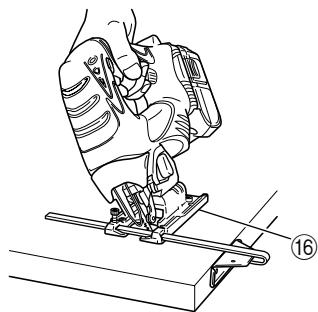
The base can be swiveled to both sides by up to 45^ for angular cutting. (Fig. 16)
(1) Loosen the base bolt by hexagonal bar wrench attached on base and move the base fully forward. (Fig. 11, 12)
(2) Align the scale (from 0 degrees to 45 degrees by 15-degree increments) of the semi-circular part of the base with the [▽] mark on the gear cover. (Fig. 17)
(3) Tighten the M5 bolt again. (Fig. 11)
(4) Set the orbital position to "0".
NOTE:
Angular cutting can not be done when adopting chip cover or dust collector.
CONNECTING WITH CLEANER
By connecting with cleaner (sold separately) through dust collector (sold separately) and adapter (sold separately), most of dust can be collected.
(1) Remove the hexagonal bar wrench from the base.
(2) Move the base fully forward. (Fig. 11, 12)
(3) Attach the chip cover.
(4) Connect the dust collector with adapter. (Fig. 18)
(5) Connect the adapter with the nose of cleaner. (Fig. 18)
(6) Insert dust collector into the rear hole of the base until the hook catches in the notch. (Fig. 19)
(7) Press the hook to remove the dust collector.
NOTE:
Wear the dust mask additionally, if available.
CONCERNING CUTTING OF STAINLESS STEEL PLATES
CAUTION:
In order to prevent blade dislodging, damage or excessive wear on the Plunger, please make sure to have surface of the base plate attached to the work piece while sawing.
When cutting stainless steel plates, adjust the unit as described below:
- Adjust the speed
| Blade | Thickness of material | Speed |
| No. 97 | 1.5 – 2.5 mm | Middle speed |
NOTE:
The higher the speed is, the quicker the material is cut. But the service life of the blade will be reduced in this case. When the speed is too low, cutting will take longer, although the service life will be prolonged. Make adjustments as desired.
2. Set the orbital position to "0"
NOTE:
○ When cutting use cutting fluid (oil base cutting fluid) to prolong the blade's service life.
SELECTION OF BLADES
○ Accessory blades
To ensure maximum operating efficiency and results, it is very important to select the appropriate blade best suited to the type and thickness of the material to be cut. Three types of blades are provided as standard accessories. The blade number is engraved in the vicinity of the mounting portion of each blade. Select appropriate blades by referring to Table 3.
HOUSING THE HEXAGONAL BAR WRENCH
It is possible to house the hexagonal bar wrench on the base. (See Fig. 20)
MAINTENANCE AND INSPECTION
1. Inspecting the blade
Continued use of a dull or damaged blade will result in reduced cutting efficiency and may cause overloading of the motor. Replace the blade with a new one as soon as excessive abrasion is noted.
2. Inspecting the mounting screws
Regularly inspect all mounting screws and ensure that they are properly tightened. Should any of the screws be loose, retighten them immediately. Failure to do so could result in serious hazard.
3. Maintenance of the motor
The motor unit winding is the very "heart" of the power tool.
Exercise due care to ensure the winding does not become damaged and/or wet with oil or water.
4. Cleaning of the outside
When the cordless jig saw is stained, wipe with a soft dry cloth or a cloth moistened with soapy water. Do not use chloric solvents, gasoline or paint thinner, as they melt plastics.
5. Storage
Store the cordless jig saw in a place in which the temperature is less than 40^ C, and out of reach of children.
6. Service parts list
A: Item No.
B: Code No.
C: No. Used
D: Remarks
CAUTION
Repair, modification and inspection of Hitachi Power Tools must be carried out by a Hitachi Authorized Service Center.
This Parts List will be helpful if presented with the tool to the Hitachi Authorized Service Center when requesting repair or other maintenance.
In the operation and maintenance of power tools, the safety regulations and standards prescribed in each country must be observed.
MODIFICATION
Hitachi Power Tools are constantly being improved and modified to incorporate the latest technological advancements.
Accordingly, some parts (i.e. code numbers and/or design) may be changed without prior notice.
GUARANTEE
We guarantee Hitachi Power Tools in accordance with statutory/country specific regulation. This guarantee does not cover defects or damage due to misuse, abuse, or normal wear and tear. In case of complaint, please send the Power Tool, undismantled, with the GUARANTEE CERTIFICATE found at the end of this Handling instruction, to a Hitachi Authorized Service Center.
NOTE:
Due to HITACHI's continuing program of research and development, the specifications herein are subject to change without prior notice.
IMPORTANT:
Correct connection of the plug
The wires of the main lead and coloured in accordance with the following code:
Blue: -Neutral
Brown: -Live
As the colours of the wires in the main lead of this tool may not correspond with the coloured markings identifying the terminals in your plug proceed as follows: The wire coloured blue must be connected to the terminal marked with the letter N or coloured black.
The wire coloured brown must be connected to the terminal marked with the letter L or coloured red.
Neither core must be connected to the earth terminal.
NOTE:
This requirement is provided according to BRITISH STANDARD 2769: 1984.
Therefore, the letter code and colour code may not be applicable to other markets except The United Kingdom.
Information concerning airborne noise and vibration
The measured values were determined according to EN60745 and declared in accordance with ISO 4871.
Measured A-weighted sound power level: 95 dB (A). Measured A-weighted sound pressure level: 84 dB (A). Uncertainty KpA: 3 dB (A).
Wear ear protection.
The typical weighted root mean square acceleration value: 3.5 m/s^2
Table 3 List of appropriate blades
| Material to be cut | Blade Material quality | No. 1 (Long) | No. 1 (Super Long) | No.11 | No. 12, 42 | No. 15 | No. 16, 46 | No. 21 | No. 22 | No.41 | No. 97 | 123X |
| Thickness of material (mm) | ||||||||||||
| Lumber | General lumber | Below 105 | Below 110 | 10~55 | Below 20 | 10~55 | 5~40 | 10~65 | ||||
| Plywood | 5~30 | Below 10 | 5~30 | 3~20 | ||||||||
| Iron plate | Mild steel plate | 3~6 | Below 3 | 2~5 | 1.5~10 | |||||||
| Stainless steel plate | 1.5~2.5 | |||||||||||
| Nonferrous metal | Aluminium copper, brass | 3~12 | Below 3 | Below 5 | ||||||||
| Aluminium sash | Height up to 25 | Height up to 25 | Height up to 30 | |||||||||
| Plastics | Phenol resin, melamine, resin, etc. | 5~20 | Below 6 | 5~15 | Below 6 | 5~15 | ||||||
| Vinyl chloride, acryl resin, etc. | 5~30 | Below 10 | 5~20 | Below 5 | 5~30 | 3~20 | 5~15 | |||||
| Foamed polyethylene, foamed styrol | 10~55 | 3~25 | 5~25 | 3~25 | 10~55 | 3~40 | 5~25 | |||||
| Pulp | Card board, corrugated paper | 10~55 | 3~25 | 10~55 | 3~40 | |||||||
| Hardboard | 3~25 | Below 6 | 3~25 | |||||||||
| Fiberboard | Below 6 | |||||||||||
NOTE:
☐ The minimum cutting radius of No. 1 (Long), No. 1 (Super Long), No. 21, No. 22 and No. 41 blades is 100 mm.
○ Le rayon de coupe minimal des lames No. 1 (Long), No. 1 (Super long), No. 21, No. 22 et No. 41 est de 100 mm.
NORME DI SICUREZZA GENERALI
AVVERTENZA!
natural_image
Line drawing of a quill pen in an inkwell (no text or symbols)| English | Nederlands | ||
| GUARANTEE CERTIFICATE1 Model No.2 Serial No.3 Date of Purchase4 Customer Name and Address5 Dealer Name and Address(Please stamp dealer name and address) | GARANTIEBEWIJS1 Modelnummer2 Serienummer3 Datum van aankoop4 Naam en adres van de gebruiker5 Naam en adres van de handelaar(Stempel a.u.b. naam en adres vande de handelaar) | ||
| Deutsch | Español | ||
| GARANTIESCHEIN1 Modell-Nr.2 Serien-Nr.3 Kaufdaturn4 Name und Anschrift des Kunden5 Name und Anschrift des Händlers(Bitte mit Namen und Anschrift des Handlers abstempeln) | CERTIFICADO DE GARANTIA1 Número de modelo2 Número de serie3 Fecha de adquisición4 Nombre y dirección del cliente5 Nombre y dirección del distribudor(Se ruega poner el sellú del distribudor con su nombre y dirección) | ||
| Français | Português | ||
| CERTIFICAT DE GARANTIE1 No. de modèle2 No. de série3 Date d'achat4 Nom et adresse du client5 Nom et adresse du revendeur(Cachet portant le nom et l'adresse du revendeur) | CERTIFICADO DE GARANTIA1 Número do modelo2 Número do série3 Data de compra4 Nome e morada do cliente5 Nome e morada do distribuidor(Por favor, carímbe o nome e morada do distribuidor) | ||
| Italiano | Ελληνικά | ||
| CERTIFICATO DI GARANZIA1 Modello2 N° di serie3 Data di acquisto4 Nome e indirizzo dell'acquirente5 Nome e indirizzo del rivenditore(Si prega di apporre il timbro con questi dati) | ΠΙΣΤΟΠΟΙΗΤΙΚΟ ΕΓΓΥΗΣΗΣ1 Αρ. Μοντέλου2 Αὐξων Αρ.3 Ημερομηνία αγορὰς4 ́Όνομα και διεύθυνση πελάτη5 ́Όνομα και διεύθυνση μεταπωλητή(Παρακαλούμε να χρησιμοποιηθεί σφραγίδα) | ||
HITACHI
| 1 | |
| 2 | |
| 3 | |
| 4 | |
| 5 |
Hitachi Koki

natural_image
Simple line drawing of a trash bin crossed out by two diagonal lines (no text or symbols)English
Only for EU countries
Do not dispose of electric tools together with household waste material!
In observance of European Directive 2002/96/EC on waste electrical and electronic equipment and its implementation in accordance with national law, electric tools that have reached the end of their life must be collected separately and returned to an environmentally compatible recycling facility.
Deutsch
Nur für EU-Länder