PathFinder P 3105 - Gps Pentagram - Free user manual and instructions
Find the device manual for free PathFinder P 3105 Pentagram in PDF.


| Product Type | GPS Bluetooth Receiver |
| Brand | Pentagram |
| Model | PathFinder P 3105 |
| Dimensions (L x W x H) | 72.2 x 46.5 x 20 mm |
| Weight (with battery) | 64.7 g |
| GPS Chipset | MTK |
| Frequency | L1, 1575.42 MHz, C/A Code 1023 MHz |
| Channels | 51 |
| DGPS Support | WAAS, EGNOS, MSAS |
| Antenna | Internal built-in low noise antenna |
| Sensitivity (Tracking) | Up to -158 dBm |
| Time To First Fix (Cold Start) | 36 seconds average |
| Time To First Fix (Warm Start) | 33 seconds average |
| Time To First Fix (Hot Start) | 1 second average |
| Position Accuracy | Open sky: < 3 m |
| Velocity Accuracy | 0.1 m/sec (0.05 m/sec with DGPS) |
| Update Rate | 1 second |
| Battery | Built-in rechargeable 1100 mAh Li-Ion |
| Power Supply | 5V DC via mini USB; AC adapter 5.3V, 500mA; Car charger 12V in, 5V out |
| Operating Current | Typical < 42 mA |
| Operating Temperature | -10°C to +60°C |
| Storage Temperature | -20°C to +60°C |
| Datum | WGS-84 |
| GPS Protocol | NMEA-0183 V3.01 (GGA, GSA, GSV, RMC), Baud rate 115200 bps |
| Bluetooth | Class 2, range up to 15 m |
| Box Contents | GPS receiver, Li-Ion battery, car charger, power adapter, user manual |
| Care and Cleaning | Use a dry, clean soft cloth; do not use harsh solvents or detergents |
| Safety | Keep out of reach of children; turn off in hospitals; do not open device; use only approved accessories |
| Spare Parts and Repairability | Only use supplied and approved accessories; unauthorized modifications void warranty |
| General Information | Compatible with Bluetooth-enabled PDA/PC; latest manual available at www.pentagram.eu |
Frequently Asked Questions - PathFinder P 3105 Pentagram
User questions about PathFinder P 3105 Pentagram
0 question about this device. Answer the ones you know or ask your own.
Ask a new question about this device
Download the instructions for your Gps in PDF format for free! Find your manual PathFinder P 3105 - Pentagram and take your electronic device back in hand. On this page are published all the documents necessary for the use of your device. PathFinder P 3105 by Pentagram.
USER MANUAL PathFinder P 3105 Pentagram
NOTE! Any information and technical data are subject to change without prior notification and/or indication in this manual.
© 2008 PENTAGRAM
All rights reserved; copying and reproduction is strictly forbidden.
PL
natural_image
Geometric star symbol enclosed in a pentagon, no text or labels presentPENTAGRAM
THE PERFECT SIMPLICITY
The latest versions of manual, drivers and applications are available on www.pentagram.eu
Introduction
- For the first time you use the GPS receiver, please charge battery until it is full (Battery status LED blinks).
- Don't use GPS receiver is used in temperatures lower than -10^ or higher than 60^ , or its battery charging capability will decrease. The Lithium battery inside the GPS receiver should be recycled.
- While in the hospital, turning off the GPS receiver is strongly recommended. Like other common equipments do, wireless GPS receiver may also affect medical equipment which use radio frequency and make these equipments malfunction.
- If GPS receiver will not be used for a long period of time, take out the battery and store it in dry/cool place.
- For safety, keep the GPS receiver and all accessories out of small children's reach.
- We assume no responsibility for any damages and loss resulting from use of this manual, malfunction, dead battery, or misuse of the product in any way.
- Use only the supplied and approved accessories. Unauthorized accessories, antenna, modifications or attachments could damage the GPS receiver, and may violate regulations governing radio devices.
- Use a dry, clean soft cloth to clean the unit. Do not use harsh cleaning solvents, chemicals, or strong detergents.
- Do not open the GPS receiver by yourself. Unauthorized hacking may damage the unit, and will void your warranty.
Box Contents
- GPS Bluetooth receiver
- Lithium-Ion rechargeable battery
- Car charger
- Power adapter
- User manual
Hardware Description
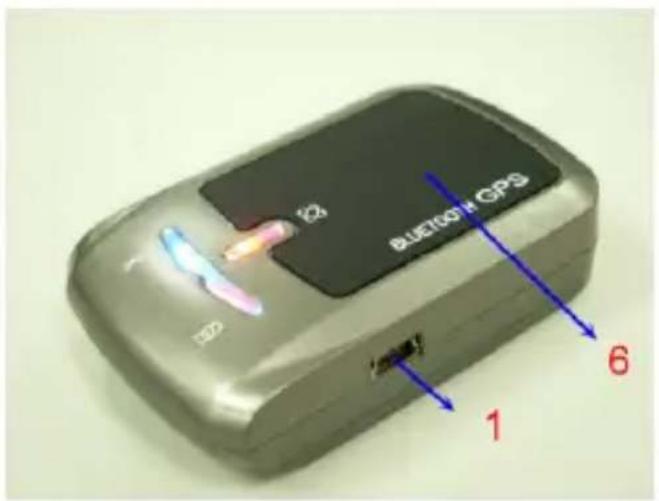
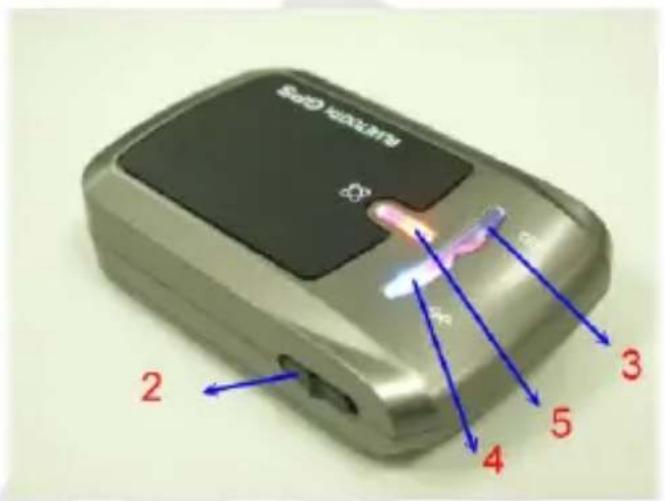
- Power jack (mini USB type)
- Power switch
- Battery status LED (red/green)
- Bluetooth status LED (blue)
- GPS status LED (orange)
- Internal antenna
LED Indicator
GPS status LED
- On - GPS position not fixed
- Blinking - GPS position fixed
Battery status LED
- Off - GPS receiver turned off
- Red (Blinking) - Low battery
- Green (On) - Battery charging
- Green (Blinking) - Battery fully charged
Bluetooth status LED
- On - Bluetooth not connected
- Slow blinking - Sleep mode
– Rapid blinking – Bluetooth connected
Getting Started
1. Install the battery
2. Turn on the GPS Bluetooth receiver.
Switch the power switch (the GPS status LED turns green and Bluetooth status LED turns Blue.)
3. Activate Bluetooth function of your PDA/PC
Prior to activating the Bluetooth function of your PDA/PC, please make sure the device is equipped with Bluetooth function, and the driver software has been installed.
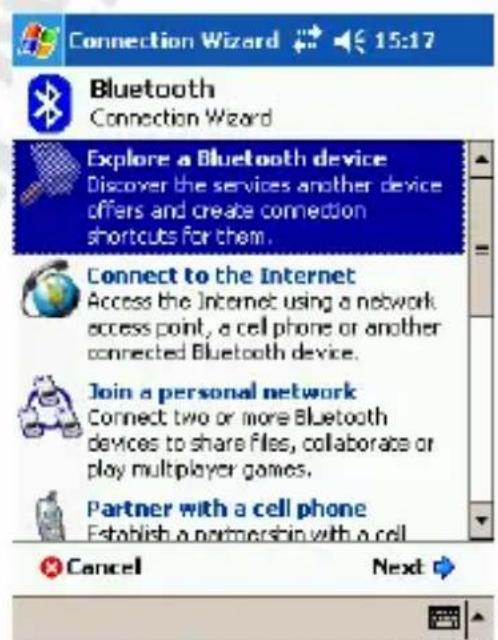
4. Activate Bluetooth Manager & Established New Connections. Illustrations using PocketPC:
a) First, find the device with which you wish to establish connection.
b) Open „Bluetooth Manager“ on your PocketPC
c) Follow the steps below
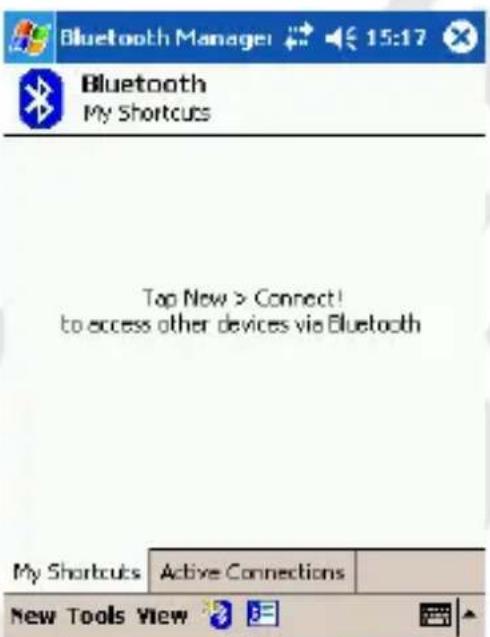
Tap New and then Connect!
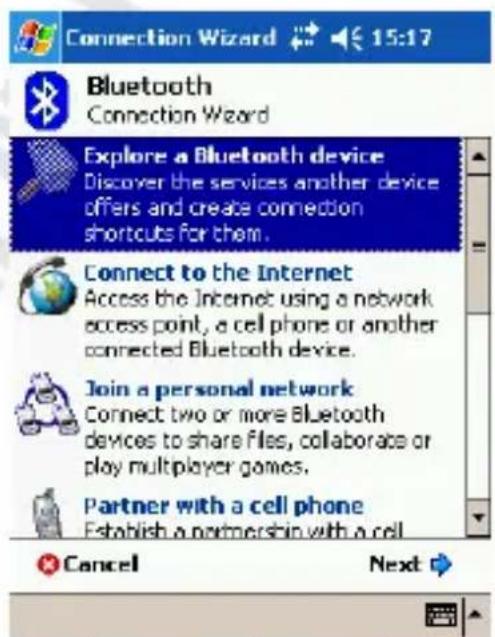
Select above option and tap Next
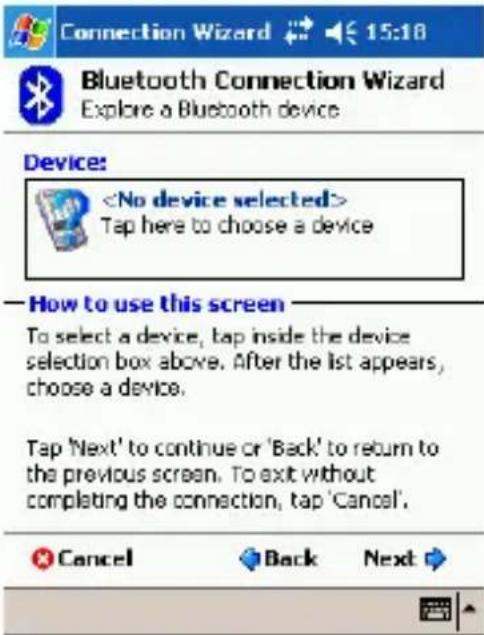
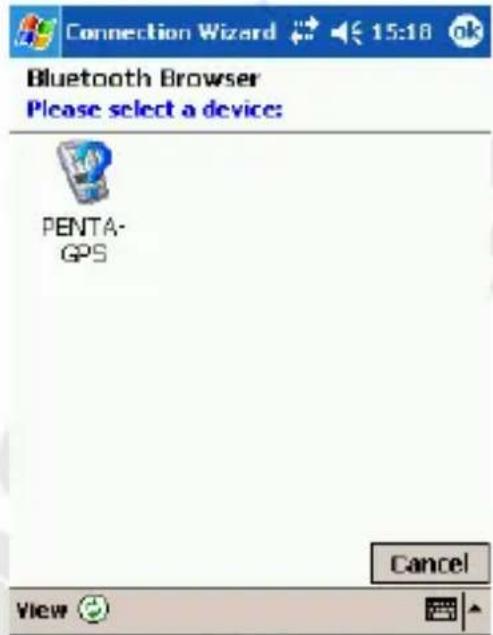
Tap within Device frame Tap on device
![Bluetooth Passkey 15:16 Bluetooth Authentication Device: PENTA-GPS Passkey: ***** Cancel —How to use this screen The Bluetooth pairing procedure establishes a secret key that is used in all future connections to authenticate. 123 1 2 3 4 5 6 7 8 9 0 • = ? Tab q w e r t y u l o p [ ] CAP a s d f o h j k l ; ' Shift z x c v b n m , . / ← Ctrl áü ^ \ ↓ ↑ ← →](/content/2026/05/945628/images/7fde2d7928169b67ad30c2418f3e1cf2ec2932e2c7ae35dd173540321e7fc470.jpg)
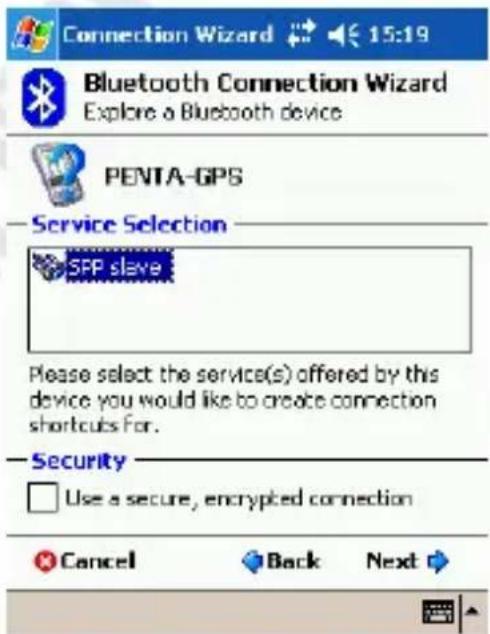
In Passkey field enter 0000 and Select above option and tap Next tap Enter
PENTAGRAM PathFinder (P 3105)
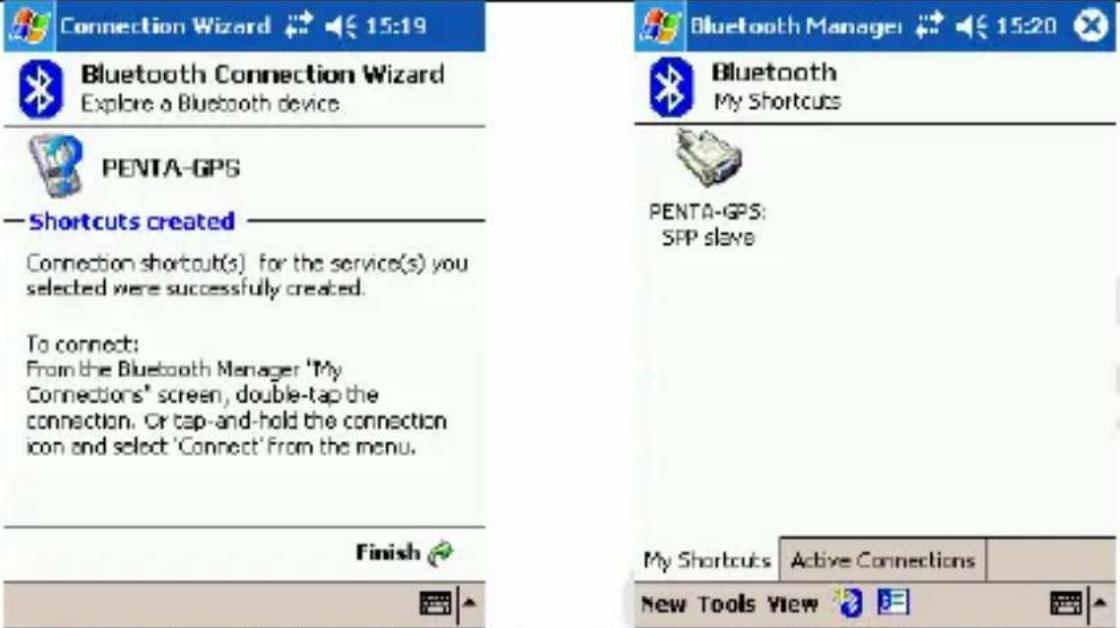
Tap Finish Double-tap this Icon will start connection
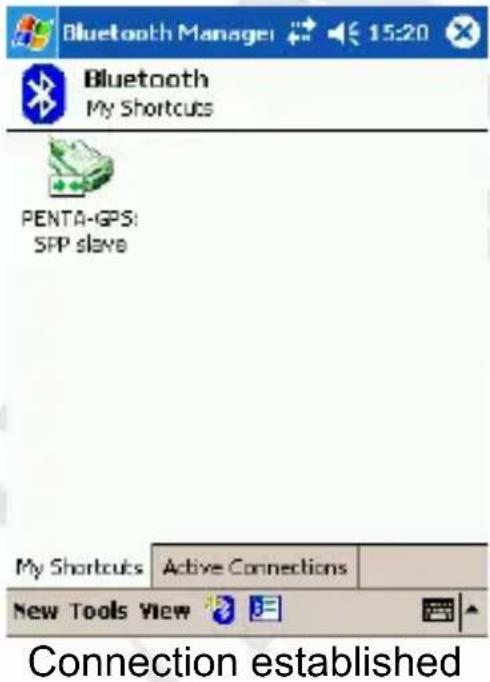
5. Turn off the GPS Bluetooth Receiver
Press the power button for Turn off, all LEDs will goes off.
We recommend that close the e-map before turning off the GPS Bluetooth receiver, in order to avoid any possible PDA/PC freeze.
Specification
GPS Features:
| Chipset | MTK | |
| Frequency | L1, | 1575,42MHz |
| C/A Code 1023MHz | ||
| Channels | 51 | Channels |
DGPS WAAS, EGNOS, MSAS
Antenna (Internal) Built-in low noise antenna
Sensitivity To 158dBm Tracking
Time To First Fix (TTFF)
Cold Start 36 s, average
Warm Start 33 s, average
Hot Start 1 s, average
Reacquisition < 1 sec
Update rate 1 s
Accuracy
Position Open sky: < 3 m
Velocity 0.1 m/sec (0.05 m/sec – DGPS)
Time ± 50 ns synchronized to GPS time
Power
Built-in rechargeable 1100mAh Li-Ion and 5V
Operation Current < 42mA (Typical)
AC adaptor Output: 5.3 V, 500mA
Car charger In 12 V; Out 5 V
Datum WGS-84
Dynamic conditions
Altitude < 18000 m
Velocity < 515 m/sec
Acceleration < 4 G
Temperatures
Operating -10 °C \~ +60 °C
Storage -20 °C \~ +60 °C
Dimensions (mm) 72.2 x 46.5 x 20 (L. x W x H.)
Weight 64.7 g (battery included)
Interface
PC/PDA Bluetooth (class 2); distance 15 m
GPS Protocol NMEA-0183 V3.01 – GGA, GSA, GSV, RMC, Baud rate 115200bps

natural_image
Geometric star symbol enclosed in a pentagon, no text or labels presentPENTAGRAM
THE PERFECT SIMPLICITY
- PL
- Introduction
- Box Contents
- Hardware Description
- LED Indicator
- Getting Started
- Install the battery
- Turn on the GPS Bluetooth receiver.
- Activate Bluetooth function of your PDA/PC
- Activate Bluetooth Manager & Established New Connections. Illustrations using PocketPC:
- PENTAGRAM PathFinder (P 3105)
- Turn off the GPS Bluetooth Receiver
- Specification
- Time To First Fix (TTFF)
- Accuracy
- Power
- Dynamic conditions
- Temperatures
- Interface
Brand : Pentagram
Model : PathFinder P 3105
Category : Gps