
TEV-501 TRAVEL VIDEO - Car video player BLAUPUNKT - Free user manual and instructions
Find the device manual for free TEV-501 TRAVEL VIDEO BLAUPUNKT in PDF.


User questions about TEV-501 TRAVEL VIDEO BLAUPUNKT
0 question about this device. Answer the ones you know or ask your own.
Ask a new question about this device
Download the instructions for your Car video player in PDF format for free! Find your manual TEV-501 TRAVEL VIDEO - BLAUPUNKT and take your electronic device back in hand. On this page are published all the documents necessary for the use of your device. TEV-501 TRAVEL VIDEO by BLAUPUNKT.
USER MANUAL TEV-501 TRAVEL VIDEO BLAUPUNKT
Travel Entertainment Video unit
TEV-501
Operating and installation instructions
natural_image
Diagram of a portable electronic device connected to a DC 12V power supply unit (no text or symbols on the device itself)Video Ausgang 1,0 Vp/p, 75 Ohm, unbalanced
① Video input VIDEO IN
② Audio input, left channel AUDIO IN L
③ Audio input, right channel AUDIO IN R
④ Headphone output 1
HEADPHONE 1
⑤ Headphone output 2
HEADPHONE 2
⑥ On/off button POWER
⑦ Volume control, quieter VOLUME, picture controls
⑧ Sequence switch for setting contrast, brightness, colour and tint PICTURE
⑨ Volume control, louder
VOLUME, picture controls
⑩ Infrared receiver for remote control, optional SENSOR
⑪ Stop button, eject cassette from the unit STOP/EJECT
⑫ Fast rewind button REWIND
⑬ Playback button PLAY
⑭ Fast forward button FFWD
⑮ Input for 12-volt direct current DC 12V
⑯ Video input VIDEO IN
⑰ Audio input, left channel AUDIO IN L
18 Audio input, right channel AUDIO IN R
⑲ Output for an external monitor AV OUT
⑳ Input for an optional television receiver
Notes 15
Securing and installing the TEV-501 16
Before using for the first time...... 16
Securing the TEV-501
between the front seats 17
Operating the TEV-501 in buildings . 18
Operating the TEV-501 ...... 18
Switching the TEV-501 on/off ..... 18
Playing a video cassette 18
Inserting a video cassette ...... 18
Removing a video cassette ...... 18
Playing a video cassette .... 18
Fast tape winding.... 19
Connecting external sources (games consoles, DVD players and television receivers) 19
Connecting a games console/ DVD player to the TEV-501 ...... 19
Connecting an external monitor .. 19
Connecting a television receiver to the TEV-501 .... 19
Headphone connection.... 19
Adjusting the volume 20
Adjusting the picture 20
Adjusting the contrast 20
Adjusting the brightness 20
Adjusting the colour 20
Adjusting the tint 20
Technical data 21
Thank you for deciding to use a Blaupunkt product. We wish you a lot of fun with your new piece of equipment.
Before operating the TEV-501 (Travel Entertainment Video) unit for the first time, please read these operating instructions carefully and keep them in the TEV-501's case for future reference. Please observe the following safety instructions to ensure you operate the TEV-501 safely and in a manner that will not be of danger to anyone.
The TEV-501 must be connected to a switched power supply (e.g. the cigarette lighter) and must not be connected directly to the vehicle battery. To avoid the battery running flat, disconnect the TEV-501 from the power supply when not in use.
The TEV-501 must always be secured in its case using the Velcro straps. Fasten the unit to the eyelets at the side.
Ensure that the unit is attached and secured in accordance with these operating instructions.
The S-hooks and all the straps must be attached and fastened correctly to avoid the unit causing injury in the event of an accident.
To ensure that the TEV-501 is well ventilated, only operate the unit with the case opened.
Only use the supplied power supply unit. Always disconnect the power supply from the socket or cigarette lighter first, before disconnecting the cable from the TEV-501.
Never touch the unit with moist hands.
To clean the unit, only use a dry, lint-free cloth. Never use harsh cleansing agents or thinners.
Danger of electric shock. Never open the unit's housing. It does not contain any components that can be serviced by the user.
Remove the video cassette from the unit when not in use.
Securing and installing the TEV-501
Before using for the first time
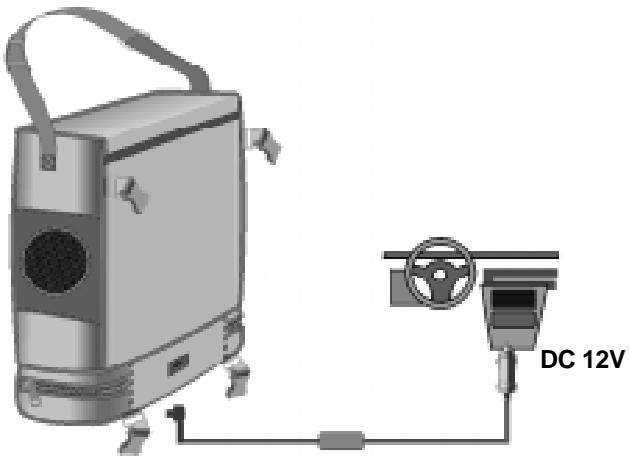
Open the lower storage compartment of the TEV-501's case, and remove the cigarette lighter adapter and the four straps.
→ Close the lower storage compartment.
Remove the unit from its case.
Thread the adapter cable through the opening in the case.
Connect the plug to the DC 12V input of the TEV-501.
Place the unit back into the case.
Secure the TEV-501 using the Velcro straps located inside the case by threading the Velcro straps through the eyelets on the side of the unit.
natural_image
Diagram of a portable electronic device connected to a DC 12V power supply unit (no text or symbols on the device itself)Securing the TEV-501 between the front seats
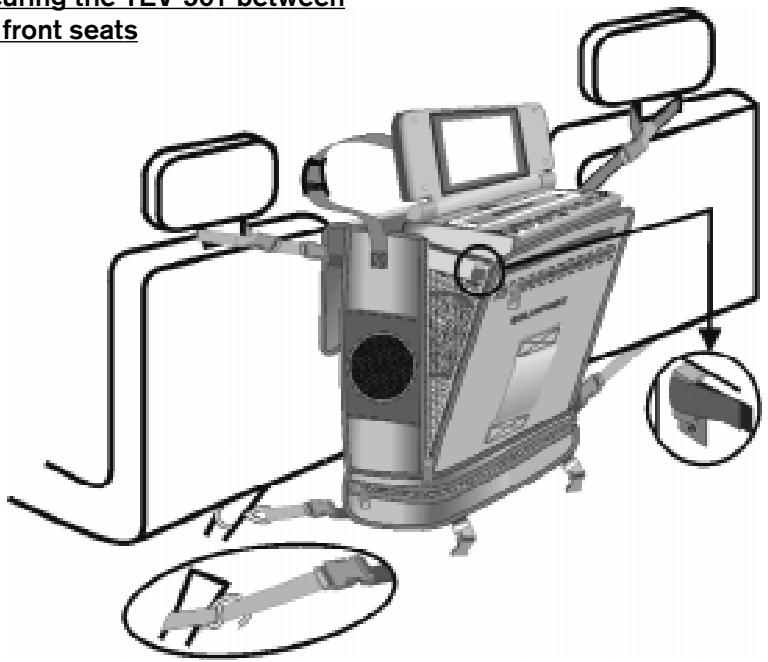
Take one of the straps that does not have an S-hook attached.
Place the strap around one of the headrest supports on the driver seat.
Fasten the belt around the headrest support using the two buckles.
Connect one of the strap's buckles to the corresponding buckle on the side of the bag. You can adjust the length of the strap to suit the conditions in the vehicle interior.
Repeat this procedure for the passenger seat.
Now take one of the straps that does have an S-hook attached.
Connect the buckle of the S-hook strap with one of the buckles at the lower end of the case.
Place the strap around the seat rail of the driver seat or the lower safety belt attachment point.
Thread the strap through the S-hook.
Pull the strap tight.
Repeat this procedure for the passenger seat.
Open the case's upper lid.
Flip up the monitor.
Open the zip fasteners at the front of the case. The unit is angled at around 15°. Close the zip fasteners until the unit is set at an angle that you find convenient.
Operating the TEV-501 in buildings
Place the unit on a secure and level surface.
Open the lower storage compartment in the TEV-501's case, and remove the power supply unit.
Connect the output of the power supply unit to the DC 12V input of the TEV-501.
Connect the mains power cable to a 220-volt socket.
Operating the TEV-501
Switching the TEV-501 on/off
→ Press the POWER button to switch the TEV-501 on/off.
Playing a video cassette
Note
The TEV-501 is designed to play standard consumer video cassettes of the VHS variety (Video Home System). Never try inserting other cassettes other than VHS cassettes into the TEV-501. Suitable VHS video cassettes are labelled with the VHS symbol. Blaupunkt-Werke cannot accept any liability for damage that may occur from using other video cassettes in this unit.
Inserting a video cassette
Carefully insert a video cassette with its printed side uppermost and its flap side first into the cassette compartment of the TEV-501.
Removing a video cassette
With playback stopped, press the STOP/EJECT button.
Playing a video cassette
To begin playback, press the PLAY button.
Note
Video cassettes will be played automatically if their recording protection mechanism has been activated.
Fast tape winding
To fast forward the tape,
→ Press the FFWD button.
To fast rewind the tape,
→ Press the REW button.
Connecting external sources (games consoles, DVD players and television receivers)
You can connect up to two external video and audio sources to the TEV-501 (e.g. a games console or DVD player), and use the monitor and loudspeakers for the output. The TEV-501 has two separate inputs for video signals and stereo audio signals. The inputs are located on the front and back of the TEV-501. If all the inputs are in use, the TEV-501 gives priority to the inputs at the front of the unit.
Connecting a games console/DVD player to the TEV-501
Use a suitable cable to connect a games console/DVD player to the VIDEO IN, AUDIO IN L and AUDIO IN R inputs at the front or back of the TEV-501.
⚠️ To avoid damage to the TEV-501 and the games console, make absolutely certain that the cable colours match the jack colours on the units.
→ First switch on the games console.
Now switch on the TEV-501.
To enable an external source to output on the TEV-501,
→ Press the STOP button.
Connecting an external monitor
You can connect a monitor to the TEV-501 in order to output to this monitor.
Connect an external monitor or television to the AV OUT connection on the TEV-501.
Connecting a television receiver to the TEV-501
There is a 32-pin connection at the back of the TEV-501 to allow you to connect the optionally available TET-01 television receiver. If you want to purchase a television receiver for the TEV-501, please contact a Blaupunkt dealer.
Headphone connection
There are two 3.5 mm headphone connections at the front of the TEV-501 labelled HEADPHONE 1 and HEADPHONE 2. You can connect headphones to either of these jacks. If you connect a headphone to the HEADPHONE 1 jack, the unit's internal loudspeakers will be deactivated. If you only connect up the HEADPHONE 2 jack, sound will be outputted simultaneously over the internal loudspeakers.
Adjusting the volume
To increase the volume,
→ Press the right VOLUME button.
To decrease the volume,
Press the left VOLUME button.
Whilst you are making your adjustments, a symbolic representation of the volume level appears in the display.
Adjusting the picture
Adjusting the contrast
To adjust the contrast of the monitor,
→ Press the PICTURE button.
CONTRAST appears in the display.
Adjust the picture contrast using the two VOLUME buttons.
Adjusting the brightness
To adjust the brightness of the monitor,
Repeatedly press the PICTURE button until BRIGHTNESS appears in the display.
Adjust the brightness using the two VOLUME buttons.
Adjusting the colour
To adjust the colour of the monitor,
Repeatedly press the PICTURE button until COLOR appears in the display.
Adjust the colour using the two VOLUME buttons.
Adjusting the tint
To adjust the tint of the monitor,
Repeatedly press the PICTURE button until TINT appears in the display.
Adjust the tint using the two VOLUME buttons.
Technical data
Television standard
PAL/NTSC/ME
SECAM/SECAM L
Diagonal image size
Approx. 12.4 cm
(5 inches)
Audio tracks 1
Tape width 12.7 mm
Tape speed SP
33.35 mm/s
Fast tape winding
Less than 7 minutes
for a 120-minute
cassette
Video output 1.0 Vp/p, 75 ohms,
unbalanced
Video S/N Better than 40 dB
Audio power 2 x 0.5 W
Audio S/N Better than 40 dB
Electrical power supply
DC 12 V,
AC 100 - 240 V/
50 - 60 Hz
Power consumption
18 W
Permissible air humidity
10-75%
Permissible temperature range
-20° to +60° Celsius
Dimensions (W x H x D)
275 × 345 × 125 mm
Service-Nummern / Service numbers / Numéros du service après-vente / Numeri del servizio di assistenza / Servicenummers / Telefonnummer för service / Números de servicio / Número de serviço
| Tel.: | Fax: | |
| Deutschland | 0 18 05 00 02 25 | 0 51 21 49 40 02 |
| Belgique / België | 0 25 25 54 44 | 0 25 25 54 48 |
| France | 014 010 70 07 | 014 010 73 20 |
| Nederland | 023 565 63 48 | 023 565 63 31 |
| Great Britain | 018 958 383 66 | 018 958 383 94 |
| Danmark | 44 89 83 60 | 44 89 86 44 |
| Sverige | 08 750 15 00 | 08 750 18 10 |
| Norge | 66 81 70 00 | 66 81 71 57 |
| Suomi | 094 359 91 | 094 359 92 36 |
| Österreich | 01-6 10 39-0 | 01-6 10 39-391 |
| Ελλάς | 015 762 241 | 015 769 473 |
| Česká republika | 026 130 04 41 | 026 130 05 14 |
| USA | 800-266 25 28 | 708-681 71 88 |
| Singapore | 006 535 054 47 | 006 535 053 12 |
| Slovensko | 042 175 873 212 | 042 175 873 229 |
- Travel Entertainment Video unit
- Securing and installing the TEV-501 16
- Operating the TEV-501 ...... 18
- Securing and installing the TEV-501
- Before using for the first time
- Securing the TEV-501 between the front seats
- Operating the TEV-501 in buildings
- Operating the TEV-501
- Switching the TEV-501 on/off
- Playing a video cassette
- Note
- Inserting a video cassette
- Removing a video cassette
- Fast tape winding
- Connecting external sources (games consoles, DVD players and television receivers)
- Connecting a games console/DVD player to the TEV-501
- Connecting an external monitor
- Connecting a television receiver to the TEV-501
- Headphone connection
- Adjusting the volume
- Adjusting the picture
- Adjusting the contrast
- Adjusting the brightness
- Adjusting the colour
- Adjusting the tint
- Technical data
- Service-Nummern / Service numbers / Numéros du service après-vente / Numeri del servizio di assistenza / Servicenummers / Telefonnummer för service / Números de servicio / Número de serviço
Brand : BLAUPUNKT
Model : TEV-501 TRAVEL VIDEO
Category : Car video player