
KV-36FQ80E - Projector SONY - Free user manual and instructions
Find the device manual for free KV-36FQ80E SONY in PDF.
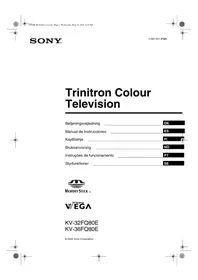


| Product Type | CRT Television |
| Brand | Sony |
| Model | KV-36FQ80E |
| Screen Size (diagonal) | 36 inches (approx. 91 cm) |
| Display Technology | FD Trinitron |
| Audio Output | 2 x 10W (stereo) |
| Power Consumption | Approx. 150 W (operating) |
| Weight | Approx. 55 kg (121 lbs) |
| Dimensions (W x H x D) | Approx. 900 x 700 x 600 mm |
| Inputs | Antenna, SCART (2x), S-Video, Composite |
| Special Features | Multi Picture In Picture (Multi PIP), Picture And Picture (PAP), Teletext, Memory Stick slot |
| Remote Control | Included (model RM-??) |
| Language Support | Multiple (English, Danish, Norwegian, Swedish, Finnish, etc.) |
| Manual Pages | 172 |
| Year of Manufacture | 2002 |
| Maintenance | Clean with soft, dry cloth. Do not use liquids or abrasives. |
| Safety | Do not open the cabinet. Refer servicing to qualified personnel. |
| Spare Parts & Repairability | Contact Sony service centers for genuine parts. Designed for professional repair. |
| Environmental | Printed on ecological paper (Totally Chlorine Free). |
| Warranty | Standard manufacturer warranty (check local regulations). |
Frequently Asked Questions - KV-36FQ80E SONY
User questions about KV-36FQ80E SONY
0 question about this device. Answer the ones you know or ask your own.
Ask a new question about this device
Download the instructions for your Projector in PDF format for free! Find your manual KV-36FQ80E - SONY and take your electronic device back in hand. On this page are published all the documents necessary for the use of your device. KV-36FQ80E by SONY.
USER MANUAL KV-36FQ80E SONY
Trinitron Colour Television
© 2002 Sony Corporation









Getting started
Multi Picture In Picture (Multi PIP) 11
Picture And Picture (PAP) 11
Multi Picture In Picture (Multi PIP)


Using the TV's menu system
Automatic program setting
Manual program setting menu

"Memory Stick" menu


The "Memory Stick" menu is displayed automatically when you insert a "Memory Stick" card into your TV. If a "Memory Stick" is already inserted, press the MEMORY STICK button on the remote control to display the "Memory Stick" menu. There are 3 options: "Index", "Slideshow", and "Setup".
Notes:
* "Memory Stick" and the logo are trademarks of Sony Corporation. ** DCF (Design rule for Camera File systems) is a standardized file name format for digital still cameras, DV camcorders, etc. It is supported by SONY and other manufacturers.
Index
- Press the MEMORY STICK button on the remote control to display the "Memory Stick" menu on the TV screen.

- Press the ♦ or ♦ button to highlight "Index". Then press the OK button to display the "Memory Stick Index" menu.
- Press the ↓, ↑, ←, or → button to highlight the desired image. Then press the OK button to display the image in full size on the screen.


Automatic tuning

Index
Adjustment
TV buttons 8
Text 9
Multi Picture In Picture (Multi PIP) 11
Picture And Picture (PAP)....11
Program table 12
Control panel....12


2 VIDEO standby button
19 Multi PIP button
TV buttons
Control panel
Multi Picture In Picture (Multi PIP)
- Press the button to enter Multi Picture In Picture (Multi PIP) mode


Automatic tuning
Manual tuning menu


Getting started


- The image rotation adjustment image is displayed. Sometimes the earth's natural magnetism can cause the image to be skewed.

- See the table below for an explanation of each option.
- Press the button to exit BOB mode.
Use the 'Individual setting' menu
You can set this menu so that only the program types you want to watch are displayed in the program list.

Manual setting menu


- Press the MEMORY STICK button on the remote control to display the Memory Stick menu on the TV screen.

- Press the MENU button to display the Picture Adjustment menu.
- Press the ➔ button for the Picture Adjustment menu. Press the ♦ or ♦ button to display the desired option*. Press the ➔ button to select.
Memory Stick warnings

Label
KV-32FQ80 FD Trinitron Approx. 82cm
KV-36FQ80 FD Trinitron Approx. 91cm
Audio output
- Press the key to activate the Multi PIP mode.
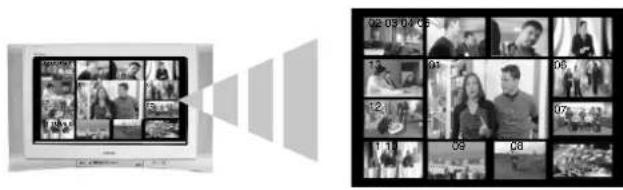
- Press the OK key to see the 'Program index table' on the screen.

- Press the ♦ or ♦ key to move through the list until the channel you want to watch is highlighted.
- Press the ➔ key to view the selected channel on the TV screen, or press the OK key to return to normal TV operation.
Screen mode
Using the 'Custom adjustment' menu

Using the TV's menu system
Automatic Selection

- Press the MEMORY STICK key on the remote control to make the "Memory Stick" menu appear on the TV screen.

- Press the MEMORY STICK key on the remote control to access the "Memory Stick" menu.


Label

Getting started


Write protection




= KV-32FQ80


KV-36FQ80




http://www.world.sony.com/ Sony Corporation Printed in Spain
Ecological Paper - Totally Chlorine Free


- TRINITRON COLOUR TELEVISION
- GETTING STARTED
- MULTI PICTURE IN PICTURE (MULTI PIP)
- USING THE TV'S MENU SYSTEM
- AUTOMATIC PROGRAM SETTING
- MANUAL PROGRAM SETTING MENU
- MEMORY STICK" MENU
- NOTES
- INDEX
- AUTOMATIC TUNING
- ADJUSTMENT
- VIDEO STANDBY BUTTON
- MULTI PIP BUTTON
- TV BUTTONS
- CONTROL PANEL
- MANUAL TUNING MENU
- USE THE 'INDIVIDUAL SETTING' MENU
- MANUAL SETTING MENU
- MEMORY STICK WARNINGS
- AUDIO OUTPUT
- SCREEN MODE
- USING THE 'CUSTOM ADJUSTMENT' MENU
- AUTOMATIC SELECTION
Brand : SONY
Model : KV-36FQ80E
Category : Projector