
iRig Pre - Hi-Fi System IK Multimedia - Free user manual and instructions
Find the device manual for free iRig Pre IK Multimedia in PDF.


| Product Type | Mobile microphone preamp for iOS and Android devices |
| Brand | IK Multimedia |
| Model | iRig Pre |
| Power | 9V battery (included, alkaline type recommended) |
| Battery Life | Approx. 30h without phantom power, 10h with |
| Microphone Input | Female XLR (balanced) |
| Headphone Output | 3.5mm jack (duplicates device output) |
| Phantom Power | +48V switchable, max 6mA |
| Gain Adjustment | Continuous potentiometer |
| Frequency Response | 20 Hz – 20 kHz ±1.5 dB |
| Noise Floor | -98 dB (full band, phantom power active) |
| Maximum Output Level | 2 Vrms |
| Harmonic Distortion | 0.025% THD |
| Compatible Apps | iRig Recorder, VocaLive (iOS and Android) |
| Included Accessories | 9V battery, Velcro strap, quick start guide |
| Maintenance and Cleaning | Clean with a dry, soft cloth |
| Safety Instructions | Do not use phantom power with ribbon microphones; moderate headphone volume |
| Warranty | See www.ikmultimedia.com/warranty |
| Repairability | Spare parts not specified; contact support |
Frequently Asked Questions - iRig Pre IK Multimedia
User questions about iRig Pre IK Multimedia
0 question about this device. Answer the ones you know or ask your own.
Ask a new question about this device
Download the instructions for your Hi-Fi System in PDF format for free! Find your manual iRig Pre - IK Multimedia and take your electronic device back in hand. On this page are published all the documents necessary for the use of your device. iRig Pre by IK Multimedia.
USER MANUAL iRig Pre IK Multimedia
Universal microphone interface for smartphone and tablets
USER MANUAL
Table of Contents
Contents 2
English 4
iRig PRE 4
Register your iRig PRE 4
Installation and setup 5
Usage tips 9
Speci cations 10
Warranty 10
Support and more info 10
Français
iRig PRE 11
CAUTION: RISK OF EXPLOSION IF BATTERY IS REPLACED BY AN INCORRECT TYPE. DISPOSE OF USED BATTERIES ACCORDING TO THE INSTRUCTIONS.
CAUTION: iRig PRO can ONLY be used with:
- Consumer grade, non-rechargeable CARBON-ZINC or ALKALINE batteries.
- Consumer grade, Ni-MH rechargeable batteries up to a maximum capacity of 300mAh.
This CAUTION cancels and supersedes all other indications on compatible battery types that may appear in the quick-start guide or elsewhere
iRig PRE
Thank you for purchasing iRig PRE.
Your package contains:
- iRig PRE
- 9V Battery
- Velcro strip
- Quick Start Guide
- Registration Card.
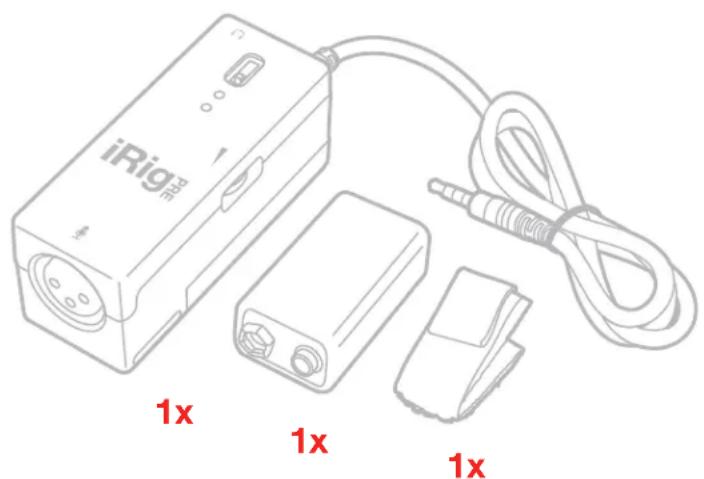
iRig PRE allows you to connect any professional microphone to your iPhone, iPod touch, iPad or Android device. Thanks to the wide gain range and integrated phantom power, you can connect any type of microphone: Dynamic, Condenser or Ribbon
Register your iRig PRE
By registering, you can access technical support, activate your warranty and receive free JamPoints™ which will be added to your account. JamPoints™ allow you to obtain discounts on future IK purchases! Registering also keeps you informed of all the latest software updates and IK products.
Register at: www.ikmultimedia.com/registration
Installation and setup
iRig PRE can be used with your iPhone, iPod touch, iPad or Android device.
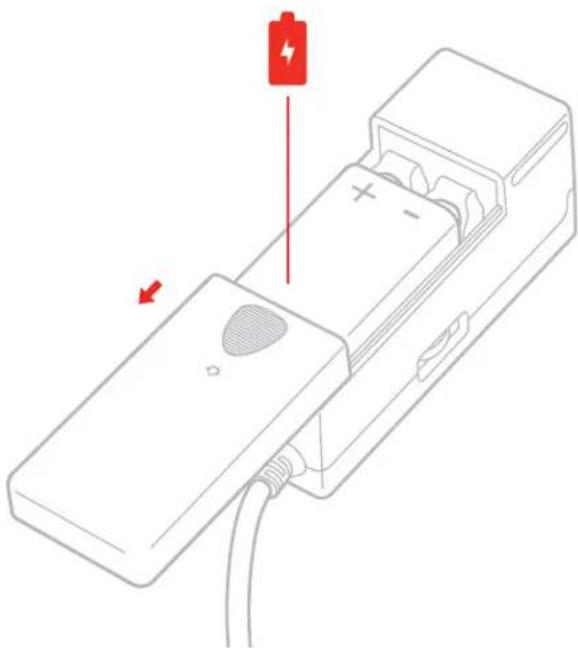
- Insert the 9V battery into the Battery compartment on the bottom side of iRig PRE. Gently open the battery cover by sliding it in the direction of the arrow near the "OPEN" text. Once the compartment is open, gently push the 9V battery into place aligning + and - polarity as shown. Depending on the brand and type of battery, it may be necessary to hold it in place while sliding in the cover again.
natural_image
Diagram of a battery pack connected to a terminal block with a red indicator light and arrow (no text or symbols)- Connect your microphone to the XLR input connector
- Connect iRig PRE to your mobile device headphone socket.
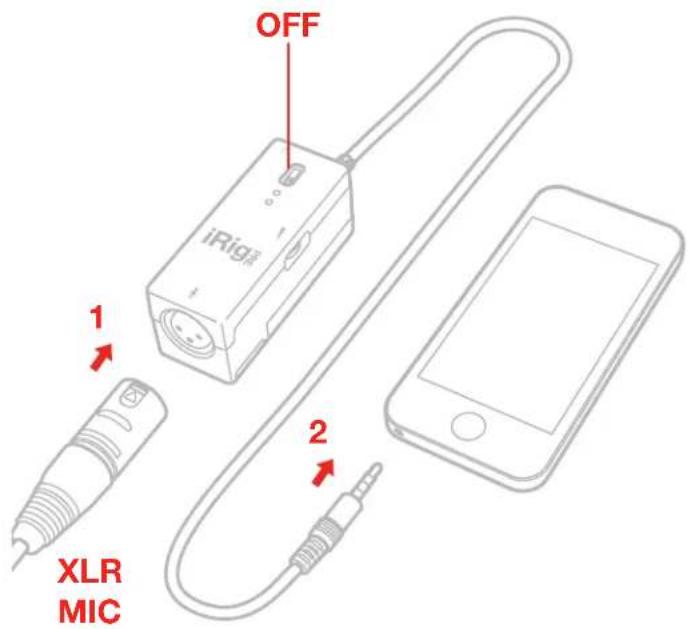
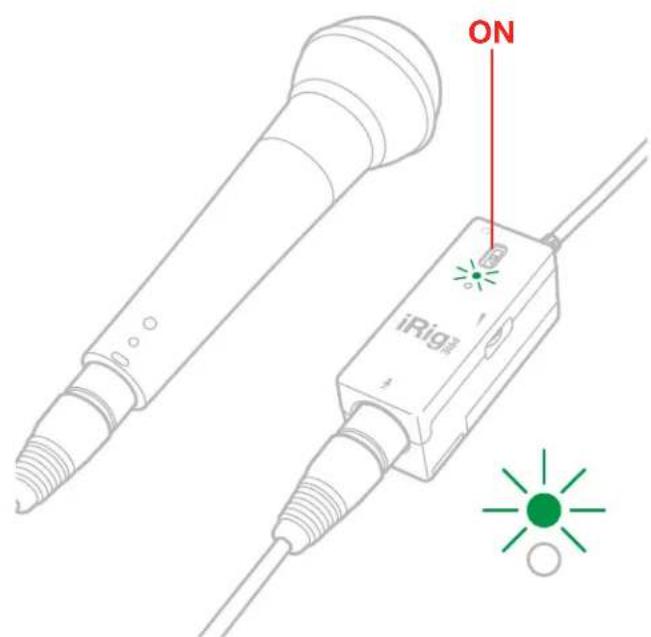
- Turn the iRig PRE ON by sliding the power switch to the ON position. The green LED will light.
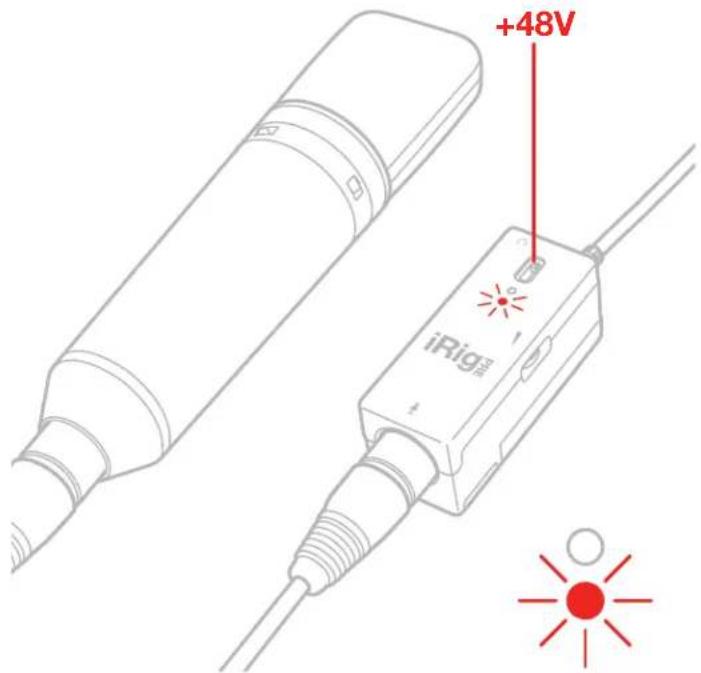
- If you are using a microphone that needs phantom power (like most condenser microphone), slide the power switch to the upper position (marked +48V) to turn phantom power ON. The red LED will light.
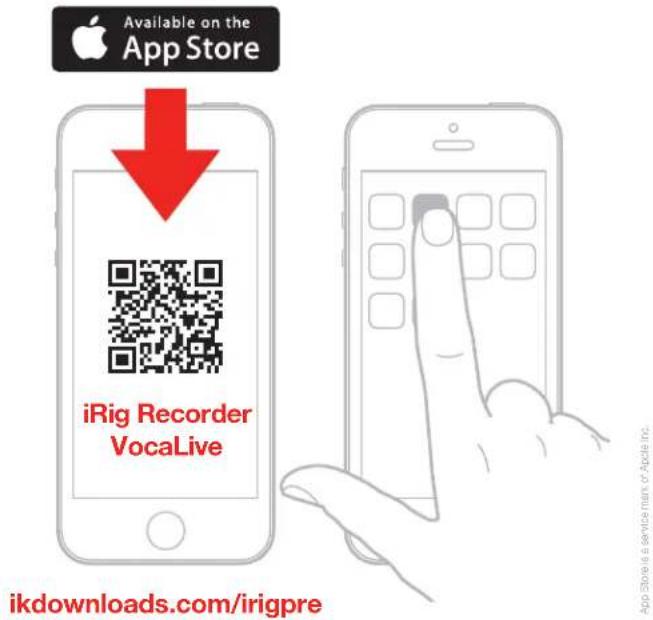
- Download the iRig Recorder or the VocaLive apps from the App Store or from the Google Play Store, and install them on your mobile device.
App Store is a service man of Apple Inc.
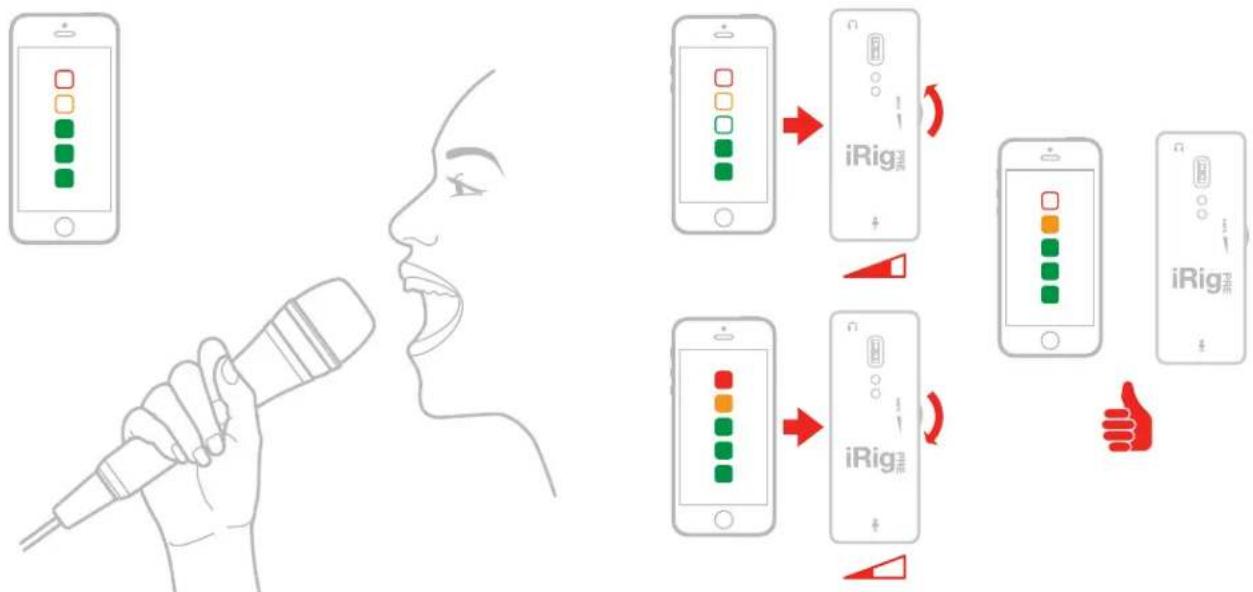
- You are now able to record using your preferred microphone on your mobile device. To get optimal results, you need to properly adjust the GAIN control. Check the input level meter on the app you are using to record (like iRig Recorder). This level meter should peak as high as possible but should never reach the maximum or clipping level. To increase the iRig PRE gain, rotate the knob toward the top of the unit. To decrease the iRig PRE gain, rotate the knob toward the bottom of the unit.
flowchart
graph TD
    A["Hand gesture: Phone with color-coded UI"] --> B["Hand gesture: Hand gesture"]
    B --> C{iRig}
    C -->|Yes| D["iRig1"]
    C -->|No| E{iRig2}
    D --> F["Right arrow to iRig1"]
    E --> G["Right arrow to iRig2"]
    F --> H["Right arrow to iRig3"]
    G --> I["Right arrow to iRig4"]
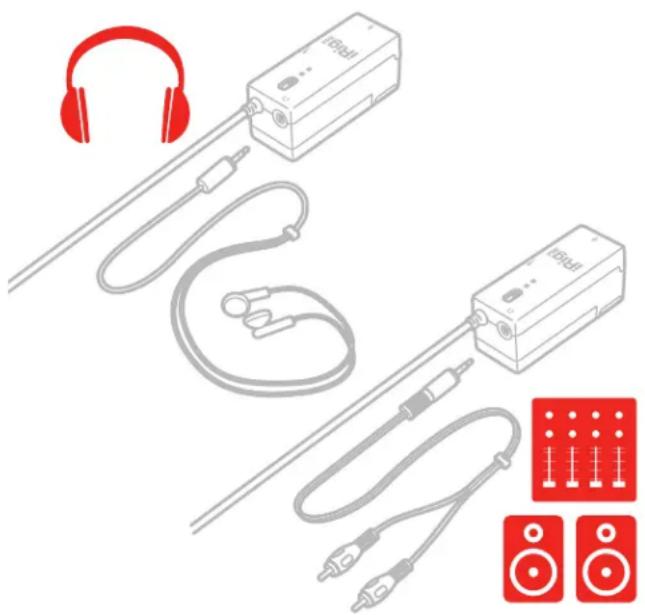
- If you need to monitor what you are recording, connect your headphones to this socket. Remember that this output replicates the mobile device headphone output, so you will hear audio here only with applications that support real-time input/output pass-through like iRig Recorder.
- If you use iRig PRE to connect a vocal microphone for vocal performance, you will need to use VocaLive app that provides high quality effects especially tailored for vocals. In this case, connect your mixer or PA system to this output socket.
natural_image
Illustration of audio equipment including headphones, audio amplifiers, and audio/video cables with speaker icons (no text or symbols)Usage tips
- To avoid having too much noise in the recordings, always set the GAIN properly. If the GAIN is too low, recordings will be too quite, and when boosted within the apps they will become too noisy. If the GAIN is too high, recordings will be distorted.
- Be CAREFUL not to turn the phantom power ON with passive ribbon microphones as the current that will flow into the ribbon element could damage it. When using ribbon mics, turn ON phantom power ONLY if the microphone specifications clearly say it's needed.
- If you hear feedback issues when using high GAIN settings, lower the mobile device volume with the device volume buttons.

WARNING: Permanent hearing loss may occur if earbuds or headphones are used at high volume. You can adapt over time to a higher volume of sound, which may sound normal but can be damaging to your hearing. Set your device volume to a safe level before that happens. If you experience ringing in your ears, reduce the volume or discontinue use of earbuds or headphones with your device.
Specifications
• Frequency response: from 20 Hz to 20 KHz +/- 1.5dB
• Noise: -98dB fullband, phantom power ON
• Max output level: 2 Vrms
• Distortion: 0.025% THD
• Phantom max current: 6mA
- Battery duration (Alkaline 9V cell): approx 30 hours when phantom power is off, approx 10 hours when phantom power is on.
Warranty
Please visit:
www.ikmultimedia.com/warranty
for the complete warranty policy.
Support and more info
www.ikmultimedia.com/support
www.irigpre.com
ATTENTION: RISQUE D'EXPLOSION SI LES PILES SONT REMPLACÉES PAR D'AUTRES PILES DE TYPE INCORRECT. JETER LES PILES USAGÉES SELON LES INSTRUCTIONS.
natural_image
Diagram of a battery pack connected to a terminal block with a red indicator light and arrow (no text or symbols)natural_image
Illustration of audio equipment including headphones, audio amplifiers, and speaker modules (no text or symbols)www.ikmultimedia.com/support
www.irigpre.com
natural_image
Diagram of a battery pack connected to a terminal block with a red indicator light and arrow (no text or symbols)flowchart
graph TD
    A["Hand gesture: Phone with color-coded UI"] --> B["Hand gesture: Hand gesture"]
    B --> C{iRig device with color-coded UI control}
    C --> D["User interface: iPhone screen with color-coded UI icons"]
    D --> E{iRig device with color-coded UI control}
    E --> F["User interface: iPhone screen with color-coded UI icons"]
    F --> G["User interface: iPhone screen with color-coded UI icons"]
    G --> H["User interface: iPhone screen with color-coded UI icons"]
natural_image
Illustration of audio equipment including headphones, audio amplifiers, and speaker modules (no text or symbols)www.ikmultimedia.com/support
www.irigpre.com
ATTENZIONE: RISCHIO DI ESPLOSIONE SE LA BATTERIA VIENE SOSTITUITA CON UNA DI TIPO NON CORRETTO. SMALTIRE LE BATTERIE SECONDO LE ISTRUZIONI.
natural_image
Diagram of a battery pack connected to a terminal block with a red indicator light and arrow (no text or symbols)flowchart
graph TD
    A["Hand speaking into microphone"] --> B["Carphone with color-coded UI icons"]
    B --> C["iRig device with orange/blue square icons"]
    C --> D["Carphone with green/blue square icons"]
    D --> E["iRig device with orange/blue square icons"]
    E --> F["Carphone with red/blue square icons"]
    F --> G["iRig device with green/blue square icons"]
    G --> H["Carphone with red/blue square icons"]
    H --> I["Carphone with green/blue square icons"]
    I --> J["Carphone with orange/blue square icons"]
    J --> K["Carphone with green/blue square icons"]
    K --> L["Carphone with red/blue square icons"]
    L --> M["Carphone with green/blue square icons"]
    M --> N["Carphone with orange/blue square icons"]
    N --> O["Carphone with green/blue square icons"]
    O --> P["Carphone with red/blue square icons"]
    P --> Q["Carphone with green/blue square icons"]
    Q --> R["Carphone with orange/blue square icons"]
    R --> S["Carphone with green/blue square icons"]
    S --> T["Carphone with red/blue square icons"]
    T --> U["Carphone with green/blue square icons"]
    U --> V["Carphone with orange/blue square icons"]
    V --> W["Carphone with green/blue square icons"]
    W --> X["Carphone with red/blue square icons"]
    X --> Y["Carphone with green/blue square icons"]
    Y --> Z["Carphone with orange/blue square icons"]
    Z --> AA["Carphone with green/blue square icons"]
    AA --> AB["Carphone with red/blue square icons"]
natural_image
Illustration of audio equipment including headphones, audio amplifiers, and speaker modules (no text or symbols)Consigli d'uso
www.ikmultimedia.com/support
www.irigpre.com
VORSICHT: EXPLOSIONSRISIKO WENN DIE BATTERIE DURCH EINEN FALSCHEN TYP ERSETZT WIRD. ENTSORGEN SIE AUFGEBRAUCHTE BATTERIEN ENTPRECHEND DEN BEIGELEGTEN HINWEISEN.
natural_image
Diagram of a battery pack with a red battery symbol and power outlet, showing internal components without any text or labels.flowchart
graph TD
    A["Hand gesture: Phone with color-coded UI"] --> B["Hand gesture: Hand gesture"]
    B --> C{iRig device: Color-coded UI control}
    C --> D["User interface: iRig device with color-coded UI"]
    D --> E{iRig device: iRig device with color-coded UI]
    E --> F["User interface: iRig device with color-coded UI"]
    F --> G["User interface: iRig device with color-coded UI"]
natural_image
Illustration of audio equipment including headphones, audio amplifiers, and speaker modules (no text or symbols)Tipps
www.ikmultimedia.com/support
www.irigpre.com
natural_image
Diagram of a battery pack with a red indicator light and arrow, showing internal components (no text or symbols)日本語
flowchart
graph TD
    A["Hand gesture: Phone icon"] --> B["Hand gesture: Microphone"]
    B --> C{iRig device with color-coded UI control}
    C --> D["User interface: iPhone screen with color-coded UI icons"]
    D --> E{iRig device with red/green color-coded UI icons]
    E --> F["User interface: iPhone screen with green/red color-coded UI icons"]
    F --> G{iRig device with orange/blue color-coded UI icons]
    G --> H["User interface: iPhone screen with red/green color-coded UI icons"]
    H --> I["User interface: iPhone screen with green/blue color-coded UI icons"]
natural_image
Illustration of audio equipment including headphones, audio amplifiers, and audio speakers (no text or symbols)使用上のヒント
www.ikmultimedia.com/support
www.irigpre.com
natural_image
Line drawing of a battery pack connected to a terminal block with a red indicator light and power symbol (no text or labels)中文 簡体字
flowchart
graph TD
    A["Hand gesture: Phone with color-coded UI"] --> B["Hand gesture: Hand gesture"]
    B --> C{iRig_PRE}
    C -->|Yes/No| D["iRig_PRE"]
    C -->|Yes/No| E{iRig_PRE}
    D --> F["Right arrow to iRig_PRE"]
    E --> G["Right arrow to iRig_PRE"]
    F --> H["Right arrow to iRig_PRE"]
    G --> I["Right arrow to iRig_PRE"]
natural_image
Illustration of audio equipment including headphones, audio amplifiers, and speaker modules (no text or symbols)使用提示
www.ikmultimedia.com/support
www.irigpre.com
IK Multimedia
IK Multimedia Production Srl
IK Multimedia US LLC
1153 Sawgrass Corporate Parkway, Sunrise, FL 33323
Phone: 954-846-9101 - Fax: 954-846-9077
IK Multimedia Asia
TB Tamachi Bldg. 1F, MBE #709,
4-11-1 Shiba, Minato-ku, Tokyo 108-0014
www.ikmultimedia.com/contact-us
iRig® PRE, VocaLive™ and iRig® Recorder are trademarks or registered trademarks property of IK Multimedia Srl. All other product names and images, trademarks and artists names are the property of their respective owners, which are in no way associated or affiliated with IK Multimedia. iPad, iPhone, and iPod touch are trademarks of Apple Inc., registered in the U.S. and other countries. App Store is a service mark of Apple Inc.. Android is a trademark of Google Inc.. Google Play is a trademark of Google Inc.
Brand : IK Multimedia
Model : iRig Pre
Category : Hi-Fi System