
iKlip - Hi-Fi System IK Multimedia - Free user manual and instructions
Find the device manual for free iKlip IK Multimedia in PDF.


| Product Type | Broadcast mount for smartphones |
| Brand | IK Multimedia |
| Model | iKlip A/V |
| Compatible Devices | iPhone, iPod touch, Android (screen size 3.5" to 6") with case |
| Audio Input | 1/8" TRRS (CTIA/AHJ standard) for smartphone; XLR for microphone |
| Microphone Preamp | Integrated XLR mic preamp with phantom power (+48V) |
| Wireless Receiver Support | Built-in receiver support (requires AA batteries) |
| Phantom Power | Switchable (on/off +48V), max current 6mA |
| Power Supply | 2x AA alkaline batteries |
| Battery Life | ~60 hours (phantom off), ~20 hours (phantom on) |
| Mounting Options | Handheld grip, tripod/monopod (1/4" UNC female thread) |
| Camera Mount | Standard 1/4" UNC thread, removable smartphone holder |
| Smartphone Holder | Expandable holding bracket (3.5" to 6" screens) |
| Audio Output | Headphone jack (monitors smartphone audio with compatible apps) |
| Frequency Response | 20 Hz – 20 kHz ±1.5 dB |
| Noise Level | -98 dB fullband (phantom on) |
| Maximum Output Level | 2 Vrms |
| Total Harmonic Distortion | 0.025% THD |
| Materials | Thermoplastic, aluminum |
| Dimensions | Approx. 7.5 x 4.5 x 2.5 in (handheld) |
| Weight | Approx. 12 oz (without batteries) |
Frequently Asked Questions - iKlip IK Multimedia
User questions about iKlip IK Multimedia
0 question about this device. Answer the ones you know or ask your own.
Ask a new question about this device
Download the instructions for your Hi-Fi System in PDF format for free! Find your manual iKlip - IK Multimedia and take your electronic device back in hand. On this page are published all the documents necessary for the use of your device. iKlip by IK Multimedia.
USER MANUAL iKlip IK Multimedia
Smartphone broadcast mount
USER MANUAL
Table of Contents
Contents 2
English 3
iKlip A/V 3
Register your iKlip A/V 4
iKlip A/V overview 4
Installation and setup 5
Speci cations 11
Warranty 12
Support and more info 12
iKlip A/V
Thank you for purchasing iKlip A/V.
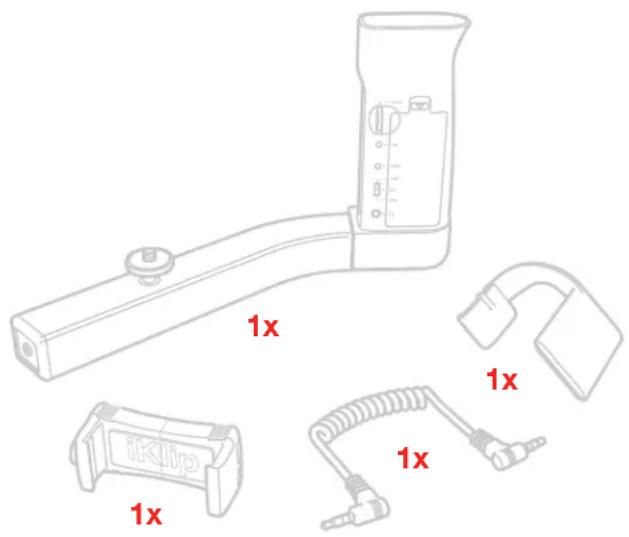
Your package contains
- iKlip A/V
• 1/8" TRRS cable - Holding bracket
- Camera nut
- 2xAA
- Quick start guide
- Registration card
Lights... camera... action! Time to dramatically improve the audio quality of your mobile video productions. Presenting iKlip A/V, the first broadcast mount designed to help you record professional audio and video with your smartphone.
iKlip A/V has a high-end integrated XLR mic preamp with phantom power and built-in wireless receiver support — two standard AA batteries provide the power. It also lets you record a superior video picture thanks to its smartphone holder and hand-held grip. It works with any smartphone or camera that accepts a 1/8" TRRS (CTIA/AHJ wiring standard) audio input. With iKlip A/V, now you have the ability to use your smartphone like a full-featured camcorder.
iKlip A/V features a steady-shot grip and expandable holding bracket that shares the same technology as iKlip Xpand Mini, IK's popular mic stand support for smartphones. It can securely hold any iPhone, iPod touch or Android device with a screen size from 3.5" to 6". You can attach iKlip A/V to a monopod or tripod thanks to its standard female threads on the underside for even more stability. You can also remove the iKlip Xpand smartphone holder and attach other types of compact video cameras to its standard camera mount. No matter how you use it, iKlip A/V delivers effortlessly stable picture quality.
iKlip A/V is compatible with all popular mobile video recording apps. Including favorites like Apple's Camera app as well as third party apps that provide more control, like Filmic Pro, Filmakr, Horizon Camera or MoviePro.
Register your iKlip A/V
By registering, you can access technical support, activate your warranty and receive free JamPoints™ which will be added to your account. JamPoints™ allow you to obtain discounts on future IK purchases! Registering also keeps you informed of all the latest software updates and IK products.
Register at: www.ikmultimedia.com/registration
iKlip A/V overview
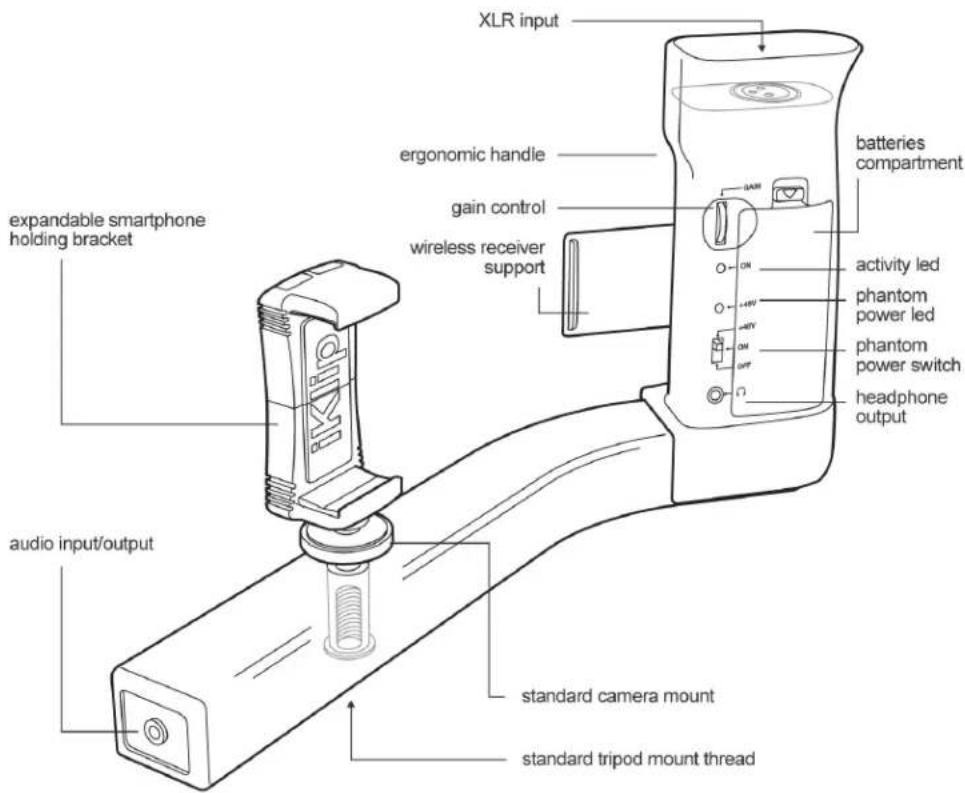
Installation and setup
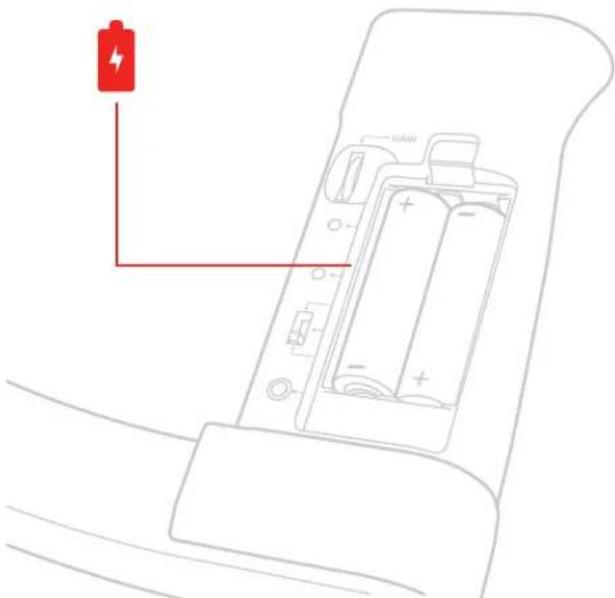
- Insert the AA batteries into the Battery compartment on the handle of iKlip A/V.
natural_image
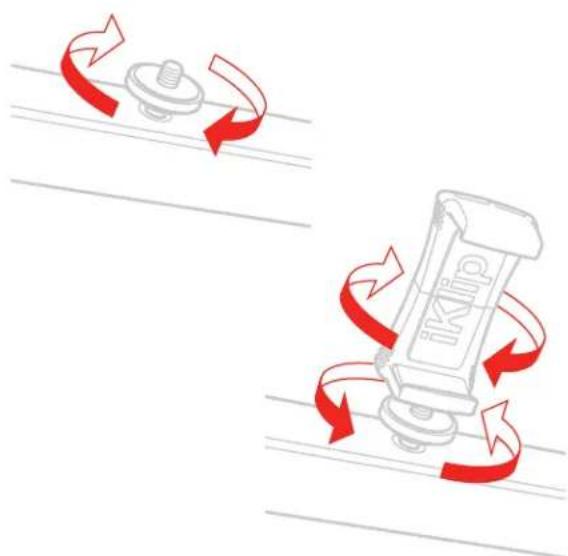
Line drawing of a car interior showing battery, battery pack, and wiring (no text or symbols)- Tighten the camera nut and the holding bracket.
natural_image
Diagram showing a mechanical device with red curved arrows indicating rotational motion, no text or symbols present.- Insert your smartphone.
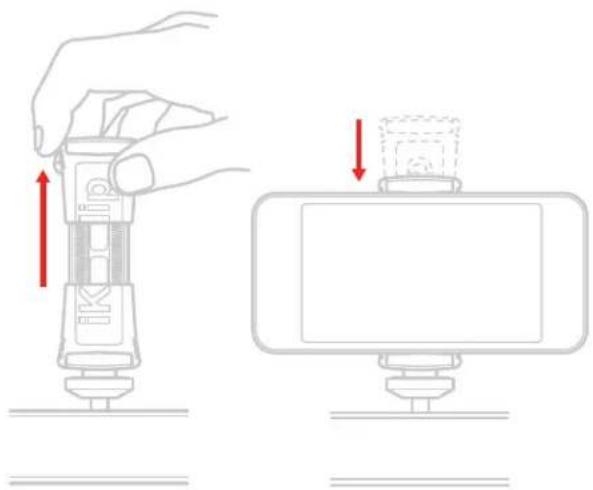
natural_image
Illustration showing a hand adjusting a device with red arrows indicating movement (no text or symbols present)- Connect the included TRRS cable to the iKlip A/V and to the device headset port.
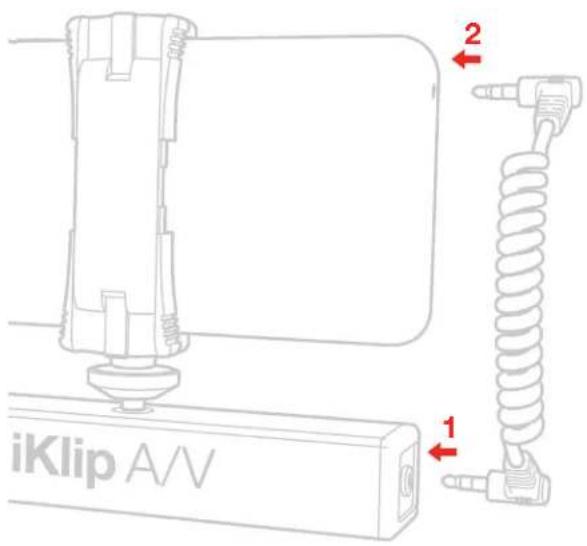
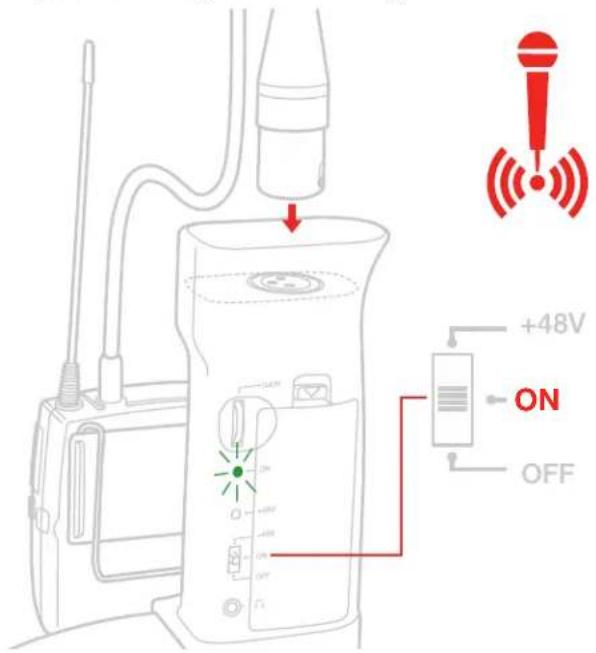
- If you are using a wireless system, first fix the receiver support to the handle.
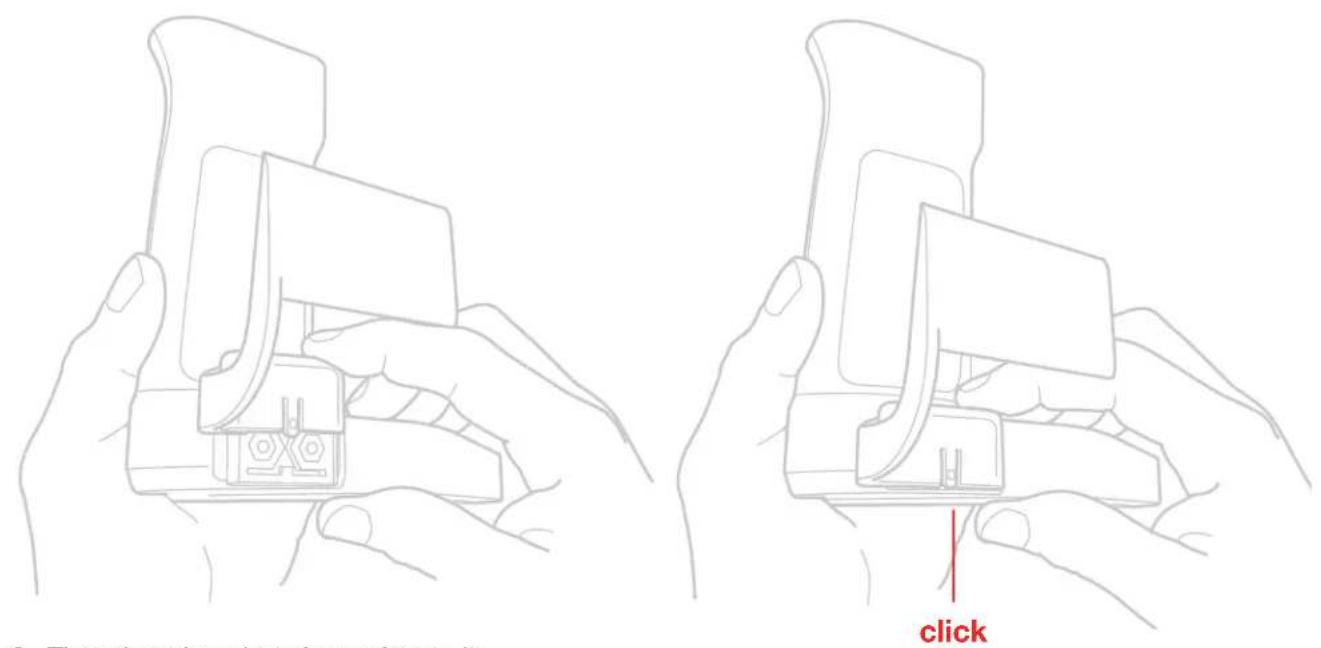
- Then the microphone's receiver to it.
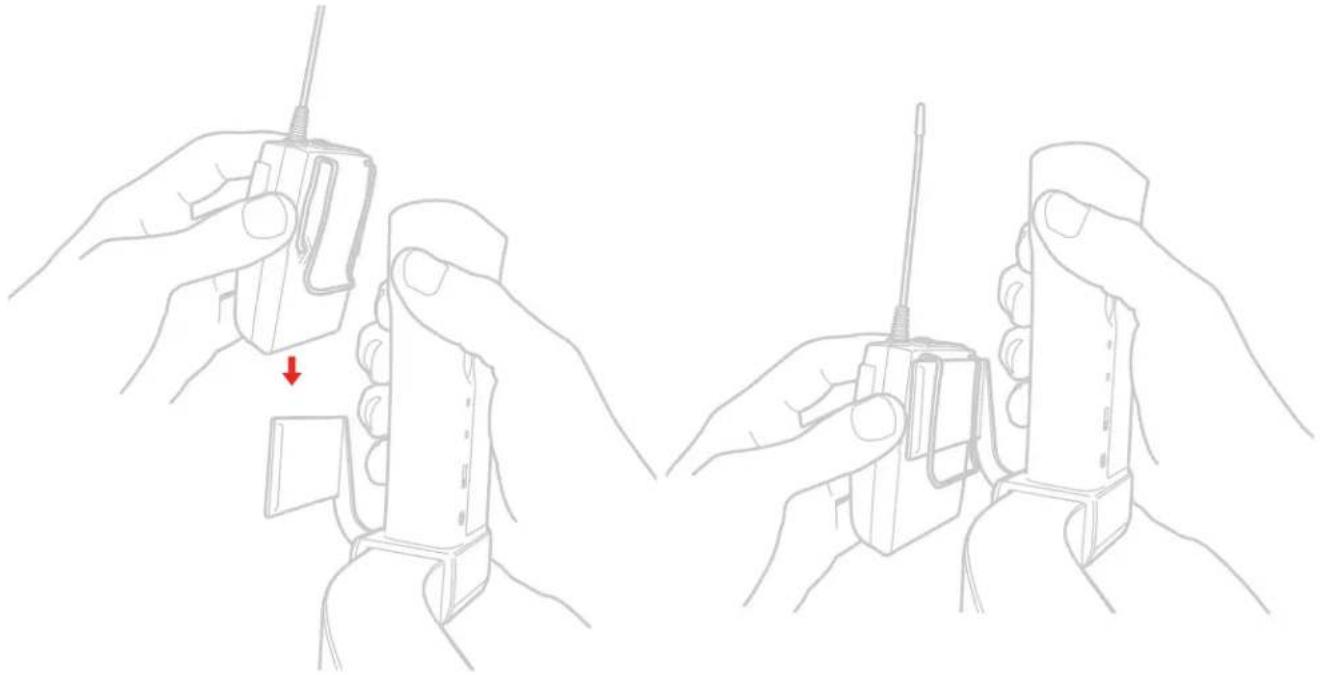
natural_image
Line drawings of two hands holding a handheld device with a red arrow indicating a downward motion (no text or symbols present)- Connect the microphone to the XLR input. Turn the iKlip A/V ON by sliding the power switch to the ON position. The green LED will light.
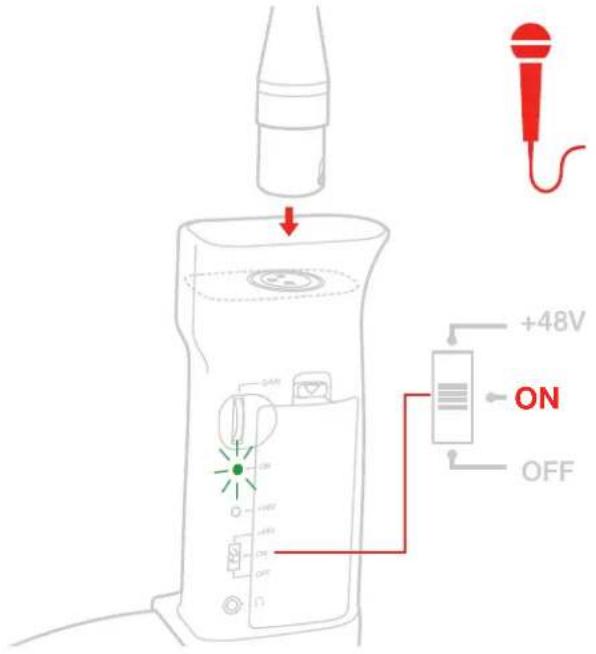
- If you are using a wired dynamic microphone connect the microphone to the XLR input. Turn the iKlip A/V ON by sliding the power switch to the ON position. The green LED will light.
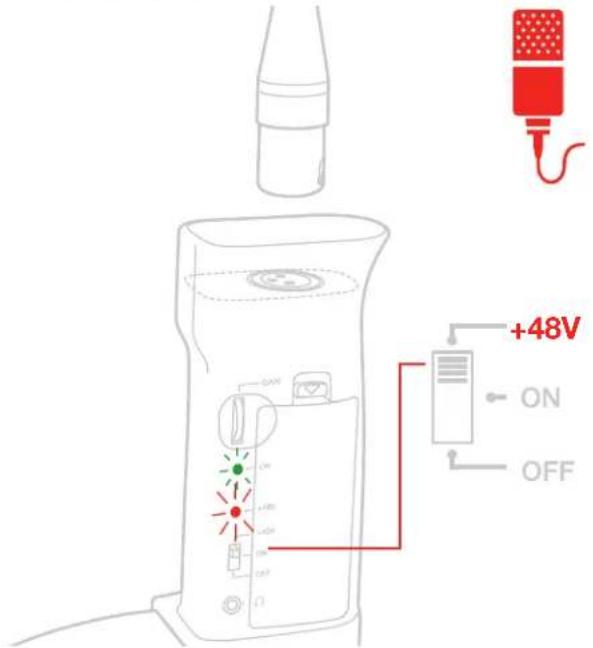
- If you are using a wired condenser microphone that requires phantom power, connect the microphone to the XLR input. Slide the power switch to the upper position (marked +48V) to turn phantom power ON. The red LED will light.
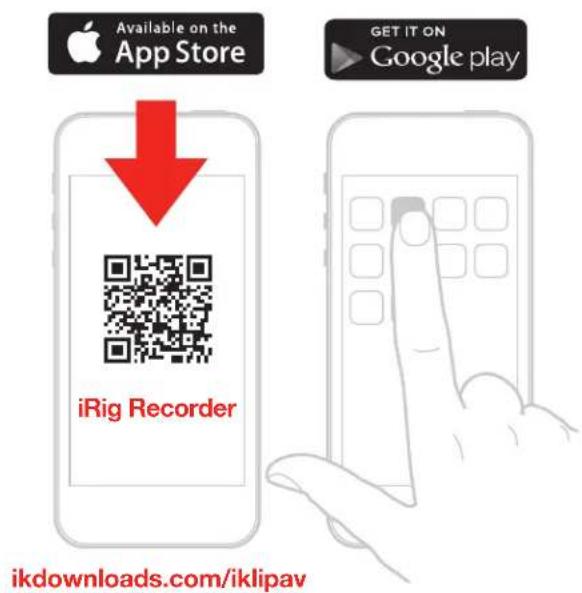
- For audio recording and editing, download the iRig Recorder or the VocaLive apps from the App Store or the Google Play Store, and install them on your mobile device.
- You are now able to record using your preferred microphone on your mobile device. To get optimal results, adjust the GAIN control appropriately. Check the input level meter on the app you are using to record (like iRig Recorder). This level meter should peak as high as possible but should never reach the maximum or clipping level. To increase the iKlip A/V gain, rotate the knob toward the top of the unit. To decrease the iKlip A/V gain, rotate the knob toward the bottom of the unit.
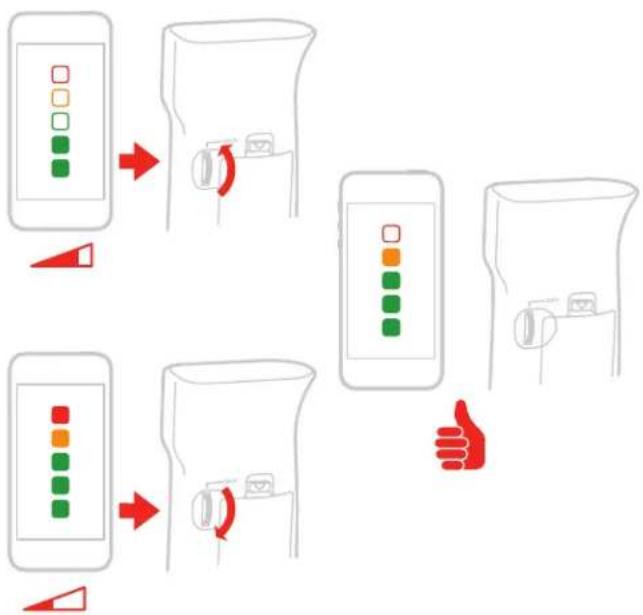
flowchart
graph TD
    A["Green Indicator"] --> B["Orange Indicator"]
    B --> C["Red Indicator"]
    C --> D["Orange Indicator"]
    D --> E["Green Indicator"]
    E --> F["Orange Indicator"]
    F --> G["Green Indicator"]
    style A fill:#f9f,stroke:#333
    style B fill:#ccf,stroke:#333
    style C fill:#cfc,stroke:#333
    style D fill:#fcc,stroke:#333
    style E fill:#cff,stroke:#333
    style F fill:#ffc,stroke:#333
    style G fill:#cfc,stroke:#333
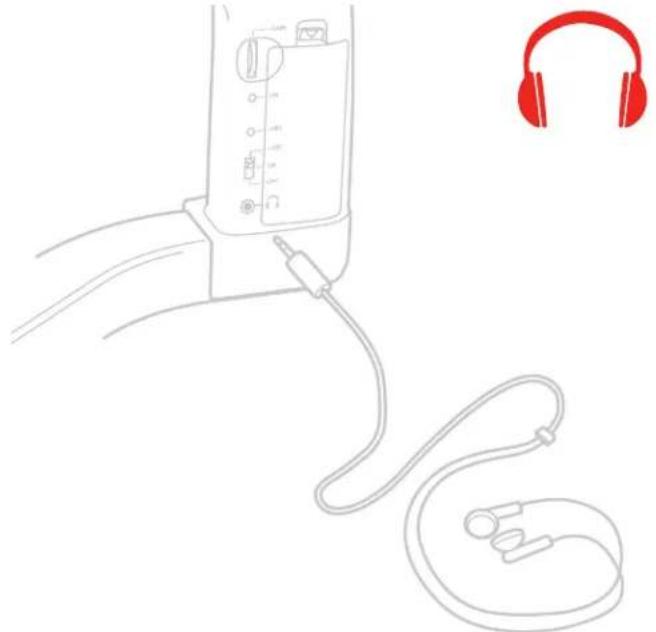
- If you need to monitor what you are recording, connect your headphones to the headphone socket. Remember that this output replicates the mobile device headphone output, so you will hear audio here only with applications that support real-time input/output pass-through like iRig Recorder.
natural_image
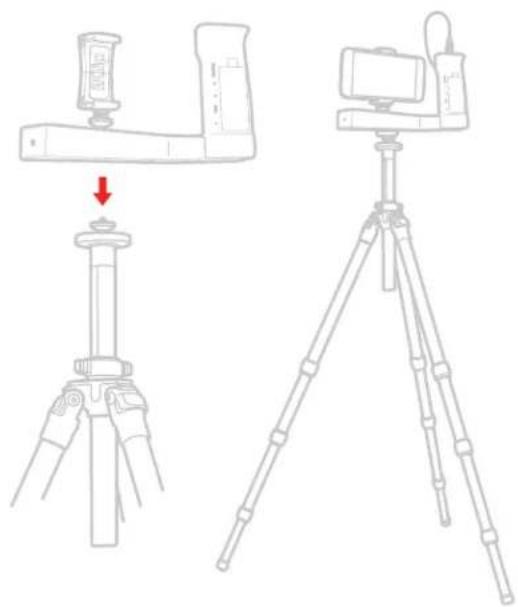
Line drawing of a medical device with attached earphones and tubing, no text or symbols present- If needed, you can fix the iKlip A/V to any camera tripod/stand, thanks to the female 1/4" thread located on the base.
natural_image
Line drawings of a tripod-mounted camera setup with a device mounted on a base, showing a drop and assembly (no text or symbols)Specifications
Holds any iPhone, iPod touch and Smartphone model with screens ranging in size from 3.5" to 6" with case on Works with Digital Cameras, Field Recorders, and devices compatible with standard 1/4" UNC thread Standard 1/4" UNC thread mount
Frequency response: from 20 Hz to 20 kHz +/- 1.5dB
Noise: -98 dB fullband, phantom power ON
Maximum output level: 2 Vrms
Distortion: 0.025% THD
Phantom max current: 6mA
Battery duration (Alkaline AA): approx 60 hours when phantom is off, approx 20 hours when phantom is on Material: Thermoplastic / Aluminum
Warranty
Please visit:
www.ikmultimedia.com/warranty
for the complete warranty policy.
Support and more info
www.ikmultimedia.com/support
www.iklipav.com
IK Multimedia
IK Multimedia Production Srl
IK Multimedia US LLC
1153 Sawgrass Corporate Parkway, Sunrise, FL 33323 Phone: 954-846-9101 - Fax: 954-846-9077
IK Multimedia Asia
TB Tamachi Bldg. 1F, MBE #709,
4-11-1 Shiba, Minato-ku, Tokyo 108-0014
www.ikmultimedia.com/contact-us
iKlip® A/V is a trademark or registered trademark property of IK Multimedia Production Srl. All other product names and images, trademarks and artists names are the property of their respective owners, which are in no way associated or affiliated with IK Multimedia.
Brand : IK Multimedia
Model : iKlip
Category : Hi-Fi System