
SLS 14 A1 - Chargeur pour appareil mobile SILVERCREST - Free user manual and instructions
Find the device manual for free SLS 14 A1 SILVERCREST in PDF.


| Type de produit | Chargeur pour appareil mobile (panneau solaire) |
| Marque | SilverCrest |
| Modèle | SLS 14 A1 |
| Dimensions (L x H x P) | 320 x 197 x 33 mm |
| Poids | Environ 560 g (sans accessoires) |
| Alimentation | Énergie solaire, panneau solaire pliable de 2 x 7 W |
| Tension de sortie USB | 5,0 V ±5%, 2 A (max. 2 A au total pour les deux ports) |
| Température de fonctionnement | 5 °C à 45 °C |
| Humidité de fonctionnement | Max. 85 % HR (sans condensation) |
| Température de stockage | -5 °C à +50 °C |
| Fonctions principales | Panneau solaire pliable, 2 ports USB, poche de rangement, crochets de suspension, indicateurs LED d'orientation solaire |
| Entretien et nettoyage | Nettoyer avec un chiffon sec ; ne pas utiliser de liquides corrosifs |
| Sécurité | Ne pas exposer à des sources de chaleur, à l'humidité ou à des chocs ; tenir hors de portée des enfants |
| Pièces détachées et réparabilité | Réparation uniquement par un personnel qualifié ; l'ouverture du boîtier annule la garantie |
| Informations générales | Usage privé seulement, non tropical ; conformité CE ; garantie 3 ans |
Frequently Asked Questions - SLS 14 A1 SILVERCREST
User questions about SLS 14 A1 SILVERCREST
0 question about this device. Answer the ones you know or ask your own.
Ask a new question about this device
Download the instructions for your Chargeur pour appareil mobile in PDF format for free! Find your manual SLS 14 A1 - SILVERCREST and take your electronic device back in hand. On this page are published all the documents necessary for the use of your device. SLS 14 A1 by SILVERCREST.
USER MANUAL SLS 14 A1 SILVERCREST
natural_image
Exterior view of a black modular solar panel with open doors and metal hinges (no text or symbols visible)FOLDABLE SOLAR PANEL SLS 14 A1
TARGA GMBH
Coatsveeg 45
DE-594941 GERMANY
Last Information Update - Datum niewals versie
Operating instructions and safety instructions
NL
- Intended use.... 3
- Trademarks.... 3
- Supplied items.... 4
- Technical data .... 4
- Safety instructions .... 4
- Maintenance / cleaning 6
- Copyright 6
- Overview of the controls....7
- Prior to use 7
9.1. Recharging with the solar panel (A) 8 - First use 9
10.1. Compatible devices....9
10.2. Recharging external devices....9 - Troubleshooting 10
- Storage when not in use.... 10
- Environmental and disposal information.... 10
- Conformity information.... 10
- Warranty and servicing advice.... 11
Congratulations!
By purchasing a SilverCrest solar panel SLS 14 A1, hereinafter referred to as solar panel, you have opted for a high-quality product.
Familiarise yourself with the solar panel before using it for the first time, and read these operating instructions carefully. Pay particular attention to the safety instructions and use the solar panel only as described in these operating instructions and for the specified range of applications.
Keep these operating instructions in a safe place. Include all documents when passing on the solar panel to someone else.
1. Intended use
This solar panel is an information technology device and is used to recharge batteries in mobile phones, MP3 players, digital cameras or other battery-operated devices which can be charged via a USB port. For this purpose, the solar panel (A) converts sunlight into electric power and conducts this voltage to connected devices. The device may only be used privately and not for industrial or commercial purposes. Furthermore, the device may not be used in tropical climates. The manufacturer does not accept any liability for any resulting damage or faults in the event of unauthorised modifications to the device. Only use accessories specified by the manufacturer. Please observe the regulations and laws in the country of use.
2. Trademarks
USB is a registered trademark.
The SilverCrest trademark and the SilverCrest brand are the property of their respective owners.
Other names and products may be the trademarks or registered trademarks of their respective owners.
3. Supplied items
natural_image
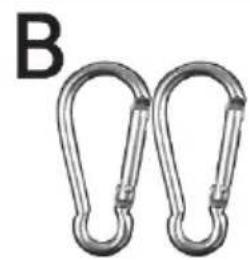
Two metallic chain carabiners with curved ends, labeled 'B' in the top-left corner (no other text or symbols)
natural_image
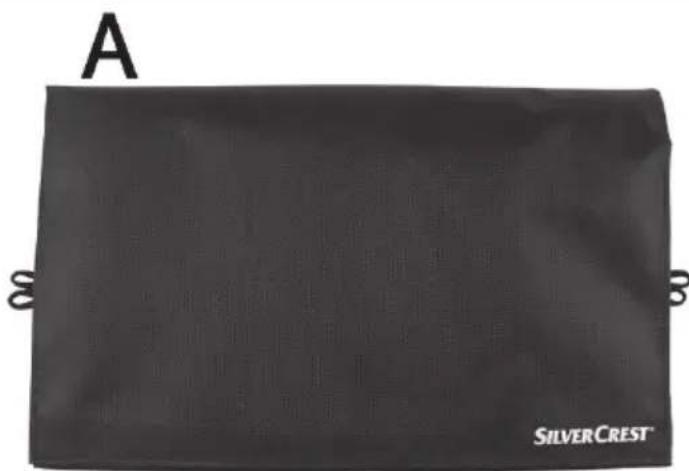
Simple line drawing of an open book with a letter C above it (no text or symbols on the book itself)A SilverCrest SLS 14 A1 solar panel
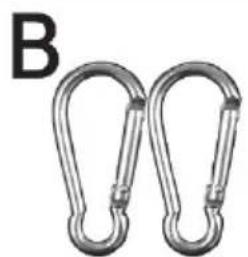
B 2 snap hooks
C These operating instructions (symbolic representation)
4. Technical data
| Solar panel power approx. 2 x 7W | |
| Output voltage/current when using a USB port | 5.0V m/- 5%, 2A |
| Output voltage/current when using both USB ports at the same time | 5.0V m/- 5%, 2A in total |
| Dimensions (W x H x D) approx. 320 x 197 x 33mm | |
| Weight (without accessories) approx. 560g | |
| Operating temperature 5°C to 45°C | |
| Operating air humidity max. 85% rel. humidity (non-condensing) | |
| Permissible storage conditions -5°C to +50°C, | max. 85% rel. humidity (non-condensing) |
The recharging time of connected devices depends very much on the sunlight (intensity). This is influenced, for example, by the season, clouds or location.
The technical data and design may be changed without notification.
5. Safety instructions
Before using this device for the first time, please read the following instructions carefully and take note of the safety warnings, even if you are familiar with the use of electronic devices. Store these
instructions in a safe place for future reference. If you sell or pass on the device to someone else, be sure to always include these instructions as they are an integral part of the product.
Symbols used and their meaning
DANGER! This symbol in conjunction with the "danger" note indicates an imminent dangerous situation which, if not prevented, could result in serious injury or even death.

WARNING! This symbol in conjunction with the "warning" note indicates important information for safe operation of the device and protection against injury and damage.

This symbol indicates other important information on the topic.
Operating environment
The device is not designed for use in environments with high humidity (e.g. bathrooms) or in extremely dusty conditions. Operating temperatures and operating air humidity: 5^ C to +45^ C, max. 85% rel. humidity. If you use it inside a car, particularly behind the windscreen, note that temperatures well above +45^ C can be reached.
DANGER! Ensure that
- no fire sources (e.g. burning candles) are placed on or near the device
- the device is never subjected to extreme temperature fluctuations as this could result in condensation and electrical short circuits. If the device was subjected to extreme temperature fluctuations, however, wait (approx. 2 hours) until the device has reached ambient temperature before use.
If the aforementioned instructions are not observed, a risk is posed to your health.

DANGER! Children and persons with disabilities
Electrical devices do not belong in the hands of children. Persons with limited physical, sensory or mental abilities should also only use electrical devices appropriately. Never allow children or persons with disabilities to use electrical devices unsupervised, unless they have been instructed accordingly or are supervised by a person responsible for their safety. Children must always be supervised to ensure that they do not play with this device. Small parts can be fatal if swallowed. Always keep plastic packaging out of reach.

DANGER! It poses a suffocation risk.
DANGER! Cables
Always handle the cables by the connector and do not pull on the cables themselves. Never place furniture or other heavy objects on the cables and take care that the cables are not kinked, especially near the plug and connection sockets. Never tie a knot in a cable and do not tie cables together. Ensure that all cables are placed so that no one can trip over them and they do not cause an obstruction.
WARNING! Ensure that
- no direct heat sources (e.g. heating) can affect the device
- the device is not exposed to bright artificial light
- no foreign objects penetrate the device
- any contact with splashed and dripping water and corrosive liquids is avoided and the device is not operated in the vicinity of water. In particular, the device should never be submerged in liquid (do not place any items filled with liquid, e.g. vases or drinks, on or near the device)
- the device is not in the immediate vicinity of magnetic fields (e.g. speakers)
- the device is never subjected to excessive shocks and vibrations
• the device is not covered.
If the aforementioned instructions are not observed, the device could be irreparably damaged.
6. Maintenance / cleaning
It is necessary to repair the device if it has been damaged in any way, for example, if the housing is damaged, if liquid or objects have penetrated the device or if the product has been exposed to rain or moisture. Repair work is also required if the device is not working properly or has been dropped. If smoke is produced, or there are any unusual sounds or smells, disconnect all cable connections immediately. In such cases, the device should not be used until it has been inspected by authorised service personnel. Only have the device repaired by qualified personnel.
Dirt on the solar panel has an adverse effect on performance. Only use a clean, dry cloth for cleaning and never use any corrosive liquids. Never open the housing of the device. This would void your warranty.
7. Copyright
All information contained in these instructions is subject to copyright and is provided for information purposes only. It is only permitted to copy or duplicate data and information with the express and
written consent of the author. This also includes commercial use of the content and data. The text and illustrations are based on the state of the art at the time of printing.
8. Overview of the controls
An illustration of the controls with the relevant reference numbers can be found on the fold-out inside cover of these instructions. You can leave this cover page folded out while reading further sections of these instructions. Thus you always keep a reference to the relevant control in sight.
1 Solar cells
2 Suspension brackets
3 Pouch
4 Velcro fastener
5 USB ports (for connecting to charging devices)
9. Prior to use
Remove the solar panel (A) and the accessories from the packaging.

We supply two snap hooks (B), which make it easier for you to mount the solar panel (A). First, mount the snap hooks on the selected suspension brackets (2). You can then easily hang the solar panel (A), for example, on a hook or rope, etc.
You can now unfold the solar panel (A) and orientate it towards the sun. You have the following options:
- You hang the solar panel (A) vertically. Either use the two suspension brackets (2) on the short side of the solar panel (A) or the individual suspension bracket (2) above the pouch (3).
- You hang the solar panel (A) horizontally. To do so, use two suspension brackets (2) on one of the long sides of the solar panel (A).
- Place the solar panel (A) on a flat surface.
Always ensure that the solar cells (1) are faced towards the sun.

Avoid the overheating of devices to be recharged by direct sunlight:
- If the device is in the pouch (3), close it so that it is facing away from the sun as much as possible.
- If you recharge a device which is not in the pouch (3), place it in a shaded area or cover it.
If you are not using the solar panel (A), fold it up and close it with the Velcro fastener (4). The solar cells (1) are thus protected against mechanical impact and the solar panel (A) can be easily transported.
9.1. Recharging with the solar panel (A)
Please note that the output power that can be generated by the solar panel (A) when used indoors is reduced due to the filter effect of glass panes.
Note that the maximum ambient temperature of +45°C must not be exceeded. You must pay particular attention to this point when using the solar panel inside a motor vehicle.
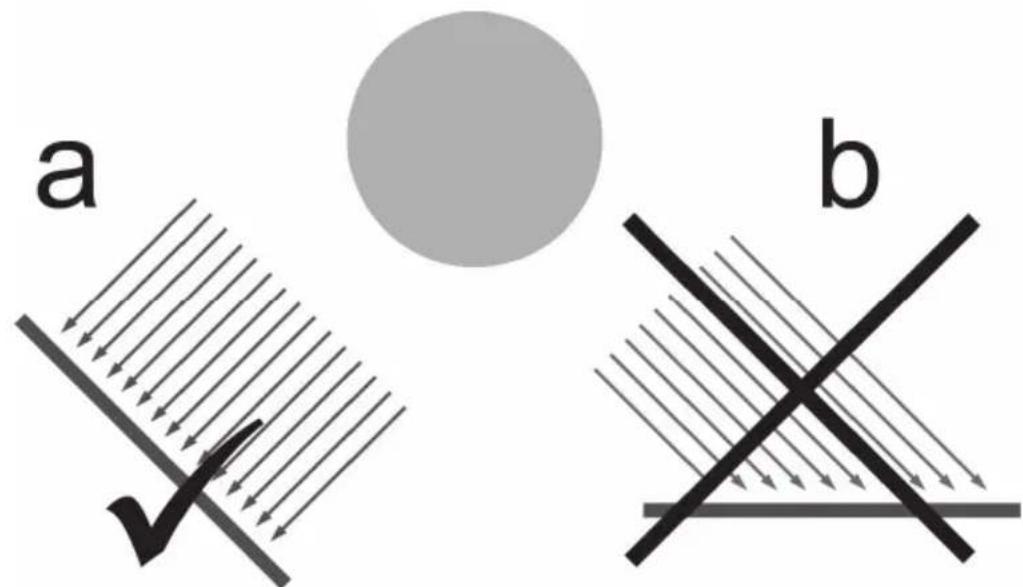
Make sure that the solar panel (A) is optimally orientated towards the sun and receives sufficient sunlight. Optimal efficiency is achieved when the sun's rays hit the solar cells (1) at an angle that is as vertical as possible (Figure a). The solar panel (A) is less efficient if the sun's rays hit the solar cells (1) at a flatter angle (Figure b).
The LEDs above the USB ports (5) assist you with the optimum orientation of the solar panel (A). To do so, your end device must be connected. The display result is distorted if no end device is connected.

natural_image
Weather icons including cloud, suns, and dots on dark background (no text or symbols)Note which LED lights up or flashes and, if necessary, correct the orientation towards the sun. For the meaning of the LED display, please refer to the following table.
| Symbol | LED colour | Meaning |
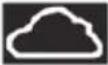 | Flashes or lights up orange | Insufficient solar radiation / bad panel orientation |
 | Lights up green | Little solar radiation / possibly bad panel orientation, thus charging is limited* |
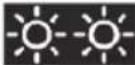 | Lights up green | Sufficient solar radiation / good panel orientation, charging is possible* |
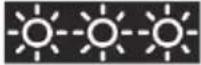 | Lights up green | Optimum solar radiation / optimum panel orientation, charging is possible with maximum performance* |
*: Please note that the maximum charging current is available for your end device only with optimum orientation of the solar panel as well as maximum sunlight (
Devices with lower power requirements (< 2A), for example, headsets or MP3 players, can be optimally charged with less sunlight (💡 ).
10. First use
10.1. Compatible devices
The solar panel (A) can be used to recharge end devices which require a charging current of 2A at most and must be charged via a USB port.
Before charging, check the suitability of your end device based on its technical data (operating instructions).
10.2. Recharging external devices
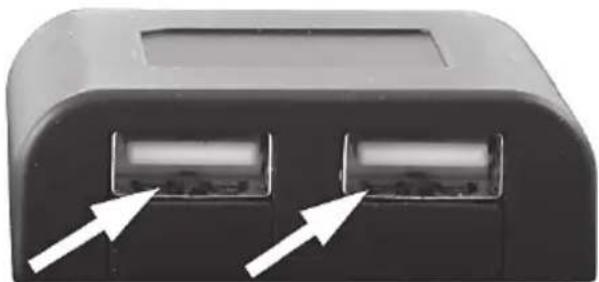
Connect the charging cable of your end device to one of the two USB ports (5) of the solar panel (A) and to your end device.
natural_image
Close-up of a black electronic device component with two ports and directional arrows indicating ports (no text or symbols visible)You can put your end device into the pouch (3) while recharging. This is especially useful if the solar panel (A) is hung vertically because the opening of the pouch (3) is always facing upwards in this case and your end device cannot fall out. This is not guaranteed if the solar panel is hung horizontally or is laid on a flat surface.
The charging process starts as soon as the connection has been established and sufficient sunlight is available.
You can recharge two end devices at the same time if the required charging current of both devices does not exceed 2A in total.
You can interrupt the charging process at any time by disconnecting your end device from the solar panel (A). When your end device is fully recharged, disconnect it from the solar panel (A).
11. Troubleshooting
A connected end device is not recharged.
- There is not enough sunlight available. Orientate the solar panel (A) better with respect to the sun.
- If there is no connection to the end device, check the connection.
- Your connected end device does not comply with the specifications. Check them using the operating instructions of your end device.
12. Storage when not in use
If you will not be using the solar panel (A) for a prolonged period, fold it up and close it with the Velcro fastener (4). Store the device in a dry, cool location.
13. Environmental and disposal information
natural_image
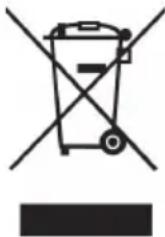
Symbol of a trash bin crossed out by two crossed lines, with a solid black rectangle below (no text or labels)When this symbol appears on a product, this indicates that the product is subject to the European Directive 2012/19/EU. All old electrical and electronic devices must be separated from normal household waste and disposed of at designated state facilities. The correct disposal of old devices in this manner will prevent environmental pollution and human health hazards. For further information about proper disposal, contact your local authorities, waste disposal office or the shop where you bought the device.
Dispose of the packaging in an environmentally compatible manner. Cardboard can be put out for municipal paper collections or brought to public collection points for recycling. Films and plastic used for packaging the device are collected by your local disposal services and disposed of in an environmentally compatible manner.
14. Conformity information

This device meets the basic requirements and other relevant regulations of the EMC Directive 2014/30/EU as well as the RoHS Directive 2011/65/EU.
The complete EU Declaration of Conformity is available on request at:
ce@targa.de
15. Warranty and servicing advice
Warranty of TARGA GmbH
Dear Customer,
This device is sold with three years warranty from the date of purchase. In the event of product defects, you have legal rights towards the seller. These statutory rights are not restricted by our warranty as described below.
Warranty conditions
The warranty period commences upon the date of purchase. Please keep the original receipt in a safe place as it is required as proof of purchase. If any material or manufacturing faults occur within three years of purchase of this product, we will repair or replace the product free of charge as we deem appropriate.
Warranty period and legal warranty rights
The warranty period is not extended in the event of a warranty claim. This also applies to replaced and repaired parts. Any damage or defects discovered upon purchase must be reported immediately when the product has been unpacked. Any repairs required after the warranty period will be subject to charge.
Scope of warranty
The device was carefully manufactured in compliance with stringent quality guidelines and subjected to thorough testing before it left the works. The warranty applies to material and manufacturing faults. This warranty does not cover product components which are subject to normal wear and which can therefore be regarded as wearing parts, or damage to fragile components such as switches, rechargeable batteries or components made of glass. This warranty is void if the product is damaged, incorrectly used or serviced. To ensure correct use of the product, always comply fully with all instructions contained in the user manual. The warnings and recommendations in the user manual regarding correct and incorrect use and handling of the product must always be observed and complied with. The product is solely designed for private use and is not suitable for commercial applications. The warranty is rendered void in the event of incorrect handling and misuse, if it is subjected to force, and also if any person other than our authorised service technicians interfere with the device. No new warranty period commences if the product is repaired or replaced.
Submitting warranty claims
To ensure speedy handling of your complaint, please note the following:
Before using your product for the first time, please read the enclosed documentation carefully. Should any problems arise which cannot be solved in this way, please call our hotline.
- Always have your receipt, the product article number as well as the serial number (if available) to hand as proof of purchase.
- If it is not possible to solve the problem on the phone, our hotline support staff will initiate further servicing procedures depending on the fault.

Service

Phone: 020 - 70 49 04 03
E-Mail: service.GB@targa-online.com

Phone: 01-4370121
E-Mail: service.IE@targa-online.com

Phone: 027 78 11 03
E-Mail: service.MT@targa-online.com

Phone: 02 - 20 09 025
E-Mail: service.CY@targa-online.com
IAN: 282355

Manufacturer
Please note that the following address is not a service address. First contact the service point stated above.
TARGA
GmbH
Coesterweg 45
DE-59494 Soest
GERMANY
Inhoudsopgave
natural_image
Two metallic chain carabiners with rounded ends, labeled 'B' in the top-left corner (no other text or symbols)
natural_image
Simple line drawing of an open book with a large letter C above it (no text or symbols on the book itself)A Zonnepaneel SilverCrest SLS 14 A1
natural_image
Weather icons including cloud, suns, and dots on dark background (no text or symbols)natural_image
Close-up of a black electronic device component with two ports and white arrows pointing to them (no text or symbols visible)natural_image
Symbol of a trash bin crossed with no text or numbers, representing waste sorting or disposal (no text present)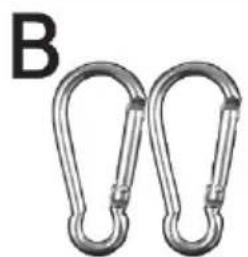
natural_image
Two metallic chain carabiners with rounded ends, labeled 'B' in the top-left corner (no other text or symbols)
natural_image
Simple line drawing of an open book with a large letter C above it (no text or symbols on the book itself)natural_image
Weather icons including cloud, suns, and dots on dark background (no text or symbols)natural_image
Close-up of a black electronic device component with two ports and white arrows pointing to them (no text or symbols visible)natural_image
Symbol of a trash bin crossed out by two crossed lines, with no text or labels present.- FOLDABLE SOLAR PANEL SLS 14 A1
- Congratulations!
- Intended use
- Trademarks
- Supplied items
- Technical data
- Safety instructions
- Symbols used and their meaning
- Operating environment
- DANGER! Ensure that
- DANGER! Children and persons with disabilities
- DANGER! It poses a suffocation risk.
- DANGER! Cables
- WARNING! Ensure that
- Maintenance / cleaning
- Copyright
- Overview of the controls
- Prior to use
- Recharging with the solar panel (A)
- First use
- Compatible devices
- Recharging external devices
- Troubleshooting
- A connected end device is not recharged.
- Storage when not in use
- Environmental and disposal information
- Conformity information
- Warranty and servicing advice
- Warranty of TARGA GmbH
- Warranty conditions
- Warranty period and legal warranty rights
- Scope of warranty
- Submitting warranty claims
- Service
- Manufacturer
- Inhoudsopgave
Brand : SILVERCREST
Model : SLS 14 A1
Category : Chargeur pour appareil mobile