
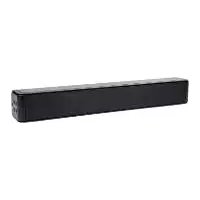
SBS 60 B2 - Soundbar SILVERCREST - Free user manual and instructions
Find the device manual for free SBS 60 B2 SILVERCREST in PDF.


| Product type | Soundbar |
| Brand | SilverCrest |
| Model | SBS 60 B2 |
| Dimensions (W x H x D) | Approx. 90 x 5 x 7 cm |
| Weight | Approx. 1.5 kg |
| Power supply | Mains adapter (included) |
| Output power | 30 W RMS |
| Speakers | 2 x 15 W |
| Connectivity | Bluetooth 5.0, optical input, AUX input (3.5 mm) |
| Main functions | Bluetooth audio player, amplification, remote control |
| Care and cleaning | Wipe with a soft, dry cloth. Do not use abrasive products. |
| Safety | Do not open the housing. Keep away from heat sources and moisture. |
| Spare parts and repairability | Repairs only by a qualified technician. Contact customer service. |
| General information | Suitable for TVs with optical audio output or Bluetooth. |
Frequently Asked Questions - SBS 60 B2 SILVERCREST
User questions about SBS 60 B2 SILVERCREST
0 question about this device. Answer the ones you know or ask your own.
Ask a new question about this device
Download the instructions for your Soundbar in PDF format for free! Find your manual SBS 60 B2 - SILVERCREST and take your electronic device back in hand. On this page are published all the documents necessary for the use of your device. SBS 60 B2 by SILVERCREST.
USER MANUAL SBS 60 B2 SILVERCREST
TV-STEREO-SOUNDBASE TV STEREO SOUND BASE PLATEAU SONORE TV STÉRÉO SBS 60 B2
DE AT CH
TV-STEREO-SOUNDBASE
Operation and safety notes
FR BE
PLATEAU SONORE TV STÉRÉO
GB/IE Operation and safety notes Page 20
EXPLOSIONSGEFAHR! Laden

natural_image
Diagram showing a cable being inserted into a device via a cable outlet, with no visible text or symbols.● = Ursache
O = Lösung
Intended use....Page 21
Trademark notice Page 21
Scope of delivery Page 21
Parts description....Page 21
Technical data Page 22
Important safety instructions ...... Page 23
Safety Page 23
Safety instructions for batteries....Page 25
Before use – preparation....Page 25
Prepare the remote control Page 26
First-time use ......Page 26
Replace the remote control battery (Fig. A)....Page 26
Placing TV or monitor....Page 26
Before use – connections ......Page 27
Use the HDMI ARC connection Page 27
Use the OPTICAL connection....Page 27
COAXIAL socket....Page 28
Use the AUX connection....Page 28
Connection to power socket....Page 29
Using the product....Page 29
Standby / ON Page 29
Select modes Page 29
Adjust the volume / Mute volume......Page 30
Select the Equaliser. Page 30
AUX 1 / AUX 2 / HDMI ARC / OPTICAL / COAXIAL operation ...Page 30
Bluetooth® operation....Page 30
Pair Bluetooth®-enabled devices....Page 30
Listen to music from Bluetooth® device Page 31
USB operation....Page 32
Charging other devices via USB port Page 32
Troubleshooting......Page 32
Glossary Page 33
Cleaning and storing....Page 33
Disposal Page 33
Simplified EU declaration of conformity Page 34
Warranty Page 34
TV STEREO SOUND BASE
Introduction
We congratulate you on the purchase of your new product. You have chosen a high quality product. The instructions for use are part of the product. They contain important information concerning safety, use and disposal. Before using the product, please familiarise yourself with all of the safety information and instructions for use. Only use the product as described and for the specified applications. If you pass the product on to anyone else, please ensure that you also pass on all the documentation with it.
Note: The soundbase is mainly referred as "the product" in this manual.
Intended use
This is a consumer electronics product. The soundbase is intended for playing sound from audio devices. The product must only be used indoors. The product is designed for private use, and must not be used for commercial purposes. Any other use is considered improper. Any claims resulting from improper use or due to unauthorised modification of the product will be considered un warranted. Any such use is at your own risk.
Trademark notice
- USB ^® is a registered trademark of USB Implementers Forum, Inc.
- The Bluetooth ^® word mark and logos are registered trademarks of Bluetooth ^® SIG, Inc. and any use of such marks by OWIM GmbH & Co. KG is under license.
- The SilverCrest trademark and trade name is the property of their respective owners.
Any other names and products may be trademarks or registered trademarks of their respective owners.
- Scope of delivery
- Immediately after unpacking, please check the package contents for completeness and if the product and all parts are in good condition.
■ Remove all parts from the packaging. Remove the packaging material completely.
1 Remote control (included CR2025 3 V battery inserted)
1 AC power cord
1 Cinch to 3.5 mm jack plug cable
1 HDMI ARC cable
1 Instructions for use
The design is subject to change without notice.
Parts description
Soundbase (main unit)
1 button (switch the product between ON and STANDBY mode)
2 button (select the source)
3 EQ button (select a preset sound effect)
4 VOL+ / VOL- buttons (increase / decrease the volume level)
5 Remote control sensor
6 POWER indicator (light up red when the product is in STANDBY mode)
7 AUX1 / AUX2 indicator
(orange indicator lights up: In AUX1 mode / orange indicator flashes: In AUX2 mode)
8 Bluetooth® indicator (blue indicator lights up: in Bluetooth® mode)
9 OPTICAL / COAXIAL indicator
(orange indicator lights up: In OPTICAL mode / orange indicator flashes: In COAXIAL mode)
10 HDMI ARC / USB indicator (orange indicator lights up: In HDMI ARC mode / orange indicator flashes: In USB mode)
11 I/O switch (POWER ON/OFF)
12 Power socket
13 COAXIAL socket
14 OPTICAL socket
15 USB socket
16 AUX 1 / AUX 2 input
17 HDMI ARC socket
Remote control
18 button (switch the product between ON and STANDBY mode)
19 SOURCE buttons (select the playback source)
20 Playback control buttons

Skip to previous track / skip to next track in Bluetooth ^® mode and USB mode.

(Play / pause / resume playback in Bluetooth ^® mode and USB mode.
Press and hold this button to activate the pairing function in Bluetooth ^® mode and disconnect the existing paired Bluetooth ^® device)

(Increase / decrease the volume level)
21 MUTE (mute or resume the sound)
22 EQ buttons (select a preset sound effect) (NIGHT MODE & BASS ON/OFF button: Press and hold the TV key to activate the night mode. Press and hold the SONG key to set the bass OFF. Press and hold the SONG key again to set the bass ON)
23 Battery tray
- Technical data
Protection class of the
product: ☐ / II
Standby power
consumption: < 0.5 W
USB audio format
support: MP3
Range: up to 10 m
Inputs: - AUX IN 1/2
2 x 3.5 mm stereo jack socket
- HDMI (ARC) 1 x HDMI ARC socket
- OPTICAL IN 1 x optical input
- COAXIAL IN: 1 x COAXIAL IN
- USB: 1 x USB socket
Input signal (coxial / optical): PCM 2.0
Operating conditions: 10 °C - 40 °C, 40 % - 85 % relative humidity
Storage temperature: -20^ to +60^
Operating voltage / 220 - 240 V\~
frequency: (alternating current) 50/60 Hz
Maximal power consumption: 30 W
Output power RMS: 15 W x 2 + 30 W
USB socket: 5 V = (direct current), max. 500 mA
Total harmonic distortion: 1 % (1 kHz, 1 W)
Audio input sensitivity (analogue input): 500 mV
Frequency response: 40 Hz - 20 kHz
Dimension: approx. 525 x 76 x 303 mm (W x H x D)
Weight: approx. 3.6 kg
Bluetooth®
Wireless standard: Bluetooth® V4.2
Range: approx. 10 m
Frequency band: 2402 MHz - 2480 MHz
Max. transmitted
power: <20 dBm
Infrared remote control
Range: 6 m
Angle: 30^
Battery type: CR2025

Important safety instructions

The lightning flash with arrowhead symbol, within an equilateral triangle, is intended to alert the user to the presence of uninsulated “dangerous voltage” within the product’s enclosure that may be of sufficient magnitude as to constitute a risk of electric shock to persons.

The exclamation point within an equilateral triangle is intended to alert the user to the presence of important operating and maintenance (servicing) instructions in the literature accompanying the appliance.
Safety
PLEASE FAMILIARISE YOURSELF WITH ALL INSTRUCTIONS FOR USE AND SAFETY NOTICES BEFORE USING THE PRODUCT FOR THE FIRST TIME. KEEP ALL THE SAFETY ADVICE AND INSTRUCTIONS IN A SAFE PLACE FOR FUTURE REFERENCE!
- READ THIS MANUAL – Before using the product, familiarise yourself with all of the safety information and instructions for use.
- KEEP THIS MANUAL IN A SAFE PLACE – Keep all safety instructions and operating instructions for future reference.
■ HEED ALL WARNINGS - All warnings on the appliance and in the operating instructions should be adhered to. - FOLLOW ALL INSTRUCTIONS – All operating and usage instructions should be followed.
-
DO NOT USE THIS APPARATUS NEAR WATER – The appliance should not be used near water or moisture – for example, in a wet basement or near a swimming pool and the like.
■ Clean only with a dry cloth. -
Do not block any ventilation openings. Install in accordance with the manufacturer's instructions.
- Do not install near any heat sources such as radiators, heaters, stoves, or other apparatus (including amplifiers) that produce heat.
-
Do not defeat the safety purpose of the polarized or grounding plug. A polarized plug has two blades with one wider than the other. A grounding plug has two blades and a third grounding prong. The wide blade or the third prong is provided for your safety. If the provided plug does not fit into your outlet, consult an electrician for replacement of the obsolete outlet.
■ Protect the power cord from being walked on or pinched particularly at plugs, convenience receptacles, and the point where they exit from the apparatus.
■ Only use attachments / accessories specified by the manufacturer.
■ Unplug the apparatus during lightning storms or when unused for long periods of time.
■ Refer all servicing to qualified personnel. Servicing is required when the apparatus has been damaged in any way, such as power supply cord or plug is damaged, liquid has been spilled or objects have fallen into the apparatus, the product has been exposed to rain or moisture, does not operate normally, or has been dropped.
This equipment is a Class II or double insulated electrical appliance. It has been designed in such a way that it does not require a safety connection to electrical earth.
■ The apparatus shall not be exposed to dripping or splashing. No objects filled with liquids, such as vases, shall be placed on the apparatus.
■ Minimum distance around the apparatus for sufficient ventilation is 5 cm. -
The ventilation should not be impeded by covering the ventilation openings with items, such as newspapers, table-cloths, curtains, etc...
■ No naked flame sources, such as lighted candles, should be placed on the apparatus.
CAUTION
■ Use of controls or adjustments or performance of procedures other than those described herein, may result in hazardous radiation exposure or other unsafe operation.
■ To reduce the risk of fire or electric shock, do not expose this apparatus to rain or moisture. The apparatus must not be exposed to dripping or splashing and objects filled with liquids, such as vases, must not be placed on apparatus.
■ The mains plug / appliance coupler is used as the disconnect device, the disconnect device must remain readily operable.
■ Danger of explosion if battery is incorrectly replaced. Replace only with the same or equivalent type.
WARNING!
■ Before operating this system, check the voltage of this system to see if it is identical to the voltage of your local power supply.
- Do not place this product close to strong magnetic fields.
- Do not place this product on the amplifier or receiver.
If any solid object or liquid falls into the system, unplug the system and have it checked by qualified personnel before operating it any further.
- Do not attempt to clean the product with chemical solvents as this may damage the finish. Use a clean, dry or slightly damp cloth.
- When removing the power plug from the wall outlet, always pull directly on the plug, never yank on the cord.
- Changes or modifications to this product not expressly approved by the party responsible for compliance will void the user's authority to operate the equipment.
DANGER
RADIO INTERFACE
Switch the product off on airplanes, in hospitals, service rooms, or near medical electronic systems. The wireless signals transmitted could impact the functionality of sensitive electronics. Keep the product at least 20 cm from pacemakers or implantable cardioverter defibrillators, as the electromagnetic radiation may impair the functionality of pacemakers. The radio waves transmitted could cause interference in hearing aids. Do not place the product near flammable gasses or potentially explosives areas (e.g. paint shops) with the wireless components on, as the radio waves emitted can cause explosions and fire. The range of the radio waves varies by environmental conditions. In the event of wireless data transmission, unauthorised third parties receiving the data cannot be excluded. OWIM GmbH & Co KG is not responsible for interference with radios or televisions due to unauthorised modification of the product. OWIM GmbH & Co KG further assumes no liability for using or replacing cables and products not distributed by OWIM. The user of the product is fully responsible for correcting interference caused by such unauthorised modification of the product, as well as replacement of such products.

In order to avoid damage to your hearing, do not listen to music at high volumes over an extended period of time.

Safety instructions for batteries
■ DANGER TO LIFE! Keep batteries out of reach of children. If accidentally swallowed seek immediate medical attention.
■ DANGER OF EXPLOSION!

Never recharge non-rechargeable batteries. Do not short-circuit batteries and / or open them. Overheating, fire or bursting can be the result.
■ Never throw batteries into fire or water.
- Do not exert mechanical loads to batteries.
- Do not ingest the battery. Chemical burn hazard.
The remote control supplied with this product contains a coin / button cell battery. If the coin / button cell battery is swallowed, it can cause internal burns in just 2 hours and can lead to death.
Risk of leakage of batteries
- Avoid extreme environmental conditions and temperatures, which could affect batteries, e. g. radiators / direct sunlight.
- Avoid contact with the skin, eyes and mucous membranes. In the event of contact with battery acid, thoroughly flush the affected area with plenty of clean water and seek immediate medical attention.
■ WEAR PROTECTIVE GLOVES!

Leaked or damaged batteries can cause burns on contact with the skin. Wear suitable protective gloves at all times if such an event occurs.
In the event of a leakage of the battery, immediately remove it from the product to prevent damage.
■ Only use the same type of batteries.
■ Remove battery if the product will not be used for a longer period.
WARNING
■ Do not ingest the battery, chemical burn hazard.
■ The remote control supplied with the product contains a coin / button cell battery. If the coin / button cell battery is swallowed, it can cause severe internal burns in just 2 hours and can lead to death.
- Keep new and used batteries away from children.
If the battery compartment does not close securely, stop using the product and keep it away from children.
If you think batteries might have been swallowed or placed inside any part of the body, seek immediate medical attention.
Risk of damage of the product
■ Only use the specified type of battery!
- Insert battery according to polarity marks (+) and (−) on the battery and the product.
■ Clean the contacts on the battery and in the battery compartment before inserting!
■ Remove exhausted battery from the product immediately.
● Before use – preparation
Note: Remove all packaging material from the product.
CAUTION! Make sure that the product and the devices to be connected are switched off before you connect them. Please also read the user instructions for the devices which you are connecting.
Prepare the remote control
The provided remote control allows the product to be operated from a distance.
■ Even if the remote control is operated within the effective range (6 m), remote control operation may be impossible if there are any obstacles between the product and the remote control.
If the remote control is operated near other products which generate infrared rays, or if other remote control devices using infrared rays are used near the product, it may operate incorrectly. Conversely, the other products may operate incorrectly.
- First-time use
The remote control has a pre-installed lithium CR2025 battery. Remove the protective tab to activate the remote control battery.
- Replace the remote control battery (Fig. A)
■ Pull out the battery tray 23 and remove the old battery.
- Place a new CR2025 battery into the battery tray 23 with correct polarity (+/-) as indicated.
■ Insert the battery tray 23 back into the slot.
the battery is not correctly replaced. Replace only with the
same or an equivalent type.
WARNING! Ensure the correct polarity of the battery. The plus symbol on the battery must be visible (see fig. A).
- Placing TV or monitor
Note: Ensure the TV is positioned properly. Turning the volume up too loud may cause the TV to vibrate and fall over.
This product is designed for use with TVs and similar display devices up to a maximum dimension of the base stand of 48 cm (W) x 22 cm (D) and within a maximum load of 35 kg. The base stand shall spread the weight across a reasonably wide area of the product.
■ The soundbase is NOT suitable for use with heavy display devices that use narrow legs instead of a large base stand, as these type of feet may concentrate excessive force onto the soundbase.
- Place the device on a level and stable surface.
Note: Furniture cleaning products may affect the soundbase's rubber stands. If in doubt, use a pad. Use a mat if in doubt.
■ Decide where to place the product. Always make sure that ...
- there is a wall socket nearby;
- there is enough space above, in case you want to place a television set on the device;
- a television set and any other devices (e.g. set-top box, DVD player) can be set up nearby, in case you do not want / are unable to place them on the device.
■ Connect the source device(s). Always ensure that all devices are securely positioned.
● Before use – connections
Use the HDMI ARC connection

Preparation
■ Refer to the owner's manual of your TV set.
■ An ARC-capable HDMI cable is part of the delivery scope of this product.
The ARC (Audio Return Channel) function allows you to send audio from your ARC- compliant TV to your product through a single HDMI connection. To enjoy the ARC function, please ensure your TV is both HDMI-CEC and ARC compliant and set up accordingly. When correctly set up, you can use your TV remote control to adjust the volume output (VOL +/- and MUTE) of the product.
- Ensure to use HDMI cables that can support the ARC function. HDMI-CEC will be called different names by different manufacturers – please refer to your owner's manual for details on setting up HDMI-CEC and ARC.
- Connect the HDMI cable from product's HDMI (ARC) socket 17 to the HDMI (ARC) socket on your ARC compliant TV. Then press the remote control to select HDMI ARC.
Use the OPTICAL connection

Use an optical cable (not included) to connect the TV's optical output socket to the product's OPTICAL socket 14.
COAXIAL socket

- You also can use the COAXIAL cable (not included) to connect the TV's COAXIAL OUT socket and COAXIAL socket 13 on the product.
Use the AUX sockets

A Use a 3.5 mm jack plug cable (not included) to connect an external audio device or TV's headphone socket to the AUX (1 or 2) input socket 16 on the product.
B Use a 3.5 mm to RCA audio cable (included) to connect the TV's audio output (R/L) sockets to the AUX (1 or 2) input socket 16 on the product.
Tip: Set the playback device (e.g. television set) to a higher volume and the soundbase to a lower volume. This way the automatic switch off of the sound base can be avoided.
- Connection to power socket
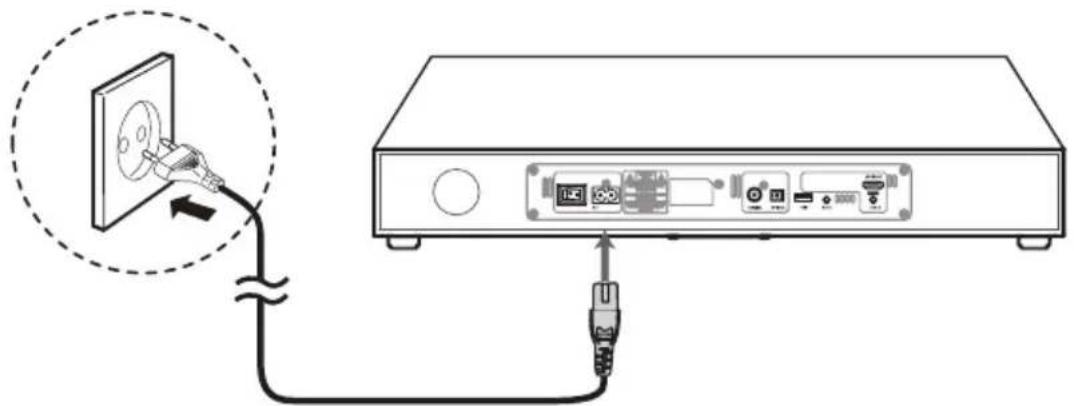
natural_image
Diagram showing a cable being inserted into a device via a cable, with no visible text or symbols.Attention! Risk of product damage!
■ Ensure that the power supply voltage corresponds to the voltage printed on the back of the product.
■ Connect the AC power cord to the power socket 12 on the product and a wall outlet.
Notes:
■ Ensure all connections are connected before connecting to the mains power socket.
■ Be sure to unplug the power cord from the outlet when the system is not in use for an extended period of time.
● Using the product
Standby / ON
After connecting the soundbase to a wall outlet, switch the product on using the I/O switch [11] . The soundbase is in standby mode now, as indicated by the red LED display.
■ Press the button 1 / 18 on the main device or on the remote control to switch the main unit ON.
■ Press the button 1 / 18 again to switch the product back to standby mode. The LED display lights up red.
■ Disconnect the mains plug from the wall socket or switch the I/O switch 11 on the rear of the product to switch the product off completely.
Note:
■ When turning the product on again, it will continue with the same mode that was used prior to turning off the product last time.
If the product is idle for over 15 minutes, the product will automatically switch to Standby mode.
Select modes
Press the ☐ button 2 repeatedly on the product or press the AUX1, AUX2, BT (Bluetooth®), OPTICAL, COAXIAL, HDMI ARC, USB buttons on the remote control to select the desired mode.
| Indicator Mode | ||
| 1 Red | Standby | |
| 2 Orange / flash | AUX1 / AUX2 | |
| 3 Blue | BLUETOOTH® | |
| 4 Orange / flash | OPTICAL / COAXIAL | |
| 5 Orange / flash | HDMI ARC / USB | |
- Adjust the volume / Mute volume
■ Press the VOL +/- buttons 4 / 20 to adjust the volume.
■ While adjusting the volume, the corresponding operation LED (7, 8, 9 or 10) flashes quickly.
If you wish to turn the sound off, press the MUTE button 21 on the remote control. Press the MUTE button 21 again or press VOL +/- buttons 4 / 20 to resume normal listening. While the mute function is active, the corresponding operation LED (7, 8, 9 or 10) is blinking once per second.
■ While the volume level reaches its maximum level, if you press the VOL + button 4 / 20 again, the corresponding operation LED flashes slowly 3 times.
■ While the volume level reaches its minimum level, if you press the VOL - button 4 / 20 again, the corresponding operation LED flashes slowly 3 times.
Select the Equaliser
■ While playing, press the EQ button 3 / 22 repeatedly on the product or press the FLAT, TV, CINEMA, SONG buttons on the remote control to select preset equalisers.
● AUX 1 / AUX 2 / HDMI ARC / OPTICAL / COAXIAL operation
Via the ARC channel of the HDMI cable, digital audio signals can be transmitted from the source device (e.g. television set) to the soundbase. The audio transmission via the HDMI (ARC) socket 17 can only work if all components are ARC-enabled.
- Set the product to standby mode with the I/O switch 11. Press the standby button 1 / 18 to switch on the product.
■ By pressing the HDMI (ARC) button 19, select the HDMI input.
■ Switch on the television set. When the connection is established for the first time, it may take several seconds until sound is output from the soundbase
■ Ensure that the product is connected to the TV or audio device.
■ Press the button 2 repeatedly on the product or press the AUX1, AUX2, HDMI ARC, OPTICAL, COAXIAL buttons on the remote control to select the desired mode.
■ Operate your audio device directly for playback features.
■ Press the VOL +/- button 4 / 20 to adjust the volume to your desired level.
Tip: While in HDMI ARC / OPTICAL / COAXIAL mode, if there's no sound output and the status indicator is flashing, you may need to activate PCM output on your source device (eg. TV, DVD or Blu-ray player).
- Bluetooth operation
Audio files from a portable audio device can also be played via the Bluetooth ^® interface of the product.
Pair Bluetooth-enabled devices
Notes:
- The operational range between the main unit and a Bluetooth® device is approximately 10 metres.
- Refer to the Bluetooth ^ device's instruction manual.
- Compatibility with all Bluetooth ^® devices is not guaranteed.
- Any obstacle between this product and a Bluetooth® device can reduce the operational range.
- Keep this product away from other electronic devices that may cause interference.
To connect your device to the product via Bluetooth ^® , follow the steps below:
- During ON mode, press the 📄 button 2 repeatedly on the product or press the Bluetooth® button to select Bluetooth® mode. The blue indicator 8 will flash slowly.
- If you cannot find the product, press and hold the ▶II / PAIR button on the remote control for approx. 2 seconds. The system has entered pairing mode. You will hear a signal sound from the product and the blue indicator 8 will flash fast.
Activate your Bluetooth ^® device and select the search mode. "SBS 60 B2" will appear on your Bluetooth ^® device.
- Select "SBS 60 B2" in the pairing list. After the system is successfully connected, it says "Paired" and the blue indicator 8 will light up solidly.
- Play music from the connected device.
To disconnect the Bluetooth® function, you can:
■ Switch to another function on the product.
■ Disable the function from your Bluetooth ^ device. The Bluetooth ^ device will be disconnected from the product after it says "Disconnected".
- Press and hold the ↗PAIR button on the remote control.
Tips:
- Enter "0000" for the password if necessary.
If there is an existing connection, press and hold the ▶II / PAIR button on the remote control to re-activate the pairing mode, the existing connection will be interrupted, the blue indicator 8 will flash.
If no other Bluetooth ^ device pairs with this player within two minutes, the player will recover its previous connection.
■ The player will also be disconnected when your device is moved beyond the operational range approx. 10 metres.
■ If you want to reconnect your device to this player, place it within the operational range.
If the device is moved beyond the operational range, when it is brought back, please check if the device is still connected to the player.
If the connection is lost, follow the instructions above to pair your device to the player again.
- Listen to music from Bluetooth device
If the connected Bluetooth ^ device supports Advanced Audio Distribution Profile (A2DP), you can listen to the music stored on the device through the player.
If your audio player supports Audio Video Remote Control Profile (AVRCP), you can control the basic functions of the audioplayer with the soundbase's remote control.
- Pair your device with the player.
- Play music via your device (if it supports A2DP).
- Use supplied remote control to control play (if it supports AVRCP).
- To pause / resume play, press the
▶II / PAIR button.
- To skip to a track, press the
buttons.
Note: Usually, audio devices remember the identification of the device. In this case, it may not be necessary to establish the connection manually again if the Bluetooth® function is activated.
USB operation
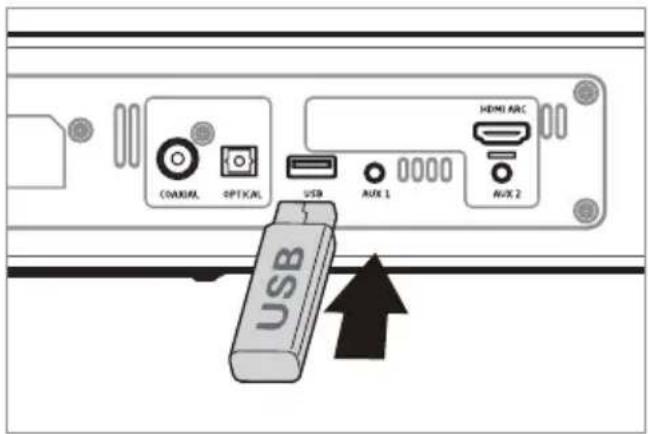
■ Plug the USB device into the USB socket 15.
■ Press the button 2 on the product repeatedly or press the USB button on the remote control to select USB mode. The light 10 is flashing in orange.
■ This USB port can read MP3 file. During playback:
- To pause or resume play, press the ▶II PAIR button on the remote control.
- To skip to the previous / next file, press the ◀◀◀, ▶Buttons on the remote control.
- Press and hold the /buttons on the remote control to perform fast forward / reverse playback. Release the button to resume normal playback.
● Charging other devices via USB port
■ This USB port charge other devices, if those devices have charging function.
● Troubleshooting
To keep the warranty valid, never try to repair the system yourself. If you encounter problems when using this product, check the following points before requesting service.
● = Fault
O = Action
● No function / no display
O Ensure the mains cable is connected securely.
○ Make sure that the product is switched on.
● The remote control does not function
○ Use the remote control near the product.
- Point the remote control at the remote control sensor 5 on the product.
○ Replace the battery in the remote control with a new one.
○ Remove any obstacles between the remote control and the product.
● Loud hum or noise is heard
○ Check if audio in plugs are well connected
● The product does not respond when pressing any buttons
An electrostatic discharge has occurred, which blocks the soundbase. Switch off the soundbase on the main switch 11 for approx. 5 seconds and then switch it on again. You can use the soundbase as usual now.
No sound output
Make sure that the product is not muted. Press the MUTE button 21 or the VOL +/- button 4 / 20 to resume normal listening.
O Ensure the audio setting of the input source (e.g. TV, game console, DVD player, etc.) is set to PCM mode.
● The sound output effect sounds unfamiliar
Press the EQ button on the product repeatedly or press the FLAT, TV, CINEMA, SONG buttons on the remote control to select preset EQ mode for the optimal sound output effect.
- I can't find the Bluetooth ^ name of this product on my Bluetooth ^ device for Bluetooth ^ pairing
- Ensure that the product is switch on.
- Ensure that the Bluetooth ^ function is activated on your Bluetooth ^ device.
The product has a Bluetooth ^® function that can receive a signal within 10 metres. Keep a distance within 10 metres between.
● Audio transmission via the HDMI (ARC) socket fails
Audio transmission via the HDMI (ARC) socket 17 can only work if all components are ARC-enabled. If the transmission is unsuccessful, you must take one or possibly several of the following items into account:
The old HDMI cable must be replaced with a new ARC-enabled cable.
Not every HDMI socket on the television set needs to support ARC. In this case, the HDMI cable on the television set must be connected to another ARC-enabled HDMI socket. Usually, the respective HDMI sockets are labelled with ARC. If not, refer to the user instructions of your television set.
For several television sets, the digital audio output must be activated. Select the audio output PCM 2.0 (PCM stereo).
When using analogue AUX input, the sound base automatically switches to standby mode after approx. 15 minutes. This may happen due to a low input level. In this case set the playback device (e.g. television) to higher volume and reduce the volume at the sound base.
Glossary
HDMI stands for High Definition Multimedia Interface. Via this transmission route, digital images and audio signals can be transmitted.
HDMI ARC (ARC - Audio Return Channel) means that the cable is provided with an ARC channel. Via this channel, audio signals are transmitted in both directions.
The following modern devices are usually provided with an ARC output: television sets, games consoles or digital receivers.
● Cleaning and storing
Pull the power unit out of the wall socket before you clean the product. Make sure that no liquid gets into the product.
- Clean the product with a slightly damp cloth. In case of persistent contamination, you can also use a slightly more gentle cleaner such as detergent. Solvents, spirits, thinners etc. must not be used, as they can damage the surface of the product.
- When not using the product, store it in a place where neither high temperatures nor moisture can affect it. Remove the battery from the remote control.
● Disposal

The packaging is made of environmentally friendly materials, which may be disposed of through
your local recycling facilities.
Contact your municipality for information on how to dispose of your worn-out product.

The adjacent symbol of a crossed out dustbin on wheels indicates this product is subject to Directive
2012/19/EU. This directive states at the end of the life this product must not be disposed of through regular household refuse but must be returned to special collection sites, recycling depots or waste management companies.
This disposal is free of charge to you. Protect the environment and dispose properly. Please contact your local waste management company or the city / municipal administration for more information.
Think about the environment and your personal health. Dispose empty batteries in separate collecting boxes. These can be found in many public buildings or in shops where batteries are sold.

Improper disposal of batteries can harm the environment!
Never dispose of batteries in your household waste. They may contain toxic heavy metals and are subject to hazardous waste regulations. The chemical symbols of the heavy metals are: Cd = cadmium, Hg = mercury, Pb = lead. Therefore dispose of used batteries through your local collection site.
● Simplified EU declaration of conformity
Hereby, OWIM GmbH & Co. KG, Stiftsbergstraße 1, DE-74167 Neckarsulm, GERMANY, declares that the product TV-STEREO-SOUNDBASE HG02955 is in compliance with Directives 2014/53/EU, 2011/65/EU and 2009/125/EC.
The full text of the EU declaration of conformity is available at the following internet address: www.owim.com

Warranty
The product has been manufactured to strict quality guidelines and meticulously examined before delivery. In the event of product defects you have legal rights against the retailer of this product. Your legal rights are not limited in any way by our warranty detailed below.
The warranty for this product is 3 years from the date of purchase. Should this product show any fault in materials or manufacture within 3 years from the date of purchase, we will repair or replace it - at our choice - free of charge to you.
The warranty period begins on the date of purchase. Please keep the original sales receipt in a safe location. This document is required as your proof of purchase. This warranty becomes void if the product has been damaged, or used or maintained improperly.
The warranty applies to defects in material or manufacture. This warranty does not cover product parts subject to normal wear, thus possibly considered consumables (e.g. batteries) or for damage to fragile parts, e.g. switches, rechargeable batteries or glass parts.
Introduction Page 36
Utilisation conforme aux prescriptions .... Page 36
1 raccordement ARC HDMI
- OPTICAL IN
1 raccordement optique
- COAXIAL IN
1 raccordement coaxial
- USB : 1 port USB
Signal d'entrée
RMS: 15 W × 2 + 30 W
⚠ GEVAAR RADIO-INTERFACE
natural_image
Diagram showing a cable being inserted into a device via a cable to a rack-mounted unit (no text or symbols present)
- TV-STEREO-SOUNDBASE TV STEREO SOUND BASE PLATEAU SONORE TV STÉRÉO SBS 60 B2
- TV-STEREO-SOUNDBASE
- PLATEAU SONORE TV STÉRÉO
- Important safety instructions ...... Page 23
- Before use – preparation....Page 25
- First-time use ......Page 26
- Before use – connections ......Page 27
- Using the product....Page 29
- AUX 1 / AUX 2 / HDMI ARC / OPTICAL / COAXIAL operation ...Page 30
- Bluetooth® operation....Page 30
- USB operation....Page 32
- Troubleshooting......Page 32
- Cleaning and storing....Page 33
- Disposal Page 33
- Simplified EU declaration of conformity Page 34
- Warranty Page 34
- TV STEREO SOUND BASE
- Introduction
- Intended use
- Trademark notice
- - Scope of delivery
- Parts description
- Soundbase (main unit)
- Remote control
- - Technical data
- Important safety instructions
- Safety
- CAUTION
- WARNING!
- DANGER
- RADIO INTERFACE
- Safety instructions for batteries
- ■ DANGER OF EXPLOSION!
- Risk of leakage of batteries
- ■ WEAR PROTECTIVE GLOVES!
- WARNING
- Risk of damage of the product
- ● Before use – preparation
- Prepare the remote control
- - First-time use
- - Replace the remote control battery (Fig. A)
- - Placing TV or monitor
- ● Before use – connections
- Use the HDMI ARC connection
- Preparation
- Use the OPTICAL connection
- COAXIAL socket
- Use the AUX sockets
- - Connection to power socket
- Attention! Risk of product damage!
- Notes:
- ● Using the product
- Standby / ON
- Note:
- Select modes
- - Adjust the volume / Mute volume
- Select the Equaliser
- ● AUX 1 / AUX 2 / HDMI ARC / OPTICAL / COAXIAL operation
- - Bluetooth operation
- Pair Bluetooth-enabled devices
- To connect your device to the product via Bluetooth ® , follow the steps below:
- To disconnect the Bluetooth® function, you can:
- Tips:
- - Listen to music from Bluetooth device
- USB operation
- ● Charging other devices via USB port
- ● Troubleshooting
- Glossary
- ● Cleaning and storing
- ● Disposal
- Improper disposal of batteries can harm the environment!
- ● Simplified EU declaration of conformity
- Warranty
- Introduction Page 36
- ⚠ GEVAAR RADIO-INTERFACE
Brand : SILVERCREST
Model : SBS 60 B2
Category : Soundbar