
TVVR33800 - Video recorder ABUS - Free user manual and instructions
Find the device manual for free TVVR33800 ABUS in PDF.


| Product type | 8-channel video recorder |
| Brand | ABUS |
| Model | TVVR33800 |
| Dimensions (L x W x H) | 300 x 250 x 45 mm |
| Weight | 1.5 kg |
| Power supply | 12 V DC, power supply unit included |
| Video inputs | 8 analog HD BNC inputs, support for IP cameras via network |
| Recording resolution | HD (1080p) per channel |
| Main functions | Continuous or motion detection recording, remote access via ABUS Link Station, live viewing |
| Storage | Internal hard drive (not included) up to 6 TB, initialization required |
| Connectivity | Ethernet network (RJ45), USB for wireless mouse |
| Configuration | Built-in configuration wizard, local interface and mobile app |
| Maintenance and cleaning | Clean with a dry cloth, avoid liquids, ensure adequate ventilation |
| Security | Complex administrator password, verification code for remote access |
| Spare parts and repairability | Replaceable hard drive and power supply unit, ABUS technical support |
| General information | Brand ABUS, manufactured in Germany, compliant with European standards |
Frequently Asked Questions - TVVR33800 ABUS
User questions about TVVR33800 ABUS
0 question about this device. Answer the ones you know or ask your own.
Ask a new question about this device
Download the instructions for your Video recorder in PDF format for free! Find your manual TVVR33800 - ABUS and take your electronic device back in hand. On this page are published all the documents necessary for the use of your device. TVVR33800 by ABUS.
USER MANUAL TVVR33800 ABUS
Security Tech Germany
ABUS


TVVR33600 / TVVR33800
QUICKGUIDE FÜR ANALOG HD- REKORDER
Scope of delivery 22
Warnings 23
Connections 24
Tips for camera installation 26
System activation 27
Software set-up 28
App setup 32
Instructions + software 34
Nederlands
natural_image
Line drawing of a cable-wrapped electronic device (no text or symbols)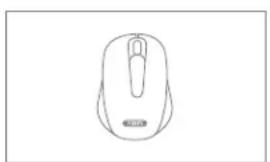
natural_image
Line drawing of a computer mouse (no text or symbols)
natural_image
Line drawing of a flexible broadband cable with connector ends (no text or symbols)
natural_image
Simple geometric diagram with two concentric circles inside a rectangle (no text or symbols)
WARNHINWEISE

Security Tech Germany
natural_image
Line drawing of a network device with ports, cables, and sensors (no text or labels)Security Tech Germany
1
Security Tech Germany
2

Einrichtung App
https://www.abus.com/product/TVVR33600
https://www.abus.com/product/TVVR33800
Soft ware:

Security Tech Germany
ABUS


TVVR33600 / TVVR33800
This quick-start guide describes the initial installation steps for your analogue HD recorder.
Detailed information can be found in the user guide on the website www.abus.com
ABUS


Dear Customer,
Thank you for purchasing one of our products. This product complies with current domestic and European regulations.
Conformity has been proven, and all related certifications are available from the manufacturer on request: ABUS Security Center GmbH & Co. KG, Linker Kreuthweg 5, 86444 Affing, GERMANY.
To ensure that this standard is maintained and that safe operation is guaranteed, you are obliged to observe the stipulations set out in this user guide. Read the entire user manual before putting the product into operation, and pay attention to all operating instructions and safety information.
All company names and product descriptions are trademarks of the corresponding owner. All rights reserved. If you have any questions, please contact your specialist dealer.
SCOPE OF DELIVERY
TVVR33600:
- 6-channel recorder
• 12 V power supply unit - Wireless USB mouse
- 1 m network cable
- Hard disk drive connection cable
- Screws for hard disk drive
• CD - Quick start guide
TVVR33800:
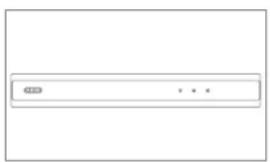
• 8-channel recorder
• 12 V power supply unit
- Wireless USB mouse
- 1 m network cable
- Hard disk drive connection cable
- Screws for hard disk drive
• CD
- Quick start guide

natural_image
Line drawing of a cable-wrapped electronic device (no text or symbols)
natural_image
Line drawing of a computer mouse (no text or symbols)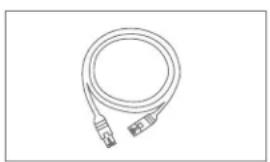
natural_image
Line drawing of a flexible broadband cable with connectors (no text or symbols)
natural_image
Simple geometric diagram with two concentric circles inside a rectangle (no text or symbols)
WARNINGS

Security Tech Germany
Keep the recorder away from strong magnetic fields.

Ensure an uninterrupted power supply.

Keep liquids away from the recorder.

Only operate and store the recorder in the ambient conditions recommended by the manufacturer.

Turn the recorder off before connecting or removing peripheral devices

Ensure that there is always sufficient ventilation.

CONNECTIONS


TIPS FOR CAMERA INSTALLATION
natural_image
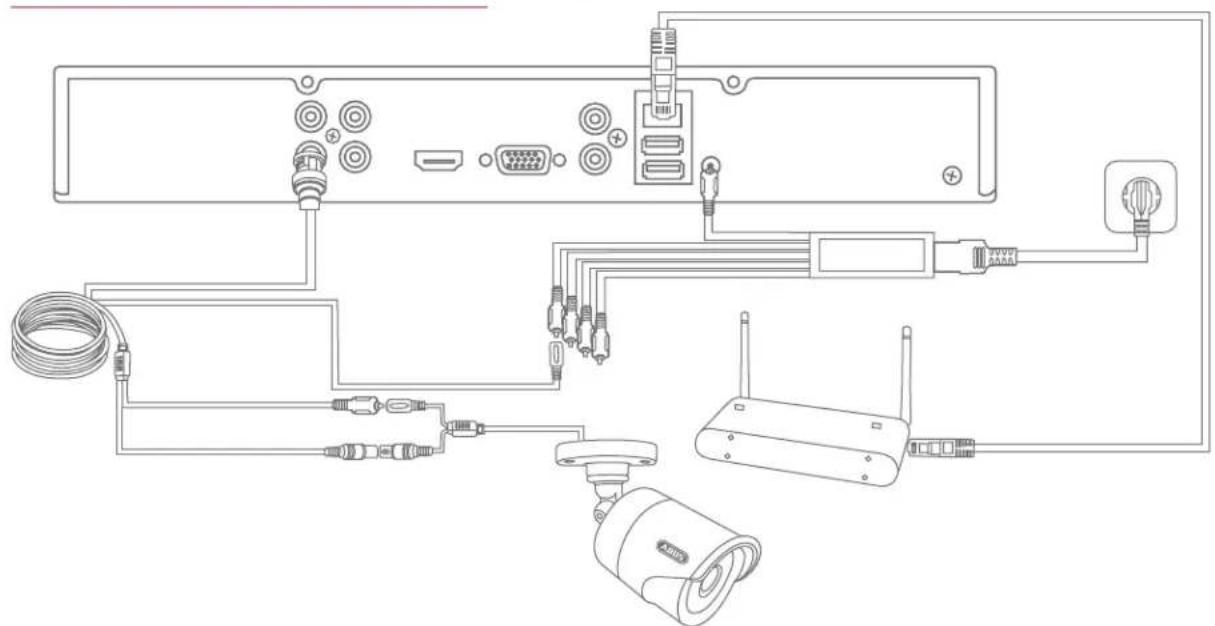
Line drawing of a network device with ports, cables, and sensors (no text or labels)Connect the recorder to the power supply and connect it to your home network via the network cable. To integrate analogue HD cameras, connect them to the BNC socket of the recorder and the recorder's power supply unit using the combined cable provided. When integrating IP cameras, connect them to the power supply and to your home network.
SYSTEM ACTIVATION

Security Tech Germany
1
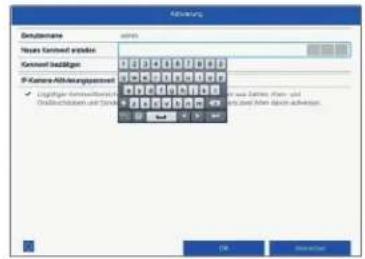
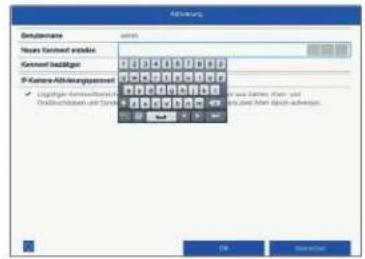
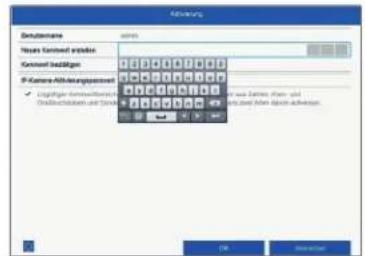
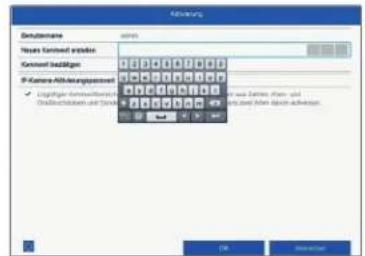
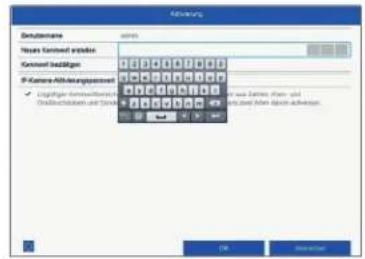
In the field "New password" enter a password for the admin user. The password must meet the specified minimum requirements. Recommendation: Use a password that is as complex as possible and is classified as "strong".
2
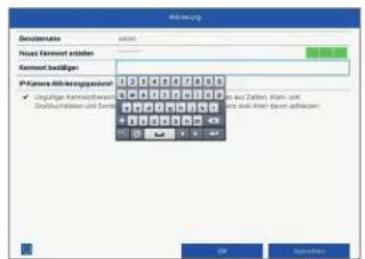
Re-enter the password to confirm it. Note down the new password and keep it in a secure location. The admin password can only be reset by ABUS technical support.
3
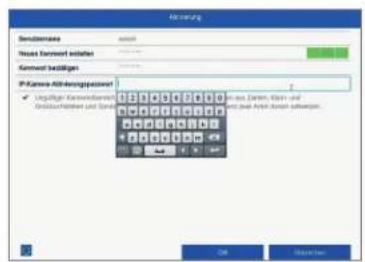
You should also enter the activation password for the cameras here. If you activate a camera via the recorder, the recorder uses this password for it. Then click on "OK". The device is now activated and all of its functions can be used.
Admin password:
SOFTWARE SET-UP
①

In the first step, select whether you wish to replace analogue HD channels (for analogue HD cameras) with IP channels (for IP cameras). This activates/deactivates the respective analogue HD BNC connection. Click on "Next" to confirm your selection.
2
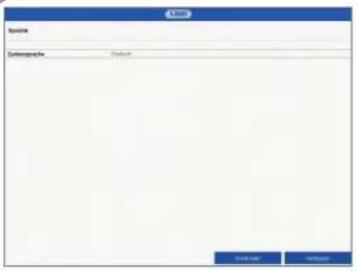
Select the desired language and click "Apply".
3
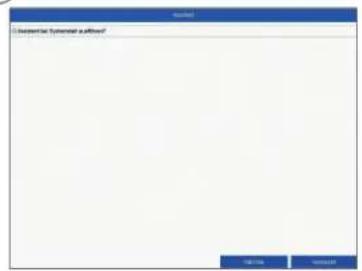
If you untick the checkbox, the set-up wizard will not automatically pop up the next time the software starts up. Click on "Next".


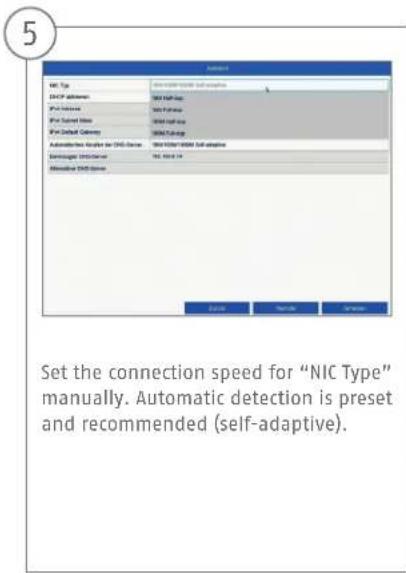

7
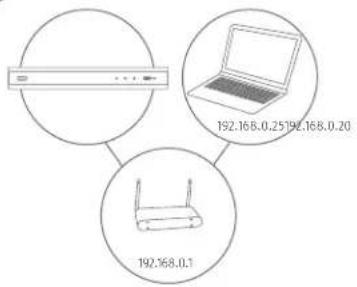
If your router does not automatically assign the address data, enter the data according to the following steps. The image gives an example of connected devices with the corresponding IP addresses.
8

You can manage and, if necessary, edit your ports here. We recommend that the default values are maintained.
9

Following installation, the hard disk drive must be initialised before use. Select the hard disk drive to be initialised.

10

Click on "Init" and confirm the successful initialisation by clicking on "OK". Go to the next screen with "Next".
11

If you wish to integrate IP cameras, click on "Search" to look for available IP cameras in the network. You can then select and add the cameras. Go to the next screen with "Next".
12

Select the recording type. You can choose between "Continuous" and "Motion detection". Close the set-up wizard by clicking "OK".
APP SETUP
1

Activating ABUS Link Station
- Navigate to the network settings in your local interface and open the ABUS Link Station settings.
- Activate the ABUS Link Station function and click on "Save settings".
- The status should now show as "online". If "offline" is still shown, check that the recorder is connected to a network with internet access.
- Now assign a verification code for the connection. You can write down the code you used here, then keep the quick guide in a safe place.
- Leave the web interface open. The QR code and verification code shown are required to set up the recorder in the app.
Please note: The ABUS Link Station connects your recorder to your smartphone via the cloud service. You do not need to reconfigure your router for this. If you do not want to use the cloud service, you can follow an alternative app setup procedure in the recorder's instruction manual.

Security Tech Germany
2

App setup
- Download the "ABUS Link Station" app from the iOS App Store or Google Playstore and open it.
- Create an account for remote access by clicking on "Log in" and then on "Register an account".
- Activate the account using the verification code sent to you by email.
- Click on "Add device" and scan the QR code from the recorder's local interface.
- After the recorder has been found, enter the recorder's verification code. The recorder has now been added to your account.
- If you experience problems during setup, please go to our support website: https://support.abus-sc.com/
INSTRUCTIONS + SOFTWARE
Instructions:

instructions for operating the online and recorder interfaces can be found under the "Downloads" tab at the following link:
https://www.abus.com/product/TVVR33600
https://www.abus.com/product/TVVR33800
Soft ware:

1 ABUS Central Monitor Station (CMS) allows you to monitor, control and manage the video data from your ABUS recorder on your PC:
ABUS IP Installer to find your recorder in the network, to check for and install firmware updates and to download instruction manuals and quick start guides directly to your PC:
Security Tech Germany
ABUS


TVVR33600/TVVR33800
natural_image
Line drawing of a cable-wrapped electronic device (no text or symbols)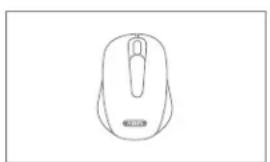
natural_image
Line drawing of a computer mouse (no text or symbols)
natural_image
Line drawing of a flexible broadband cable with connector ends (no text or symbols)
natural_image
Simple geometric diagram with two concentric circles inside a rectangle (no text or symbols)
WAARSCHUWINGEN

Security Tech Germany
natural_image
Line drawing of a network device with ports, cables, and sensors (no text or labels)Security Tech Germany
1
ABUS Link Station activeren
Security Tech Germany
2

Confi guratie app
https://www.abus.com/product/TVVR33600
https://www.abus.com/product/TVVR33800
Soft ware:

Security Tech Germany
ABUS


TVVR33600 / TVVR33800
GUIDE DE DÉMARRAGE RAPIDE POUR ENREGISTREUR HD ANALOGIQUE

natural_image
Line drawing of a cable and rectangular electronic device (no text or symbols)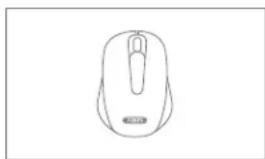
natural_image
Line drawing of a computer mouse (no text or symbols)
natural_image
Line drawing of a flexible network cable with connectors (no text or symbols)
natural_image
Simple geometric diagram with two concentric circles inside a rectangle (no text or symbols)
Security Tech Germany
natural_image
Line drawing of a network device with ports, cables, and sensors (no text or labels)Security Tech Germany
1

Security Tech Germany
2

Confi guration de l'application
https://www.abus.com/product/TVVR33600
https://www.abus.com/product/TVVR33800
Logiciel :
Security Tech Germany
ABUS


TVVR33600 / TVVR33800
KVIKGUIDE TIL ANALOG HD-OPTAGER
natural_image
Line drawing of a cable-wrapped electronic device (no text or symbols)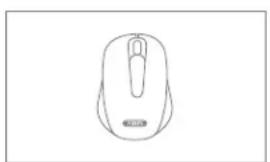
natural_image
Line drawing of a computer mouse (no text or symbols)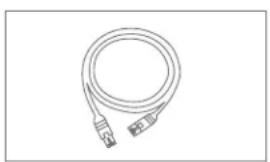
natural_image
Line drawing of a flexible broadband cable with connectors (no text or symbols)
natural_image
Simple geometric diagram with two concentric circles inside a rectangle (no text or symbols)
ADVARSELSHENVISNINGER

Security Tech Germany
natural_image
Line drawing of a network device with ports, cables, and sensors (no text or labels)Security Tech Germany
1
Security Tech Germany
2

Opsætning app
https://www.abus.com/product/TVVR33600
https://www.abus.com/product/TVVR33800
Soft ware:
Security Tech Germany
ABUS


TVVR33600 / TVVR33800
GUIDA RAPIDA PER REGISTRA- TORE HD ANALOGICO
natural_image
Line drawing of a cable-wrapped electronic device (no text or symbols)
natural_image
Line drawing of a computer mouse (no text or symbols)
natural_image
Line drawing of a flexible broadband cable with connector ends (no text or symbols)
natural_image
Simple geometric diagram with two concentric circles inside a rectangle (no text or symbols)
AVVERTENZE

Security Tech Germany
natural_image
Line drawing of a network device with ports, cables, and sensors (no text or labels)Security Tech Germany
1

Security Tech Germany
2

Confi gurazione app
https://www.abus.com/product/TVVR33600
https://www.abus.com/product/TVVR33800
Soft ware:

Security Tech Germany
ABUS


TVVR33600 / TVVR33800
KRÓTKI PRZEWODNIK DO ANALOGOWEJ NAGRYWARKI HD
natural_image
Line drawing of a cable-wrapped electronic device (no text or symbols)
natural_image
Line drawing of a computer mouse (no text or symbols)
natural_image
Line drawing of a flexible broadband cable with connectors (no text or symbols)
natural_image
Simple geometric diagram with two concentric circles inside a rectangle (no text or symbols)
Security Tech Germany
natural_image
Line drawing of a network device with ports, cables, and sensors (no text or labels)Security Tech Germany
1
Security Tech Germany
2

https://www.abus.com/product/TVVR33600
https://www.abus.com/product/TVVR33800
Oprogramowanie:

Security Tech Germany
ABUS


TVVR33600 / TVVR33800
natural_image
Line drawing of a cable-wrapped electronic device (no text or symbols)
natural_image
Line drawing of a computer mouse (no text or symbols)
natural_image
Line drawing of a coiled cable or connector with two connectors (no text or symbols)
natural_image
Simple geometric diagram with two concentric circles inside a rectangle (no text or symbols)
ADVERTENCIAS

Security Tech Germany
natural_image
Line drawing of a network device with ports, cables, and sensors (no text or labels)Security Tech Germany
1

Security Tech Germany
2

https://www.abus.com/product/TVVR33600
https://www.abus.com/product/TVVR33800
Soft ware:
Security Tech Germany
ABUS


TVVR33600 / TVVR33800
SNABBGUIDE FÖR ANALOG HD-INSPELARE
natural_image
Line drawing of a cable and rectangular device (no text or symbols)
natural_image
Line drawing of a computer mouse (no text or symbols)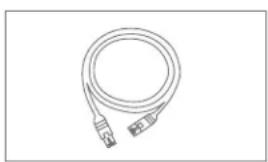
natural_image
Line drawing of a flexible network cable with connector ends (no text or symbols)
natural_image
Simple geometric diagram with two concentric circles inside a rectangle (no text or symbols)
WARNINGAR

Security Tech Germany
natural_image
Line drawing of a network device with ports, cables, and sensors (no text or labels)Security Tech Germany
1

Security Tech Germany
2

Ställa in appen
https://www.abus.com/product/TVVR33600
https://www.abus.com/product/TVVR33800
Programvara:

Security Tech Germany
| abus.com |
- QUICKGUIDE FÜR ANALOG HD- REKORDER
- Nederlands
- WARNHINWEISE
- Einrichtung App
- SCOPE OF DELIVERY
- TVVR33600:
- TVVR33800:
- WARNINGS
- CONNECTIONS
- TIPS FOR CAMERA INSTALLATION
- SYSTEM ACTIVATION
- SOFTWARE SET-UP
- 7
- 8
- 9
- APP SETUP
- INSTRUCTIONS + SOFTWARE
- WAARSCHUWINGEN
- GUIDE DE DÉMARRAGE RAPIDE POUR ENREGISTREUR HD ANALOGIQUE
- 1
- KVIKGUIDE TIL ANALOG HD-OPTAGER
- ADVARSELSHENVISNINGER
- Opsætning app
- GUIDA RAPIDA PER REGISTRA- TORE HD ANALOGICO
- AVVERTENZE
- KRÓTKI PRZEWODNIK DO ANALOGOWEJ NAGRYWARKI HD
- ADVERTENCIAS
- SNABBGUIDE FÖR ANALOG HD-INSPELARE
- WARNINGAR
- Ställa in appen
Brand : ABUS
Model : TVVR33800
Category : Video recorder