
Citation OASIS - Loudspeaker HARMAN KARDON - Free user manual and instructions
Find the device manual for free Citation OASIS HARMAN KARDON in PDF.


| Product type | Portable connected speaker |
| Brand | Harman Kardon |
| Model | Citation Oasis |
| Dimensions (L x H x D) | Approximately 200 x 100 x 100 mm |
| Weight | Approximately 1.2 kg |
| Power | Rechargeable lithium-ion battery via USB-C |
| Battery life | Up to 8 hours |
| Connectivity | Bluetooth 4.2, Wi-Fi 802.11 b/g/n |
| Voice assistant | Integrated Google Assistant |
| Multiroom function | Compatible with Google Chromecast |
| Care and cleaning | Wipe with a soft, dry cloth. Do not use chemicals. |
| Safety | Do not expose to water or humidity. Use in a temperate environment. |
| Spare parts and repairability | No spare parts available. For any repair, contact customer service. |
| Box contents | Speaker, USB-C cable, power adapter, documentation |
| Warranty | 2 years |
Frequently Asked Questions - Citation OASIS HARMAN KARDON
User questions about Citation OASIS HARMAN KARDON
0 question about this device. Answer the ones you know or ask your own.
Ask a new question about this device
Download the instructions for your Loudspeaker in PDF format for free! Find your manual Citation OASIS - HARMAN KARDON and take your electronic device back in hand. On this page are published all the documents necessary for the use of your device. Citation OASIS by HARMAN KARDON.
USER MANUAL Citation OASIS HARMAN KARDON
harman/kardon® HARMAN
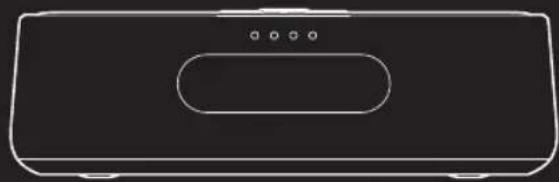
natural_image
Line drawing of a rectangular electronic device with a rounded top and four small dots on the side (no text or symbols)CITATION OASIS DAB

APP
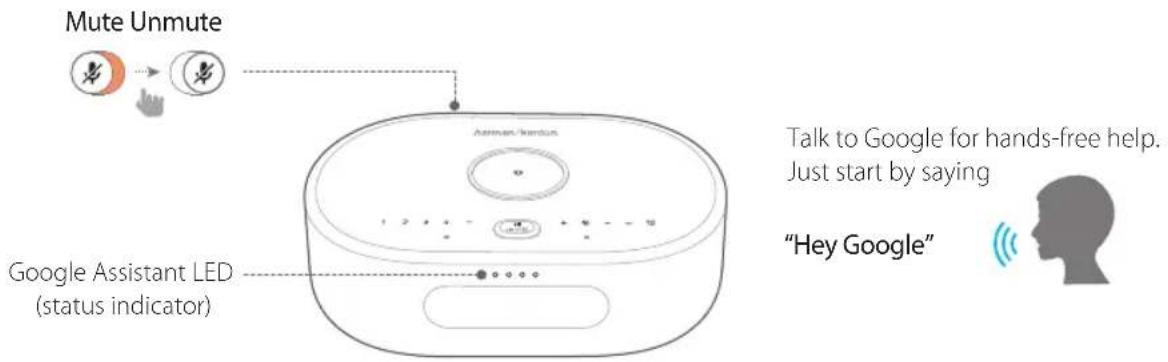
Hey Google
Google Assistant setup

natural_image
Smartphone screen displaying a colorful house icon with a red downward arrow (no text or symbols)
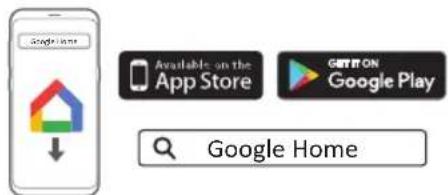
Google Home
Download the Google Home app to set up Google Assistant to use your voice to control your Citation Oasis DAB.

All product features will be set up.
② PRODUCT TOUR
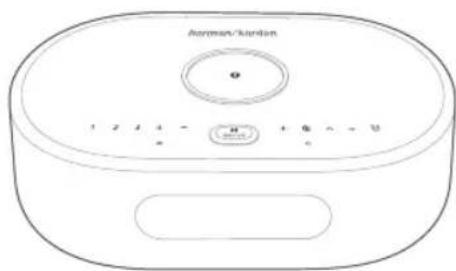
Citation Oasis DAB x1
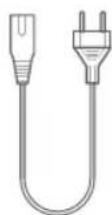
Regional power cord x1 (varies depending on country)

DAB antenna x1

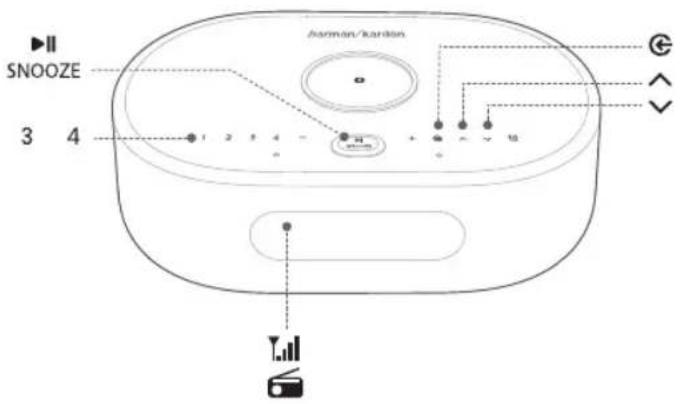
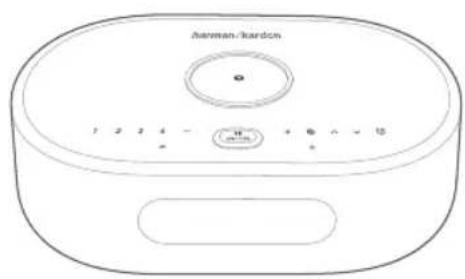
Source selector

/ Select a DAB station

Check alarm time
1,2,3,4

Volume down/up

Press briefly: Snooze alarm for 10 minutes; pause or resume playback
Press and hold (> 5s): Start DAB station scanning

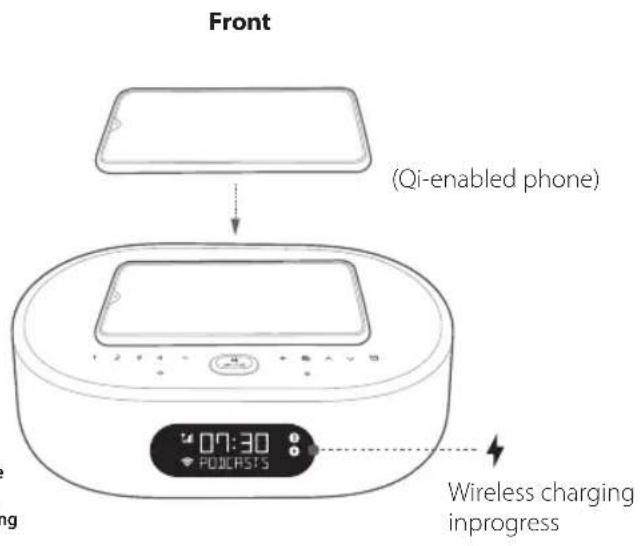
Wireless charging pad
Notes:
The wireless charging may be interrupted by obstacles between the Qi-enabled device and the wireless charging pad, such as a metallic casing that covers the device. Phone cases may impact charging speed and performance. If your phone is not charging properly, remove the case during charging.
POWER Power cable connector
SERVICE Service only
AUX
3.5 mm audio input connector for external devices
DAB
DAB antenna connector

Night Wi-Fi
Wi-Fi on (00:00 - 24:00)
Wi-Fi is switched off automatically from 00:00 to 06:00.
To change the time duration, go to the Night mode settings in Google Home app.
[Non-Text]
Display brightness selector

Microphone Mute / Unmute
Back
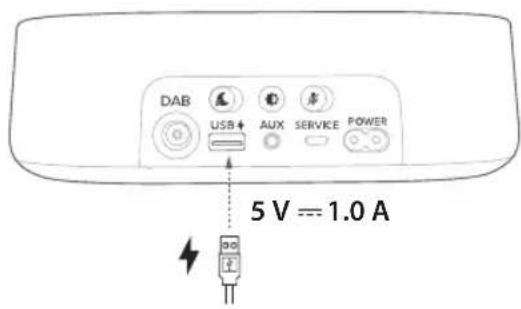
USB ↑ Type A USB connector for charging
Bottom
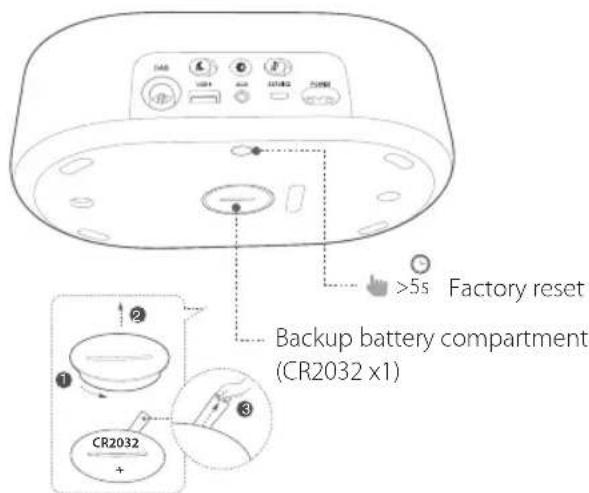
Display information
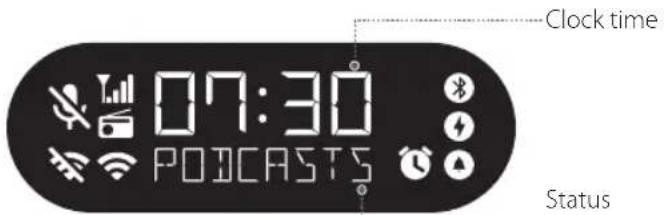

Bluetooth status indicator

Wireless charging in progress

Alarm set

Alarm time displayed

Wi-Fi signal strength

Night Wi-Fi activated, Wi-Fi disconnected

DAB signal strength

DAB source selected

Microphone mute

SETUP
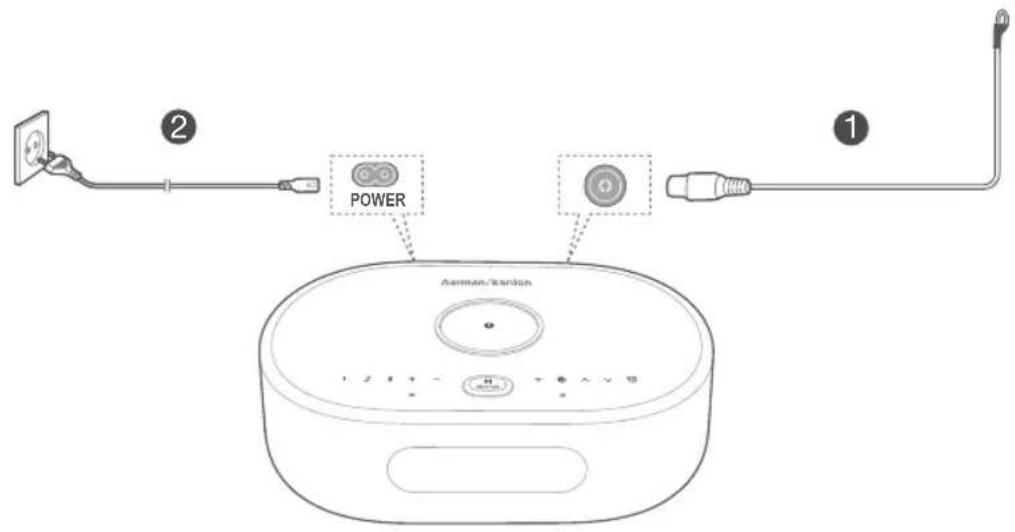
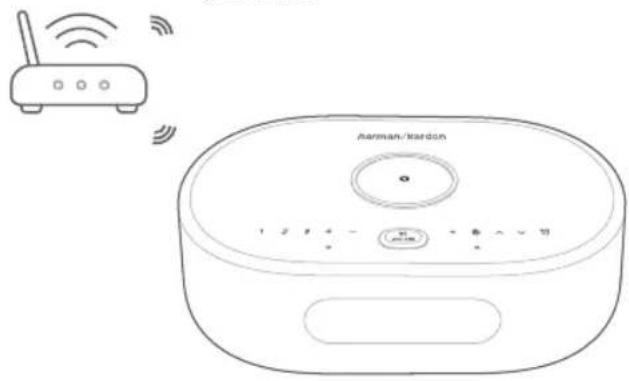
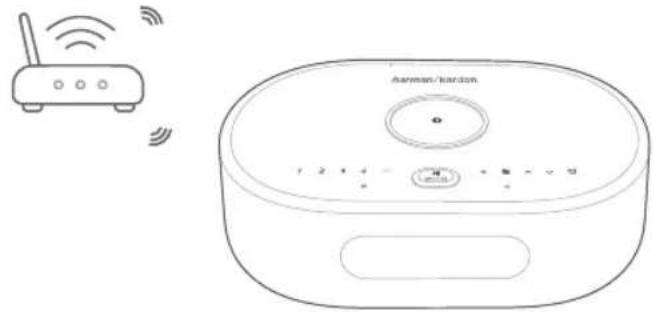
Wi-Fi and DAB setup
On your smartphone or tablet, download the Google Home app and follow the app instructions to have the CITATION OASIS DAB join your home Wi-Fi network. Sign in with your Google account. If you do not have one, create a new one.
After Wi-Fi setup, the CITATION OASIS DAB starts to sync clock time and scan DAB stations automatically.
Notes:
- On your Android device, enable Bluetooth and the location service; on your IOS device, enable Bluetooth.
• The Night Wi-Fi function is disabled before Wi-Fi setup.
(Android/iOS)
natural_image
Line drawing of a Harman/Kardon router with wireless signal icons above (no text or symbols on the device itself)
PLAY
4.1 DAB


Press repeatedly to select the DAB mode.

Press briefly: Select a DAB station.
Press and hold (>3s): Fast search for a station.

During playback, press and hold (> 3s) to
store current station as a preset. Press 1 / 2 / 3 / 4 to play the preset station.

Press briefly: Turn on/off the DAB radio.
Press and hold (> 5s): Restart DAB station scanning.

4.2 Google Assistant

Set and manage your alarms
| Desired Action | Voice Command(Say “Hey Google”, then...) |
| Set new alarm “Set an alarm for 6 AM to morrow” | |
| Set alarm with name “Set an alarm for 7 AM called Medicine” | |
| Set recurring alarm “Set an alarm for 7 AM on weekdays” | |
| Ask about existing alarm “When is my alarm set for?” | |
| Ask about all alarms “What alarms are set?” | |
| Cancel an existing alarm “Delete alarm” |
\* Set your favorite music as an alarm
Select a song, artist, genre or playlist from your default music service in the Google Home app.
| Desired Action | Voice Command(Say “Hey Google”, then...) |
| Set media or music alarm | “Set J-pop radio alarm for 6am tomorrow” or “Set birthday music alarm for 7:30 am Monday” |
| Set recurring media or music alarm “Set Beethoven music alarm for 7am every day” | |
Note:
* This feature is available in selected countries. To check the list of supported countries, go to https://support.google.com/googlenest/answer/7071598?hl=en.
Set DAB as an alarm

Press and hold (> 5s): Use DAB for all alarms;
Press and hold (> 5s) again: Restore the default alarm tone.
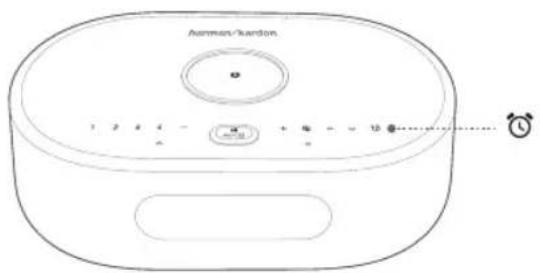
Change alarm volume
- Make sure that your mobile device or tablet is connected to the same Wi-Fi as the Citation Oasis DAB.
- Launch the Google Home app
- Select the Citation Oasis DAB.
- At the top right, tap Settings ⚙> Alarms & Timers.
- Move the slider to adjust the volume.
Note:
When DAB is set as alarms, the alarm volume is the same as the system playback volume.
Set the sleep timer for music playback
| Desired Action | Voice Command(Say “Hey Google”, then...) |
| Set a sleep timer during music playback “Set a sleep timer for 30 minutes” / “Set a sleep timer at 9:30” | |
| Set a sleep timer before music playback “Play some music for 30 minutes” | |
Note:
The Sleep timer function is now available for Chromecast built-in and Bluetooth music streaming. For DAB, AUX and AirPlay music streaming, this feature may be available in the future via automatic software updates.
4.3 Alarms
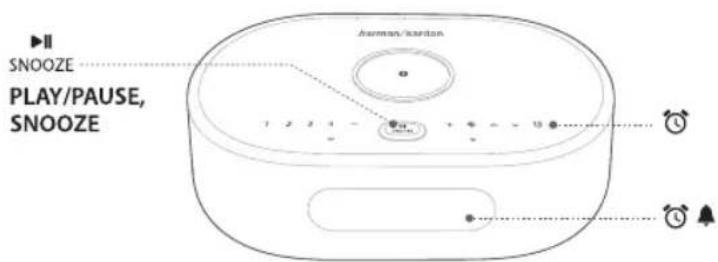
To snooze the alarm for 10 minutes, press SNOOZE PLAY/PAUSE, SNOOZE
To stop the alarm, press (or ) "STOP"
To check the alarms you have set, press repeatedly.
To delete an alarm, do the following:
-
Press 🔒 repeatedly to select an alarm.
-
Press SNOOZE to delete the alarm.
4.4 Chromecast built-in™
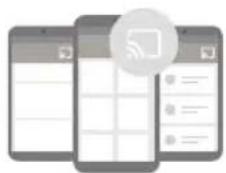
Step 1: Open a Chromecast-enabled app.
Step 2: Play Music.
Step 3: Tap the cast icon and select "Citation Oasis DAB".
e.g.
Spotify
Pandora
Tuneln
Deezer
Google Play Music
* The Citation Oasis can be included into a multi-room system with other products that support Chromecast built-in. For more details please refer to the Google Home app.
natural_image
Line drawing of a modern kitchen appliance with control buttons and a circular vent (no text or symbols)4.5 AirPlay
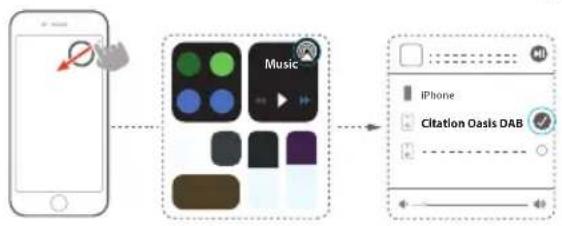
- On an iOS device, enter the Control Center.
2.Tap 🔒 to select "Citation Oasis DAB" as speaker. - Start audio streaming from an app.

flowchart
graph LR
    A["Smartphone"] --> B["Music App"]
    B --> C["Citation Oasis DAB"]
natural_image
Line drawing of a wireless router with antenna and control buttons (no text or symbols)4.6 Bluetooth

- Press ⬆ repeatedly to select the Bluetooth source.
- Press and hold Ⓗ 3s) to enter the Bluetooth pairing mode.
- On the Bluetooth device, enable Bluetooth and search for "Citation Oasis DAB".
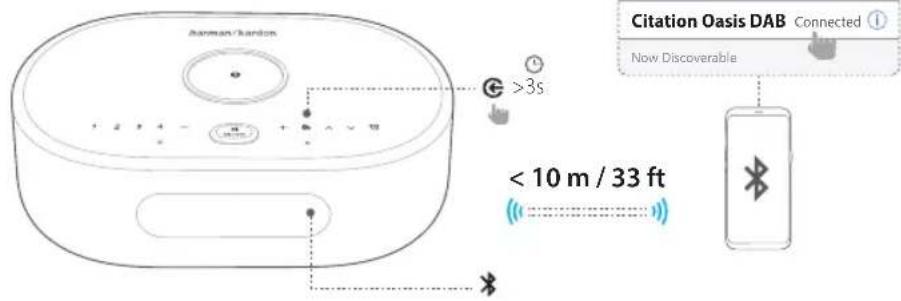
After successful connection, start audio playback on your Bluetooth device.

OWNER'S MANUAL
Download the full Owner's Manual from harmankardon.com
DA: Hent den fulde brugervejledning på harmankardon.com
DE: Laden Sie die vollständige Bedienungsanleitung von harmankardon.com herunter
ES: Descárgate el Manual de usuario completo en: harmankardon.com
FR: Téléchargez le mode d'emploi complet sur harmankardon.com
IT: Scarica il manuale dell'utente integrale da harmankardon.com
NL: Download de complete gebruikershandleiding van harmankardon.com
NO: Last ned hele brukerhåndboken fra harmankardon.com
SV: Ladda ner hela bruksanvisningen från harmankardon.com
RU: Загрузите полное руководство пользователя с сайта harmankardon.com

SPECIFICATIONS
• Model Name: Citation Oasis DAB
• Transducer: 2 x 45 mm (full range)
• Output power: 12 W RMS
• Signal-to-noise ratio: > 80 dB
• Power Supply: 100-240 V \~ 50/60 Hz
- Bluetooth version: 4.2
- Bluetooth transmitter frequency range: 2402 – 2480 MHz
- Bluetooth transmitter power: <10 dBm (EIRP)
- Bluetooth transmitter modulation: GFSK, /4 DQPSK, 8DPSK
• Wireless network: 802.11 a/b/g/n/ac (2.4GHz/5GHz)
- 2.4G Wi-Fi transmitter frequency range: 2412 – 2472MHz (2.4GHz ISM Band, USA 11 Channels, Europe and others 13 Channels)
• 2.4G Wi-Fi transmitter power: <20dBm (EIRP)
• 2.4G Wi-Fi modulation: DBPSK, DQPSK, CCK, QPSK,BPSK,16QAM, 64QAM - 5G Wi-Fi transmitter power: <23dBm (EIRP)
• 5G Wi-Fi modulation: QPSK, BPSK, 16QAM, 64QAM, 256QAM - 5G Wi-Fi transmitter frequency range: 5.15 - 5.35GHz, 5.470 - 5.725GHz, 5.725 - 5.825GHz
CITATION OASIS DAB is in compliance with European Commission Regulation (EC) No 1275/2008 and (EU) No 801/2013.
• Power consumption
Off mode: N/A; Standby: N/A; Network standby: 2.0 Watts; Time to networked standby: 5 minutes
* Networked standby: in the condition that any wireless connection of the device is activated and microphone is off, if no audio signal is provided to the device, it will automatically switch to networked standby mode in 5 minutes. Any audio recover will bring device from networked standby to operation mode.
DA
① APP
4.4 Chromecast built-in™
4.2 Google Assistant
Google LED (Statusanzeige)
4.4 Chromecast built-in™
4.4 Chromecast built-in™
Mode nocturne (WI-FI)
4.2 Assistant Google
4.4 Chromecast built-in™
4.4 Chromecast built-in™
Compartment back-up batterij
Informatiescherm
Kloktijd
Status informative
* Bluetooth-statusindicator
4.4 Chromecast built-in™
4.4 Chromecast built-in™
4.4 Chromecast built-in™
4.4 Chromecast built-in™
TCC/IC Radiation Exposure Statement: This equipment complies with FCC/IC RSS-102 radiation exposure limits set forth for an uncontrolled environment. This equipment should be installed and operated with minimum distance 20cm between the radiator and your body.
Use Restriction: This device is restricted to indoor use when operating in the 5150 to 5350 MHz frequency range in following countries:
| BE EL LT PT | ||
| BG ES LU RO | ||
| CZ FR HL SI | ||
| DK HR MT SK | ||
| DE IT NL FI | ||
| EE CY AT SE | ||
| IE LV PL UK |
Belgium (BE), Greece (EL), Lithuania (LT), Portugal (PT), Bulgaria (BG), Spain (ES), Luxembourg (LU), Romania (RO), Czech Republic (CZ), France (FR), Hungary (HU), Slovenia (SI), Denmark (DK), Croatia (HR), Malta (MT), Slovakia (SK), Germany (DE), Italy (IT), Netherlands (NL), Finland (FI), Estonia (EE), Cyprus (CY), Austria (AT), Sweden (SE), Ireland (IE), Latvia (LV), Poland (PL) and United Kingdom (UK).
This product contains open source software. For your convenience, the source code and relevant build instruction for software licensed under the GPL is available at http://www.harmankardon.com/opensource. You may also obtain this information by contacting us at OpenSourceSupport@Harman.com

The Bluetooth® word mark and logos are registered trademarks owned by Bluetooth SIG, Inc. and any use of such marks by HARMAN International Industries, Incorporated is under license. Other trademarks and trade names are those of their respective owners.

The Wi-Fi CERTIFIED™ Logo is a certification mark of the Wi-Fi Alliance®.

Works with Apple AirPlay
Apple ^® , AirPlay ^® , iPad ^® , iPad Air ^® , iPad Pro ^® , and iPhone ^® are trademarks of Apple Inc., registered in the U.S. and other countries. Use of the Works with Apple badge means that an accessory has been designed to work specifically with the technology identified in the badge and has been certified by the developer to meet Apple performance standards. To control this AirPlay 2-enabled speaker, iOS 11.4 or later is required.

Google, Google Play, Google Home and Chromecast built-in are trademarks of Google LLC. Chromecast built-in may require subscription(s). Google Assistant requires an internet connection and is not available in certain countries and languages. Availability and performance of certain features and services are device, service and network-dependent and may not be available in all areas. Controlling certain devices in your home requires compatible smart devices. Subscriptions for services and applications may be required and additional terms, conditions and/or charges may apply.
_
一
| _
1
HA_HK_Oasis DAB_QSG_EMEA_CR_V22
- Google Home
- ② PRODUCT TOUR
- 1,2,3,4
- Notes:
- Night Wi-Fi
- Wi-Fi and DAB setup
- PLAY
- DAB
- Google Assistant
- \* Set your favorite music as an alarm
- Note:
- Set DAB as an alarm
- Change alarm volume
- Alarms
- Chromecast built-in™
- AirPlay
- Bluetooth
- OWNER'S MANUAL
- Download the full Owner's Manual from harmankardon.com
- SPECIFICATIONS
- DA
- ① APP
- Mode nocturne (WI-FI)
- Assistant Google
- Informatiescherm
- Works with Apple AirPlay
Brand : HARMAN KARDON
Model : Citation OASIS
Category : Loudspeaker