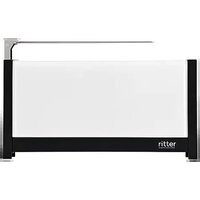
Volcano 5 - Toaster Ritter - Free user manual and instructions
Find the device manual for free Volcano 5 Ritter in PDF.


| Product type | Toaster |
| Brand | Ritter |
| Model | Volcano 5 |
| Number of slots | 2 |
| Dimensions (W x D x H) | 28 x 18 x 22 cm |
| Weight | 1.5 kg |
| Power supply | 230 V / 50 Hz, 1800 W |
| Housing material | Plastic and stainless steel |
| Color | Black or white (depending on version) |
| Browning control | 7-position dial |
| Special functions | Defrost, reheat, manual stop |
| Auto shut-off | Yes, with motorized ejection |
| Bread centering | Yes, adjustable guides |
| Cord storage | Yes, cord winder under base |
| Crumb tray | Yes, removable for cleaning |
| Cool exterior surface | Yes, CoolTouch technology |
| Maintenance and cleaning | Unplug, empty the crumb tray regularly, clean the exterior with a damp cloth |
| Safety | Auto shut-off in case of overheating, cool surface, non-slip feet |
| Included accessories | Dust bag (depending on version) |
| Spare parts available | Yes, via Ritter after-sales service |
| Repairability | Repairability index 8/10 (estimate) |
| Warranty | 2 years |
| Country of origin | Germany |
Frequently Asked Questions - Volcano 5 Ritter
User questions about Volcano 5 Ritter
0 question about this device. Answer the ones you know or ask your own.
Ask a new question about this device
Download the instructions for your Toaster in PDF format for free! Find your manual Volcano 5 - Ritter and take your electronic device back in hand. On this page are published all the documents necessary for the use of your device. Volcano 5 by Ritter.
USER MANUAL Volcano 5 Ritter
FALLS SICH EIN BROT VERKLEMMTHAT
GENERAL SAFETY INSTRUCTIONS
To avoid personal injury or damage to the toaster, please observe the following safety instructions:
- The toaster is to be used for domestic purposes only and must not be used commercially.
- Never set the appliance down on hot surfaces or close to a naked flame.
- Use the accessories included in the delivery specification only.
- Use suitable extension cables only.
- Do not bend the power cord. Never wrap the cable around the appliance.
- Route the power cord so that it does not come into contact with hot or sharp-edged objects.
- Only start to use the toaster after it has been securely set up.
- The appliance may be used by children over 8 years of age as well as by persons with reduced physical, sensory or intellectual capabilities or persons lacking in relevant
experience and/or knowledge provided that they do so under supervision or have been instructed in the safe use of the appliance and understand the potential risks associated with its use.
- Do not allow children to play with the appliance.
- Keep the appliance and its connection cable out of reach of children under the age of 8.
– Children must not be permitted to clean or perform user maintenance on the appliance unless they are over 8 years of age and supervised.
- Always disconnect the appliance from the mains whenever it is to be left unsupervised and prior to cleaning.
- The toaster must not be operated using a timer or tele-control system.
- Only connect the toaster to a suitable voltage source that conforms with the specifications on the type label.
– Never leave the toaster unattended while it is operating.
Risk of electric shock
- Always remove the power plug from the socket in the event of a malfunction, before cleaning and when the toaster is not in use. When doing so, pull on the plug and not on the cable. - Never immerse the toaster in water. Never expose the toaster to rain or any other form of moisture. If the toaster falls into water, unplug the cable from the mains socket before removing the toaster from the water. Have the toaster inspected at an authorized service location before using it again.
- Always ensure that your hands are completely dry before using the toaster. Do not use the toaster if it is wet or damp or while you are standing on a damp surface. Do not use the toaster outdoors.
- Stop using the appliance immediately if any parts are damaged and contact the ritter after-sales service.
- If the power cord is damaged, it must be replaced by the manufacturer, the manufacturer's after-sales service or a similarly qualified person to eliminate risk of personal injury.
- The heating wires are supplied with mains power during operation. Therefore, you should never place any metal objects in the toaster.
Risk of burns
- The outer surfaces of the toaster may become very hot while the toaster is in operation. Always allow the toaster to cool down a little before touching it (e.g. prior to cleaning). - The bread and roll rack may become very hot. Always use the slide bar to raise or collapse the bread and roll rack. - Freshly toasted or warmed-up bread can be very hot. You should therefore only remove the bread from the toaster when it has cooled down slightly.
Risk of fire
Bread can burn. It is therefore not inconceivable that bread may catch fire while the toaster is operating. Please observe the following fire safety instructions:
- Do not operate the toaster near or below flammable material such as curtains.
– Never cover the toasting slot while the toaster is in use.
– Never use this appliance to toast dried breads such as crisp bread, melba toast etc.
– Never use the toaster to toast bread covered in any kind of coating.
– Never place bread rolls directly over the toasting slot. Always place bread rolls on the bread and roll rack provided.
- Allow the toaster at least 30 seconds to cool down after each use.
– Empty the crumb tray after each use.
Unfold the graphics in the front of the book.
Please read these instructions thoroughly before you start to use the toaster. Keep these operating instructions in a safe place and ensure that they are included with the toaster if passing it on to a third party. Alternatively, the current operating instructions are available at www.ritterwerk.de.
INTENDED USE
This toaster is intended to be used exclusively for the toasting of sliced bread and bread rolls that are suitable for toasting in a domestic setting and on a domestic scale.

The toaster is suitable for contact with foodstuffs.
If the appliance is used for a purpose other than this, or if it is operated incorrectly, severe injuries may occur or the toaster may be damaged. All warranty and liability claims will be rendered null and void in this case.
FUNCTIONS
The toaster includes an auto-centring function.
Toasting
The toasting function allows you to toast bread to your desired toasting degree.
Reheating
The reheating function allows you to reheat cold bread that has already been toasted. The reheating process takes approximately 30 seconds.
Defrosting
The defrost function allows you to thaw frozen slices of bread and toast them to the desired degree in a single process.
Warming-up
The integrated bread and roll rack allows you to warm up bread rolls for an oven-fresh taste.
LED DISPLAY
The LED display provides information about the function that is currently in use:
Toasting
When you begin toasting, the LED indicators light up to indicate the toasting degree selected. You can configure nine different toasting degrees.
As toasting progresses, the LED indicators switch off one by one to allow you to estimate the remaining toasting time.
Reheating
The LED indicators light up and switch off one by one when the reheating process is completed.
Defrosting
During defrosting, the LED indicators flash to indicate the toasting degree selected. The indicators do not switch off until the bread has been fully defrosted and toasted.
Warming-up
When the warming-up process begins, the LED indicators light up to indicate the toasting degree selected. As warming-up progresses, the LED indicators switch off one by one to allow you to estimate how much warming-up time remains.
BEFORE USING THE APPLIANCE FOR THE FIRST TIME
Preparation
- Clean the toaster before allowing it to come into contact with any food (see CLEANING).
- Set the toaster down on a flat, non-skid surface close to a mains socket.
- Plug the power plug (7) into the socket.
- Set the toaster to "Toast" three times without inserting any bread into the toasting slot (see USING THE APPLIANCE).
- Ensure that there is sufficient ventilation in the room (e.g. by opening a window).
USING THE APPLIANCE
Preparation
- Ensure that the crumb tray (8) is in its designated slot.
The toaster is designed so that regular bread that is suitable for toasting will turn golden brown when a medium toasting degree is selected.
Toasting to golden brown brings out the taste of the bread perfectly.
The result of toasting may differ depending on the type and freshness of the bread.
Note:
Consuming bread that has been toasted to an excessive degree may be harmful to health.
Toasting
- Place the bread in the toasting slot (4).
- Push the power sliding switch (3) downwards until it locks into place.
- Use the buttons for setting the toasting degree (1.4/1.5) to select the desired degree of browning if required.
Toasting then begins.
After the set toasting time has elapsed, toasting stops.
Reheating
- Place the bread you want to reheat in the toasting slot (4).
- Push the power sliding switch (3) downwards until it locks into place.
- Press the Reheat button (1.2).
The bread takes approx. 30 seconds to reheat.
Defrosting
- Place the bread you want to defrost in the toasting slot (4).
- Push the power sliding switch (3) downwards until it locks into place.
- Press the Defrost button (1.3) and then use the buttons for setting the toasting degree (1.4/1.5) to select the desired degree of browning if required.
The defrosting and toasting process then begins. The bread is first defrosted and then toasted to the selected toasting degree.
After the set toasting time has elapsed, toasting stops automatically.
Warming-up
- Raise the bread and roll rack (5).
- Place the bread you want to warm up on the bread and roll rack.
- Push the power sliding switch (3) downwards until it locks into place.
- Use the buttons for setting the toasting degree (1.4/1.5) to select the desired degree of browning if required.
Interrupting operation
- Press the Stop button (1.1) to interrupt operation of the appliance at any stage.
• After you press the Stop button, the toasting degree is reset to the default settings.
WHAT TO DO IF BREAD BECOMES JAMMED
If the item you are toasting gets jammed in the toasting slot, the toaster switches off after the set toasting degree is complete.
- You then need to pull the power plug (7) out of the socket.
- Carefully try to loosen the bread and remove it from the toaster in one piece (e.g. using a small wooden implement).
You should ideally empty the crumb tray (8) after each use to prevent breadcrumbs from carbonizing or becoming baked onto the toaster (see CLEANING section).
CLEANING
Clean the toaster after each use to prevent the accumulation of food residue.

WARNING, risk of electricshock:
Always unplug the appli- ance from the mains before cleaning.
CAUTION, risk of burns:
Always allow the toaster to cool down before cleaning.
- Remove the crumb tray (8) from the appliance and remove any crumbs.
- Clean and dry the crumb tray manually (NOT in the dishwasher).
- Wipe down the external housing parts with a damp cloth.
CAUTION, risk of damage to the toaster:
- Do not use any abrasive cleaners, sponges with rough surfaces or hard brushes to clean the appliance.
– Never clean the interior of the toasting slot.
DISPOSAL

At the end of its service life this product must not be disposed of as part of normal domestic waste. It must be taken to a dedicated collection point for recycling electrical and electronic devices. This is indicated by the symbol on the product, the operating instructions or the packaging.
The materials can be used again in accordance with their identification. The re-use, material-sensitive recycling or other forms of recycling of old appliances enables you to make a vital contribution to protecting our environment.
Please consult with the disposal office at your local authority.
REACH DIRECTIVE
SERVICE, REPAIRS AND SPARE PARTS
Please contact your local after-sales service for service, repairs and spare parts.
The appliance complies with the CE specifications.
Mains voltage/power consumption: Refer to the type label on the underside of the appliance.
Safety class: 1
WARRANTY
This ritter toaster comes with a 2-year manufacturer's warranty, calculated from the date of purchase and in accordance with EU warranty directives. Your legal warranty claims according to § 437 ff. BGB (German Civil Code) remain unaffected by this regulation. The manufacturer warranty applies to all devices sold within the European Union. For details of the warranty conditions, see www.ritterwerk.de/warranty. For any warranty claims or for customer service, the toaster must always be sent to the customer service centre in your country.
EXPLANATION OF SYMBOLS
Symbol Explanation

CE marking: The product complies with the applicable requirements of the European Union.

The product was put on the market after 13 August 2005. It must not be disposed of as normal domestic waste. The crossed-out wheelie bin symbol indicates that separate collection is required.

Suitable for contact with foodstuffs
INSTRUCTIONS DE SÉCURITÉ GÉNÉRALES
LORSQU'UNE TRANCHE S'EST COINCEE
MURUALUSTAN TYHJENNYS
BESCHRIJVING VAN DE WERKING
SERVICE, REPARATIONER OCH RESERVDELAR



- FALLS SICH EIN BROT VERKLEMMTHAT
- GENERAL SAFETY INSTRUCTIONS
- Risk of electric shock
- Risk of burns
- Risk of fire
- INTENDED USE
- FUNCTIONS
- Toasting
- Reheating
- Defrosting
- Warming-up
- LED DISPLAY
- BEFORE USING THE APPLIANCE FOR THE FIRST TIME
- Preparation
- USING THE APPLIANCE
- Note:
- Interrupting operation
- WHAT TO DO IF BREAD BECOMES JAMMED
- CLEANING
- WARNING, risk of electricshock:
- CAUTION, risk of burns:
- CAUTION, risk of damage to the toaster:
- DISPOSAL
- REACH DIRECTIVE
- SERVICE, REPAIRS AND SPARE PARTS
- WARRANTY
- EXPLANATION OF SYMBOLS
- Symbol Explanation
- INSTRUCTIONS DE SÉCURITÉ GÉNÉRALES
- LORSQU'UNE TRANCHE S'EST COINCEE
- MURUALUSTAN TYHJENNYS
- BESCHRIJVING VAN DE WERKING
- SERVICE, REPARATIONER OCH RESERVDELAR
Brand : Ritter
Model : Volcano 5
Category : Toaster