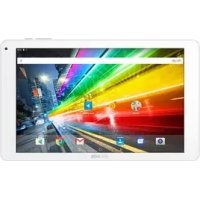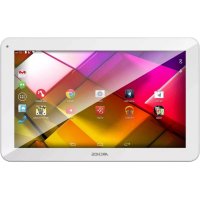
70 PLATINUM - Tablet ARCHOS - Free user manual and instructions
Find the device manual for free 70 PLATINUM ARCHOS in PDF.


User questions about 70 PLATINUM ARCHOS
0 question about this device. Answer the ones you know or ask your own.
Ask a new question about this device
Download the instructions for your Tablet in PDF format for free! Find your manual 70 PLATINUM - ARCHOS and take your electronic device back in hand. On this page are published all the documents necessary for the use of your device. 70 PLATINUM by ARCHOS.
USER MANUAL 70 PLATINUM ARCHOS
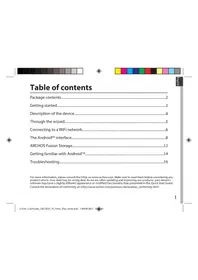
Package contents....2
Getting started....3
Description of the device....4
Through the wizard....5
Connecting to a WiFi network....6
The Android ^TM interface....8
ARCHOS Fusion Storage....12
Getting familiar with Android ^TM ....14
Troubleshooting....16
For more information, please consult the FAQs on www.archos.com. Make sure to read them before considering any product return. Your deal may be no big deal. As we are often updating and improving our products, your device's software may have a slightly different appearance or modified functionality than presented in this Quick Start Guide.
Consult the declaration of conformity on http://www.archos.com/products/declaration_conformity.html


natural_image
Gradient color bar transitioning from black to white (no text or symbols)

natural_image
Color palette bar with eight distinct squares in yellow, magenta, cyan, blue, green, red, black, yellow, pink, cyan, and gray (no text or symbols)Package Content
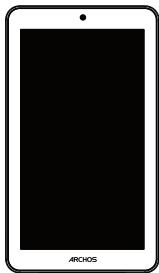
natural_image
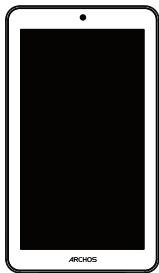
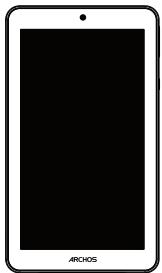
Front view of a smartphone with a black screen and 'ARCHOS' label at the bottom (no other text or symbols)ARCHOS 70 Platinum
text_image
ARCHOSQSG booklet
text_image
WarrantyWarranty, legal & safety booklet

USB cable
natural_image
Simple line drawing of a black cable with a small connector (no text or symbols)Charger
2

Getting Started
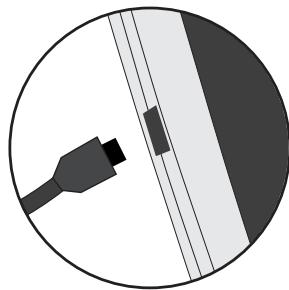
Charging
natural_image
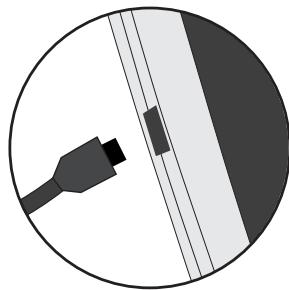
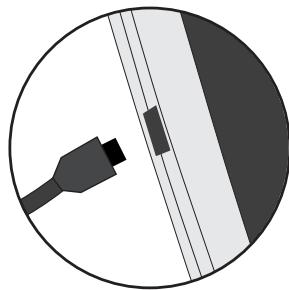
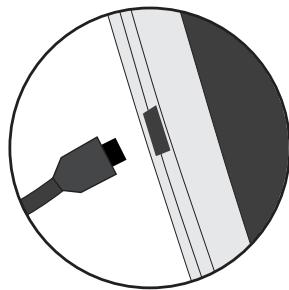
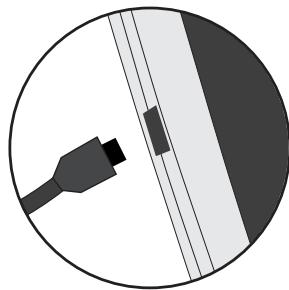
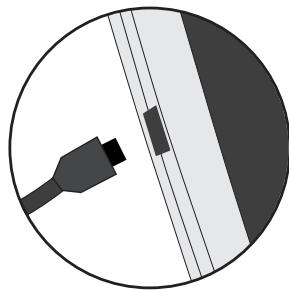
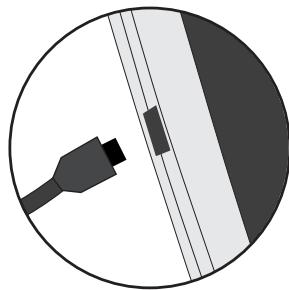
Circular diagram showing a connector or cable with a rectangular component, no text or symbols present.- Charge your device by plugging your power cable into the power connector. The ARCHOS device will start charging.
- Press the Power button to turn on the device.
The charging indicator light is on when the battery is charging.
- You can use your ARCHOS whilst it charges.
- Let your device charge completely the first time you use it.
- Use only the supplied charger.
When your device is completely discharged, you need to charge it for at least 10 minutes before the charging battery icon can be displayed.
TIP:
To receive more complete service, please register your product.
From a computer, go to www.archos.com/register.
Description of the device
text_image
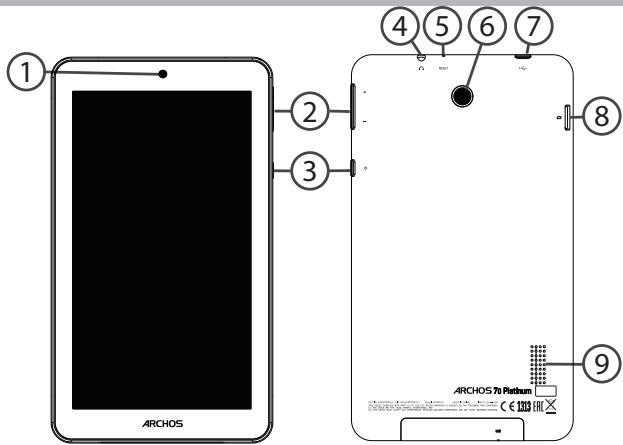
ARCHOS ① ② ③ ④ ⑤ ⑥ ⑦ ⑧ ⑨ ARCHOS To Platform CE 100①Webcam
②Volume buttons
③ON/OFF button
④ Headphone jack
⑤ Reset button
⑥ Camera
⑦ Micro-USB port
⑧ Micro-SD card slot
⑨ Loudspeaker
Through the Wizard
The first time you start up your ARCHOS, the installation wizard will help you set up your device:
- Language
- WiFi connection
- Date & time
- Your name
- Location service options
- 3rd party apps
TIP:
We recommend that you set up your device in the WiFi zone of the network that you will regularly be using.

Connecting to a WiFi Network
WARNING: Make sure that you are in a WiFi zone.
You can access the WiFi settings quickly from the status bar.
- Touch and pull down the status bar to display it.
- Touch again the bar to reveal the quick settings.
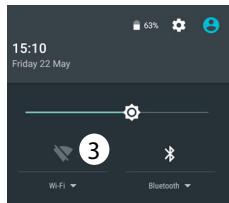
- Select the WiFi icon 📋 to activate the WiFi connection 📋.
- Select "WiFi" below the WiFi icon.
- Touch the name of network you want to connect to. Private networks are shown with a lock icon and will require you to enter your password.
TIPS:
- When entering a WiFi password, we recommend that you select "Show password" so you can see the characters you are typing. To get the correct WiFi password (or settings) for the network, contact the WiFi network provider. If your WiFi is on and you are in range of a network that you previously connected to, your ARCHOS will automatically attempt to connect to it.
- To keep your WiFi connection ON when the device is on sleep, select the Menu icon in the "WiFi" page. Then, select Advanced >Keep WiFi on during sleep >Always.
text_image
15:10 Friday 22 May 63% 3 Wi-Fi Bluetooth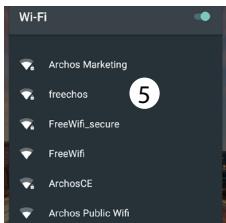
text_image
Wi-Fi Archos Marketing freechos FreeWifi_secure FreeWifi ArchosCE Archos Public Wifi
Connecting to WiFi using WPS
| 1. Touch and pull down the status bar to display it. | Wi-Fi | Add network |
| 2. Touch again the bar to reveal the quick settings. | Saved networks | |
| Refresh | ||
| 3. Select the WiFi icon ▼ to activate the WiFi connection ▼. | Advanced | |
| 4. Select “WiFi” below the WiFi icon. | Wi-Fi Direct | |
| 5. Select the Menu button, then Advanced. | WPS Push Button— | |
| 6. Select WPS Push Button. | ||
| 7. Press the WiFi Protected Setup button on your router. It may be called “WPS” or contain a symbol: ▼ | WPS Pin Entry | |
The Android™ Interface
text_image
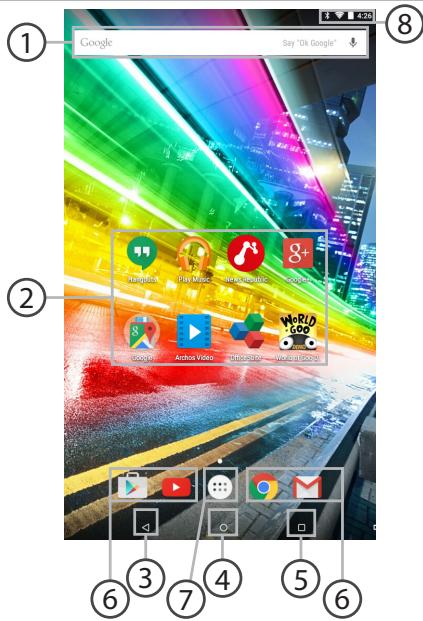
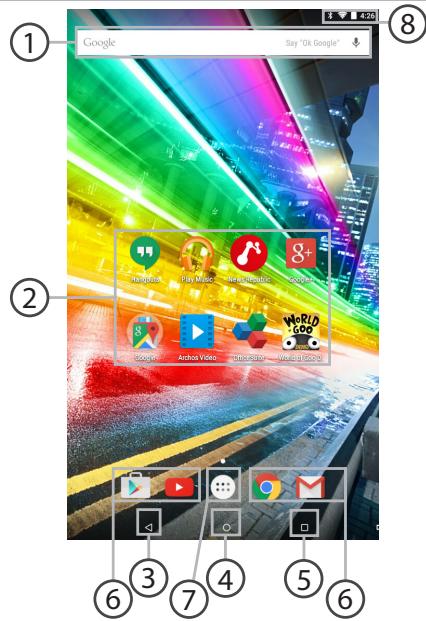
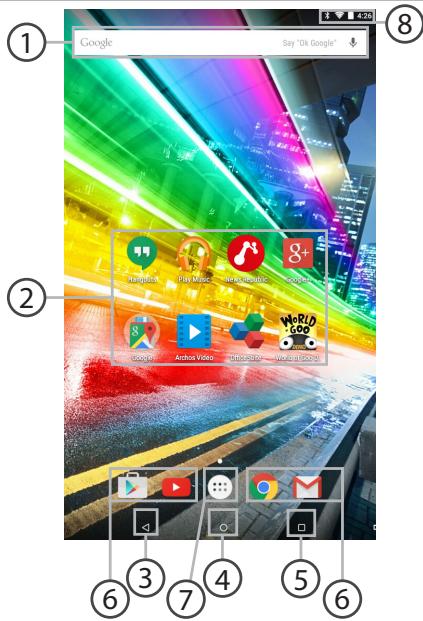
Google Say "Ok Google" ① ② ③ ④ ⑤ ⑥ ⑦ ⑧① Google™ Search
Touch "Google" for text search or touch the microphone icon for voice search.
② Android™ apps shortcuts
Touch to start an application.
③ Back button
④ Home button
⑤ Recent apps buttons
⑥ Permanent Android™ apps shortcuts
Touch to start an application
⑦ All Apps button
Touch this icon to show all the applications and widgets installed on your ARCHOS. All your downloaded applications are here.
⑧ The status bar
Displays notifications and quick settings

The Android™ Interface
text_image
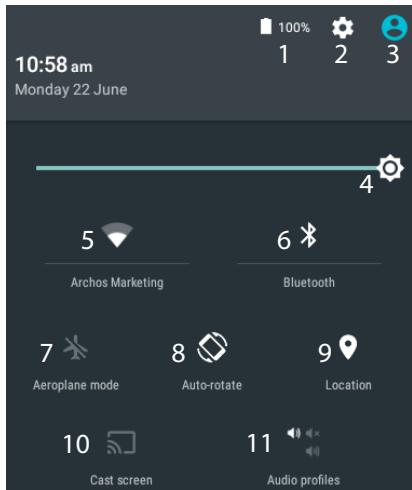
10:58 am Monday 22 June 100% 1 2 3 4 5 Archos Marketing 6 Bluetooth 7 Aeroplane mode 8 Auto-rotate 9 Location 10 Cast screen 11 Audio profiles*New multi-user support for tablets lets different users have their own separate, customizable spaces on a single device. Add users in Settings > Device.
The Quick settings
1 Percentage of battery remaining
2 To access all your settings.
3 Current user*
4 To adjust the screen brightness.
5 To turn on/off your WiFi connection.
6 To turn on/off your Bluetooth connection.
7 To activate/deactivate all wireless connections, especially when flying.
8 To activate/deactivate automatic screen orientation as you turn your ARCHOS.
9 Location services
10 To mirror your Android device to the TV so you can enjoy your great content exactly as you see it on your mobile device.
11 To select a notification type


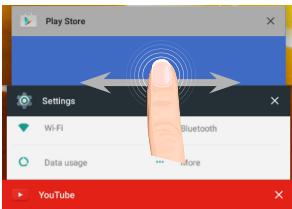
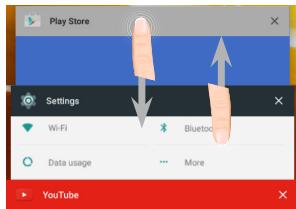
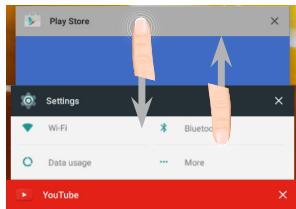
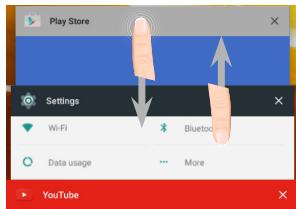
The Recent Apps
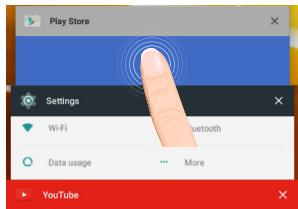
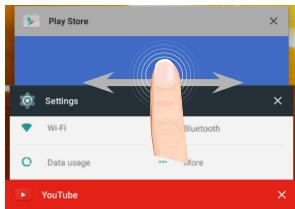
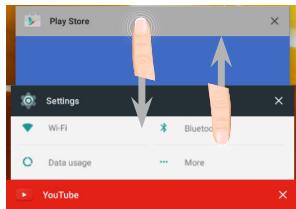
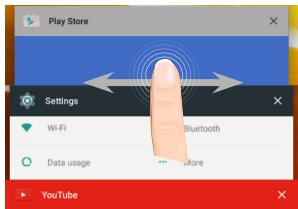
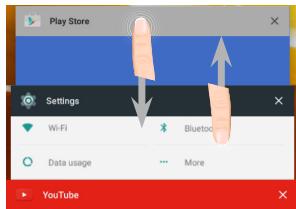
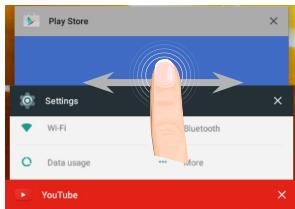
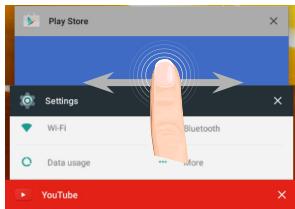
Opens a list of thumbnail images of apps you've worked with recently:
text_image
Play Store Settings Wi-Fi Bluetooth Data usage More YouTube
Archos GamePad 2 Unboxing
leodee
1 year ago · 20K views
text_image
Play Store Settings Wi-Fi Bluetooth Data usage More YouTube
Archos GamePad 2 Unboxing
leodee
1 year ago · 20K views
text_image
Play Store Settings Wi-Fi Bluetooth Data usage More YouTube
Archos GamePad 2 Unboxing
leodee
1 year ago · 20K views
Touch: to open an app.
Swipe left or right: to close an app.
Scroll up or down: to view other recent apps

ARCHOS Fusion Storage
Setting up fusion storage
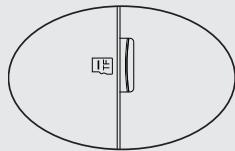
- Insert a micro-SD card in the device's micro-SD card slot.
Make sure to insert the card in the right direction.
Your device will detect the micro-SD card automatically and offers you to merge the internal storage with the micro-SD card.
-
Select "OK".
-
Select "OK" in the Optimizing storage window to confirm your choice.
natural_image
Simple line drawing of an oval shape with a vertical line and a small rectangular cutout on the left side (no text or symbols)Archos Fusion Storage
A new SD card has been detected.
You can enable Archos Fusion Storage so as to increase your storage.
Enable ?(reboot required)
Not now
OK
2
Optimizing storage
Archos can optimize the already used storage so as to free some space for installing apps.
No data will be lost.
Optimize?
Cancel
OK
3
The device will reboot.
- When the device restarts, you are informed that the ARCHOS Fusion storage is active.
- In the status bar, a notification is displayed.
- Select the Settings app, then ARCHOS Fusion Storage. The merged storage is displayed.
Disabling fusion storage
- Select the Settings app.
- In the Settings app, select ARCHOS Fusion Storage.
- When the ARCHOS Fusion Storage is active, select
"Disable ARCHOS Fusion Storage" and confirm.
Your device will reboot in order to apply the changes.
OPTIONS
Disable Archos Fusion Storage
Get back to the initial configuration
Tip:
We recommend you to turn off the device before inserting the micro-SD card.
Getting familiar with Android™
text_image
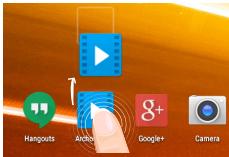
Hangouts Anchor Google+ CameraMoving a home screen item:
Touch and hold your finger onto it until the positioning gridlines appear, then slide it to the desired location, and release your finger.
text_image
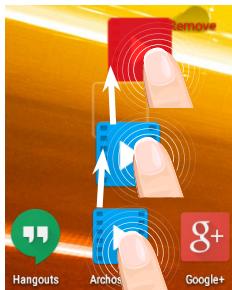
Hangouts Archos Google+Removing a home screen item:
Touch and hold it, slide your finger towards the top of the screen and drop it over the Remove icon.
text_image
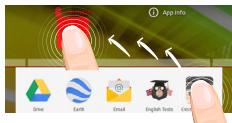
App info Drive Earth Email English Texts EventUninstalling an item:
From the All apps screens, touch and hold it, slide your finger towards the top of the screen and drop it over Uninstall bin.


text_image
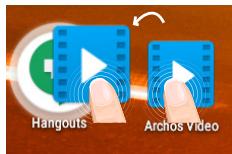
Hangouts Archos VideoCreating application folders:
Drop one app icon over another on a home screen and the two icons will be combined.
text_image
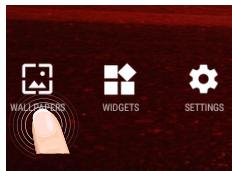
WALLEFERS WIDGETS SETTINGSChanging your wallpaper:
Hold your finger on a home screen at an empty location, then choose from the list: Wallpaper.
text_image
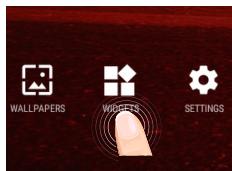
WALLPAPERS WIGBETS SETTINGSWidgets:
Hold your finger on a home screen at an empty location, then choose from the list: Widgets.


Troubleshooting
If your device is frozen:
Press the ON/OFF button for 10 seconds.
If your device doesn't turn on:
- Charge your device.
- Press the ON/OFF button for 10 seconds.
If you want to extend the life of your battery:
Decrease the screen brightness and turn off the wireless connections if not in use.
If your device functioning is too slow:
Close all apps which are not currently used.
If your WiFi reception is too low:
Make sure you are not far from the WiFi hotspot.
Update the firmware of the device: http://www.archos.com/support.
Reset and redefine your connection parameters.
Contact your WiFi connection provider.


Table des matières
natural_image
Gradient color bar transitioning from black to white (no text or symbols)

natural_image
Color palette bar with eight distinct squares in yellow, magenta, cyan, blue, green, red, black, yellow, pink, cyan, and gray (no text or symbols)Contenu de la boîte
natural_image
Front view of a smartphone with a black screen and 'ARCHOS' text at the bottom (no other visible text or symbols)ARCHOS 70 Platinum
text_image
ARCHOSnatural_image
Illustration of a black cable with a USB port connector (no text or symbols)Chargeur
Mise en route
Charger la batterie
natural_image
Circular diagram showing a black cable inserted into a white panel with a small rectangular component, no text or symbols present.text_image
15:10 Friday 22 May 63% 3 Wi-Fi Bluetooth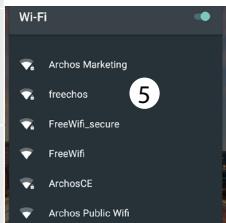
text_image
Wi-Fi Archos Marketing freechos FreeWifi_secure FreeWifi ArchosCE Archos Public Wifi22

text_image
10:58 am Monday 22 June 100% 1 2 3 4 5 Archos Marketing 6 Bluetooth 7 Aeroplane mode 8 Auto-rotate 9 Location 10 Cast screen 11 Audio profilesnatural_image
Gradient color bar transitioning from black to white (no text or symbols)

natural_image
Color palette bar with eight distinct squares in yellow, magenta, cyan, blue, green, red, black, yellow, pink, cyan, and gray (no text or symbols)
natural_image
Simple line drawing of an oval shape with a vertical line and a small rectangular cutout on the left side (no text or symbols)Archos Fusion Storage
A new SD card has been detected. You can enable Archos Fusion Storage so as to increase your storage. Enable ?(reboot required)
Not now
OK
2
Optimizing storage
Archos can optimize the already used storage so as to free some space for installing apps. No data will be lost. Optimize ?
Cancel
OK
3
Get back to the initial configuration
Astuce :
text_image
Hangouts Anchor Google+ Cameratext_image
App Info Drive Earth Email English Texts Opennatural_image
Gradient color bar transitioning from black to white (no text or symbols)

natural_image
Color palette bar with eight distinct squares in yellow, magenta, cyan, blue, green, red, black, light yellow, pink, cyan, and gray (no text or symbols)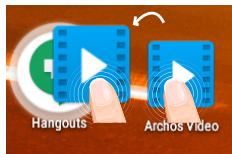
text_image
Hangouts Archos Videotext_image
WALLEFERS WIDGETS SETTINGSnatural_image
Gradient color bar transitioning from black to white (no text or symbols)

natural_image
Color palette bar with eight distinct squares in yellow, magenta, cyan, blue, green, red, black, yellow, pink, cyan, and gray (no text or symbols)natural_image
Front view of a smartphone with a black screen and 'ARCHOS' text at the bottom (no other visible text or symbols)ARCHOS 70 Platinum
text_image
ARCHOSBenutzerhandbuch
text_image
Warrantynatural_image
Illustration of a black cable with a USB tag, no text or symbols presentLadegerät
Erste Schritte
Aufladen des Akkus
natural_image
Circular diagram showing a black cable inserted into a white panel with diagonal lines (no text or symbols)text_image
15:10 Friday 22 May Wi-Fi Bluetooth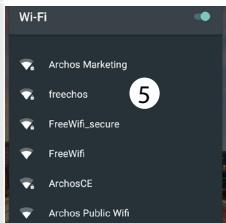
text_image
Wi-Fi Archos Marketing freechos FreeWifi_secure FreeWifi ArchosCE Archos Public Wifi
text_image
10:58 am Monday 22 June 100% 1 2 3 4 5 Archos Marketing 6 Bluetooth 7 Aeroplane mode 8 Auto-rotate 9 Location 10 Cast screen 11 Audio profilesnatural_image
Simple line drawing of an oval shape with a vertical line and a small rectangular cutout on the left side (no text or symbols)Archos Fusion Storage
A new SD card has been detected. You can enable Archos Fusion Storage so as to increase your storage. Enable ?(reboot required)
Not now
OK
2
Optimizing storage
Archos can optimize the already used storage so as to free some space for installing apps. No data will be lost. Optimize ?
Cancel
OK
3
Get back to the initial configuration
Tipp:
text_image
App info Drive Earth Email English Texts Eventtext_image
WALLEFERS WIDGETS SETTINGSnatural_image
Gradient color bar transitioning from black to white (no text or symbols)

natural_image
Color palette bar with eight distinct squares in yellow, magenta, cyan, blue, green, red, black, yellow, pink, cyan, and gray (no text or symbols)natural_image
Front view of a smartphone with a black screen and 'ARCHOS' text at the bottom (no other visible text or symbols)ARCHOS 70 Platinum
text_image
ARCHOSGuía de usuario
text_image
Warrantynatural_image
Simple line drawing of a USB cable with a connector (no text or symbols)Cargador
natural_image
Circular diagram showing a black cable inserted into a white panel with a small rectangular component, no text or symbols present.text_image
15:10 Friday 22 May Wi-Fi Bluetooth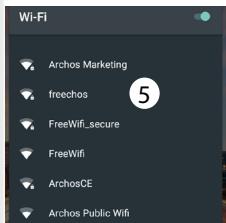
text_image
Wi-Fi Archos Marketing freechos FreeWifi_secure FreeWifi ArchosCE Archos Public Wifi
text_image
10:58 am Monday 22 June 100% 1 2 3 4 5 Archos Marketing 6 Bluetooth 7 Aeroplane mode 8 Auto-rotate 9 Location 10 Cast screen 11 Audio profiles1 year ago · 20K views
text_image
Play Store Settings Wi-Fi Bluetooth Data usage Yoube
Archos GamePad 2 Unboxing
leodee
1 year ago · 20K views
text_image
Play Store Settings Wi-Fi Bluetooth Data usage More YouTube
Archos GamePad 2 Unboxing
leodee
1 year ago · 20K views
natural_image
Simple line drawing of an oval shape with a vertical line and a small rectangular cutout on the left side (no text or symbols)A new SD card has been detected.
You can enable Archos Fusion Storage so as to increase your storage.
Enable ?(reboot required)
Not now
OK
2
Archos can optimize the already used storage so as to free some space for installing apps.
No data will be lost.
Optimize?
Cancel
OK
3
text_image
App Info Drive Earth Email English Texts Opentext_image
WALLEFERS WIDGETS SETTINGSCambio del fondo:
text_image
WALLPAPERS WIGGETS SETTINGSWidgets:
natural_image
Gradient color bar transitioning from black to white (no text or symbols)

natural_image
Color palette bar with eight distinct squares in yellow, magenta, cyan, blue, green, red, black, yellow, pink, cyan, and gray (no text or symbols)natural_image
Front view of a smartphone with a black screen and 'ARCHOS' text at the bottom (no other visible text or symbols)ARCHOS 70 Platinum
text_image
ARCHOSGuida dell'utente
text_image
Warrantynatural_image
Illustration of a black cable with a USB tag, no text or symbols presentCaricatore
Avvio
natural_image
Circular diagram showing a black cable inserted into a white panel with a small rectangular component, no text or symbols present.text_image
15:10 Friday 22 May Wi-Fi Bluetooth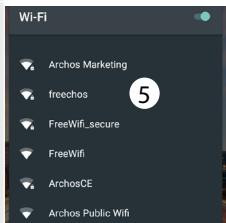
text_image
Wi-Fi Archos Marketing freechos FreeWifi_secure FreeWifi ArchosCE Archos Public Wifi
| Wi-Fi | Add network |
| Saved networks | |
| Refresh | |
| Advanced |
Wi-Fi Direct
WPS Push Button
WPS Pin Entry
Interfaccia Android™
text_image
① Google Say "Ok Google" ② Play Music My Music 2000s Google Archos Video Materika World 5000s ③ ④ ⑤ ⑥72
① Google™ Search
text_image
10:58 am Monday 22 June 100% 1 2 3 4 5 Archos Marketing 6 Bluetooth 7 Aeroplane mode 8 Auto-rotate 9 Location 10 Cast screen 11 Audio profiles1 year ago · 20K views
text_image
Play Store Settings Wi-Fi Bluetooth Data usage YouTube
Archos GamePad 2 Unboxing leodee
1 year ago · 20K views
text_image
Play Store Settings Wi-Fi Bluetooth Data usage More YouTube
Archos GamePad 2 Unboxing
leodee
1 year ago · 20K views
natural_image
Simple line drawing of an oval shape with a vertical line and a small rectangular cutout on the right side (no text or symbols)Archos Fusion Storage
A new SD card has been detected.
You can enable Archos Fusion Storage so as to increase your storage.
Enable ?(reboot required)
Not now
OK
2
Optimizing storage
Archos can optimize the already used storage so as to free some space for installing apps. No data will be lost. Optimize ?
Cancel
OK
3
Get back to the initial configuration
Suggerimento:
text_image
Hangouts Anchor Google+ Cameratext_image
App info Drive Earth Email English Texts Eventtext_image
WALLETERS WIDGETS SETTINGSnatural_image
Gradient color bar transitioning from black to white (no text or symbols)

natural_image
Color palette bar with eight distinct squares in yellow, magenta, cyan, blue, green, red, black, yellow, pink, cyan, and gray (no text or symbols)natural_image
Front view of a smartphone with a black screen and 'ARCHOS' text at the bottom (no other visible text or symbols)ARCHOS 70 Platinum
text_image
ARCHOSnatural_image
Illustration of a black cable with a USB port connector (no text or symbols)Lader
Aan de slag
De batterijen laden
natural_image
Diagram of a cable connector inside a circular frame, showing no text or symbolstext_image
15:10 Friday 22 May Wi-Fi Bluetooth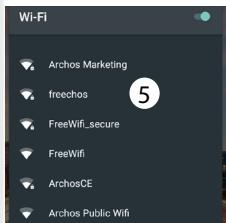
text_image
Wi-Fi Archos Marketing freechos FreeWifi_secure FreeWifi ArchosCE Archos Public Wifi
text_image
10:58 am Monday 22 June 100% 1 2 3 4 5 Archos Marketing 6 Bluetooth 7 Aeroplane mode 8 Auto-rotate 9 Location 10 Cast screen 11 Audio profilesnatural_image
Gradient color bar transitioning from black to white (no text or symbols)

natural_image
Color palette bar with eight distinct squares in yellow, magenta, cyan, blue, green, red, black, yellow, pink, cyan, and gray (no text or symbols)
Recente apps
1 year ago · 20K views
text_image
Play Store Settings Wi-Fi Bluetooth Data usage More YouTube
Archos GamePad 2 Unboxing
leodee
1 year ago · 20K views
text_image
Play Store Settings Wi-Fi Bluetooth Data usage More YouTube
Archos GamePad 2 Unboxing
leodee
1 year ago · 20K views
natural_image
Simple line drawing of an oval shape with a vertical line and a small rectangular cutout on the left side (no text or symbols)Archos Fusion Storage
A new SD card has been detected.
You can enable Archos Fusion Storage so as to increase your storage.
Enable ?(reboot required)
Not now
OK
2
Optimizing storage
Archos can optimize the already used storage so as to free some space for installing apps.
No data will be lost.
Optimize?
Cancel
OK
3
Get back to the initial configuration
Tip:
text_image
Hangouts Anchor Google+ Cameratext_image
App info Drive Earth Email English Texts Eventtext_image
WALLEFERS WIDGETS SETTINGSnatural_image
Gradient color bar transitioning from black to white (no text or symbols)

natural_image
Color palette bar with eight distinct squares in yellow, magenta, cyan, blue, green, red, black, yellow, pink, cyan, and gray (no text or symbols)natural_image
Front view of a black tablet device with 'ARCHOS' branding at the bottom (no other text or symbols)ARCHOS 70 Platinum
text_image
ARCHOSGuia do usuário
text_image
Warrantynatural_image
Simple line drawing of a black cable with a small connector icon (no text or symbols)Carregador
Início
Carregar a bateria
natural_image
Circular diagram showing a connector or cable with a rectangular block inside, no text or symbols present.text_image
15:10 Friday 22 May Wi-Fi Bluetooth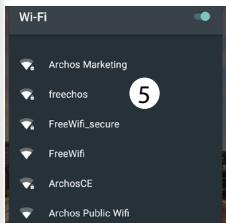
text_image
Wi-Fi Archos Marketing freechos FreeWifi_secure FreeWifi ArchosCE Archos Public Wifi
Ligar à rede Wi-Fi através de WPS
text_image
10:58 am Monday 22 June 100% 1 2 3 4 5 Archos Marketing 6 Bluetooth 7 Aeroplane mode 8 Auto-rotate 9 Location 10 Cast screen 11 Audio profilesnatural_image
Simple line drawing of an oval shape with a vertical line and a small rectangular cutout on the left side (no text or symbols)Archos Fusion Storage
A new SD card has been detected. You can enable Archos Fusion Storage so as to increase your storage. Enable ?(reboot required)
Not now
OK
2
Optimizing storage
Archos can optimize the already used storage so as to free some space for installing apps. No data will be lost. Optimize ?
Cancel
OK
3


natural_image
Gradient color bar transitioning from black to white (no text or symbols)

natural_image
Color palette bar with solid and dotted squares in yellow, magenta, cyan, blue, green, red, black, yellow, pink, cyan, gray (no text or symbols)Get back to the initial configuration
Dica:
text_image
Hangouts Anchor Google+ Cameratext_image
App info Drive Earth Email English Texts Eventtext_image
WALLETERS WIDGETS SETTINGSnatural_image
Gradient color bar transitioning from black to white (no text or symbols)

natural_image
Color palette bar with eight distinct squares in yellow, magenta, cyan, blue, green, red, black, yellow, pink, cyan, and gray (no text or symbols)Содержимое упаковки
natural_image
Front view of a smartphone with a black screen and 'ARCHOS' logo at the bottom (no additional text or symbols)ARCHOS 70 Platinum
text_image
ARCHOSКраткое руководство
text_image
Warrantynatural_image
Illustration of a black cable with a USB port connector (no text or symbols)Зарядное устройство
Начало работы
Зарядка
natural_image
Circular diagram showing a connector or cable with a rectangular component, no text or symbols present.text_image
15:10 Friday 22 May Wi-Fi Bluetooth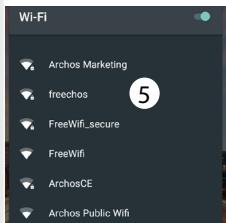
text_image
Wi-Fi Archos Marketing freechos FreeWifi_secure FreeWifi ArchosCE Archos Public Wifi
text_image
10:58 am Monday 22 June 100% 1 2 3 4 5 Archos Marketing 6 Bluetooth 7 Aeroplane mode 8 Auto-rotate 9 Location 10 Cast screen 11 Audio profilesnatural_image
Simple line drawing of an oval shape with a vertical line and a small rectangular cutout on the left side (no text or symbols)Archos Fusion Storage
A new SD card has been detected. You can enable Archos Fusion Storage so as to increase your storage. Enable ?(reboot required)
Not now
OK
2
Optimizing storage
Archos can optimize the already used storage so as to free some space for installing apps. No data will be lost. Optimize ?
Cancel
OK
3
Get back to the initial configuration
Подсказка:
text_image
Hangouts Anchor Google+ Cameratext_image
App Info Drive Earth Email English Texts Opentext_image
WALLEFERS WIDGETS SETTINGSИзменение обоев:
natural_image
Front view of a smartphone with no visible text or symbols on its body, labeled 'ARCHOS' at the bottom (no other text or symbols)ARCHOS 70 Platinum
text_image
ARCHOStext_image
GWarrantjanatural_image
Illustration of a black cable with a USB port connector (no text or symbols)Ładowarka
130
natural_image
Circular diagram showing a black cable connector inserted into a white panel with diagonal lines (no text or symbols)text_image
15:10 Friday 22 May Wi-Fi Bluetooth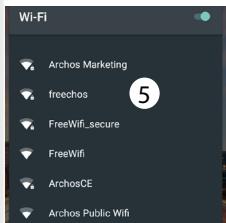
text_image
Wi-Fi Archos Marketing freechos FreeWifi_secure FreeWifi ArchosCE Archos Public Wifi
| Wi-Fi | Add network |
| Saved networks | |
| Refresh | |
| Advanced |
Wi-Fi Direct
| WPS Push Button |
WPS Pin Entry
Interfejs Android™
text_image
Google Say "Ok Google" ① ② ③ ④ ⑤ ⑥ ⑦ ⑧
text_image
10:58 am Monday 22 June 100% 1 2 3 4 5 Archos Marketing 6 Bluetooth 7 Aeroplane mode 8 Auto-rotate 9 Location 10 Cast screen 11 Audio profiles*New multi-user support for tablets lets different users have their own separate, customizable spaces on a single device. Add users in Settings > Device.
Szybka konfiguracja
natural_image
Simple line drawing of an oval shape with a vertical line and a small rectangular cutout on the left side (no text or symbols)A new SD card has been detected.
You can enable Archos Fusion Storage so as to increase your storage.
Enable ?(reboot required)
Not now
OK
2
Optimizing storage
Archos can optimize the already used storage so as to free some space for installing apps.
No data will be lost.
Optimize?
Cancel
OK
3
Get back to the initial configuration
Wskazówka:
text_image
Hangouts Anchor Google+ Cameratext_image
App info Drive Earth Email English Texts EventUsuwanie elementu:
text_image
WALLETERS WIDGETS SETTINGSZmiana tapety:
natural_image
Gradient color bar transitioning from black to white (no text or symbols)

natural_image
Color palette bar with eight distinct squares in yellow, magenta, cyan, blue, green, red, black, yellow, pink, cyan, and gray (no text or symbols)A csomag tartalma
natural_image
Front view of a smartphone with a black screen and 'ARCHOS' label at the bottom (no other text or symbols)ARCHOS 70 Platinum
text_image
ARCHOSnatural_image
Simple line drawing of a black cable with a USB tag and arrow indicating cable extension (no text or symbols)Töltő
Első lépések
Töltés
natural_image
Circular diagram showing a connector or cable with a rectangular component, no text or symbols present.text_image
15:10 Friday 22 May 63% 3 Wi-Fi Bluetooth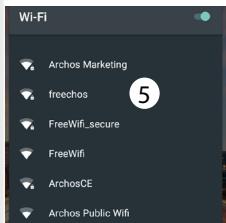
text_image
Wi-Fi Archos Marketing freechos FreeWifi_secure FreeWifi ArchosCE Archos Public Wifi
text_image
10:58 am Monday 22 June 100% 1 2 3 4 5 Archos Marketing 6 Bluetooth 7 Aeroplane mode 8 Auto-rotate 9 Location 10 Cast screen 11 Audio profiles1 year ago · 20K views
text_image
Play Store Settings Wi-Fi Bluetooth Data usage More YouTube
Archos GamePad 2 Unboxing
leodee
1 year ago · 20K views
text_image
Play Store Settings Wi-Fi Bluetooth Data usage More YouTube
Archos GamePad 2 Unboxing
leodee
1 year ago · 20K views
natural_image
Simple line drawing of an oval shape with a vertical line and a small rectangular cutout on the left side (no text or symbols)Archos Fusion Storage
A new SD card has been detected. You can enable Archos Fusion Storage so as to increase your storage. Enable ?(reboot required)
Not now
OK
2
Optimizing storage
Archos can optimize the already used storage so as to free some space for installing apps. No data will be lost. Optimize ?
Cancel
OK
3
Get back to the initial configuration
Tipp:
text_image
Hangouts Anchor Google+ Cameratext_image
App info Drive Earth Email English Texts EventElem eltávolítása:
text_image
WALLEFERS WIDGETS SETTINGSNational restrictions
This device is intended for home and office use in all EU countries (and other countries following the EU directive 1999/5/EC) without any limitation except for the countries mentioned below:
| Country | Restriction | Reason/remark |
| Bulgaria | None | General authorization required for outdoor use and public service |
| France | Outdoor use limited to 10 mW e.i.r.p. within the band 2454-2483.5 MHz | Military Radiolocation use. Refarming of the 2.4 GHz band has been ongoing in recent years to allow current relaxed regulation. Full implementation planned 2012 |
| Italy | None | If used outside of own premises, general authorization is required. |
| Luxembourg | None | General authorization required for network and service supply (not for spectrum) |
| Norway | Implemented | This subsection does not apply for the geographical aera within a radius of 20 km from the centre of Ny-Alesund |
| Russian Federation | None | Only for indoor applications |
Note: Frequency 2454-2483.5MHZ are restricted to indoor use in France.
Consult the declaration of conformity on http://www.archos.com/products/declaration_conformity.html


Open Source Software Offer
The software bundled with this product includes software files subject to certain open source license requirements. Such open source software files are subject solely to the terms of the relevant open source software license. Such open source software is provided on an "AS IS" basis to the maximum extent permitted by applicable law.
For the open source files contained herein, please access "Open source license" section located at: Settings\About tablet\Legal information on the device for the relevant copyright and licensing terms. You may obtain a copy of Apache License, Version 2.0 at http://www.apache.org/licenses/LICENSE-2.0. You may also obtain a copy of GNU General Public License, Version 2 at the Free Software Foundation, INC, 51 Franklin Street, Fifth Floor, Boston, MA 02110-1301, USA.
Until the date that is three years after our last shipment of this product, you may obtain a copy of the source code corresponding to the binaries for any GPL-Licensed file by contacting ARCHOS customer service at http://www.archos.com and ARCHOS will send you a link to such source code or will provide instructions to get the source on a physical medium.
This offer is valid to anyone in receipt of this information.
Archos company declares that this device is in compliance with the essential requirements and other relevant provisions of Directive 1999/5/EC
C€1313
162