50F HELIUM - Smartphone ARCHOS - Free user manual and instructions
Find the device manual for free 50F HELIUM ARCHOS in PDF.



User questions about 50F HELIUM ARCHOS
0 question about this device. Answer the ones you know or ask your own.
Ask a new question about this device
Download the instructions for your Smartphone in PDF format for free! Find your manual 50F HELIUM - ARCHOS and take your electronic device back in hand. On this page are published all the documents necessary for the use of your device. 50F HELIUM by ARCHOS.
USER MANUAL 50F HELIUM ARCHOS
Congratulations for the purchase of an ARCHOS device! This quick start guide helps you to start using your device properly. If you have more questions concerning the use of your device, visit us at:

twitter.com/archos

www.facebook.com/archos

http://faq.archos.com/

www.archos.com, click Support > After-sales support

www.archos.com, click Support > Downloads > Declaration of conformity
As we are often updating and improving our products, your device's software may have a slightly different appearance or modified functionality than presented in this quick start guide.
Unboxing

ARCHOS 101b Cesium
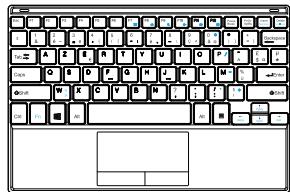
Removable keyboard
Quick start guide

Charger adapter
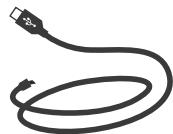
Charging cable
Warranty, legal and safety notice
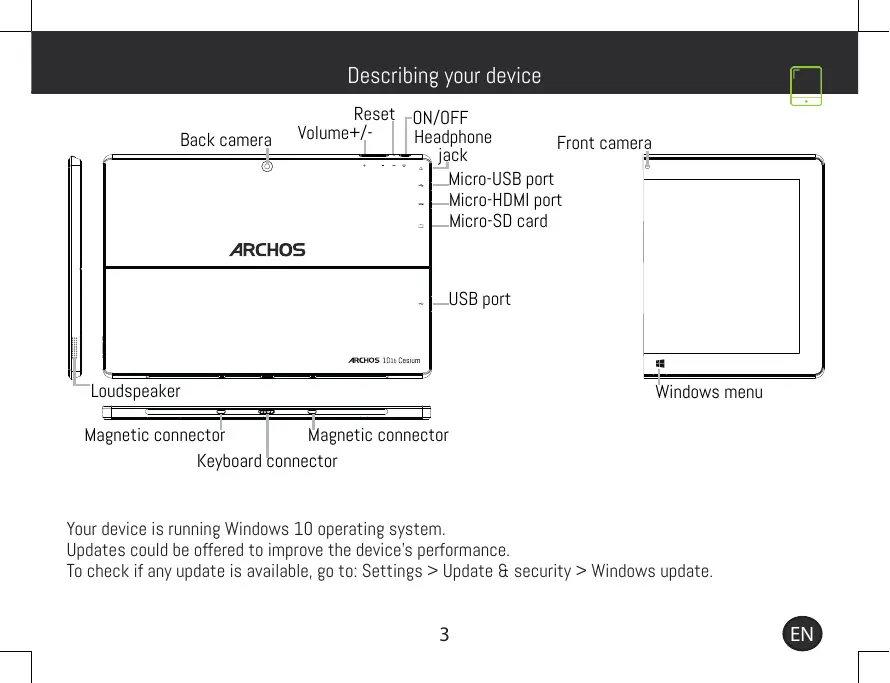
Describing your device

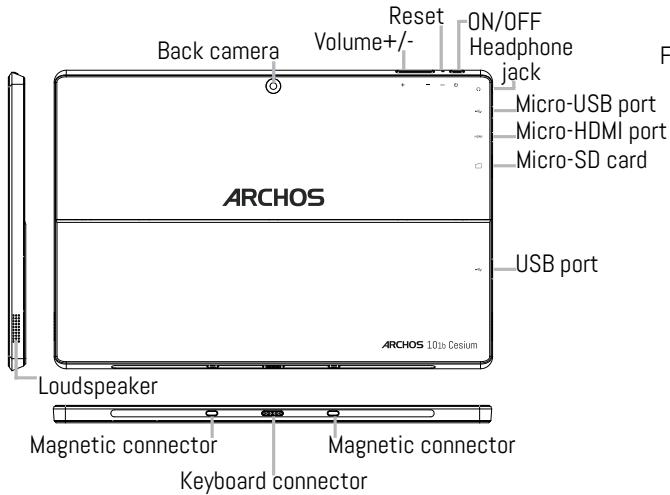
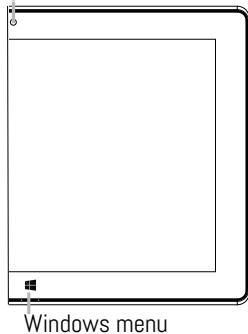
Front camera
Your device is running Windows 10 operating system.
Updates could be offered to improve the device's performance.
To check if any update is available, go to: Settings > Update & security > Windows update.
Using tablet & keyboard
Installing the tablet on the keyboard
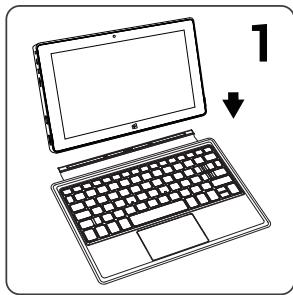
Using the keyboard as a cover
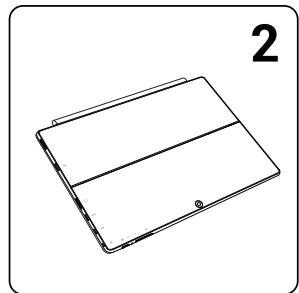
Using the tablet's stand
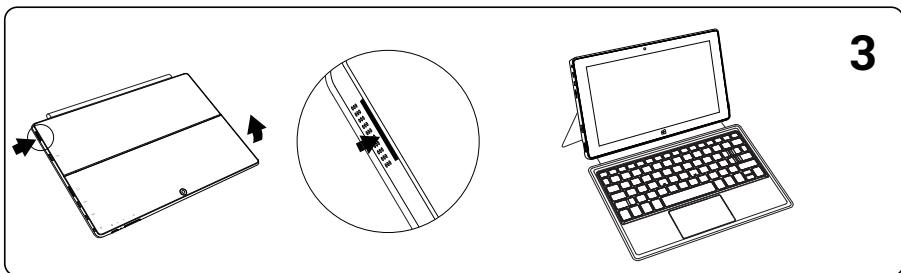
Starting up
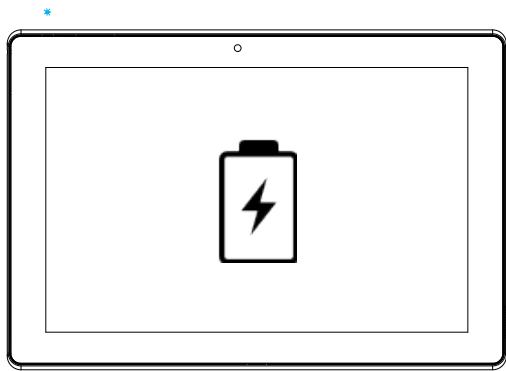
Before using your device for the first time, charge its battery completely.
- Connect the charging cable to its charger adapter.
- Plug the charging cable in the Micro-USB port and the adapter in a power outlet. When the tablet is charging, the charging led is blue.
- Press and hold the ON/OFF button to turn on the device.
- Follow the instructions to set up your device. We recommend you to add or create a Microsoft account so that you can download apps and enjoy many more options.

Troubleshooting
- My tablet is frozen: press the ON/OFF button for more than 10 seconds or use the reset button and charge your device for at least 2 hours.
- My tablet encounters dysfunctions: go to settings > update&security to check for updates. If your device is up-to-date, try to reset the device from settings > update&security > recovery. We recommend to save your files before resetting.
- If your WiFi reception is too low: make sure you are not far from the WiFi hotspot. Update the firmware of the device: http://www.archos.com/support. Reset and redefine your connection parameters. Contact your WiFi connection provider.
- My Windows tablet is not detected when it's connected to a computer: Windows tablets work in the same way as a standard PC - as such they can't be detected as peripheral devices by other PC. To transfer files to or from your Windows tablet, you will need to connect a USB drive to the device using a USB host cable, or transfer via your Windows home network setup.
For more answers about your technical difficulties, do not hesitate to visit: faq.archos.com
www.archos.com, click Support > After-sales support

www.archos.com, cliquez Support > Telecharges > Déclaration de conformité
National restrictions
This device is intended for home and office use in all EU countries (and other countries following the EU directive 1999/5/EC) without any limitation except for the countries mentioned below:
| Country | Restriction | Reason/remark |
| Bulgaria | None | General authorization required for outdoor use and public service |
| France | Outdoor use limited to 10 mW e.i.r.p. within the band 2454-2483.5 MHz | Military Radiolocation use. Refarming of the 24 GHz band has been ongoing in recent years to allow current relaxed regulation. Full implementation planned 2012 |
| Italy | None | If used outside of own premises, general authorization is required. |
| Luxembourg | None | General authorization required for network and service supply (not for spectrum) |
| Norway | Implemented | This subsection does not apply for the geographical aera within a radius of 20 km from the centre of Ny-Alesund |
| Russian | None | Only for indoor applications |
Federation
Note: Frequency 2454-2483.5MHZ are restricted to indoor use in France.
Consult the declaration of conformity on http://www.archos.com/products/declaration_conformity.html Archos company (Contact adress : ARCHOS SA 12 Rue Ampère 91430 Igny France) declares that this device is in compliance with the essential requirements and other relevant provisions of Directive 1999/5/EC: http://www.archos.com/support/download/conformity/CE_DOC_AC101bCE.pdf Par la presente, ARCHOS (adresse de contact : ARCHOS SA 12 Rue Ampère 91430 Igny France) déclare que l'appareil est conforme aux exigences essentielles et aux autres dispositions pertinentes de la directive 1999/5/CE. La déclaration de conformité peut être consultée sur le site : http://www.archos. com/support/download/conformity/CE_DOC_AC101bCE.pdf