
50 DIAMOND - Smartphone ARCHOS - Free user manual and instructions
Find the device manual for free 50 DIAMOND ARCHOS in PDF.


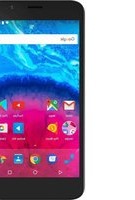
| Product Type | Smartphone |
| Brand | ARCHOS |
| Model | 50 DIAMOND |
| Operating System | Android |
| Display | Capacitive touchscreen |
| Rear camera | Yes, with flash |
| Front camera | Webcam |
| Cellular connectivity | 4G/3G/2G (dual SIM: 1 slot 4G/3G, 1 slot 2G) |
| Wireless connectivity | WiFi 802.11 b/g/n |
| Expandable storage | microSD card (dedicated slot) |
| Ports | Micro-USB, 3.5mm headphone jack |
| Buttons | Volume (+/-), Power button |
| Battery | Rechargeable lithium-ion (included) |
| Power supply | Mains charger supplied (5V) |
| Box contents | Smartphone, hands-free kit, USB cable, charger, quick start guide, warranty guide |
| Care and cleaning | Clean with a soft, dry cloth. Do not use abrasive products. |
| Safety | Use only original accessories. Do not expose to moisture or extreme temperatures. |
| Warranty | Refer to the provided warranty guide. |
| General information | Manufactured by ARCHOS. Declaration of conformity available at www.archos.com. |
Frequently Asked Questions - 50 DIAMOND ARCHOS
User questions about 50 DIAMOND ARCHOS
0 question about this device. Answer the ones you know or ask your own.
Ask a new question about this device
Download the instructions for your Smartphone in PDF format for free! Find your manual 50 DIAMOND - ARCHOS and take your electronic device back in hand. On this page are published all the documents necessary for the use of your device. 50 DIAMOND by ARCHOS.
USER MANUAL 50 DIAMOND ARCHOS
Description of the phone. 3
Assembling. 6
Getting started. 8
4G & WiFi connection. 10
Google account & Contacts. 12
Hints & tips with AndroidTM 14
Troubleshooting. 16
For more information, please consult the FAQs on www.archos.com. Make sure to read them before considering any product return. As we are often updating and improving our products, your device's software may have a slightly different appearance or modified functionality than presented in this Quick Start Guide.
Consult the declaration of conformity on http://www.archos.com/products/declaration_conformity.html
1
Package Contents
Check your product box for the following items:
- ARCHOS 50 Diamond
- Headset
- USB cable
-Charger - Quick start guide
Warranty Legal & Safety notices
The items supplied with your device and available accessories may vary depending on your region or service provider.
The supplied items are designed only for your device and may not be compatible with other devices.
Unapproved accessories may cause your device to malfunction.
2

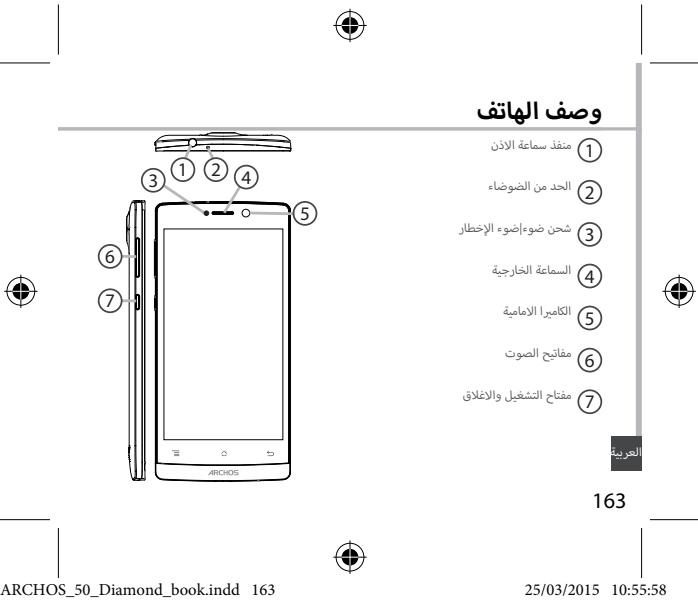
Description of the phone
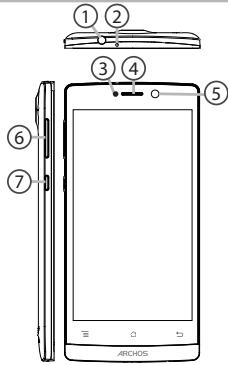
① Headset jack
② Noise reduction
③ Charging led | Notification led
④ Phone speaker
⑤ Camera
Volume buttons
⑦ ON/OFF button
3
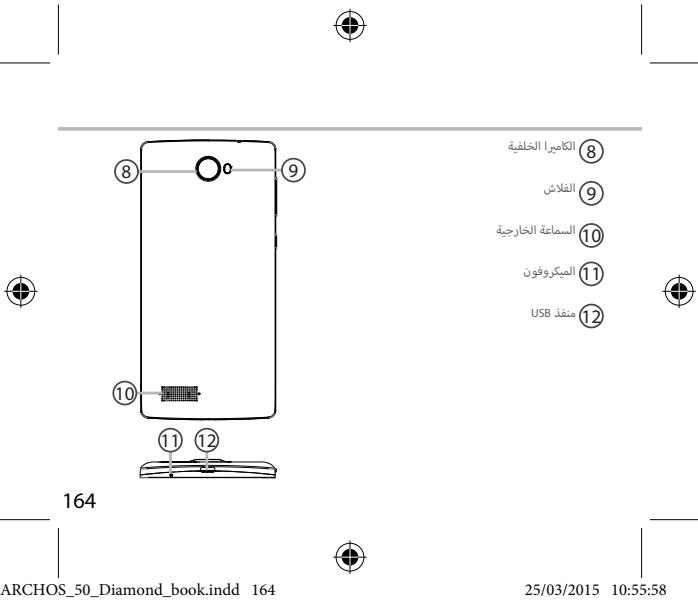
Description of the phone
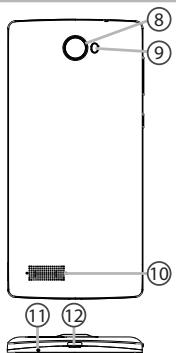
Camera
⑨ Flash light
10 Loudspeaker
11 Microphone
⑫ Micro-USB port
4



Assembling
Opening
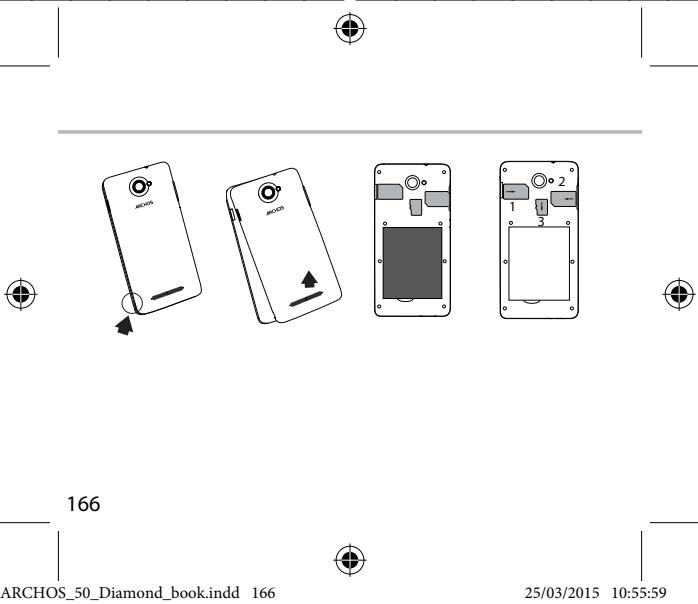
Use the notch to remove the back cover.
Do not bend or twist the back cover excessively.
Doing so may damage the cover.
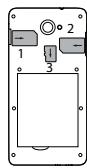
Inserting a SIM card
For your 4G SIM card, slide it facing downwards in the 4G/3G slot(1).
For your standard SIM card, slide it facing downwards in the 2G slot(2).
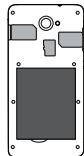
Inserting a Memory card
For your Memory card, slide it facing downwards in the slot mSD(3). To
insert a Memory card, push downwards the memory card slot and lift the
cover. Place the Memory card. Close the cover and push it upwards.
Closing
Replace the back cover clicking it back into position.
Tip:
Before using your device for the first time, charge completely its battery.
6

EN
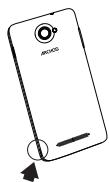
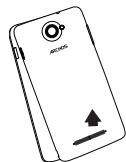
Lift the back cover using the notch



Sound & Notification profiles
- When the device is turned on, press and hold the ON/OFF button.
- Select an option.

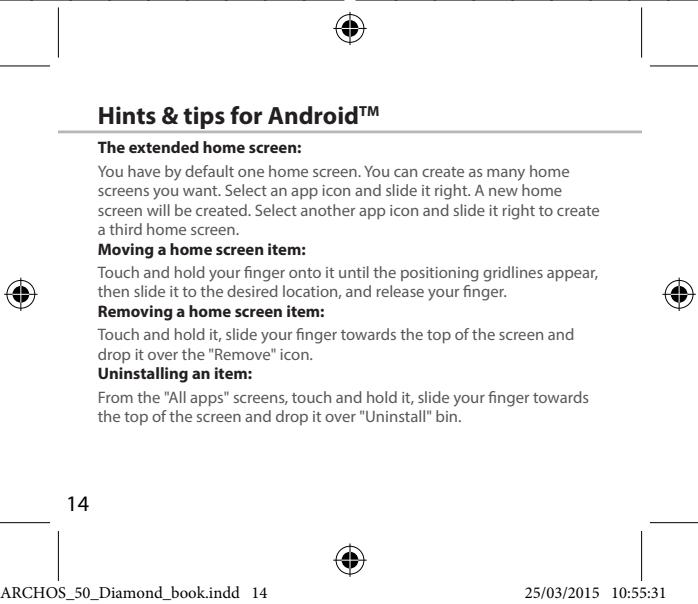
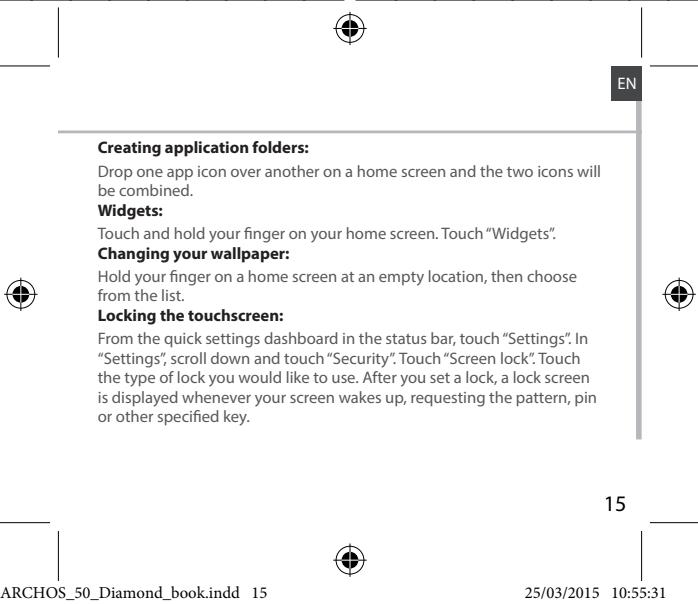
Touch screen actions:
Tap: touch once to select or launch a menu, option, or application.
Tap and hold: tap an item and hold it for more than 2 seconds.
Drag: tap an item and move it to a new location.
Double-tap: tap an item twice quickly.
Flick: briskly scroll up, down, left, or right to move through lists or screens.
Pinch in/out: place two of your fingers far apart, and then pinch them together.
Tip:
Your device goes in standby mode when you do not use it for a specified period of time. To wake up your device, press the ON/OFF button. To set the duration, go to Settings > Display > Sleep.



3G & WiFi connection
4G & 3G connection
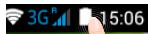
With your SIM card, you should be connected to the Internet without any further setup. The ARCHOS will only have signal if you are in an area covered by your provider's 4G or 3G network. When connected to the 4G network, the 4G icon is displayed in the status bar.
Activating the mobile data
To be able to access Internet, the mobile data icon must be activated.
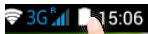
- Touch and hold the time & battery icons to reveal the status bar.

- Pull the blue line down to display the status dashboard.

- Touch the status dashboard icon
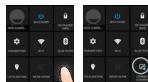
- Touch the mobile data icon to activate it.
Tip:
When you encounter connection problem's, see the FAQs on www. archos.com or contact your 4G network connection provider.



WiFi connection
WARNING: Make sure that you are in a WiFi zone. You can access the WiFi settings quickly from the status bar.
- Touch and hold the time & battery icons to reveal the status bar.
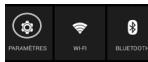
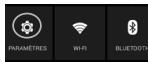
2.Pull the blue line down to display the status dashboard. - Touch the status dashboard icon
- Touch the "Settings" icon to open the settings menu.
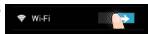
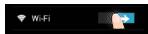
- In the "Wireless & networks" section, if the WiFi is off, slide the WiFi switch to the "ON" position. Once the WiFi is on, the ARCHOS will scan for WiFi networks in range.
- Touch "WiFi" to display available networks.
- Touch the name of network you want to connect to.
Private networks are shown with a lock icon and will require you to enter your password.





Google & Contacts
Adding a Google account
A Google account lets you take full advantage of any Google apps and services that you may want to use.
- Go to "Settings" > "Accounts" > "Add account".
- Select the account type "Google" to add.
- Follow the onscreen instructions to enter information about the account. Once the account is created, you can access Play Store, Gmail, Hangouts, Maps and many other apps.
Synchronizing info
Information must be sync to be saved. Your data is backed up on Google servers.
- Go to "Settings" > "Accounts" > "Google".
- Select your account.
The list of information that can be sync are displayed.
Automatic sync should be activated. To launch the sync, press the Menu button, then Sync now. You can get them back in case of loss of your device or SIM card. When your Google account is added to a new device, all your saved information is transferred.
12

Saving your contacts
When your contacts are saved, they are always available on the web and can be syncsed to any Android phone that's set up with your Google account.
- Install the SIM card with your contacts in your phone.
- From a Home or All Apps screen, select the People app
- Touch the Menu button > "Import/Export".
- In Import/export contacts, select "Import from SIM card".
- Select your Google account.
- Check contacts to be imported and validate.
- Once the contacts are imported in the Google account, go to "Settings" > "Accounts"> "Google".
- Select you Google account.
- Select the Menu button, then "Sync now".
Your contacts are saved to via your Google account.




Troubleshooting
My phone is frozen or cannot switch on
- Charge your device.
- Press the ON/OFF button for 10 seconds or use the Hardware reset. To use the Hardware reset, press the "pinhole reset" button by using a sharp object such as a toothpick.
My phone cannot connect to a network or "No service" is displayed
Try connecting in another location. Verify the network coverage with your operator.
Unable to make outgoing calls
Make sure your phone is connected to a network, and the network is not overloaded or unavailable.
Unable to receive incoming calls
Make sure your phone is switched on and connected to a network (check for overloaded or unavailable network).
SIM card PIN locked
Contact your network operator to obtain the PUK code (Personal Unblocking Key).
To configure a new 4G network:
On your device, tap Settings.
Select Wireless & networks > More... > Mobile networks.
Select Network settings. In Network operators, select your operator. In Access Point Names, select the correct access point name and enter the exact connection parameters provided by your 4G provider.

Table des matieres
FR
He ydaetcBbINHnTb NxCODaune Bbl3OBbl
Y6eHNTcB, YTO TeneoH NOdkIouen K Cetn, IN TO CeT DOCTynHa IN He nepeRpyKeHa.
He ydaetc npHHMaTb BXOJaune Bbl30Bbl
Y68dTeTb, bTO TeneoB KINIOUeH NIOKIOUeH K cETn (IPOBeBte, ITO cTb DOCTyTHN H e nepereyKcb.
3a6loKoPobAH PIN-KoD SIM-KapTbI
06Publntbck Oncoterpatry MO6bIbnB C8BnI pyraonyueHIN PKU-KOa (Personal Unblinding Key — nepoehanabpaa3oNkKpyouwn koid).
HnactpoiknHOBOI cTn 3G m4G
Ha 3KpaHe yCTpoiCTBa KOCHNTecb nyHKta Settings (HacTPOkN).
Babeprute Wireless & networks (Becepnoobuaa cbaa n cetn) > More... (Bobnue...) > Mobile networks (Moibnhe bce).
Bubepeyere nynkTN Network Settings (Cetebe Nactoikno). B paezade Network Operators (Onetapotbyc ceti) Bubepeyere cboor noctabuizka ycnyr. B paezade Access Point Names (Meha Toekdoctya) npaibnHb 8vejnt IMK ToKIN doCTyaN TO HUeYI napamETpy CoeHNHNI, PpOeOCTABENHbte noctabuOKYM cytTe C4G.


clalalol ola l aol, alol alalal alalal alalal alalal alalal alalal alalal alalal alalal alalal alalal alalal alalal alalal alalal alalal alalal alalal alalal alalal alalal alalal alalal alalal alalal alalal alalal alalal
.
162







aJdssylldd
aalal alalalalalalal
. 1
aalb
3Gg44s01s00(4G/3G)(1)g 3Gddo
.284gbyy 2Gdawdoa
aJlal aJb
(3) alal lalall gogg aai yolll alalb Cauu, laaasall kalk oylll alalb goggy
.(mSD)
Jawwaj liq 1d jai Jabi wai jai Wai .1
.
:maall aiaa plss
.
a 2 a 2 a 2 a 2 a 2 a 2 a 2 a 2 a 2 a 2 a 2 a 2 a 2 a 2 a 2 a 2 a 2 a 2 a 2 a 2 a 2 a 2 a 2 a 2 a 2 a 2 a 2 a 2 a 2 a 2 a 2 a 2 a 2 a 2 a
jol jolal aayjol baoi gao joi
aegjoo
. 1111111111111111111111111111111111111
. 100000000000000000000000000000000000000
∴ ab > la
gao 100000000000000000000000000000000000000000
<0000<0000<0000<0000



J
J
∴ 4b > 3a
www.archos.com cuiyjgogjgl aaiiwlalldyllg jy, jayl yd g
.4aJ1JzauuUaiygl,


aSLwUJ aS. & 4G aS.
aLwUd
aalal alal alal alal alal alal alal alal alal alal alal alal alal alal alal alal alal alal alal alal alal alal alal alal alal alal alal alal alal alal alal alal alal
.11111111111111111111111 1
10 2
aJyall aagai baal .3

. clllal ydi jil gai 11111111111111111111

aSLWUdJg, aSLWUdJgJgJgJgJgJgJg
aalllk
. 1
Gmail, jzall aluwr u, golll Goggle wu wu wu wu wu wu wu wu wu wu wu wu wu wu wu wu wu wu wu wu wu wu wu wu wu wu wu wu wu wu wu wu wu wu wu wu wu wu wu wu wu wu wu wu wu wu wu wu wu wu wuuw
. 1

claglgljolji
Google aoucuiuocucll bao, lqboollogal joiy
Google
.1wJj1.2
LgocjSsGdcloglallao
.ajolj lac aai wll clogall no Stily
jGc Google Cwll 1, clll oiaaiai aaiil gaiil gl aiill
.1uulJdsalw
172


slawl &Google
e 1
``` 'hello' israel 'a', 'david' israel 'b', 'he' israel 'c', 'she' israel 'd', 'his' israel 'a', 'you' israel 'b',

173




aaijll aai jy
. jllgl nnll aaiil alal lao yj Jaiill oaiiell k
:aaaijaiai jia
.4auiyjllolil jdoagai oJg Jb
.1goluswai jyll oj yll clalabill aqil l jssw gdo bdo
a 431y jll gl jnall gubill yai
:aaai jia aie
ggy ggy yall kall g 4000y gai lgl uyluuyuuyuyuyuyuy
. cleowl
aaiyll aalw jaoaic
a"ddal lall kall gdo yd a calixg uy daiy
.
:aaic
40000000000000000000000000000000000000000000000
J 1

Jusyll
:
a 100g abdfo 3 loo aabull oao w g yol gubdi agal lc gubdi agal gogy
: widgetsjolc
. widgets ralic jlll g nnll aill l y , "clalll J" aill Ugul
:laIJI
aaiall no jai, aaiyll aaii 10 kao lbaal all
:a

jaaallll jaiy aaii jaiy jaiy jaiy jaiy jaiy jaiy jaiy jaiy jaiy jaiy
jolldl ldlai gaoi g aillg day, pssallalll jegj jai, aill
. j, PIN jəj, "JaaU 3gaw" jk algw aJauJ Jaa




[ \Leftrightarrow \frac{1 - k}{x} > \frac{\ln x}{x\left( {1 + u}\right) } - \frac{\ln x}{x\left( {1 + u}\right) }]
aaglljz
jglj1jxw1-
baiol baiol oslc jj alsiw. baiol oslc jj alsiw gl a10 od wgl 10
jLwyl alJ 13a 40g jolal olssuWU Caii ciis bawd oale! JJ
a 1y ygl kbljllg
a aai g g g g g g g g g g g g g g g g g
aJlKcJgJd
aTo g Jasi aai j g, aaiy iil Jui j no sll
aJalka Jaa aJg d
.(aio g Jasi aai 1g),auiu Jao g Jaa ai all joi Stll
aIPIN jao
. PUK joo Jgauu aJusu Jusu Juaaiy
4G
jol, jgssallllglllk. <joll < kslwll & slwll 4kwl jol , cldscyl l jgsd
aouall clogleoll g aouall jgssll abai jwj jsi , aill Jaa Jzly, a, aull
4GaoJusJooJxJooJua
y jg jll gjgslalgljus jgsjldj, hag aqjall oossslll
aU
![ARCHOS 50 DIAMOND - [ \Leftrightarrow \frac{1 - k}{x} > \frac{\ln x}{x\left( {1 + u}\right) } - \frac{\ln x}{x\left( {1 + u}\right) }] - 1](/content/2024/12/87037/images/919948e491f949f0d60b0ae79e1459aada12343b0e90b72e5ebb91c6d1ec6650.jpg)
![ARCHOS 50 DIAMOND - [ \Leftrightarrow \frac{1 - k}{x} > \frac{\ln x}{x\left( {1 + u}\right) } - \frac{\ln x}{x\left( {1 + u}\right) }] - 2](/content/2024/12/87037/images/10b52f2cf0eb2a5273639e19574d5fb6638cd608f454b4011c0a6655b4ed198d.jpg)
![ARCHOS 50 DIAMOND - [ \Leftrightarrow \frac{1 - k}{x} > \frac{\ln x}{x\left( {1 + u}\right) } - \frac{\ln x}{x\left( {1 + u}\right) }] - 3](/content/2024/12/87037/images/a183f69e67680082d15f8be03cd86cd0835b908fb1e4af0c380a6de8b88555c6.jpg)
![ARCHOS 50 DIAMOND - [ \Leftrightarrow \frac{1 - k}{x} > \frac{\ln x}{x\left( {1 + u}\right) } - \frac{\ln x}{x\left( {1 + u}\right) }] - 4](/content/2024/12/87037/images/274068e766b7a793df20ba4bac40463091e8f820123295170c9878b32eca76a2.jpg)
![ARCHOS 50 DIAMOND - [ \Leftrightarrow \frac{1 - k}{x} > \frac{\ln x}{x\left( {1 + u}\right) } - \frac{\ln x}{x\left( {1 + u}\right) }] - 5](/content/2024/12/87037/images/94f0ede0b0af560979627a6a3d50932afacc2378f412e75b91cc5185aa82d7e9.jpg)
yulqulqulqulqoljoo
OJAL
S111 111 111 111 111 111 111 111 111 111 111 111 111 111 111 111 111 111 111 1

iJlEIOIigjUJIa:JUo eUJUW:JUOeUJI
auiA
aaiiaaii aaiiaai iaiiaai iaiiaai iaiiaai iaiiaai
aLd

a00000000000000000119:oo
a-0gJ0JI
JU 10:00
b0
aJJIeJUgJGooJUWoA:
ARCHOS
Entertainment your way
U
...
wJg o a JI 9

Uni-Group

19043
www.uni-grp.com

ArchosEgypt

ArchosEgypt





aull aolal aolb uocgall llllloo aolglblu jx
jL
uuluguloljogjglgabayallllulllggtaley
jua aooJUoJIOaOaJoojuooaJoooooo
Jg
:jgulalaiwJLdagolglgoglljajduggugg:
auiu uo 100gugooallugjlljao jy jllluej
jlll jlll ruiu all oio g hao jilai uill lulu o jiu duiu
yjg j0 uuguagall a(jo (bdo dlaol) a
00000000000000000000000000000000000000
.
JgOoolljogollll jywlly aol ojiell oiae ngle aulalao
yuljolaljioJlaoiEoJUeOuggUgsaJIoo(dlaIol)
Jl 1
UuuaUaUcU
J000000000000000000000000000000000000000
g jj j j j j j j j j j j j j j j j j j j j j j j j j j j j j j j j j j j j j j j j j j
aulll jlljuligic100rajjgaoiao jloguilljoljglfuiuuiyraai
info@ntra.gov.eg jgjjlllglpE ojjjllgjlllqjll
jLjwJdawu:ju
()UolqgQgUgUgUgUgUgUgUgUgUgUgUgUgUgUgUgUgUgUgUgUgUgUgUgUgUgUgUgUgUgUgUgUgUgUgUgUgUgUgUgUgUgUgUgUgUgUgUgUgUgUg
oogg 15 (uul uusuul uusu uusu uusu uusu uusu uusu
Jaaolaljai jilqaiuiofo 1
auiugaiuiooJiaydiJIuaIiUjuiuIlaiojiuoiEua
auiuuljolil0jgilo jolqE aull
UoOla
1 1
:
:JMLWol
aJyIyIyIyIyIyIyIyIyIyIyIyIyIyIyIyIyIyIyIyIyIyIyIyIyIyIyIyIyIyIyIy
hao jia auij
.
:ullllullllulllllojio jgluJluuJusE Eoi
aalalalagcoglll 10 10
a auiu uuiu uua uua uua uua uua uua uua
L2oUcAUGuO u
llo polyll lioofo oaoa oao aoo
.
JUJIJIJIJUJI-JUJIJI-10JUJIWJUgU)UCaJUUGCJUJUJUJI
JU 1j q jq jlg u
Uo2uuluglo-juaJyueqglgai-0aoieooogwovolrrol
LgduoLcUulaloofoocuUuluuluuluuluul
aaiiuiuuiuuiuuiuuiuuiuuiuuiuuiuuiuuiuuiuui
.8golrrnai gaauiuia 29g 0 uullglu


Open Source Software Offer
The software bundled with this product includes software files subject to certain open source license requirements. Such open source software files are subject solely to the terms of the relevant open source software license. Such open source software is provided on an "AS IS" basis to the maximum extent permitted by applicable law.
For the open source files contained herein, please access "Open source license" section located at: Settings\About phone\Legal information on the device for the relevant copyright and licensing terms. You may obtain a copy of Apache License, Version 2.0 at http://www.apache.org/licenses/License-2.0. You may also obtain a copy of GNU General Public License, Version 2 at the Free Software Foundation, INC, 51 Franklin Street, Fifth Floor, Boston, MA 02110-1301, USA.
Until the date that is three years after our last shipment of this product, you may obtain a copy of the source code corresponding to the binaries for any GPL-Licensed file by contacting ARCHOS customer service at http://www.archos.com and ARCHOS will send you a link to such source code or will provide instructions to get the source on a physical medium.
This offer is valid to anyone in receipt of this information.
National restrictions
This device is intended for home and office use in all EU countries (and other countries following the EU directive 1999/5/EC) without any limitation except for the countries mentioned below:
Country Restriction Reason/remark
Bulgaria None General authorization required for outdoor use and public service
France Outdoor use Military Radiolocation use. Refarming of the 2.4 GHz band has been ongoing in recent mW e.i.r.p. years to allow current relaxed regulation. Full within the implementation planned 2012
Italy None If used outside of own premises, general authorization is required.
Luxembourg None General authorization required for network and service supply (not for spectrum)
Norway Implemented This subsection does not apply for the geographical aera within a radius of 20km from the centre of Ny-Alesund
Russian None Only for indoor applications Federation
Note: Frequency 2454-2483.5MHZ are restricted to indoor use in France.
Consult the declaration of conformity on http://www.archos.com/products/ declaration_conformity.html
SAR After the laboratory measurement, this mobile phone SAR value is: Max Head:0.300W/kg(10g); Max Body:0.730W/kg(10g) Archos company declares that this device is in compliance with the essential requirements and other relevant provisions of Directive 1999/5/EC
€0700


- PACKAGE CONTENTS
- DESCRIPTION OF THE PHONE
- ASSEMBLING
- OPENING
- INSERTING A SIM CARD
- INSERTING A MEMORY CARD
- CLOSING
- TIP
- SOUND & NOTIFICATION PROFILES
- TOUCH SCREEN ACTIONS
- G & WIFI CONNECTION
- G & 3G CONNECTION
- ACTIVATING THE MOBILE DATA
- WIFI CONNECTION
- GOOGLE & CONTACTS
- ADDING A GOOGLE ACCOUNT
- SYNCHRONIZING INFO
- SAVING YOUR CONTACTS
- TROUBLESHOOTING
- MY PHONE IS FROZEN OR CANNOT SWITCH ON
- MY PHONE CANNOT CONNECT TO A NETWORK OR "NO SERVICE" IS DISPLAYED
- UNABLE TO MAKE OUTGOING CALLS
- UNABLE TO RECEIVE INCOMING CALLS
- SIM CARD PIN LOCKED
- TO CONFIGURE A NEW 4G NETWORK
- TABLE DES MATIERES
- AJDSSYLLDD
- J
- ASLWUJ AS. & 4G AS
- CLAGLGLJOLJI
- JUSYLL
- [ \LEFTRIGHTARROW \FRAC{1 - K}{X} > \FRAC{\LN X}{X\LEFT( {1 + U}\RIGHT) } - \FRAC{\LN X}{X\LEFT( {1 + U}\RIGHT) }]
- YULQULQULQULQOLJOO
- ARCHOS
- UOOLA
- OPEN SOURCE SOFTWARE OFFER
- NATIONAL RESTRICTIONS
Brand : ARCHOS
Model : 50 DIAMOND
Category : Smartphone