
ATT-240SP - Gramophone AKAI - Free user manual and instructions
Find the device manual for free ATT-240SP AKAI in PDF.


| Product Type | Stereo turntable with two external speakers |
| Brand | AKAI |
| Model | ATT-240SP |
| Speeds | 33 1/3, 45, 78 RPM |
| Drive System | Belt driven |
| Cartridge Type | High quality ceramic cartridge |
| Auto-Stop Function | Yes |
| Record Sizes Supported | 7", 10", 12" |
| Bluetooth | Version 5.3, range up to 10m |
| USB Playback | Yes, supports MP3, WMA, WAV; max 32GB USB drive |
| Recording Function | From PHONO or Bluetooth to USB drive |
| External Speakers | Two 4-inch speakers, 2 x 10W RMS |
| Power Supply | DC 12V, 2A adapter; input AC 100-240V ~50/60Hz |
| Power Consumption | 24W |
| Frequency Response | 100Hz - 10KHz |
| Speaker Unit Size | 105 mm, 4Ω 15W each |
| Accessories Included | Dust cover with hinges, 45 RPM adaptor, warranty card |
| Transit Screw | Yes, must be unlocked before playing |
| Safety Features | Auto power-off after 15 minutes of inactivity (ERP2 compliant) |
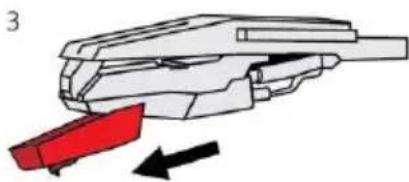
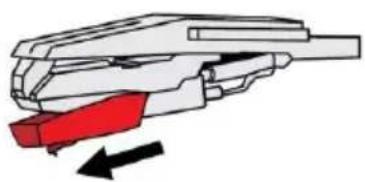
| Stylus Replacement | Replaceable ceramic stylus; pull forward to remove |
Frequently Asked Questions - ATT-240SP AKAI
User questions about ATT-240SP AKAI
0 question about this device. Answer the ones you know or ask your own.
Ask a new question about this device
Download the instructions for your Gramophone in PDF format for free! Find your manual ATT-240SP - AKAI and take your electronic device back in hand. On this page are published all the documents necessary for the use of your device. ATT-240SP by AKAI.
USER MANUAL ATT-240SP AKAI
Stereo Turntable with 2 External Speakers

natural_image
Exterior view of a black Akai radio with two gold speakers on either side (no visible text or symbols)ATT-240SP
INSTRUCTION MANUAL
EN - ENGLIS
Safety instructions
Read these safety instructions before using your device and store them for possible future reference.
- If the charger cord is damaged, have it repaired by the Service or a similarly qualified person in order to avoid any danger.
- The power supply must be replaced by a new one in case of malfunction, because this power supply is not repairable.
- The device is not intended for use by persons (including children) with reduced physical, sensory or mental capacity. Persons who have not read the manual, unless they have received explanations by a person responsible for their safety and supervision should not use this unit. Children should be monitored to ensure that they do not play with the unit.
- The device should not be exposed to dripping or splashing water.
- Always leave a minimum distance of 10 cm around the unit to ensure sufficient ventilation.
- At full volume, prolonged listening to the portable audio device may damage the user's hearing and cause hearing troubles (temporary or permanent deafness, hyperacusis). So we recommend not to use this portable audio device at high audio volume and no more than one hour per day at medium audio volume.
Interference
All wireless devices are susceptible to interference which may affect their performance.
Switch the mobile device off where the use of mobile devices is not allowed or where there is a risk causing interference or danger, for example on board an aircraft, near medical equipment, fuel, chemicals or blasting sites.
Children
Keep your device in a safe place, out of the reach of young children. The device contains small parts that may present a choking hazard.
Packing Contents
1*Turntable with two external Speakers
1*Dust cover with 1 pair hinge
1*Adapter (12V,2A)
1*User manual
1* Warranty card
Functions:
● 3-speed (33 1/3, 45 and 78 RPM)
- Two powerful 4-inch external speakers (2 X 10W)
● High quality ceramic cartridge produces detailed sound
- Belt driven turntable mechanism
● Big platter with AUTO-STOP function
● Play 7", 10" & 12" Records
- Bluetooth function
- USB playback and encoding;
● Recording from PHONO/Bluetooth to USB drive
Product Description
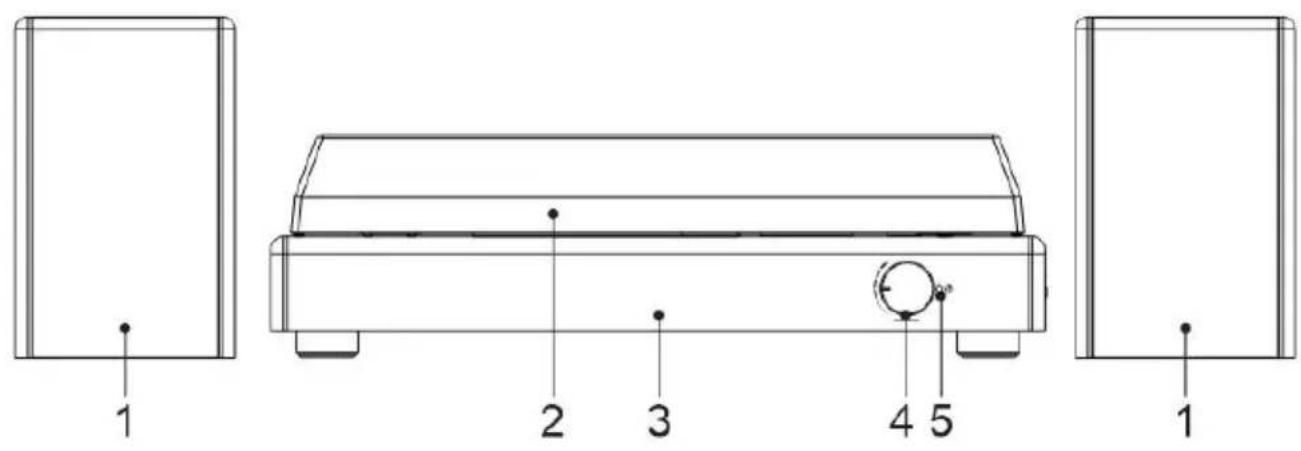


- Speaker
- Dust Cover
- Main body
- Volume control knob
- Indicator light
- Platter
- Transit screw crossing
- Lift lever
- Tonearm lock
- Speed selector (33 1/3, 45 and 78 RPM)
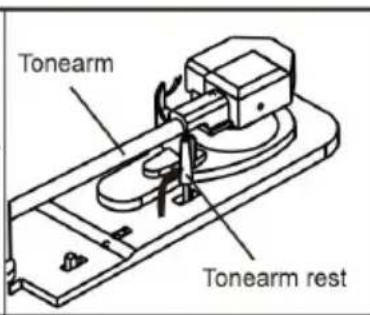
- Tonearm
- Cartridge with Stylus
- 45 RPM adaptor
- Previous track
- Next track
- Play/Pause, Power on/off, Delete button
- Mode button: Bluetooth/PHONO, Recording
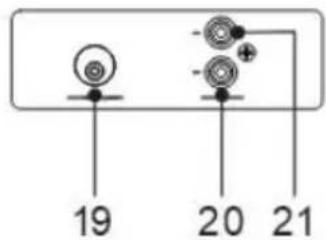
- USB port (The max support 2.0 USB drive of 32GB)
- DC power jack (12V, 2A)
- Speaker out jack-Left channel
- Speaker out jack-Right channel
Fitting the dust cover
Please refer to the following instructions:
- Install the hinge clamp in the position of the dust cove in the correct direction (Hinges are in the attachment).
- Then install the dust cover on the turntable, note the clamp should be aligned with the hinge base on the tu Take care when fitting, and do not press down too har

natural_image
Diagram of a device with two ports and a central component, showing directional arrows (no text or symbols)Unpacking and setup
- Carefully remove the turntable from the package and remove all packing material.
- Unwind the AC adapter power cord and extend it to its full length.
- Place the turntable on a stable, level surface in proximity to an AC outlet and away from any strong magnetic fields.
- Plug the power cord into your AC outlet.
- Remove the opaque white plastic stylus cover from the phonograph stylus by sliding it in the direction of the arrow.
- Be cautious and gentle when removing this stylus cover, as damage to the stylus is not covered by warranty.
- Remove the twist-tie securing the tonearm during the shipment.
- Release the tone arm lever lock.
IMPORTANT!
-
To protect the turntable from damage during transportation, a silver transit screw is located on the upper right of the turntable platform.
-
Before playing, please use a screwdriver to turn the transit screw in a clockwise direction (screw going down) completely to unlock the turntable.
-
To lock the turntable again for transportation, please turn the screw in a counter-clockwise direction.

natural_image
Technical diagram of a mechanical device with concentric circular components and a circular button labeled '+', showing directional arrows (no text or symbols beyond basic diagram)Initial Set -up
MAINS CONNECTION
Ensure that the mains voltage of your home corresponds to the operating voltage of the unit. Your ur is ready to be connected to a mains voltage of 12V 2A DC adaptor.
EXTERNAL SPEAKER CONNECTION
The external speaker connects to the speaker out socket (SPK OUT) of the turntable.
Black plug into R/L channel input.
Playing Records
Important: To avoid stylus damage, make sure the included stylus guard is in place whenever the turntable is being installed, moved and cleaned.
- Turn on the unit and adjust the volume to an appropriate level.
- Press the Mode button to the PHONO function (Default startup mode is Bluetooth).
- Please be sure that you have removed the stylus cover from the stylus and have released the tonearm lock.
- Select the speed required using the speed selector switch.


natural_image
Simple line drawing of a mechanical lever with an arrow indicating rotational motion (no text or symbols)- Push the Lift Lever up to raise the tonearm and then gently move the tonearm to the desired position over the record. The platter will begin to spin when the tonearm is moved toward the record. Push the Lift Lever forward to lower the tonearm slowly onto the desired position on the record. The record will begin playing.
- When the record is finished, push the Lift Lever backwards to raise the tonearm and gently move it back to its rest position.
- When you have finished playing records, engage the tonearm lock to protect it from accidental movement. Unplug it from the power supply if it is not going to be used for a while.
NOTE:
- This unit is designed with AUTO STOP function for the PHONO. The vinyl record will stop automatically when it plays to the end.
- AUTO STOP function applies to most 33 1/3 RPM vinyl records. Some vinyl records, e.g. 45RPM, will stop before playback comes to the end.
Bluetooth Function
- Turn on the turntable and make sure the tonearm is on the rest.
- The turntable will release a prompt tone to indicate enter Bluetooth function.
- Open the Bluetooth option on your smartphone and look for the "ATT-240SP" Bluetooth device.
- Once connected, you will hear a prompt tone from the turntable.
- Short press the button to play the previous or next track.
- Press the ▶ button to play/pause the track. Double click this button to disconnect Bluetooth, the turntable will release a prompt tone. Press and hold this button to power standby.
USB Playback Function
- Turn ON the unit and adjust the volume to an appropriate level.
• Maximum capacity of the USB stick that can be used, is 32GB. - Press the Mode button to the USB mode, insert a USB stick into the USB port, music playback will start automatically.
- Short press the ◄◀/▶◀button to play the previous or next track. Double click these two buttons to select the previous/next folder in USB to play (invalid operation if there are no multiple folders in the device).
- Press the button to start/pause playback. Press and hold this button to power standby.
Recording From Phono/Bluetooth to USB Drive
- Connect a USB stick to the turntable's USB port.
- Place a vinyl record on the platter or connected your Bluetooth device successfully.
- Press the "MODE/REC" button, switch to PHONO mode or Bluetooth mode.
- To start recording, press and hold the "MODE/REC" button for about 2 seconds, the beep indicates recording.
- When finish the recording, press and hold the "MODE/REC" button again for 2 seconds. Two beeps indicate the end of the recording. The recorded songs will be located in the "RECORD" folder on your USB stick.
• To record more songs, repeat Steps above. - To erase tracks from the USB stick, press and hold "MODE/REC" button or about 2 seconds, the first recording song will play. Double click the PLAY/PAUSE button, the playing track will be erased, a beep indicates that the track has been erased.
- Recorded track will be in duophonic sound.
Note: To comply with CE energy saving rules (ERP2), if no music is played, the turntable will automatically turn off without further instruction or signal after 15 minutes.
Maintenance
REPLACING THE STYLUS
Take off the stylus
- Gently pull down the front edge of the needle.
- Pull needle forward.
- Pull out and remove.

natural_image
Diagram of a mechanical component with a red highlighted section and a downward arrow, no text or symbols present.
natural_image
Diagram of a mechanical component with red highlighted section and black directional arrow (no text or symbols)
natural_image
Diagram of a mechanical component with a red component and black directional arrow (no text or symbols)NOTES:
Using opposite operations to install a stylus.
Technical Data
- Rated voltage: 12V,2A
• Output power: 2 x 10W RMS
• Power consumption: 24W
• USB port: up to 32GB - BT version: 5.3
- Bluetooth frequency 2.400 – 2.483 GHz
• BT channel emission power: 6 dbm - Bluetooth range :10m
- Adaptor: INPUT: AC 100-240V \~50/60Hz 0.35A / OUTPUT: DC 12V 2A
• Frequency: 100Hz-10KHz - Speaker unit size: 105 mm; 4Ω15W
• Supported files: MP3, WMA, WAV
Troubleshooting
| Problem | Solution |
| Unit will not power on | Make sure that the unit's power cord is connected to an appropriate electrical outlet and the wall socket is switched on. |
| There is no sound | Rotate the volume knob clockwise to increase the volume. |
| The vinyl record will not play | Make sure the phono function is selected. |
| Make sure you have selected the right speed (33 1/3, 45 or 78 RPN) | |
| Nothing will play via the USB device | Make sure the memory device is properly inserted in the USB port and the correct function is selected. |
NOTE: If normal operation cannot be obtained, unplug the power cord from the power outlet and plug it in again.
DISPOSAL OF ELECTRICAL AND ELECTRONIC EQUIPMENT
| This symbol on the product or packaging means that the product should not treated as household waste. Do not throw garbage at the end of its life, bit to a collection center for recycling. In this way you will help to protect environment and be able to prevent any negative consequences that it would have on the environment and human health.To find your nearest collection center:- Contact local authorities;- Access the website:www.mmediu.ro- Request additional information from the store where you purchased the product. |
AKAI
Pick-up cu 2 boxe externe

natural_image
Exterior view of a black Akai radio driver with two gold speakers on either side (no text or symbols visible)ATT-240SP
MANUAL DE INSTRUCTIUNI
RO - ROMÂNĂ


natural_image
Diagram of a device with two ports and directional arrows indicating movement or assembly (no text or symbols)natural_image
Diagram of a mechanical component with a red highlighted section and a downward arrow, no text or symbols present.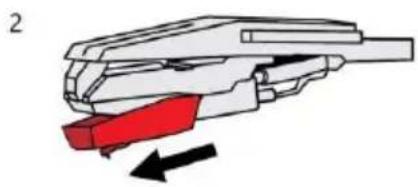
natural_image
Diagram of a mechanical component with a red highlighted section and black directional arrow (no text or symbols)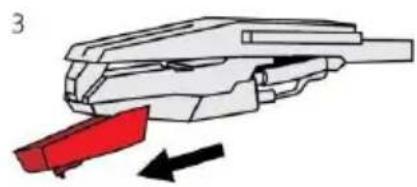
natural_image
Diagram of a mechanical component with red and black directional arrows indicating movement or force (no text or symbols)NOTĂ :
natural_image
Symbol of a trash bin with crossed lines indicating no waste, and a solid black rectangle below (no text or labels)natural_image
Exterior view of a black Akai radio with two gold speakers on either side (no text or symbols visible)ATT-240SP
ΟΔΗΓΙΕΣ ΧΡΗΣΗΣ
ΕΛ - ΕΛΛΗΝΙΚ
Οδηγίες ασφαλείας


natural_image
Diagram of a device with two ports and directional arrows indicating movement or assembly (no text or symbols)natural_image
Technical diagram of a circular device with internal components and a circular button, showing no text or symbols.Αρχική ρύθμιση
ΣΥΝΔΕΣΗ ΔΙΚΤΥΟΥ
natural_image
Diagram of a mechanical component with a red highlighted section and a downward arrow, no text or symbols present.
natural_image
Diagram of a mechanical component with red and black arrows indicating movement or force (no text or symbols)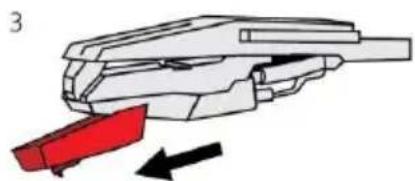
natural_image
Diagram of a mechanical component with a red component and black directional arrow (no text or symbols)ΣΗΜΕΙΩΣΗ:
natural_image
Exterior view of a black and gold electronic device with two speakers (no visible text or symbols on the device body)ATT-240SP
РЪКОВОДСТВО ЗА УПОТРЕБА
BG - БЪЛГАРСК
natural_image
Technical diagram of a mechanical assembly with two components and directional arrows indicating movement (no text or labels)natural_image
Technical diagram of a mechanical device with concentric circular components and a circular button, showing no text or symbols.natural_image
Simple line drawing of a tool with an arrow indicating rotation (no text or symbols)natural_image
Diagram of a mechanical component with a red highlighted section and a downward arrow, no text or symbols present.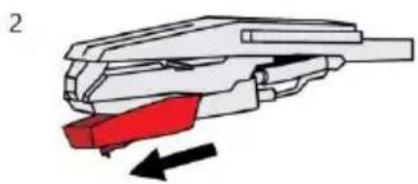
natural_image
Diagram of a mechanical component with a red highlighted section and black directional arrow (no text or symbols)
natural_image
Diagram of a mechanical component with a red component and black directional arrow (no text or symbols)ЗАБЕЛЕЖКА :
natural_image
Simple line drawing of a trash bin with crossed lines indicating no waste or discharge (no text or symbols)natural_image
Exterior view of a black Akai radio with two speakers and a clear cover, no visible text or symbols on the device itself.ATT-240SP
INSTRUKCJA OBSŁUGI
PL - POLS
natural_image
Diagram of a device with two ports and directional arrows indicating movement or assembly (no text or symbols)natural_image
Diagram of a mechanical component with a red highlighted section and a downward arrow, no text or symbols present.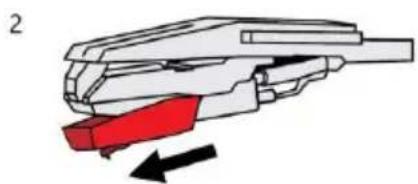
natural_image
Diagram of a mechanical component with red highlighted section and black directional arrows indicating motion (no text or symbols)
natural_image
Diagram of a mechanical component with red and black directional arrows indicating movement or force (no text or symbols)UWAGA :
natural_image
Exterior view of a black Akai radio with two gold speakers and a clear cover (no text or symbols visible on the device body)ATT-240SP
NÁVOD K POUŽITÍ
CZ - ČESK
Bezpečnostní pokyny
natural_image
Diagram of a device with two ports and directional arrows indicating movement or assembly (no text or symbols)natural_image
Technical diagram of a mechanical device with concentric circular components and a circular button labeled '+', showing no readable text or symbols.Počáteční nastavení
PŘIPOJENÍ K SÍTI
natural_image
Diagram of a mechanical component with a red highlighted section and a downward arrow indicating force or direction (no text or symbols present)2

natural_image
Diagram of a mechanical component with red and black parts, showing directional arrows (no text or symbols)3
natural_image
Diagram of a mechanical component with a red component and black directional arrows indicating motion (no text or symbols)POZNÁMKA :
natural_image
Exterior view of a black Akai radio with two speakers and a clear cover, no visible text or symbols on the device itself.ATT-240SP
NÁVOD NA POUŽITIE
SK - SLOVENSI
Bezpečnostné pokyny
natural_image
Diagram of a device with two ports and directional arrows indicating movement or assembly (no text or symbols)natural_image
Diagram of a mechanical component with a red highlighted section and a downward arrow indicating force or direction (no text or symbols present)2
natural_image
Diagram of a mechanical component with red and black parts, showing directional arrows (no text or symbols)3

natural_image
Diagram of a mechanical device with a red component and directional arrows indicating motion (no text or symbols)POZNÁMKA :
EU DECLARATION OF CONFORMITY
Nr. INT309
We, INTERVISION TRADING RO SRL, default importer (manufacturer), with registered office in Mosoia Commune, Smeura Village, 8 Fagetului Alley, declare under sole responsibility that the following products:
Brand name: AKAI
Type: ATT-240SP
Descriptions: TURNTABLE
Lot: 240SP23100XXX
to which this declaration related is in conformity with the essential requirements of the following directives of the Council of the European Communities:
EUROPEAN COMMUNITY DIRECTIVE 2014/35/EU
EUROPEAN COMMUNITY DIRECTIVE 2014/53/EU
EUROPEAN COMMUNITY DIRECTIVE 125/2008 Amd 801/2013
EUROPEAN COMMUNITY DIRECTIVE 2011/65/EU AMD 2015/863/EU
The products are compliant with the following standards and safety regulations:
EN 62368-1:2020+ A11:2020
EN 62479:2010
EN 50663:2017
EN 300328 V2.2.2: (2019-07)
EN 301 489-1 V2.2.3: (2019-11)
EN 301 489-17 V3.2.4: (2020-09)
EN 55032:2015+ A1:2020
EN 55035:2017 + A11:2020
EN 61000-3-2:2019 +A1:2021
EN 61000-3-3:2013+A1:2019+A2:2021
IEC 62321-3-1: 2013;
IEC 62321-4: 2013 +A1:2017;
IEC 62321-7-1:2015;
IEC 62321-5: 2013;
IEC 62321-6: 2015;
IEC 62321-7-2: 2017;
IEC 62321-8: 2017
Certificate of conformity issued based on the Certificates and Test Reports AT18220WC301213; AT18300RC302766; 18220WC30121302S; 18220WC30121303H; 18220WC30121301E; 18220WC30121304W and 18300RC30276601 of Shenzhen Anbotek Compliance Laboratory Limited, 1/F, Building D, Sogood Science and Technology Park, Sanwei community, Hangcheng Street si Shenzhen Anbotek Compliance Laboratory Limited, 4/F., Building A, Hourui No.3 Industrial Zone, Xixiang Street, Bao'an District, Shenzhen, Guangdong, China.
Intervision Trading Ro SRL,

Signature:
Printed name and Position:
CIOBANU DORIN - GENERAL MANAGER
Date: 29 ^th August, 2023
Place: Pitesti, Romania
DECLARATIE DE CONFORMITATE UE
Nr.INT309
Noi, Intervision Trading-RO SRL, avand sediul social in Com.Mosoia, Sat. Smeura, Aleea Fagetului, Nr.8, Jud.Arges, in calitate de representant autorizat al marcii AKAI, implicit importator (producator) declaram pe propria raspundere ca:
Marca: AKAI
Model: ATT-240SP
Descriere: PICK-UP
Lot: 240SP23100XXX
la care se refera aceasta declaratie, respecta cerintele de protectie cuprinse in urmatoarele documente normative :
EUROPEAN COMMUNITY DIRECTIVE 2014/35/EU
EUROPEAN COMMUNITY DIRECTIVE 2014/53/EU
EUROPEAN COMMUNITY DIRECTIVE 125/2008 Amd 801/2013
EUROPEAN COMMUNITY DIRECTIVE 2011/65/EU AMD 2015/863/EU
IEC 62321-7-2: 2017 ;
IEC 62321-8: 2017
Certificat de conformitate eliberat in baza certificatelor si rapoartelor de teste AT18220WC301213; AT18300RC302766; 18220WC30121302S; 18220WC30121303H; 18220WC30121301E; 18220WC30121304W si 18300RC30276601 ale Shenzhen Anbotek Compliance Laboratory Limited, 1/F, Building D, Sogood Science and Technology Park, Sanwei community, Hangcheng Street si Shenzhen Anbotek Compliance Laboratory Limited, 4/F., Buiding A, Hourui No.3 Industrial Zone, Xixiang Street, Bao'an District, Shenzhen, Guangdong, China.
Intervision Trading Ro SRL,
Semnatura:

Numele si functia: CIOBANU DORIN – DIRECTOR
Data: 29 August, 2023
Locul: Pitesti, Romania

- Safety instructions
- Interference
- Children
- Packing Contents
- Functions:
- Product Description
- Fitting the dust cover
- Unpacking and setup
- IMPORTANT!
- Initial Set -up
- MAINS CONNECTION
- EXTERNAL SPEAKER CONNECTION
- Playing Records
- NOTE:
- Bluetooth Function
- USB Playback Function
- Recording From Phono/Bluetooth to USB Drive
- Maintenance
- REPLACING THE STYLUS
- Take off the stylus
- NOTES:
- Technical Data
- Troubleshooting
- DISPOSAL OF ELECTRICAL AND ELECTRONIC EQUIPMENT
- AKAI
- Οδηγίες ασφαλείας
- Αρχική ρύθμιση
- ΣΥΝΔΕΣΗ ΔΙΚΤΥΟΥ
- ΣΗΜΕΙΩΣΗ:
- ЗАБЕЛЕЖКА :
- UWAGA :
- Bezpečnostní pokyny
- Počáteční nastavení
- PŘIPOJENÍ K SÍTI
- POZNÁMKA :
- Bezpečnostné pokyny
- EU DECLARATION OF CONFORMITY
- DECLARATIE DE CONFORMITATE UE
Brand : AKAI
Model : ATT-240SP
Category : Gramophone