APRC-106 - Radio AKAI - Free user manual and instructions
Find the device manual for free APRC-106 AKAI in PDF.


Pick your language and provide your email: we'll send you a specifically translated version.
| Product Type | Portable Radio |
| Brand | AKAI |
| Model | APRC-106 |
| Radio Bands | AM / FM |
| Frequency Range FM | 87.5 - 108 MHz |
| Frequency Range AM | 530 - 1600 kHz |
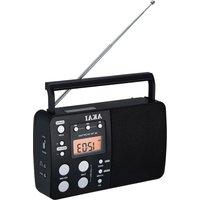
| Antenna | Telescopic antenna for FM |
| Power Source | AC 220-240V or 6V DC batteries |
| Display | Analog tuning dial |
| Speaker | Built-in 3-inch speaker |
| Headphone Jack | 3.5mm stereo output |
| Volume Control | Rotary knob |
| Dimensions (approx.) | 230 x 130 x 60 mm |
| Weight (approx.) | 0.6 kg |
| Functions | AM/FM reception, volume and tuning controls |
| Cleaning | Wipe with a soft dry cloth |
| Safety | Keep away from moisture and heat |
| Spare Parts and Repairability | Contact authorized AKAI service center |
| General Information | User manual available in PDF (14 pages) |
Frequently Asked Questions - APRC-106 AKAI
How do I switch between AM and FM bands?
Use the dedicated band selector switch on the side or front panel. Slide it to the desired band, then adjust the tuning knob to find your station.
How can I improve FM reception?
Extend the telescopic antenna fully and reposition it for the strongest signal. For AM, rotate the radio as AM uses an internal ferrite rod antenna.
How do I connect headphones?
Plug your headphones into the 3.5mm headphone jack. When connected, the internal speaker is muted automatically.
What type of batteries does the radio use and how do I install them?
The radio operates on 4 x AA (LR6) batteries or AC power. Open the battery compartment on the back, insert batteries with correct polarity, close the cover.
Can I use the radio while it is charging?
If your unit supports AC operation, yes. Simply connect the included AC power cord to a wall outlet and use the radio normally while it is powered.
How should I clean the radio?
Unplug the radio and wipe the exterior with a soft, dry cloth. Avoid using abrasive chemicals or liquids that could damage the finish.
What should I do if there is no sound?
Check the volume level, ensure headphones are not plugged in, and verify the band selector is on a station. For battery operation, check batteries are installed correctly.
Is there any safety precaution I should follow?
Do not expose the radio to moisture, direct heat, or strong impacts. For battery operation, remove batteries if not used for long periods to avoid leakage.
Where can I find spare parts or get repairs?
Contact your local AKAI authorised service center. Always provide the model number (APRC-106) when requesting assistance.
Can I use the radio with an external antenna?
Some models may have an external antenna connection. Consult your manual for specific details. In general, the built-in telescopic antenna is sufficient for most environments.
User questions about APRC-106 AKAI
0 question about this device. Answer the ones you know or ask your own.
Ask a new question about this device
No questions yet. Be the first to ask one.
Download the instructions for your Radio in PDF format for free! Find your manual APRC-106 - AKAI and take your electronic device back in hand. On this page are published all the documents necessary for the use of your device. APRC-106 by AKAI.
USER MANUAL APRC-106 AKAI
Manual assistant
Powered by Anthropic
Waiting for your message
Product information
Brand : AKAI
Model : APRC-106
Category : Radio