
Heat M30 - Home Automation Evolveo - Free user manual and instructions
Find the device manual for free Heat M30 Evolveo in PDF.


| Product Type | Home Automation Thermostat Kit (Gateway + Radiator Valve Actuator) |
| Brand | Evolveo |
| Model | Heat M30 |
| Product Numbers | Gateway: EVO-RV-M30SP; Valve: EVO-RV-M30 |
| Gateway Power Supply | 5V DC, 1A (adapter included, model KA25-0501000EU) |
| Valve Power Supply | 2 × AA alkaline batteries |
| Connectivity | Wi-Fi 802.11 b/g/n, Zigbee 802.15.4 |
| Operating Temperature (Gateway) | -10°C to 55°C |
| Operating Temperature (Valve) | -10°C to 60°C |
| Operating Humidity | 10% – 90% RH (non-condensing) |
| Display Accuracy | 0.5°C |
| Default Temperature Range | 5°C to 35°C (adjustable) |
| Maximum Lift | 4.5 mm |
| Thread Size | M30 × 1.5 mm |
| Valve Dimensions | 53 × 89.5 mm |
| Main Functions | Manual/Auto modes, weekly 5+2 programming, child lock, booster, holiday, open window detection, calibration |
| Compatibility | Works with M30 × 1.5 mm radiator valves; includes adapters for RA, RAV, RAVL |
| App Control | Evolveo Heat app for iOS and Android (QR code available) |
| Maintenance | Clean with dry cloth; remove batteries if not used for extended period |
| Safety Features | Child lock, temperature limits, overheat protection |
| Certifications | CE compliant |
| Warranty | Standard warranty; unauthorized repair voids warranty |
Frequently Asked Questions - Heat M30 Evolveo
User questions about Heat M30 Evolveo
0 question about this device. Answer the ones you know or ask your own.
Ask a new question about this device
Download the instructions for your Home Automation in PDF format for free! Find your manual Heat M30 - Evolveo and take your electronic device back in hand. On this page are published all the documents necessary for the use of your device. Heat M30 by Evolveo.
USER MANUAL Heat M30 Evolveo
Confirm 2 indicators on
a
| Information published | Value and precision | Unit |
| Model: KA25-0501000EU | / | / |
| Input voltage | 100-240 | V |
| Input AC frequency | 50/60 | Hz |
| Output voltage | 5 | V |
| Output current | 1 | A |
| Output power | 5 | W |
| Average active efficiency | 74,32 | % |
| Efficiency at low load (10 %) | 68,79 | % |
| No-load power consumption | 0,075 | W |
| Supplier: Shenzhen Keyu Power Supply Technology Co., Ltd, Commercial registration number: 91440300591889293H. Address:1-5F, No.13, Lane 3, Yuquan East Road, the 2nd Industrial park, Yulv, Guangming District, Shenzhen, Guangdong, China. | ||
Výrobce
Náxya Limited / No. 5, 17/F, Strand 50, 50 Bonham Strand, Sheung Wan, Hong Kong.
Dovozce
Abacus Electric, s.r.o.
Copyright © Abacus Electric, s.r.o.
www.evolveo.com
www.facebook.com/EvolveoCZ
Confirm 2 indicators on
| Information published | Value and precision | Unit |
| Model: KA25-0501000EU | / | / |
| Input voltage | 100-240 | V |
| Input AC frequency | 50/60 | Hz |
| Output voltage | 5 | V |
| Output current | 1 | A |
| Output power | 5 | W |
| Average active efficiency | 74,32 | % |
| Efficiency at low load (10 %) | 68,79 | % |
| No-load power consumption | 0,075 | W |
| Supplier: Shenzhen Keyu Power Supply Technology Co., Ltd, Commercial registration number: 91440300591889293H. Address:1-5F, No.13, Lane 3, Yuquan East Road, the 2nd Industrial park, Yulv, Guangming District, Shenzhen, Guangdong, China. | ||
Výrobca
Náxya Limited / No. 5, 17/F, Strand 50, 50 Bonham Strand, Sheung Wan, Hong Kong.
Dovozca
Abacus Electric, s.r.o.
Copyright © Abacus Electric, s.r.o.
www.evolveo.com
www.facebook.com/EvolveoCZ
thank you for choosing the EVOLVEO Heat M30.
Before using the device, read the user manual.
Gateway
| Product name | EVOLVEO Heat M30 |
| Product number | EVO-RV-M30SP |
| Adapter output | 5V 1A |
| Operating current | <1A |
| Working temperature | -10 °C – 55 °C |
| Operating humidity | 10% – 90% RH (non-condensing) |
| Wi-Fi technology | Wi-Fi 802.11 b/g/n, Zigbee 802.15.4 |
Contents of the Gateway package
1× Gateway
1× 5V DC power adapter
1× Power cable
1× Ethernet cable
1× User manual
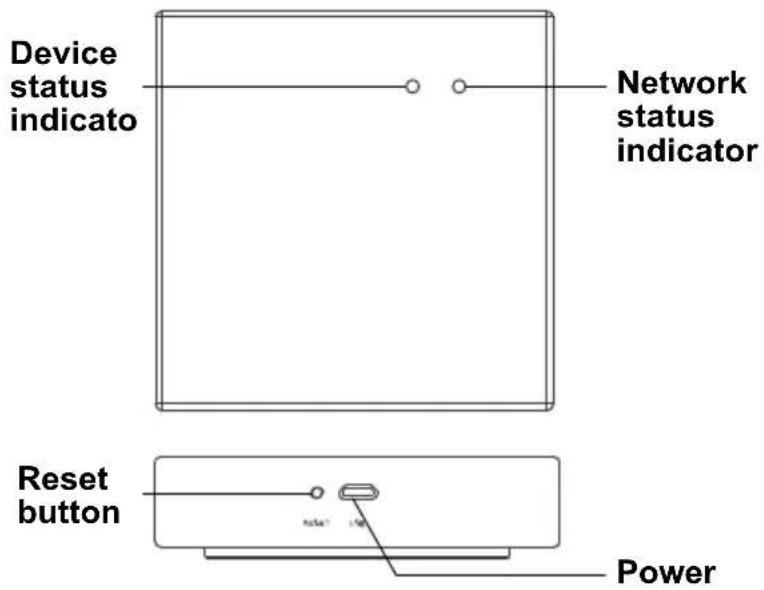
Device layout – Gateway
Mobile app
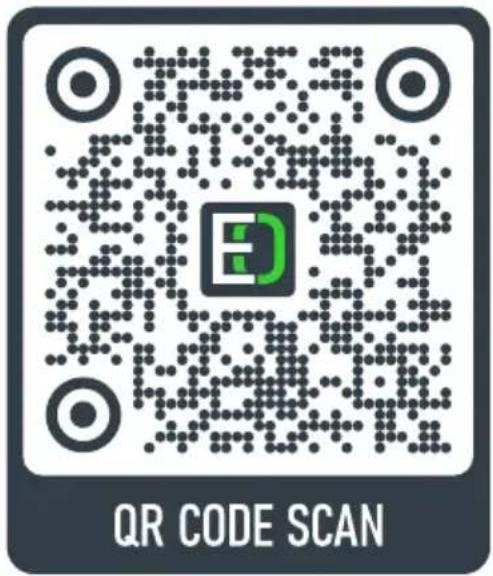
www.evolveo.com/app/evolveo-heat/
First use and putting into operation - Gateway + creating an account
1) To start-up the gateway, connect the cable (microUSB) to the device gateway, the other end to the power adapter and plug the adapter into a 230V socket. Or press and hold the Reset button for 10 seconds and try again.
2) Use the QR reader (or at the link provided) to download the app to your mobile phone (it supports the Android or iOS system). Follow the instructions of the app step by step according to the instructions in order to create an account using your email.
3) Pairing requirement: The mobile phone must be connected to the same Wi-Fi network as the Gateway, i.e. to the same router.
a. On the home page, select Pridat zařízení or the + symbol in the corner. Select Gateway Control in the following menu.

Gateway
(Zigbee)
b. Click (Zigbee) to continue. Confirm the ticking of the Confirm 2 indicators on option and click
c. On the next page, click + next to the Smart Zigbee Gateway Zařízení která lze přípolit to continue. The device will start to search, this will take a maximum of 2 minutes.
d. Once the process is successfully completed, you will see a device with a icon. Click on the symbol to name the device. Click on the Dokončeno button to finish the pairing.
Device layout – radiator valve actuator
| Product name | EVOLVEO Heat M30 |
| Product number | EVO-RV-M30 |
| Power | 2× AA alkaline batteries |
| Display accuracy | 0.5°C |
| Measuring sensor | NTC (10k) 1% |
| Maximum lift | 4.5 mm |
| Default temperature range | 5°C ~ 35°C |
| Operating temperature | -10°C~60°C |
| Insulation | Normal conditions |
| Program run | 1 week as a cycle |
| Device dimensions | 53 × 89.5 mm |
| Temperature display range | 1°C ~ 70°C |
| Maximum current | 90mA |
| Thread size | M30 × 1.5 mm |
Contents of the valve actuator package
Capacitive touch buttons
For direct control and setting of the device.
| - | Decrease button.Press and hold to lock or unlock the valve actuator. | ||
| + | Increase button.Press and hold to turn on the Booster mode. | ||
| Press shortly to switch between the Automatic and Manual modes.Press and hold for 3 seconds to enter the setting interface.Enter. | |||
| Holiday mode. | Open window. | ||
| Booster mode. | Automatic cycle. | ||
| Clock setting. | Minute setting. | ||
| Low battery. | Child lock. | ||
| Motor movement. | Displayed temperature. | ||
First use and putting into operation – radiator valve actuator
1) Mount the valve actuator on the radiator valve, you have 3 different adapters (RA, RAV, RAVL) to choose from.
2) Insert 2× AA alkaline batteries into the valve actuator and close the lid. LED indicators of the valve actuator will light up.
3) After a while, the n and m symbols will start to flash, confirm by pressing Enter ☺.
4) Then the h symbol will start to flash, use the +/− symbol to set the current hour, confirm by pressing Enter Ⓤ. Use the m symbol to set the minutes. The 8 will display a number between 1 and 7, set the day of the week. The number 1 means Monday.
5) Then the Rd symbol will appear on the display and the motor will move, verifying the movement from the open to closed position and back. Wait for this process to complete. It will take approximately 1 minute.
6) Press and hold Enter 📋 for 5 seconds. Then press the + button 5 times until ⚙ starts to flash.
7) Press Enter ⚙️ and the ⚡ symbol will glow steadily.
8) Press and hold Enter 📋 for 5 seconds and the 🔗 symbol will start to flash quickly. You have now completed setting of the pairing mode of the valve actuator. If the setting failed and the 🔗 symbol is not flashing quickly, repeat the above steps starting with 5). Note: The icons on the display go out after a period of inactivity - click on any button first to wake up the display.
9) In the app, click on the already paired Gateway and click on the 🧠 Přidat podvýbor button on the bottom of the screen. On the next page you will see a 🖱️ button. Do not click on it yet. Ideally, have this button ready on your mobile phone; next to it, activate the pairing mode of the valve actuator, point 7), so the 🔒 symbol will start to flash quickly and then click on the 🖱️ button on your phone. Within a few seconds, the valve actuator will be assigned to your app. If not, repeat steps 8) and 7).
Valve actuator setting in the mobile app
 | This scale on the home page of the mobile app shows the set temperature; text with a smaller font indicates the current room temperature. |
 | Use this symbol to switch between the heating modes: Manual, Automatic, Comfort, Booster, Holiday, Automatic, Eco. |
 | Use this symbol to go to Settings and turn on: Child lock, Calibration, Temperature limits etc. |
Weekly programming
 | Select the valve actuator in the mobile app. |
 | Click on the Settings symbol. |
| AutoMode Type 5+2>week programming > | Select the last option in the menu. |
| PASSWORD | Enter: 123456. |
| PERIODS | Edit working days / weekends using a schedule. |
Do you still need advice after reading this manual?
Read FAQs at www.evolveo.com first or contact the EVOLVEO technical support.
Warranty and post-warranty service
Repairs and service may only be carried out at an authorized EVOLVEO service centre (more at www.evolveo.com), otherwise you can damage the device and lose the warranty.
The warranty DOES NOT APPLY to:
• using the device for other purposes than it was designed to;
- installation of firmware other than the one installed by the manufacturer or the one that can be downloaded manually or automatically from the device menu;
• mechanical damage caused by improper use;
• damage caused by natural elements such as fire, water, static electricity, power surges etc.;
• damage caused by unauthorized repair;
- damage of the guarantee seal or unreadable serial number of the device.

Disposal: The symbol of crossed out container on the product, in the literature or on the wrapping means that in the European Union all the electric and electronic products, batteries and accumulators must be placed into the separate salvage after finishing their lifetime. Do not throw these products into the unsorted municipal waste.


DECLARATION OF CONFORMITY
Hereby, the company Abacus Electric, s.r.o. declares that the EVOLVEO Heat M30 is in compliance with the requirements of the standards and regulations, relevant for the given type of device.
Find the complete text of Declaration of Conformity at www.evolveo.com/ftp/ce/.
| Information published | Value and precision | Unit |
| Model: KA25-0501000EU | / | / |
| Input voltage | 100-240 | V |
| Input AC frequency | 50/60 | Hz |
| Output voltage | 5 | V |
| Output current | 1 | A |
| Output power | 5 | W |
| Average active efficiency | 74.32 | % |
| Efficiency at low load (10 %) | 68.79 | % |
| No-load power consumption | 0.075 | W |
| Supplier: Shenzhen Keyu Power Supply Technology Co., Ltd, Commercial registration number: 91440300591889293H. Address: 1-5F, No.13, Lane 3, Yuquan East Road, the 2nd Industrial park, Yulv, Guangming District, Shenzhen, Guangdong, China. | ||
Manufacturer
Naxya Limited / No. 5, 17/F, Strand 50, 50 Bonham Strand, Sheung Wan, Hong Kong.
Importer
Abacus Electric, s.r.o.
Copyright © Abacus Electric, s.r.o.
www.evolveo.com
www.facebook.com/EvolveoCZ
All rights reserved.
Design and specification may be changed without prior notice.


- Výrobce
- Dovozce
- Výrobca
- Dovozca
- Contents of the Gateway package
- First use and putting into operation - Gateway + creating an account
- Contents of the valve actuator package
- Capacitive touch buttons
- First use and putting into operation – radiator valve actuator
- Do you still need advice after reading this manual?
- Warranty and post-warranty service
- The warranty DOES NOT APPLY to:
- DECLARATION OF CONFORMITY
- Manufacturer
- Importer
Brand : Evolveo
Model : Heat M30
Category : Home Automation