
XS-E843B - Pregnant JVC - Free user manual and instructions
Find the device manual for free XS-E843B JVC in PDF.


| Product Type | Bookshelf Speaker |
| Brand | JVC |
| Model | XS-E843B |
| Dimensions (W x H x D) | 200 x 300 x 250 mm |
| Weight | 4.5 kg |
| Power Output | 50 W RMS |
| Impedance | 8 ohms |
| Frequency Response | 50 Hz - 20 kHz |
| Sensitivity | 88 dB |
| Driver Configuration | 2-way (woofer and tweeter) |
| Input Types | Speaker wire terminals |
| Recommended Amplifier Power | 20 - 100 W |
| Grille | Removable cloth grille |
| Enclosure Type | Bass reflex with rear port |
| Finish | Black wood grain vinyl |
| Magnetic Shielding | Yes |
| User Manual | Available for download in PDF format (32 pages, English) |
| Safety Instructions | Read manual before use; keep away from water |
| Cleaning | Wipe with dry cloth; do not use liquids |
| Spare Parts | Contact JVC support |
| Repairability | Designed for professional repair only |
Frequently Asked Questions - XS-E843B JVC
User questions about XS-E843B JVC
0 question about this device. Answer the ones you know or ask your own.
Ask a new question about this device
Download the instructions for your Pregnant in PDF format for free! Find your manual XS-E843B - JVC and take your electronic device back in hand. On this page are published all the documents necessary for the use of your device. XS-E843B by JVC.
USER MANUAL XS-E843B JVC
natural_image
Black portable electronic device with two speakers and a handle, no visible text or symbolsBLUETOOTH SPEAKER
XS-E843B
INTRODUCTION
Thank you for buying our product. Please read through these operating instructions, so you will know how to operate your equipment properly. After you finished reading the instructions manual, put it away in a safe place for future reference.
IMPORTANT SAFETY PRECAUTIONS
When using your Speaker, basic safety precautions should always be followed, including the following:
- Children should be supervised to ensure that they do not play with the device.
- Keep this Speaker and its accessories away from excessive heat.
- No sharp object should be subjected to the speaker/speaker-drivers as it may damage the speakers.
- Only use a soft cloth, no harsh abrasives or chemicals to clean, as it may damage the surface finishing.
- Keep away from dripping or splashed fluids.
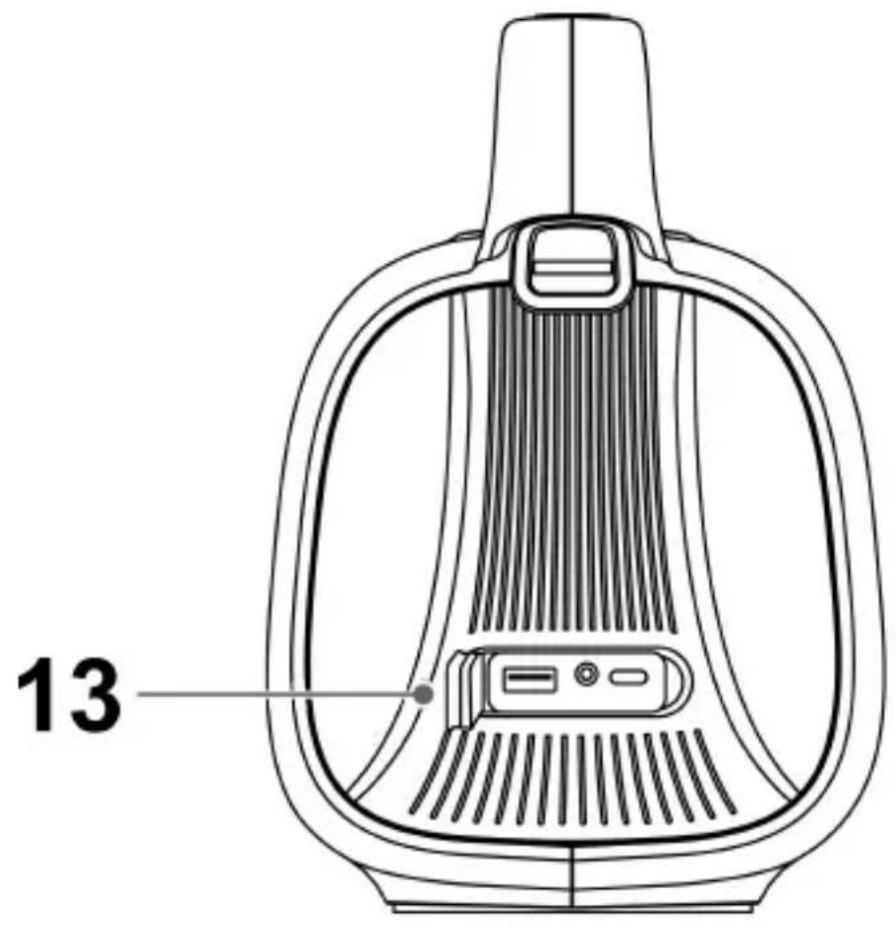
- Ensure the speaker is waterproof by removing all the connected cables and the cap is tightly closed before exposing the speaker to liquid.
- NEVER expose the speaker to water while charging, as doing so may result in damage to the speaker or the power source.
- NEVER operate this speaker with a damaged cable or after it has malfunctioned or has been damaged in any manner.
- NEVER leave the speaker unattended while charging. If the speaker becomes hot, smokes, or gives off an odor during charging, terminate charging immediately.


TO AVOID DANGER OF SUFFOCATION, KEEP THE PLASTIC BAG AWAY FROM BABIES AND CHILDREN. DO NOT USE THIS BAG IN CRIBS, BEDS, CARRIAGES OR PLAYPENS. THIS BAG IS NOT A TOY.
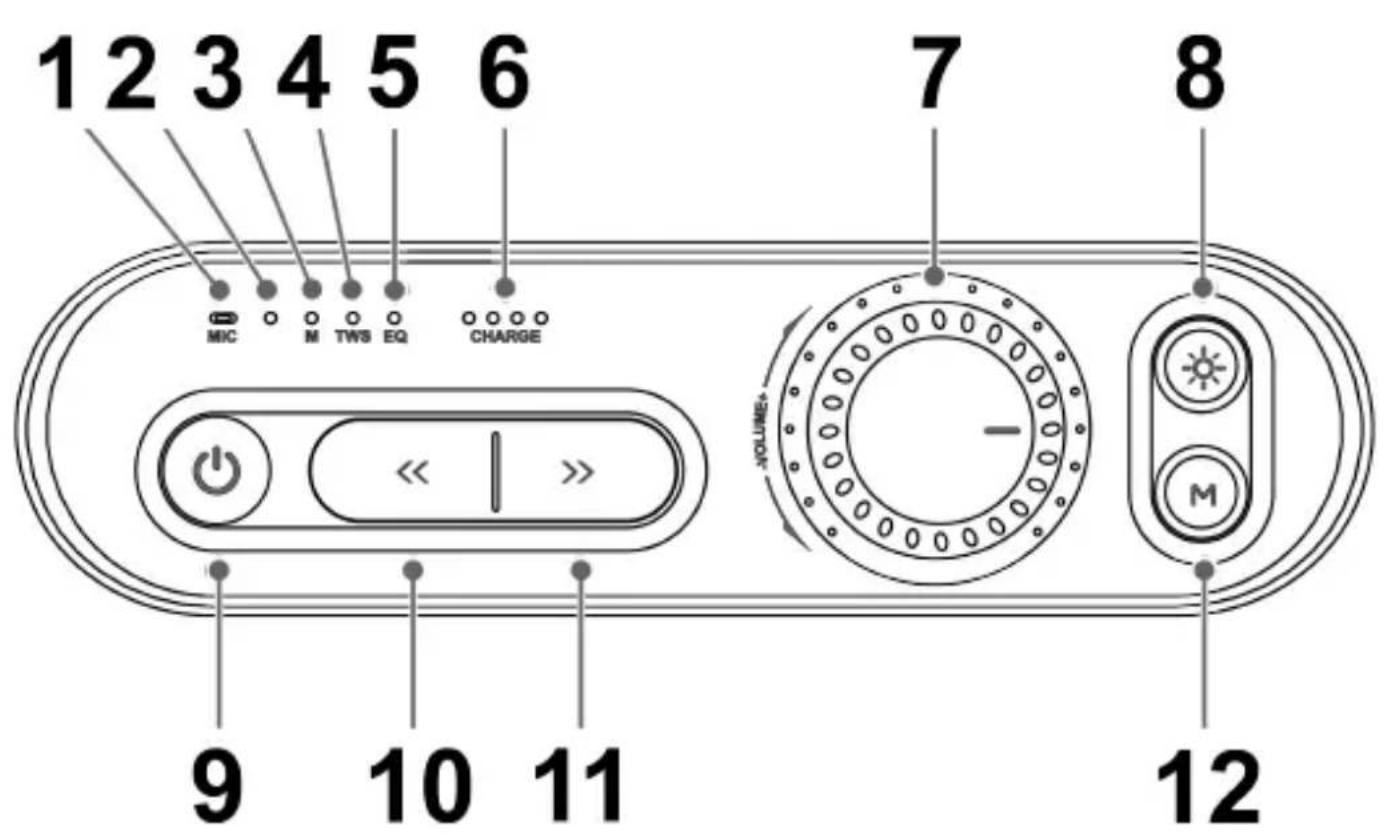
PRODUCT OVERVIEW AND CONTROL BUTTONS
- Microphone
- MODE indicator light
Blue (Bluetooth) / Green (AUX IN) / White (USB) - POWER-ON indicator light
- TWS connection indicator light
- EQ indicator light
OFF (Balance Sound) / White (Bass Sound) / Yellow (Pure Sound) -
Charging indicator lights
● (25%) / ● ● (50%) / ● ● ● (75%) / ● ● ● ● (100%) -
Volume control
-
button
Press to switch LED light mode (10 different LED lights modes).
Long press to turn off/on LED light.
- button
Long press to turn on/off the speaker.
Press 1 time to Pause/Play music (Bluetooth); Mute/Unmute (AUX IN).
Press 2 times to switch mode (Bluetooth / AUX IN / USB).
Press 3 times to delete speaker's Bluetooth connection history information.