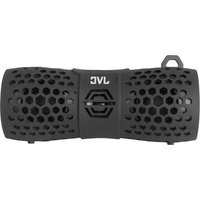
XS-N1249BBA - Loudspeaker JVC - Free user manual and instructions
Find the device manual for free XS-N1249BBA JVC in PDF.


| Brand | JVC |
| Model | XS-N1249BBA |
| Product Type | Car Speaker (Coaxial) |
| Speaker Size | 6.5 inches (165 mm) |
| Speaker Type | 2-Way Coaxial |
| Peak Power | 300 W |
| RMS Power | 50 W |
| Impedance | 4 ohms |
| Sensitivity | 90 dB |
| Frequency Response | 40 Hz - 20 kHz |
| Cone Material | Polypropylene |
| Tweeter Type | 1-inch Balanced Dome |
| Mounting Depth | 1.97 inches (50 mm) |
| Mounting Diameter | 5.71 inches (145 mm) |
| Weight (per speaker) | 1.5 lbs (0.68 kg) |
| Sold As | Pair |
| Cleaning | Wipe with dry cloth |
| Safety Compliance | CE, RoHS |
| Spare Parts Availability | Contact JVC dealer |
| Warranty | 1 year limited |
Frequently Asked Questions - XS-N1249BBA JVC
User questions about XS-N1249BBA JVC
0 question about this device. Answer the ones you know or ask your own.
Ask a new question about this device
Download the instructions for your Loudspeaker in PDF format for free! Find your manual XS-N1249BBA - JVC and take your electronic device back in hand. On this page are published all the documents necessary for the use of your device. XS-N1249BBA by JVC.
USER MANUAL XS-N1249BBA JVC
Adventure Bluetooth Speaker
XS-N1249BBA
XS-N1249ABA

natural_image
Black JVC portable electronic device with perforated design and 'JVC' branding (no visible text beyond branding)Important Safety Instructions
Warning: To avoid electrical shock, do not dismantle. Refer all servicing to qualified service personnel.
- Please read all of the instructions carefully and retain for future reference.
- When using electrical appliances, basic safety precautions should always be followed.
- This product is not a toy! Children should be supervised to ensure that they do not play with the appliance.
- There are no user-serviceable parts inside. Do not attempt to repair by yourself.
- Do not immerse the unit in water or other liquids.
- Do not insert foreign objects into any opening on the unit.
- Do not play music at excessive volume levels as this can cause hearing loss or damage the unit.
- Keep the unit away from flammable materials.
- Do not expose batteries to heat or fire as they may explode.
- Do not dispose of batteries in your household waste. Contact your local council for information on disposal or recycling.
Important note on outdoor use
This speaker is IP66 rated - splash proof and dust proof. This IP rating is only applicable when the silicone port cover is closed.
Please make sure the cover is closed and secure before using outdoors.
Important: DO NOT submerge the speaker in water. If the speaker gets wet, dry it thoroughly before using it again.
Description:

1.ON/OFF button
6.Blue LED(Bluetooth)
2.Play/Pause/Phone
7.Red LED(Charging)
3.MIC
8.Green LED(AUX)
4.Previous/Volume –
-
Micro USB Charging Port
-
Next/Volume +
10.AUX in Port
Included:
1.Speaker
- Micro USB Charging Cable
3.3.5 mm Audio Cable
4.User Manual
5.Warranty Card
Specifications
Supported Profiles: A2DP v1.2, HFP v1.5, HSP v1.2
Bluetooth Range: 33ft (10m)
Dimensions: 180 X 68 X 82 mm
Battery: Li-Ion 3.7V, 2000 mAh
Charging Input: DC 5V, 1A
Operation
Powering On
Press and Hold "ON/OFF" button 2 seconds to power ON, the Blue LED will start to flash.
If an Aux (3.5 mm) cable is connected to the unit, the Blue LED will turn off, and the Green LED will stay illuminated, indicating that unit is in Aux-In mode.
Powering Off
Press and Hold "ON/OFF" button 2 seconds to power off.
Bluetooth Mode
The unit automatically enters 'pairing mode' when it is powered on.
Place your Bluetooth-enabled device within 10 metres of the speaker.
Navigate to the Bluetooth setting menu on your device and search for new devices. The Bluetooth name for this speaker is “XS-N1249”.
Note: The speaker powers off automatically in 10 minutes if there is no audio in Bluetooth mode.
Begin Streaming Music
Press “ ” to start playing music.
Press and Hold“ + ” 2 seconds to play the next track.
Press and Hold“ — ” 2 seconds to play previous track.
Press either “ + ” or “ — ” for volume control.
Using the Hands-Free Function
When the unit is connected and paired to a Bluetooth-enabled device like a smartphone, the unit allows you to answer phone calls with its built-in microphone.
Press “√” to accept a call.
To end a call press“ ”.
To reject a call, press and hold “ √” for 2 seconds.
Aux-In Mode
Plug in the supplied 3.5 mm cable into the unit. Connect the other end to the AUX out port on your device. The Green LED will only illuminate when in “Aux” mode.
Please note music and volume can be controlled on your device.
Charging
Attach the USB cable to the unit, and plug into any USB charger.
If the unit is completely discharged, it will take approximately 4 hours to fully charge.
The red LED lights up when the unit is charging. When fully charged, the red LED turns off.
Note: There will be a beep when the battery is low and needs to be recharged.
LED Status
| Blue LED flashing & solid Bluetooth Mode | |
| Green LED on solid | Aux Mode |
| Red LED | Charging |
Troubleshooting
| Unit doesn’t connect to device | Speaker needs to be connected/re-paired to device |
| A tone is heard every few seconds | Speaker needs to be charged |
| Unit will not power on | Speaker needs to be charged |
| Unit doesn’t control track(s)/volume | Speaker needs to be in Wireless mode for full control |
| Unit distorts at high volume | The device volume needs to be lowered |
JVC

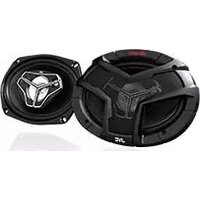
Brand : JVC
Model : XS-N1249BBA
Category : Loudspeaker