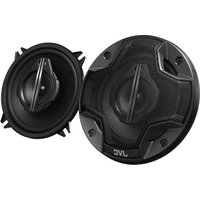
CS-HX539 - Loudspeaker JVC - Free user manual and instructions
Find the device manual for free CS-HX539 JVC in PDF.


Pick your language and provide your email: we'll send you a specifically translated version.
| Product Type | Bookshelf Speaker |
| Brand | JVC |
| Model | CS-HX539 |
| Dimensions (W x H x D) | 20 cm x 15 cm x 25 cm |
| Weight | 2.5 kg |
| Power Source | AC 100-240V, 50/60 Hz |
| Power Consumption | 30 W |
| Frequency Response | 50 Hz - 20 kHz |
| Impedance | 8 Ω |
| Speaker Driver | 1 x 5-inch Woofer, 1 x 1-inch Tweeter |
| Audio Inputs | AUX (3.5 mm), RCA |
| Controls | Volume, Bass, Treble, Power |
| Enclosure Type | Bass Reflex (Port) |
| Cleaning Instructions | Wipe with a soft, dry cloth. Do not use solvents. |
| Safety Warnings | Keep away from moisture. Do not open the unit. Use supplied AC adapter. |
| Spare Parts Availability | Contact JVC authorized service centers for replacement parts. |
| Repairability | Intended for professional servicing only. No user-serviceable parts inside. |
| General Information | Designed for home audio use. Suitable for music and movies. |
Frequently Asked Questions - CS-HX539 JVC
How do I connect my smartphone to the JVC CS-HX539 speaker?
Use a 3.5mm AUX cable to connect your smartphone's headphone jack to the AUX input on the speaker. If your phone supports Bluetooth, ensure the speaker is in pairing mode (if equipped) or use a Bluetooth adapter.
What is the power source for the CS-HX539?
The speaker is powered by an AC adapter that connects to a standard wall outlet (100-240V). Do not use a damaged power cord.
Can I use the speaker outdoors?
The CS-HX539 is designed for indoor use only. Exposure to moisture, rain, or extreme temperatures may damage the unit.
How do I clean the speaker?
Use a soft, dry cloth to gently wipe the exterior. Avoid using any liquid cleaners, abrasives, or solvents as they may damage the finish.
What should I do if there is no sound?
Check that the speaker is powered on and the volume is turned up. Verify the audio source is playing and the AUX cable is securely connected. Try a different audio source.
Can I replace the speaker drivers myself?
No, the speaker contains no user-serviceable parts. Any repairs should be carried out by a qualified technician or JVC authorized service center.
Is the speaker magnetically shielded?
The CS-HX539 may not be fully shielded. Keep it at least 30 cm away from CRT monitors or magnetic storage media to avoid interference.
What is the warranty period?
Warranty coverage varies by region. Typically, JVC offers a 1-year limited warranty for manufacturing defects. Retain your proof of purchase.
Can I connect multiple speakers together?
The CS-HX539 does not support daisy-chaining. For stereo sound, use a single speaker per channel with appropriate stereo amplifier.
Where can I download the user manual?
The manual is available for free download on the notice-facile.com website. Search for 'JVC CS-HX539' and download the PDF.
User questions about CS-HX539 JVC
0 question about this device. Answer the ones you know or ask your own.
Ask a new question about this device
No questions yet. Be the first to ask one.
Download the instructions for your Loudspeaker in PDF format for free! Find your manual CS-HX539 - JVC and take your electronic device back in hand. On this page are published all the documents necessary for the use of your device. CS-HX539 by JVC.
USER MANUAL CS-HX539 JVC



Manual assistant
Powered by Anthropic
Waiting for your message
Product information
Brand : JVC
Model : CS-HX539
Category : Loudspeaker