
SW2102 - Home trainer HMS Premium - Free user manual and instructions
Find the device manual for free SW2102 HMS Premium in PDF.


| Product Type | Home Trainer (Stationary Exercise Bike) |
| Brand | HMS Premium |
| Model | SW2102 |
| Max User Weight | 120 kg (265 lbs) |
| Product Dimensions (L x W x H) | 120 x 48 x 105 cm |
| Net Weight | 33 kg |
| Gross Weight | 37 kg |
| Packing Dimensions | 105 x 23 x 83 cm |
| Resistance System | Friction belt brake (independent of speed) |
| Display | LCD (Time, Speed, Distance, Calories, RPM, Pulse) |
| Power Supply | Battery powered (2x AA, not included) |
| Heart Rate Monitoring | Hand pulse sensors on handlebar |
| Phone Holder | Yes, on handlebar |
| Transport Wheels | Yes (2 moving wheels on front stabilizer) |
| Seat Adjustment | Vertical (seat post) and horizontal (seat slider) |
| Handlebar Adjustment | Height adjustable via lock pin |
| Pedal Type | Standard pedals with left/right threading |
| Safety Class | EN ISO 20957-1 Class H (home use) |
| Warranty | 24 months from date of sale |
| Assembly Required | Yes, with included tools and instructions |
| Intended Use | Home fitness, not for therapeutic/rehabilitation purposes |
Frequently Asked Questions - SW2102 HMS Premium
User questions about SW2102 HMS Premium
0 question about this device. Answer the ones you know or ask your own.
Ask a new question about this device
Download the instructions for your Home trainer in PDF format for free! Find your manual SW2102 - HMS Premium and take your electronic device back in hand. On this page are published all the documents necessary for the use of your device. SW2102 by HMS Premium.
USER MANUAL SW2102 HMS Premium
natural_image
Line drawing of a stationary exercise bike with visible components and suspension mechanism (no text or labels)Komputer
Ustawienia
- Read this manual carefully before first using and retain it for future reference.
- Observe all warnings and precautions including assembly steps. Use it only for intended purpose.
- Assemble and use it only according to this manual to assure your safety. Inform all other users about safe usage.
- Keep it away from children and pets. Don't let children unattended near this device. Only an adult person may assemble and use it.
- Ask your physician for advice before starting any exercise program. It is especially necessary if your suffer from some health problems or if you take some medication that could affect your heart rate, blood pressure or cholesterol level.
- Observe body signals. If you feel some problems (pain, tightness in chest, irregular heartbeat, breathing shortness, dizziness or nausea), stop immediately, improper exercising can result in serious health problems or in an injury.
- Put it only on a flat, dry and clean surface and keep a safety safety clearance of at least 0.6 m from other objects for higher safety. Use a protective cover to protect carpet or floor.
- Wear adequate sports clothes and sports shoes. Avoid too loose clothes.
- Don't use it outdoors.
- Check this device for damage or wearing before each using. Regularly check all bolts and nuts. They should be well tightened, Re-tighten, if necessary. Never use damaged or worn device to assure your safety.
- If some sharp edges occur, stop using.
- If you hear some unusual noises coming from this device, stop using.
- No adjustable part should protrude and obstruct user movements. Only one person may use it at time.
- Braking is independent of the speed.
- It is not intended for therapeutic purpose.
- Pay attention while lifting or transporting it to avoid back injury. Use only proper lifting techniques or ask some other person for help.
- Don't do any improper modification of this product. If necessary, contact authorized service.
- Max user weight: 120 kgs
- Category: The equipment has been tasted and certified according EN ISO 20957-1 under class H. It is not suite for therapeutic use.
WARNING! The heart rate frequency monitoring may not be completely accurate. Overexertion during training can lead to a serious injury or even death. If you start to feel faint, stop the exercise immediately.
| No. | Parts | Qty |
| 1 | Main frame | 1 |
| 2 | Front stabilizer | 1 |
| 3 | Rear stabilizer | 1 |
| 4 | Seat connection | 1 |
| 5 | Seat post | 1 |
| 6 | Handlebar post | 1 |
| 7 | Handlebar | 1 |
| 8 | Seat slider | 1 |
| 9 | Seat cushion | 1 |
| 10 | Phone holder | 1 |
| 11 | Left chain cover | 1 |
| 12 | Rigth chain cover | 1 |
| 13 | Left wheel cover | 1 |
| 14 | Right wheel cover | 1 |
| 15 | Left cover | 1 |
| 16 | Right cover | 1 |
| 17 | Axis | 2 |
| 18 | Belt wheel | 1 |
| 19 | Belt | 4 |
| 20 | Flywheel | 1 |
| 21 | Left crank | 4 |
| No. | Parts | Qty |
| 22 | Right crank | 1 |
| 23 | Left pedal | 1 |
| 24 | Right pedal | 2 |
| 25 | 40- 80 oval plug | 1 |
| 26 | Bushing | 2 |
| 27 | Knob | 1 |
| 28 | Knob | 1 |
| 29 | Brake cover | 1 |
| 30 | Brake pad | 1 |
| 31 | Lock pin | 1 |
| 32 | Pulse sensor | 2 |
| 33 | Moving wheel | 2 |
| 34 | M8- 53 screw | 4 |
| 35 | 8 gasket | 4 |
| 36 | M8 nut | 4 |
| 37 | M8-45 screw | 2 |
| 38 | M8 nut | 4 |
| 39 | Monitor post | 1 |
| 40 | Monitor | 1 |
| 41 | M8 screw | 4 |
| 42 | 38- 38 quadrate plug | 2 |
Assembly instructions
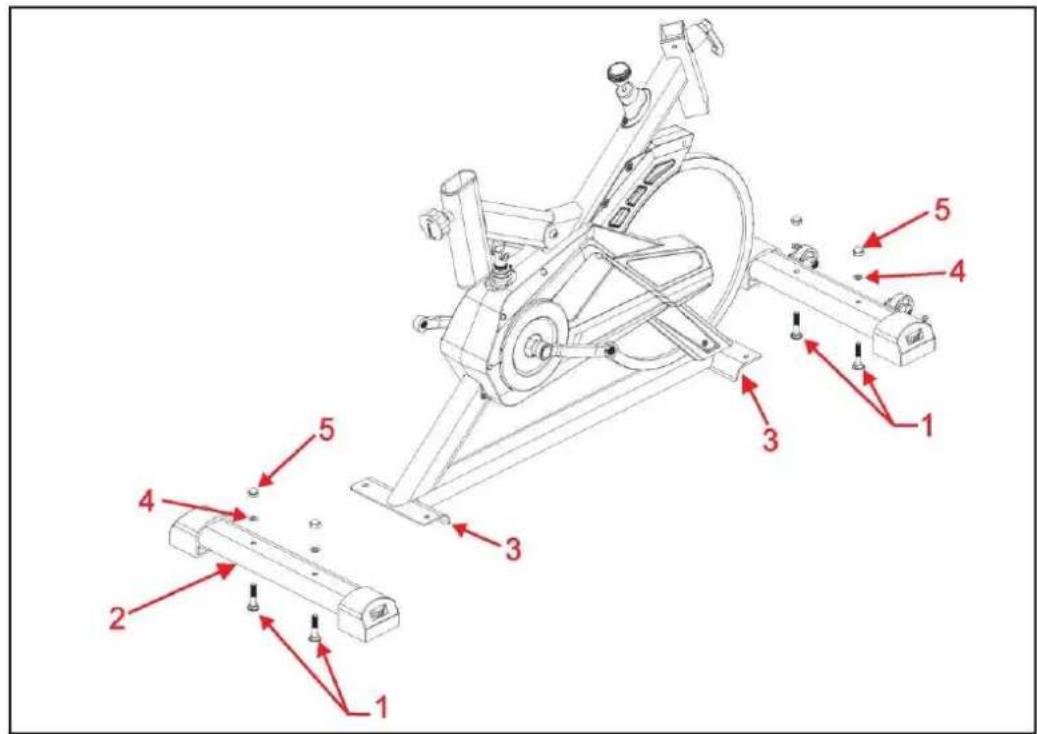
Step 1 Connect front and rear stabilizer to main frame using 4 M8 screws, washers and nuts (1, 4, 5) as in the picture.
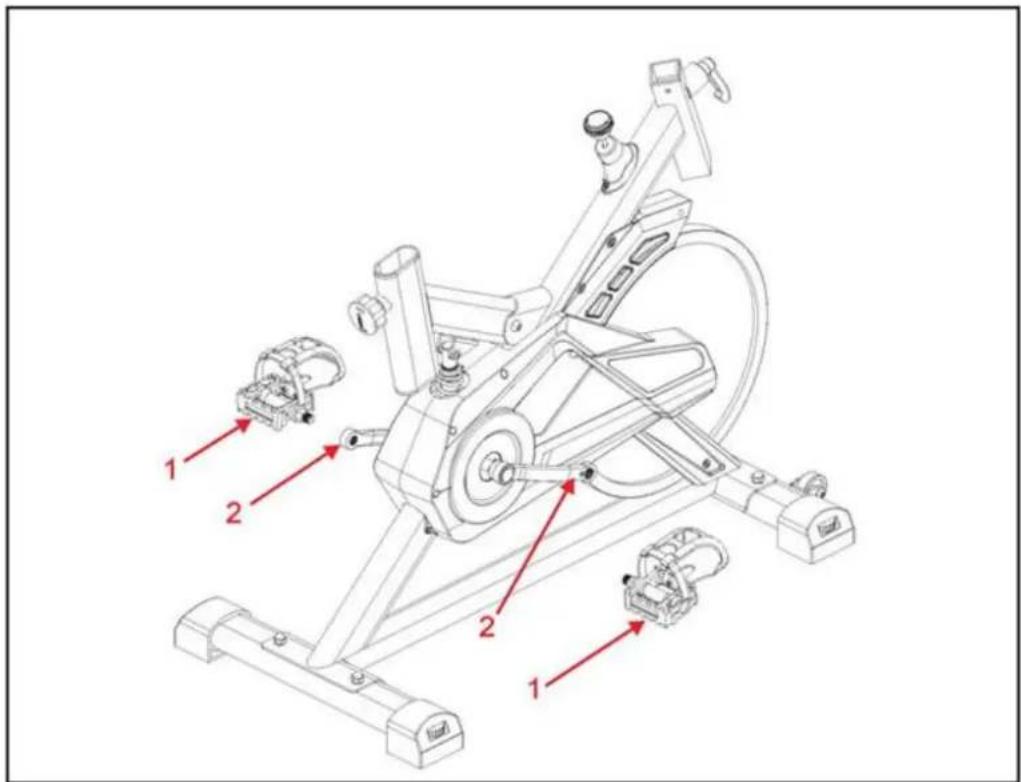
Step 2 Attach left and right pedal to the correct crank. Remember that left pedal is screwed in counterclockwise, and right is screwed clockwise.
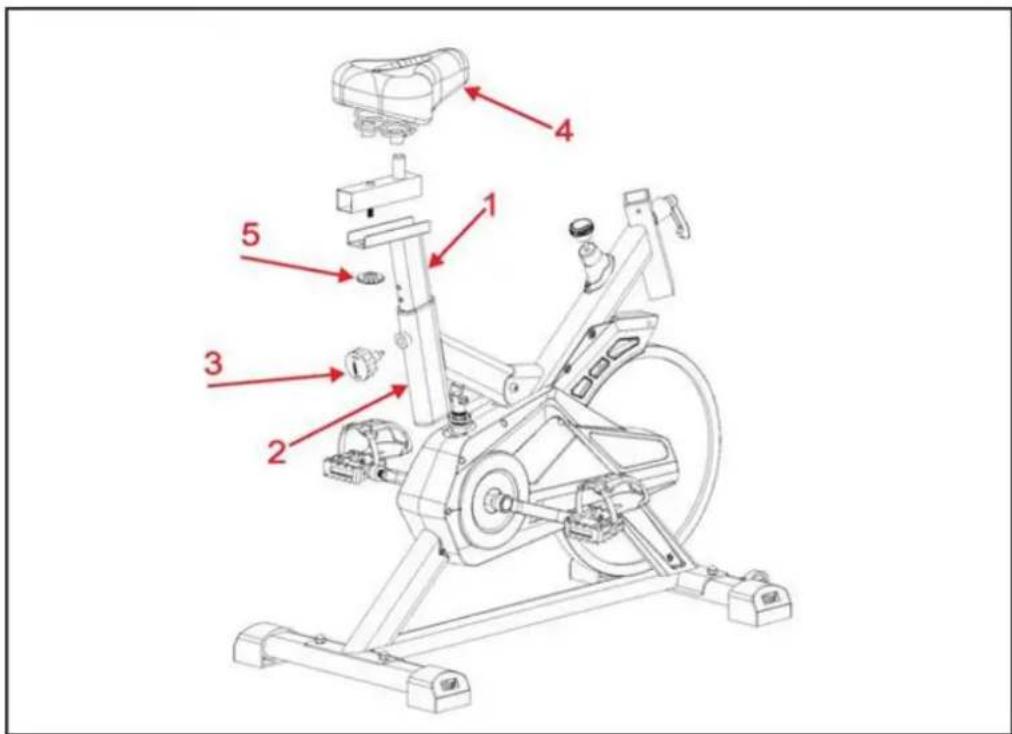
Step 3 Attach the seat post (1) into the main frame (2), fix it with the plum knob (3). Then fix the seat (4) to the frame by the knob (5).
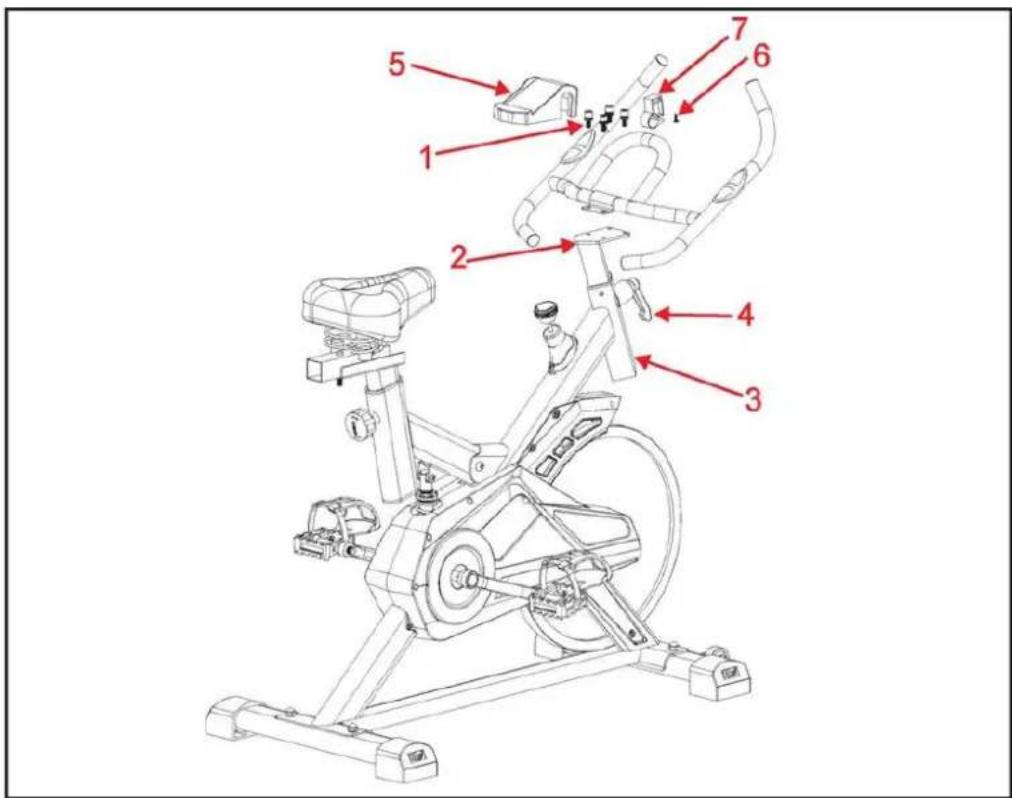
Step 4 Fix the handlebar to the front post (2) with 4 screws M8 (1). Thwn insert it to the main frame (93) and lock use the 7-pull pin (4) to fix it with the main frame.
Attach the phone case (5) on the handlebar using computer suport (7) and screw (6).
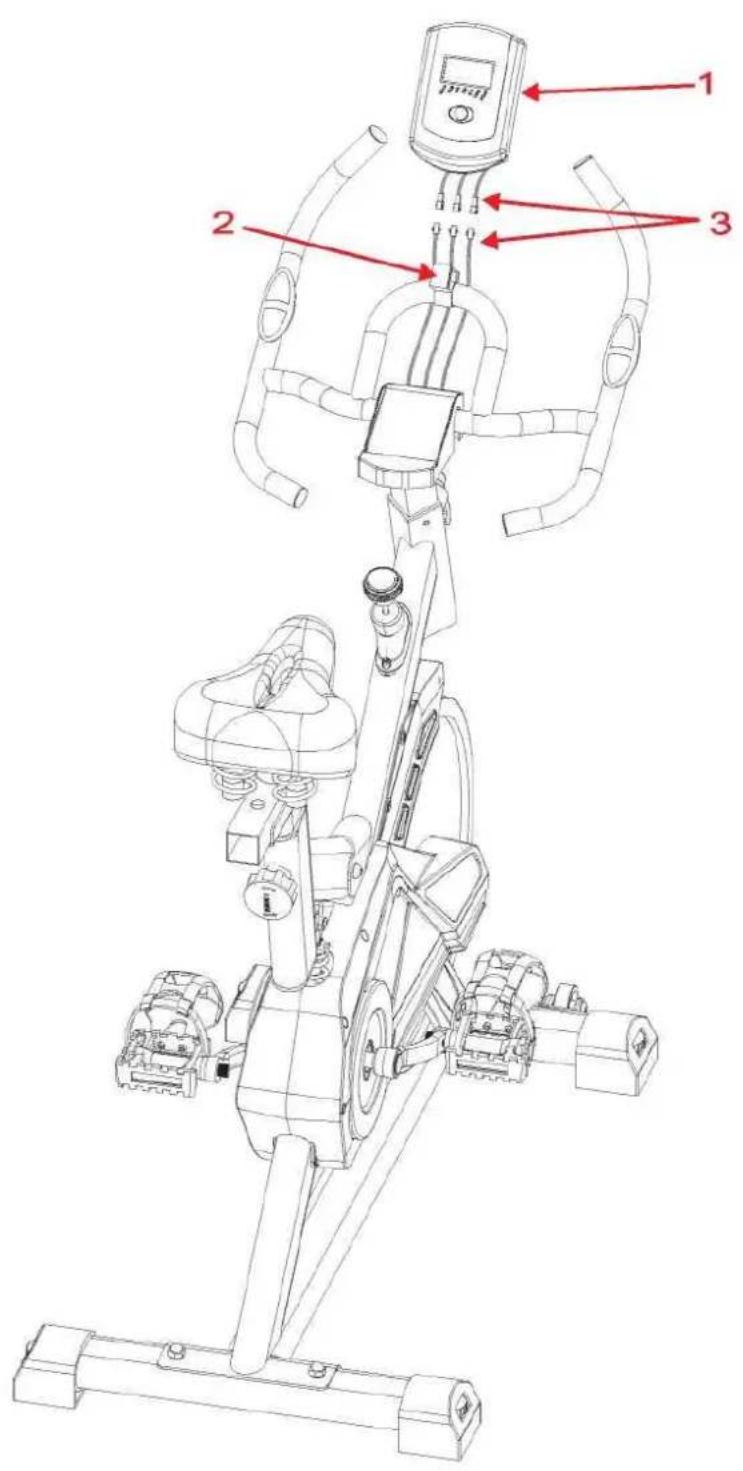
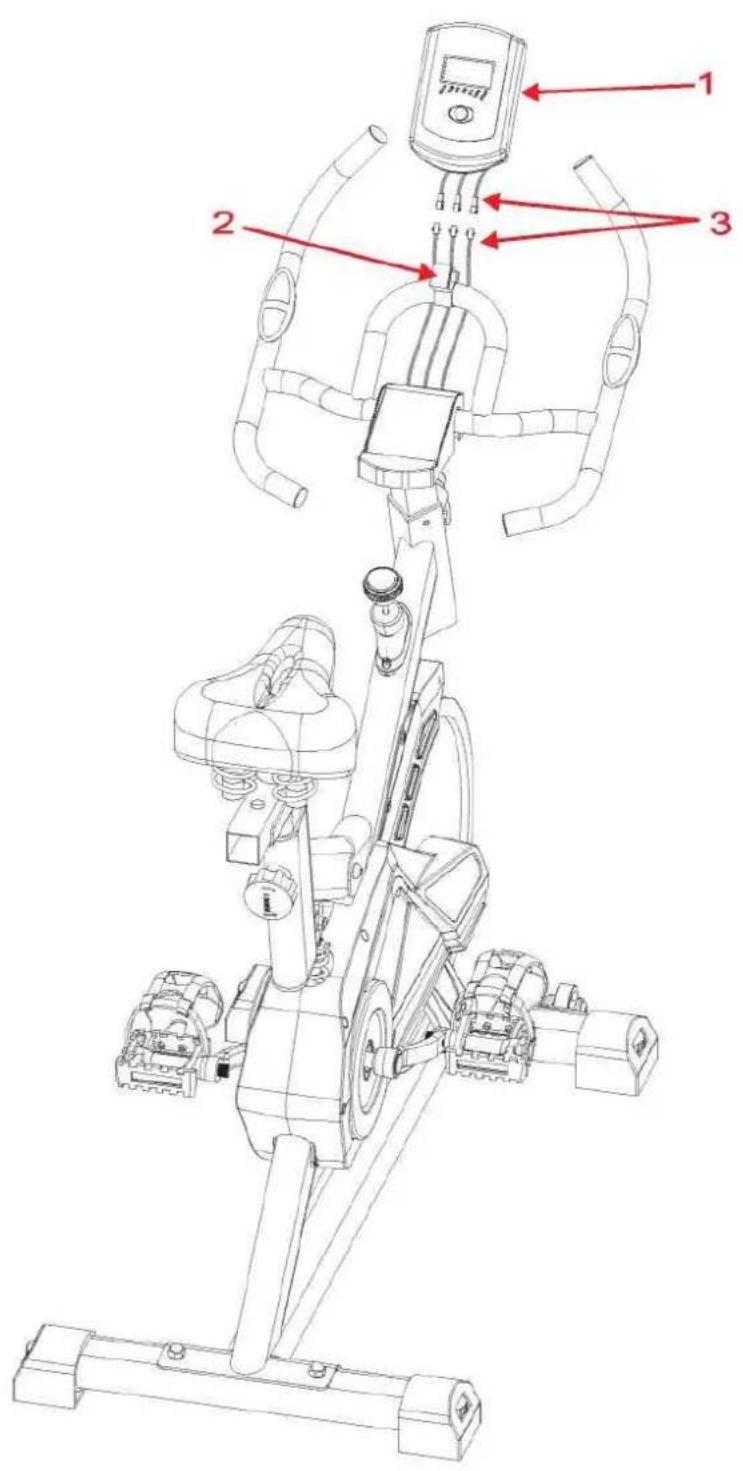
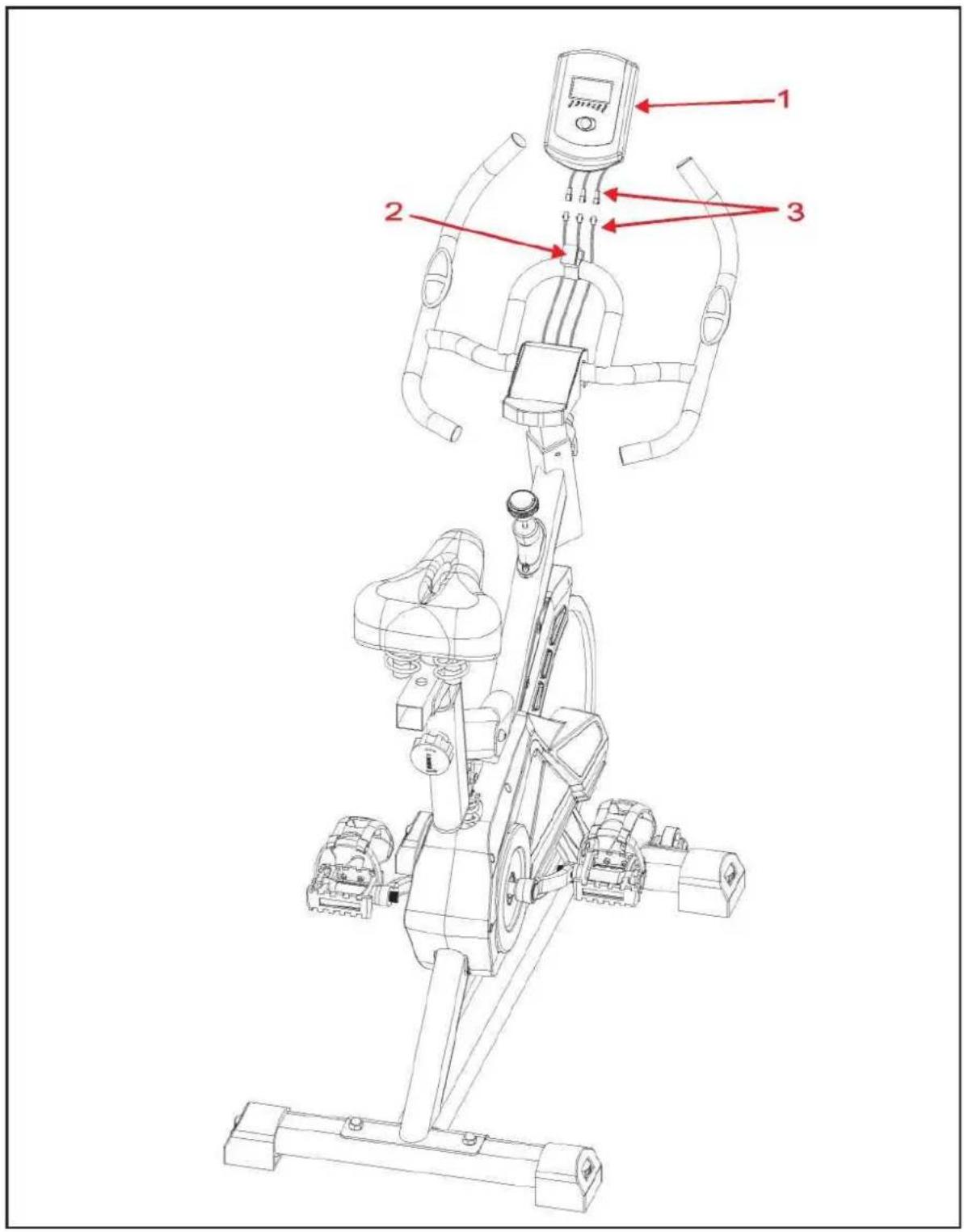
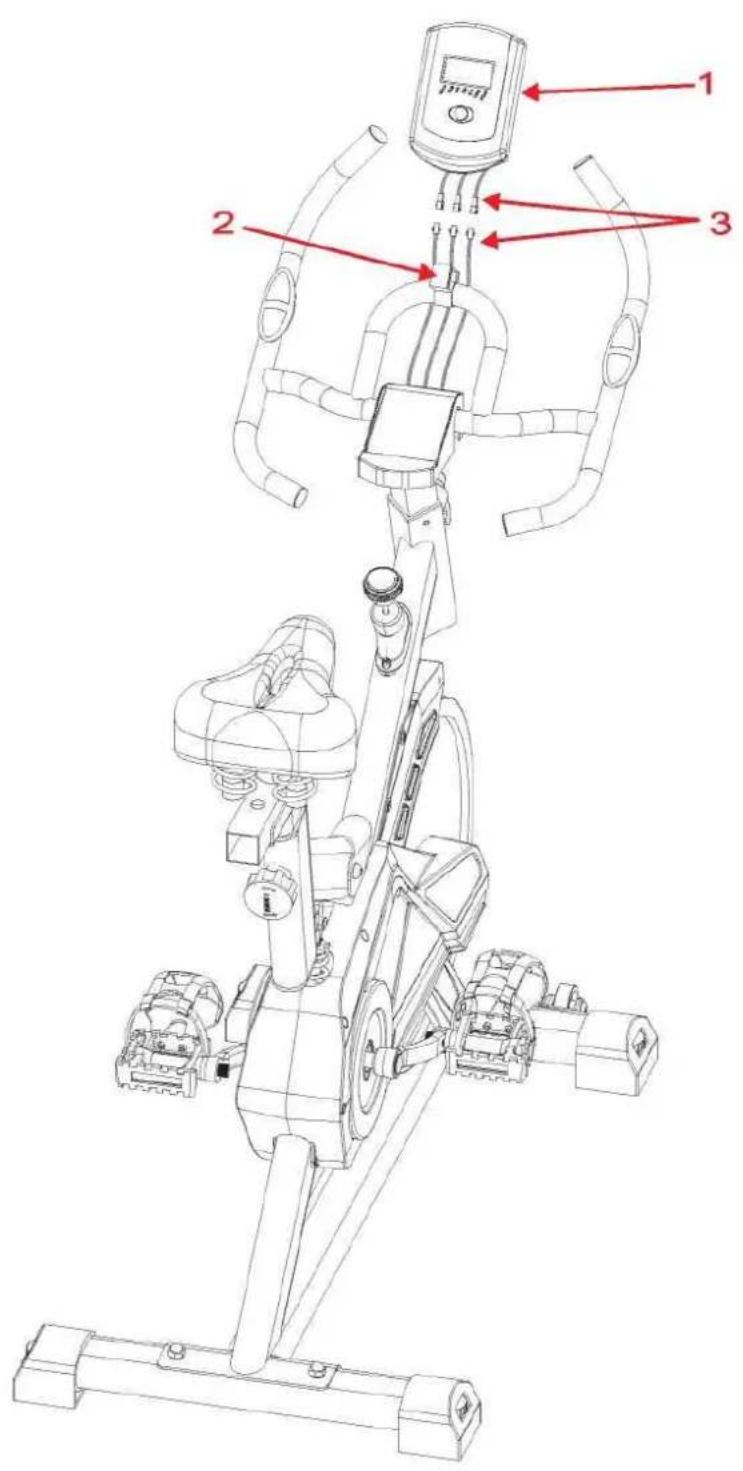
Krok 5 Connect all the wires of the computer with handlebar post wires.
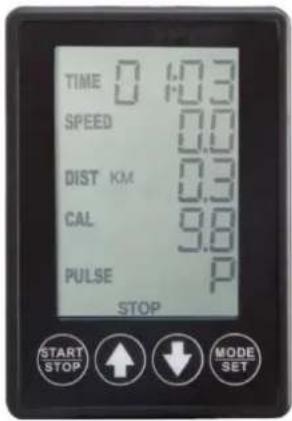
Computer
Setting value
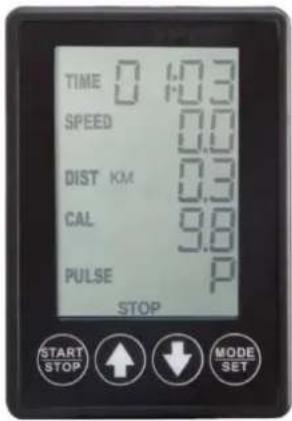
- At the stop state, Press the enter key, Then press UP or DOWN keys to set up your exercise TIME, DISTANCE.
- Press the START key to START/STOP exercise.
- When you reach the target, the console will produce beep sounds and then stop.
- If you set up more than one target and you would like to reach next target, press START/STOP key to keep on exercise.
Wake-Up Function
The monitor will entry SLEEP mode (LCD off) when there is no signal input and no key be pressed after 4 minutes. Press the screen to start the monitor.
Functions and Features
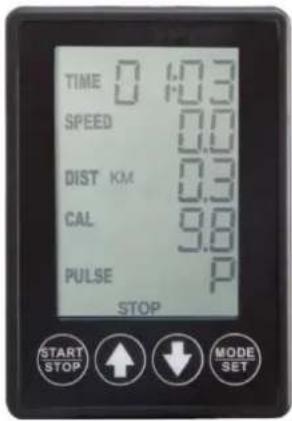
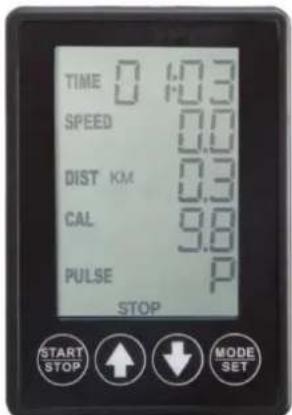
- TIME: Shows your elapsed workout time in minutes and seconds. Your console will automatically count up from 0:00 to 99:59 in one second intervals. You many also program your console to count down from a set value by using the UP and DOWN keys. If you continue exercising once the time has reached 0:00, the console will begin beeping, and reset itself to the original time set, letting you know your workout is done.
- SPEED: Displays your workout speed value in KM per hour. If no speed signal input then the console will display "0.0" on the window.
- DISTANCE: Displays the accumulative distance traveled during each workout up to a maximum of 99.9KM.
- CALORIES: Your console will estimate the cumulative calories burned at any given time during your workout.
- RPM: Your pedal cadence.
- PULSE: Your console displays your pulse rate in beats per minute during your workout. If no pulse signal input then the console will display "P" on the window.
Key function
- UP key: During the setting mode, press the key to increase the value of Time and Distance.
- DOWN key: During the setting mode, press the key to decrease the value of Time and Distance.
- ENTER key: During the setting mode, press the key to accept the current data entry; At the stop mode, by holding this key for over two seconds the user can reset all values to zero or default value.
- START/STOP key: Press the key to START exercise.
The item is equipped with APP

Warm up
I. WARM-UP PHASE
This phase should help improving blood circulation and make your muscles working properly while reducing a cramp risk or injury. It is advisable to do a few stretching exercises as shown below. Each stretching exercise should be taken for approx. 30 seconds. Don't overstretch and don't jerk your muscles. If you feel pain, stop immediately.
II. EXERCISE PHASE
It is a phase, during which you should put in your effort. After regular workout, your leg muscles should get more flexible. Keep steady tempo throughout your exercising. The workout intensity should be sufficient to raise your heartbeat into the target zone as shown below.
NOTE: This stage should last for at least 12 mins. Thus, most people start at approx. 15-20 mins.
III. COOL-DOWN PHASE
In this stage, your cardio-vascular system and muscles should get calm. Repeat the warm-up exercises, reduce your tempo and continue for approx. 5 mins. Repeat the stretching exercises, but don't overstretch or jerk your muscles. As you get fitter, you can exercise longer and harder. It is advisable to train at least three times a week and, if possible, to space your workouts evenly throughout a week.
Maintenance
Proper maintenance is very important to ensure a faultless and operational condition of the treadmill. Improper maintenance can cause damage to the treadmill or shorten the life of the product.
All parts of the must be checked and tightened regularly. Worn out parts must be replaced immediately.
Technical data
Max user's weight: 120 kg
Dimension: 120 x 48 x 105 cm
Net weight: 33 kg
Gross weight: 37 kg
Packing dimension: 105 x 23 x 83 cm
Computer
Einstellungen
Počítač
Nastavení
- The Seller provides guarantee on behalf of the Guarantor within the territory of the Republic of Poland for the period of 24 months from the date of sale.
- The Guarantee will be recognised by the shop or service centre after the client provides:
- clearly and correctly filled-in guarantee card with the sale stamp and the seller's signature - valid purchase confirmation for the equipment including the date of sale / bill / - complained product.
- Possible defects and damages revealed during the guarantee period shall be remedied free of charge within not more than 21 days from the delivery of the product to the shop or service.
-
Should it be necessary to import some components, the guarantee term can be extended by the period required to import such part, however such period shall not be longer than 40 days.
-
The guarantee does not cover:
-
mechanical damages and subsequent defects,
- damages and defects resulting from incorrect storage and usage of the equipment against its purpose,- incorrect assembly and maintenance,
-
damages and consumption of such elements as: cables, straps, rubber parts, pedals, sponge grips, wheels, bearings, etc.
-
The guarantee expires in the event of:
-
expiry of the validity term,
- self-repairs,
-
failure to follow the rules of correct operation.
-
No duplicates of the guarantee cards shall be issued.
- The product handed over for repair should be complete and clean. If some parts are missing, the service is entitled to refuse to accept the product for repair. The service may refuse to accept a dirty product or clean in on the client's expense after the client's written permit.
- The guarantee does not cover activities related to assembly, maintenance, which, according to the instruction, the user is obliged to perform themselves.
- The Guarantor also informs that they offer post-guarantee service.
- The product should be provided in its original packaging and should be secured for shipment.
The guarantee for sold goods is not exclusive, does not limit or suspend entitlements of the buyer resulting from the non-compliance of the product with the agreement.
THE EQUIPMENT IS NOT INTENDED FOR REHABILITATION AND THERAPY
NOTES ON THE COURSE OF REPAIRS
| Item | Date of notificacion | Date of provision | Course of repairs | Signature of the recipient (shop, owner) |
ZÁRUČNÍ LIST
Název produktu:
EAN kód:
Datum prodeje:
ZÁRUČNÍ PODMÍNKY
natural_image
Abstract geometric logo composed of black and white interlocking 3D shapes (no text or symbols)HMS
PREMIUM


- Komputer
- Ustawienia
- Assembly instructions
- Computer
- Setting value
- Wake-Up Function
- Functions and Features
- Key function
- The item is equipped with APP
- Warm up
- WARM-UP PHASE
- EXERCISE PHASE
- COOL-DOWN PHASE
- Maintenance
- Technical data
- Einstellungen
- Počítač
- Nastavení
- THE EQUIPMENT IS NOT INTENDED FOR REHABILITATION AND THERAPY
- ZÁRUČNÍ LIST
- ZÁRUČNÍ PODMÍNKY
- HMS
- PREMIUM
Brand : HMS Premium
Model : SW2102
Category : Home trainer