
WS15WH - Weather Station BLAUPUNKT - Free user manual and instructions
Find the device manual for free WS15WH BLAUPUNKT in PDF.


| Product Type | Weather Station |
| Brand | Blaupunkt |
| Model | WS15WH |
| Main Unit Dimensions | 87 x 25 x 125 mm |
| Sensor Dimensions | 38 x 19 x 100 mm |
| Main Unit Weight | 0.134 kg |
| Sensor Weight | 0.032 kg |
| Main Unit Power | 2 x AAA batteries (included) |
| Outdoor Sensor Power | 2 x AA batteries (included) |
| Wireless Frequency | 433.92 MHz |
| Max Outdoor Range | 80 meters (open area) |
| Weather Forecast | Sunny, Partly Cloudy, Cloudy, Rainy, Snowy (12-24 hour prediction) |
| Temperature Measurement | Indoor: -10°C to +50°C; Outdoor: -40°C to +60°C |
| Humidity Measurement | 1% to 99% |
| Clock Format | 12/24-hour with calendar and weekday (7 languages) |
| Alarm | With snooze function (5-minute repeat) |
| Max Sensors Supported | 3 (1 included) |
| Backlight | Temporary (20 seconds) on battery power |
| Cleaning Instructions | Wipe with clean, dry or slightly damp cloth; no chemical solvents |
| Safety Precautions | Do not expose to water, moisture, direct sunlight, or heat; do not open casing; operating temperature max 35°C |
| Spare Parts / Repairability | No user serviceable parts; refer to qualified service personnel |
| Compliance | EU Directives 2014/53/EU, 2009/125/EC, 2012/19/EU, 2006/66/EC |
Frequently Asked Questions - WS15WH BLAUPUNKT
User questions about WS15WH BLAUPUNKT
0 question about this device. Answer the ones you know or ask your own.
Ask a new question about this device
Download the instructions for your Weather Station in PDF format for free! Find your manual WS15WH - BLAUPUNKT and take your electronic device back in hand. On this page are published all the documents necessary for the use of your device. WS15WH by BLAUPUNKT.
USER MANUAL WS15WH BLAUPUNKT
Multi-functional Weather Station
Important Notes
- Safety and operating instructions should be retained for future reference.
- The apparatus should not be exposed to dripping or splashing or placed in a humid atmosphere such as a bathroom.
- Do not install the product in the following areas:
- Places exposed to direct sunlight or close to radiators.
- On top of other stereo equipment that radiates too much heat.
- Blocking ventilation or in a dusty area.
- Areas where there is constant vibration. • Humid or moist places.
- Do not place near candles or other naked flames.
- Operate the product only as instructed in this manual.
- Before turning on the power for the first time, make sure the power adaptor is properly connected.
For safety reasons, do not remove any covers or attempt to gain access to the inside of the product. Refer any servicing to qualified personnel.
Do not attempt to remove any screws, or open the casing of the unit; there are no user serviceable parts inside. Refer all servicing to qualified service personnel.
SAFETY INSTRUCTIONS
- Read Instructions - All the safety and operating instructions must be read before the product is operated.
- Retain Instructions - The safety and operating instructions should be kept with the product for future reference.
- Heed warnings - All warnings on the product and in the operating instructions should be adhered to.
- Follow instructions - All operating and users' instructions should be followed.
- Installation - Install in accordance with the manufacturer's instructions.
- Power sources - This product should be operated only from the type of power source indicated by the marking adjacent to the power cord entry. If you are not sure of the type of power supply to your home, consult your product dealer or local power company.
- Water and moisture - To reduce the risk of fire or electric shock, do not expose the product to rain, dripping, splashing or excessive moisture such as in a sauna or bathroom. Do not use this product near water, for example, near a bathtub, washbowl, kitchen sink, laundry tub, in a wet basement or near a swimming pool (or similar).
- Object and Liquid Entry - Never push objects of any kind into this product through openings, as they may touch dangerous voltage points or short-circuit parts that could result in a fire or electric shock. Never spill liquid of any kind on the product. Do not place any object containing liquid on top of the product.
- Servicing - Do not attempt to service this product yourself, as opening or removing covers may expose you to dangerous voltage or other hazards. Refer all servicing to qualified service personnel.
- Replacement parts - When replacement parts are required, ensure that the service technician has used replacement parts specified by the manufacturer or have the same characteristics as the original part. Unauthorized substitutions may result in fire, electric shock or other hazards.
- The highest environmental temperature suitable for this product is 35°C.
- ESD hints - If the product may reset or not reset to operation of control due to electrostatic discharge, just switch off and reconnect again, or move the product to another location.
- Battery
a. The batteries must not be exposed to excessive heat such as sunshine, fire or the like.
b. The batteries should be drawn to the environmental aspects of battery disposal.
c. Battery usage CAUTION - to prevent battery leakage which may result in body injuries, property damage, or damage to the apparatus:
. Install all batteries correctly, + and - as marked on the apparatus.
Do not mix batteries (old and new or carbon and alkaline, etc.).
Remove batteries when the unit is not used for a long time.
ERP2 (Energy Related Products) note
This product with ecodesign complies with the stage 2 requirements of Commission Regulation (EC) No. 1275/2008 implementing Directive 2009/125/EC regarding standby and off mode electric power consumption of electronic household and office equipment.
WARNING
This appliance is not intended for use by persons (including children) with reduced physical, sensory or mental capabilities, or lack of experience and knowledge, unless they have been given supervision or instruction concerning use of the appliance by a person responsible for their safety. Children should be supervised to ensure that they do not play with the appliance.
- Never use the device unsupervised! Switch off the device whenever you are not using it, even if this is only for a short while.
- The appliance is not intended to be operated by means of an external timer or separate remote control system.
- If the supply cord is damaged, it must be replaced by the manufacturer, its service agent or similarly qualified persons in order to avoid a hazard.
- Before operating this system, check the voltage of this system to see if it is identical to the voltage of your local power supply.
- To prevent fire or shock hazard, do not expose this equipment to hot places, rain, moisture or dust.
- Do not place this unit close to a strong magnetic field.
- Do not place the unit on an amplifier or receiver.
- Do not place this unit in a damp area as the moisture will affect the life of electric components.
- If the system is brought directly from a cold to a warm location, or is placed in a very damp room, moisture may condense on the lens inside the player. If this occurs, the system will not operate properly. Please leave the system turned on for about an hour until the moisture evaporates.
- Do not attempt to clean the unit with chemical solvents as this might damage the finish. Wipe with a clean, dry or slightly damp cloth.
NOTICE

Conformity
Hereby, Blaupunkt Competence Center 2N-Everpol Sp. z o.o., declares that this equipment is in compliance with the essential requirements and other relevant provisions of Directive 2014/53/EU. The declaration of conformity can be obtained from the product page at www.blaupunkt.com.
Responsible party: 2N-Everpol Sp. z o.o, Puławska 403A, 02-801 Warsaw, Poland, Phone: +48 22 688 08 00, E-mail: info@everpol.pl
Your product is designed and manufactured with high quality materials and components, which can be recycled and reused.
When this crossed-out wheeled bin symbol is attached to a product, it means that the product is covered by the European Directive 2012/19/EU. Please inform yourself about the local separate collection system for electrical and electronic products. Please act according to your local rules and do not dispose of your old products with your normal household waste. Correct disposal of your old product helps to prevent potential negative consequences for the environment and human health.
Your product contains batteries covered by the European Directive 2006/66/EC, which cannot be disposed of with normal household waste. Please inform yourself about the local rules on separate collection of batteries because correct disposal helps to prevent negative consequences for the environment and human health.
Environmental information
All unnecessary packaging has been omitted. We have tried to make the packaging easy to separate into three materials: cardboard (box), polystyrene foam (buffer) and polyethylene (bags, protective foam sheet). Your system consists of materials which can be recycled and reused if disassembled by a specialized company. Please observe the local regulations regarding the disposal of packaging materials, exhausted batteries and old equipment. Recording and playback of material might require consent. See Copyright Act 1956 and The Performer's Protection Acts 1958 to 1972.
Thank you for purchasing our model. This weather station product includes the following features. Please read and reference this manual carefully before operating the unit. Please keep the manual for future operation reference.
Features
• Weather forecast: Sunny, Partly cloudy, Cloudy, Rainy, Snowy. - Indoor/outdoor temperature. • Indoor & outdoor humidity. • In/outdoor maximum & minimum temp. & humidity history memory. • 12/24 hours clock time, calendar. • Alarm with snooze function. • Maximum support and work with 3 outdoor wireless transmitters in different channels (only one transmitter included).
Display & controls
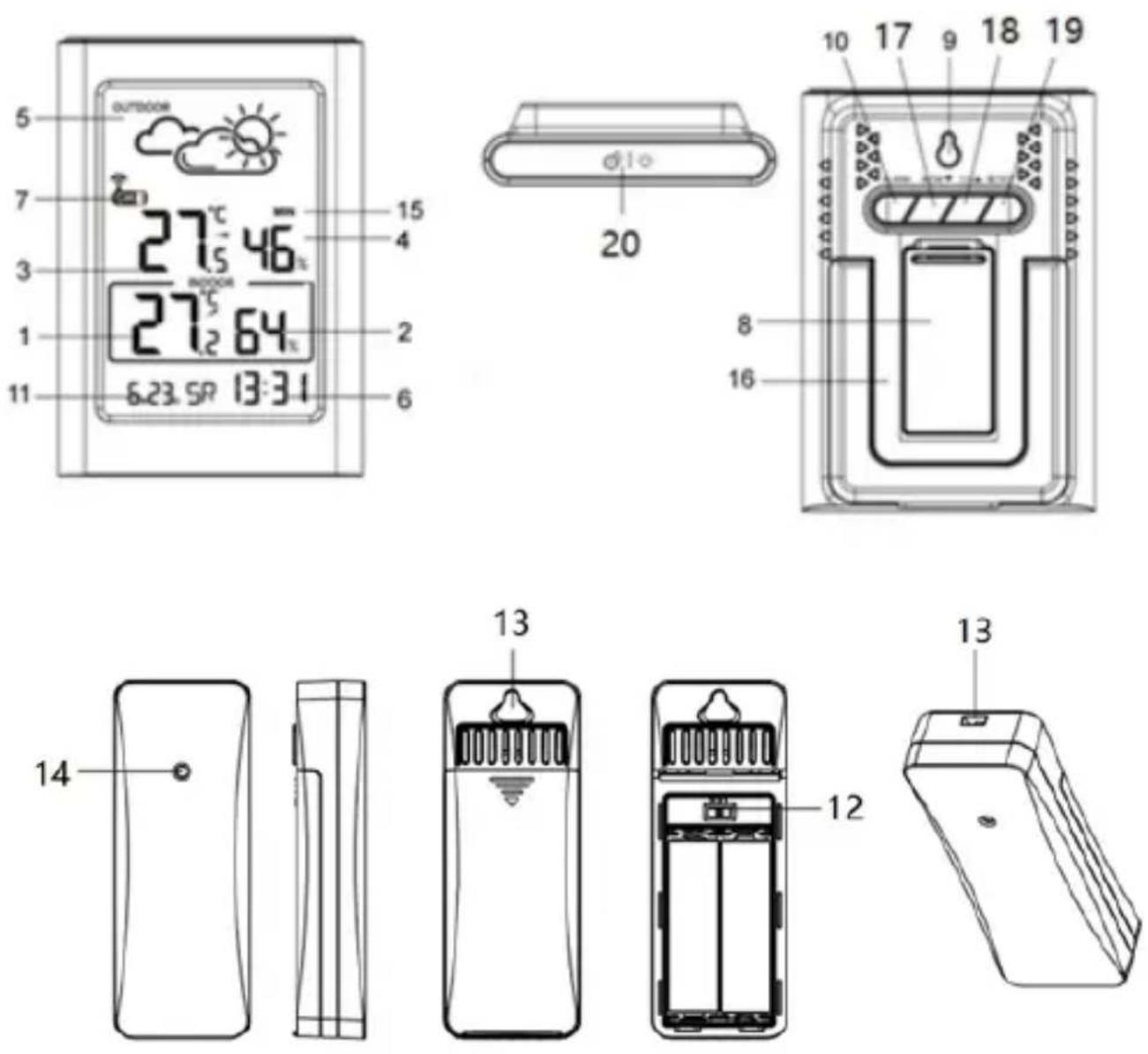
- Indoor temperature/trend 2. Indoor humidity
- Outdoor temperature/trend 4. Outdoor humidity
- Animated weather forecast 6. Clock time
- Wireless transmitter channel 8. Battery compartment cover
- Hole for hanging 10-17-18-19: Adjustment buttons: alarm, memory/down, Channel/up, set
- Calendar 12. Channel selector
- Rope and hook hole 14. Sensor
- Max/min records for temperature and humidity
- Foldable stand (unfold for table placement) 20. Backlight/snooze button
Installation
Open the battery compartment cover. Insert 2 x AAA batteries into the main unit, and insert 2 x AA batteries into the transmitter according to the correct polarity shown in the compartment. (Batteries are included)
We recommend using high-quality alkaline batteries for the best product performance. Heavy-duty or rechargeable batteries are not recommended. The display will turn off if battery power is exhausted. (Fresh battery life: 6 months for the main unit, 12 months for the outdoor wireless transmitter; reference only, not a warranty)
Receive signal from outdoor wireless transmitter
The main unit can detect and receive the outdoor temperature and humidity wireless signal from the transmitter automatically after power is set up. It may take up to 3 minutes for signal searching. The wireless symbol (near the channel on the display) will flash during searching and become stable once the signal is received. If no signal is received, the wireless symbol will disappear after 3 minutes, and outdoor temperature and humidity data will show "- -" on the display. To reconnect the wireless signal, press and hold the up button for 3 seconds.
Placement and important notes:
- The main unit can work and connect with up to 3 outdoor wireless transmitters. Open the battery door of the outdoor wireless transmitter to see and adjust the channel (3 channels available). It must be set to the same channel as the main unit for signal reception. For example, if you select channel 1 on the wireless transmitter, the channel display on the main unit should show CH1 for connection. Press the up button on the rear panel of the main unit to adjust the channel number and check outdoor data between CH1-3 on the display. You can use the same method to connect other wireless transmitters, but set them to different channels. Only one wireless transmitter is included in the package.
- Please use and place the main unit or transmitter device 1.5~2 meters away from interference sources like computer monitors or TV sets. Also, place the main unit stand away from metal window frames.
- Please do not use other electronic products such as headphones or speakers operating at the same signal frequency (433.92MHz), which may cause interference. Your neighbors using electronic devices operating on the same signal frequency (433.92MHz) can also cause interference.
- To ensure accurate temperature measurement, place the device in a dry area, free of dirt and dust. Place out of direct sunlight and away from heat sources or vents.
- You can install the wireless transmitter outdoors. For better accuracy, please place the sensor lengthwise/standing up at least 1.5~2 meters away from the ground with enough air flow and protection from rain. Please do not expose the sensor to direct sunlight for a long time.
- The maximum working distance of the wireless transmitter is 80 meters away from the main unit.
- The wireless signal from the transmitter will refresh every 114 (channel 1) / 134 (channel 2) / 158 (channel 3) seconds in a cycle.
Calendar/language/clock time setting
Press and hold the set button for 3 seconds and the ON/OFF text will flash on the display. Press the up or down button to choose the key tone on/off function. Press the set button to confirm and skip to year setting, which is the same operation as the key tone ON/OFF setting. Repeat and finish the rest of the settings for calendar format/month/date/weekday language (GE (German), EN (English), FR (French), IT (Italian), SP (Spanish), DU (Dutch), DA (Danish)/hour format/hour/minute. (Press and hold the up or down button can accelerate the adjustment; there will be auto save and exit from the current setting if there is no further operation for over 20 seconds)
Alarm and snooze
Press and hold the alarm button to activate alarm setting mode. Press the up or down button to adjust the hour digits. Press the alarm button to confirm and skip to minute setting, which is the same operation as hour setup. Short press the alarm button to finish the alarm setting. Press the alarm button again to turn on/off the alarm. Press the top backlight/snooze button to return to normal clock time.
When the alarm sounds at the set time, press any button (except the top backlight/snooze button) to cancel the alarm voice, and it will sound again at the same time the next day. Briefly press the top backlight/snooze button to activate the snooze function, which will sound again after 5 minutes. The snooze can be repeated every 5 minutes.
Press any other button (except snooze) to cancel the snooze.
The buzzer alarm will sound for 2 minutes if there is no further operation.
Temperature and humidity
- Indoor temperature range: -10 to +50 °C / 14 to 122 °F.
- Outdoor temperature range: -40°C to 60°C (-40°F to 140°F). Note: LL.L°C or HH.H°C will be displayed when out of the above range.
- Indoor and outdoor humidity range: 1% to 99%. LL% or HH% will be displayed when out of range.
- Temperature accuracy: ±1.0°C between 0°C and +50°C / 32°F to 104°F. ±1.5°C outside this measuring range.
- Humidity accuracy: (40-70%) ± 5%, others ±8%.
- Press MEMORY to check maximum and minimum historical data. Press and hold the MEMORY button to manually clear the record. (Note: Historical records will be cleared automatically at 00:00 every day.)
- Press SET to switch temperature units: °C (Celsius) or °F (Fahrenheit).
Temperature trend
The temperature trend arrow (near the temperature data) points in different directions depending on whether the latest temperature reading is higher or lower than previous readings.
Arrow pointing upwards = Temperature rose by 1°C in the past 1 hour.
Arrow pointing straight = Temperature changed less than 1°C in the past 1 hour.
Arrow angled downwards = Temperature fell off 1°C in the past 1 hour.
Weather forecast
The weather forecast is based on collected hourly temperature & humidity data from the outdoor sensor CH1. The forecast station predicts weather conditions for the next 12 hours
with 70-75% accuracy. The default weather icon is partly cloudy, the base station will calibrate the weather report in the first 1-2 week based on the outdoor temperature and humidity data.
The outdoor wireless transmitter CH1 should be placed outside to get accurate outdoor data, or it will affect the accurate of the weather forecast.
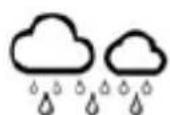
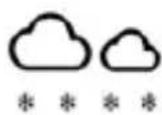
Weather forecast will appear in one of the following combinations (reference only):

SUNNY

PARTLY CLOUD

CLOUDY
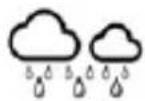
RAINY

SNOWY
Please note that the device forecasts the weather based on limited parameters and may differ from official weather forecasts which are calculated on the basis of advanced algorithms.
Backlight and auto dim
When powered by batteries, press top backlight/snooze button to turn on the backlight. The backlight will last 20 seconds and auto off.
Trouble shooting
| Doesn't display anything. ✦ Check if the batteries power installed correct in the device. | |
| Temperature from outdoor sensor not displayed. | ✧ Check that the distance between the thermometer and sensor doesn't exceed 30m(recommended).✧ Make sure that the devices are located at least 2m from monitors and TV sets.✧ Avoid placing the devices on or close to window frames made of metal.✧ Avoid using electronic devices such as loudspeakers which operate at the same frequency (433 .92MHz), close to the devices.✧ Please double check if the main unit and outdoor wireless transmitter was set up at same channel.✧ Remove the batteries, wait a while and then reinsert them. |
| Displayed temperature is incorrect. | ✧ Remove the batteries, wait a while and then re-insert them.✧ Make sure that the devices are not affected by heat sources or air-conditioning units and such. |
Specifications
- Indoor / outdoor temperature display • Indoor / outdoor humidity display • Temperature trend indication • Temperature / humidity Max/Min record for the day • Weather forecast for next 12-24 hours • Clock (12/24 hour format) and calendar • Weekday display in 7 languages (EN/GE/DA/SP/DU/IT/FR) • Alarm with snooze function • Outdoor sensor included (1 pc) • Support for up to 3 sensors • LCD display with backlight • LCD display size: 61 x 93 mm
- Main unit power source: 2 x 1.5 V (AAA size, included) • Outdoor wireless transmitter power source: 2 x 1.5 V (AA size, included) • Wall hanger/Table stand • IP54 (water proof for wireless transmitter) • Wireless transmitter working frequency: 433.92 MHz • Power consumption: 18 mW (main unit), 24 mW (wireless transmitter) • Device dimensions: 87 x 25 x 125 mm • Net weight: 0.134 kg • Sensor dimensions: 38 x 19 x 100 mm • Sensor Net weight: 0.032 kg
Important information

SUNNY
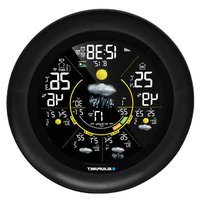
- Indoor temperature / trend
- Indoor humidity
- Outdoor temperature / trend
- Outdoor humidity
- Animated weather forecast
- Clock
- Outdoor sensor channel indicator
- Battery compartment cover
- Mounting hole for hanging 10-17-18-19: Adjustment buttons: alarm, memory (MEM) / down, channel (CH) / up, settings (SET),
- Calendar
- Sensor channel switch
- Mounting holes for hanging
- Sensor indicator light
- Data on minimum and maximum temperature and humidity measurement values
- Foldable stand (unfold to stand on a table)
- Light / snooze button
Mounting
Open the battery compartment cover. Insert 2 AAA batteries into the weather station, then insert 2 AA batteries into the outdoor sensor according to the polarity shown in the section. (batteries are included)
02-801 Warsaw, Poland
phone: +48 22 688 08 00
e-mail: info@everpol.pl
www.blaupunkt.com
In case of questions or problems
Please contact our service.
Tel. 00 48 22 688 08 33
E-mail: info@blaupunkt-audio.pl
Enjoy it.
All rights reserved. All brand names are registered trademarks of their respective owners. Specifications are subject to change without prior notice.

- IMPORTANT NOTES
- SAFETY INSTRUCTIONS
- ERP2 (ENERGY RELATED PRODUCTS) NOTE
- WARNING
- NOTICE
- CONFORMITY
- ENVIRONMENTAL INFORMATION
- FEATURES
- DISPLAY & CONTROLS
- INSTALLATION
- RECEIVE SIGNAL FROM OUTDOOR WIRELESS TRANSMITTER
- PLACEMENT AND IMPORTANT NOTES
- CALENDAR/LANGUAGE/CLOCK TIME SETTING
- ALARM AND SNOOZE
- TEMPERATURE AND HUMIDITY
- TEMPERATURE TREND
- WEATHER FORECAST
- BACKLIGHT AND AUTO DIM
- SPECIFICATIONS
- IMPORTANT INFORMATION
- MOUNTING
- ENJOY IT
Brand : BLAUPUNKT
Model : WS15WH
Category : Weather Station