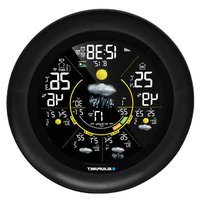
ACC20WS - Weather Station BLAUPUNKT - Free user manual and instructions
Find the device manual for free ACC20WS BLAUPUNKT in PDF.


Pick your language and provide your email: we'll send you a specifically translated version.
| Product Type | Weather Station |
| Brand | Blaupunkt |
| Model | ACC20WS |
| Display Type | LCD Digital Display |
| Indoor Temperature Range | 0°C to +50°C (32°F to 122°F) |
| Outdoor Temperature Range | -20°C to +60°C (-4°F to 140°F) |
| Indoor Humidity Range | 20% to 90% RH |
| Outdoor Humidity Range | 20% to 95% RH |
| Wireless Outdoor Sensor | Included |
| Wireless Transmission Range | Up to 30 meters (open area) |
| Weather Forecast Function | Icon-based forecast (sunny, cloudy, rainy) |
| Clock with Alarm | Yes, with snooze |
| Calendar Display | Date and month |
| Backlight | Yes (adjustable) |
| Mounting Options | Table stand and wall mount |
| Power Supply (Station) | 2 x AAA 1.5V batteries (not included) |
| Power Supply (Sensor) | 2 x AAA 1.5V batteries (not included) |
| Dimensions (Station) | Approx. 120 x 98 x 22 mm |
| Net Weight (Station) | Approx. 150 g |
| Maintenance | Wipe with a soft, dry cloth; avoid solvents |
| Safety Instructions | Do not expose to extreme temperatures, moisture, or direct sunlight |
| Spare Parts & Repairability | Batteries replaceable; outdoor sensor can be purchased separately |
Frequently Asked Questions - ACC20WS BLAUPUNKT
How do I set up the weather station?
Place the outdoor sensor and the main unit within range, insert the batteries, and wait for the wireless signal to synchronize.
Why is my outdoor sensor not connecting?
Check the batteries, reduce the distance between units, avoid obstacles or interference from other devices, and press the reset button on both the sensor and the station.
How do I switch between Celsius and Fahrenheit?
Press the unit button (usually on the back or side of the station) to toggle between °C and °F.
How do I set the clock manually?
If the station does not receive a radio time signal, press and hold the time/set button until the hour digits flash, then adjust with the +/‑ buttons.
How do I interpret the weather forecast icons?
The icons display a weather tendency for the next 12–24 hours, not current conditions. A sun indicates clear weather, clouds indicate overcast, and a raindrop indicates precipitation.
How frequently does the outdoor sensor update data?
The sensor usually transmits data every 30 to 45 seconds. The station updates the display automatically after each signal.
What type of batteries should I use?
Use high-quality alkaline AAA 1.5V batteries. Avoid rechargeable batteries as they may not provide a stable voltage.
Can I mount the weather station on a wall?
Yes, the back of the main unit has a keyhole slot for wall mounting. Use a suitable screw and ensure it is securely anchored.
How should I clean the weather station?
Use a soft, dry cloth to wipe the surfaces. Do not use abrasive cleaners or solvents, and avoid getting water inside the device.
What is the wireless transmission range of the sensor?
In an open area, the range is up to 30 meters. Walls, metal objects and other electronic devices can reduce the effective range.
User questions about ACC20WS BLAUPUNKT
0 question about this device. Answer the ones you know or ask your own.
Ask a new question about this device
No questions yet. Be the first to ask one.
Download the instructions for your Weather Station in PDF format for free! Find your manual ACC20WS - BLAUPUNKT and take your electronic device back in hand. On this page are published all the documents necessary for the use of your device. ACC20WS by BLAUPUNKT.
USER MANUAL ACC20WS BLAUPUNKT


Manual assistant
Powered by Anthropic
Waiting for your message
Product information
Brand : BLAUPUNKT
Model : ACC20WS
Category : Weather Station