
DR-2300 - Dictaphone OLYMPUS - Free user manual and instructions
Find the device manual for free DR-2300 OLYMPUS in PDF.



| Product type | Digital Dictaphone (Directrec) |
| Brand | OLYMPUS |
| Model | DR-2300 |
| Dimensions | 154 mm × 44.6 mm × 31.6 mm (excluding protrusions) |
| Weight | 206 g |
| Recording format | PCM 16 bit, 44.1 kHz, mono |
| Microphone input level | 86 dBSPL (-45 dBV) |
| Microphone frequency response | 100 Hz – 14 kHz |
| General frequency response | 300 Hz – 10 kHz |
| Maximum output power | 320 mW (8 Ω speaker) |
| Connectivity | USB (2.5 m cable, type A connector) |
| Compatible operating systems | Windows XP SP3, Vista SP1, 7 ; Mac OS X 10.4.11 – 10.6 |
| Main functions | Directional microphone, one-hand control, programmable keys, use as USB microphone/speaker, DNS 6 voice recognition, built-in speaker |
| Maintenance and cleaning | Wipe with a dry cloth, do not use alcohol or thinner |
| Safety | Do not disassemble, do not expose to excessive heat or moisture |
| Spare parts and repairability | Contact an authorized Olympus dealer or after-sales service center |
Frequently Asked Questions - DR-2300 OLYMPUS
User questions about DR-2300 OLYMPUS
0 question about this device. Answer the ones you know or ask your own.
Ask a new question about this device
Download the instructions for your Dictaphone in PDF format for free! Find your manual DR-2300 - OLYMPUS and take your electronic device back in hand. On this page are published all the documents necessary for the use of your device. DR-2300 by OLYMPUS.
USER MANUAL DR-2300 OLYMPUS
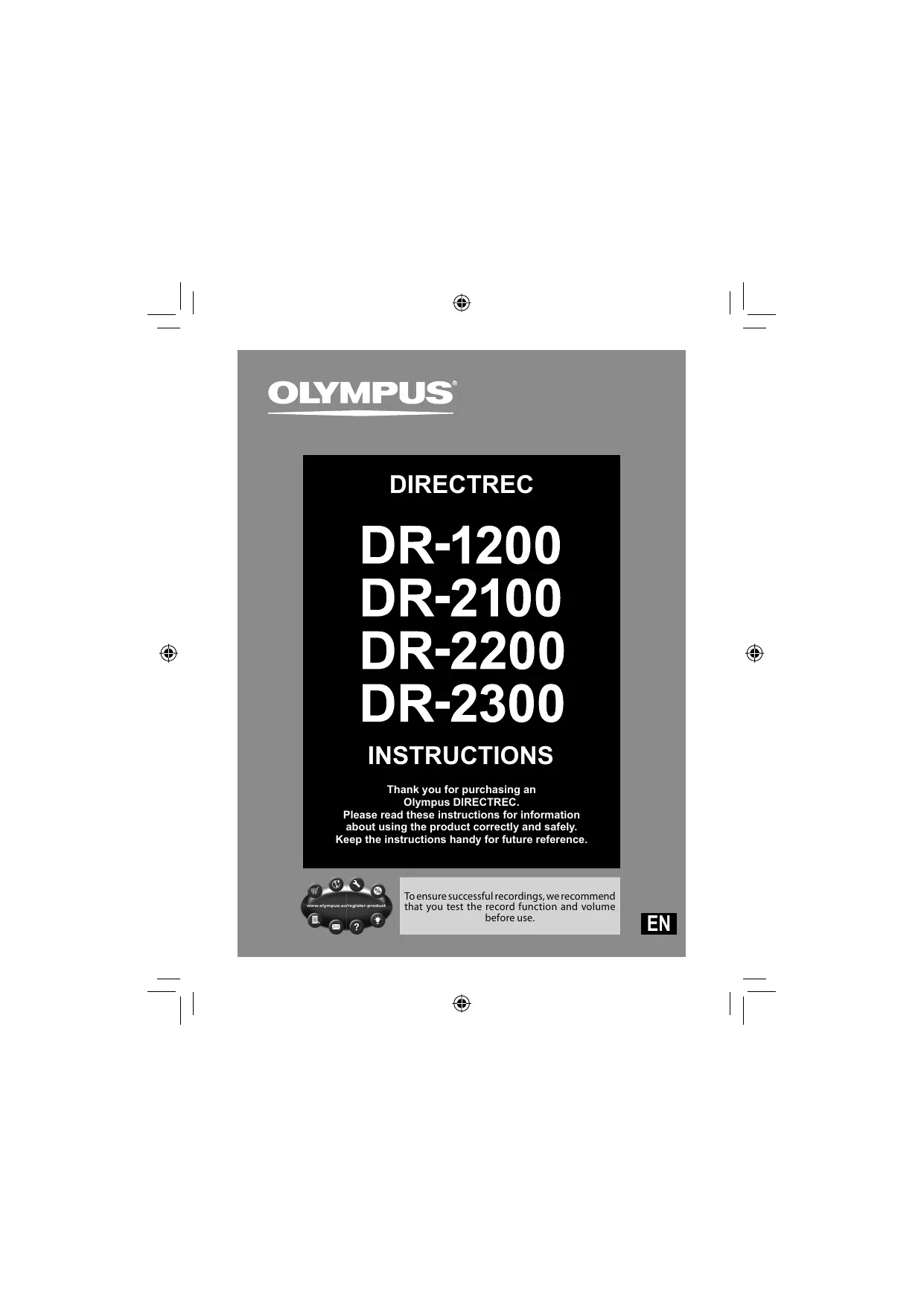
Thank you for purchasing an Olympus DIRECTREC.
Please read these instructions for information about using the product correctly and safely.
Keep the instructions handy for future reference.
- The contents of this document may be changed in the future without advanced notice. Contact Olympus authorized dealer or Customer Support Center for the latest product information.
- The illustration of the Directrec shown in this manual may differ from the actual product. For questions regarding this document and information presented, please contact Olympus Professional Authorized Dealer or Olympus Customer Support Center.
- Any liability due to damages including but not limited to loss of data due to product defect or repair performed by Olympus, Olympus authorized repair center, or third party, is excluded.
- OLYMPUS IMAGING CORPORATION holds the copyrights for instructions (this manual).
Trademarks and registered trademarks
- Microsoft and Windows are trademarks or registered trademarks of Microsoft Corporation.
- Macintosh and Mac OS are trademarks or registered trademarks of Apple Inc.
Other product and brand names mentioned herein may be the trademarks or registered trademarks of their respective owners.
Safety precautions
- Do not disassemble, repair or modify the unit yourself.
- Keep young children and infants away from the Directrec. The cable can be a strangulation hazard.
- Disconnecting the cable while the Directrec is recording/deleting could damage the unit making it unusable.
-
Do not leave the Directrec exposed to high humidity, high temperature or direct sunlight.
-
Do not store the Directrec in humid or dusty environments.
- If the Directrec is wet, wipe it immediately with a dry cloth.
- Do not use alcohol or lacquer thinner to clean the unit.
- Do not subject the Directrec to severe shocks or vibrations.
- Leaving magnetic cards near the Directrec's speaker may lead to unusual behaviors of the data stored in the card.
Main features
This product is equipped with the following features.
- New design and location of buttons enable single-handed control without ever having to visually check the placement of buttons. Directrec fits easily into your hand providing effortless control coupled with superb dictation experience.
- Rated with DNS Score 6 (highest rate), Directrec is the perfect device for speech recognition.
- Equipped with a directional microphone that eliminate undesired background noise and allows clear and precise recordings.
- All buttons are programmable to allow for easy and personal customization.
- Directrec is USB Audio Device, It can be used as a USB microphone and/or USB speaker when connected to a PC.
- Directrec can save a recording as a file on a PC in PCM format.
- Powerful built-in speaker provides hi-fidelity acoustic playback.
Operating environment
Make sure that your computer meets the minimum requirements listed below.
Please check with your system administrator or your Olympus Professional Dealer.
Windows
Operating System:
Microsoft® Windows® XP Service Pack 3 (32bit/64bit)
Microsoft® Windows Vista® Ultimate/Enterprise/Business Service Pack 1 (32bit/64bit)
Microsoft® Windows® 7 Ultimate Professional (32bit/64bit)
CPU/RAM:
At least meeting the minimum requirements for the operating system in use
USB port:
One or more free ports
Macintosh
Operating System:
Mac OS X 10.4.11 - 10.6
CPU/RAM:
At least meeting the minimum requirements for the operating system in use
USB port:
One or more free ports
Note
- When connecting the Directrec through an USB hub the operation may become unstable. In such cases, refrain from using a USB hub.
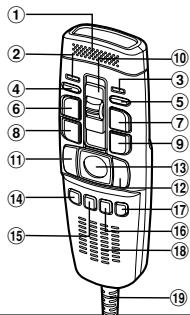
DR-2200
DR-1200
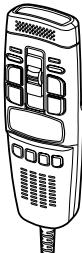
DR-2100
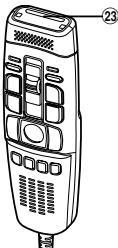
DR-2300
① Built-in microphone
② Recording three color LED (red, green and blue)
③ Insert Recording LED (green)
④ Volume down button
Volume up button
⑥ NEW(New) button
⑦ Insert / Overwrite button
⑧ REW(Rewind) button
FF (Fast Forward) button
10 Slide REC (Record)/STOP (Stop)/ PLAY (Play)/REV (Review) switch
⑪ LEFT (Left) button
12 RIGHT (Right) button
⑬Trackball
F1 (Function 1) button
15 F2 (Function 2) button
16 F3 (Function 3) button
F4 (Function 4) button
Built-in speaker
USB cable
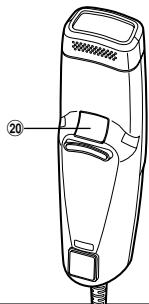
20 BACK (Back) button
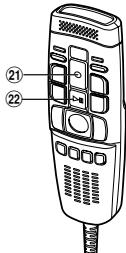
21 REC (Record) button
22 PLAY Play)/PAUSE(Pause) button
② Barcode slot
Recording format: PCM 16bit 44.1kHz mono
■ Input level: 86dB SPL(-45 dBv)
Microphone frequency response: 100Hz to 14kHz
Overall frequency response: 300Hz to 10kHz
Output power: 320 mW (8Ω speaker)
External dimensions: 154mm× 44.6mm× 31.6mm (without protrusions)
Weight: 201g(DR-1200), 183g(DR-2100), 201g(DR-2200), 206g(DR-2300)
Cable length: 2.5m
Plug shape: USB connector A type
Technical assistance and support
The following is contact information for technical support for Olympus Directrec only.
Technical Hotline Number in the U.S. and Canada 1-888-553-4448
- User Support E-mail address in the U.S. and Canada distec@olympus.com
Technical Hotline Number in Europe
Toll free number: 00800 67 10 83 00
available for Austria, Belgium, Denmark, Finland, France, Germany, Italy, Luxembourg, Netherlands, Norway, Portugal, Spain, Sweden, Switzerland, United Kingdom
Charged numbers for the Rest of Europe
+49 180 567 1083
+49 40 23773 4899
User Support E-mail address in Europe dss/support@olympus-europa.com
For customers in Europe

"CE" mark indicates that this product complies with the European requirements for safety, health, environment and customer protection.

This symbol [crossed-out wheeled bin WEEE Annex IV] indicates separate collection of waste electrical and electronic equipment in the EU countries. Please do not throw the equipment into the domestic refuse. Please use the return and collection systems available in your country for the disposal of this product. Applicable Product : DR-1200/DR-2100/DR-2200/DR-2300

This symbol [crossed-out wheeled bin Directive 2006/66/EC Annex II] indicates separate collection of waste batteries in the EU countries. Please do not throw the batteries into the domestic refuse. Please use the return and collection systems available in your country for the disposal of the waste batteries.
DIRECTREC
DR-1200
DR-2100
DR-2200
DR-2300
MODE D'EMPLOI
Shinjuku Monolith, 3-1 Nishi-Shinjuku 2-chome, Shinjuku-ku,
Tokyo 163-0914, Japan. Tel. +81 (0)3-3340-2111
http://www.olympus.com
OLYMPUS EUROPA HOLDING GMBH
(Premises/Goods delivery) Wendenstrasse 14-18, 20097 Hamburg, Germany.
Tel. +49 (0)40-237730
(Letters) Postfach 10 49 08. 20034 Hamburg, Germany.
http://www.olympus-europa.com