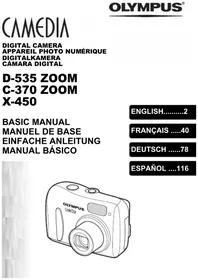
![OLYMPUS Μ[MJU:]-III WIDE 100 - Digital Camera](/assets/marques/52.png "Notice OLYMPUS Μ[MJU:]-III WIDE 100 — Digital Camera — Mode d'emploi PDF")
Μ[MJU:]-III WIDE 100 - Digital Camera OLYMPUS - Free user manual and instructions
Find the device manual for free Μ[MJU:]-III WIDE 100 OLYMPUS in PDF.

![Notice OLYMPUS Μ[MJU:]-III WIDE 100 - page 2](/file/2024/12/84339/page-02.webp)


| Product type | 35 mm autofocus zoom film camera |
| Dimensions | 117 × 61.5 × 42.5 mm (excluding protrusions) |
| Weight | 220 g (without battery) |
| Power supply | 3 V lithium battery (CR123A or DL123A) |
| Lens | Olympus 28–100 mm, F4.6 – F11.9, 7 elements in 7 groups |
| Shutter | Programmed electronic shutter |
| Focus | Passive multi-autofocus system (max. 11 points), lock possible |
| Focus range | Wide: 0.6 m – ∞; tele: 0.8 m – ∞ |
| Film speed | Auto for DX films (ISO 50 – 3200); non-DX set to ISO 100 |
| Flash | Built-in automatic flash, recycle 0.5 – 5.5 s |
| Flash modes | Auto, Red-Eye Reduction, Flash Off, Fill-In, Night Scene, Red-Eye + Night Scene |
| Exposure modes | Auto exposure, Spot metering, Infinity |
| Self-timer | Electronic, approx. 12-second delay |
| Remote control | Optional (RC‑300C), infrared, 3 s delay, range ~5 m |
| Design | All-Weather |
| Maintenance and cleaning | Wipe with a soft cloth; avoid solvents, heat, humidity, sand |
| Safety | Do not disassemble, contains high voltage; keep batteries out of reach of children |
| Spare parts and repairability | Consult dealer or Olympus service center; optional remote control with CR2025 battery |
Frequently Asked Questions - Μ[MJU:]-III WIDE 100 OLYMPUS
User questions about Μ[MJU:]-III WIDE 100 OLYMPUS
0 question about this device. Answer the ones you know or ask your own.
Ask a new question about this device
Download the instructions for your Digital Camera in PDF format for free! Find your manual Μ[MJU:]-III WIDE 100 - OLYMPUS and take your electronic device back in hand. On this page are published all the documents necessary for the use of your device. Μ[MJU:]-III WIDE 100 by OLYMPUS.
USER MANUAL Μ[MJU:]-III WIDE 100 OLYMPUS
8
OLYMPUS®
OLYMPUS OPTICAL CO. (EUROPA) GMBH
(Premises/Goods delivery) Wendenstraße 14 – 18, 20097 Hamburg, Germany. tel. 0 40-23 77 30
(Letters) Postfach 10 49 08, 20034 Hamburg, Germany
www.olympus-europa.com
![OLYMPUS Μ[MJU:]-III WIDE 100 - OLYMPUS OPTICAL CO. (EUROPA) GMBH - 1](/content/2024/12/84339/images/2ab83a9c35ae653c6943f092243f569dc7a77d0309bc4637c83e922f97ffd282.jpg)
EN This camera complies with EU directive 89/336/EEC for CE marking.
DE Diese Kamera erfüllt die EU-Richtlinien 89/336/EEC für die CE-Marke.
FR Cet appareil est conforme à la directive 89/336/CEE sur le marquage CE.
ES Esta cámara cumple las normas de la directiva 89/336/EEC de la Unión Europea relativa a la marca CE.
IT Questa fotcamera rispetta le direttive EU 89/336/EEC per il mercato CE.
RU Эта фотокамера соответствует Директиве ЕС 89/336/EEC для маркировки СЕ.
UA Ця фотокамера відповідає Директиві ЄС 89/336/ЕЕС для маркування СЕ.
DK Dette kamera overholder EU 89/336/EEC for CE mærkning.
SE Denna kamera uppfyller EU direktiv 89/336/EEC för CE märkning.
NL Dit product voldoet aan richtlijn 89/336/EEC.
FI Tämä kamera täyttää EU-direktiivin 89/336/EEC vaatimukset, jotka oikeuttavat CE-merkintään.
CZ Tento fotoaparát vyhovuje požadavkům evropské směrnice 89/336/EEC pro ochrannou značku CE.
OLYMPUS
![OLYMPUS Μ[MJU:]-III WIDE 100 - OLYMPUS - 1](/content/2024/12/84339/images/89fca977d25cc779b2eb32868c9d076d21dbe92cfb17029234cec35dfbb2a60a.jpg)
Stylus 100 WIDE
μ[mju:]-III WIDE 100
![OLYMPUS Μ[MJU:]-III WIDE 100 - μ[mju:]-III WIDE 100 - 1](/content/2024/12/84339/images/b8125ab7bf848fbfe9dca5dac04285260722c0435ae526e84741c37ba4f7f677.jpg)
natural_image
Line drawing of a Olympus digital camera with no text or symbols on the bodyEN INSTRUCTIONS 4
DE BEDIENUNGSANLEITUNG 14
FR MODE D'EMPLOI 24
ES INSTRUCCIONES 34
IT ISTRUZIONI 44
RU РУКОВОДСТВО 54
UA КЕРІВНИЦТВО 64
DK BETJENINGSVEJLEDNING 74
SE BRUKSANVISNING 84
NL HANDLEIDING 94
FI KÄYTTÖOHJE 104
CZ NÁVOD K POUŽITÍ 114
![OLYMPUS Μ[MJU:]-III WIDE 100 - μ[mju:]-III WIDE 100 - 2](/content/2024/12/84339/images/4966a86b2d848acb3176ff2b2061ad54d3f095bc37f2a61e24aa4230ed4cad71.jpg)
natural_image
Illustration of a woman standing near a curved building with city skyline in background (no text or symbols)•
1
![OLYMPUS Μ[MJU:]-III WIDE 100 - μ[mju:]-III WIDE 100 - 3](/content/2024/12/84339/images/90af5e7d1f4df02b33fa851293440e21eb045c6acdee9b6620df75671c8a30a5.jpg)
natural_image
Illustration of a double door with two black-and-white landscape photos showing mountains and forests (no text or symbols)△
2
![25 26 24 { [ ] } 28 27](/content/2024/12/84339/images/c318b5c10418021502d3c8c5512fbf822308372ce53d606eba8753a90b9d3b5d.jpg)
INSTRUCTIONS
Read this manual carefully before using your camera (especially “Care and Storage” on page 12).
NAMES OF PARTS
(Open the front flap and keep page 3 visible.)
Camera Body
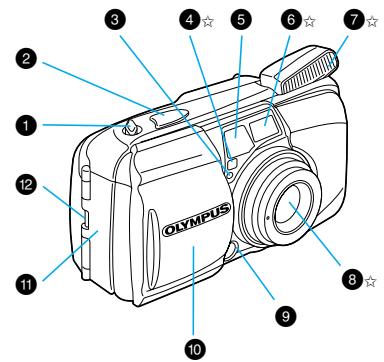
1 Zoom lever (p. 7)
2 Shutter release button (p. 7)
3 Selftimer/remote control indicator
4 Light sensor☆
5 Viewfinder
6 Autofocus window☆
7 Flash☆ (pp. 7 - 9)
8 Lens☆
9 Remote control sensor
10 Lens barrier
11 Battery compartment cover (p. 5)
12 Strap eyelet (pp. 5 & 10)
13 Diopter adjustment dial (p. 5)
14 Film window
15 Tripod socket
16 Date MODE and SET buttons
(Quartzdate model only) (p. 11)
17 Mid-roll rewind button (p. 10)
18 Exposure mode button (p. 9)
19 Flash mode button (p. 8)
20 Selftimer/remote control button (p. 10)
21 LCD panel
22 Back cover
23 Back cover release (p. 6)
☆Always try to keep this clean. Dirt and stains can result in pictures that are unclear and out-of-focus.
Wipe off any dirt or stains with a soft cloth.
Viewfinder Indications
24 Autofocus marks (p. 7)
25 Spot marks (p. 9)
26 Close-up correction marks (p. 6)
27 Green lamp (autofocus indicator)
Lights: Subject is in focus. You can shoot.
Blinks: Subject is not in focus. Shutter is locked.
Blinks rapidly: Subject is difficult to focus on. You can shoot, but subject may be out of focus.
28 Orange lamp (flash indicator)
Goes out: Flash does not fire. You can shoot.
Lights: Flash will fire. You can shoot.
Blinks: The flash is being recharged. Wait until it lights.
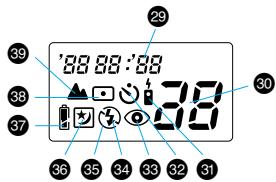
LCD Panel
29 Date/time indicator (Quartzdate model only) (p. 11)
30 Exposure counter
31 Remote Control (optional) (p. 10)
32 Selftimer (p. 10)
33 Red-Eye Reduction Flash (p. 8)
34 Fill-In Flash (p. 8)
35 Flash-Off (p. 8)
36 Night Scene Flash (p. 8)
37 Battery check (p. 5)
38 Spot Metering (p. 9)
39 Infinity (p. 9)
Note: Not all indicators are displayed as shown at the same time.
MEMO
![OLYMPUS Μ[MJU:]-III WIDE 100 - MEMO - 1](/content/2024/12/84339/images/78c56053f1bc1b4a2187457f421add82b414d913bb195269e6f99558093e8cc0.jpg)
natural_image
Simple line drawing of a human face with eyes and eyebrows (no text or symbols)![OLYMPUS Μ[MJU:]-III WIDE 100 - MEMO - 2](/content/2024/12/84339/images/4560bdca9a244197710e07e765b02364ffe01814db8a32167425fdf080119b5f.jpg)
natural_image
Simple line drawing of a human face with eyes and eyebrows, no text or symbols present[NO TEXT]
3
![OLYMPUS Μ[MJU:]-III WIDE 100 - MEMO - 3](/content/2024/12/84339/images/ff777dd49c964b726944388a420d71663c632598005e6e4972a5d6a4d450059a.jpg)
natural_image
Illustration of two people viewing framed artworks on a wall (no text or symbols visible)•
![OLYMPUS Μ[MJU:]-III WIDE 100 - MEMO - 4](/content/2024/12/84339/images/270f14c222d59a7d7684e746a7b7ce707d3c0284e5c1e753b2cd0fd85b7b2218.jpg)
natural_image
Black-and-white illustration of two people viewing framed artworks on a wall (no text or symbols visible)①
![OLYMPUS Μ[MJU:]-III WIDE 100 - MEMO - 5](/content/2024/12/84339/images/0f3d4bbba9b594b4e47c5b1a0fcc891547a13c0dde247bc07e19e8a249c424b5.jpg)
natural_image
Black-and-white sketch of a person with short hair and a scarf, partially obscured by foliage (no text or symbols)△
![OLYMPUS Μ[MJU:]-III WIDE 100 - MEMO - 6](/content/2024/12/84339/images/e215756771a35b7acb6746a15f46c98368032ceb194fa5238d4c66093cc11cfb.jpg)
natural_image
Black-and-white illustration of a woman with traditional hairstyle and leafy background (no text or symbols)↓
![OLYMPUS Μ[MJU:]-III WIDE 100 - MEMO - 7](/content/2024/12/84339/images/598a42d312b2d527aabccb0015a62a90a6edda71fb81cbf59adee192a125dcf8.jpg)
natural_image
Illustration of a person standing in front of a starry night sky with streaks and scattered objects (no text or symbols)△
![OLYMPUS Μ[MJU:]-III WIDE 100 - MEMO - 8](/content/2024/12/84339/images/241bd598e0fea97cf237737613706da95d4b87df178138772da7f60f2d44bb6a.jpg)
natural_image
Illustration of a worker standing in front of a truck and building facade (no text or symbols)[Non-Text]

△
7
[Non-Text]
Read this manual carefully before using your camera (especially “Care and Storage” on page 12).
NAMES OF PARTS
(Open the front flap and keep page 3 visible.)
Camera Body
| 1 Zoom lever (p. 7) | 14 Film window |
| 2 Shutter release button (p. 7) | 15 Tripod socket |
| 3 Selftimer/remote control indicator | 16 Date MODE and SET buttons(Quartzdate model only) (p. 11) |
| 4 Light sensor | |
| 5 Viewfinder | 17 Mid-roll rewind button (p. 10) |
| 6 Autofocus window | 18 Exposure mode button (p. 9) |
| 7 Flash (pp. 7 – 9) | 19 Flash mode button (p. 8) |
| 8 Lens | 20 Selftimer/remote control button(p. 10) |
| 9 Remote control sensor | |
| 10 Lens barrier | 21 LCD panel |
| 11 Battery compartment cover (p. 5) | 22 Back cover |
| 12 Strap eyelet (pp. 5 & 10) | 23 Back cover release (p. 6) |
| 13 Diopter adjustment dial (p. 5) |
☆Always try to keep this clean. Dirt and stains can result in pictures that are unclear and out-of-focus.
Wipe off any dirt or stains with a soft cloth.
Viewfinder Indications
24 Autofocus marks (p. 7)
25 Spot marks (p. 9)
26 Close-up correction marks (p. 6)
27 Green lamp (autofocus indicator)
Lights: Subject is in focus. You can shoot.
Blinks: Subject is not in focus. Shutter is locked.
Blinks rapidly: Subject is difficult to focus on. You can shoot, but subject may be out of focus.
28 Orange lamp (flash indicator)
Goes out: Flash does not fire. You can shoot.
Lights: Flash will fire. You can shoot.
Blinks: The flash is being recharged. Wait until it lights.
LCD Panel
29 Date/time indicator (Quartzdate model only) (p. 11)
30 Exposure counter
31 Remote Control (optional) (p. 10)
32 Selftimer (p. 10)
33 Red-Eye Reduction Flash (p. 8)
34 Fill-In Flash (p. 8)
35 Flash-Off (p. 8)
36 Night Scene Flash (p. 8)
37 Battery check (p. 5)
38 Spot Metering (p. 9)
39 Infinity (p. 9)
Note: Not all indicators are displayed as shown at the same time.
LOADING AND CHECKING THE BATTERY
Use one 3 V lithium battery (CR123A or DL123A).
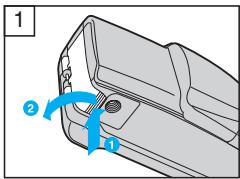
- While pressing the bottom of the battery compartment cover in direction
1, turn it in direction 2 to open. - Make sure the lens barrier is closed before opening the battery compartment cover.
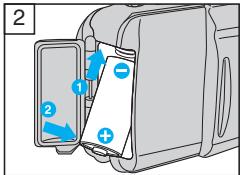
- Insert the battery correctly 1. Close the battery compartment cover 2.
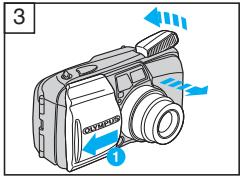
- Slide the lens barrier in direction until it clicks. The lens comes out and the flash flips open. Check the remaining battery power on the LCD panel.
- A brand-new battery lasts for about 15 rolls of film.
| lights(turns off automatically). | Battery is OK. You can shoot. |
| blinks and other indicators are displayed normally. | Battery is low and should be replaced with a new one. |
| blinks and other indicators go out. | Battery is dead and should be replaced with a new one immediately. |
ATTACHING THE STRAP
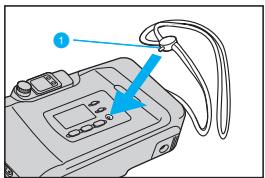
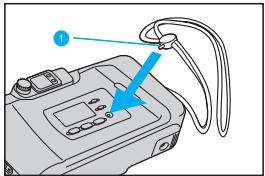
Attach the strap as shown.
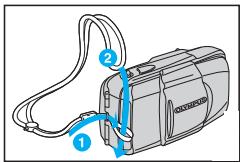
DIOPTER ADJUSTMENT
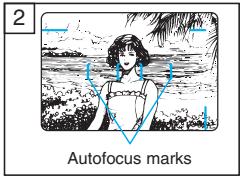
Turn the diopter adjustment dial until the autofocus marks are clear.
![OLYMPUS Μ[MJU:]-III WIDE 100 - DIOPTER ADJUSTMENT - 1](/content/2024/12/84339/images/e5420e089082b0d6135b7ad22d1307496223abd780d91502ab4aef30bd96d23d.jpg)
natural_image
Side view of a car front panel with a circular dial indicator (no text or symbols)LOADING THE FILM
![OLYMPUS Μ[MJU:]-III WIDE 100 - LOADING THE FILM - 1](/content/2024/12/84339/images/6ae05811d8ab08d49595cc2ab3bfbe33d14ceab1b85ff8dc69024fc817c8ece6.jpg)
natural_image
Diagram of a device casing with internal components and blue arrows indicating motion or flow (no text or symbols)![OLYMPUS Μ[MJU:]-III WIDE 100 - LOADING THE FILM - 2](/content/2024/12/84339/images/b993cd98301095695b99c2ea0c39324c7444c77ae1b8cc37553d21b249124654.jpg)
natural_image
Diagram of a camera module showing internal components and a blue arrow indicating rotation (no text or symbols)- Slide the back cover release upward to open the back cover.
- Do not touch the inside of the camera, especially the lens.
- Insert the film cartridge until it clicks into position.
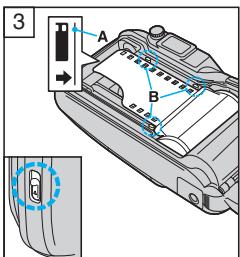
-
Align the film leader with the guide line (A), and place the film between the positioning guides (B). Then close the back cover until it clicks.
-
The film automatically advances to the first frame.
- Open the lens barrier until it clicks. Make sure the exposure counter on the LCD panel reads "I".
- If "E" blinks, reload the film.
FOCUSING AND WORKING DISTANCE
![OLYMPUS Μ[MJU:]-III WIDE 100 - FOCUSING AND WORKING DISTANCE - 1](/content/2024/12/84339/images/51e1c559e20326831d9762c9c3426a7cb205d3c597334e385ea5287432e25a09.jpg)
natural_image
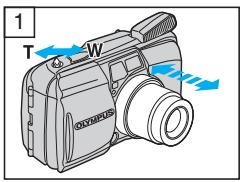
Illustration of two people standing outdoors with trees and foliage in the background (no text or symbols)This camera uses a wide multi-autofocus system that makes it easier for the camera to focus on subjects even if they are not in the center of the viewfinder. Shoot your subject from a distance of 0.6 m to (infinity) at wide angle and from 0.8 m to (infinity) at telephoto.
Although the shutter will release when a subject is extremely close to the subject, the subject will be out of focus.
CLOSE-UP PHOTOGRAPHY
![OLYMPUS Μ[MJU:]-III WIDE 100 - CLOSE-UP PHOTOGRAPHY - 1](/content/2024/12/84339/images/b1c08ad0a68cb597a46cc0450b9b7450ff7415dea6ef08751d45ec2498ee1673.jpg)
flowchart
graph TD
    A["①"] --> B["Blue Box"]
    C["②"] --> B
    B --> D["Block 1: [ "]
    B --> E["Block 2: [ "]]
The picture area will move lower in the viewfinder as you get closer to the subject.
① Close-up correction marks (picture area at closest distance).
② Picture area at infinity.
TAKING PICTURES
![OLYMPUS Μ[MJU:]-III WIDE 100 - TAKING PICTURES - 3](/content/2024/12/84339/images/9f819e7eb94cc4a518949eaff38adc36656e2c4959af4691783c9542b6738fbb.jpg)
natural_image
Illustration of a hand holding a portable electronic device with a digital display and control buttons (no text or symbols)- Open the lens barrier until it clicks. The lens will extend slightly and the LCD panel will turn on. Push the zoom lever to the "T" side for telephoto (100 mm) or to the "W" side for wide angle (28 mm).
- After about 4^1/2 minutes of inactivity, the lens retracts and the LCD panel goes out.
- Position the autofocus marks (AF) on your subject.
- Do not look at the sun or other strong light sources through the viewfinder.
- Press the shutter release button halfway to focus on the subject. Make sure that the green lamp lights; then press the shutter release button all the way to take the picture. After the shutter is released, the film automatically advances to the next frame.
AUTO FLASH – WORKING DISTANCE
(with color negative film)
When reversal film is used, the working range at the telephoto side will be reduced by about 30%.
| ISO | Wide angle (W) | Telephoto (T) |
| 100 | 0.6 to 4.6 m | 0.8 to 1.8 m |
| 200 | 0.6 to 6.5 m | 0.8 to 2.5 m |
| 400 | 0.6 to 9.2 m | 0.8 to 3.6 m |
FILM REWINDING AND UNLOADING
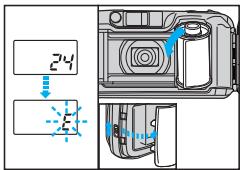
The camera automatically rewinds the film when you reach the end of a roll. Make sure the motor has stopped and that “ ±b ” is blinking; then open the back cover to remove the film.
Open the back flap and keep page 126 visible.
Red Eyes in Flash Pictures –
RED-EYE REDUCTION FLASH
When taking flash photos of persons in the dark the flashlight falls into the wide-open iris. There the flashlight is reflected red from the retina.
The Red-Eye Reduction Flash emits a series of low-power pre-flashes before the main flash. This gives the subject's eyes a chance to adapt to the bright light by making the iris smaller. Assuming that the subject looks into the pre-flashes, the eyes will not appear red in the picture (see figure 3 on page 126).
- Hold the camera securely. It takes about 1 second until the shutter releases.
-
Red-eye reduction may not be effective when the subject:
-
Is not looking at the flash from right in front.
- Is not watching the pre-flashes.
- Is too far from the camera.
The effectiveness of red-eye reduction varies depending on the individual characteristics of each subject.
No Flash Allowed or Flash Spoils Atmosphere – FLASH-OFF
The Flash-Off is needed where flash photos are not allowed or where you want to keep the twilight or artificial light atmosphere unspoiled (see figure 4 on page 126).
- Since a slow shutter speed (as low as 2 seconds) is selected, use a tripod to prevent camera-shake.
- Have your subject stay still; otherwise, blurring may result.
Closing the lens barrier restores the Auto Flash mode.
Shadow on the Face – FILL-IN FLASH
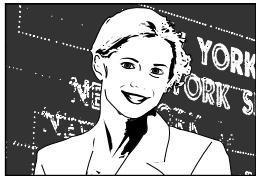
When taking portrait photos in backlight or underneath a tree or roof, the subject's face may look too dark. The Fill-In Flash provides just the right amount of additional light to compensate for the shadow (see figure 5 on page 126) and for fluorescent light.
- Make sure your subject is within the flash working range (p. 7).
- Fill-in flash becomes ineffective in extremely bright conditions.
Closing the lens barrier restores the Auto Flash mode.
City at Night – NIGHT SCENE FLASH
When taking a walk in the city at night, you may want to take photos of your subject in the foreground with the city lights in the background. The Night Scene Flash takes care of this. The main flash lights the subject in the foreground while the shutter stays open up to 4 seconds to capture the city lights. You'll need to secure the camera on a tripod or other support to prevent camera shake (see figure 6 on page 126).
Combination of the Two Modes –
Prevents the typical red eyes seen in pictures when shooting at night (see figure 7 on page 126). Both modes cannot be combined with the Spot Metering mode. Closing the lens barrier restores the Auto Flash mode.
SETTING THE FLASH MODES
| No display | Auto Flash |
| Red-Eye Reduction Flash | |
| Flash-Off | |
| Fill-In | |
| Night Scene Flash | |
| Red-Eye Reduction Night Scene Flash |
Press the flash mode button (⚡). The mode switches in the order shown on the left. The selected mode is displayed on the LCD panel. Do not fire the flash right in front of the eyes of people and animals. Do not point the camera at a motorist and fire the flash.
• High contrast – SPOT METERING
When taking photos in a high contrast environment (e.g. backlight portraits), the main subject may come out too dark or too bright. To make sure that the subject is exposed correctly use Spot Metering (see figure 1 on page 2). Position the spot marks (A) on the area where you want to measure the light. Press the shutter release button halfway; the green lamp lights and the focus and exposure are locked on that area. Reframe your subject and press the shutter release button all the way.
Shooting scenery – INFINITY
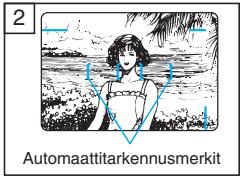
The camera automatically sets the workings distance at infinity. The flash does not fire except in the Fill-In Flash mode (see figure 2 page 2).
SETTING THE EXPOSURE MODES
| No display | Auto Exposure |
| Spot Metering | |
| Infinity |
Press the exposure mode button (☐/▲). The mode switches in the order shown on the left. The selected mode is displayed on the LCD panel. Closing the lens barrier restores the Auto Exposure mode.
SETTING THE SELFTIMER/REMOTE CONTROL
| No display | — |
| Selftimer | |
| Remote Control |
Press the selftimer/remote control button. The mode switches in the order shown on the left. The selected mode is displayed on the LCD Panel.
![OLYMPUS Μ[MJU:]-III WIDE 100 - SETTING THE SELFTIMER/REMOTE CONTROL - 1](/content/2024/12/84339/images/39f6aca09cba22814dd155a3377766978ea63f8980fe1d8ce30b52065221f31f.jpg)
SELFTIMER
Secure the camera on a tripod or other support. Compose your shot in the viewfinder. Press the shutter release button halfway (the focus and exposure are locked at this time). Then press the shutter release button all the way. The selftimer indicator lights for about 10 seconds and then blinks for about 2 seconds. After this, the shutter will release.
![OLYMPUS Μ[MJU:]-III WIDE 100 - SELFTIMER - 1](/content/2024/12/84339/images/8b81c7b8197d1bb809d2b03a45b1dbb81be55fc952bf1a9047132faf07c023d0.jpg)
REMOTE CONTROL RC-300C (Optional)
Compose your shot in the viewfinder. Position the autofocus frame on your subject. To take a picture, point the remote control at the camera and press the button on the remote control. The selftimer/remote control indicator starts blinking, and the shutter will release about 3 seconds later (see figure 8 on page 127).
OTHER OPERATIONS
REWINDING THE FILM MID-ROLL
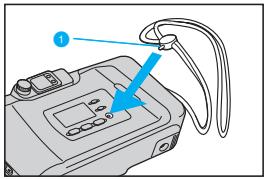
Press the mid-roll rewind button with the protrusion on the strap buckle 1. Do not use an instrument with a sharp tip. Unload the film as described on page 7.
PRINTING THE DATE/TIME (Quartzdate model only)
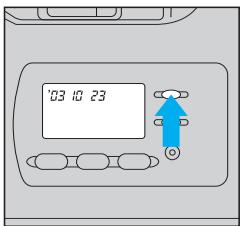
![OLYMPUS Μ[MJU:]-III WIDE 100 - PRINTING THE DATE/TIME (Quartzdate model only) - 2](/content/2024/12/84339/images/dbe57cec9e60faf0036ad5949b5bad543a87610c2635dd4058db0852d8637297.jpg)
flowchart
graph TD
    A["--- --- --"] --> B["'03 10 23"]
    B --> C["'10.23 '03"]
    C --> D["23 10 '03"]
    D --> E["23:15:59"]
    E --> F["Day-hour-minute"]
    G["None"] --> B
    H["Year-month-day"] --> C
    I["Month-day-year"] --> D
    J["Day-month-year"] --> E
First select the date/time mode you want to print. Press the MODE button. Each time you press it, the mode will switch in the order shown on the left. Keep the mode you want to print displayed. Date/time is imprinted in the lower right corner of the picture. If the date/time is superimposed on a bright color like white, orange, yellow, etc., it may be difficult to read. When black-and-white film is used, the date/time may not be printed.
CORRECTING THE DATE AND TIME
(Quartzdate model only)
Be sure to correct the date and time after the battery has been inserted or replaced.
- Keep the MODE button pressed until the "year" indicator starts blinking.
- Press the SET button to adjust the "year" indicator. If you press the button once, the number on the display will advance by 1. If you keep the button pressed, the numbers will run in rapid succession. If you pass the intended number, keep pressing to return to that number.
- Press the MODE button once more to make the "month" indicator blink. Press the SET button to adjust the "month" indicator. As you press the MODE button, the blinking indicator changes in the order of "year", "month", "day", "hour" and "minute".
- Repeat Steps 2 and 3 to set "hour" and "minute". Make sure the "minute" indicator is blinking.
- When "minute" has been set, press the MODE button. None of the indicators will be blinking and date/time correction is now complete.
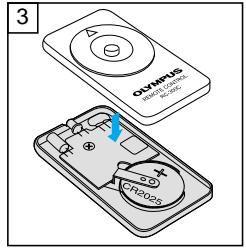
REPLACING THE REMOTE CONTROL BATTERY
(Optional RC-300C)
If the selftimer/remote control indicator doesn't blink even when you press the button, replace the battery with a new one (CR2025).
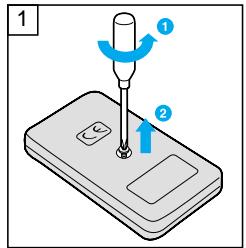
- Turn the screw on the bottom of the remote control counterclockwise to loosen.
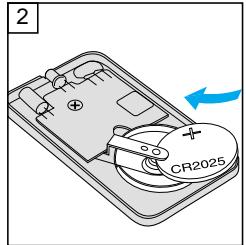
- Turn the remote control over, and remove the cover. With the battery facing up, remove the old battery and insert a new battery as shown.
-
Replace the cover, turn the remote control over, and turn the screw on the bottom clockwise to tighten (see figure 9 on page 127).
-
Do not leave the camera in any place exposed to excessive heat, humidity or direct sunlight – for example, in a car or on the beach.
- Do not expose the camera to formalin or naphthalene.
- If the camera gets wet, wipe it with a dry towel. The salt in seawater can be especially damaging.
- Do not use organic solvents such as alcohol or paint thinner when cleaning the camera.
- Do not leave the camera on or near a television, refrigerator or other appliance with a magnetic field.
- Do not expose the camera to dust or sand as this could cause serious damage.
- Do not shake or shock the camera.
- Do not apply excessive force to the zoom lens.
- Do not expose the camera to extreme heat (over 40^ / 104^ ) or to extreme cold (below -10^ / 14^ ). Low temperatures, even within this range may sometimes cause deterioration in battery performance, temporarily disabling the camera.
- Avoid leaving the camera unused for long periods of time. This can cause mold to grow on the camera as well as other problems. Try to press the shutter release button and check the operation of the camera before use.
- Some airport X-ray machines can damage the film in your camera. Try to avoid passing your camera through these machines. Give it to the security officer for manual inspection.
- Do not touch the front surface of the flash after using it continuously over a short period as the surface may be hot.
WARNING
KEEP THE BATTERIES AWAY FROM FIRE. NEVER TRY TO DISASSEMBLE, RECHARGE OR SHORT-CIRCUIT BATTERIES.
KEEP THE BATTERIES OUT OF THE REACH OF CHILDREN. IF A CHILD SWALLOWS A BATTERY, CONTACT A DOCTOR IMMEDIATELY.
NEVER ATTEMPT TO DISASSEMBLE THE CAMERA; IT CONTAINS A HIGH-VOLTAGE CIRCUIT. IF THE INTERNAL PARTS OF THE CAMERA ARE EXPOSED DUE TO DROPPING OR DAMAGE, REMOVE THE BATTERY IMMEDIATELY TO PREVENT FURTHER USAGE. IN CASE OF MALFUNCTION, CONSULT YOUR NEAREST OLYMPUS DEALER OR OLYMPUS SERVICE CENTER.
| Type: | Fully automatic 35 mm autofocus lens-shutter camera with built-in 28 mm ~ 100 mm zoom lens. |
| Film format: | 35 mm standard DX-coded film (24 x 36 mm). |
| Lens: | Olympus lens, 28 mm ~ 100 mm, F4.6 ~ 11.9, 7 elements in 7 groups. |
| Shutter: | Programmed electronic shutter. |
| Viewfinder: | Real image zoom view with diopter adjustment. |
| Focusing: | Passive-type wide multi-autofocus system (max. 11 points). Focus lock possible. |
| Focusing range: | 0.6 m ~∞ (infinity) at wide angle, 0.8 m ~∞ (infinity) at telephoto. |
| Exposure control: | Programmed automatic exposure control, 3-zone light metering. Auto exposure range – EV2.4 (F4.6, 4-sec) ~ EV16 (F10.2, 1/630-sec) at wide angle, EV5.1 (F11.9, 4-sec) ~ EV17 (F18, 1/410-sec) at telephoto. |
| Exposure counter: | Progressive type displayed on LCD panel. |
| Selftimer: | Electronic selftimer with approx. 12-sec. delay. |
| Film speed range: | Automatic setting with DX-coded film with ISO 50, 100, 200, 400, 800, 1600 or 3200. Other intermediate film speeds will be automatically set for next lower speed. Non-DX-coded film is set at ISO 100. |
| Film loading, advance, rewind: | |
| Automatic. | |
| Flash: | Built-in pop-up flash. Recycling time – approx. 0.5 ~ 5.5 sec. (at normal temperature, with new battery). |
| Flash modes: | Auto Flash (low-light, backlight and fluorescent light), Red-Eye Reduction Flash, Flash-Off, Fill-In, Night Scene Flash and Red-Eye Reduction Night Scene Flash. |
| Exposure modes: | Auto Exposure, Spot Metering and Infinity. |
| Power source: | One 3 V lithium battery (DL123A or CR123A). |
| Dimensions: | 117 (W) x 61.5 (H) x 42.5 (D) mm (excluding protrusions). |
| Weight: | 220 g (without battery). |
| Other: | All-weather design. |
| Remote Control Specifications (Optional) | |
| Remote control system: | |
| Infrared, with approx. 3-sec. delay. | |
| Power source: | One CR2025 battery. |
| Battery life: | Approx. 5 years, with approx. 20,000 times. |
| Working distance: | Approx. 5 m. |
| Dimensions: | 56.5 x 35.0 x 6.5 mm. |
| Weight: | 11 g (without battery). |
SPECIFICATIONS ARE SUBJECT TO CHANGE WITHOUT NOTICE OR OBLIGATION ON THE PART OF THE MANUFACTURER. THE ACTUAL PRODUCT MAY DIFFER FROM ONES SHOWN IN THIS MANUAL.
DIOPTRIEAUSGLEICH
natural_image
Side view of a car front panel with a circular dial indicator (no text or symbols)erkenn- bar ist.
EINLEGEN DES FILMS
![OLYMPUS Μ[MJU:]-III WIDE 100 - EINLEGEN DES FILMS - 1](/content/2024/12/84339/images/6fee9e0c9c5b2809208cdb7c0949ccc2dca9dc5a4dba463b674366c9a740e415.jpg)
natural_image
Diagram of a device casing with internal components and blue arrows indicating motion or flow (no text or symbols)![OLYMPUS Μ[MJU:]-III WIDE 100 - EINLEGEN DES FILMS - 2](/content/2024/12/84339/images/48a8acad1a265c977e53b98dfe36adf3598d45e61930faf24b61a761aaf84bad.jpg)
natural_image
Diagram of a camera module showing internal components and a blue arrow indicating rotation (no text or symbols)natural_image
Illustration of two people standing outdoors with trees and foliage in the background (no text or symbols)NAHAUFNAHMEN
![OLYMPUS Μ[MJU:]-III WIDE 100 - NAHAUFNAHMEN - 1](/content/2024/12/84339/images/0fe16441ce917f22ffcd4f6fa7d382f74b09ed898f6cb5b618a33546edfcb8ae.jpg)
flowchart
graph TD
    A["①"] --> B["输出"]
    C["②"] --> B
    B --> D["输出"]
    style A fill:#f9f,stroke:#333
    style C fill:#f9f,stroke:#333
![OLYMPUS Μ[MJU:]-III WIDE 100 - NAHAUFNAHMEN - 2](/content/2024/12/84339/images/4b5fdc99d5dd841d15cd53242e6d5e20e9793a14e3aae534542f3e35e13db7f8.jpg)
natural_image
Illustration of a woman in a beach with palm trees and waves, labeled 'Autofocus-Messfeld' (no other text or symbols)![OLYMPUS Μ[MJU:]-III WIDE 100 - NAHAUFNAHMEN - 3](/content/2024/12/84339/images/bc33f03b9178d84fc4a271ecf16cb2353f0d88fc9cb99de80168e501aef480c6.jpg)
natural_image
Illustration of a hand holding a printer with a digital display and control buttons, emitting sound waves (no text or symbols)REGLAGE DIOPTRIQUE
natural_image
Side view of a car door with a circular dial indicator (no text or symbols)CHARGEMENT DU FILM
![OLYMPUS Μ[MJU:]-III WIDE 100 - CHARGEMENT DU FILM - 1](/content/2024/12/84339/images/509b71418a0f451eda6cbc5664f2f8c3c2db81ed3fed843726cfecb55c4029d6.jpg)
natural_image
Diagram of a device casing with internal components and blue arrows indicating motion or flow (no text or symbols)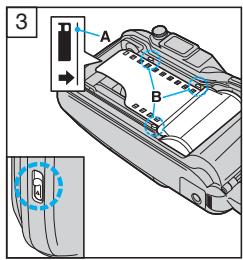
![OLYMPUS Μ[MJU:]-III WIDE 100 - CHARGEMENT DU FILM - 3](/content/2024/12/84339/images/e9f26171e4eadf602b3e3ae801abc103e7a7640b88005e744e2b3c610d54511c.jpg)
natural_image
Diagram of a camera module showing internal components and a blue arrow indicating rotation (no text or symbols)natural_image
Illustration of two people standing outdoors with trees and foliage in the background (no text or symbols)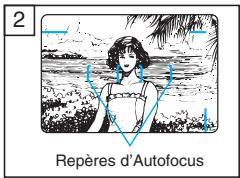
![OLYMPUS Μ[MJU:]-III WIDE 100 - CHARGEMENT DU FILM - 5](/content/2024/12/84339/images/dcbe23b6a296fc8ca5adac94b82c27c3ccc23d6bd4daea2e116bbaae63554d50.jpg)
natural_image
Illustration of a hand holding a printer with a digital display and control buttons, emitting sound waves (no text or symbols)AJUSTE DIÓPTRICO
natural_image
Side view of a car door with a circular dial indicator (no text or symbols)CARGA DE LA PELÍCULA
![OLYMPUS Μ[MJU:]-III WIDE 100 - CARGA DE LA PELÍCULA - 1](/content/2024/12/84339/images/9df073ec2211eef17126023d8db60d6dd61989fdc91750db13c6b6c152966073.jpg)
natural_image
Diagram of a device casing with internal components and blue arrows indicating motion or flow (no text or symbols)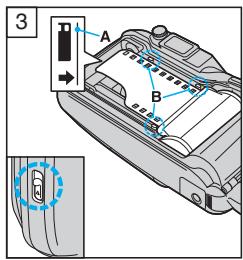
![OLYMPUS Μ[MJU:]-III WIDE 100 - CARGA DE LA PELÍCULA - 3](/content/2024/12/84339/images/7a82cfb9d6ea47cca0af3fe269a15fc836278d24c769ff6c5b1ba066a5fc90b0.jpg)
natural_image
Diagram of a camera module showing internal components and a blue arrow indicating rotation (no text or symbols)natural_image
Illustration of two people standing outdoors with trees and foliage in the background (no text or symbols)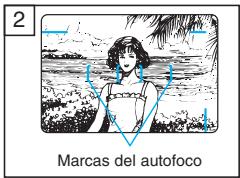
![OLYMPUS Μ[MJU:]-III WIDE 100 - CARGA DE LA PELÍCULA - 5](/content/2024/12/84339/images/efc57edfbeddd0aa2d042f93fa0ba99cdab27a5f59c36f61b92f69f57fbe84ba.jpg)
natural_image
Illustration of a hand holding a printer with a digital display and control buttons, emitting sound waves (no text or symbols)FLASH PARA ESCENAS NOCTURNAS CON
![OLYMPUS Μ[MJU:]-III WIDE 100 - FLASH PARA ESCENAS NOCTURNAS CON - 1](/content/2024/12/84339/images/f76331d7adf0d182810b78f5e34e20a3bcef120ac75cbe6fb01a6ad054f3692b.jpg)
natural_image
Diagram of a car door with a circular dial indicator and a blue arrow pointing to the side (no text or symbols)natural_image
Diagram of a digital camera module with blue indicator lights, no text or symbols present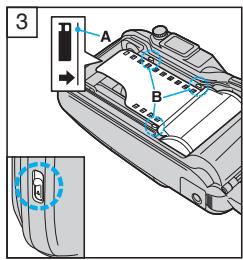
![OLYMPUS Μ[MJU:]-III WIDE 100 - FLASH PARA ESCENAS NOCTURNAS CON - 3](/content/2024/12/84339/images/835147b4da0d6b31b59db4ae4d19c0b1d4ee3e11ff99d1a68b36c85e5af1ee96.jpg)
natural_image
Diagram of a camera module showing internal components and a blue arrow indicating rotation (no text or symbols)natural_image
Illustration of two people standing outdoors with trees and birds in the background (no text or symbols)natural_image
Illustration of a hand holding a printer with a digital display and control buttons, emitting sound waves (no text or symbols)natural_image
Side view of a car door with a circular dial indicator (no text or symbols)ЗАРЯДКА ФОТОПЛЕНКИ
![OLYMPUS Μ[MJU:]-III WIDE 100 - ЗАРЯДКА ФОТОПЛЕНКИ - 1](/content/2024/12/84339/images/610f64b97f255a8bcde6561cf099ad94de54e5a28251b7156b53d09ee5f82e97.jpg)
natural_image
Diagram of a device casing with internal components and blue arrows indicating motion or flow (no text or symbols)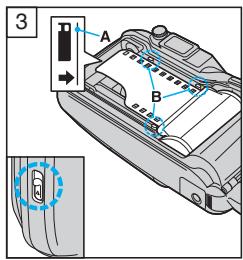
![OLYMPUS Μ[MJU:]-III WIDE 100 - ЗАРЯДКА ФОТОПЛЕНКИ - 3](/content/2024/12/84339/images/79bc313bd7c985a576f77f4691b04e929dd0bc9bc26915547b1d3a4f5206851e.jpg)
natural_image
Diagram of a camera module showing internal components and a blue arrow indicating rotation (no text or symbols)natural_image
Illustration of two people standing outdoors with trees and foliage in the background (no text or symbols)flowchart
graph TD
    A["①"] --> B["Blue Box with [ "] ]
    C["②"] --> B
    B --> D["Empty Block"]
    style B fill:#cce5ff,stroke:#333
![OLYMPUS Μ[MJU:]-III WIDE 100 - ЗАРЯДКА ФОТОПЛЕНКИ - 4](/content/2024/12/84339/images/4a78a9cf1bdc60a40bd4786f9fea924cb5e294a0f3af20cf5fa1d111954a2738.jpg)
natural_image
Illustration of a hand holding a printer with a digital display and control buttons, emitting sound waves (no text or symbols)ДІОПТРІЙНА КОРЕКЦІЯ
natural_image
Side view of a car's front panel showing the door and side door (no text or symbols)ЗАРЯДКА ФОТОПЛІВКИ
![OLYMPUS Μ[MJU:]-III WIDE 100 - ЗАРЯДКА ФОТОПЛІВКИ - 1](/content/2024/12/84339/images/e8d039cc1874426f24ef4346f213b2bf265ad9a58225d805738989fe876d78a6.jpg)
natural_image
Diagram of a device casing with internal components and blue arrows indicating motion or flow (no text or symbols)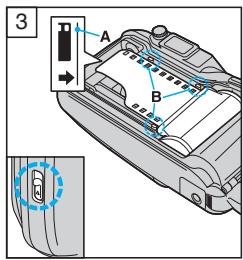
![OLYMPUS Μ[MJU:]-III WIDE 100 - ЗАРЯДКА ФОТОПЛІВКИ - 3](/content/2024/12/84339/images/09a22b1c029748f91a40fd5f5cb71897d13ebaad0a2caf80b533230745efafaa.jpg)
natural_image
Diagram of a camera module showing internal components and a blue arrow indicating rotation (no text or symbols)natural_image
Illustration of two people standing outdoors with trees and foliage in the background (no text or symbols)![OLYMPUS Μ[MJU:]-III WIDE 100 - ЗАРЯДКА ФОТОПЛІВКИ - 4](/content/2024/12/84339/images/f5209ff97035edc282f33e76392d4bbe09fea60f06faced0ea1a84d17a9207e7.jpg)
natural_image
Illustration of a hand holding a portable electronic device with a digital display and control buttons (no text or symbols)INDSTILLING AF DIOPTRI
natural_image
Side view of a vehicle door with a blue circular dial indicator (no text or symbols)ISÆTNING AF FILM
![OLYMPUS Μ[MJU:]-III WIDE 100 - ISÆTNING AF FILM - 1](/content/2024/12/84339/images/fef33347499b77a3a8f029aed4fa58757b76f9bb88463360bb7cf001b7104b25.jpg)
natural_image
Diagram of a device casing with internal components and blue arrows indicating motion or flow (no text or symbols)![OLYMPUS Μ[MJU:]-III WIDE 100 - ISÆTNING AF FILM - 2](/content/2024/12/84339/images/8c9ddd2e498ded2c248f0460cde91a69fab5f0226d8d695f6981a4c2a9c8af06.jpg)
natural_image
Diagram of a camera module showing internal components and a blue arrow indicating rotation (no text or symbols)natural_image
Illustration of two people standing outdoors with trees and foliage in the background (no text or symbols)![OLYMPUS Μ[MJU:]-III WIDE 100 - ISÆTNING AF FILM - 3](/content/2024/12/84339/images/aa2f80d7f69a6c023341a95995643f076cf5effe993bd87fb14ba4f13966a727.jpg)
natural_image
Illustration of a woman in a beach with palm trees and waves, labeled 'Autofokusmærke' (no other text or symbols)![OLYMPUS Μ[MJU:]-III WIDE 100 - ISÆTNING AF FILM - 4](/content/2024/12/84339/images/df66750f599f11443f54895f60a955e1c359c10f438523de372f612c5091fe6b.jpg)
natural_image
Illustration of a hand holding a digital scanner with a lock and indicator lights (no text or symbols)MANUEL TILBAGESPOLING AF FILMEN
natural_image
Side view of a car door with a circular dial indicator (no text or symbols)FILMLADDNING
![OLYMPUS Μ[MJU:]-III WIDE 100 - FILMLADDNING - 1](/content/2024/12/84339/images/45449ae63aa4b87294d2b6777ee7147fbcffb3c72290c81af818962030a11214.jpg)
natural_image
Diagram of a device with internal components and blue arrows indicating motion or flow (no text or symbols)![OLYMPUS Μ[MJU:]-III WIDE 100 - FILMLADDNING - 2](/content/2024/12/84339/images/f1dcf9ed222ff3ce4a59de071b046091a4c611f66a3c6442c397294360866fbe.jpg)
natural_image
Diagram of a camera module showing internal components and a blue arrow indicating rotation (no text or symbols)natural_image
Illustration of two people standing outdoors with trees and birds in the background (no text or symbols)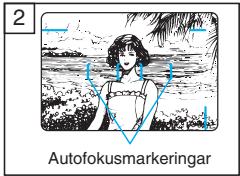
![OLYMPUS Μ[MJU:]-III WIDE 100 - FILMLADDNING - 4](/content/2024/12/84339/images/c8a7010125da47a8723d0b49c712626e07b074ca6c70842861041f73ed80f924.jpg)
natural_image
Illustration of a hand holding a digital camera with a sensor and indicator lights (no text or symbols)ÅTERSPOLNING AV FILM INNAN FILMSLUT
INSTELLEN VAN DE OOGCORRECTIE
natural_image
Side view of a car front panel with a circular dial indicator (no text or symbols)natural_image
Diagram of a device casing with internal components and blue arrows indicating motion or flow (no text or symbols)![OLYMPUS Μ[MJU:]-III WIDE 100 - INSTELLEN VAN DE OOGCORRECTIE - 1](/content/2024/12/84339/images/a54985825d1a3ae94477c7f1811dd4c46450b8b7dfd321ebe462e66818d3fdf2.jpg)
natural_image
Diagram of a camera module showing internal components and a blue arrow indicating rotation (no text or symbols)natural_image
Illustration of two people standing outdoors with trees and foliage in the background (no text or symbols)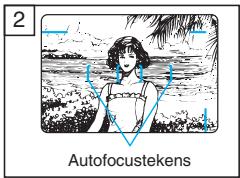
![OLYMPUS Μ[MJU:]-III WIDE 100 - INSTELLEN VAN DE OOGCORRECTIE - 3](/content/2024/12/84339/images/7971622203f8ac861555ddfba2ad00d33239c3905ded6d25867a373ed77952d1.jpg)
natural_image
Illustration of a hand holding a printer with a digital display and control buttons, emitting sound waves (no text or symbols)![OLYMPUS Μ[MJU:]-III WIDE 100 - INSTELLEN VAN DE OOGCORRECTIE - 4](/content/2024/12/84339/images/782e355225b9b7d822e149d555c9eb763959ea5807b5c02c5dca0ecf032b12f2.jpg)
flowchart
graph TD
    A["Geen functiepictogram"] --> B["'03 10 23"]
    B --> C["'10.23 '03"]
    C --> D["'23 10 '03"]
    D --> E["'23 15:59"]
    F["Jaar-maand-dag"] --> C
    G["Maand-dag-jaar"] --> D
    H["Dag-maand-jaar"] --> E
    I["Dag-uur-minuten"] --> E
Eén 3 V lithiumbatterij (DL123A of CR123A).
Afmetingen:
DIOPTERIN SÄÄTÖ
natural_image
Side view of a car's front panel showing the door and side door (no text or symbols)FILMIN LATAAMINEN
![OLYMPUS Μ[MJU:]-III WIDE 100 - FILMIN LATAAMINEN - 1](/content/2024/12/84339/images/83fa760b815536d168755216c5d882073d3bef9d38f7837da02570d581986794.jpg)
natural_image
Diagram of a device casing with internal components and blue arrows indicating motion or flow (no text or symbols)![OLYMPUS Μ[MJU:]-III WIDE 100 - FILMIN LATAAMINEN - 2](/content/2024/12/84339/images/95f69c59e8a650d3cc6dec8f9ed4cf59880b4e23295011aec9ffe5c81cdd0833.jpg)
natural_image
Diagram of a camera module showing internal components and a blue arrow indicating rotation (no text or symbols)natural_image
Illustration of two people standing outdoors with trees and birds in the background (no text or symbols)flowchart
graph TD
    A["①"] --> B["Blue Box with blank rectangular block"]
    C["②"] --> B
    B --> D["Empty Block with empty rectangle"]
Paina kesken rullan
DIOPTRICKÁ KOREKCE
natural_image
Diagram of a car front panel with a circular dial indicator (no text or symbols)ZALOŽENÍ FILMU
1
![OLYMPUS Μ[MJU:]-III WIDE 100 - ZALOŽENÍ FILMU - 1](/content/2024/12/84339/images/0ec3899ed507fd1eb43f45151816460fb5e3e7c575bc645dc73cbd4f43a053c0.jpg)
natural_image
Technical line drawing of a camera module with no visible text or symbols![OLYMPUS Μ[MJU:]-III WIDE 100 - ZALOŽENÍ FILMU - 2](/content/2024/12/84339/images/b1fbed50ed15e1b8c631dea827761be56b47052b626c2e0dceaaae9ba19c2d1c.jpg)
natural_image
Cross-sectional diagram of a digital camera showing internal components and a blue arrow indicating rotation (no text or symbols)natural_image
Illustration of two women standing outdoors in a forest setting (no text or symbols)2
![OLYMPUS Μ[MJU:]-III WIDE 100 - ZALOŽENÍ FILMU - 3](/content/2024/12/84339/images/6bc98f510484c7192b282ca7f1f8d5ab5b14726ffdf398fa3fe164457fd6d92d.jpg)
natural_image
Black-and-white illustration of a woman standing in a beach with palm trees and waves (no text or symbols)natural_image
Illustration of a hand holding a device with a digital display and control buttons (no text or symbols)AUTOMATICKÝ BLESK – PRACOVNÍ ROZSAH
natural_image
Diagram of a device with labeled cable and connector (no text or symbols present)(Pouze u modelu Quartzdate)